

Hey, you! Are you still trusting that flimsy wooden door lock to keep your stash of secret snacks safe? I know… we all do. But what if I told you there’s a little gadget that screams its lungs out the moment someone tries to sneak into your room? Sounds exciting, isn’t it…
Let me introduce you to the Sekyo Wi-Fi Smart Door and Window Sensor. It’s a tiny security guard for your home, office, or even that one drawer you don’t want anyone opening.
Think of it like this. Imagine you have a highly trained guard dog, but instead of needing food and walks, it just needs a couple of AAA batteries and a Wi-Fi connection. Whenever someone opens the door, it barks directly into your phone.

Let’s dive into what makes this little device tick.
The Looks and Feel
The Sekyo sensor comes in two pieces. You get a main unit that houses the brains and a smaller magnetic companion unit that is roughly the size of an eraser. Both are completely wireless.
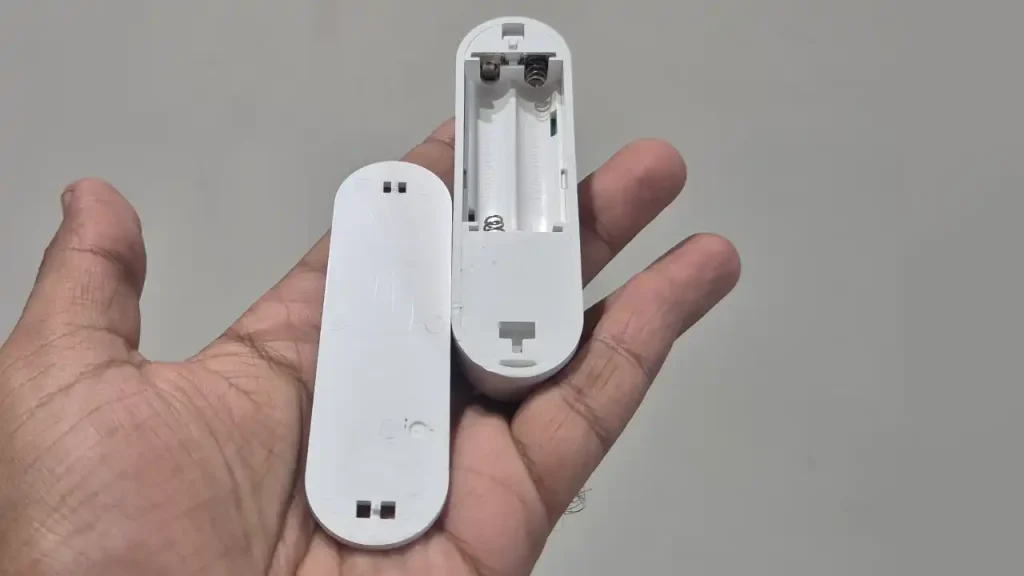
The main unit takes two AAA batteries (which you have to buy yourself, sadly). But guess what happens if a clever intruder tries to rip the batteries out? Answer: It alerts you instantly! The battery compartment is fully tamper-protected.
There are two versions available. The standard model simply shoots notifications to your phone when triggered. The higher-end version takes things up a notch with a built-in siren.
Is there a downside to the design? Well, yes. It only comes in white. If you have a dark aesthetic going on with your wooden doors, this bright white sensor is going to stick out like a sore thumb. I know, design choices matter!
Slapping It on the Door
Installing this thing is ridiculously easy. You don’t need drills or a degree in engineering.
Find a flat spot on your door or window. You just use the provided double-sided tape to stick the main unit to the frame and the smaller unit to the moving door panel. Just make sure the arrows on both units line up closely when the door is shut. That’s it. You are officially in the home security business.
How Smart Is It Really?
Once you pop the batteries in, the main unit pairs with the companion automatically. The moment those two pieces are separated, a blue light flashes. If you bought the siren variant, it also unleashes a seriously loud alarm.

You control the whole show through the SmartLife app, which is available for both Android and iPhone. Connecting takes about a minute. The app lets you do all the cool stuff: adjust the siren volume, mute it, check the battery health, and look at the history log to see exactly how many times someone opened your door.
But hold on, because there is one major flaw you need to know about.
How does the sensor talk to your phone? Answer: Through your home Wi-Fi. So what happens if your internet goes down? The sensor stops sending phone alerts. That makes sense, right? However, the real problem is that the device does not notify you when it loses that Wi-Fi connection. If your router trips while you are on vacation, your sensor goes offline and you won’t even realize it until you get home. Gotcha!!! That is a pretty big blind spot for a security device.
Pricing

You can pick up the standard version for Rs 999 on Official Website. If you want the one with the built-in siren (which I highly recommend for the scare factor), it will cost you around Rs 1,300. For a device that keeps a digital eye on your stuff while you are away, that is a very solid deal.
Final Verdict
At the end of the day, the Sekyo Wi-Fi Smart Door Sensor nails the basics perfectly. Every time I tested it, the phone notification popped up within seconds.
If you want an affordable way to add some high-tech security to your home, this is a great pickup. Just make absolutely sure your internet connection is as reliable as you want your security to be. Goodbye!!!

