3D printing is a process of making three-dimensional solid objects from a digital file. Here in this article, we are going to talk about Toybox 3D printer which is an affordable and an amazing 3D printer. Ben Baltes, the co-founder and CEO of Toybox believes in empowering kids with the tools to create amazing things, thus the name- Toybox.
Working on Toybox requires no training. It is quite simple, first of all, install Toybox by assembling all accessories and then connecting to an outlet. Connect to WiFi and pair your profile with the printer.
Make sure that printer food is loaded into its chamber. Printer food means the biodegradable plastic, out of which printed materials will be made. Now use Toybox’s phone app to navigate and print whatever you need.
Features
In Toybox phone app, you can find a catalogue of toys which you can print.
You can also print any design of your own.
The plastic used to print is biodegradable and non-toxic.
It is designed in such a way that it can easily be used by kids above 5 years of age.
Approximately 100-300 toys can be printed per roll.
Why should you buy it?
https://youtu.be/KiYSRvmAI7I
Toybox 3D printer is a kid friendly, easy to use and an affordable 3D printer which not only lets you print from a catalogue of given designs but also enables you to print a design of your own. It’s a great help for the parents or kids who have to make projects for schools/tuition, etc.
Moreover, it helps you to print your own creation which you can use for decorating your room or to gift somebody, etc. It’s a fun printer that can be used by all the age group for various purposes.
Availability:
The product is available on Indiedigogo.com for pre-order. The price of The Toybox 3D printer is 299 $. It will probably be shipped later this year. Grab it now to avail the special discount.
Thanks for hanging out with us guys. Please do drop your suggestion and ideas in the comment section below. If you want to keep tabs on a more innovative product like this, subscribe to our website and don’t forget to give your reaction.
As we always know No.1 the brand is always up-to there new and innovative products in the market. They release there new products in every few weeks and today we have one of there latest product which is No.1 G8 smartwatch. Now whats special in this watch when we compare the same with other smartwatches available in the market.
So, lets find it out.
Highlights
First smartwatch with 3 different modes.
First smartwatch to have more than 120 hours of battery
Cheapest smartwatch with all such features
replaceable strap
Extra Strap in the package
SIM Card can also be inserted which also make this a phone watch
Pedometer, HR, BP and Sleep monitor
Stopwatch, Alarm, Range Alert, Calculator
Built
Now coming to the built part of the smartwatch, it is pretty solid and made up of metal in all directions. They have used rubber padding to close down the charging port which is a micro USB port, but seems to be bit long not like a ordinary one so don’t try to use any ordinary cable to charge the smartwatch.
Another thing came up over here is strap, which is made up of pretty high quality rubber material and fits perfectly on hand without any irritation or problem. For me i am having the white color strap and we get a light green color strap free withing the box. We also has Black and Red Color straps which you can order accordingly.
Overall in this price bracket i wont say they have left any kind of stuff while building the device.
Design
Finally coming to the design part it seems be inspired from Samsung gear S3 Frontier. It only looks like S3 Frontier but now actually works like it, but still you will get almost all feature which you can expect from a low budget smartwatch.
The DT No.1 G8 Smartwatch comes with three different clock faces which are pre-installed. You can easily switch between them by holding your finger long on the display. To go to different menu option you just need to swipe front left to right.
You can also install different watch faces but you have to literally fiddle around with the watch to know the actual way to do that. I personally won’t recommend you doing it, if you are not good with rooting and other stuff like that.
Modes
To get better battery life in the smartwatch, No.1 has added three different mode which works according to the usage.
Watch Mode – This mode will disable the Bluetooth connection to your Smartphone as well as the SIM options. In this mode, the G8 will give the maximum output to the battery which will be up to 120 hours.
Bracelet – The G8 will interact with your smartphone via Bluetooth 4.0. It will receive all calls and phone notifications. You can read and reply to text messages, access your contacts and make calls from the watch. One thing which i wanna add over here is that you can only reply back to text messages and not the messages or notification which we received using other applications like whats-app, viper etc. In this mode, the G8 can still manage a respectable 60 hours.
Phone – As with Bracelet mode, the G8 will make a Bluetooth connection with your phone. Additionally, it will also add SIM card functions. If we assuming that your SIM card is inserted, you’ll be able to make calls and send texts independently. In this mode, the battery should last approximately about 38 hours.
Software
The No.1 G8 Smart watch has huge amount of setting and features. To make the smartwatch run perfectly you just need to scan the QR Code and it will start downloading the application. The application is available for both android and IOS Devices.
It will allow you to connect with G8 and sync all your steps, sleep and heart rate info to your watch. It will also record your old data using which you can analyse your work and step. The G8 also has a built-in blood pressure monitor which i don’t think so is reliable in any scenario.
When it comes to testing the accuracy of the other functions, it is also not as accurate as it should be. I tested the same by using Mi Band 2, and there is always a different of about 800 to 1000 steps between both of them. Mi Band 2 was more accurate than compare to this one. But still i would say in this price they are offering too much stuff in this watch. I would like to use this smartwatch more like a watch which looks cool and better than any other watch in this price available in the market.
Verdict
Overall, i would say if you want a smartwatch and cannot afford a high end smartwatch then this one is for you. All the basic stuff which top notch quality which can be beered up with this pricing is perfect.
Pros
Quality
Extra Rubber Strap
3 Days long Battery
Display is good in Sunlight
Great Pricing
Cons
Need to Import (i Have paid no customs)
Only 3 watch faces
Not as accurate as it should be while measuring steps
There are so many devices and brand which are coming in the market. Recently a well knows old US brand InFocus launched their new device in the market InFocus Turbo 5 Plus and Infocus Snap 4. So, today we are going to talk about Infocus Snap which has a Big USP in the market which is its 4 Cameras, Yes, i am talking right in the price of Rs. 11,999 they are offering dual back cameras as well as dual front facing cameras. Now this is gonna be insane and change the scenario completely. So let’s see how it actually performs in real life.
InFocus Snap 4 Specs
Model
InFocus Snap 4
Display
5.2-Inch, HD, IPS LCD
Processor
Mediatek MT6750N
RAM
4GB
Internal Storage
32GB, expandable up to 128GB
Software
Android Marshmallow 7.0
Primary Camera
13+8 MP
Secondary Camera
8 + 8 MP selfie camera
Weight
162 Grams
Battery
3000mAh
Others
4G LTE with VoLTE, WiFi, Bluetooth, GPS, USB OTG, 3.5mm audio jack, Hybrid SIM tray
InFocus Snap 4 is available in two colors Pure Gold and Black, and personally, I like Black one rest color is always a personal preference we cannot recommend color to anyone. Rest color choice is a never ending discussion. Starting with the front part here we get a Dual 8-megapixel Camera which captures some decent shots, beside it an earpiece, LED Notification and different sensors. LED Notification over here is having a Multi color Light not what we get in Xiaomi budget devices. Coming below we get 5.2” HD Display, which is covered with 2.5D curved glass which gives additional looks to the phone and rests no info on adding any extra protection on it.
Sliding little bit down here we get Back capacitive keys which are printed like we see in other budget devices and don’t light up at night.
Coming to the bottom portion of the phone here we get a Micro USB port, beside it a primary MIC and a speaker grill which is properly crafted in metal and is quite loud too. The Phone is not having fast charging and only support normal 5 Volts at 1.5 Amp charging speed.
Turning to the top, we get a 3.5mm audio jack and Secondary noise cancellation MIC, Rest nothing much which needs to be mentioned over here.
Turning to the left, here we get Volume rockers which are made up of metal and gives quite hap-tic feedback. To add luxury feel to the phone they have also given pattern feel on volume rockers which feels good and premium while using the phone.
On the right side of the phone we get the same quality power button which works well and also has a pattern feel on it. Above the power lock key we get a Hybrid SIM tray slot which support Dual SIM’s or Single SIM + Micro SD card at the same time that to up to 128 GB. This means you are never gonna be out of memory in any scenario.
Finally coming to the back panel of the phone here we get 13+8-megapixel Dual camera setup, beside that a LED flash, below that a Fingerprint sensor which really works pretty fast. Below that we get InFocus branding. Overall the built of the design is made up of metal. Due to its built, 4 cameras and Android Nougat it comes in the category of best smartphone under 12,000 INR.
InFocus Snap 4 comes with a 5.2-inch HD with a resolution of 720 x 1280. The Display colors are sharp tone and watching movies, and playing games look great. It will somewhat give you the feel of using an AMOLED display. While watching a movie on to the phone give immense experience. The Sunlight legibility is also good because of its really great brightness. When we compare the brightness with other budget-oriented phones, InFocus snap 4, has better sunlight experience. I know the resolution seems to be lower down but as they have given the display from sharp the well know brand who provide display to other high end brands also, the quality is good within this price bracket.
Viewing Angle is good, and blacks are decent enough. While watching movies from odd angle won’t affect you in any way. Overall no complaints with the display.
Performance
The phone comes with Mediatek MT6750N processor which features a 4 GB Ram. This combo makes it a decent purchase at this price. Out of 32 GB of internal storage, you get about 24.9 GB free after that also you can expand it to up-to 128 GB as the phone support Hybrid SIM tray, which means whether you can install dual sim at the same time or you can install one sim and one micro SD Card in it.
1 of 2
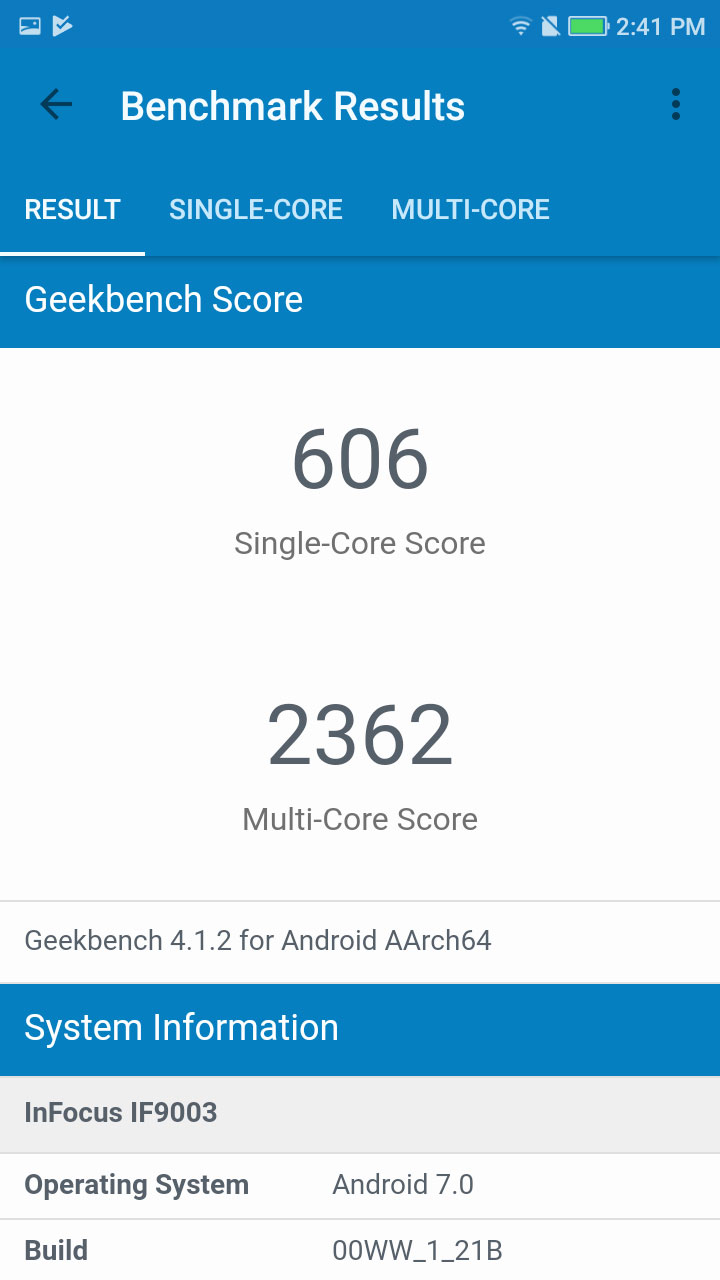
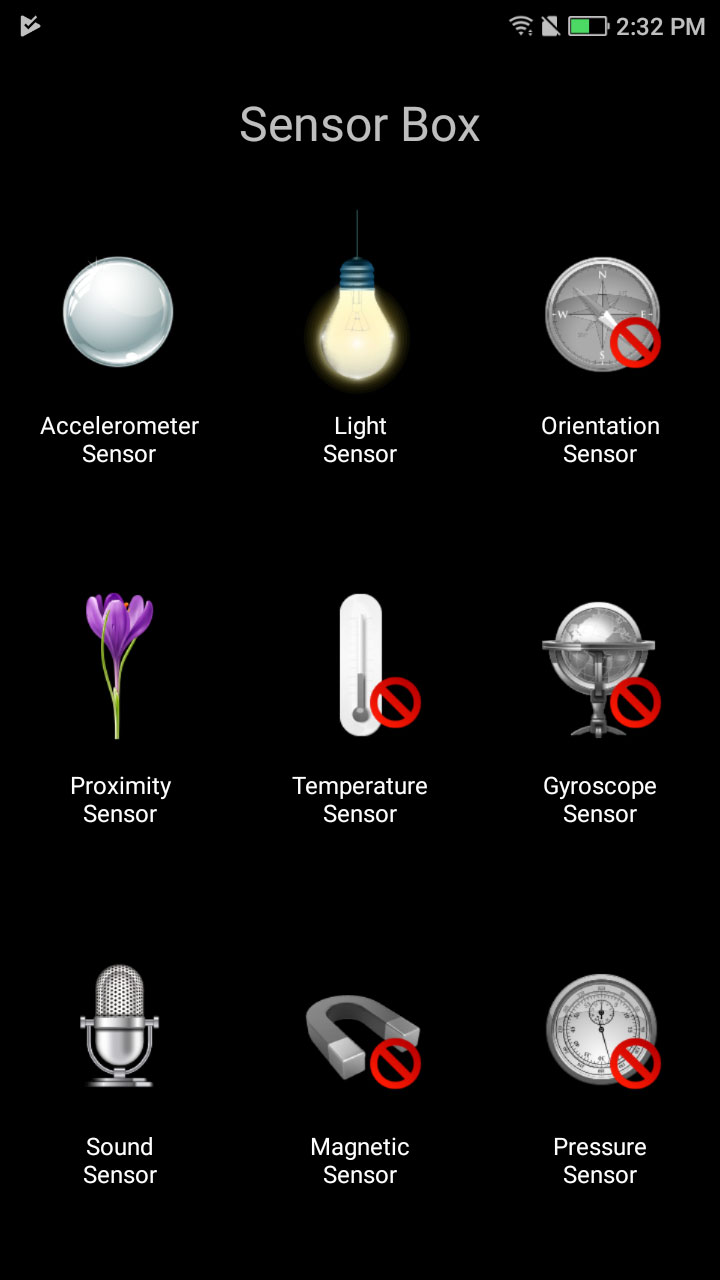
We get Antutu Score of 39337 and certain other scores are also decent. To low down the price that bit they have remove few of the sensors which are required. It is not up to gyroscope but they have removed the orientation sensor which is required for better GPS functionality. I have attached all the images which you see over here.
Coming to the gaming part, we can play almost all games but in medium and high settings, depending on what kind of game are you playing with. Asphalt 8 and asphalt 8 xtreme were working quite well on high graphics without any lag, sometime you might notice very minor frame drop in asphalt 8 but asphalt 8 xtreme it was working flawlessly. Rest, gaming will work perfectly and while my testing i have not shown any heating issue in India, Delhi Temperature. Rest, in this price no other brand is offering 4 Cameras which is the main USP of the phone that too with great built.
Now, finally coming to the camera part which is the main USP of the phone. This device comes with 4 cameras, now let me explain how. At the back part we get Dual camera setup which is a 13+8-megapixel Combo.
Here we get some great depth as well as both camera are having RGB sensors. 13-megapixel camera is a normal camera where as the 2nd 8-megapixel camera is a Wide angle lens which camera wider area and group while taking shot.
1 of 4
Overall the UI of camera application is almost stock and works smoothly without any lag and issues. The phone can record video at High and fine only. They have not mentioned that what actually high means and what actually fine means.
Coming to the front camera of the phone we get dual 8+8-megapixel camera, which actually makes device world’s cheapest device with four camera in the whole. We also get normal camera in front and other one is a wide angle camera.
Camera sometime struggle a bit while focusing rest it is good if you use some third party application like cinema FV or camera 360. It is actually some software fix which need to be done Rest you gonna love it.
I have also attached many camera samples in different conditions which will be more then enough for you guys to understand the actually performance of the camera.
Software
1 of 2
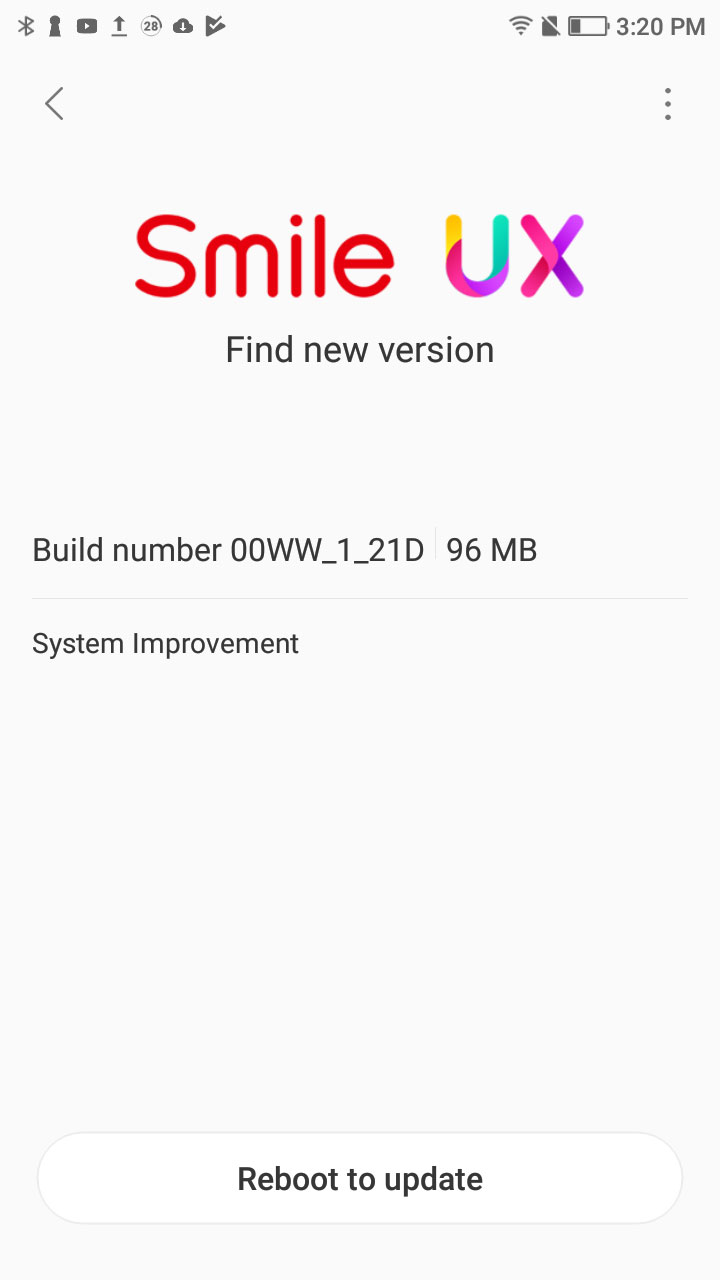
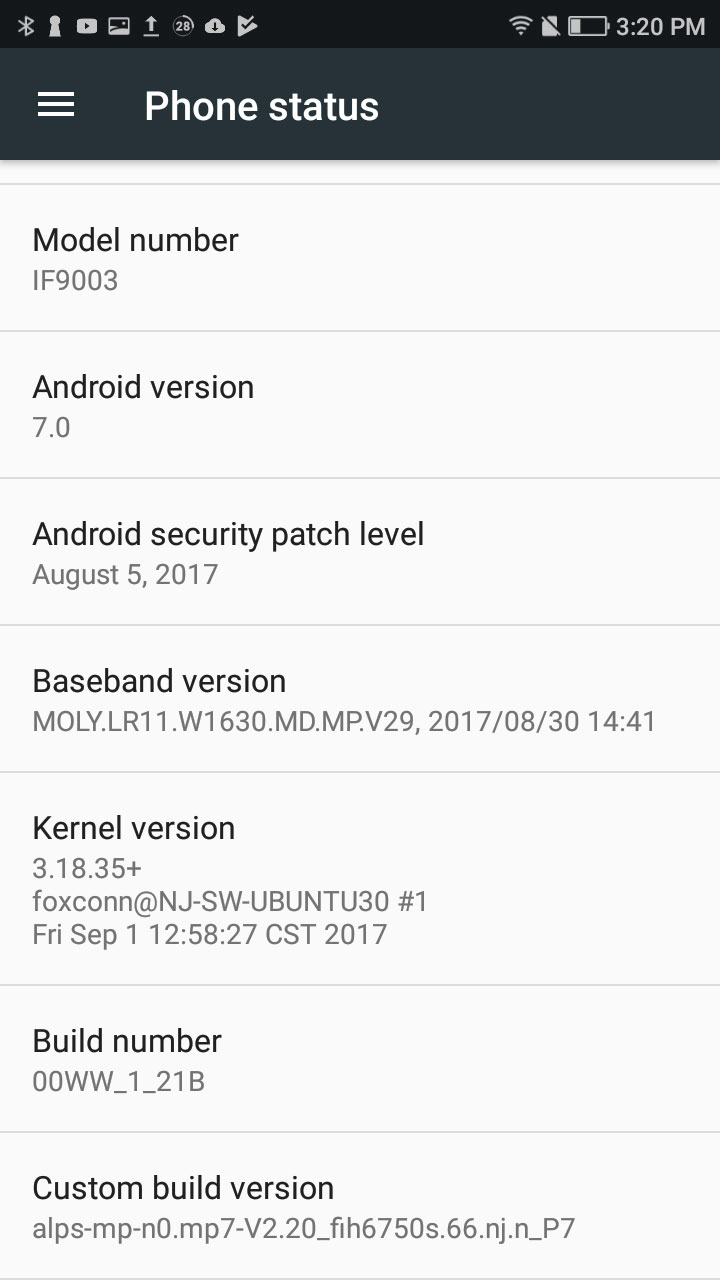
InFocus Snap 4 is loaded with Android Nougat 7.0 out of the box. With 4 GB RAM the UI works. The device can handle normal multitasking on the phone. The software is loaded with negligible bloatware which we can always disable and uninstall same like other devices. They have tried to optimized the UI quite well and it seems to be more like stock this time. Rest, Everything will work fine for normal users. The best part is that every game is working well on this processor with almost no lag.
Battery
Coming to battery part of the phone which is its 3000 mAh Battery which works really well. It took me 3.5 Hours to charge from 0 to 100% using its default charger. Battery usage of the device is good. It will easily going to last you for whole day because of good software optimization and small display size. Rest all what we can expect from it.
Coming to the battery performance, on normal usage it will easily last you for a day and might be on very heavy usage you need a additional power bank by end of the day.
Verdict
Overall, device is well built, and with this price they are i think gonna make a record in offering 4 camera in budget device.
Firefox is indeed a very useful browser; the browser doesn’t just pack some useful feature. It is the hub of all the customization. There are not just fancy audio converter or translator, but some of the add-ons are so much useful that if you combine all the add-ons, it becomes the most powerful browser ever.
The list of add-ons on Firefox is way too much and we can’t tell you install all of them. So, we have picked some of favorite add-ons; just for you.
Here are 10 Best Firefox Add-ons to Ensure Privacy
Hoxx VPN Proxy 2.2.2
This Add-on allows you to access blocked websites within seconds also keeps your identity secure. Hoxx VPN can also be used to keep your information safe from hackers at a public Wi-Fi location. You only need a Hoxx account and its plugin and you will be able to avail all these features for free. You can Download this Firefox Addon from HERE.
uBlock Origin 1.13.10
It is one of the best ad-blocker present around which takes lower memory/CPU footprint and also reads/creates filters from host files. It uses thousands of filters which include – EasyList, Peter Lowe’s Ad server list, EasyPrivacy, Malware domains, MVPS HOSTS and many more. This add-on has a very low memory footprint in comparison to other blockers out there even after various filters have been enabled. You can Download this Firefox Addon from HERE.
Ghostery 7.3.2.5
This Add-on is great for providing a better and secure browsing while using the internet. It helps you speed up your web by decreasing the trackers and clears out the page clutter. Including the largest tracker database, Ghostery contains over 2200 trackers and 4500 scripts and also provides you the feature of individual tracker control. You can Download this Firefox Addon from HERE.
Bluhell Firewall 2.6.4
This add-on is created by Diego Casorran and it works as a light weight (30 KB) Ad-Blocker. It is very simple and easy to use for removing and blocking the nasty web resources as well as it doesn’t contain various other options which aren’t generally used. Overall it provides a fast browsing experience as it eliminates such resources by the use of its seven hard-coded blocking rules which cover around 8400 .com/.net domains. You can Download this Firefox Addon from HERE.
PriceBlink – Price Comp & Coupons 6.2
Featured in USA Today and the winner of About.com 2012 Reader’s Choice Award for Best Browser Add-on, PriceBlink is used for price comparison of various products and tells you if the desired product is available at lower costs from another retailer. It also displays the shipping costs along with the price comparison data. Alerts for various money-saving coupons and free shipping codes can also be availed by this Add-on. It currently works for US and UK retailers only. You can Download this Firefox Addon from HERE.
Grammarly for Firefox
This add-on is well known for helping improve your writing skills by checking your grammar and correcting the mistakes or errors found. Being trusted by students, writers, bloggers and various other million users it provides you with a mistake free document as an end product after correction. It uses a contextual spelling checker for the correction of commonly misspelled words and a grammar checker for the improvement of complicated grammar, if any. You can Download this Firefox Addon from HERE.
Verdict:
My personal favorite is Hoxx VPN and Ghostery; it gives you control over your browsing and also keep you anonymous as possible. The uBlock origin, BlueHell firewall are generally used for ad-blocking, so if you want to block ads then these are the best one for you. Pop up controller is the best pop blocker in Firefox library, it is very useful. Grammarly is a professional app, specially designed for blogger, editors and writers, so if you’re one of them then install it, this add-on will not disappoint you.
At last but not the least, if I missed your favorite app and you like me to check out, please mention them below. Also, feel free to share your experience with these add-ons in the comment section.
More people than ever before prefer running their own businesses from home, businesses which are both fulfilling and lucrative. Running your own business at home offers you several advantages, including the fact that you are your own boss and you get more time to spend with family. Also, it offers you a more flexible lifestyle; however, there are legal things that need to be taken into consideration.
The last thing home-based business owners need to deal with is a lawsuit, something that is more likely to occur in today’s litigious society. This is why you should start taking steps to ensure your business is protected from being sued. Here are four things you ought to implement to keep your home-based business legal and out of trouble in future.
Get A Business Name And Protect It
One of the first things you have to do, as you start your business, is choosing a business name that resonates with the products or services you are selling. However, you need to protect the name by ensuring that it is not in use by executing a trademark search and registering it through a trademarking attorney. If you do not do this, you will likely have to change the name somewhere down the line (confusing your customers) or even face legal liability.
Get A Business Tax ID
While the Employer Identification Number (EIN) or a business Tax ID is not a legal requirement in the country, it’s still a good idea to have one. You can use this number for ordering items from suppliers, when hiring employees or even when taking on new business partners. In addition, using your personal SSN will leave you and your business vulnerable to identity theft.
Moreover, the EIN will help keep your personal and business assets separate; and legal compliance is a requirement for businesses that accept credit cards. This means that any money coming from your customers is deposited into the business’ account and not your personal account.
Alternatively, when you buy a computer or a car, it can be registered under your company’s name, protecting your personal assets in case an individual suing you win the case in court.
Keep Your Business Insured
Ensure that you are careful when it comes to your business insurance policies by setting up alerts and reminders of when they are due. That one day you are not covered is all it takes for a customer to take you to court. In the event customers come to your house to pick their orders, for example, get a third party general liability cover in case of a slip and fall incidence on your property.
If you are providing consultancy services, a purchase insurance cover should sufficiently protect you from any errors and omissions that may occur while advising a client. To keep your premiums low, ensure that your grounds are free of slippery spots and barriers, get a good computer backup system, and install a security camera system.
While general business advice sites offer you tips on a huge array of legal business issues, they rarely go into the specific state information. So, reading the online material on the type of licenses, permits and certifications you need for your business should only act as a guide. You can get specific information on the legal requirements of your business, depending on what you are doing, from your local county or city council office.
Are you looking to write content for your blog or website, but don’t know how to include SEO? SEO is one of the most important factors when blogging, because it can help generate traffic. Without it many websites would fail, which is why you need to know how to use it. Lucky for you including SEO in your blogs is not difficult to do and once you get the hang of it you will see the traffic swarming in.
With that in mind here are 7 need to know SEO writing tips, which will help you generate traffic.
Make the content sharable
Creating content that is sharable is great for off page and on page SEO. That’s because once a post gets shared on social media it generally gets popular quick. Creating high quality content that people want to share will lead to your blog getting more and more popular, thus adding readers to your email list.
On the other hand, some bloggers actually pay for their articles to be written, whether it’s because they don’t have the time to do it themselves or they don’t have the knowledge to write. That’s why hiring a writing service Essays Scholaradvisor is a great option, since they can help bloggers when they need high quality SEO articles.
Use keywords
Keywords are essential when creating content, since this will help your blog rise in the search engine. Once you have a topic do the research and find out what the best keywords are in that niche.
Also, you can make a list of phrases until you find one that meets your standards. When creating your blog include keywords regularly, because this will help readers find your content. Make sure to use them in your header, sub header and paragraphs.
Make the content just right
Although having content that is quick and to the point is appealing to some readers it doesn’t help in the long run. Search engines love juicy big articles that are 700 words plus, because this makes it easier for their algorithms to identify where the good content is. Also, remember to include keywords throughout the article, otherwise the search engine won’t know what keyword you’re trying to rank for.
Use tools
Using tools can help you succeed as they will provide you with information surrounding SEO. A great tool is Yoast as it can give you real time analysis, which will help improve the content.
Also, using tools that show how much traffic you’re getting is a great way to determine what keywords work. Then you can focus your SEO campaign on specific words to try and get the bulk of the traffic that the niche has to offer.
Write content people search for
Before even writing the first letters think of who will actually be searching for it. Does the topic get a lot of monthly views? If not then consider writing about something else. It doesn’t matter how well your SEO is going to be if the keyword doesn’t get any searches then it’s pointless. Use Google’s keyword tool to see how many searches a keyword or phrase gets.
Edit the work when necessary
In some cases you may have tried to rank for a keyword that gets little to no searches, which means you need to change the keyword your ranking for. Change all the old keywords you were trying to rank and switch them up for the new ones. As mentioned previously use a traffic tool to see the up to date traffic volumes for each keyword.
Quality over quantity
Although search engines love longer articles it’s important to note that if the content it terrible then the algorithms won’t bump it up in the searches. It’s far better to write a short 300 word article that is high quality, rather than 1000 words writing about a bunch of nonsense. Yes, it’s better to have really long articles, in fact search engines favour 2000+ word articles, but if the content is bad then it’s not worth it.
Conclusion
Crafting content with SEO imbedded in them is not so difficult when you have the right information. Use the tips listed above to guide you, thus generating traffic more traffic from SEO will be a straightforward task.
Asus a well know brand which are always on top with there great Laptops and even with top level cell phones recently came up with there new product under VivoBook and Zenbook Series; that too with great pricing and high end specs. Asus comes up with VivoBook S15 and Zenbook UX430 with the pricing of Rs 59,990 and Rs 74,990 respectively.
The VivoBook S15 packs up with 15.6-inch screen and weighs only 1.7 kg. The laptop comes with a metallic Icicle Gold finish body with a FHD Nano Edge display with only 7.8 mm bezels. VivoBook is powered by the 8th generation Intel Core i7 processor with 16 GB of DDR4 RAM alongside NVIDIA MX150 graphics processor. The laptop also comes with 1 TB HDD and a 128 GB of SSD for the operating system, which will be more than enough for any user.
VivoBook also comes with a reversible Type-C port that supports the USB 3.1. They are also offering two USB 2.0 ports and one USB 3.0 port. The keyboard which we get in the laptop is backlit with an integrated fingerprint sensor. The VivoBook S15 comes with Windows 10 Professional right out of the box.
Now, coming to the ZenBook UX430 which only weighs about 1.25 kg and comes with a 14-inch FHD screen featuring Nano Edge display, similar to what we get in VivoBook S15. The laptop is powered by 8th generation Intel i7 processors with 16 GB of DDR4 RAM and 512 GB of HDD storage along with the NVIDIA MX150 graphics.
Overall it’s up to you which one is your favorite and what you can easily afford according to your work.
Nokia a well known brand about which we all know. A few months back Nokia came back in Indian as well as in Global Market with there Android Devices. By giving the bang in the market with great sales they came up with another amazing device in India “Nokia 8“. The Nokia 8 is available at the pricing of Rs 36,999. The Device will be available on Amazon.in.
First Nokia 8 was unveiled by HMD Global in August. The main highlight of the device is its Carl Zeiss optics with its dual camera setup and this is not enough both the camera actually takes latest name called up as ‘Bothie’ where both the front and back camera work together while doing a Facebook or a YouTube Live. As per the company this feature is first in the world in any smartphone.
Specification
Nokia 8 comes with a 5.3-inch 2K display along with Corning Gorilla Glass 5 protection on top of it. The device is powered by Snapdragon 835 which is supported with 4 GB RAM, coupled with a 64GB internal storage which can be expanded to up to 256 GB using microSD Card. The smartphone runs on Android 7.1.1 Nougat out-of-the-box. The whole device is juiced up with a 3090 mAh battery. Nokia 8 features a 13-megapixel dual camera at the back where one is having a RGB sensor and another one is having a monochrome lens. This is not enough we also get a 13-megapixel camera at the front. The camera setups on the Nokia 8 use Carl Zeiss optics using which it captures really great shots.
Nokia 8 will be available in 3 different colour options – Polished Blue, Tempered blue and Steel, whereas the fourth variant – Polished Copper will go on sale after a few weeks which is one of my favorite personally.
Ajey, HMD Global Vice president and Country Head, India, announced that the Nokia 8 users will also get access to Nokia Mobile Care services, wherein the users can get the smartphone repaired while sitting at home, through the company’s door-to-door service. Ajey further added that all the Nokia smartphones sold in India have been manufactured in India itself, in compliance with Prime Minister Narendra Modi’s ‘Make in India’ vision.
Power bank which is one of the most essential tech product in our life these days. As the power of phones with there usage is increasing day by day so to complete up the juice of our device we need other device which is power bank which help us to continue our work on the go. Pebble, which is one of the leading company for consumer electronics, has launched a new power bank named ‘PB44‘ in India at the price of Rs 1,499.
This new power bank ships with a huge power backup of 10,000 mAh with additional 2 cables in it, which it attached within the power bank. This is not enough out of two inbuilt cable in power bank we get Type-C cable too which makes this power bank purely future proof.
The PB44 measures 7x70x135mm and weighs only 230g. The company is claiming that it is slimmer than a third of the options available in the market. The power bank comes with Li-Polymer batteries which as per the company claims can be charged within three hours. The power bank is also equipped with quick charge technology. The power bank comes with built-in 4 LED indicators which indicate the status of the amount of juice left in the unit.
Commenting on the launch of the Power Bank series, Komal Agarwal, Director Marketing, Pebble said: “Pebble is known in the market for its premium and powerful Power Banks which suit the needs of consumers while fitting into their budget. Our latest 10,000mAh power bank is a flagship model designed to impress not just with its smooth and elegant finish but its high quality and blazing speed that can charge up to four devices. Supported by Pebble’s Quick Charge Technology and a 2.4A output port, it is an ideal gadget for smartphone, tablet, camera as well as iPhone users who run out of power due to heavy applications and non-stop usage. The 2 additional inbuilt cables make this device the most user-friendly and convenient power bank in the market today!”
Overall, in this price i would say this could be a great deal in this price.
Power bank which is one of the most essential tech product in our life these days. As the power of phones with there usage is increasing day by day so to complete up the juice of our device we need other device which is power bank which help us to continue our work on the go. QHMPL, which is one of the leading company for consumer electronics, has launched a new power bank named ‘QHM 10KP‘ in India under the brand Quantum Hi Tech at the price of Rs 1,899.
This is not gonna be an ordinary power bank but one of the slimmest power bank available in the market. The power bank gives you the power capacity of 10,000mAh. The battery is equipped with Polymer battery, which support 500 times charge-discharge cycle which is common in high end batteries. The main reason to buy such kind of power bank is its huge power that too in very light weight and compact size.
Speaking on the launch of the Pocket-sized power, Mr. Ashish Mutneja – Director Quantum Hi Tech says, “Very recently Quantum has launched a series of Power Banks, the latest being QHM 10KP, all designed in slim profile and heavy battery capacity. Very soon we launching our 15000mAh in Li-ion cell and 8000mAh in Slim Polymer series exclusive to the demands of the festive season”
The QHM 10KP is available in two colors Black and White colors. You can get one for you both from offline and online retail stores.
We all have been aware of the fact that the environment we live in is polluted. Even at our homes, the air we breathe is not all bacteria free. The only solution to this problem is having a decent Air purifying technology.
Well, we might be able to help you something for that, BRID is an air purifier that uses nanotechnology to eliminate harmful elements, odours and toxicity from the air we breathe.
How does it work?
You can place BRID wherever you feel like. Plug it in and the work begins. BRID uses photocatalysis to purify the air. In simple terms, its active ceramic element absorbs radiation from its precisely calibrated LED board, producing free radicals which in turn attack pollutant molecules and turn them into harmless substances. Thus making the air as fresh as possible.
Features:
It uses a powerful cleaning technology called Photocatalytic Oxidation(PCO).
Its filters are washable and do not require to be replaced.
It can also be placed in a car with the car adapter provided with it.
It does not use UV lights, thus it is Ozone free.
Having 3 modules of BRID, you can clean 90% of the air within 6 hours.
Why should you buy it
Since the air around us goes polluted day by day, using such technology is our necessity. Moreover, other air purifier’s filters are needed to be replaced, here the filters are easily washable. It uses a technology which vaporizes the toxic particles thus removing them for good. You can connect your phone to BRID via WiFi and know about your surrounding atmosphere. Thus, in short, BRID is a perfect device to make your home environment healthy, so one should totally go for it.
Availability:
The product is currently available on pre-order basis on Kickstarter.com, so go ahead and order your smart air purifier, the price of the product is 289 USD.
Thanks for hanging out with us guys. Please do drop your suggestion and ideas in the comment section below. If you want to keep tabs on a more innovative product like this, subscribe to our website and don’t forget to give your reaction.