Home Blog Page 289

How To Write a Blog Post Headline Will Hook the Reader

They say: “Don’t judge a book by its cover”. We believe the same saying relates to the blog headline. Nevertheless, if your blog post headline is not catchy, most likely the readers will never read your content. Stats says that 80% of people read your headline copy, while only 20% read the rest. As you see, perfect headlines are vital for any successful blog.

How To Write a Blog Post Headline Will Hook the Reader 1

The first thing the reader will see entering your blog is the title or the titles of your blog post(s). So, you’d better make it pop. Engage your audience with a teaser hinting of what’s to come in the main text. Don’t try to come up with some fake sensation, but don’t be boring, either.

It’s also very important not to be misleading. Identify the main “thesis” idea of your blog post and refer to it in your title. Your titles may be to-the-point or descriptive. Everything depends on your audience.

We advise you to figure out a few things before you start:

    Who are you targeting?

    How are you branding yourself?

    Where are you sharing your blog posts?

Don’t try to write a great title at once. Start by writing your blog post.

Let’s say it’s about one of the WordPress artist themes created by TemplateMonster.

You have your subject and should describe it to your criteria. You can write a small summary of the post. We bet you’ll find the title for your content within that post.

So, you wrote about Magic, which is a multipurpose WordPress theme.

How To Write a Blog Post Headline Will Hook the Reader 2

Your summary is a description of what is so special about this theme. Twist it.

“Magic by TemplateMonster: the Illusion that Won’t Disappear”

Not a bad title, isn’t it?

Right now we will recap some major tips that will help you write irresistible headlines in future.

Did you scan the top blogs to see their posts headlines structure? It’s a good practice to learn from the best.

Are you ready? Then we begin.

– Be ready to spend time on your title. Many new bloggers do not spend much time on the good title. They think that the quality of their content is enough. It’s a mistake. Your blog title makes the first impression that may turn into last one. If readers don’t find your title catchy, they won’t bother clicking on it.

– Keep your title short. The ideal length of a blog title is between 6 – 8 words. A long blog title is boring, it dilutes the reader’s attention. Moreover, long titles get truncated by search engines.

– Optimize your headline for SEO. Otherwise you won’t get visibility and those dream converted shares.

 – Try to put the post category into title. This will help you to filter the readers (save readers’ time) and only those who are interested in your writing will click on it.

– Use numbers or stats occasionally. They draw readers’ attention. BTW, odd numbers perform better than the even numbers.

– Use emotive words if you want your headline stand out. Include power verbs and interesting adjectives.

– Highlight the benefits the reader can get, but not the features of your product. For example: “7 witty ways to boost productivity”.

– Be accurate and clear. Do not confuse your readers with vague or ambiguous titles. “Designers refuse to work after death”.

– Explain the Hows. Such kind of headline will draw the information-seekers in this Age of information.

– Explain the How – Nots. Readers want to know about common failings and how to prevent them.

– Be unbelievable: make a statement that seems too good to be true. (NB! Practice this only if the statement is really true).

– Be confrontational. This sounds like a challenge to readers.

– Be controversial. Spark conversation by making a statement contrary to standard practices or thought.

– Avoid words with multiple meanings.

– Be accurate, not vague. Call a spade a spade. Nothing makes a reader bounce than a totally incongruent and irrelevant title. Imagine a title that says The Complete and Ultimate Guide to… then you just see 2 to 3 items in the list.

– Take advantage of the curiosity gap to draw them in.

– Write a title that elicits that faintest bit of fear from the reader.

– Use awesome, amazing, and greatest to affirm your findings.

– Go exclusive and secret to give the readers something they haven’t seen.

– Ask the question they’re asking themselves. And answer it.

Start titles with:

    How to…

    Top 5…

    Best…

    Any number

Or

   Ask a question. “Are you feeling depressed lately?”, “Ever wonder if other people __________ too?” “Is ____________ healthy/ good for you/dangerous?”

Or

    “I did__________ and here’s what happened.”

Or

    “Most people think_______ and here’s why they’re wrong!”

Inspire with Cosmopolitan-style headlines. For years writers and editors of beauty magazines have learnt the hard way what works and what doesn’t by having to sell “a book” by its cover, so, they know what they do.

How to’s:

    How To Change What You Find Attractive In 60 Seconds.

    7 Things You Can Do Right Now To Protect Your Vision.

Other examples of path/time/entity nouns you can use in titles:

    The 15 minute workout that …

    100 facts that …

    50 ways to …

    10 secrets to …

    The 7 Key trends to…

    6 choices that …

    5 moves to …

    3 things that …

    2 tips that…

Achievement/Statements/Facts headlines:

    Men talk. Love, sex, break-ups and bad behavior.

    Be beautiful naked with the 14 day workout!

    “My boyfriend didn’t talk to me for 3 days”.

    George Clooney says: “I never had sex with a woman”.

Some other interesting statements:

    Be the best at …

    Become a …

    Start to …

    Deliver the fastest …

    Never lose again in …

Questions/Quizzes type of headlines:

    Quiz… Do you fall in love too fast?

    Megan Fox Naughty or Nice? You decide…

    Are The Guts Of Your Cell Phone Hiding An Illegal Operation?

Another formula: ask a broad question that you address somehow in your blog subject. Involve the curiosity pitch.

The trick has been growing a lot online. The guys at upworthy use it particularly well.

    “What guys hate for you to do in bed.”

    “Find out her secret attraction by…”

    “This guy tried inviting this girl on a date, what happened next was totally unexpected.”

    “My family stopped eating sugar for one year and this is what happened.”

    “This Amazing Kid Just Died. What He Left Behind Is Wondtacular.”

    “His First 4 Sentences Are Interesting. The 5th Blew My Mind.”

    “Meet Tiffany. She Works For Walmart, And She’s Got Something To Tell You.”

One more formula: imagine you are going to tell a family member or a friend a story. Think about how you would start, but just leave it hanging as if they need to say… “c’mon what happened next!”.

Conclusion

In the end of this blog post we would like to say that there are no formulas to be a truly creative copywriter besides testing, trying, reading. There are people whose entire job is “just” creating these appealing titles and interesting headlines that drive sales/views to the roof. There is nothing bad in learning from them. In any case we hope we gave you some charge to come up with a remarkable title for your next blog post.

Have any questions/thoughts/suggestions, maybe your own perfect title formulae? They are welcome at the comments section.

Charge your devices anytime, anywhere with Kogalla Solar Storage Bank

Tired of carrying bulky power banks for charging your electronic gadgets in your storage bank wherever you go? Why not have a storage bank which can be your portable charger whenever you want and wherever you go?

Get it Now

If you’re looking for something like that, then Kogalla is the right storage bank for you. This device is a storage bank which can charge all your electronic gadgets like your phone, speakers, mp3 players via USB cable. On top of that this device can charge itself from solar energy as well as by electricity. This portable device looks very sleek and stylish. It also has a cool accessory pouch which includes USB light, micro-USB cable and lightening cable.

Features:

  • Ultra-Portable Kit: The Solar Storage Bank is a high-energy, ultra-slim power bank matched to a high-efficiency foldable solar array housed in the rugged waterproof fabric. This compact, portable kit includes a zippered pouch for accessories. The kit also includes a USB light, micro-USB cable and lightning cable.
  • Rapid Solar Charging: 22 W solar panel provides fast charging in full sunlight.
  • Anywhere you Go: Matching panels to storage bank provides optimal energy harvesting even in low light.
  • Powerful solar array: Dual USB-A power ports (12 W) powers lights and charges any USB device.
  • Rapid Solar Charging: In full sun with reasonable orientation, the SSB2210 will recharge the internal 10,000 mAh storage bank in three to four hours. That’s enough energy to charge an average smartphone three to five times.
  • Charge Your Phone at Night: Having an integrated storage bank lets you keep your phone with you during the day and recharge it after sundown. The unit’s 10,000mAh capacity provides enough energy to charge your phone, a GPS, a rechargeable flashlight and run the included USB light all night long with the power to spare.

Other features:

  • Whenever the Red Solar LED is on you know the unit is charging from the solar panels.
  • The four blue Charge Status LEDs indicate storage bank charge status like a fuel gauge.
  • The accessory pouch includes USB light, micro-USB cable and lightening cable.
  • The plastic case and waterproof material protect the device from minor water exposure.

Why should I buy it?

Kogalla Solar Storage BankThis compact portable device has very distinct and convenient features. It gives you the power to stay connected. It can charge all those electronic gears that are rechargeable via USB. This idea is really very revolutionary and it is a must have for every gadget lover. With its sleek and stylish design and multiple useful features, this device can be really useful for all of us.

Pricing:

This device is available for order since January 2017 on indiegogo.com. Its pricing starts from 159$. If you are also in love with this device like several others, then why wait. Go and grab it now.

Get it Now

Thanks for hanging out with us guys. Please do drop your suggestion and ideas in the comment section below. If you want to keep tabs on a more innovative product like this, subscribe to our website. And don’t forget to give your reaction. It’s fun, I promise.

Homemade DIY Power Bank

These days everyone need a power bank, everyone is having one or other kind of power bank which they have bought. But what if i would say you can make your own powerbank at home in just 2$ by using your old laptop batteries. Yes, this is true, we all have laptops and their batteries get faulty after few years, but those batteries never get dead and can be used to power up our small devices.

So, keeping it in mind you can create your own powerbank just using a small circuit which is already available on internet for only 2$.

Buy Here

There are other types of circuits which are also available but it won’t be having so many feature which this one is having. This Circuit will give you in so many built in options:

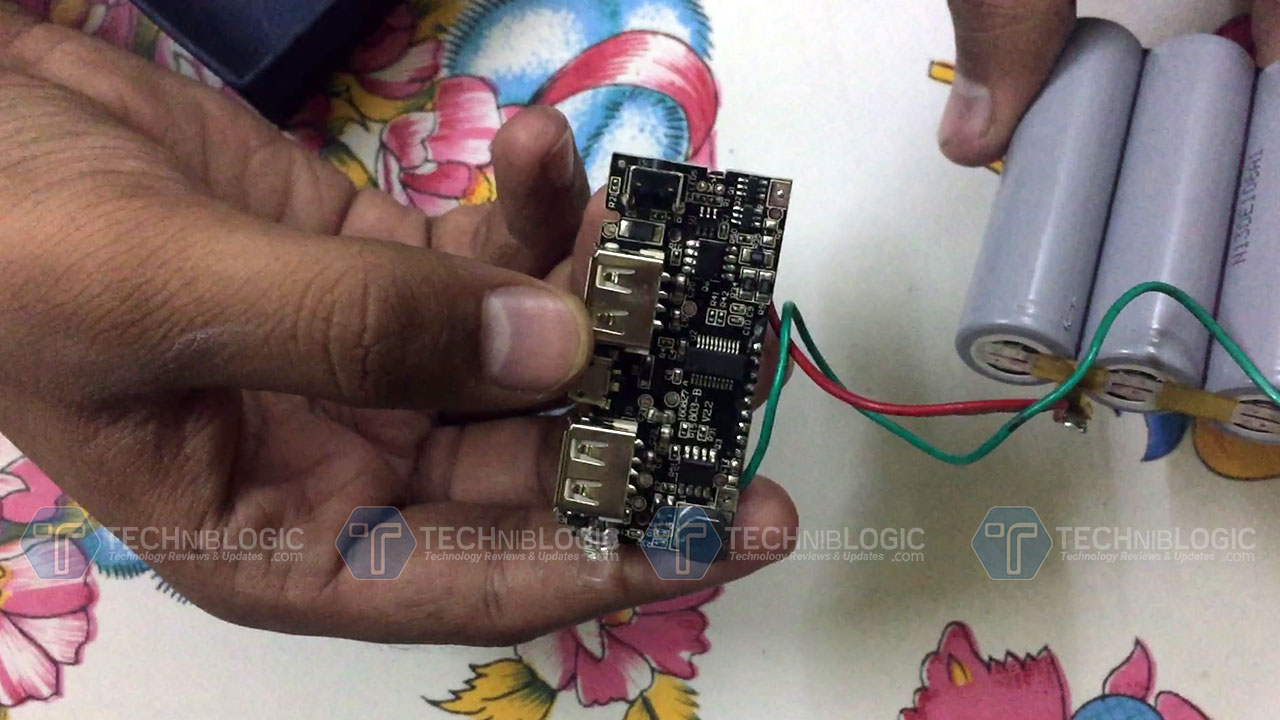
DIY-POwerbank-Board

  • LED Light
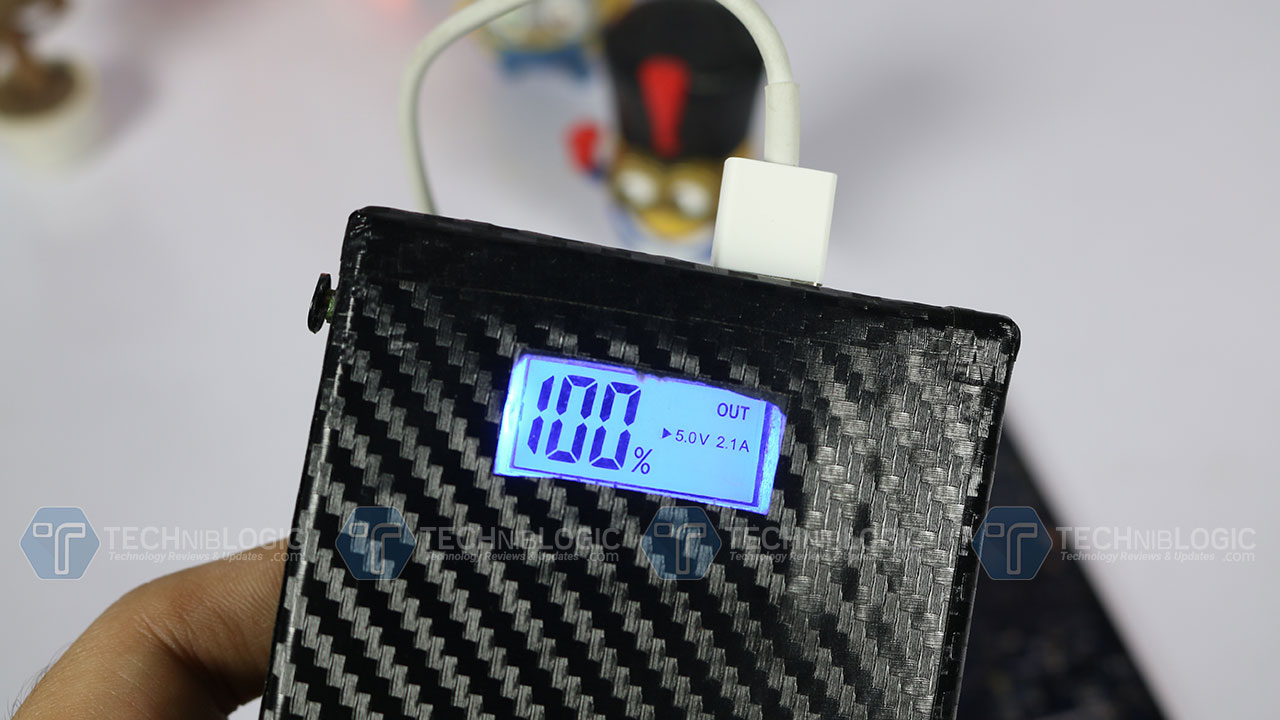
  • Charging percentage on Screen
  • Charging speed indicator on screen
  • Two USB Ports: one for 1A charging and other for 2.1A charging speed
  • Button to control the charging.

DIY-POwerbank-raw Board

So, to start i just opened up my old laptop battery which was lying around in our home from past few years, i got 6 cells out of which only 4 were working perfectly. You can measure it using a power meter, if it is getting you the power of 3.8volts or 3.7 volts or even higher means it is working pretty fine.

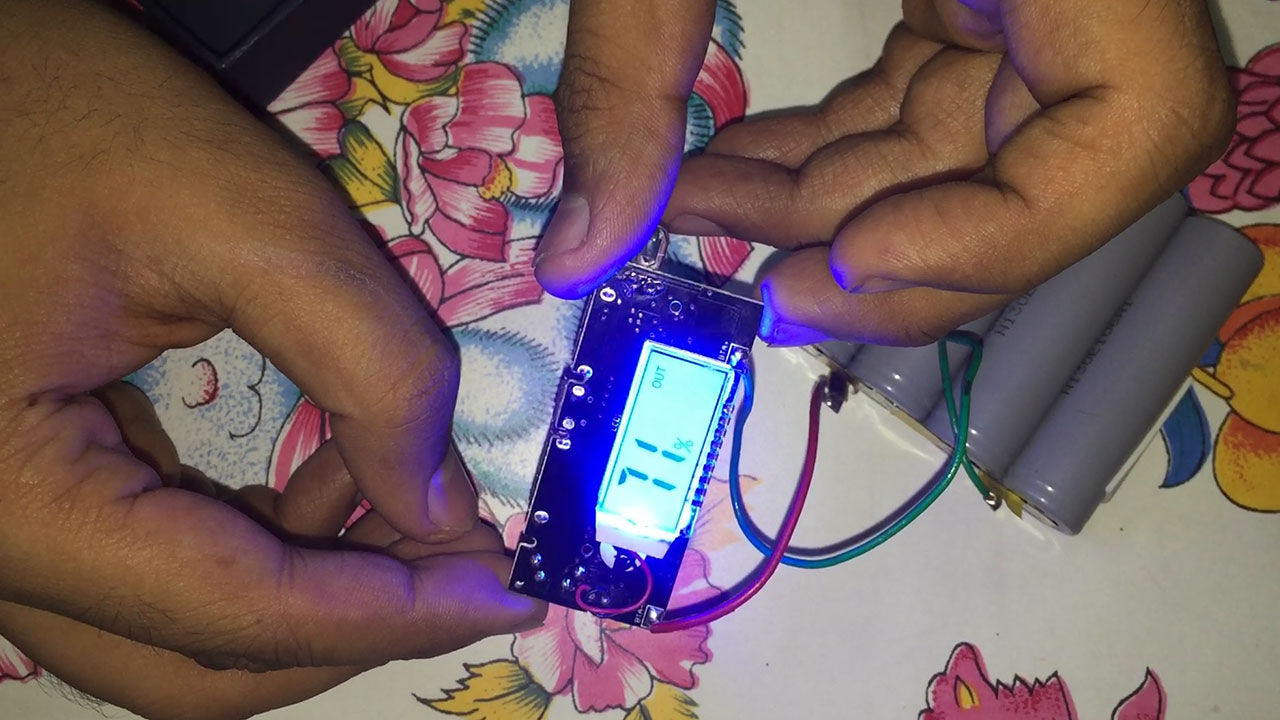
DIY-POwerbank-after-solder

After that i used some old Pins to connect all the batteries in serial orders which is normal and can be done by anyone. You can use normal wire also to connect them all, they will work in the same way to pass on the current to the board.

After that you need to solder the board with positive point and negative point, which is already mentioned on the board as you can see in the image. Now, you are ready to go, try to connect the wire and start charging the phone. It will work perfectly. You can test different charging speed as per the compatibility of your phone. You can even use it with any USB LED light or any other device, it will work like a normal power bank.

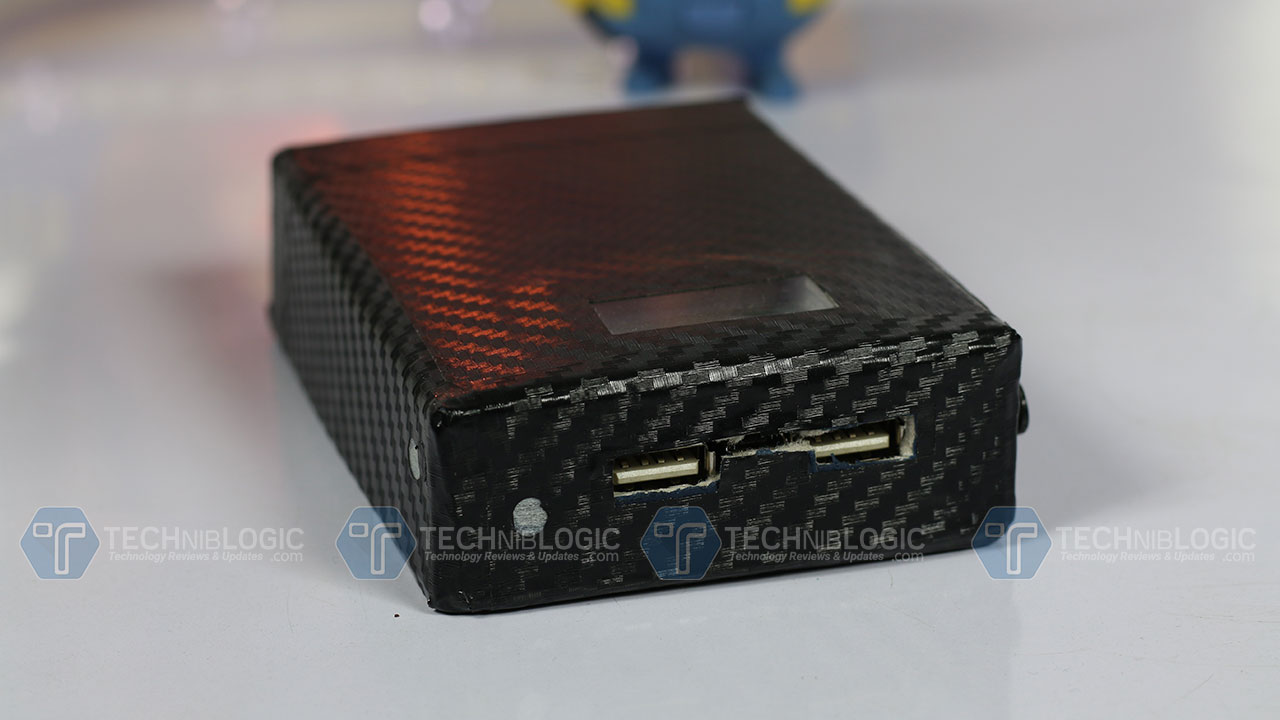
DIY-POwerbank-box

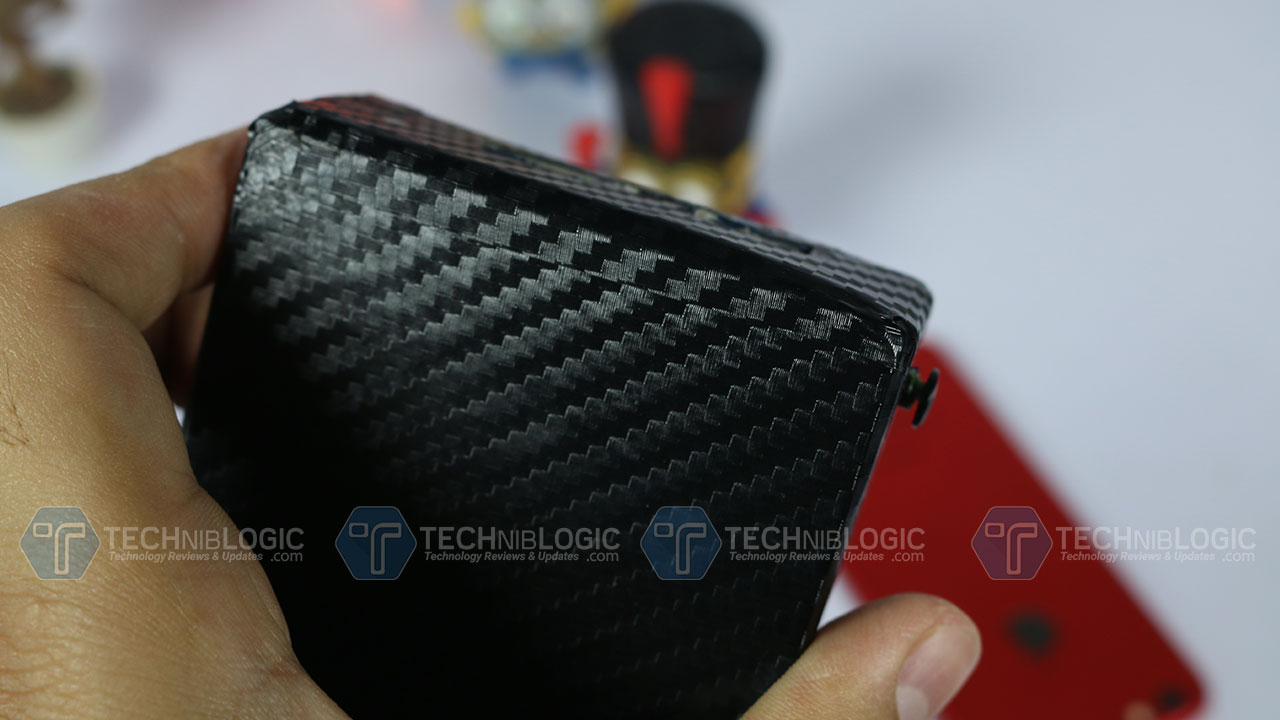
Now, the main thing which arises is to make a case for it, you can use any plastic box container to fit all the stuff tight in it so that when you insert the USB in the board it wont loose up and wire get perfectly fit in it. In my case i have used a old cardboard box and used only Double sided tape to stick all the stuff inside it. I also used small cardboard scrap waste to tight up the board in the place. Once everything is done, i make different hole for LED, screen and USB ports. I was not so successful to get clean cuts for USB but you can take your time doing it.

Once everything is done, close the box using the same cardboard and install vinyl skin on it, to add extra and professional looks to it. I also used a small plastic stick and a plastic piece to use it as a button by plastic the plastic stick on the button so that after the casing the button can be used normally.

According to me it looks decent, and what all we can expect from a 2$ 10000mAh home made power bank.

Buy Here

Sony Xperia XZ Premium Launched in India: Price, Release Date Specifications, and More

Xperia is a well known old brand. We have all used xperia devices in our life. Now they are up in the market with something unique and different. They have start working on smartphone high end camera with some insane feature which we can just imagine. Xperia in India launched Xperia XZ Premium, which will be made available from June 12. The smartphone is priced Rs. 59,990. The phone will also be available in Sony Center ans some selected retail outlets.

Sony Xperia XZ Premium Launched in India: Price, Release Date Specifications, and More 7

We can Pre-book the Sony Xperia XZ Premium which will begin from June 2, and will go on till June 11. There is a good news for all Customers who pre-book, as they will get a Sony SRS-XB20 Wireless Bluetooth Speaker worth Rs. 8,990 for free. This is not enough the company is also bundling a 3-month subscription to Sony LIV worth Rs. 349 for free for all buyers, as well as a Gameloft’s Modern Combat 5 with 5,200 in-game credits, this is one is awesome.

Sony Xperia XZ Premium Launched in India: Price, Release Date Specifications, and More 8

The Sony Xperia XZ Premium comes with top-end Snapdragon 835 SoC. The phone comes with a 19-megapixel Motion Eye camera which can shoot the videos at 960 frames per second, no other phone in the world can do this till now. It also offers you predictive hybrid autofocus and predictive capture features.

At the front we get a 13-megapixel camera, with 5-axis stabilisation. The smartphone is dust and water resistance with an IP65/68 rating, with added Corning Gorilla Glass 5 on both front and back.

This time Sony has added dual-SIM support in XZ Premium in India. Out of the box the phone comes with Android 7.1 Nougat. We get 5.5-inch 4K display which again makes it world’s first phone with 4K display.

The smartphone comes with Qualcomm Snapdragon 835 SoC which is supported with 4GB of RAM. The phone packs 64GB of inbuilt storage that can be expanded via microSD card (up to 256GB).

The phone is powered by a 3230 mAh non-removable battery with the feature of Qualcomm Quick Charge 3.0 technology and only weighs 191 grams. We get all sensor which is needed in a phone.

ZenPad 10 Tablets (Z301MFL and Z301ML) Launched

Asus, one of the top notch global brand launched their new affordable segment tablet in Computex 2017 in taipei. ZenPad 10 tablet is going to cater budget segment market with some decent specs which they are offering.

ZenPad 10 will be available in two variants (Z301MFL and Z301ML), they both sport the same design with no difference, even most of the specs are similar as per on the paper. The more premium Z301MFL variant is running on Android 7.0 Nougat and sports a 10.1-inch (1920×1200 pixels) display. The Tablet is available and powered by a 1.4GHz MediaTek MT8735A quad-core processor which is supported with Mali-T720MP2 GPU. The tablet will be offered in various bundles – 2GB RAM/16GB of storage, 3GB RAM/32GB of storage, and 3GB RAM/64GB of storage. Now, you have so many choice to choose.

Coming to the camera here we get a 5-megapixel rear camera and a 2-megapixel sensor in the front. The ZenPad 10 Z301MFL packs in non-removable battery, with the connectivity options of 4G, USB Type-C port, 3.5mm audio jack, and a microSD card slot. The dimensions measure at 251.77×172.17×8.95mm, and the tablet only weighs 490 grams.

The tablet will be made available in Royal Blue, Pearl White, and Quartz Grey colour variants, and will be launched with accessories like a Bluetooth keyboard dock, which need to purchased differently and will not be included in the package.

Coming to the ZenPad 10 Z301ML, we get almost same specifications for this tablet too. Some changes which we noticed are, the resolution is at 1280×800 pixels, and it is powered by a 1.3GHz MT8735W quad-core processor. As of now, no pricing is mentioned by Asus, let see when they are going to announce the pricing for these.

6GB Samsung Galaxy S8+ Launched with 74,900 INR

Samsung India has finally launched a new exclusive variant of Galaxy S8+ with 6GB RAM and 128GB internal storage giving the price tag of Rs. 74,990 and will be available from 9th June. This is done because Samsung has received a great response to their recently-launched smartphones Galaxy S8 and Galaxy S8+.

The new variant, will only be available in Midnight Black colour, as everything is same. Samsung higher RAM and storage variant of the Galaxy S8+ will be on pre-orders via the Samsung Shop and Flipkart from Friday, June 2. If you pre- order the phone all customers will be eligible for a free bundled wireless charger which is worth of Rs. 4,499.

To recall, Samsung launched the Galaxy S8 and Galaxy S8+ back in April in India, featuring 4GB RAM and 64GB of inbuilt storage. The Samsung Galaxy S8 is priced at Rs. 57,900 (MOP), while the regular Galaxy S8+ variant is priced at Rs. 64,900 (MOP), giving the new variant a premium of Rs. 10,090. It also forgoes Coral Blue and Maple Gold colour options the regular version is available in.

To recall other info here are some of point which is considered in Samsung S8 and S8 Plus:

  • Camera: The device features an advanced 8MP front camera with f/1.7 aperture. It also supports autofocus which is combined with the facial recognition technology, which enables you to get amazing selfie even from a distance. It also comes with a 12MP rear camera which is inbuilt with a dual pixel technology to give you a fast autofocus.
  • Performance: The Galaxy S8 and S8 plus, both are powered by the new 2.35 GHz Snapdragon 835 processor and features a 4 GB of RAM. The internal storage is 64GB, which is expandable up to 256GB via microSD card. With these specs, we can assure it is going to deliver a groundbreaking performance.
  • Display:Samsung-Galaxy-S8-Plus-front-buttons-techniblogicThe infinite display is the new dope tech, right now. Both the device has much larger screen compare to normal smartphone, which is identical in body size. Which means, the 5.8-inch screen is packed in a body of 5-inch smartphone, and the 6.2-inch screen in 5.5-inch smartphone. That is a huge display, really.
  • Battery: Well, like the display we can’t stop thinking about the battery itself. The S8 packs a 3,000 mAh battery and the S8 Plus packs a 3,500 mAh. Samsung has promised that it can deliver a day-long performance but to be honest, it needed a little bit more juice. Thanks to the quick charge, you can power up the device very quickly.
  • Fingerprint sensor: That happens sometimes. It’s just that you don’t expect these kinds of things from premium manufacturers. I mean, there is surely a design flaw but it’s okay for some user. Users who are habitual in using the device with two hands because honestly, you can’t reach the fingerprint sensor with one hand.
  • Bixby is the new Google assistant:Samsung-Galaxy-S8-Plus-Bixby-Demo-techniblogicFrankly, we are ok with Bixby. What we are not ok with the dedicated Bixby button on the side. It just seems redundant, the priority button that OnePlus 3 introduced was cool, but a dedicated button for an assistant, which is not a full assistant seems a little bit off. But it’s there, so yeah deal with it.
  • The problem with Aspect Ratio: The phone has not even gone into the hands of the consumers, and there are problems with it. Yes, the aspect ratio. You have to admit, the display of the S8 and S8 plus is huge, and when you have a huge display which is not fully optimized for different apps, you’ll definitely face some issues. Well, that’s all software issue which will surely get fixed in coming days, so its ok.

SunBank : World’s Smartest Solar Portable Charger

So, isn’t it too late to talk about clean energy or solar system tech? I don’t think so. Well, we have seen many solar products from different manufacturers. Like one of those feature phone that SAMSUNG built with a solar panel on the back. it didn’t do well in the market but it was certainly an innovative product, and innovative product is always welcome in the market.

Sunbank-solar-charger-founders

Taking the innovation to next step a company named Happiana is going to launch a revolutionary product in the tech market, which is a solar power bank known as SUNBANK. The device is the world’s smartest portable charger powered with advanced solar cells, inbuilt with 6400 mAh Li-ion battery. You can also charge any device wirelessly or through USB cables.

How does it work?

So, as far as we know that every solar system set has a solar panel. In this device, solar panels are inbuilt with batteries and charging jack, such as USB type A. The device has attached magnets on the sides, so you can attach it any magnetic surface. It also has sticky pads so you can attach it to your bag pack or wall.

Pre-order

Attach the panel to your bag, connect the charging cable and leave to your office. The Sunbank will never disappoint you. It can be easily folded and carried everywhere.

Charging system:

SunBank-prototype

The device has two charging system. Which is the manual charging via an electronic charger and the solar charging. So, if the weather is not nice, you can just plug in your SunBank and use it as a normal Power bank.

The packaging also comes with a wireless charging sticker, which can be used in almost any smartphone to charge wirelessly via the Sunbank. Or you can choose the old fashion way, which is via the USB. The device can charge two devices simultaneously.

Mobile app:

The Sunbank is also synced with the Happinan app. Which reminds you to charge the device and when it will be running low. The notification system will also remind you to take the device with you in case you have left it at your home. The app also monitors the activity of the Sunbank and tell you exactly, how much electricity you have generated so far. You can sign in and also challenge your friends in the game of clean energy.

Download app

The device is an innovative and spectacular device, with a motto of clean energy. Well, the device is now available in pre-order. Starting from 59$ to 85$.

You can also help them to raise their funding.

Pre-order

That’s was all for this guys, stay tuned.

Reset Forgotten Windows 10 Password without Reset Disk

0

Have you set up a strong password to lock Windows 10 but you then forgot the password? Can’t sign in to the only Administrator account on your computer? Don’t have a password reset disk? In this tutorial we’ll show you 2 simple ways to reset Windows 10 password when you lost or forgot it.

Method 1: Reset Windows 10 Password with Installation Disk

This method works since Windows Vista, but it is still rarely known to most of computer users. Follow these instructions and you can reset Windows 10 password with installation disk. No need to reinstallation Windows.

  1. Boot your PC with Windows 10 installation disk. Either DVD or USB will work just fine.
  2. When prompted to “Enter your Language and other preferences”, press SHIFT + F10 keys and a command line window will open.
  3. Now type in the following commands to backup utilman.exe, and replace it with a copy of cmd.exe.

copy d:\windows\system32\utilman.exe d:\

copy /y d:\windows\system32\cmd.exe

d:\windows\system32\utilman.exe

Windows 10 password reset 1

  1. Restart your computer. At Windows 10 sign-in screen, click on the “Ease of Access” icon in the lower right corner. This will now open a Command prompt window where you can reset lost password.
  2. Type in net user command to reset forgotten password of your Windows 10 account.

net user Administrator 123456

  1. Close Command Prompt and reboot without installation disk, you can then log in to Windows 10 with your new password!

Method 2: Reset Windows 10 Password with PCUnlocker

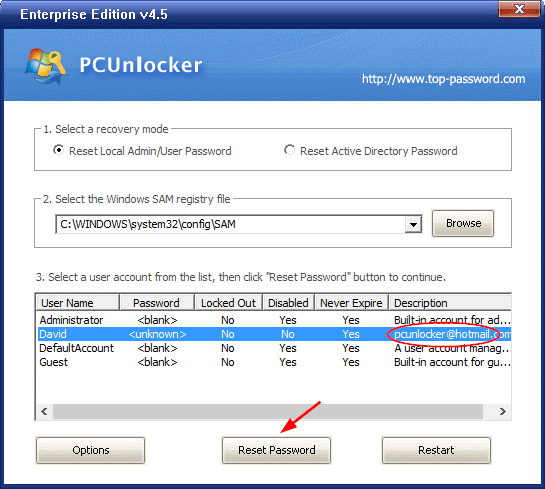
Looking for an easy way to reset forgotten Windows 10 password? Accidently disable all admin accounts in your computer? Need to bypass Microsoft account and sign into Windows 10? With PCUnlocker you can recover access to your computer account in no time. Here’s how:

  • To get started, download PCUnlocker ISO image using an accessible PC with admin rights. Next burn the ISO file to your USB drive (or CD) using the freeware ISO2Disc.

Windows 10 password reset 2

  • Insert your USB drive on your Windows 10 computer. Boot up the PC and get it to boot from USB, rather than hard drive.
  • After loading system files from USB, you’ll see a screen that display a list of user accounts that were found in the SAM database of your Windows 10 system.
  • Choose an account and click on Reset Password button to remove your forgotten password.

Windows 10 password reset 3

  • Click the Restart button to reboot your computer, you can then log into Windows 10 account without entering a password!

Conclusion

These Windows 10 password reset methods prove to be very helpful, especially when you forgot your Windows 10 password but you don’t have a password reset disk. Save you lots of time and trouble!

Keep your Power Bank in your Wallet with PRSRV PowerBank 🔋

Products are getting smarter day by day. There are much more innovation products, that are setting their way into the market. And in that ruckus, there is one device that stands aside but tends to attract a lot of attention by their feasibility and innovation. A kind of similar device just got into the lime light, and the device is a Smart power bank.

Buy from Here

The PRSRV is a Smart power bank which is so small that it can fit inside your wallet. That’s just crazy!

How PRSRV works?

Unlike another banal power bank, the PRSRV comes with a removable chargeable battery that sticks with the main component of the power bank but with an easy click it can come off. You can easily fit it inside in your wallet and carry an extra juice, whenever you need. The removable battery can charge your device up to 30% in no time.

The main component of the power bank is the place where the magic happens. Just plug the device into a wall socket and starts charging your smartphone with it. The smart charging technology recognises how much power your device need, so it transmits only that much amount of power, making it an energy efficient power bank. It also recognises when your device is fully charged and automatically stops the charging process.

Features:

  • A Credit card size removable battery.
  • Prevention from overcharging.
  • Eco-friendly algorithm.
  • USB Type-C support.
  • Quick charge 3.0 support.
  • 8000 mAh non-removable battery.

Why should I buy it?

PRSRV PowerBank

To be honest, the device looks promising. The main power bank is an 8000 mAh beast, which is considered good for a power bank. But the thing that is most exciting is the removable credit-card size battery that fits in your pocket. Which is simply amazing. So, if you’re constantly looking for a power socket every time, then that’s it. This is the device for you.

Availability:

Since it is a start-up. The device is not available at e-commerce website such as Amazon but it is available worldwide with a shipping charge from Indegogo.com. The retail price of the device is 99$, but you can buy less, they are offering discounts.

Buy from Here

Thanks for hanging out with us guys. Please do drop your suggestion and ideas in the comment section below. If you want to keep tabs on a more innovative product like this, subscribe to our website. And don’t forget to give your reaction. It’s fun, I promise.

Panasonic launched 4K Mid Range Television

One of the Top Notch Japanese consumer electronics giant Panasonic finally unveiled a new set of their 4K Ultra HD Televisions in Indian market with an integrated UA7 sound system which insanely sounds great, and they are going to bundle the same with their television.

The latest launch includes their a 65-inch EX-750 4K PRO LED TV, which is priced at Rs 3,10,000 and the picture quality which we get in this Television is insanely great. Watching hollywood movies with that high speaker attached will make you feel like a theater.

They have used 6-color reproduction feature which makes it look like this. There are other features like auto brightness when ever it is needed by the viewer as per the movie. The display is having the brightness level of 550-nits.

The Speaker which is bundled with the 4K TV is UA7 which inbuilt includes 10 units which contains Four woofers, two super woofers and four tweeters. The whole system will able to deliver 1700W of sound.  Overall the customers will surely enjoy the home theater level quality viewing and audio.

Panasonic has Also launched their three other 4K TVs under EX600 series. These are in screen sizes, 55-inch, 49-inch and 43-inch. While the 55-inch TV will cost Rs 1, 78, 900 and the 49-inch, Rs 1, 41, 000, the 43-inch TV in the EX600 series will be sold at Rs 78, 900. The 1300 Hz processor drives these televisions.

One thing which should be mentioned is that  the 55-inch and the 49-inch TVs are also bundled with the UA7 speaker system but the 43-inch TV will be a standalone product and no speaker is bundled within the package.

Fotojet Review : Lifesaver for Non graphic Designers

There are so many people in the world who has their own startup or want to do something for their own, by making facebook pages or other stuff. But the main thing which arises in there life is that they have no info about the graphics and how they are made which will at the end will attract the viewers towards their work.
Any idea starts from a graphics part and you need a professional graphic designer which is always very costly for any startup. They work on Photoshop, graphic-design software and make your work complete.

But what if you don’t want to invest that much and still want to do something. The for you a website name fotojet comes in which will help you o create any kind of banner, advertisement, banner online with no knowledge of graphics, It is just like dragging dropping and editing with a ease.

get-more-templated-and-edit-it-online

Fotojet is a graphic-design service that makes photo-editing, collage making and designing software. when we first visit the website the main interface is divided in three major tabs- Design, Edit and Collage.

Each particular tab has plenty of options to choose like- templates, text fonts, clipart, stock images, effects or layouts. This is not enough you can also unlock it’s premium features. You can even create your own work over there just by simply adding your background and other cliparts. You can even unlock the free premium content just by registering a account with Fotojet.

So, Lets take a look at all the features and tab Fotojet comes with:

The collage:

Fotojet’s collage maker is an amazing and the simplest way to create a collage. It offers a whole lot of choices for different layouts which you can use. You get different templates, different backgrounds and so many effects which you can use with your different photos as per your likings. This is not enough you can also change the actual aspect ratio of the picture in the collage.

The Design:

Coming to the design panel from where you can find so many already made design which you can simply choose and edit it as per your likings. Fotojet’s also offers dozens of templates in design panel even even added custom-sized blank template which you can modify in anyway. You can then use the dozens of options with stock photos, text fonts, backgrounds, and effects.

fotojet-edit-page

The best thing is that you also get a editing feature using which you can do whatever you want to do in that available banner or image in your own way. It also offers different kind of cliparts, borders and you can use it in any way.

Verdict

edit-anything-in-fotojet

Overall, I love using Fotojet as it offers some great already made templates and also help you to edit the same online only that too in very easy way. One more thing you can even directly share all your designs on different social media sites or saved it to your computer.
It is a tool is designed in such a way that anyone use it to design their different stuff on it.

Charge anything with OmniCharge Powerbank 🔋

There are numerous power banks in the market and they all kind of do the same thing, isn’t it? There is just the battery that charges your device from 0 to 100% but what if I say that you can not only charge your smartphone but you can also charge your laptop and or any other device, even with a 3 male pin.

Buy Now

Well, behold because the ultimate solution for your power problem is here. The Omnicharge is a compact smart power bank that can charge or power up any device with an AC/DC power outlet.

How OmniCharge PowerBank works?

The world’s smallest power bank with AC/DC outlet is amazing. The device has a sturdy body and can charge almost anything with its huge 20,400 mAh battery. It has a 3 Pro AC/DC socket and 2 USB fast charging ports and performs like a beast in the toughest environment.

The device also has a wireless charging system making it more exciting, just put your supportable smartphone on the top and you’re good. Its fast recharging technology lets Omnicharge charge itself in not more than 3 hours.

See Also: 3 In 1 Audio Solution For Your Phone with Civia PowerBank

The device also has a patented smart power management system that adapts a voltage level for each device you plug. Basically, it is an intelligent power bank of this generation. It also has a tiny display from which you can manage and see the voltage flow.

Features:

  • Wireless charging.
  • Compact size; can fit in your pocket.
  • Direct DC output for DSLR camera.
  • Supports the Qualcomm 3.0 charging, with 5V/4.8A.
  • 3 Pro socket with output up to 100W.

Why should I buy it?

Charge anything with OmniCharge PowerbankIf you’re fed up with you power bank and in desperate need of a new power bank, then you should definitely buy it. This is it, this is the perfect solution for your battery problem. The most exciting feature that we love is the compact size and the ability to charge through 3 pro socket. With these in your pocket, you’re never going to run out from power.

Availability:

The device is a commercial success; it was first a Kickstarter project, but with numerous funding, it became successful. The device is available on Amazon.com worldwide with a shipping charge. The retail price of the device is 299$.

Buy Now

Thanks for hanging out with us guys. Please do drop your suggestion and ideas in the comment section below. If you want to keep tabs on a more innovative product like this, subscribe to our website. And don’t forget to give your reaction. It’s fun, I promise