Sony India has launched their new high-speed SD card series for 4K video and DSLR camera. The new SG-G series SD cards are class 10 SD card, which offers speed up to 300MB/s in reading and 299MB/s in writing. The SD cards are compatible to record 4k video on the go. With the new data transferring speed the SD card is perfect for a 4K video shoot for compatible comers.
The SD card also features an Ultra-High Speed Class 3 rating, which amplifies speed to improve the quality of the pictures and videos. The SD card also features the Sony File Rescue software, which is the first in the world to support 3D movies and photos. The software also allows people to recover accidently removed pictures and videos.
The SD card is also packed with high protection with moulded resin, which made the memory card extraordinarily durable, shockproof and buoyant to temperatures.
Different versions:
Model
MRP
Availability
Warranty
SF-G32/T1 IN
Rs.6,700
3rd April 2017
5 years
SF-G64/T1 IN
Rs.11,000
3rd April 2017
5 years
SF-G128/T1 IN
Rs.19,900
3rd April 2017
5 years
MRW-S1/T1 IN
Rs.2,300
3rd April 2017
1 year
Specification sheet:
Memory Size
32GB
64GB
128GB
Usable Capacity (Approx.)
28.8GB(30,923,764,224 Byte)
57.6GB (61,847,528,960 Byte)
115.2GB (123,695,057,920Byte)
SD Interface
UHS-II (HD312)
UHS-II (HD312)
UHS-II (HD312)
SD Format
SDHC
SDXC
SDXC
Bus Interface
UHS-II
UHS-II
UHS-II
Speed Class
Class 10 (SD Speed Class)
Class 10 (SD Speed Class)
Class 10 (SD Speed Class)
Class 3 (UHS Speed Class)
Class 3 (UHS Speed Class)
Class 3 (UHS Speed Class)
Actual Speed
UHS-II (HD312): Read:300MBs, Write: 299MBs
UHS-II (HD312): Read:300MBs, Write: 299MBs
UHS-II (HD312): Read:300MBs, Write: 299MBs
UHS-I (SDR104): Read: 95MB/s, Write:90MBs
UHS-I (SDR104): Read: 95MB/s, Write:90MBs
UHS-I (SDR104): Read: 95MB/s, Write:90MBs
COLOR
Black (Media Body)
Black (Media Body)
Black (Media Body)
Yellow (Write Protect Switch)
Yellow (Write Protect Switch)
Yellow (Write Protect Switch)
Dimension (Approx. W x L x T)
24 x 32 x 2.1 mm
24 x 32 x 2.1 mm
24 x 32 x 2.1 mm
Weights (Approx.)
2g
2g
2g
Services Support Period
5years
5years
5years
That’s all for this guys, stay tuned for more update and please subscribe to our YouTube channel for more awesome video and update.
Samsung is always there in the market with their new innovative, unique products. Last year they were out with Gear s2 which was a great hit in the market and now finally a few weeks back they are out with their new upgraded model of a smartwatch Samsung Gear S3. Samsung products always get evolved years after years and so at this time. The Samsung smartwatch is available in two different variants – Classic and Frontier and the best part is that both will be priced at Rs 28,500. In some foreign markets, the Frontier variant will also support LTE connectivity with voice calling feature. Coming to the Indian Variant, there is no e-SIM support from any telecom operators. So, after using this so called awesome smartwatch for a couple of weeks now here is our review:
After Gear S2 there was a major change we can see in Samsung Gear S3 Classic and Gear s3 frontier. They have come up with new design statement with full circle display and a rotating bezel which also control the circular UI in the smartwatch. This time Gear s3 base is similar which we get in gear s2 classic, but it feels more like a classic retro watch than a normal looking Smartwatch. They have increased the weight as well as thickness of the watch to make the watch more look like a classic watch. If you like wearing large size watches then surely this is going to be your favorite one.
Here we get the classic version and not the frontier version, so the Classic version is having a premium brushed steel finish which adds up more style statement to the smartwatch. In the Classic version, we get a leather strap with an additional small strap in the box whereas in Frontier we get a more like armour-style design with a silicon strap which will suit to more sporty kind of a person.
Top Bezels covered under stainless steel which also include steel made rotating bezels.
Coming to the bottom part of the watch there we get a heart rate sensor which works quite accurately. On the right side, you get two circular buttons where the top one is back button whereas the bottom one is the menu button as well as also works as a power button. Between them houses a small opening for a MIC.
Coming to the left side of the watch you get three small openings for the speaker, which can actually play songs which are stored on your smartwatch.
Overall, Samsung has worked really very hard in making this smartwatch possible and personally I love it. If I ant to give some score to the design of the watch, i will give full marks to luxury, quality, and premiumness which we get in this watch.
Display
Gear S3 comes with a 1.3-inch Super AMOLED with full circle touchscreen display. The Screen is giving the resolution of 360 x 360 pixels with 278 ppi. On top of the screen, Samsung has also added Corning Gorilla SR+ Glass protection for extra protection in daily use. The display is quite bright, and colors look vibrant. We can easily read text with no hassle even in bright sunlight. This time we also get ‘Always-On’ display mode on gear s3 which everyone most of the time wanted. It surely affects the battery life, but in some scenario, you can turn it off also if you want.
Software
So, coming to the main part of the smartwatch i.e. its software and UI. Gear S3 runs their own UI called Tizen OS. The UI for the watch is well-designed and smooth. As we get some great hardware with 1GHz dual-core processor and 768MB of RAM which ensures its smooth functioning on daily usage. The Best thing is that it is compatible with any Android device as well as now with any iOS device too. Most of the time I have tested gear s3 on iOS app only which works quite well.
It doesn’t matter weather it a iOS app or Android one, the app for gear s3 has everything you need in it. It gives you the access to their Tizen app store from where you can download different watch faces, apps and even few games.
We also get 4GB of internal storage, and out of which approx 2.2GB is reserved by the system and only 1.8GB is available for photos, apps, and music (if you want to side load them). Everything on Gear S3 works Via Bluetooth because if we want to add music to watch, or transfer photos or want to share data, we need the watch to be connected via Bluetooth to your device.
The best thing I like in gear s3 is its smooth rotating bezel, even if we are going to rotate the bezel in anti-clockwise, it will show you unread notifications from different apps whereas rotating it clockwise will help you switching different apps on the home screen.
Battery Life
Now, the most awaited question which is going to arise is how much battery life that great smartwatch is going to give in daily usage? It is because we have a major concern with the battery as these days already available smartwatches can hardly last over a day.
Whereas this is Samsung has almost had a way to tackle the battery issue. They got a 380mAh battery on their new Gear S3, along with great software optimization done to get some good battery life with the same usage. In my case, I was using it normally with “ALWAYS ON DISPLAY OFF” it last me more than 3 days on a single charge and if I switch on “ALWAYS ON DISPLAY” it will last you about one-and-a-half-days which seem to be managed.
We also get a power saving mode which turns the screen to grayscale and turns off all the functions except message notifications. When I was in this mode, it gave me the battery life of more than 8 days, which is insane.
One thing I forget to mention above is that Gear S3 also support Samsung Pay feature which means no need of cards, no need to phone just place your smartwatch near any POS machine and you can pay any amount using it just by putting your authentication pin in the watch.
Asus, today announced the availability of the Zenbook UX330 in India. The device is the one of the slimmest and lightest 13.3-inch notebook featuring an Intel Core i processor. The Zenbook UX330 will be available across all online retailers and channel partners from March 21st, 2017 at the price of INR 76,990. The device will be available in two color variants Rose Gold and Quartz Gray and it is an exemplary tech for notebook enthusiastic.
The ultra-slim Zenbook UX330 weighs only 1.2kg. As for the specification, the device is powered by a 7th gen Intel core i processor (i7-7500/i5-7200), 8GB of 1,866MHz RAM. The device has 512GB SSD. It also has a USB type-C port. The Zenbook UX330 is featuring ASUS sonicMAster audio system developed to deliver the best audio.
The device has a 13.3-inch QHD+ 3200×1800 display powered by ASUS proprietary splendid display technology display. The notebook can provide up to 12 hours of battery life, which is one the longest battery life for any notebook with a 13.3-inch screen. The device is also equipped with fast charging technology.
The Zenbook UX330 has a full-size backlit keyboard. A glass-covered touchpad, which provides accurate input. The device also has a built-in fingerprint reader, which can unlock the device in seconds.
Different variants :
ZenBook UX330
FC082T
INR 76,990
FB132T
INR 83,990
FB157T
INR 83,990
FB089T
INR 96,990
FB088T
INR 96,990
That’s all for this guys, stay tuned for more update.
Panasonic is here with their two new Eluga phones: Eluga Ray Max and Eluga Ray X. The company is going to feature Arbo a kind of virtual assistant which works on the platform of Artificial Intelligence. Arbo tracks and learns users usage and what he wants at what time and a whole lot of features are being added to it. As of now, Arbo is in Beta stage and with every new update, they are going to make it better and better.
To debut arbo, as of now it will be available in Eluga Ray Max and Eluga Ray X. May be future they are going to open its platform for other devices. Also, we never know. So starting with, Panasonic Eluga Ray Max. The phone will be available in two variants – 32GB storage at Rs. 11,499 and 64GB storage at Rs. 12,499. As of now it will be available on Flipkart exclusively, but soon anyone can buy it from offline stores. The Device will be available in Gold, Metallic Silver, and Rose Gold colours. It is having dual-SIM (Micro+Nano) smartphone and runs Android 6.0 Marshmallow and with added 5.2-inch full-HD display with Corning Gorilla Glass 3 protection on top of it. It is powered by a Snapdragon 430 SoC processor coupled with a 4GB of RAM.
Eluga Ray Max sports a 16-megapixel rear camera with a dual-LED flash, and a 8-megapixel front-facing camera with a wide-angle lens and a added front flash. It also sports a fingerprint scanner that’s Android for Work certified.
Whereas on other hand Panasonic Eluga Ray X is priced at Rs. 8,999, with same availability. It will be available in Gold, Rose Gold, and Space Grey colors. It sports a 13-megapixel rear camera with dual-LED flash and a 5-megapixel front-facing camera. Connectivity options include 4G VoLTE, Wi-Fi 802.11 b/g/n, Bluetooth v4.2, GPS/ A-GPS, FM radio with RDS, and Micro-USB with OTG support. It comes with 32GB of inbuilt storage that can also be expandable via microSD card (up to 64GB). It runs on a 4000mAh battery and weighs 193 grams. Coming to the part of sensors, it comes with accelerometer, ambient light sensor, barometer, gyroscope, magnetometer, proximity sensor, and temperature sensor
One thing which I forgot to mention is that both Eluga Ray Max and Eluga Ray X will be getting Arbo in one or two weeks after it releases.
As per the company, Arbo virtual uses some kind of machine tracking to provide great suggestions. It also prompts you for Bluetooth pairing if user has previously paired their smartphones with a nearby available device. Arbo as of now is in early days and several new features can be expected in ‘Phase 2’.
So, the most awaited camera from CES 2017 is here from Panasonic. From past couple of days, there are so many searched which are going on google for Lumix GH5 launch and when it is going to get available in India. So, finally, it is being launched in India and will be available soon both online as well as in offline market. They are primarily targeting on professional photographers and videographers. The main USP which is going to be in “LUMIX GH5” will be that it can capture 6K photos.
This newly-added 6K photo feature will make it possible to capture moments some precious and priceless moments at 30 fps and then by extracting the frame with the some best timing out of 6K burst file with the aspect ratio of 4:3 or 3:2. The file will be saved as an approximately equivalent to 18MP high-resolution photo.
LUMIX GH5 is capable of recording some smooth, high precision 4k 60p/50p video recording with ratio of 4:2:2 10-bit 4K 30p/25p internal video recording. With this insane recording feature your surely going to need a big back for big data.
Panasonic has also added some connectivity options that includes Bluetooth and Wi-Fi which offer more flexible shooting experience and at the same time sharing on different media. LUMIX GH5 comes with updated 20.3MP digital live MOS sensor without a low-pass filter which combines with new “Venus Engine,” which help the camera in achieving great picture quality with insane resolution, color reproduction.
*“Venus Engine” is a technology with empowers DFD (depth from defocus) technology, which is capable of ultra-high-speed digital signal processing maximum of 480 fps. In new Lumix GH5, focus area is increased from 49 to 225 areas in addition to conventional face/eye recognition. The end result is more precise focusing.
The DC-GH5 body is priced at Rs 143,990 and DC-GH5 kit with 12-60 mm F2.8-4.0 will be available for Rs 188,990.
The current brawl in the social media world has been between the two leading telecom operators of India – Airtel and Jio. With Ookla certifying Airtel as the fastest network in the country, Reliance Jio claims the certification to be inaccurate. Jio’s argument states that speed test on dual sim phones can possibly tag Jio’s data to Airtel, hence, the test result are incorrect.
Ookla has responded by rubbishing all these claims and saying that they have multiple ways of ascertaining the ACTIVE CARRIER in a speed test beyond what is on display. These are fool proof things like IP which absolutely cannot go wrong.
For a second let’s try and understand what the whole fiasco is all about!
JIO’S WORD – Dual sim phone’s results are attributed to SIM ‘slot 1’ irrespective if the data is in SIM ‘slot 2’. Honestly, sim slots do not make any difference in the speedtest as the criteria depend upon the “calling” sim.That mean if in a dual sim phone, sim slot 1 has data sim and sim slot 2 has voice calling sim then the speedtest would attribute to sim slot 2.
Now in any “Android” dual sim phones, there are two scenarios:
1. Jio is the 4G data sim and Airtel is voice only – Here jio is claiming that Jio is getting wrongly attributed towards Airtel
2. Airtel is the 4G data sim and Jio is voice only – Since Jio does not have a 2G/3G network, the Jio sim would automatically de-register itself from being the calling SIM. Hence, Airtel samples are attributed to Airtel itself.
Conclusion:
Since Jio cannot get registered as a Calling SIM, therefore, it is clear that the corruption of sample can only happen from JIO to AIRTEL and not vice versa. Considering Ookla has give Airtel an average of 8.76 and 7.47 to Jio. It can be said that Jio’s slow speed is in fact pulling down Airtel’s. Further, if we separate Jio’s count from Airtel’s, the numbers are only going to go up. Simple Maths!
It won’t be wrong if we get to know Airtel is even faster than what Ookla claims.
When we talk about laptop. We have this clear picture of a laptop, which is going to assist you in your daily work hours. They deliver a quite okay performance and as a buyer who just invested a good amount of money, you are always satisfied with its performance. Well, worry not because we are here to help you with that.
Gaming laptops are today’s trend and beast. They deliver a great performance but they are highly expensive. These laptops don’t just feature a good processor and RAM but they pack lots of good gaming features and technology. Such as ASUS Turbo-Master technology. GPU overclocking, dual-fan cooling or the new Liquid cooling. Well, the fun fact is some of these laptops are cheap too, which have the capability to overpower the normal daily use laptops.
[toc]
Here is Top 10 Cheap Gaming laptop 2017 list
Acer Aspire-V15 Nitro
Acer Aspire-V15 is a best cheap gaming laptop out there. The Laptop is packing an Intel Core i7 processor with the 4GB DDR5 Nvidia 960M Graphics card. It has 12GB DDR3 RAM and 1TB SATA hard drive.See All Features and Specs, click here.
Dell Inspiron 15 7559
Dell Inspiron 15 7559 is second and in the list and delivers great performance. The Laptop is packing an Intel Core i7 6700HQ processor with the 4GB DDR5 Nvidia Geforce GTX 960M Graphics card. It has 16GB DDR3 RAM and 1TB SATA hard drive with 128GB SSD.See All Features and Specs, click here.
Acer Aspire VX 15 Gaming laptop
Acer Aspire VX15 is the best budget laptop with good performance. The Laptop is packing a 7th generation Intel Core i7 7700HQ processor with the 4GB GDDR5 Nvidia Geforce GTX 1050 Ti Graphics card. It has 16GB DDR4 RAM and 256GB SSD.See All Features and Specs, click here.
Asus ROG Strix GL553
ASUS ROG strix GL553 is the best budget laptop with a big RAM. The Laptop is packing a 7th generation Intel Core i7 processor with the 4GB GDDR5 Nvidia Geforce GTX 1050 Ti Graphics card. It has 16GB RAM and 256GB SSD plus 1 TB of HDD.See All Features and Specs, click here.
5.Dell Inspiron i7559 HFD Gaming laptop
Dell Inspiron i7559 HFD gaming laptop is pretty good in terms performance. The Laptop is packing a 6th generation Intel Core i7 6700HQ processor with the 4GB GDDR5 Nvidia Geforce GTX 960M Graphics card. It has 8GB DDR4 RAM and 8GB SSD plus 1 TB of HDD.See All Features and Specs, click here.
Dell Alienware 13
Dell Alienware 13 is great gaming laptop with an amazing alien technology. The Laptop is packing an Intel Core i5-4210U processor with the 2GB GDDR5 Nvidia Geforce GTX 860M Graphics card. It has 16GB DDR3 RAM and 80GB SSD plus 1 TB of HDD.See All Features and Specs, click here.
Lenovo Y700
Lenovo Y700 is a good gaming laptop with a trendy style. The Laptop is packing an Intel Core i7-6700HQ processor with the 4GB Nvidia Geforce GTX 960M Graphics card. It has 8GB DDR3 RAM and 1 TB of HDD.See All Features and Specs, click here.
Asus K501UX-AB78 Gaming laptop
Asus K501UX-AB78 is an average gaming laptop. The Laptop is packing an Intel Core i7-6500U processor with the 4GB Nvidia Geforce GTX 960M Graphics card. It has 8GB DDR3 RAM and 512 GB of SSD.See All Features and Specs, click here.
MSI GL62M 7RD-056 Budget Gaming Laptop
The brand MSI is famous for their spectacular laptop performance. The Laptop is packing an Intel Core i7-7700HQ processor with the 2GB Nvidia Geforce GTX 1050 Ti Graphics card. It has 16GB DDR4 RAM and 1 TB of HDD.See All Features and Specs, click here.
ASUS ZX53VW Gaming laptop
Asus ZX53VW is an average gaming laptop with really cheap MRP. The Laptop is packing an Intel Core i5-6300HQ processor with the 4GB Nvidia Geforce GTX 960 Graphics card. It has 8GB DDR3 RAM and 512 GB of SSD.See All Features and Specs, click here.
If we missed anything, please mention them below. Also feel free to share your view about Cheap Gaming Laptop in the comment section below. That’s all for this guys, stay tuned for next update.
There are many issue related to network registration in android phones. Most of the user get confused about the problem itself. They tend to go service center for normal connection problem such as this. This problem occurs when you try to call someone and an error message pops up saying ‘Not registered on network’. Such errors are irritating, especially when you’re trying to reach somebody in an emergency situation.
Well, no worry at all. We have figure out a way to solve this problem in a jiffy. All you need to do is follow these simple steps carefully.
Solution 1: Remove battery and Sim Card
The first thing you need to idea ASAP, is turn off the phone, take out the battery. Wait for 5 minutes. Insert the sim and battery and power on the device.
If you have a non-removable battery. Then you need to turn off the phone and detached the SIM card. Wait for 5 minutes and then pop it back in. Then restart the phone. The above process will refresh the setting, if you still receive the error follow the solution 2.
Solution 2: Changing the network manually
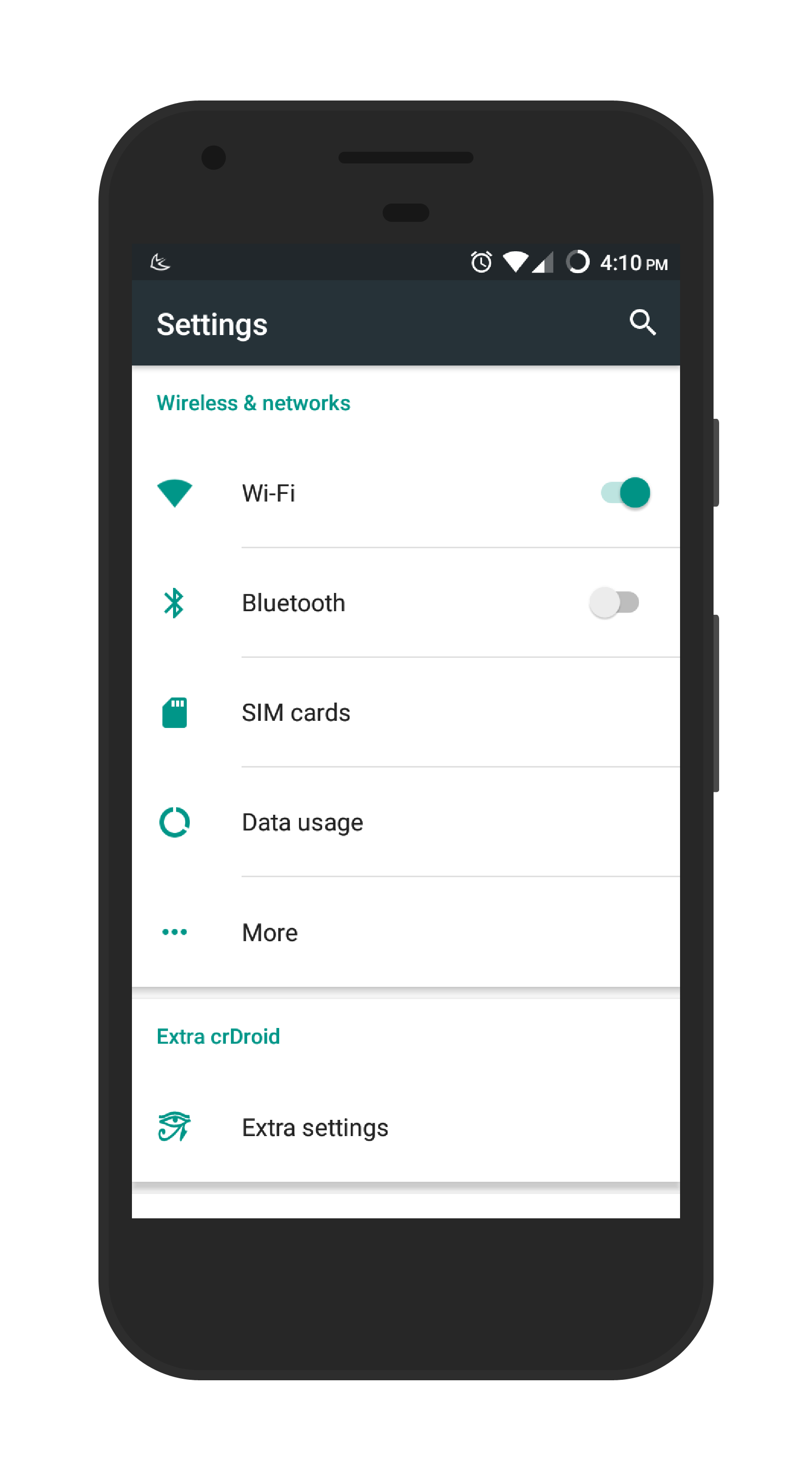
Step 1: Go to settings.
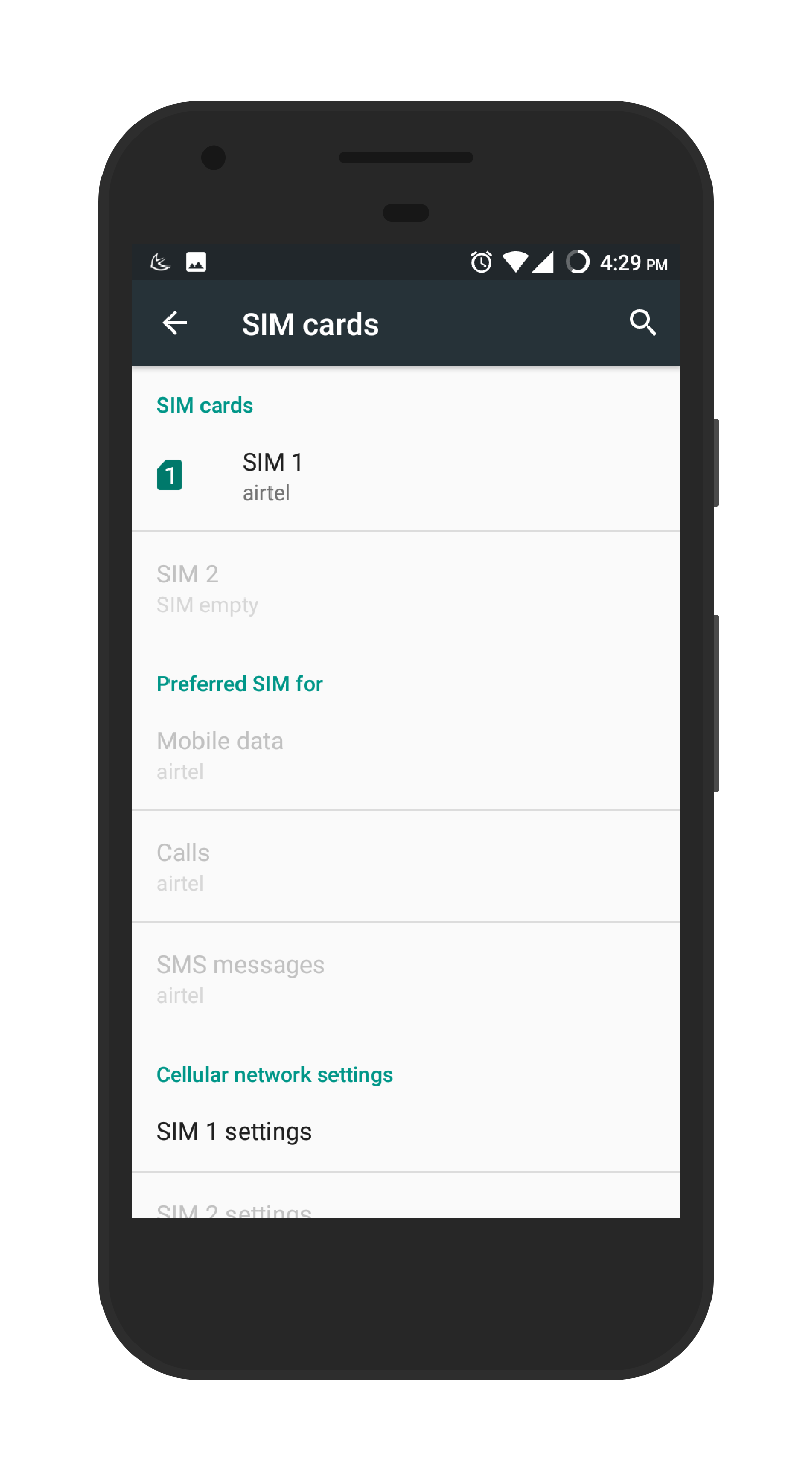
Step 2: Go to Wireless and networks or SIM Cards.
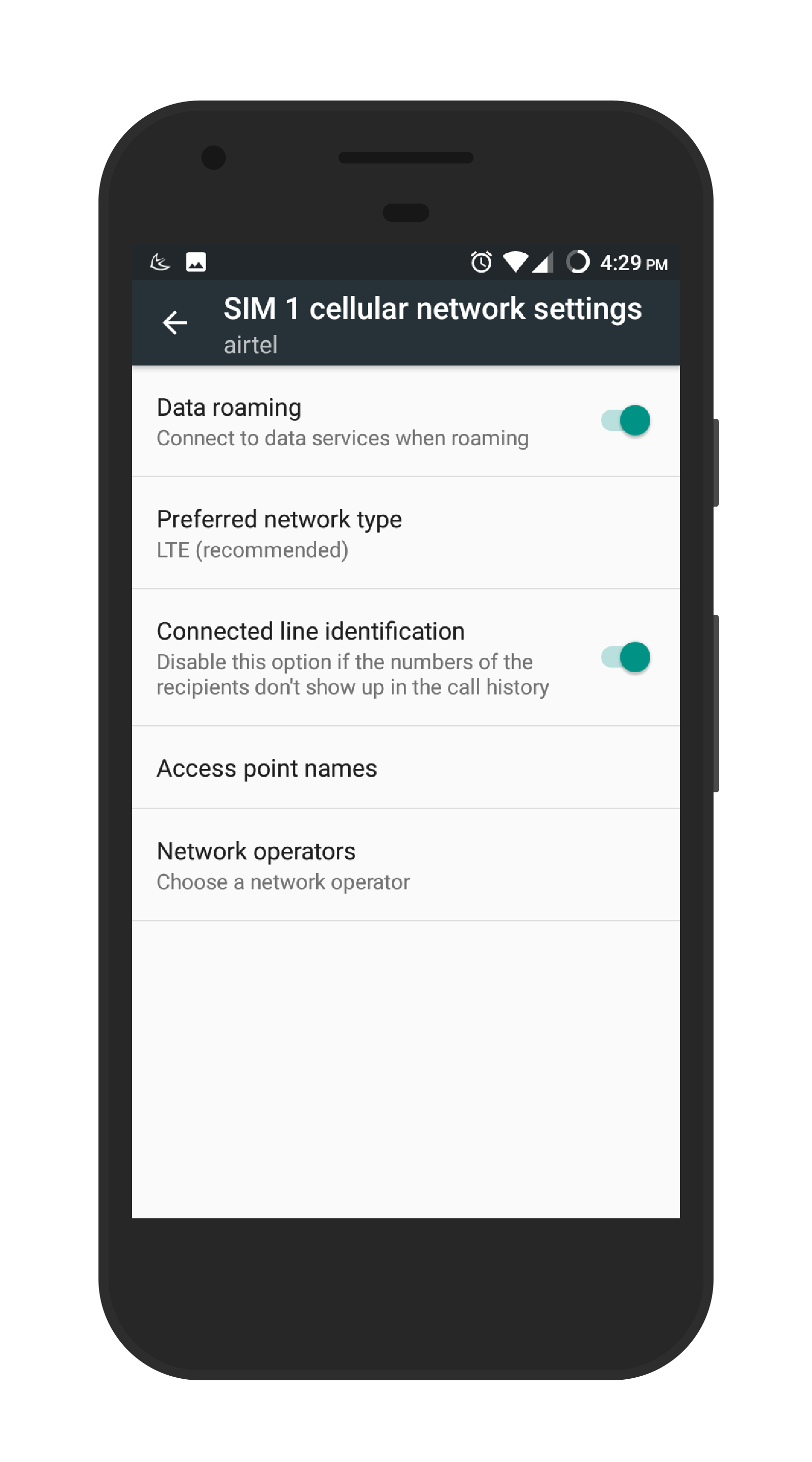
Step 3: Select your preferred SIM, if you have a dual SIM phone.
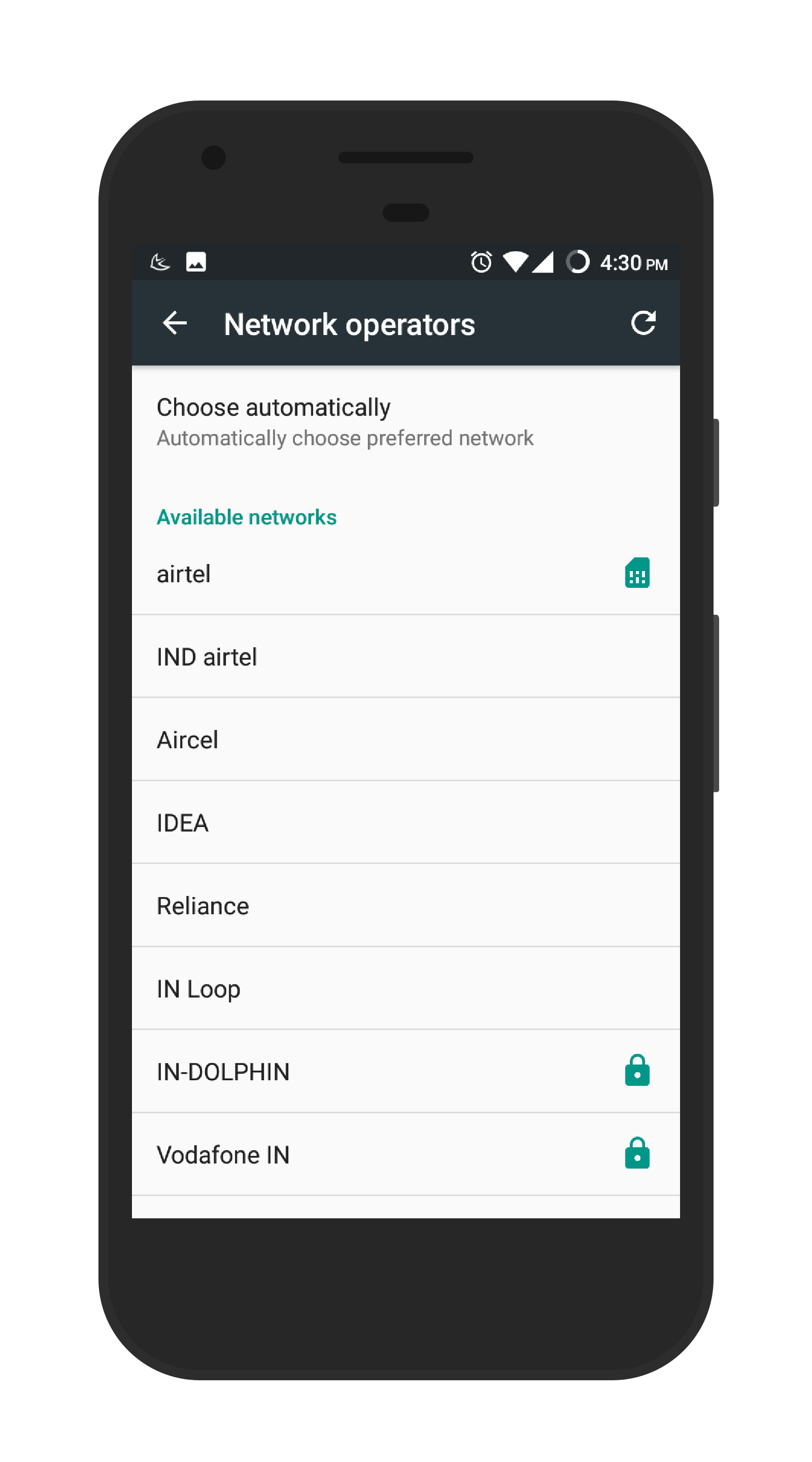
Step 4: Go to Networks operators.
Step 5: After the search ends. Select your network Operator manually (Such as AT & T, Verizon, Vodafone).
Step 6: In Preferred network type select 3G or 2G. In case you were on different network. That’s it.
In our research, we found out that these solutions are working very fine. Follow these steps carefully and you’re good to go.
Well, we hope you liked hanging out with us and if you have any query feel free to drop your suggestions and views in the comment section below, we’ll love to answer them. Till then, that’s all for this guys and stay tuned for next update.
The Chinese manufacturer Gionee recently launched its latest Selfie phone in India, the Gionee A1. The main feature which is highlighted in the device’s is it’s Selfie camera, a bigger battery and a trendy look. The device is going to be available in three color Grey/Gold/Black with full metal body design. The pre-booking for A1 starts will start from march 31st on Amazon at the price of Rs. 19,999. The best part is that customers will be getting two-year of warranty along with a JBL headphone or a Swiss military Bluetooth speaker.
To get higher level of connection with consumers gionee is going to celebrate its first flagship of the year with their end consumer. The company is going to unveil the phone in ‘YouTube Fanfest 2017’ with Gionee’s new brand ambassador Alia Bhatt, along with the campaign #Selfiestan, which is just so cool.
The device is rocking at 2.0 Ghz MediaTek Helio P10 Octa Core processor, which is backed by a Mali T860 MP2 700MHz GPU. It features 4GB of RAM and 64GB of internal storage, which can be expandable via microSD card up to 256 GB.
The Gionee A1 has a beautiful crispy display of 5.5inch full HD (1920 x 1080 pixels) 401Ppi LCD screen, packing with a 2.5D curved glass. The device is powered by Android 7.0 Marshmallow with Gionee’s Amigo 4.0 UI on top of it.
The device features a 13-megapixel rear camera with dual tone flash and an impressive f/2.0 aperture. The most astonishing thing about the phone is the Selfie camera which is a 16-megapixel shooter, along with a customized selfie flash and features like beauty settings (loved this feature). There has a fingerprint sensor on the front of the device, which can unlock the device in less than a second, i would say same as we get in oneplus 3T. The device is also action packed with a 4010mAh battery which gives a long-lasting performance.
That’s all for this guys, stay tuned for more update and don’t forget to subscribe the website and our YouTube channel.
The Chinese brand Oppo is back with another Selfie smartphone, the OPPO F3 Plus. The device is a selfie phone, featuring with a dual front camera. The F3 Plus will go on sale from 1st April 2017, online stores such as Flipkart and Amazon and Snapdeal. The device will also be available in offline stores. The pre-order of the device will end on 31st March 2017.
As for the device, it is powered by a 1.95 GHz Qualcomm Snapdragon 653 MSM8976 Pro Octa-core processor, which is backed by a Qualcomm Adreno 510 GPU. The device is packed with a 4GB of RAM and has an internal storage of 64GB, which is also expandable via micro-SD card up to 256GB.
The device features a high-resolution crispy display, with a 6.0-inch Full HD screen and a resolution of (1920 x 1080) with 367 ppi of pixel density. The screen is protected via a 2.5D curved glass and a added Corning GORILLA 5 on it. The OPPO F3 Pro is also packed with 4000maH battery which is no doubt is going to last long. The device is equipped with a fingerprint sensor in the front.
The device features a 16-Megapixel High-speed camera, with an awesome f/1.7 aperture. The front camera is the most intruding feature, it features one 16-megapixel lens and one 8-megapixel lens. The cameras are integrated with a Son IMX398 Exmor Rs sensor, with a CMOS and Digital image stabilisation inbuilt. The best part is that one camera is for normal selfie and other camera in the front is a groufie camera for taking group photos using that 120-degree wide angle lens. Here we don’t get front flash only on-screen flash is there.
The device comes with an Android 6.0.1 marshmallow with their own UI on top of it. In the connectivity section, we have 4G LTE, a dual sim standby, WiFi 802.11 a/b/g/n 2.4GHz/5GHz, Bluetooth 4.1, Built in GPS and Sensors such as G-Sensor, Glonass, P-Sensor, L-Sensor, Accelerometer, Compass, Gyroscope.
So, That’s all for this guys, please subscribe the website for more update.
Hi Guys, are you struggling while making good website for your business. Have you tried doing coding for months to make a good looking website but still finding that something is missing in it?
If you are not a programmer or a website designer and still want to start your own business online, then this article is for you…
By using the mentioned method you won’t be requiring any technical skills. You don’t even need to hire someone to do so. You can yourself build a professional looking website in just few clicks.
Yes! It is TRUE, I am not joking. You can try it by your own mean.
The ultimate solution for these types of problems, we have WIX.com. This one site is going to solve every problem which is regarding to build online professional website in just few clicks. Now, you might be thinking that it will be same as we see in WordPress.com or blogspot.com but in actual not. Believe me! Wix.com has taken website creation to another level. You can now create any kind of website in just few simple clicks.
You can build your own Blog, portfolio website, Event Websites and that’s not it, you can even create your own E-commerce business website in just few minutes. They are also providing there WIX ADI service which is a kind of their own Artificial intelligence technology which will automatically help you to create your website in more unique and user friendly manner. Doesn’t that sound interesting?
Now, the next question that arises is, it might be very expensive or you might need to pay additional for server to host such website. But the simple answer is NO! In any scenario there is no need for spending a big amount on separate hosting. Once you get registered with WIX.com your website is going to be hosted on WIX own Server only. Their own service is reliable as well as fast. Using WIX the most important of creating website which is getting hosting is FREE! Yes it is free.
So, to start with it you just need to do a free signup and start creating your own website online. WIX is only going to charges you if you want to use some kind of additional features. We are going to talk about all additional features later in article.
After reading all of the above content, you might have a proper idea about what WIX is and what you can do with it.
So, let’s come straight to the main topic – what is the best way to build a website using WIX?
Steps to Make WIX free Website
First, go to WIX.com and signup with your email id or you can even sign up using your social media accounts in just single click.
Once you get login, it will ask you about your website and want exactly you want to create. Here you have to select what you actually want as per your requirement. As shown in the screenshot:
Once you are done with it, you will get 2 more options i.e. “Create Your Website with WIX ADI” or “Create Your Website with WIX Editor”. Now, the choice is yours that how you want to work with it. Personal recommendation will be using WIX ADI as it will help beginners to work easily. WIX Artificial Design Intelligence is used to help you to create your website with more unique and user friendly system. It will start designing your website by learning about you and what you want, just by asking few questions.
The first question which is going to be asked by WIX ADI is “What kind of business do you want to create a website for?” You can search for the most relevant category in their database. In my case, I have selected “News Blogger”.Now, another question will appear, asking you about what all features you want in your website. You can check the screenshot which shows “Sell Online” and “Get Subscribers”. You can select as per your choice.
At last you need to enter your Website or Blog Name.
To get more personalized and professional feel, I would suggest you to fill out maximum fields, which will give you better connections from your visitors. You can even upload your Company Logo if it is a business website or you can add your own pic to increase the connectivity by your audience.
You are almost done and your professional looking website in just a few minutes away.
You can choose the best looking style that you want for your website and within few second it will be developed in your cup of taste.
You can even view the live demo of your professional looking website. If you want more adjustments to do you can do it from here. You get all drag and drop functionality which makes it super easy to use. No coding is required for any kind of adjustments, WIX will do for you automatically within a second.
Now coming to the part of publishing the website live on the internet. So, for that just click on the publish button on the top-right side and you are all done. You now finally have a professional looking website with no coding skills.
If you have created a blog, you will get a completely optimized UI for posting your content on your website. You can write a post, Schedule your post as well as manage your post categories and tags in this clean interface.
As you have registered for free you will get some limitation for using WIX own domain extension, but you can always edit and connect it to your own customized domain.
You can even use WIX shopping features that will also work on a blog. It gives a simple and easy interface for adding and managing different products catalog with their payment integration. You can even add Payment methods like Online Payment via PayPal and Offline Payment via Cash.
If you want to add some more features to the blog, just like opening up your own Forum or want to E-mail your customers etc. you can use WIX Apps which provide extra functionalities to your website
Now the question arising that if all these features are available for free then what extra benefits can a Premium Plan Users will get? Don’t Worry! WIX has, even more, to give in a single package. All WIX plan is very affordable when we compare the same with other available alternatives where we need to code or hire a person to code.
So, as per my views, if you want to start for the FREE plan to test and design your website just go for it. Once you are comfortable with all other stuff you can always opt a premium plan that fits you best. Hope this articles suits you and you like it. WIX is a new technology which helps anyone to focus on their content or business on online platform by making a website. If you like this article make sure to subscribe to our website for more posts like this. Thank you 🙂
We have already seen Zenfone 3 line up, where they have diversified their brand from budget segment to premium segment. We have already reviewed other Zenfone 3 line up like Zenfone 3, Zenfone 3 Max, and even the latest one Zenfone 3s Max. Finally today we are having Zenfone 3 Ultra, the device with 6.8″ Display. So, due to screen size you might have imagined that this device is more towards battery and display centric.
Initially when i start using the phone, it was really hard for me to get my full hands on that big screen size but after few days i get used to it and starting loving it as my daily driver. I can write on it using bluetooth keyboard, watching movies in Jio Cinema is awesome. This is not enough playing Batman Game is insane.
The Device comes in well built navy blue color box. Opening it from the top first we get the phone and nothing else. To get other accessories we need to slide down the box and there we all the accessories.
Accessories which comes within the box are:
Fast Charger
High Quality Type C cable
User Manuals
High Quality Premium In-Ear Earphones
Design & Built
Asus Zenfone 3 Ultra is available in three colours Glacier Silver, Titanium Gray & Rose Gold. When first i picked up the device in the hand it feels quite good and well built. I have never complained about the built in Zenfone 3 series, the only issue was the price. This time also in Zenfone 3 ultra we get great built with chrome at all sides, which elegantly increase the looks of the phone. Asus Zenfone 3 Ultra comes with the basic design form of Bar shape. The only issue i found was the device cannot be handled single handedly. But as it is under phablet category i would say best built till now.
Starting with the front part of the phone at the top we get a 8 Megapixel Shooter and beside that you get different sensors and a LED notification Light.
Coming little bit down you get a 6.8″ FHD display and i would say is one of the best display i have ever used (may be it is due to larger display).
Below that houses a back capacitive keys which do not light up (BUT WHY SO?). There you also get a Home button in which you also get a fingerprint sensor.
Coming to the down portion of the phone you will get a USB Type C port, which do support fast charging beside it you will get primary MIC and dual Speaker grills and the surprising thing is that both the speakers works and give quite loud stereo sound, rather i love the sound output from the phone.
Turning around to the top side you will get the 3.5mm audio jack and beside it houses a secondary noise cancellation MIC and nothing much over there.
On the right side of the phone, you get separate SIM trays. The top SIM tray can be used by inserting a nano SIM while the second SIM tray can take either a nano SIM or a microSD card slot that too upto 256GB.
Turning to the left side there is nothing, just a plane side.
Now finally coming to the back panel of the phone you will get a 23 megapixel camera which the support of laser autofocus and dual tone LED flash. Below that you will get Volume rockers because with this big screen it the best place to handle these volume rockers with ease. Below that there is just branding and nothing much to see.
Display
Asus Zenfone 3 Ultra comes up with a 6.8 inch FHD with a resolution of 1920 x 1080 and pixel density of 324 ppi. The colors are quite vibrant and towards the more natural side. White balance feels perfect and makes it a pleasant display to use. There are different color profiles that you can choose as per your comfortability which we see in other Asus devices as well.
The Sunlight legibility of Zenfone 3 ultra is quite good, and auto-brightness makes it work perfectly, so no complaints regarding the display rather i would say this is the best display i have ever worked on just because of its larger display part. Watching movies is insanely awesome and take my word if you want to play games like batman you will nailed it because of HD display. Viewing Angle are good and odd angle won’t affect you in any way. Overall i love it.
Performance
1 of 3
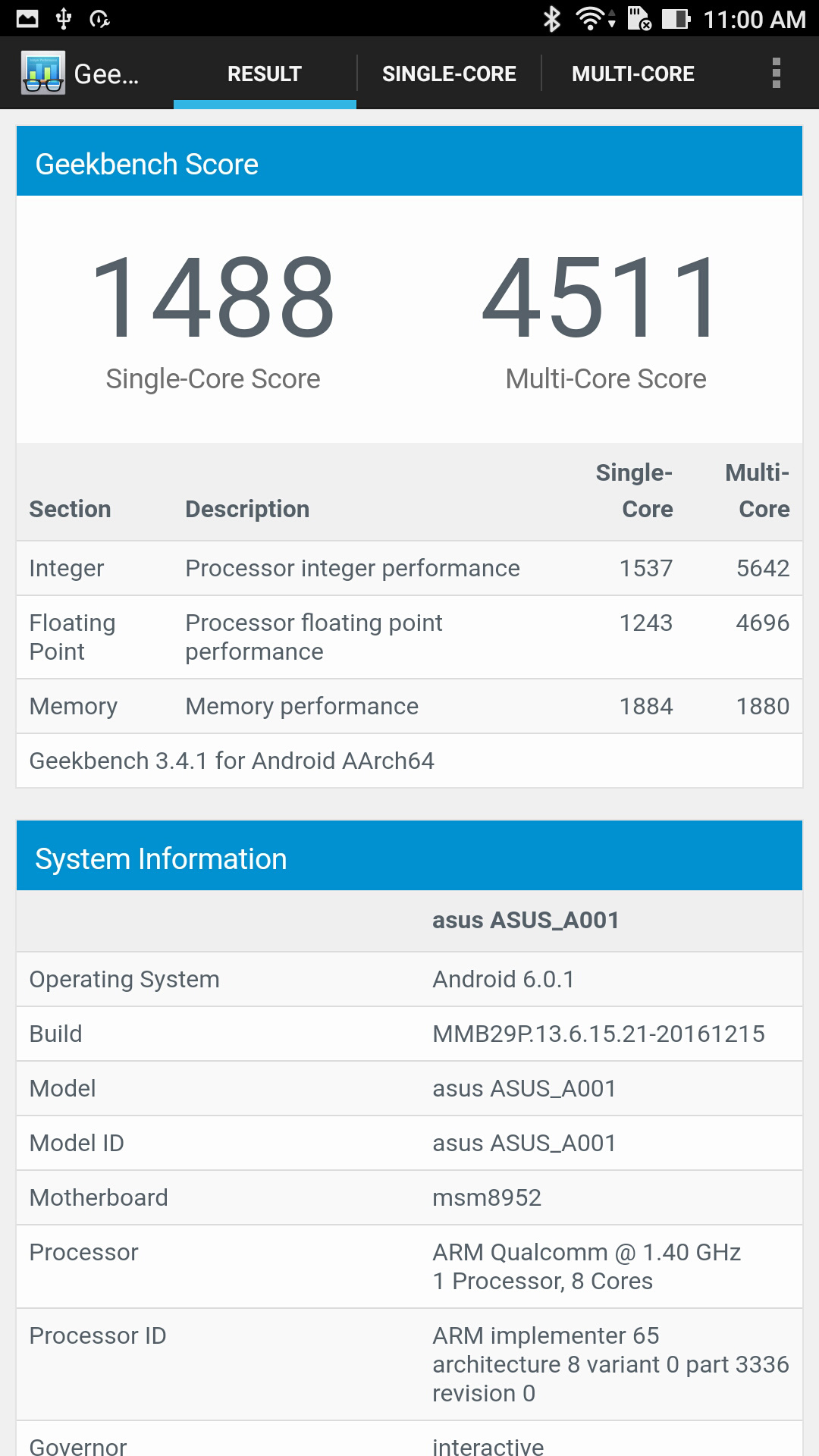
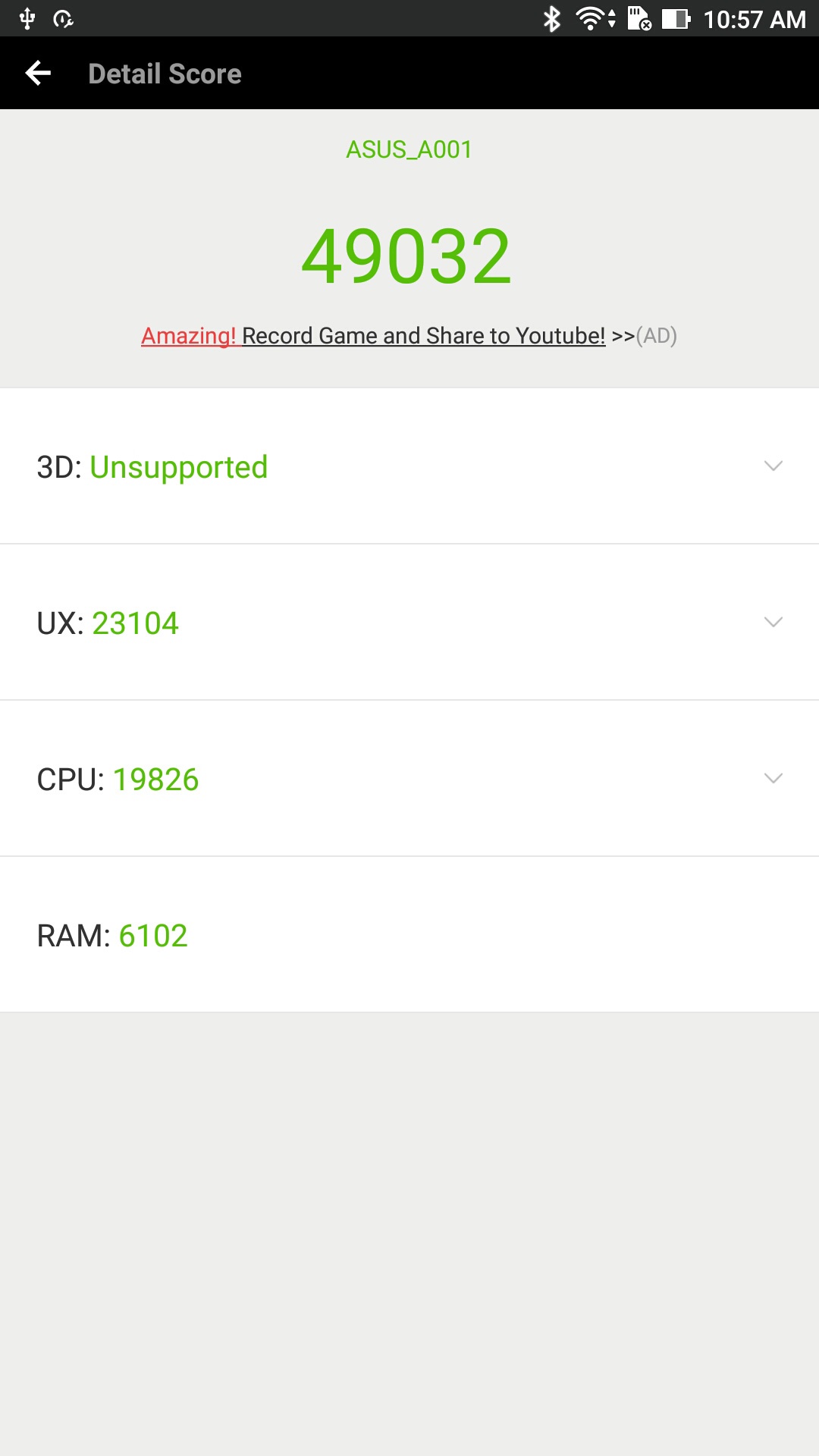
Asus Zenfone 3 Ultra is powered by the Snapdragon 652 processor which 3/4GB Ram it depends which variants you are buying. The price in which the phone is being offered i would say processor is quite old rest when we practically see the performance no issue is with it. EVen after Snapdragon 625 the performance of the phone is quite well, and you can almost run any kind of High-end games or multi-task on it with no lag and sluggishness.
While playing some high-end games like Batman, GTA San Andreas, Bully I won’t find any lag or sometimes in Asphalt 8 i get some minors drops rest every game is working fine. While playing games for more than 30 minutes it get little bit warm but won’t heats up. The max temperature which I noted was 38 degree, which is quite cool for the gamers out there.
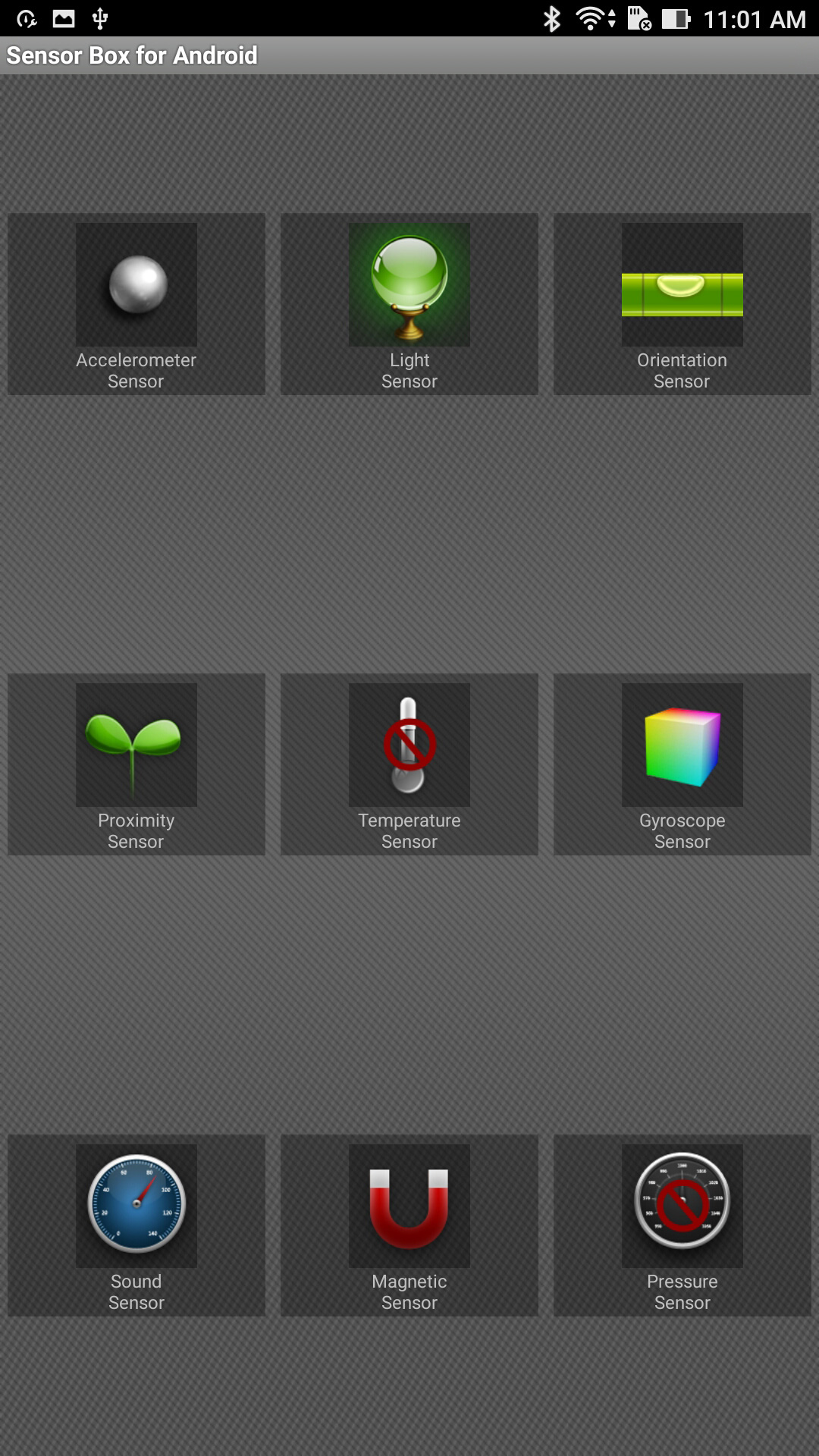
Honor 6X has almost all sensor which a consumer can demand like Gyroscope and many other, which means you can use VR on Asus Zenfone 3 ultra, but using VR with this big device won’t be a practical point.
Camera
On Asus Zenfone 3 ultra we get 23 megapixel camera which is supported with a laser autofocus and dual tone LED flash. The device capture decent images but need more work on software part. When using default app the images captured with the phone get some noise into it but using a third party app removed all the noise from the images and images came out to be much better. Overall this is not a more towards camera centric phone but it captures decent image quality rest you can check our camera samples for better idea.
On front side it will give you 8 Megapixel camera which also captures decent images, but when we compare it with other selfie centric phone that too in very low budget it is not upto the mark. Still we can say this is not a camera centric phone it is more towards screen, audio and built centric phone.
Camera Samples
1 of 4
Software
Asus Zenfone 3 Ultra is loaded with Android Marshmallow 6.0 with a skin of ZenUI 3.0. The device has already received the update for Android 7.0 a few days back. The software of Zenfone 3 ultra is quite well optimized, in terms of battery but too much bloatware is loaded int it. The good thing is that we can remove the bloatware from the phone very easily. lag free interface. The UI of Honor devices is inspired from iPhone and works perfectly well. Asus has also packed with a ‘Mobile Manager” in their ZenUI which gives you more info. on how much data you have used, power saving modes, notifications and privacy. It also comes with a One Hand Mode for some of the people who find it really very difficult to use the 6.8-inch screen phone. Still it is not meant for one-handed use in any scenario.
One thing i forget to mention over here is that, you will get 100GB storage free google drive storage with the device for one year as a promotion by Asus while botting the device for the first time.
Battery
As the device is so large with its screen size it is necessary to add up a larger battery. So, over here we are getting 4600 mAh battery which will just blow away your mind with the added features of battery modes. The battery gives some intense backup. In the battery modes we get different modes like Performance mode, Normal mode, Power saving mode and Super saving mode we can also customize the modes as per our usage and benefits.
While testing the device the, the phone get charge from 0% to 100% in 1 hours 45 minutes, that too is very great because charging that intense battery if 4600mAh will obviously take time with that fast charging feature also. Rest no complaints against battery part of asus zenfone 3 ultra.
Verdict
So, the final verdict as per my views will be the device is good for its built, display and only focuses more on display part. If you want a large screen device to enjoy gaming, reading, movies with decent performance than this device is for you. Asus ZenFone 3 Ultra is priced at Rs 49,999. Everything is fine only the part which is not at all good is the pricing. WHY SUCH PRICING?.
The battery life performance is good, there are no noticeable flaws in performance. In fact, you the display size love will increase day by day when you will start playing games and watching movies on zenfone 3 Ultra.
Pros
Massive screen with great quality
Good battery backup
Good sound quality both with speakers and even with headphones