Home Blog Page 334

How to Organize Style Sheets in Ruby on Rails Projects

Although the asset pipeline in Ruby on Rails is a powerful feature, it can be pretty perplexing. Rails’ scaffold automatically generates a style sheet for each controller. As a result, your styles are organized according to the domain model of your application. You will not find it very convenient if you create a modular codebase and reusable components. In this case, a standard CSS architecture will be the most appropriate option since you’ll be able to create, change, and reuse the elements.

Before placing the assets in the public/assets folder, the asset pipeline pre-compiles, concatenates and minifies them. Sprockets and Tilt are two technologies that power the asset pipeline.

How to Organize Style Sheets in Ruby on Rails Projects

Tilt is a template engine used by Sprockets. It supports the file types such as saas, erb,
coffee, etc. which can be used in the Asset Pipeline.

The main function of Sprockets is to package the assets, that is, to gather the assets from all the specified paths, compile them, and place them in the public/assets folder.
Here emerges the question as to the principle and algorithm of files concatenation. The answer lies in a manifest file – the core of the asset pipeline. Based on the received directives, it marks the files to be included and defines the order in which they will be organized. The number of manifest files can be different and depends on your own needs and preferences. It’s up to you to choose one per layout or one per page.

CSS Preprocessing

Any CSS preprocessor (LESS, SASS or Sylus) can be easily used with the asset pipeline. As to us, we prefer SASS for two reasons: it comes with a Rails app by default and it’s simply great.
All CSS preprocessors allow you to use features, variables, mixins, and other useful stuff shared through all modules and files. However, before you can use them, SASS source code should be combined and then compiled to CSS.

The main challenge here is connected with Sprockets //=require syntax used to identify the files that should be combined. Firstly, Sprockets compiles your SASS source code as separate style sheets. After that, it combines the resulting CSS into a single file. There will be an exception if you try to use any mixin unless you have imported your mixins.sass at the top of each file. Using the @import syntax, you instruct the SASS compiler to combine the SASS source code first, and only then perform the compilation.

File organization

Although the majority of Rails projects feature several layouts with different styles, yet they share a common codebase. Here are some tips on how to organize your asset files and directories to make them easily extendable, flexible, and well-structured.

Base styles. All fixed base styles (reset, grids, spaces, and helpers) are placed in the base folder. They can be added to any manifest.

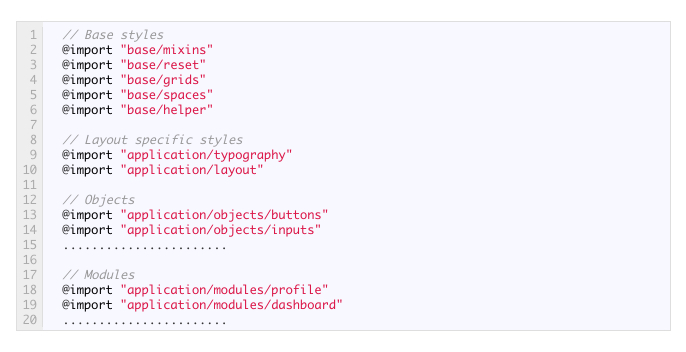
Manifest files per layout. If the layouts have different styles, you should create one manifest file for each layout. “Manifest” means not Sprockets manifest, but .sass file with all @imports of necessary files (variables, mixins, objects and modules).
CSS PreprocessingFolder for each manifest file. One folder should be allotted for each manifest file. It should have the same name: application folder for application.sass file as a default layout. The folder will contain layout styles, typography, all objects and modules used in this layout.
Every manifest folder can contain responsive styles in a responsive folder. You can also divide your interface into objects and modules and put them inside the appropriate folder. This will keep your styles independent and modular. If you need to reuse some styles from a different manifest folder, move them to a shared folder that is located on the same level as manifest itself.

It is highly important to organize the assets properly from the start; otherwise, you take the risk of getting lost in your style sheets after the first month of development. Following the conventions, you’ll prevent mixing styles of different layouts and divide your styles into smaller reusable parts. Ultimately, everything will be located in the right place.

Labeley – Free Online Label Maker

Venturing into a new business and making sure it runs smoothly represents a significant challenge, especially when working on a tight budget. You want to give your customers and clients the best possible service or product, yet you still want to make some profit. That is why it takes more than just being creative and having plenty of ideas to be an entrepreneur. You have to be a visionary, definitely a risk-taker and constantly out and about: in search of new trends, new ways, and resources to improve your business and get the most out of it.

Of course, in the highly competitive global market, where many small businesses make or break overnight, most things don’t come for free. However, every now and then, you can stumble upon a free resource that can help you out a step or two on your road to success.

Once they have a product ready, most businesses need some type of branding or labelling. Hiring a designer to make a company’s logo and design product labels is the usual scenario in this case and always comes with a price. However, with Labeley.com, which is a completely free online label maker, you have a chance to design and control your label making process every step of the way, and all for free.

The tool allows you to choose between different predesigned shapes, graphics, borders and many other design options that help you come up with a completely unique and attractive-looking label. Or, you can skip this step completely and go straight to the professional printing option, in case you already have a prepared design and you’re in need of quality printing.

Here is how it works:

  1. Visit Labeley.com and click on the Start Designing button.labeley 1
  1. Now, choose between different label categories depending your business’s needs.labeley 2
  1. This is where your creativity can be unleashed. Start by choosing your label’s shape so you can move on and play with different Backgrounds, Borders, Graphics and Text. If you are a registered user, you can also access your previous label designs anytime by clicking on the My Designs button or you can Upload any photo from your computer to fully personalize your label.labeley 3
  1. Once your new label is ready, you can save it for later or proceed to checkout if you need professionally printed labels. If you decide to do that, a new window will pop up offering various material types and other specifications needed to complete your order.labeley 4

Labeley’s simplicity and accessibility can come in handy even in situations when you’re not dealing with physical products, but rather a service such as an event planning, party organizing or even household management. With this tool, creating a label of your own choice and branding a product, event or personal item becomes a fun and enjoyable experience.

What is GPU? Why do you need it in your Smartphone?

GPU stands for graphic processor unit. A GPU in the smartphone is the only responsible unit for that clean and crispy images that you are seeing or the big FPS game you are playing. Now, these days GPU’s are playing major role in smartphone manufacturing, possibly because lots of smartphone these days are Ultra HD, Full HD or HD. Most of the consumer, even the tech personals do not talk about it that much, as much as they discuss about the Processor or the Camera configuration or maybe the build quality. My only point here is that GPU’s have always been to the side line. I mean, we have always bragged about or Computer’s graphic grad. So, why not the Smartphone GPU? This little fella may feel left alone, I’m just saying.

The GPU (Graphics Processing Unit) is a specialized circuit designed to accelerate the image output in a frame buffer intended for output to a display. GPUs are very efficient at manipulating computer graphics and are generally more effective than general-purpose CPUs for algorithms where processing of large blocks of data is done in parallel.

You may also Like :

GPU features include :-

  • 2-D or 3-D graphics
  • Digital output to flat panel display monitors
  • Texture mapping
  • Application support for high-intensity graphics software such as AutoCAD
  • Rendering polygons
  • Support for YUV color space
  • Hardware overlays
  • MPEG decoding

These features are designed to lessen the work of the CPU and produce faster video and graphics. Thus, GPUs became more popular in the modern smartphone age as the demand for graphic applications increased. Increasing Display resolution, different launcher animations, App animations, Video performance, gaming, to be honest a single CPU cannot handle this much of processing, however If we talk in theoretically then in some phase it will, but the higher CPU processing will obviously slow application performance, so a dedicate video processor is a spectacular solution. Eventually, GPU became not just an enhancement but a necessity for optimum performance of a Smartphone. Specialized logic chips now allow fast graphic and video implementations.

Top 10 GPU of today’s smartphone

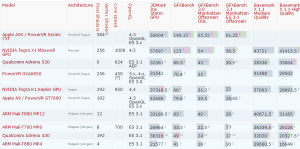
Smartphone GPU Comparison

From thee results it seems like the apple A9X/PowerVR Series 7XT is the most power full GP of all, 384 Cuda cores and the GFX benchmark 140, its clearly a win, win. So, even in a GPU things matter like pixel shaders, Vertex Shaders, Core speed, Architecture and etc. and combined together they give a spectacular graphics and immaculate visual experience. Well, now you know.

10 Benefits of Having a Big Screen Phone

0

Over the years Chinese smartphone manufacturers are transforming the mobile landscape in India with affordable yet value for money devices.Players such as Coolpad, Oppo, Vivo, Lenovo and Xiaomi and front runners in this space. Earlier users want to buy small and handy phones which were just used for calling and messaging purpose.

But certainly, the trend seems to be changing as of now user what the whole access on their mobile phone because of more potable, as compared to a personal computer. They get easy to access their emails, bank details, and many other things directly on their phones in just one click. There is no need to turn on their computers for just checking their Emails.

These days almost all daily tasks can be performed on a mobile device, but wait here is a twist, previously we were having a huge computer screen where we get proper control on all the tools. Now if we access all those important things on our small screen phones which give lesser area to view and click, just one wrong click can delete your most important data.

So it is important to get a big screen phone if you are doing some important and precious work in daily use. A Bigger screen will ultimately enrich your user experience and way of doing work in a proper and errorless manner.

So, here are some of the benefits of having a Big Screen Phones:

Typing is much faster:

Are you a writer or love to chat a lot using different messaging apps then you are the one who need a Big screen device because it will ultimately help you to get more speed while typing as well as you will get almost no typing error which you get on small screen devices.

Easy Reading e-Books:

Are you a book reader and love to read E-books on your phones, then you need a switch from small screen phone to a large screen phone because it will help you in getting better reading experience and no strain on your eyes as well.

Better Gaming Experience:

Are you a gamer and love to play a whole lot of games on your phone, then for better gaming experience you need to switch to big screen devices as it will help you to get better access to on-screen keys as well as you will able to get better graphics and color on big screen devices compared to the smaller screen phones.

Documentation on finger tips:

Want to do most of the office work ON THE GO, then using small screen phone can punish you while using excel, word, and their other functions. To get the best usage out of it, maximum screen area is being needed which can only be possible by having a Large screen device.

Watching Movies:

Love watching movies on your phone, then again you need a large screen device to get better color, better details, and better clarity. Eg, we always love to watch movies in the theater, same as like watching the movie on small phones or on large screen phones.

Video chatting Experience:

If you have any loved once who live abroad or away from you and want to do video chat for long basis, then for better views and screen experience again large screen device will be your first preference.

Taking pictures:

Taking a picture using your small screen phones won’t give you whole access to all the controls easily because everything gets messed in that small panel but getting a larger screen phone give to more access and clarity of what you are clicking on more functions on the same screen.

Browsing the web:

Getting a large screen device gives to a better experience in browsing, as you get more screen area and large font to read the text. You can even add two tabs at a single time on a single screen by dividing the screen into two parts.

Bigger Battery:

Bigger device means big battery.  Getting the larger battery and get you more movie time, gaming time and obviously standby and talk time. This is because with a larger phone we get more space for the battery.

 Multi-tasking become easier:

Larger screen means getting more area where more things at the same time can be done like we do on our Laptops and Pc’s. We can do multitasking easily like watching YouTube + chatting. Playing a game as well as chatting with friends on the same screen by doing multitasking and opening different panels on the same screen.

Verdict

So these are some of the benefits which need to be taken care before buying any of the devices these days. The trend is again changing towards large screen phones because nowadays almost all our work we can do on our fingertips by using our smartphones. Then why to use small screen devices and make the typing mistake and other small mistakes when we can remove all those mistakes by just changing our phone with a large screen. For example, Coolpad a well-known Mobile brand launched various smartphones with 5.5-inch screen sizes such as Coolpad Note 3,Coolpad Note 3 Plus and CoolPad Max. And Customers are loving the Big Screen Phones in their daily usage. Now they can do almost all the regular working on their smartphone.

10 Benefits of Having a Big Screen Phone 1

Oppo F1s launched at Rs. 17990 with the latest Selfie Expert

Selfie Expert OPPO F1sThe global smartphone brand OPPO, stepped up the selfie revolution today by adding up new ‘Selfie Expert’ phone the OPPO F1s. It is a advanced version of the Selfie Expert F1. The F1s is taking selfies to another step with a 16 MP front camera, with a sophisticated beautification mode. The F1s comes up with a 5.5-inch HD screen, with an Octa-core  Helio P10 processor. It is packed up with 3 GB RAM, 32 GB ROM, and a 3075mAh battery. It will be available with a price of Rs. 17,990 & right now is on Pre-order.

A Perfect Selfie Experience

The OPPO F1s uses a 16 MP front camera, providing HDR and minimizing noise, which makes up pictures come out with a vivid depth and detail.

The F1s is your personalized selfie expert with the latest beautification feature.Another innovative feature which they add up is Selfie Panorama feature, which make taking group selfi easy. OPPO finally added the in-built feature Screen Flash Function. We Can also touch to focus while taking selfi which is just great as in some other devices there is no such feature present.

Faster User Experience

The F1s front-facing fingerprint recognition recognize’s a fingerprint in only 0.22 seconds. You can also assign up to five different fingerprints to different apps and contacts,which is again a new innovation. With one touch of the home button, you can launch an app or start a phone call to a pre-assigned contact directly.

The F1s is backed up with powerful hardware with Helio P10 Octa-core processor, 3GB RAM and 32GB ROM. The triple-slot card tray gives space for two Nano 4G SIM cards and an SD card to expand the storage space by up to 128 GB.

Long Battery Endurance for full day use

oppo f1s battery

The battery is large enough to last you whole day easily as it comes up with 3075 mAh battery. The device comes up with ColorOS 3.0’s with some of the power-saving optimizations.

Coming to the looks, as always oppo looks great and feel great in built and design no compromise is over there.

The company will begin the first sale of the F1s from 11th-13th August in numerous stores across Delhi, Mumbai, Bangalore, Kolkata, Trivandrum, Bhopal, Ludhiana, Gurgaon, Vijaywada, Hyderabad, Ghaziabad and Ahmedabad. Consumers can also buy the products online on Amazon.in starting 11th August.

IbidInfo OST to PST Converter – Export OST Files to PST Format in Precise Manner

In this article, I will attempt to determine the issue of Outlook clients who are working with MS Exchange server. At the point when clients are synchronizing with Exchange, then of course an OST documents is made in your computer. Infrequently, OST document gets to be collapse due to corruption or client needs to change over all OST record email information into Outlook PST record. IbidInfo OST to PST Converter is the ideal answer for solve this inaccuracy.

IbidInfo Data Recovery has been contributing a considerable measure to give assistance to all MS Outlook clients with regards to information misfortune. One more enhancement incorporates IbidInfo OST to PST Converter that gives help when the Exchange Server doesn’t permit open the messages and other information of OST file.

Foremost it’s essential to clarify the OST documents which are the Outlook information record made by the application when you connected to Exchange Server or you have an Outlook account associated with Exchange Server. OST documents are Offline folder records empowering you to work with the client notwithstanding when the Server is stop working, crashed and corrupted. The documents contain the whole Outlook information and sync with Exchange server when it gets to be accessible once more. The information that OST contains incorporates contacts, messages, notes, diaries, calendar entries, appointments, journals, drafts and so on. With the synchronization, you are given the most breakthrough information.

OSt to PST converter - techniblogic

Notwithstanding, when Exchange confronts any issues including corruption or server crash, you lose access to the information and search for the arrangement that could reestablish your information. It is uplifting news that you can get to the information from OST record accumulate on your PC. Be that as it may, a critical point to note is that you can’t get an immediate access to the record; rather it requires getting changed over to PST document. The IbidInfo OST to PST Conversion plays out this change and permits you to gather the information. The following is a numerous components the product offers:

1. Effectively recuperates messages, attachments, notes, drafts, journals, appointments, contacts and other Outlook information by converting OST document into an identical PST.
2. Clients can see messages in 3-view position.
3. Re-establishes formatting from HTML and RTF messages.
4. Tool to supports all available versions of MS Outlook 2010, 2007, 2003, 2002 and 2000

You can get the product through an online registration and it can without much of a stretch be configured by tailing some on screen prompts.

The most effective method to convert OST document to PST utilizing IbidInfo Convert OST to PST
Accomplish the underneath offered ventures to change over an OST data to PST document:
• Go through “File” menu, select ‘Open Outlook File’
• The option “Select Outlook Data File” will become visible. In the event that you know the accurate position of OST document then choose the required file which you want to convert. Hit it off on “Select” else click on “Find” option to discover the OST records that you need to change.
• Hit on “Start” option. Note that when you begin the procedure, an option named “Stop” empowers you to stop the procedure if you need.
• On fulfillment, the product will demonstrate the preview. Points of interest, for example, number of restored messages, emails with attachments, calendar entries, contacts, tasks, journals and notes are appeared at the base.
• Hit on the option “Save Recovered File” and then click “Browse” Select the area where you need to assign the changed over OST. Now hit “OK” option and then again click on “OK” option to accomplish the process.

You now have the PST document at the area you determined. Be that as it may, clearly, you require the information of the transformed document in MS Outlook, for which the resultant PST should be transported in Outlook.

WordPress is a “good guy”!

0

All we see these days is developers and business owners raving about WordPress and how great of a tool it is for everyone to use. No matter you are a professional website developer or a regular consumer who wishes to have their own website for free, WordPress is the first option that hits everyone.

Originally launched in 2003, there has not been much long since WordPress has been around even then it has become the top, most popular content management system (CMS) in the world with more than 74 million active websites posting daily. If you are a business owner looking forward to having a website or someone who is still not using WordPress, God knows why, check out these reasons why WordPress is the best and why you should start using it ASAP!

SEO Friendly

wordpress1 techniblogic

The very first concern for any developer and website owner is to make the website as SEO friendly as possible. Algorithms change quite often and it has become extremely hard, not impossible, for SEO specialists to keep up with these changes and deliver results. In order for your website to be ranked by Google it should meet a certain number of predefined parameters that render it SEO friendly. The more parameters a website fulfils the more SEO friendly it is in Google’s eyes and the better are its chances of getting ranked higher. WordPress handles all the SEO responsibilities that a content management system (CMS) should fulfil and even offers a number of different plugins to improve your website’s SEO ranking.

Extremely Easy To Use

wordpress easy to use techniblogic

WordPress at first appears quite intimidating to an untrained eye especially with most of its features available on the dashboard. However it is probably the easiest to setup, manage and update even for someone who is not an internet savvy and does not know coding at all. All you need is a computer system and an internet connection to get your website up and running. How cheaper could it get? Begin with a free plan that allows you to customize your website to a great extent and if you want you can always shift to a paid domain and enjoy your own .com website. If you have work load you can also outsource WordPress management.

Amazing For Both Blogs and Websites

It all began for blogs really in 2003. WordPress was the go-to CMS for bloggers for it’s easy to use features, amazing layout, extreme user-friendliness, availability of thousands of professional themes and the overall clean and professional look it gave to their blogs. However, it has become equally amazing and useful for websites as well. Over the years it has evolved into a content management system with complete features necessary to build and manage a website rendering it the go-to option for every type of business and developer. You can always run a blog alone over it if that is what you desire. The options are always open with WordPress.

Mobile-Ready Themes

Mobile Frinedly Themes Techniblogic

We all know how much hiring a professional website developer could cost and be a burden on your budget especially if yours is a small scale business. WordPress leverages that burden off with its thousands of professional designed and built themes ready to use for free! WordPress allows you to have a professional looking website without spending a fortune on a specialized developer. Moreover, it saves you the pain of ensuring whether the website you design will be mobile-friendly or not. If you have built it over WordPress, it sure will be.

Unlike other CMSs, WordPress provides you complete control over your website whether it is a personal or a professional one and that is the ultimate reason for anyone to choose WordPress over any other option.

Spying on iPhone is Not Difficult Anymore, but You Will Need to Keep These Things in Mind

iOS is considered to be one of the most secure and optimized mobile software out there. Every year and with every version the iOS’s efficiency and security is tweaked so that it gets more difficult to hack and jailbreak. Their iTunes service and the iCloud are no exceptions either. At one point it was nearly impossible to think a person could spy on an iPhone except maybe using the old’ 007 routine – get up close and personal with the person and then do what is referred to as social hacking. Now with commercially available monitoring apps that are able to work on iOS, spying on iPhone is not difficult anymore, things have become pretty easy – you don’t have to follow the person around all the time – you just have to install the app on their device once and then you are all set provided you have chosen a decent monitoring app. We will look at some of the things that you should look for and know about when going for a monitoring and tracking app in order to make your monitoring and spying tasks easy, efficient and as convenient as possible.

What you need to know about installation

You Will Need to Keep These Things in Mind

Unlike their black-hat counterparts that are installed remotely through the use of hacks and viruses, the commercially available monitoring app usually require physical access to the device and some ownership information if it is to be installed remotely. You didn’t think it was gonna be that easy did you? If the device is your own or you are a parent of a minor or an employer who has given company owned smart devices to their employees then you will be able to install with minimal issues. If, however, the device is not yours, then you will need some amount of social skills to get your hands on the device or get the iCloud password in case the iPhone is not jailbroken. Once the app is installed it is usually smooth sailing given that the app is an efficient and optimized one.

Size does matter

They say in a fight size and strength matters, the bigger and stronger you are the better the odds of you winning the battle. Sadly, this is not the case with spying apps – the smaller they are the better it will be for you. An app with a small size will be easier and quicker to install, which is important especially if the device is not your own.

An efficient app is a good app

Besides having a small size the monitoring app in concern should be efficient – efficient in this case would mean being able to carry out its monitoring and tracking by using the least amount device processor usage, RAM, and battery. Otherwise large and non-efficient apps not only take up notable space, they also slow down or hang the device that they are installed on as well as drain the battery. All of these factors are detrimental to the act of spying, if the app is not stealthy meaning if it gets found out then the device owner can do a factory reset and there goes the app and all your effort.

Automated monitoring for the smart person

Automated monitoring for the smart person

Spying on iPhone is not difficult anymore, but the following tools and processes will help make it even easier. As we know monitoring 24/7 is a difficult and tedious task in itself. Most apps provide alerts or watchlists that when activated with certain pre-defined criteria automate the monitoring process. For example, apps usually allow watchlists for words, contacts, and locations. Watchlists for words allows the app to match a set of listed words with those coming in on text messages through SMS, IM chats, and email; if a match is found the app user is alerted through an email with completed details including the message in which the words was used. It works the same way with contacts, every time a highlighted contact is communicated with or communicates with the device owner the app owner is notified. For the location alerts whenever the device enters, gets near or leaves a certain pre-defined area(s) the app user is notified. All of these systems and many others automate the monitoring process making life easy for the app user.

Failsafe Systems are invaluable

Good apps will also provide failsafe systems, their value can only be understood in worst-case scenarios where the device is lost or stolen. In case you are using it for yourself, you can remotely lock your device or if you fear that sensitive data might be leaked you can delete all the data from your device, ensuring that no one will see anything. The same can be used if you are monitoring someone else, if there is a chance you will get caught in some way, you can delete the data on the iPhone to protect yourself.

Although spying on iPhone is not difficult anymore, these factors and the knowledge provided in this

Gionee Marathon M6 , M6 Plus launched another battery Beast

Gionee unveiled its brand new flagship Gionee Marathon M6 /M6 plus in Beijing, these two products are housed with innovative technology including long-life battery.

Super Power 

Gionee M6

As the series states up “Marathon” M series, Gionee M6 has furthered comes up with much better and long-life battery compared to the previous one. The M6 is packed with a typical 5000mAh battery and the M6 Plus has an amazing 6020 mAh battery capacity, which you wont find in any other device.
Additionally, It offers dual charge chips that allow charging which is faster, safer and cooler. The Gionee M6 can also be used as a power bank. With a 1.2A charge current, the charging speed is 20% faster than a normal power bank.
The smart power consumption involves a power-management system developed by Gionee. Several measures such as app freezing and background cleaning through force shutdown of unnecessary apps, are there to optimize the performance under the minimum power usage.

Super Performance 

M6 come with aerospaceclass unibody aluminum

The M6 come with aerospaceclass unibody aluminum, superior-grade 2.5D glass and comfortable grip. Despite of having 5000 mAh battery, the battery thickness is only 8.2mm.
The Gionee M6 also features up 5.5-inch full HD AMOLED display, with 4GB RAM and 64GB ROM and can be expanded to upto 128 ROM. A 13 MP rear camera from Sony IMX 258 and 8 MP front camera are able to provide better images and clarity. Its having Amigo 3.2 OS based on Android 6.0.

Global Price : 

M6:
  • 128 GB- 2899 RMB
  •  64 GB- 2699 RMB
M6 Plus:
  • 128 GB- 3199 RMB
  •  64 GB- 2999 RMB

Product Specifications

  • Color Gold & Latte Gold
  • Dimensions 152.3 x 75.3 x 8.2mm
  • Weight TBD
  • CPU MT6755
  • Battery Non-removable Li-ion battery Typical capacity 5000mAh
  • SIM Dual micro SIM
  • Display  5.5-inch FHD AMOLED • 1920 x 1080 pixels, 401PPI • NTSC 100% color gamut • 30000:1 contrast ratio OS •
  • Android 6.0  Amigo 3.2
  • Memory  4GB RAM •
  • Internal 64GB ROM • Extend to 128 GB
  • Camera  Rear: Sony IMX258, 13MP, pixel size 1.12um, F2.0, 5P Lens,
  • PDAF  Front: OV8856, 8MP, pixel size 1.12um, F2.2, 4P Lens •
  • Camera mode: Face Beauty, Panorama, HDR, PicNote, Professional, Night, Smart Scan, GIF, Smart Scene, Slow Motion, Time-lapse, Text Recognition, Mood Photo
  • Sound  3.5mm audio jack

Sony Xperia XA Ultra – Click a Perfect Selfie

Sony India launches a Xperia XA Ultra, which is the ultimate phone for selfie lovers. It is a  new addition to the Xperia X series with the 6” Full HD display and has 16 MP front camera and  21 MP main camera. As per the company the battery can last up to 2 days. Coming to the design of the phone it is having the stylish thin design with borderless screen.

Perfect selfie with 16MP front camera and optical image stabilizer

16MP-front-camera-and-optical-image-stabilizer

Xperia XA Ultra, is having a perfect selfie Camera, because it adds up a 16 MP front camera with Optical image stabilizer and smart selfie flash to click the perfect selfie. At the 21 MP main camera has super-fast auto-focus. Both the cameras are equipped with EXMOR-RS sensor for superior low light capture. Selfies are also enhanced with the integration of the hand shutter feature; just raise your hand and shutter timer will start the count-down, giving ample time to make the right pose. With the quick launch application.

Borderless design with premium built

Xperia XA Ultra looks stunning with almost borderless 6inch Full HD display with its curved glass beside its metal surround. Despite of its large screen, its design seems to be one handed means you can still use it comfortably in one hand (personally not tested yet).

Better performance with a power-packed battery

The big, bright display of Xperia XA Ultra doesn’t compromise on the Sony battery standards. For quick battery XA Ultra is bundled with Quick Charger UCH- 12 and get 5.5 hours battery life in just 10 minutes.

Model Xperia™ XA Ultra
Display Full-width 6’’ Full HD 1080p, Mobile BRAVIA® Engine 2
Main camera 21.5 MP, 1/2.4” Exmor RS for mobile image sensor, Hybrid autofocus with object tracking, Photo flash,  Quick launch and capture, Low-light photography up to ISO 6400 (in manual mode)
Front camera 16 MP, 1/2.6” Exmor RS™ for mobile image sensor, Optical image stabilizer, Smart Selfie flash, Low-light photography (up to ISO 6400), 22mm (88°) wide angle lens
Battery Up to 2 days battery life, 2700 mAh,  STAMINA Mode, Quick charge
RAM 3 GB
Internal memory Up to 16 GB* with expandable slot (upto 200 GB)
SIM Dual Nano SIM
Network 4G
OS Android 6.0
Processor 64 Bit 2.0 Ghz Octacore

BUY NOW

Comparison of Xperia XA and XA Ultra:

Details Xperia XA Xperia XA Ultra
MRP Rs. 20,990 Rs. 29,990
CPU 2.0 Octa Core 2.0 Octa Core
Chipset Mediatek MT6755 Helio Mediatek MT6755 Helio
Display 5″HD 6″FHD
Resolution 720 x 1280 1080 x 1920
Camera Main 13MP 21.5MP
Camera Front 8MP 16MP
Front Flash No Yes
Battery 2300mAh 2700mAh
Memory (RAM) 2 GB 3 GB
Storage 16GB 16GB
External Storage Yes Yes
Network 4G 4G
Dual SIM Yes Yes


Xiaomi Mi Notebook Air Here to Bang the Market

So, finally its here. The most awaited and rumored notebook from Xiaomi has been announced Mi Notebook Air. They are just offering too much as per the price tag. As it was expected it looks something similar to Macbook Air, and as per the company it is much better in performance and hardware.

Mi-Notebook-Air-techniblogic

The Mi Notebook Air, will run on Windows 10, and will come in two sizes which is 13.3-inch and 12.5-inch, both will feature a slim body with 1080p display. The keyboard which they are offering is having backlit keyboard with a USB Type-C charging port. The Notebook is made up of metallic body and will be available in gold or silver and you can found no logo on top of it. The best part as of now is the price as it will gonna cost you just 4,999 yuan which is about $750.

Xiaomi-Mi-Notebook-AIr 13inch techniblogic

Cming to the 13.3-inch model it is just 14.8mm thick and 1.28kg heavy, you get an Intel Core i5-6200U processor and a awesome NVIDIA 1 GB GeForce 940MX GPU. It also add up with 8GB of DDR4 RAM, which none other company is offering till now. The memory it comes up with is 256GB of SSD and one free SATA slot for expansion in future. The 40Wh battery will last easily for about 9.5 hours, and can go from zero to 50 percent in just half an hour using the USB-C charger, as per the info.

xiaomi-mi-air-12 inch techniblogic
Coming to the smaller variants, it offers 12.5-inch screen size which is even slimmer and lighter from previous bigger one with 12.9mm and 1.07kg, respectively. On more thing here you need to compromise a bit because of its sleekness as you will be getting Intel Core M3 CPU & no dedicated GPU & only 4GB of RAM with just 128GB SSD via SATA. you will only get 1 Usb 3.0 Port over here, and adding up you still have an HDMI port. The upside of this model is that you get two more hours of battery life and price only 3,499 yuan or about $520.

Xiaomi-Mi-Notebook-AIr-keyboard-techniblogic

Mi Notebook Air 13.3-inch specs

  • Intel Core i5 processor
  • 9.5-hour battery life
  • 13.3-inch Full HD display
  • 8GB RAM, 256GB SATA SSD storage, expandable SSD slot
  • 1.28kg weight

Mi Notebook Air 12.5-inch specs

  • Intel Core M3 processor
  • 11.5-hour battery life
  • 12.5-inch Full HD screen
  • 4GB RAM, 128GB SATA SSD storage, expandable SSD slot
  • 1.07 kg weight, 12.9 mm thin

you can even personalize the laptop with different skins like leather sleeve (RMB 299), PU leather sleeve (RMB 99), and Microfibre sleeve (RMB 69). The Mi Notebook Air is launching in China on August 2nd. And as per my info just forget to get this in India any soon.

Best Business Laptops for Under $1000

0

Technology is constantly evolving and simultaneously becoming cheaper in the process. While a couple of years back you perhaps weren’t able to buy top-notch laptops for less than a thousand dollars, this budget can land you a quality rig nowadays. The amount of affordably-priced cutting-edge machines has grown tremendously as of recently and still continues to grow.

Also Read: World’s Best Laptop : Acer Predator 21 X

Prerequisites for a Good Laptop:

The modern prerequisites for a good laptop are: Intel i5 or higher, 8GB of RAM or more, a 512GB SSD and, depending on your needs, a fast graphics card (Photoshop, for example favors nVidia’s cores), quality display and an extra HDD storage, which is especially important for photo and video editing lines of work.

  • MMGF2LL/A MacBook Air 13.3-Inch – The new and improved model of the original 2010 version has managed to retain the good looks of its predecessor – a solid aluminium shell is quite an eye-catcher. The attractive keyboard with black island-style keys is still present and so is the trackpad. The model’s 1440×900 resolution might seem unimpressive, but even without the Full-HD, the screen is clear and bright enough for users who value productivity above everything else. The integrated Intel Core i5-5250U processor performs well with modest tasks, and the battery life you can hope for is as high as 12 hours. The bump from 4GB to 8GB RAM-wise is complementary with more hardware-intensive apps.
MacBookAir

  • ASUS F555UA-EH71 15.6-Inch – Modern in design and powerful in terms of hardware, its performance delivery is smooth all-round. The black textured finish gives this model a stint of class, while actually being great for keeping the scratches and smudges away. Its spacious keyboard is yet another perk and the touchpad supports smart gesture fingertip input. The 15-inch screen is coated in matte, so as to minimize reflections and glare and the color accuracy and viewing angles are optimal. Specifications-wise, the model includes a Sixth gen Intel Core i7-6500U processor, which clocks at 2.5Ghz, 8GB of RAM and a 1TB Hard Drive.
Asus F555

  • Dell XPS 93501340SLV 13.3-inch – Attractive designs and excellent hardware has always been the name of the game when it comes to Dell’s XPS models. The Intel Core i5-6200U is more than good enough for your regular computing needs and with the 8GB of RAM included, you are well-off for at least next few years. Although the 128GB of storage can be pretty limiting, this is exactly what makes this laptop an excellent multi-tool – if you have a day job and a couple of side gigs, this laptop from Dell will do the job. Make sure, though, that you always have a portable hard disk drive on your side.

  • MSI GL72 6QD-001 – A real gem for a limited budget, although this MSI laptop is gaming-oriented, it is excellent for business as well as those gaming enthusiasts among businessmen. Gaming laptops tend to be expensive, on account of the necessary cutting-edge hardware, but with this laptop, you can expect to be able to run all the latest games, for as little as $800. Equipped with Intel Skylake i5-6300HQ processor and an NVIDIA GeForce GTX 950M 2GB, this MSI laptop not only meets the optimum requirements of the majority of new games, but also works great with Adobe apps, especially Photoshop. The 8GB of RAM may seem average, but this machine can be upgraded up to 32GB of RAM, which is more than enough for running even the latest games on ultra specs.
MSI GL72

If you are looking at a budget limit of $1000 for a new laptop, you can rest assured that you will be able to buy an excellent model for the money. All four of the mentioned are great in their own department, so find one that suits your needs the best.