Home Blog Page 214

Recover Deleted Memory Card Files with Data Recovery Software

Whether you’re using your memory card in a camera or as an external device on your PC, it is entirely too easy to accidentally delete photos. This can set a person in a panic because our photos are oftentimes important keepsakes that we use to commemorate our most cherished memories. Accidental data deletion can happen during the movement of files from the memory card to another storage device, or even as a result of the card itself becoming corrupted.

The best way to restore data that has been lost due to human error, viral attacks or corruption is to download and install RecoverIt on your main Windows or Mac PC.

What is RecoverIt?

RecoverIt is the internet’s favorite data recovery software. This powerful recovery tool works across both Mac and PC platforms, enables a deep and thorough scanning of the PC or connected external storage devices, and produces more results than its competitors. This free-to-use software was created by Wondershare and has been utilized by thousands of professionals and casual PC users who take their data recovery seriously.

How to Use RecoverIt to Restore Lost or Deleted Files on Your Memory Card

Read on for a step-by-step guide to memory card recovery.

Step One: Download RecoverIt

You can go here to download this powerful data recovery software.

Step Two: Install the Program

Once the .exe file has finished downloading, you will have to install RecoverIt onto your PC. When you launch the application after installation, you will see this screen:

recoverit1

Step Three: Select the Recovery Option

As you can see from the screenshot above, RecoverIt gives the user eight different recovery options, ranging from an all-around system recovery to recycle bin recovery. For the purpose of restoring lost data on your memory card, you will want to click “External Devices Recovery.”

After selecting “External Devices Recovery,” you will be prompted to make another selection on this screen:

recoverit2

Step Four: Connect the Memory Card

Using a card reader if necessary, connect the memory card to the computer that you’re using and select “Memory Card” when you see the screen prompting you to make another selection.

Step Five: Select the External Device

After clicking “Memory Card,” you will be given a list of all available external storage devices that you can access from your computer’s interface. Select the memory card that needs data recovery.

Step Six: Conduct the Scan

RecoverIt will now scan the memory card that’s attached to your computer. Depending on the size of the files and the quantity of the files in which it has to search through, this can take anywhere from a few minutes to a half an hour. This will be a very thorough search that pulls up any possible files that can still be restored to your memory card.

Step Seven: Preview the Results

Once the application has completed its scan, you will be given a preview screen. Through this screen, you will be able to see exactly which files the software has pulled up to restore.

recoverit3

Step Eight: Click “Recover”

If you are satisfied with the results of RecoverIt’s scan, all you have to do to finish the recovery process is to click the “Recover” button in the bottom-right corner of the screen. After this step is completed, you should find your recovered files in their original locations on your memory card.

It really is that easy!

Recovering data with RecoverIt makes the process of restoring your lost or deleted files easier than ever. This high-functioning software helps in MAC data recovery as well as Windows data recovery and works with hundreds of the most common file types and can scan across any device that has experienced unprecedented data loss.

Our photos mean a lot to us. The sentimental value that’s been recorded from behind the lens of a camera cannot be understated. When we think that these photos have been lost forever, it can be alarming – even downright infuriating. Whether you have experienced data loss due to human error, file corruption or even a vicious viral attack, RecoverIt is available to all users – free of charge – to restore what has been lost. Don’t give up, thinking that your photos have been lost to the abyss.

Titan: The Deepest Underwater Drone dives to 492ft

2

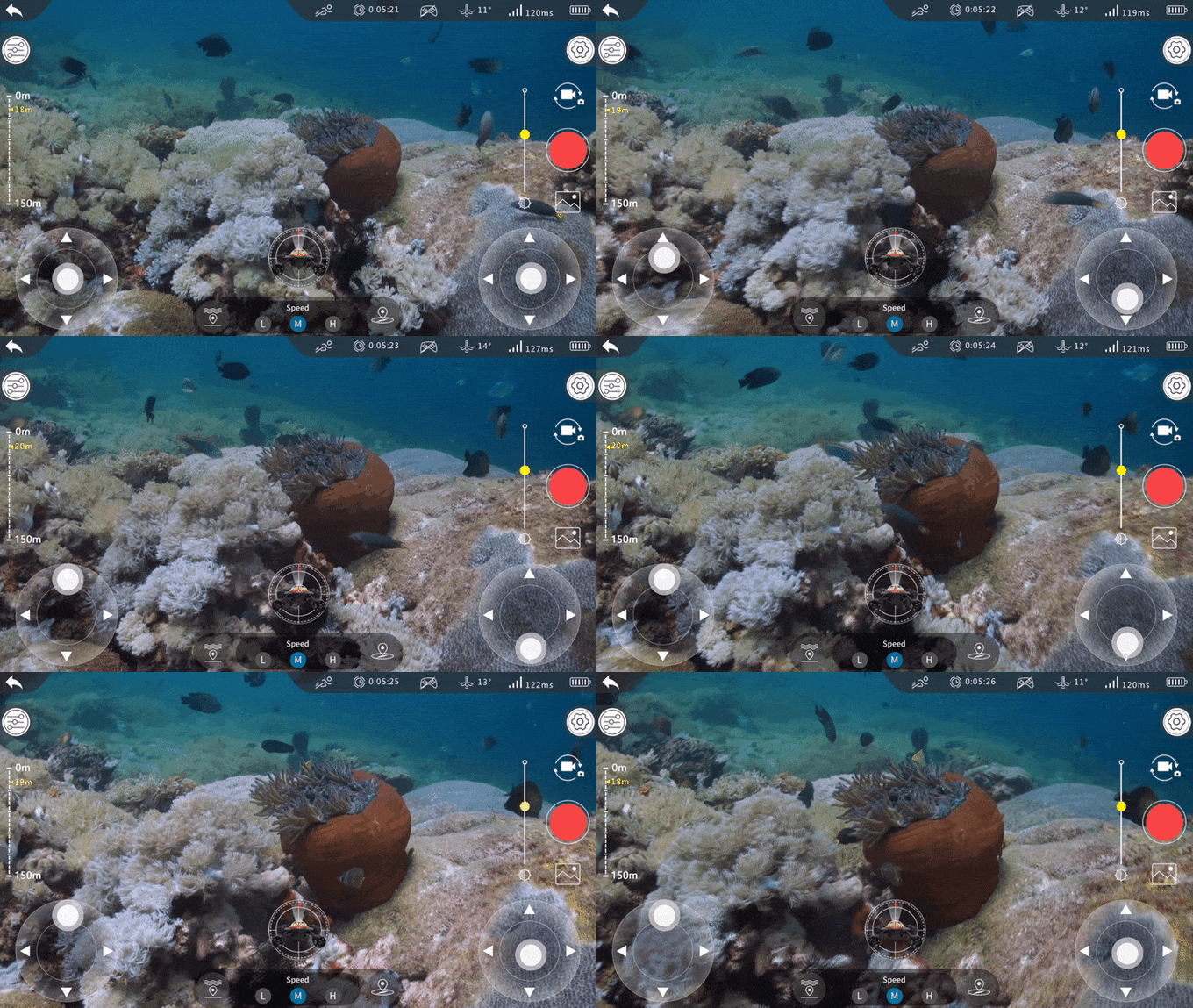
Nowadays people can go to the ocean without many complications but not for diving purpose, just for fun. I just mean how often do you think you go into the ocean to explore or dive? Even if underwater exploration has now become easier with drone people don’t tend to do that. Well, we might have found something which can change your perspective about diving, Titan is the most advanced and affordable underwater drone available. It provides a fun way to explore the ocean depths with the highest available water pressure rating which is built to go wherever your underwater adventure takes you.

Tell me how it works?

https://www.youtube.com/watch?v=WmH1X6Gxk5Y

The functionality of a drone has been expanded to meet challenging ocean currents with high-performance motion technology. Titan can go really deep undersea and can capture both videos and still images as it has a high degree of movement. You can control titan using a mobile app with which you can find locations to fishes or even carry out accurate technical inspections of undersea World.

What’re its features?

Titan-features

  • It comes with 4K UHD footage and 8 MP4 photos with 160° wide angle FOV.
  • It has 1080P high-resolution real-time streaming.
  • Perfect for fresh or saltwater as it has dive filters for colour correction.
  • It has 3000LM lights for diving in the dark.
  • It has a diving depth of 150M which is the deepest any other underwater drone can reach.
  • It has 6 thrusters for powerful motion which helps to withstand deep dives and strong currents.
  • It has an adaptable interface and rolling case design.
  • It has polymer lithium batteries which can last up to 4 hours.
  • It can be controlled by a mobile app named as GeneRov app.

Why should I buy it?

Titan provides you with endless opportunities with advanced features. You can use it for a professional inspection, fishing, salvage work etc. It is an easy to use technology with low maintenance. You can carry it anywhere as it comes with an aesthetic design which is portable.

Availability

The product is available on indegog.com, the price of Titan underwater drone is 799 USD. It will probably be shipped later this year. Grab it now to avail the special discount.

Know more

Thanks for hanging out with us guys. Please do drop your suggestion and ideas in the comment section below. If you want to keep tabs on a more innovative product like this, subscribe to our website and don’t forget to give your reaction.

How to get Rid of Facebook Ads?

0

Facebook is full of different posts, feeds, messages, etc by your friends or anyone, whose pages you’ve liked. But there is one more thing, like the unwanted gift that comes with these news feeds or posts; Advertisements. So, How to get rid of Facebook Ads?

At the beginning, when Facebook was new, there was a fewer number of ads but now the number of ads has increased exponentially. In this Article, I will show you How to get Rid of FACEBOOK ADS? Hope you will like it.

Also See: World’s First Walkie-Talkie Case For iPhone

Now let us tell you how these and finds you. Suppose you search for something on Facebook, or like something, you’ll soon start getting advertisement to similar topics or some products related to your search. The company claims that these ads are helpful for the users and are give users what exactly they are looking for. But what happens sometimes, these ads are completely irrelevant or are in so much quantity that one can not distinguish between the actual post and advertisement. So we are here to guide you through about different ways to remove these Facebook ads.

Before starting, let us see what Facebook help guide says about unwanted ads. According to it, If you don’t want to see a specific ad, you can click the x on the top right corner of the ad and choose I don’t want to see this. You can’t block Facebook ads entirely. Ads help keep Facebook free and we strive to show you only ads that are relevant and interesting to you.

Thus Facebook gives you the chance to stop seeing the ad from a particular source. To block single ingress, click on the small down arrow beside the ad post and select I don’t want to see this option.

Also See: World’s First Light Bulb WIFI Security Camera

How to get Rid of FACEBOOK ADS

Whenever you like a page or some product on Facebook. Facebook suggests the same product to your friends in form of ads. You can stop it by going to your settings > Ads > change third-party apps to No one. Mainly there are two types of ads on Facebook; sidebar ads and sponsors ads on Newsfeed. To remove all these kind of ads, you can use Browser extensions which will not only detect these ads but also block them. There are many ad blocker browser extensions present in the market but we would recommend you to use FB Purity. This extension is a cross-blocking extension and works on all browsers including Chrome, Firefox, opera, etc.

How to get rid of Facebook ads using FB Purity

  1. Firstly install FB Purity.
  2. After installing click on the FBP logo in the top of FB search option to modify the ads.

Now you can select the apps which you find relevant or which you find irrelevant. Do this and you’re good to go.

Overall advertisements are an important source of revenue and we do use Facebook for free. Thus Facebook also needs to earn some money in order to provide us with a quality service. But these ads should not overhead the user experience, so we need to get to rid of them. Some of the ads also turn out to be good for us. So before blocking them entirely, choose wisely. Keep surfing! Stay tuned to Techniblogic for more such articles.

How to get rid of facebook ads?

You can’t completely opt-out of Facebook ads, but you can change your preferences so that you see ads of your choice.

How to get rid of Facebook ads from my mobile?

Go to Ads Manager. Select Campaigns, Ad Sets or Ads. Click the toggle next to each campaign, ad set, or ad you want to turn on or off.

What is the best ad blocker for Android?

The best ad blockers for Android are Total Adblock, NordVPN Threat Protection, Surfshark CleanWeb, Adblock Plus, and Ghostery

Vivo V11 Pro first sale Offers !

VIVO technology has introduced yet another version of the V series in India. The Vivo V11  Pro. By launching this device in India they have expanded there V series with another great device. This new device will available at all offline stores and will be sold also on Flipkart and Vivo e-Store. The new variant is focused to give a trendy water droplet Full HD+ Super AMOLED display with great looks and great camera as always.

Buy Here

VIVO V11 Pro Offers and Availability

  •  Flat INR 2,000  cashback on HDFC Bank Credit and Debit cards
  • Flat 5% cashback with Capital First
  • Flat INR 2,000 cashback if purchased from PayTM Mall
  • Additional up to INR 2,000 off on the exchange
  • One Time Screen Replacement in case screen damage during 6 months
  • No Cost EMI (Up to 12 Months on Credit Cards, Debit Cards, and Bajaj Finance cards)
  • Buyback Guarantee (Post 6 to 8 months of usage) 
  •  Benefits worth INR 4,050 from Reliance Jio
  • Complimentary liquid and physical damage insurance along with additional data for Vodafone-Idea customer

Also Read:

Vivo V11 Pro UNBOXING in HINDI

VIVO V11 Pro Specification

Vivo V11 Pro is powered by a Snapdragon 660 2.0 GHz Octa-core processor, with 6 GB of RAM and 64 GB internal memory. The device runs on Android 8.1 Oreo with the custom Funtouch OS 4.5 over it. The Vivo V11 is packing a 25MP front camera and a 12+5 megapixel rear camera. The device also has features Moonlight Glow feature, which allows users to click perfect selfies in low lighting condition.

The Vivo V11 Pro has a 6.41-inch FHD+ Super AMOLED display with the resolution of 2340 X 1080 pixel, the device is also protected with Corning Gorilla 2.5D curved glass. It features a 3,400 mAh non-removable battery. The device also features an Under Display fingerprint sensor which is Vivo’s 4rth device to launch with under screen fingerprint sensor. No other brand till now is offering this kind of advance fingerprint their devices. This 4rth gen under display fingerprint can unlock the device in just 0.2 seconds.

That’s all for this guys, stay tuned for more update and please subscribe to our YouTube channel and our Website for More Vivo News and Updates.

Buy Here

Pioneer Launches SPH-C19BT For Making Driving Safe

Pioneer India launched the SPH-C19BT car audio-head unit along with it’s Smart Sync mobile app for making driving safe. This new definition of Smart Car Stereo converts your phone into an in-car informant system with that one can access all important features in just a few clicks. Priced at Rs. 7,150, SPH-C19BT will be a promising head unit which takes an all-around care of driver’s concerns.

The product has been specially designed for Indians. As in India, more than a lakh individuals die a sudden and painless death in road accidents. Where drunk driving, over speeding and red light jumping, must be blame for brutal death incidents, a distraction to drivers in the commonest of all. Seeing the increase in such accidents due to phone distractions, the product has been designed to help the driver in many ways, be it music, call answering, message reading or google navigation.

The elegant black SPH-C19BT head unit is compatible with both iOS & Android Phones and can be connected through Bluetooth or USB cable. If you connect your phone over USB, it also charges your phone. It has five interactive keys assigned to perform five most-important tasks while not distracting one from safe driving. A Music Key to alter or stop the music, a Voice Recognition Key to allow voice commands, a Navigation Key to find the destination maps, a Messages Key to concentrate to the incoming messages, and a Menu Key to open/launch the apps for setting customization. It also supports steering wheel controls, intelligent voice recognition, hands-free calling, google navigation and message read-out.

Pioneer SPH-C19BT is also equipped with Rear Parking sensor Input that is compatible with Pioneer Parking sensor to provide the entire read distance information to the driver and alert him with the beep while parking. The audio tuning, time alignment, multicolour illumination and other settings can be easily customized on Pioneer Smart Sync App. The Pioneer Smart Sync can be used to access several apps including Waze, Facebook Messenger, WhatsApp, Wynk, Saavn, Gaana, Amazon Prime Music and more.

Briefing on the SPH-C19BT, Gaurav Kulshrestha, Head, Marketing & Product Planning for Pioneer India, said, “Driving safe is no more a concern, but the main responsibility of the driver. Pioneer SPH-C19BT is designed for catering to the needs as well as choices of Indian masses, especially families who enjoy long drives and prefer own transport over public transport. Its hi-end features and easy connectivity would make the driving focused, entertaining, and convenient even during the night journeys.”

Fotor Review- The Best Online Photo Editing and Graphic Design Tool for Everyone

When it comes to image editing and designing, professional software like Photoshop definitely maintains a dominant position in the market. However, it’s not everyone’s cup of tea, as it requires a fair degree of time and skills to use it. The good news is that there are lots of great online services, such as Fotor, that allow you to create awesome images in a simple and quick way.

Visit

Fotor is a handy online tool which enables you to edit your photos, create photo collages and design banners, posters, blog post graphics, email headers and other types of graphics content very easily. Let’s take a look at what this tool can do.

Also Read: CamScanner’s AI Photo Restorer — Restoring Photos with CamScanner’s AI

  1. Photo Editing

With Fotor’s powerful image editing features, you can easily give your photo a new look. You can quickly do all the basic photo editings such as crop, rotate, resize, apply a filter, add texts and more with simple clicks. More than that, Fotor’s patent HDR feature is pretty much a bonus. It brings out more details and vivid color of the photo as it is seen through your eyes.

Fotor also offers a feature-rich suite of portrait touch-up tools, such as blemish fix, smoothing skin, wrinkle remover, teeth whitener, and so on. The retouching tools are quite useful and without the complexity, this is normally associated with professional software. Be sure not to overcook your photo and end up with anything but realistic.

fotor-02
  1. Photo Collage

Fotor offers a variety of pre-set templates that allows you to put up photo collages in a snap. Simply choose your preferred template, upload your photos, drag them in the slot, make minor adjustments and you are done. It’s super easy and fun to play around with.

fotor-03
  1. Graphic Design

The graphic design feature is one of the core features which would be mostly used by bloggers and content marketers. To simplify the complex design process for non-designers, Fotor packs up with a huge bank of templates for you to choose from.

fotor-04

To be frank, such a kind of service lives and dies on the quality of the templates, and Fotor obviously did a great job. There are thousands of templates (the number is still growing) under various styles and categories, such as poster, logo, email header, Facebook cover, etc. With such a broad of options, you can literally create impressive graphic designs for all your project.

Also Read: 10 Hidden Best App to Make Video with Photos and Music

Fotor Review- Bottom Line

Overall, Fotor is really a useful online tool for graphics content editing and creation. It comes packed with all the resources and features you need to create pro-looking graphics on under one roof. If you are still struggling with how to create images for your blog posts or all kinds of social media platforms, I would suggest you have a play with Fotor. You can really end up with some cool images to strengthen your online presence and extend your reach.

You may also like the video:

World’s First Walkie-Talkie Case For iPhone

0

A mobile phone case is one of the most important accessories that is used to protect your phone from any sort of damage. Also, people nowadays go for customised mobile cases which not only protects their smartphone from damage, but also it provides a new look to your device. Currently, we have an iPhone case which features a walkie-talkie handset to talk to your friends and family when you are travelling or when you are on fieldwork. This is not a traditional phone case that we all have seen in the market and that we often use but it is a smart iPhone case which features walkie-talkie, power bank and also protects your device from accidental damage.

How does the Walkie-talkie for iPhone works?

It is not a regular iPhone case but a phone case which supports the walkie-talkie feature and it has a built-in battery on board that can charge the iPhone when it’s battery is about to die. It has a two-colour shell, one is hard and the other one is soft shell just to provide the best protection to your device.

Features:

  1. The phone case has a built-in battery of 3500 mAh which can charge your iPhone when needed via 3.0 USB port.
  2. It is available for all iPhone size i.e. 4.7”, 5.5” and 5.8”.
  3. It is a full protection case with an excellent intercom function.
  4. It supports wireless walkie-talkie with a short antenna and a long antenna.

Why should one have it?

This smartphone case features a built-in battery that increases the iOS phone usage. Also, it is way too different than the regular or traditional phone cases that we have been using until now. So, for people who are tech freak and need something different and creative must go for this iPhone case because it is a multi-purpose case with lots of additional features.

Availability:

This 3 in 1 walkie-talkie iPhone case is available on Indiegogo, register right below to get the awesome case.

Know more

That’s all for this guys, stay tuned for the net update.

Volareo: The Smart Speaker That Plays Video

1

Ever thought of having a speaker which is capable of playing videos? Well, we now have a device that is capable of multi-tasking. Volareo is a portable video playing speaker with almost all the services that you love. This smart device is also compatible with Android so you can easily customise it by installing your favourite applications from the app store. This device has also been mentioned in Forbes magazine and entertainment was never so easy unless it was launched.

How does it work?

This a handy device. You can carry it with you anywhere and anytime you want. If you want to listen music connect Volareo with your Bluetooth and experience your favourite music. Just in case you want to watch the video, connect it to your TV and watch the content you need to.  This device runs on an Android and hence it is compatible with your smartphones too and you can enjoy applications like Netflix, YouTube and Twitch by simply downloading them.

Features:

  1. It is a portable device with a battery life of 6 hours.
  2. This device features Bluetooth and Wi-Fi. You can listen to music over Bluetooth and you can watch the movie over Wi-Fi.
  3. You can connect it with your TV through HDMI and you can stream entertainment on your television.
  4. This device also features touch and voice control.
  5. It features wireless charging. Charge this device without cables.
  6. This device is built while keeping people’s privacy in mind. You can turn off the microphone with a touch of a button.

Why should one go for it?

The device is a speaker and an Android TV box. Keeping customers privacy in mind, this device provides everything that you need for an entertainment purpose. People who usually travel and often watch movies or shows and listen to music and are also searching for one device that is capable of performing all the actions then they must definitely go for it.

Availability:

This awesome smart speaker is available on Indiegogo at a minimal cost of 99 USD. So hurry up before it runs out.

Know more

That’s all for this guys, stay tuned for next update.

Lenovo Cardio Plus HX03W Smart Band launched in India for Rs.1,999

Lenovo has finally launched its health and fitness band, the Cardio Plus HX03 in India. It has been priced at Rs. 1,999 and will be available to the customers exclusively via Amazon from 9th September, 2018. The company also launched their Lenovo Life application, which is a modified version of its fitness app, Lenovo Healthy. The new Lenovo Cardio Plus HX03W is an IP68-certified fitness band with heart rate sensor, step counter, and anti-sleep mode.

The Lenovo Cardio Plus HX03W features a 0.96 inch OLED full screen display which also contains an embedded heart rate sensor. It consists of various fitness related features such as a Running Mode which tracks the steps, distance covered while walking/running and the amount of calories burnt. It also includes heart rate monitoring, sleep monitoring, pedometer, long sitting alert and a sedentary reminder. The anti-sleep mode feature alerts the user through vibrations if you ever sleep or doze off while driving.

Sebastian Peng, Head of Lenovo MBG Ecosystem, said “We are delighted to reach another milestone with the launch of Cardio Plus HX03W Smart Band in India. The fitness space in India is witnessing growth at a tremendous pace and Cardio Plus HX03W is a perfect pick for fitness enthusiasts who are looking for premium and stylish looking gizmo at value price point.”

The Cardio Plus HX03W will be available in different color variations – black, red, orange and blue. It supports detachable straps, USB charging and comes with IP68 rating water resistance. The device comes with real time tracker that allows users to share activity result and timely correction of bugs.

You may also Like to Watch:

Vu 100 Launched in India, a 100-Inch 4K TV Priced at Rs. 20 Lakhs

Popular television brand Vu has launched a new 100-inch TV in India. The smart TV has been named as Vu 100. The company claims that this model is the world’s first 100-inch 4k LED TV. The Vu 100 comes with a 120Hz refresh rate, 700nits brightness and a 178-degree viewing angle.

The 100-inch display comprises an IPS panel with a 3840×2160 pixels resolution. It can display 2.5 billion colours and supports features such as HDR10, and WCG (Wide Colour Gamut). Along with this, dynamic contrast, local dimming, ultra-smooth motion control, and MPEG noise reduction has also been provided in the system.

The Vu 100 runs on Android 8.0 Oreo and is powered by a quad-core CPU coupled with a GPU that is capable of crunching 3D games and has 2.5GB of RAM. It bears 16GB of inbuilt storage for apps, games and media. With this, users can communicate with other smart devices present inside the house. Popular media apps like Netflix, Amazon Prime Video and Hotstar are pre-installed and it comes with Google Play Store for additional apps. It also features Google Assistant for voice control, there is an additional dedicated button on the remote for this.

The TV has been featured with a good surround sound experience that consists of 8 Dolby inbuilt certified JBL speakers and woofer. Vu 100 supports 4K Ultra HD resolution with HDR for a premium viewing experience. It also supports two way Bluetooth connectivity to connect wirelessly with most Bluetooth enabled devices. The cost price of Vu is worth Rs.20 lakhs.

You may also like to Watch:

Tovnet : World’s First Light Bulb WIFI Security Camera

Spy cameras are a prevalent part of everyday life and can be used for various reasons. How about having a combination of a security camera and a light bulb? The camera called Tovnet is the world’s first bulb WiFi security camera. It is an advanced technology with WiFi enabled security system that will let you record people without their knowledge. Tovnet is perfect for anybody who wants hands free covert footage.

How it works?

The light bulb camera is a new technology that functions as a spy camera which can be placed in any light outlet and transmit video to your device. It uses WiFi technology to provide feeds so that you can easily monitor any room in your home. It is easy to install it, it is just like screwing a light bulb.

Features

  • It has a lens resolution of the 2mp and wide viewing angle of 120°.
  • It is compatible with socket type E26/E27.
  • It supports 32 GB SD card recording.
  • It is compatible with iOS and Android both via a mobile
  • It is equipped with powerful infrared night vision which can record videos day and night.
  • It has built-in motion detection and high definition display 960p.
  • It features both audio and video recording with H2.64 video compression.
  • It has the two-way audio ability and supports wireless WiFi.

What’s so interesting about it?

Tovnet’s LED lights and camera can be controlled separately through the mobile app which means you can keep recording video when the light is off and vice versa. It will provide you with the benefits of both camera and light bulb. It is easier to set up which makes it perfect for home and the footage is of better quality as compared to wired cameras.

Availability

The awesome security camera is available on kickstarter at a minimal cost of 110 USD. So get your hands on these before they run out.

Know more

That’s all for this guys, stay tuned for the next update.

Creators Gurukul introduces India’s first Co-Gaming Zone powered by AMD and Gaming Central

AMD has partnered with Gaming Central and domestic shared space provider, Creator’s Gurukul, to launch India’s first co-gaming zone in India. This first co-gaming zone was unveiled on Thursday at Gurgaon adjacent to Cyber City. These co-gaming space will feature high-end PC gaming powered by the latest hardware from AMD Ryzen series of processors and AMD Radeon line-up of graphics cards. This gaming zone will definitely be a one-stop shop for all gamers and technology enthusiasts.

Gaming market in India continues to expand as the accessibility of consumers to internet and screens increases. To support this growth, Creators Gurukul has taken an initiative to introduce a first of its the kind that helps increasing hardware accessibility to budding entrepreneurs, gamers and technology enthusiasts. Powered with the best hardware from AMD, this will help India in 3Cs- Creating, Collaborating and CoWorking. Famous cricket player, Yuvraj Singh also promoted and shared this co-gaming zone.

Regarding the new initiative, Vinay Sinha, Head of Sales – India, Director – Commercial Business, AMD Asia Pacific-Japan (APJ) Mega Region said, “India continues to be one of the most important markets for us in the APJ region and we are always looking for innovative ways to help bring AMD technology to consumers. We are very excited and appreciate Creators Gurukul and Gaming Central for choosing the best in class hardware from AMD. The co-gaming zone is a wonderful new initiative and we wish them great success for the first ever experience of this kind in India.”

India’s first Co-Gaming Zone powered by AMD

In an official press release, Creator’s Gurukul mentioned that the AMD gaming zone will enhance hardware accessibility for gamers and people who employ AMD’s computing hardware and graphics solutions. Abhinav Tandon, Co-founder, Creator’s Gurukul said, “This will mark the creation of the world’s first community-driven Phygital Gaming Zone, which combines the power of physical and digital gaming to give a 360-degree experience to gaming enthusiasts. These systems are powered by high-end gaming and VR-ready PCs from AMD and feature a unique community focused pay as you go model.”

At this zone, people can access a mix of AMD-powered gaming PCs powered by AMD ‘Ryzen’ and ‘Radeon’ products. In addition to providing co-gaming space, the zone will have a unique e-sports experiences and leagues of popular multiplayer games such as PlayerUnknown’s Battlegrounds (PUBG) and Fortnite among others. “We envision the zone as a place for the gaming community to engage in tournaments, creator support with live streaming, game development and much more. AMD’s hardware support will provide advanced gaming technologies and help even more people understand and appreciate gaming in India,” said Shrey Mishra, Founder, Gaming Central.