Home Blog Page 249

Vivo V7 Energetic Blue: Color That Everyone Loves

Given how indispensable smartphones are becoming to our daily lives, companies are exploring new avenues to draw in more and more customers. Due to intense online competition, certain businesses are more hardware-focused, while other brands are now solely focused on meeting market expectations from customers. As of right now, the most sought-after product on the market is a selfie camera. In order to address all of these issues, Vivo has released the Vivo V7, a new smartphone. With the added function of moonlight shine as an LED flash, this device’s 24-megapixel selfie camera will let users to take the greatest photos even in low light. Compared to previous Vivo devices, there has been a significant improvement in both camera performance and application.

Buy Here

Previously the phone was launched in Gold color but finally, they launched another color in the Indian market which is one of the most demanded and loved the color. Vivo Launched Vivo V7 in Energetic Blue color. This color is said to be the most favorite by the male as it features a sport which is Indian Cricket team. The specs and features which we get with this device are same in what we get in Vivo V7 other color variants.

Also Read: Vivo V7 Review: Infinity Display with Great Selfie

Design & Display

Vivo-V7-energetic-Blue-front-Techniblogic

As Always Vivo V7 comes with a very sleek design with metal and glass build all over. The Blue color which we get this time suits up a lot with that metal body and infinity display. For antennas, the brand has given up silver lining all around the frame of the phone which adds up more humor and luxury to the smartphone. We get an infinity display with the ratio of 18:9. We get a 5.7-inch panel which makes it look very premium. In short, the design of this phone seems to best which you get under Rs. 20,000 segment.

Camera & Music

Vivo phones are always on top of their camera as well as Music quality. These are the only two features which are being needed by Indian youth these days. College Students want to capture every moment in picture and selfies as well as they want high-quality music all the time. Due to this Vivo is quite mainly focused on Camera with a great selfie as well as great audio using earphones are without earphones.

This time in Vivo V7 they came up with 24 MP front-facing camera with added moonlight front-facing flash. At the back for better shots, they have also given a 16 MP camera which also captures great shots.

They have also added a beauty mode on the camera which removes any imperfections from the face and makes the pictures look beautiful. This is the most used feature used by any selfie lover. Everyone needs to look best in their shots and this camera with added features make it happen without using any kind of professional application.

Whereas, when we come on to the music capabilities of the phone it is really very impressive. In the box, they have included earphones are pretty good in quality and you are surely going to love the music experience. The overall nice audio quality which we get with this smartphone.

Performance & Battery Life

Vivo-V7-energetic-Blue-Display-Techniblogic

The phone comes with Snapdragon 450 processor which features a 4 GB Ram. This combo makes it a perfect device for under 20,000 segments. Out of 32 GB of internal storage you get about 24.5 GB free, even after that, you can expand it to up-to 256GB because of the phone support dedicated Micro SD card Slot.

Our Antutu score is 55103, and some of the other scores are equally excellent. They have included all the sensors that a typical person would need in addition to the large screen and excellent selfie feature. Because this device supports a gyroscope sensor, we can also use VR with it. You will receive accurate results even while using GPS because it features an orientation and magnetic sensor.

When it comes to the gaming section, we can play nearly every game. Even on the highest level for Asphalt 8, I have not experienced any latency or frame dropouts in my usage. Every game functions flawlessly, even at the most advanced settings. I’ve tried using the Adreno 506 GPU and the Snapdragon 450 processor to play most games, including Asphalt 8, Shadow Fight 3, Batman, and Bully. In the lengthy gaming sessions I’ve had in Delhi, India, I have also not experienced any temperature problems.

When it comes to the battery, the Vivo V7 has a 3,000mAh capacity.To charge from 0% to 100% with their usual charger, it took roughly 1 hour and 30 minutes total. Even with my extensive use of a dual SIM card and a WiFi hotspot throughout the entire day Calling, texting, and browsing all day long. I had 35% battery life when I left at the end of the day.

This means you need to worry about battery while using the phone it will last you long.

Buy Here

Verdict

According to the pricing which is now being lowered down by the brand, it is a nice buy. The best buy for selfie lovers as well as best buy for a large display and great handiness.

Choose your topic for your communication technology paper from these ideas to be the best in your class

Communication technology paper points can incorporate an extensive variety of thoughts. You may have adopted new things so far in this field that could fill in as an incredible topic idea. Since this industry influences an extensive number of individuals all the time, you might need to consider points that give factual information on changes being made and the future standpoint of the business. Since there are different wide subjects you can expound on for a paper, here are 10 thoughts to consider that may rouse your very own unique point. Use help from writing bee if you actually believe you cannot do this properly.

  1. How had TV changed the way the world is seen? A technology paper can audit ways individuals see things distinctively on account of TV.
  2. Has the web turned out to be more dependable for news than TV? More individuals utilize the web all the time and watch everything utilizing it including TV programs, news and climate.
  3. Has innovation blue-pencilled more improper substance shared on TV or the web? A technology research can investigate what necessities need to be changed or enhanced in connection with a restriction of the substance through media.
  4. Are mechanized voice systems supportive or destructive to an organization and their client benefit relations? A Communication technology essay can investigate advantages and disadvantages of utilizing computerized voice systems.
  5. Are more individuals stick to PCs? As of late various examinations assert individuals may utilize them to do pretty much everything including shopping for food.
  6. Should phones have the choice to shop over the web? An article can talk about favourable circumstances and hindrances of utilizing phones to get to the web.
  7. Has online networking energized constructive or pessimistic interchanges among individuals? More individuals may utilize web-based social networking to associate with others, yet is more correspondence thought about negative or positive for online networking clients?
  8. How has communication technology helped organizations procure more individuals? What have regions of innovation enable organizations to develop at a speedier pace? What are regions that may negatively affect procuring?
  9. The development of working from home. A communication technology research paper can investigate ways the idea has assisted more individuals that have the capacity to telecommute or work from home as opposed to having a conventional activity.
  10. How technology assumes an enormous part in helping individuals get a training. How are more individuals ready to get confirmations and degrees considerably quicker?

Asus Vivobook S510UN Review : 15 Inch on Budget !

The VivoBook lineup from Asus is one of the most affordable yet luxuries and premium series we have ever used till now. They have some unique designs with their high-end specification and portability. The best part is the Quality. You will never be going to have a single complaint regarding the built of VivoBook or any Asus Product. If you are a business person or even a college student this budget 15″ portable light high-end laptop won’t be affecting your pocket much.

Buy Now

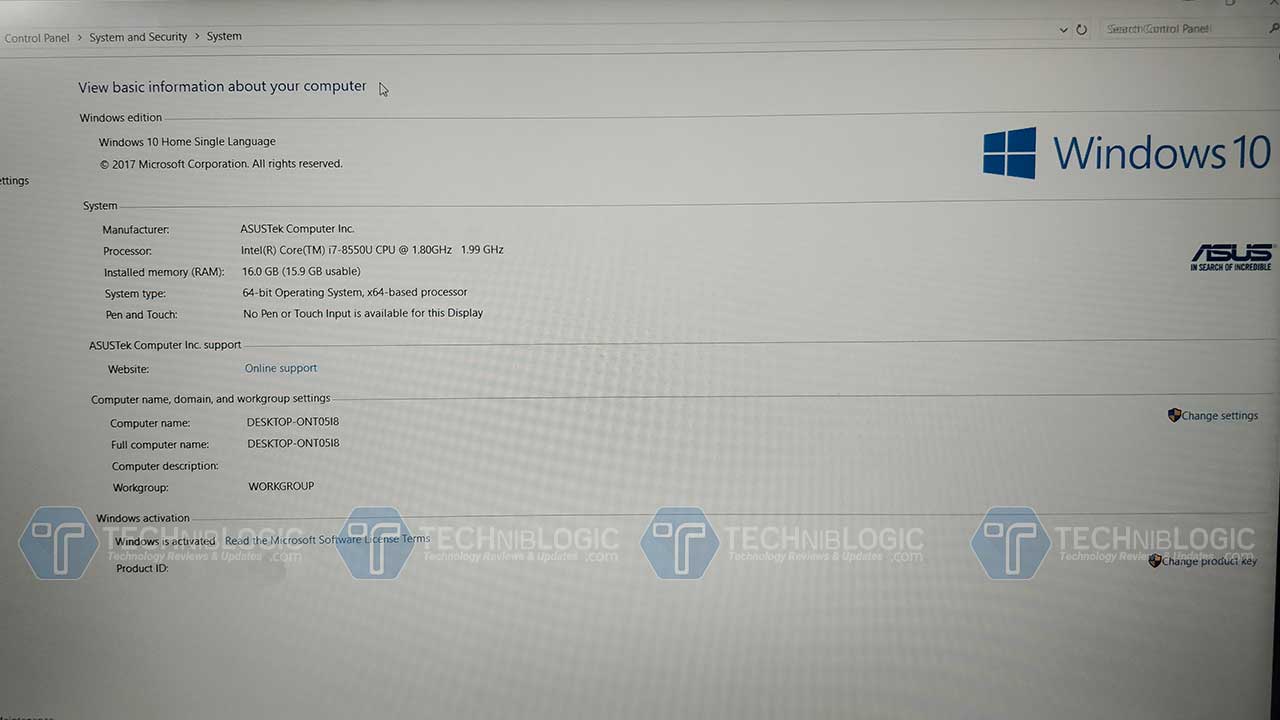
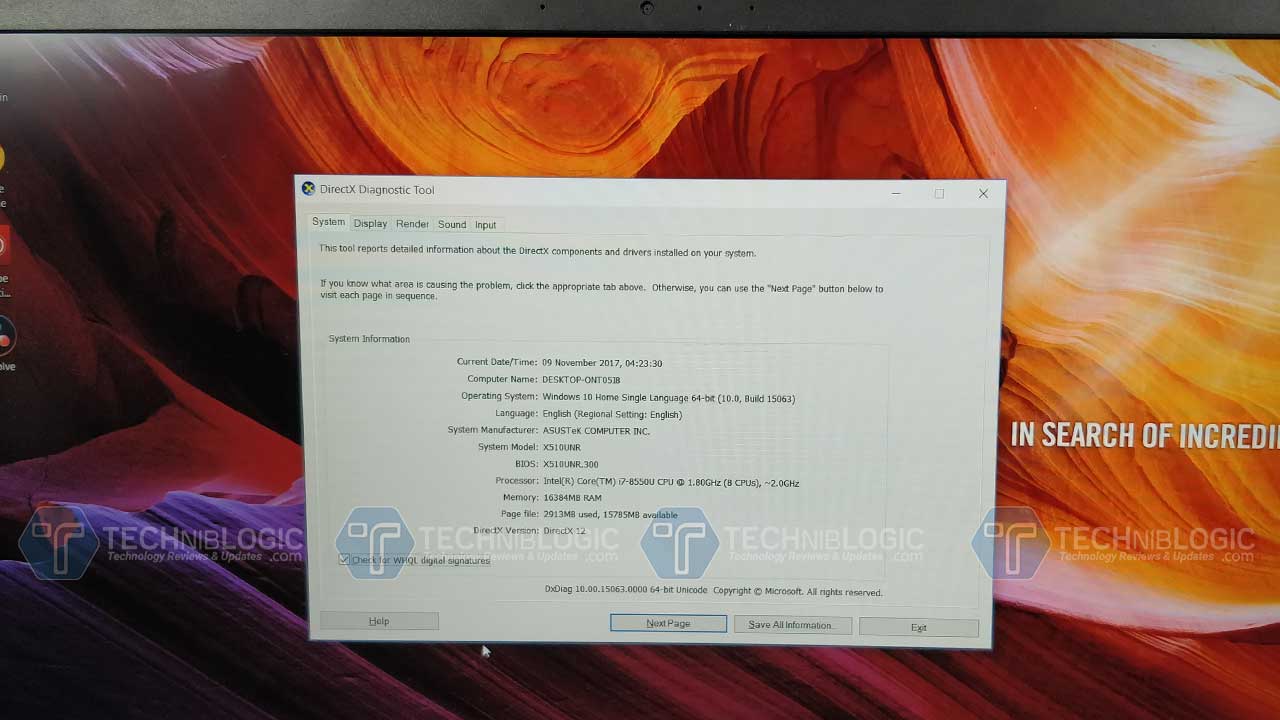
So, today to review we are having Asus VivoBook lineup, Asus VivoBook S510UN. This is one of the best among the hardware with price available in the market. The laptop from Asus is priced at 57,990 INR for i5 and 8GB model whereas today we are having the higher end model with us with i7 and 16GB Memory, which I was unable to find online.

Asus Zenbook UX430UA
Screen 15.6″, 1920 x 1080px, IPS, non-touch, Matt
Processor Intel Core i7- 8550U CPU
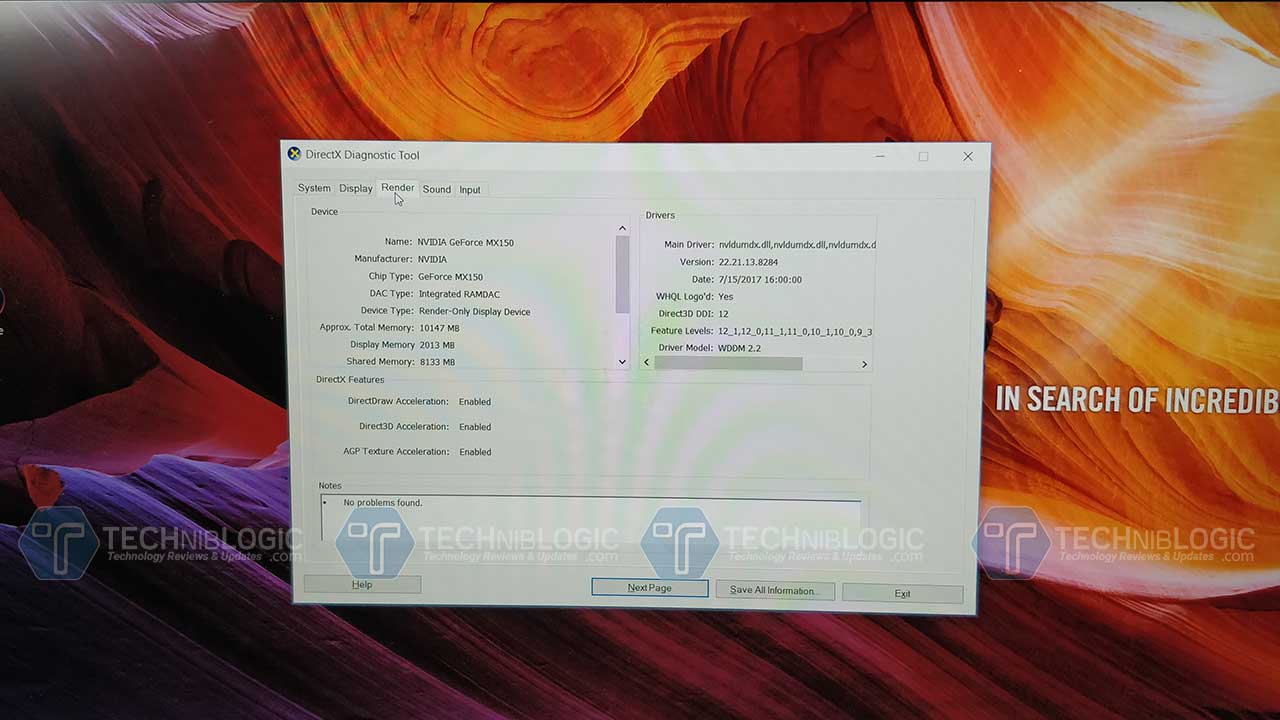
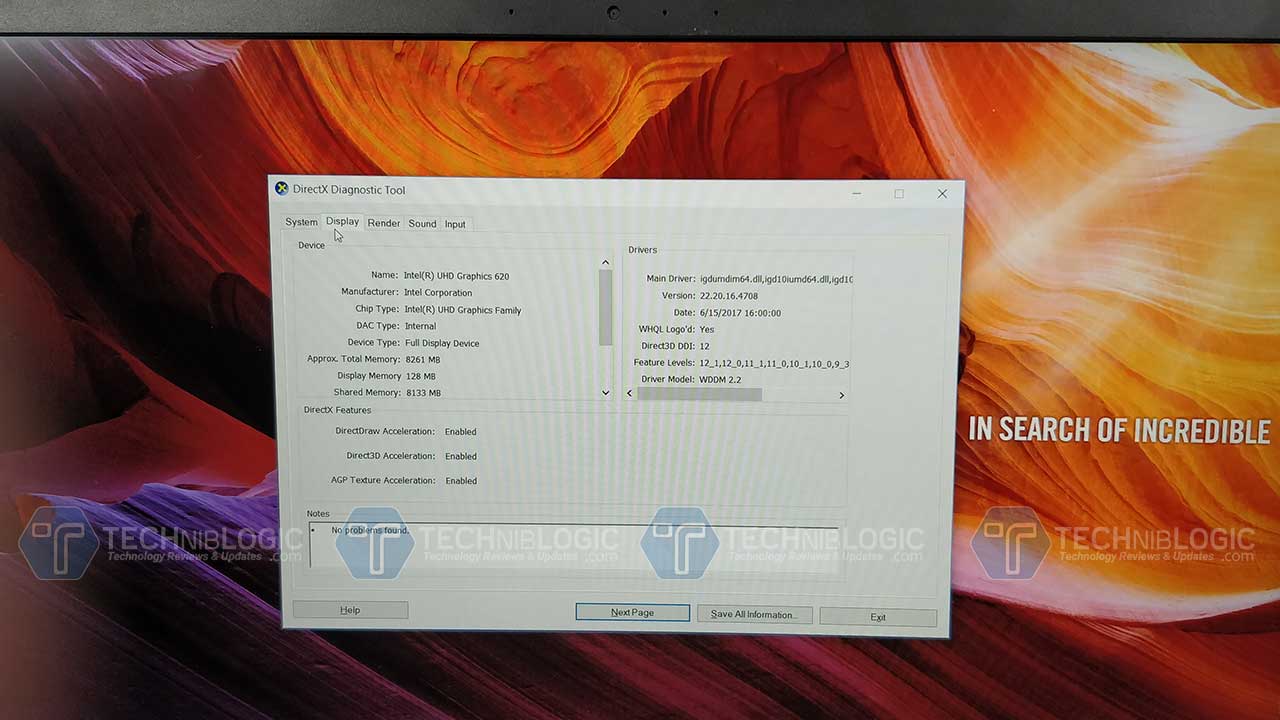
Video Intel UHD 620 and 2 GB NVIDIA MX150 for Performance
Memory 16 GB DDR4 2133 MHz
Storage 256 GB (SSD)
Connectivity Wifi, Bluetooth 4.1
Ports 1x USB 3.1 Type-C gen 1, mic/headphone, HDMI, SD Card, 2xUSB 2.0
Battery 42 WHrs, 3-cell Li-Ion
Operating system Windows 10

Design and Built

Asus-VivoBook-S510-U-Review-Cover-Techniblogic

Coming to the design part, here with Asus VivoBook S510UN, comes with a very unique brushed metal design which we have never seen on any other laptop. The Quality which they have used it on top but still too low down the price they have used high-quality plastic. The body part of the S510UN is made up of plastic. The top side of the lid has a Brushed metal finish with some added pattern feel on it which do attract fingerprints a bit and but give a premium feel to you.

Asus-VivoBook-S510-U-Review-Keypad-Techniblogic

Coming to the other area of a laptop like a palm rest area, it has proper space which is needed by a person which working on it. We also get a keyboard without numpad still it works well. The keys also make a sound while we use them. They are made up of plastic and not rubber which makes it way better while typing. The spacing between keys are proper and are well comfortable while typing. It feels like you are using some kind of ultrabook to type, which makes you work way longer on it.

Asus-VivoBook-S510-U-Review-Front-Camera-Techniblogic

It has a decent camera for a web face to face chatting with your friends. While doing some live session and for skype video calls the webcam will be working -perfectly. In low light, it will struggle a bit, due to which I will suggest you use additional LED light in front of your face. The only which is faced in WebCam is that it only supports 480p video and no 720p video.

Asus-VivoBook-S510-U-Review-Touchpad-Techniblogic

The trackpad which we get in on VivoBook S510UN works great. It is as smooth as we get in any Macbook. We also get a fingerprint sensor inbuilt in the trackpad which is a kind of positive as well as negative point and many users need larger space for travel which might affect the fingerprint sensor placement. Still, the fingerprint sensor works well and is accurate.

Ports

Asus-VivoBook-S510-U-Review-Ports-Right-Techniblogic

The best part of this laptop is we never ran out of ports. We have all the ports which are needed by a person on their regular usage. We get USP Type C 3.0 (USB 1st Gen). We also get 1 USB 3.0 and 2 USB 2.0. We also get a Full-Size HDMI port which is sometimes necessary for college while giving a presentation. On the same side, we also get 3.5mm Audio jack and power connection. We are not getting an Ethernet port on the laptop but we can always use a USB to Ethernet connector for that.

Asus-VivoBook-S510-U-Review-Ports-left-Techniblogic

Coming to the other side we get different light indicators a 2XUSB 2.0 Port and a Full-Size Card Slot. This kind of card slot is mandatory these days as everyone has there DSLR with them most of the time.

Here we are not getting any DVD drive but we can always use a USB Drive if needed. Rest, the bottom part is completely sealed off and the battery is not removable unless you open up the screws and take the battery out like we do on other premium laptops.

Display

Asus-VivoBook-S510-U-Review-Front-Techniblogic

The VivoBook S510UN gets a 15.6-inch FHD display, with a resolution of 1920 x 1080px. The result is we get just 7.8mm bezels on the sides, which I loved the most. Not like large ugly bezels which we get in 15.6-inch models.

Now, this is not enough the display which we get is covered with an anti-glare coating which dismisses the reflections and makes it a worth buy for best display. Watching content like movies will just going to give you an amazing experience. The display is reproducing vivid colors which offer sharp, bright, and great picture quality. Adding to it with matt finish as mentioned above, it also makes the viewing angles great.

This panel adds up the max score till now when compared with another laptop in this premium segment.

Buy Now

Sound

Asus-VivoBook-S510-U-Review-Bck-Techniblogic

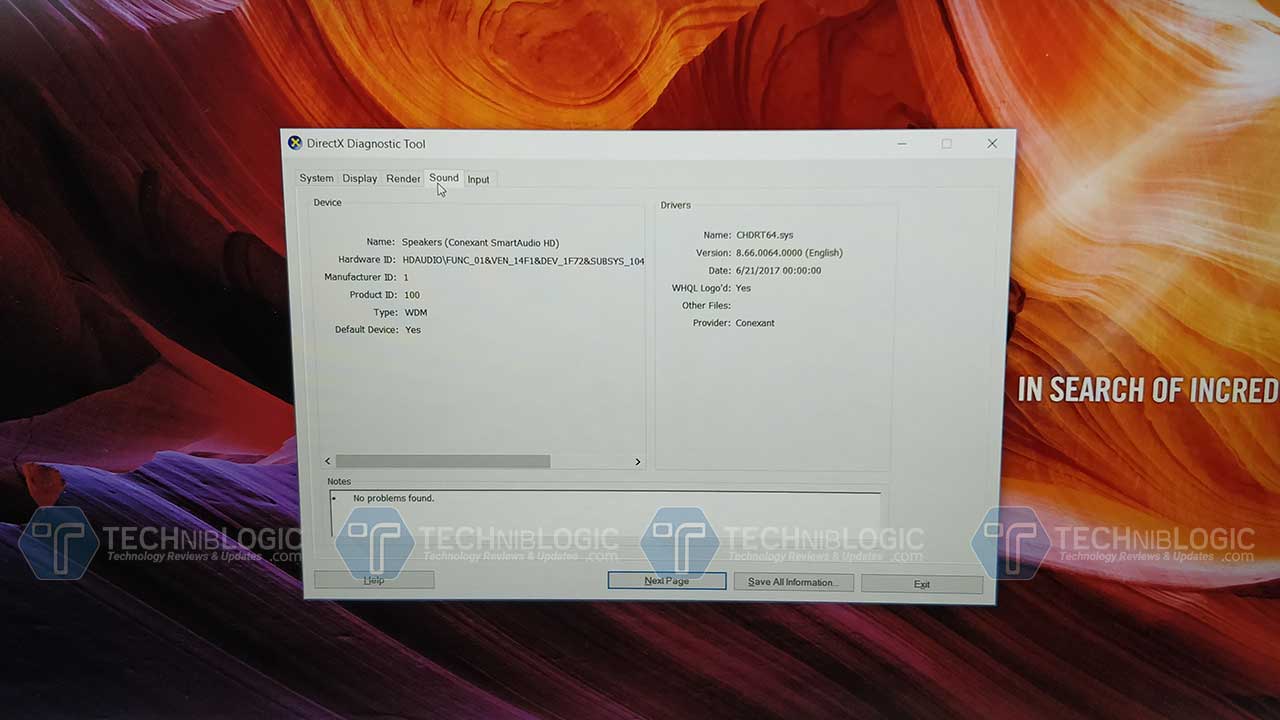
The stereo speakers which we get on VivoBook S510UN are mounted at the down portion. It is designed in a way that the sound bounces upward from the table and get back to your ears. To be honest, this time speakers don’t seem to be the best which we get. Still, i would say it manageable and quite loud when listening in the calm room. Overall for the great audio experience, you need external speakers attached to it.

Performance

Coming to the main part which is performance, here Asus VivoBook S510UN comes with i7- 8550U CPU which is supported with 16GB and a 128GB SSD and 1TB Hard drive. We also get another version where we get 8th Gen Core i5-CPU and 1TB Hard Drive. Both the variant is also packed with NVIDIA MX150 with an integrated Intel HD 620 graphics card. With these two cards we get easily do 720p gaming, Photo and video editing, Watching 4k movies and Web Browsing. We can also do normal 4k Video editing in Premiere Pro. I think with this power in portability you will just love it.

Battery life

According to my usage, while working on a word or using a web browser for typing articles and surfing it was leading me about 6 hours and rest depends on work to work. If you are doing Photoshop, Premier pro and other high-intensity work it will hardly lead you to about 3 to 4 hours battery backup. At this price, it seems to be ok to me because you can always upgrade the battery from external market according to your usage and work. We are getting a 42Wh battery which seems to be quite promising this time.

Verdict

Personally, when we consider the quality and high-end specification you are going to love it. It is offering best latest Notebook Graphic card which can handle high-end games obviously on medium setting but GTA  can be played at High setting too. We can render easily with premier pro and other application perfectly. The best part is that we are getting the best display with the proper portability of use, anywhere anytime.

Pros

  • Display
  • Keyboard
  • Trackpad Smoothness
  • Premium Built
  • Great Performance
  • Price

Cons

  • Speakers
  • No NumPad

Infocus Vision 3 Review : Best in Price with Infinity Display !

There are so many devices and brand which are coming on the market. Recently a well knows old US brand InFocus launched their new device in the market InFocus Vision 3. So, today we are going to talk about Infocus Vision 3 which has a Big USP in the market which is its Infinity display that too at very affordable pricing. Yes, I am talking right at the price of Rs. 6,999 they are offering dual back cameras as well as infinity display with a fingerprint sensor. Now, this is gonna be insane and change the scenario completely. So let’s see how it actually performs in real life.

Buy Here

InFocus Vision 3  Specs

Model InFocus Vision 3
Display 5.7-Inch, HD, IPS LCD
Processor MediaTek MT6737
RAM 2GB
Internal Storage 16GB, expandable up to 128GB
Software Android Marshmallow 7.0
Primary Camera 13+5 MP
Secondary Camera 8 selfie camera
Weight 150 Grams
Battery 4000mAh
Others 4G LTE with VoLTE, WiFi, Bluetooth, GPS, USB OTG, 3.5mm audio jack, Hybrid SIM tray
Price INR 6,999 (Buy Link)

Box Content

  1. InFocus Vision 3
  2. Manual
  3. USB Cable
  4. Charging Brick

Design & Built

Infocus-Vision-3-Front-Camera-Techniblogic

InFocus Vision 3 is available in single colors Black, and personally, I like Black one as it is always a personal preference we cannot recommend color to anyone. Rest color choice is a never-ending discussion. Starting with the front part here we get a Dual 8-Megapixel Camera which captures some decent shots, beside it an earpiece, LED Notification and different sensors. LED Notification over here is having a Multicolor Light not what we get in Xiaomi budget devices. Coming below we get 5.7” HD Display, which is covered with 2.5D curved glass which gives additional looks to the phone and rests no info on adding any extra protection on it.

Infocus-Vision-3-On-Screen-Keys-Techniblogic

Sliding little bit down here we get on Screen back keys which can be edited as per our usage by going into the setting panel.

Infocus-Vision-3-icro-USB-Port-Techniblogic

Coming to the bottom portion of the phone here we get a Micro USB port, beside it a primary MIC and nothing much which need to be bothered over here. The Phone is not having fast charging and only support normal 5 Volts at 1.5 Amp charging speed. But still with this price 4000 mAh Battery is great.
Infocus-Vision-3-Audio-Jack-Techniblogic
Turning to the top, we get a 3.5mm audio jack. Rest nothing much which needs to be mentioned over here.
Infocus-Vision-3-Volume-Rockers-Techniblogic
Turning to the left, here we get Volume rockers which are made up of metal and gives quite hap-tic feedback. To add a luxury feel to the phone they have also given pattern feel on volume rockers which feels good and premium while using the phone.
Infocus-Vision-3-Hybrid-Sim-Tray-Techniblogic
On the right side of the phone, we get the same quality power button which works well and also has a pattern feel to it. Above the power lock key, we get a Hybrid SIM tray slot which supports Dual SIM’s or Single SIM + Micro SD card at the same time that to up to 128 GB. This means you are never gonna be out of memory in any scenario.
Infocus-Vision-3-Dual-Back-Camera-Techniblogic
Finally coming to the back panel of the phone here we get 13+5-megapixel Dual camera setup, besides that, a single tone LED flash, below that a Fingerprint sensor which really works pretty fast.
Infocus-Vision-3-Back-Speaker-Techniblogic
Below that, we get InFocus branding and a back Speaker which is quite loud, but the placement I don’t like it. Overall the built of the design is made up of metal. Due to its built, 2 cameras, infinity display, and Android Nougat it comes in the category of best smartphone under 7,000 INR.

Display

Infocus-Vision-3-Cover-Techniblogic

InFocus Vision 3 comes with a 5.7-inch HD with a resolution of 720 x 1440. The Display colors are sharp tone and watching movies, and playing games look great. It will somewhat give you the feel of using an AMOLED display. While watching a movie on to the phone give immense experience. The Sunlight legibility is also good because of its really great brightness. When we compare the brightness with other budget-oriented phones, InFocus Vision 3 with infinity display and 18:9 ratio, has better sunlight experience. I know the resolution seems to be lower down but as they have given the display from sharp the well knows a brand who provide a display to other high-end brands also, the quality is good within this price bracket.
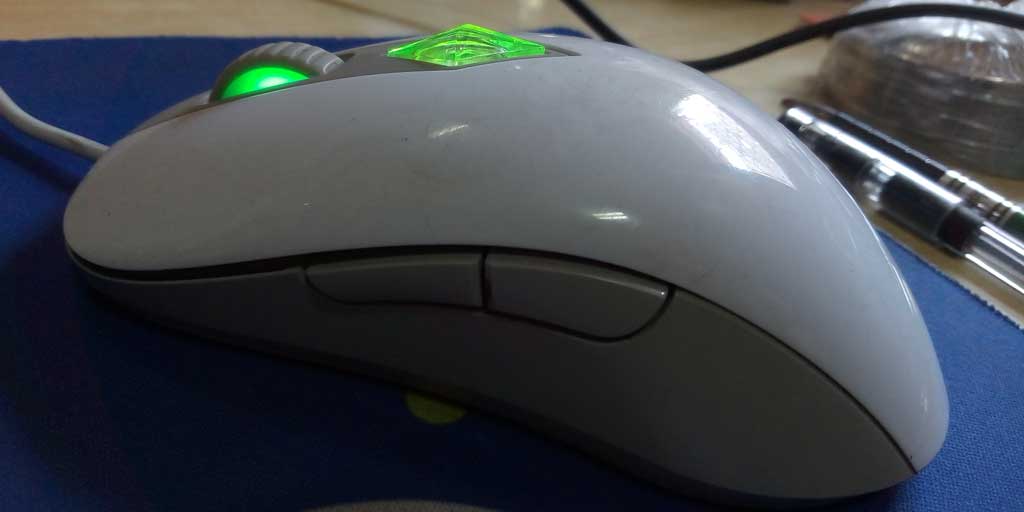
Viewing Angle is good, and blacks are decent enough. While watching movies from odd angle won’t affect you in any way. Overall no complaints with the display.

Buy Here

Performance

The phone comes with MediaTek MT6737 processor which features a 24 GB Ram. This combo makes it a decent purchase at this price. Out of 16 GB of internal storage, you get about 11 GB free after that also you can expand it to up to 128 GB as the phone support Hybrid SIM tray, which means whether you can install dual sim at the same time or you can install one sim and one micro SD Card in it.

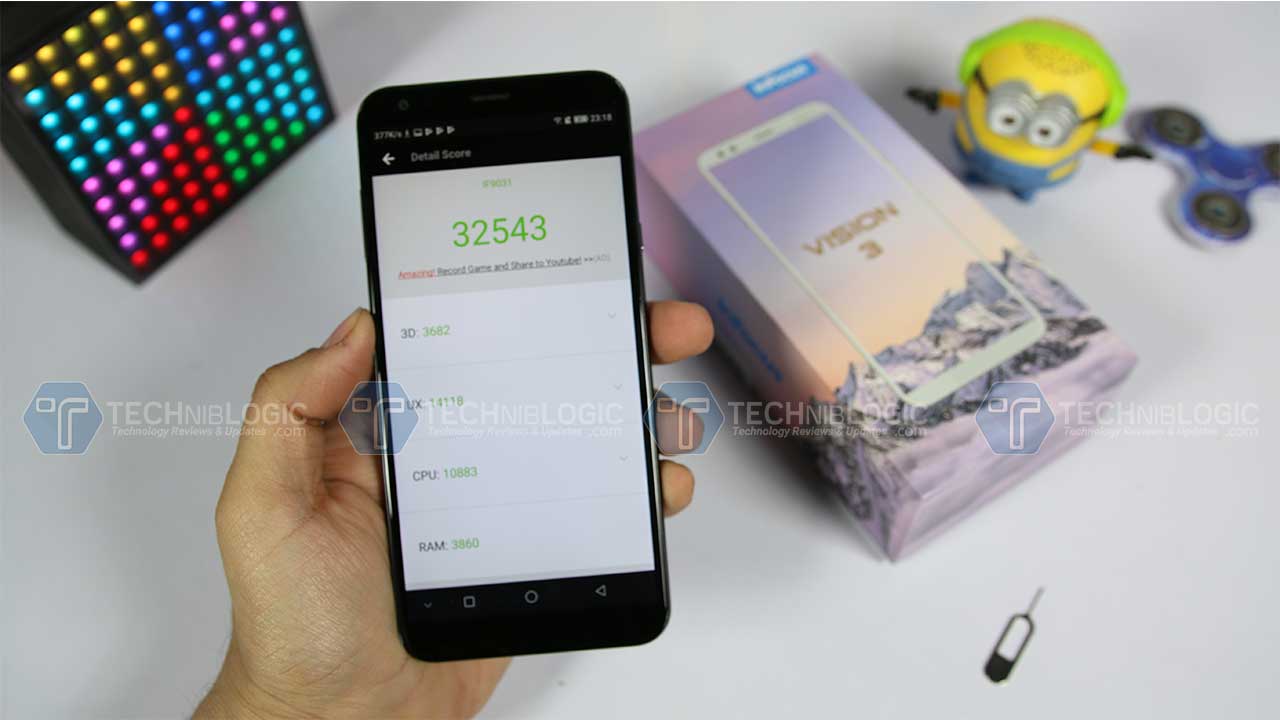
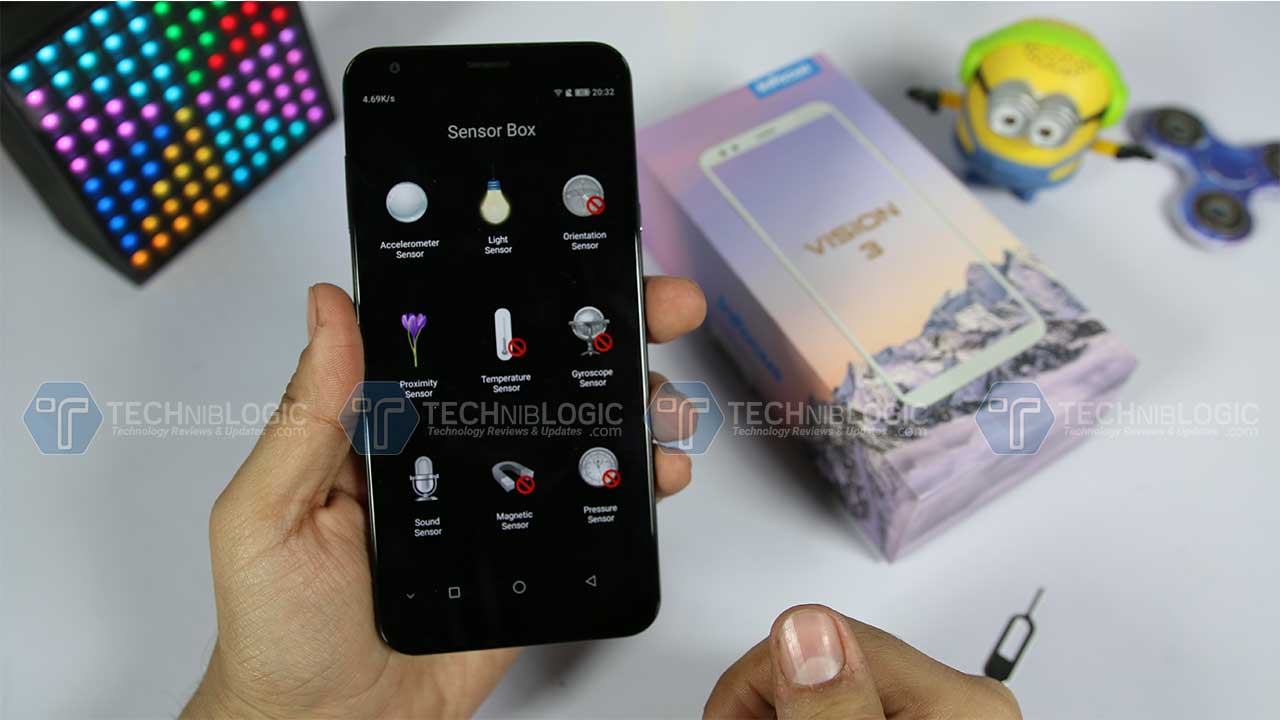
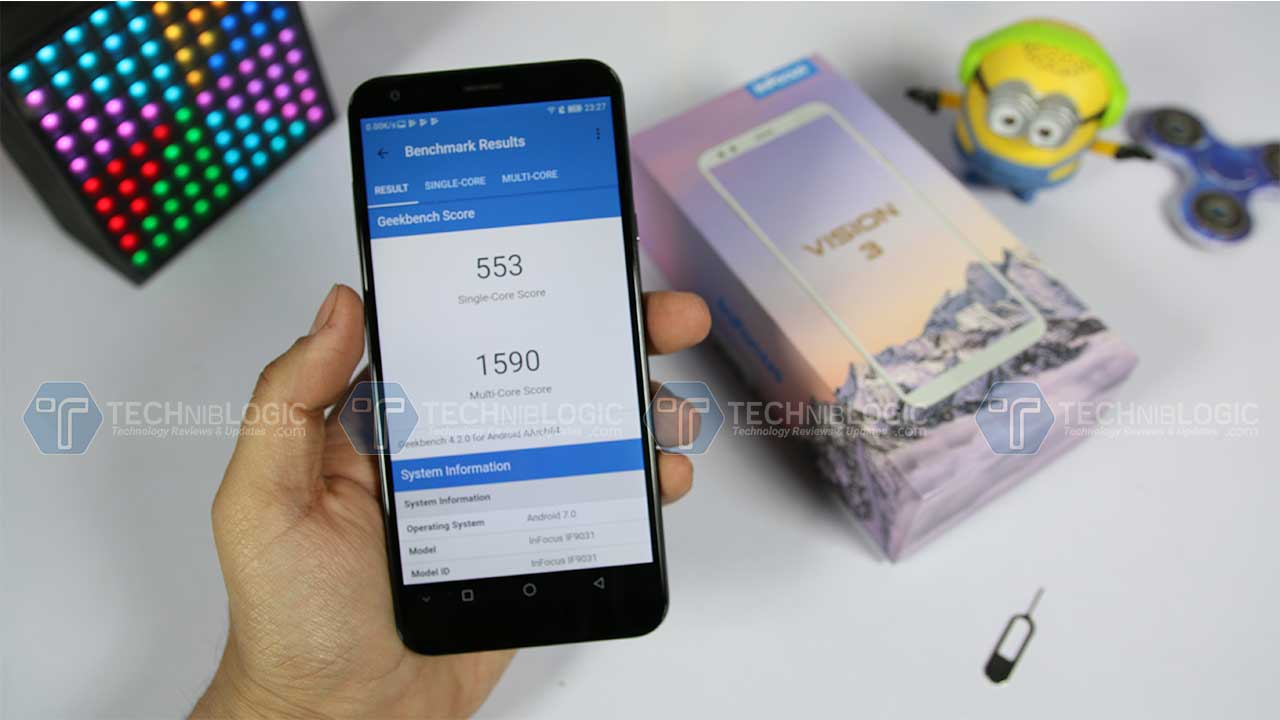
We get Antutu Score of 32543 and certain other scores are also decent. To low down the price that bit they have to remove few of the sensors which are required. It is not up to gyroscope but they have removed the orientation sensor which is required for better GPS functionality. I have attached all the images which you see over here.

Coming to the gaming part, we can play almost all games but in medium and high settings, depending on what kind of game are you playing with. Asphalt 8 and asphalt 8 Xtreme were working quite well on high graphics without any lag, sometime you might notice very minor frame drop in asphalt 8 but asphalt 8 Xtreme it was working flawlessly. Rest, gaming will work perfectly and while my testing I have not shown any heating issue in India, Delhi Temperature. Rest, at this price, no other brand is offering 2 Cameras with infinity display for movies which is the main USP of the phone that too with great built.

Camera

Now, finally coming to the camera part which is another USP of the phone. This device comes with 2 cameras, now let me explain how. At the back part, we get Dual camera setup which is a 13+5-megapixel Combo.

Infocus-Vision-3-Camera-Techniblogic

Here we get some great depth, as well as both camera, are having RGB sensors. The 13-megapixel camera is a normal camera whereas the 2nd 5-megapixel camera is a Wide angle lens which camera wider area and group while taking a shot.

Overall the UI of camera application is almost stock and works smoothly without any lag and issues. The phone can record video at High and fine only. They have not mentioned that what actually high means and what actually fine means.

Coming to the front camera of the phone we get a 5-megapixel camera, which captures some above average shots if we compare the same with another phone with same price racket as of now.

Camera sometimes struggles a bit while focusing rest it is good if you use some third party application like cinema FV or camera 360. It is actually some software fix which needs to be done Rest you gonna love it.

Software

InFocus Vision 3 is loaded with Android Nougat 7.0 out of the box. With 2 GB RAM. The device can handle normal multitasking on the phone. The software is loaded with negligible bloatware which we can always disable and uninstall same like other devices. They have tried to optimize the UI quite well and it seems to be more like stock this time. Rest, Everything will work fine for normal users. The best part is that every game is working well on this processor with almost no lag. The smartphone runs Smile UX, a forked Android UI based on Nougat.

Soon, they are also going to role out the stable update which will add up Face Unlock feature in this phone which is going to make this phone worlds cheapest phone with perfect Face Unlock feature.

Battery

Coming to battery part of the phone which is its 4000 mAh Battery which works really well. It took me approximately 3 Hours to charge from 0 to 100% using its default charger. Battery usage of the device is good. It will easily go to last you for a whole day because of good software optimization and small display size.  Rest all that we can expect from it.

ALSO READ: Best Smartphones with Longest Battery Life 🔋 in India

Coming to the battery performance, on normal usage, it will easily last you for more than a day and might be under very heavy usage it will last one whole day very easily.

Verdict

Overall, the device is well built, and at this price they are I think gonna make a record in offering infinity display and face unlock.

Pros

  • Built ( loved it )
  • Handy
  • Almost stock UI
  • Price
  • Face Unlock (Works Well on Beta too)
  • Loved the Display
  • Memory Expansion

Cons

  • Processor
  • Camera quality is average
  • No Fast Charging

MiniTool Power Data Recovery: the Newest Version Review

Are you looking for a tool to recover your lost data? Discover in this review why MiniTool Power Data Recovery will be for you, the software developed by MiniTool has useful functions that allow you to retrieve your lost or deleted files by mistake

pdr

Let’s face it, MiniTool Power Data Recovery is not the only software to perform data recovery functions. However, after careful use, I can state that it is certainly a valid alternative to the most used tools. Intuitive, practical and reliable, all qualities that make this program a choice to keep in mind in case we need to get back our lost files. Here is our review.

pdrscreen

MiniTool Power Data Recovery: for every one

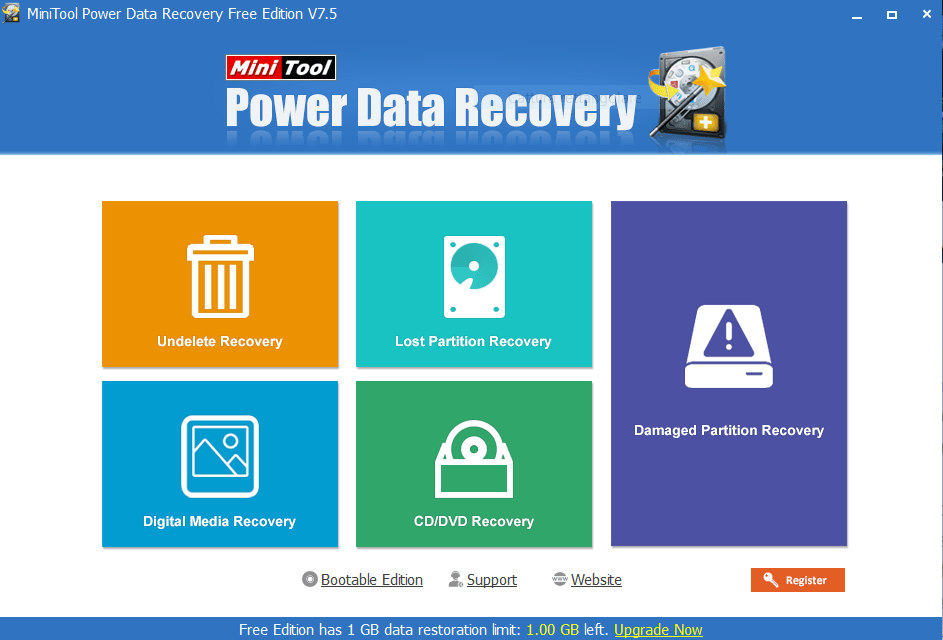
We must admit that  MiniTool has worked well in software development: the interface of Power Data Recovery is intuitive and you can immediately understand what steps you need to do to recover our data. The possible options are as follows, while more advanced features have been added to the latest version:

Undelete Recovery: This function performs a fast scan that allows you to recover deleted files;

Lost Partition Recovery: Here it is possible to recover data incorrectly deleted from a partition or during the Windows installation process;

Digital Media Recovery: Allows you to regain photos, MP3 / MP4 or video contained in flash drives or external memories;

CD / DVD Recovery: From here it is possible to recover our files from damaged or formatted CDs or DVDs;

Damage Partition Recovery: Again, as you can understand, you can recover lost data from damaged partitions.

All functions that can be very useful, it happens to everyone sooner or later to have to recover a file deleted by mistake or maybe even voluntarily. Power Data Recovery will come to the rescue whenever necessary.

MiniTool has made several software licenses available. The tested version is the free version that allows you to recover only 1 GB of data. They can certainly seem a few, in which case you just have to buy a license for personal use, prices range from $69 to $129, depending on your needs. If you have an office or work with several PCs do not despair, MiniTool also offers on its website business licenses with prices that are certainly higher, but which guarantee security on practically all company computers. The top package is priced at $499 but allows for software installation on 299 computers.

An important tip is to not install the software on the disk from which you would like to recover data, otherwise, it will be rewritten. You must then install the software on another disk and rely on its features. But there will be no possibility of error since during the installation of the tool this warning will be displayed several times.

Check New Features ( May 2018 Release)

1. New interface with simple steps to recover data.
2. Improved the data recovery engine.
3. Speed up the scan process to find lost data more quickly.
4. Listed the found files during the scanning process.
5. Allowed to pause or stop the scan when you have found your needed files.
6. Allowed to save files while scanning to enhance data recovery efficiency.
7. Easy to recover the deleted files larger than 4gb in Win10.

Conclusion

In conclusion, MiniTool Power Data Recovery allows you to recover lost data from all our peripherals, I have personally tested it and managed to recover several text files. But MiniTool promises safety on most of our data, from images to video, but also audio files and more. So you just have to try it to see if it’s right for you. And if necessary buy a license for not having the limitation of 1 GB. The software can be downloaded from the manufacturer’s website.

Vivo V7+ Infinite Red ‘Limited Edition’

VIVO technology has launched yet another device today. The device is a part of the bezel-less smartphone, which is today’s haute couture. Vivo V7 Plus is a 24-megapixel front camera smartphone and after the huge success they came up with a limited edition version in Vivo V7+. The Vivo V7 Plus is priced at 22,990 INR. The device is a VoLTE enabled smartphone, which will give a quality video/audio calling on LTE network.

“With the launch of V7+ Manish Malhotra Limited edition, we are providing an opportunity for consumers to express their love in a more elegant and captivating manner,” Kenny Zeng, CMO, Vivo India, said in a statement.

Previously the device was launched in champagne gold and matte black colored variants in September and now this Red one which looks quite good.

“I am happy to collaborate with Vivo and present the V7+. We have created a phone that symbolizes the spirit of youth and infinite love,” Malhotra, said in a statement.

Vivo V7+ was company’s first phone with an 18:9 aspect ratio with ‘Full View’ display. Rest we get a high point of the device is 24MP selfie camera with an aperture of f/2.0 and flash. The phone sports a 5.99-inch IPS display (1440×720 pixels) in a unibody metal body.

In Smartphone we get a 4GB RAM and 64GB internal storage that can be expanded up to 256GB via a dedicated memory card slot. The device is powered by Qualcomm Snapdragon 450 chipset. It is backed by a 3,225mAh battery. The V7 Plus also supports an ‘Eye Protection Mode’ feature that filters out blue light to protect vision and prevents eye strain. The device also features a fingerprint sensor, which can unlock the device in just 0.2 seconds. Overall the device gives a very good performance.

Buy Now

That’s all for this guys, stay tuned for more update and please subscribe to our website and YouTube channel.

Zoutons launches Coupon app for Shopaholic

One of the leading coupon aggregation website, Zoutons, has launched its new mobile app for its users. With this mobile app, the users can access differentiated offers and coupons in one go.  The website is targeting the online e-commerce sector, which has garnered drastic boost and public interest over the past year.

More About Zoutons

Summing up numerous coupons on offers & discounts from around 170 online shopping stores, Zoutons has made distinctions into approximately 75 categories. It provides the best coupons for clothing & accessories, electronics, footwear, home appliances etc. Also, there are special coupons for services like utility bill payments, recharges and more. As the tagline, “The Loot is on” suggests, this is the new and innovative platform to get the purchases done at bargained rates.

The mobile app is launched with respect to the consumer satisfaction. With this app, users will be able to explore the related offers in a better way. As you download the app, you will be introduced to best offers & coupons across the internet, from leading stores like Amazon, Paytm, Tata cliq, Flipkart, Ebay and more.

Currently ranked at 5315 nationally according to Alexa Rankings, this organization is trying to expand and make stronger networks with the new app. The basic aim is to feed the users will regularly updated coupons & offers on respective categories. The interface has minimal projections which make it easy for the users to scroll through the broad set of coupon options. As a whole, a target of 100k downloads by the end of January 2019 is set by the company.

Special Offers on Famous Stores

  • Flipkart Offers: Min 40% Off On Electronics

Flipkart minimum 40% off on electronics applicable on large home appliances, tv, smartphones & accessories

  • Amazon offers: Up to 80% Off on products

Amazon up to 80% off on products is valid for all users and no minimum purchase required to avail offer

Setting up new Horizons for better shopping experience

A company dedicated to the customers flourishes to another level. This organization has the best services organized collectively to help the user accomplish shopping satisfaction. After all the deals, discounts & offers, coupons are known to be the next source of reaching the desired cost price. The app, accordingly, redirects the users to the particular online store or app with automatic activation of the offers.

The mobile app is definitely making the shopping easy as it ensures personalized feed from the choice of varied stores like Amazon, Flipkart, Paytm, Tata cliq, Snapdeal, Ebay. One of the most efficient factors about this application is that it takes up negligible space in the device storage. The size of the app is 2.7MB which doesn’t even affect the RAM of the device.

Enabling the app to send notifications can benefit the users with automated information about the best offers or discounts that are being provided by a particular store. Ongoing sales, latest offers or exclusive coupons, this mobile app keeps the user updated with immediate notifications. The users can also subscribe to the newsletter conducted by the app wherein one can keep a check on ongoing and upcoming sales or discounts.

The app has a clean interface with offers getting listed according to what the user searches for. It is embedded with Night Mode which makes sure that the usage is not disturbing the view of the customer and utilize less storage space on your smartphone. Developed in a way which makes it easy to use for anyone- the user needs to shop according to the terms and conditions of the offer to get maximum benefits.

Zoutons App is the new way to facilitate shopping

Users can download the mobile app from Google Playstore, or from the iOS Appstore, and get a set of regularly updated coupons, deals & offers from the best online stores, within the reach of the fingers. The app seems to be a handy addition to your online shopping arsenal.

How to Bypass Number Verification on WhatsApp

WhatsApp Messenger is a freeware messaging provider for smartphones. It uses internet for messaging, voice calling, GIF, Videos etc. WhatsApp has an end to end encryption which keeps all your texts secure. But it works with your mobile number and you need to verify the mobile number before logging in. A lot of people don’t like that. And if you are one of them, you are at just the right place. In this article, you are going to learn how to bypass the number verification on WhatsApp without actually giving them your personal number.

  1. Use Landline number

A lot of people don’t know about this, but you can use your landline number too for WhatsApp instead of your personal number. But make sure you have a hand on your landline. WhatsApp gives you two number verification options, one of which is ‘Call me’. In this method, you get a call from WhatsApp and they tell you the verification code. Here’s what you have to do.

  1. Install WhatsApp on your phone and enter landline number.
  2. Now, as you’ve provided them your landline number, SMS verification wouldn’t work, so opt for ‘Call me’ option.
  3. You will get the verification code via phone call. Enter that number and press confirm.
  4. Using Fake Number

Using a fake phone number is one of the oldest tricks to hack number verification. It’s not just for WhatsApp but for every app or software which involves number verification to install. They give you a fake or a temporary number which you can provide to the app and verify number via SMS. The best part of this method is you can avail the numbers of even different countries according to your need.

Here’s what you will have to do.

  1. Firstly you need to install the app ‘Textplus’ on your phone. It’s available for Android, iPhone, and Windows. You can download it from the link given below.
    https://textplus.com/download-text-plus-free-text-call-app/
    2. Install WhatsApp on your phone.
  2. Enter the fake number you’ve got from Textplus and choose verification via SMS.
  3. Enter the verification code you’ve got on that number and press Confirm.
  4. Spoof Verification and use without sim.

For using this method, you will again have to install a certain app on your phone. But never mind as they’re just small apps and don’t take much of a storage of your phone. Here’s what you have to do.

  1. If you are an Android user, install ‘Spoof Text’ and if you are an iPhone user, install ‘Fake-a-message’.
  2. Send an SMS stating your email address from your number to +447900347295
  3. You will get a verification code.
  4. Enter that code for number verification and press Confirm.Spoof text: https://play.google.com/store/apps/details?id=com.spoof_text.anonymous&hl=en
    Fake-a-text: https://itunes.apple.com/us/app/fake-text-free-fake-text-free-fake-call-call-it-prank/id340790528?mt=8

There were the three methods with which you can bypass number verification without actually giving your personal number. You can whichever method you are comfortable with. I hope this article was useful to you.

aFOREO UFO: Beauty Tech Revolutionizes Face Masks in 90 Sec

0

There are many women who love to use a facial mask every day. Most of the women prefer facial mask over spa treatment because facial mask can be your “at-home” solution for imperfections. We all are aware of an old-fashioned way of using and applying a facial mask. But for a beneficial change, a team at Foreo has designed UFO- “The world’s most elegant smart mask” that will make your skin flawless and attractive in just 90 seconds.

Know More

How do UFO works?

UFO provides you with a total skin makeover in just 90 seconds. The hyper-Infusion technology pushes premium Korean skincare formulas into the deepest layer of your skin and locks in the moisture for better, long-lasting results.  It uses different app controlled treatment routines that use latest professional beauty technologies to maximize results.

Features:

  1. UFO is 100% waterproof and is USB rechargeable.
  2. UFO features hyper-Infusion technology (heating+cooling+T-sonic pulsations) and LED light therapy.
  3. The facial treatment offered by UFO is controlled by an app.
  4. App-controlled treatment routines activate essential ingredients in the exclusive Korean mask formulas, maximizing the benefits according to your skincare need.

Why should one go for UFO?

aFOREO UFO: Beauty Tech Revolutionizes Face Masks in 90 Sec

UFO combines beauty with technology to make sure that you get more benefits out of every other mask.  It allows better facial coverage and deeper penetration of mask essence. UFO mask is not messy and ineffective like sheet masks.

Availability:

The UFO mask is available on kickstar.com, at a minimal price of 99 USD. So grab it before it goes out of stock.

Know More

That’s all for this guys. If you want to keep tabs on more stuff like this then subscribe to our website and don’t forget to give your reaction down below.

Snore Circle : Smart Anti-Snoring Eye Mask

0

There is a saying, “Laugh and the world laugh with you. Snore and you sleep alone.” Snoring is the vibration of respiratory structure and the resulting sound due to obstructed air movement during breathing while sleeping. Snoring can be sometimes loud and unpleasant that disturbs the person sleeping next to the person who is snoring. Thanks to technology that now we have snore circle, the smart anti-snoring eye mask. It is the 4th generation and the most effective solution to stop the snoring and make you sleep better.

Know More

How does snore circle work?

To use the device, put it on your ear, turn it on, snore circle will automatically enter the preset working mode, so it is even easier for everyone, even the elderly, to use. The snore circle app will show your snoring data and sleep data. Download and use the app.

Features:

  1. Snore circle eye mask can identify snoring sound with the advanced bone conduction and sound recognition technology, and it will begin to work by giving out vibrations at 36 levels for physical intervention to stop snoring and make you sleep better.
  2. It is a portable design that makes it a nice travel gadget for snorers. You can have quite sleep anytime and anywhere.
  3. It is comfortable to use, as it is made up of high-density sponge.
  4. It is also affordable as you can enjoy a scoreless at the fraction of the cost with a 30-day money back guarantee and 1-year warranty service

Why should one go for snore circle?

Snore Circle - Smart Anti-Snoring Eye Mask

Those looking for a snoring solution will find the SNORE CIRCLE to be one of the more advanced options out there when it comes to eliminating the night time annoyance. SNORE CIRCLE is also affordable and if you are not happy with the device then there is also a money back guarantee.

Availability:

The Snore circle is available on indegogo.com, at a minimal price of 69 USD. So grab it before it goes out of stock.

Know More

That’s all for this guys. If you want to keep tabs on more stuff like this then subscribe to our website and don’t forget to give your reaction down below.

8 Best Alternatives To Facetime On Android (2019)

Facetime is a well-known video calling app for iPhone users. It is best for long distance plans, people who are living far from their friends and family. They can be connected through facetime just by using the Internet connectivity. The only drawback is that it can only be used by iPhone users not by android users. But Android users need not worry because there are several other videos calling apps that provides you good quality video calls in the same country or internationally. Let’s have a look at these best alternatives to facetime.

Here are Best Alternatives To Facetime On Android

1. Whatsapp

[appbox googleplay com.whatsapp screenshots]

Whatsapp is one of the most used apps across the world. It is the best messaging app that comes along with the feature known as video calling. It is compatible with iOS, Android and Windows. It provides you free video call anywhere anytime. It has recently launched a feature of group video call with which you can talk to a maximum of 4 people at a time.

2. Google duo

[appbox googleplay com.google.android.apps.tachyon screenshots]

Google duo is a video chat mobile app by Google for both Android and iOS. It has improved video quality as it is optimised for low bandwidth networks. This app switches between WiFi and Internet automatically. There is a ‘knock knock’ feature that shows a live preview of the Caller before recipient picks up.

3. Skype

[appbox googleplay com.skype.raider screenshots]

Skype is the best alternative to facetime. It is an app that provides video call and voice call both. It supports both text and video messages and allows its user to do video conference calls. You can share your screen with 25 people at a time for free. It is best for business meetings and zoom calls.

4. Google hangout

[appbox googleplay com.google.android.talk screenshots]

It is cross-platform for telecommunication by Google. It allows conversation between two and more users at a time for free. It has upgraded to 25 users in HD videos at the same time. It is great for work and education purposes. It is compatible with both iOS and Android.

5. Facebook messenger

[appbox googleplay com.facebook.orca screenshots]

Facebook messenger needs a Facebook account to be logged in first. You can easily find your friends and family just by using their names and numbers. You can connect with people across the Internet without even having their contact numbers. You can do video chat and voice calls directly. It is compatible with most of the devices and operating system present in the market.

6. Viber messenger

[appbox googleplay com.viber.voip screenshots]

Viber is a messaging app that allows the user to exchange media through an Internet connection. It provides you hassle-free international voice calls and video calls just by adding the phone numbers in your contacts. It supports secured communications. It is very useful for office works in big groups for daily updates and schedules.

7. Tango

[appbox googleplay com.sgiggle.production screenshots]

Tango provides you with one of the best quality video call service. You can also send stickers, photos, add filters and can even play games while you are on a live call with friends and family. You can also get gifts from fans and redeem them for real cash to earn money.

8. Signal private messenger

[appbox googleplay org.thoughtcrime.securesms screenshots]

Signal private messenger is a communication app for your phone as well as desktop. It supports group messages, images, videos and makes one to one voice and video calls. All communication to other signal users is automatically ended to end encrypted.

Verdict

Here is some best alternative to face time you should try. According to me, Skype is the best communication app you can use as it supports high quality dedicated video conferencing and provides frictionless cross-platform experience. Other than this you can go for Google hangout as it is easy, free, multi-platform and gives you versatility.

LattePanda Alpha – Soul of a MacBook in a Pocket-sized Board

0

Lattepanda alpha, a hackable computer that is made for your big ideas. It comes with Intel 7th generation core m3 processor as the latest mac book and three CPUs. Lattepanda alpha is yet another revolution to define a new era of computing not just for enthusiasts, but also for everyone who uses a computer system.  Lattepanda alpha is the world’s most powerful hackable device with the soul of a MacBook in a phone sized board.

Know More

How do Lattepanda works?

In order to interact between different platforms, a streaming cable has been introduced.  The streaming cable enables your windows enabled, lattepanda device to act like a USB on a MAC or LINUX system, just plug and play into your device Apple/Linux device.

Features:

LattePanda Alpha - Soul of a MacBook in a Pocket-sized Board

  1. It is an emblem of performance embodying the best 8GB RAM, built-in EMMC 5.0 memory and 9000 MHz graphics dynamic frequency.
  2. It is the world’s first hackable computer synthesized with window 10 Pro, supplemented with LINUX UBUNTU compatibility.
  3. Ultimate networking on clouds and things like 4.2 Bluetooth, 802.11 AC WiFi and gigabit Ethernet.
  4. Up to 42 expandable interfaces i.e true hackability and rich playability.

Why should one go for lattepanda?

LattePanda Alpha - Soul of a MacBook in a Pocket-sized Board

The core m3 processor used in lattepanda alpha is the perfect choice for superior performance and low power consumption.  In additional one should also go for lattepanda alpha because the size has been shrunken from a laptop to the size of a phone.

Availability:

The Latteoanda alpha is available on kickstar.com, at a minimal price of 179 USD. So grab it before it goes out of stock.

Know More

That’s all for this guys. If you want to keep tabs on more stuff like this then subscribe to our website and don’t forget to give your reaction down below.