Home Blog Page 252

Adelaide Offices: 4 Tips on what to Check When Choosing Office Space

Aside from the fact that Adelaide ranks as one of the five most livable cities in the world, it also ranks as the most cost-competitive city for businesses in Australia. The tax reforms in the 2015 State Budget has made Adelaide the lowest taxing state in the country, making it an attractive place to start a business.

When relocating to South Australia to expand your current operations or start a new business altogether, it’s important to find an office space in Adelaide that, checks the boxes for your business. It might seem like an uphill struggle at first to find a location and facility that meets all of your requirements but don’t give up just yet. Choosing the right office space in Adelaide for your business is an important step towards the success of your company and it’s important you make the right choice.

Here are our four tips on what you need to check when choosing an office space in South Australia’s capital city.

Business Purpose

The category your business falls into and the type of business you own has to be taken into careful consideration when choosing a suitable office space in Adelaide. Correctly defining what you need from your office will help you to select an appropriate office space to suit the nature of your business.

Start out with a plan and begin executing that plan right away. You need to start building your business with the right intentions early on. In the long run, you don’t want to forfeit your chances of success in a new city by choosing the wrong location starting out.

Cost

Adelaide currently ranks as the 35th most expensive city in the world. As a small business owner, you might want to think twice before forking out all your business savings to buy or lease an elegant office space in the Adelaide CBD.

Instead, consider a serviced or even a virtual office solution to get your business up and running smoothly and quickly. Providers of office solutions in Adelaide offer office spaces that are fitted out to a 5-star standard have the world-class technology, a dedicated receptionist and phone line and all in the most prestigious locations in the city. With month-to-month leasing options, you don’t have to worry about being locked into expensive long-term contracts but can enjoy flexibility, choice, and savings instead.

Location

As a business owner in Adelaide, being in the right location is one of the key factors you must consider before committing to an office space. It’s crucial to base yourself in an area of the city that has a stellar reputation for business, gives you easy access to transport networks and allows clients easy access to your organization.

Select an office space that highlights your business increases your visibility in the city and puts you directly in the eye of the consumer. Building your market presence in this way will lead to more people knowing who you are, what you do and you’ll build a positive brand image in the process.

Aesthetics

The aesthetics of the office space you choose to operate from might not seem important but they will leave a lasting impression on your clients. Look for office spaces that feature well-appointed furniture, a unique design, and original artwork.

Remember you only ever get one first impression, so while the office aesthetics may seem insignificant, they’re more important than you may realize. A visually appealing office space will have a lasting impression on your business, so make it count!

Choose the Right Office Space For Your Business

When moving to a new location for business, it’s vital that you get set up as quickly as you can, without rushing, and become familiar with the city as soon as possible. Don’t waste too much time worrying about the finer details, just focus on getting the important things right such as your budget, where you will locate your office and the first impressions you are going to make.

Through an experienced, local provider of office solutions, you can ensure that your business gets started without any problems. Having gone through it all before, they will be able to assist you through every stage of the process. As soon as you’re up and running, Adelaide will be your new business home and you can start to enjoy living and working n this wonderful and attractive south Australian gem.

Doogee BL12000 – Cheapest Smartphone with 12000mAh Battery Backup!

Doogee, a Chinese manufacturer which is not a famous company but it came over as a big player after launching Doogee BL12000. Even though Doogee is not a known brand in the world as far as smartphone manufacturing is a concern, it really deserves more visibility. The Doogee BL12000 smartphone comes with a promise of the long-lasting battery which is gaining a lot of popularity. It seems like a reliable model. It is the biggest battery volume in smartphones which is 4 times of regular volume. Let’s have a quick look at its key features.

Buy Now

Doogee BL12000 comes with 6.0 inches with resolutions of 1080×2160 pixels and 24-bit colour depth. It has a bezel-less display with sides ratio 18:9 from which you can enjoy a wider view. The device has octa-core 4×1.5 GHz ARM Cortex-A53 + 4×1.0 GHz ARM Cortex A53, Media Tek MT6750T 64-bit processor along with ARM Mali – T860MP2, 650 MHz, 2-cores GPU. The processor is highly powerful and can operate modern games and apps easily. The device runs on latest android 7.0 nougat which has future upgrades to android Oreo. The device has 4GB +32 GB ROM that supports micro SD card up to 256 GB which eradicate the problems of storage completely.

It consists of two 16mp+13mp shooters at the back with LED flashlight along with one front camera with 130° wide angle which is good enough to take clearer selfies.

doogee bl12000 battery phoneThe main attraction of the Doogee BL12000 is its super huge 12000mAh battery which is not a removable lithium polymer battery. It can deliver almost1200 hours of standby after fully charged. It has 12V-3A which will allow your phone to charge faster. In addition, it supports dual SIM, LTE networks, OTG, Bluetooth for connectivity.

Buy Now

If you’re looking for a long lasting smartphone with high-end features then Doogee BL12000 is definitely a product for you which is available on Banggood priced at Rs.  11,600 (Approx).

3 Spot-on things to consider before buying electronics online

Planning to buy your favorite electronic gadget online? Confused about the myriad offers and discounts available or even a little hesitant about which website would be the best to buy from? Definitely, it is always a question of who is the most trusted supplier. With electronic items, you have to be doubly sure that you procure from one that has a reputation and more importantly, can also be reached for post-sales service requirements. Of course, there are the online sites like Amazon and e-Bay that have amazing stuff, but you would still need to verify their seller credentials before you take the plunge. Also, it is immensely important to compare products, read reviews, and if possible, get a feel for the product before you buy.

Identify Online Stores

You could start off by doing a google or web search for your product. Identify the websites that are offering your product. From the list of websites that appear in your search results, identify the stores that you already know about, then identify the links that are clearly websites of stores or are simply review sites. Open each link and compare prices on all the websites that are offering the product. Identify a couple of web stores that are offering the lowest prices. Also, read through the product descriptions to get a clear idea of the specifications of your product and the features on offer.

Trust factor

When you are buying online, the most important factor would trust. Online stores are not the brick and mortar ones in your neighborhood or city that you can easily reach out to physically. These are virtual stores and in case of any future problems, reaching out to some of them can be difficult and a painful process of reaching out over email or through their customer service and then hoping to get a timely response. It is therefore good to check out the reputation of the website and see whether they are a trusted electronic supplier. Check out online reviews on the site. Also, if they are an affiliate website, do check whether they are affiliated with a famous online or retail store. An affiliate website should not also ask for personal and credit card information. If they are not asking for this personally identifiable information, then you could probably trust them.

Think Through

It often happens that a gadget catches our fancy and in our eagerness to buy the product, we often are in a jiffy to buy it at the earliest. Remember always that any gadget that you are buying should last. So, do take your time and consult some of the technical review sites to read up opinions from experts or even better, reviews from actual users. Often, you would come across points that would get you thinking or you could even come across a comment that gets you thinking about a competing product. You should always try and get the best deal when you are paying for it. Also, even in this online age, it sometimes is worthwhile to pay a visit to a physical shop. Get to a store that stocks your product and maybe ask for a demo. Get a feel for the gadget. Touch and feel and maybe even operate it to see how the product works. Does it look okay, do you find operating it easy, will the offered features and functionality suit all your requirements? At a physical store, the people are trained on the latest specs and offerings and would be able to offer your opinion about operating conditions and best usage scenarios that are vital for you to consider whether this gadget would fit in your environment.

Best still, you could use apps. For example, if you are an iPhone user, you could get an app called RedLaser to get instant price comparisons. If you are having an Android phone, you could download Barcode Scanner to get the same functionality. These apps also give you quick access to online reviews and are good options to read through.

In addition, also consider whether there is any sales season coming up. For example, Black Friday sales or Boxing Day. If they are, it is always good to wait for a little and first check out the offers that come out. You may get a better deal than you are now.

In conclusion, patience pays. Read reviews, consult friends, try it out, see demos and then buy from the most reliable site that you could locate. Happy Shopping!

See This: Reliable Apple Music Solver

Good news comes that you may expect song recognition on Apple Music in the years to come given its surprising acquisition move for Shazam. As Apple Music always brings forth the fresh, it is yet not a good deal to still get stuck with some little matters. Today you’re expected to see the detailed analysis of possible Apple Music problems and a reliable Apple Music solver, Tunefab Apple Music Converter.

Contents:

  1. Possible Apple Music Problems That May Stick with You
  2. Reliable Apple Music Solver: TuneFab Apple Music Converter
  3. Top Features
  4. Operation Guide
  5. Conclusion

1. Possible Apple Music Problems That May Stick with You

  • Can I listen to Apple Music offline?

A long press on the album cover will pop up the menu with Make Available Offline option. If you want a certain song, enter the playlist and you can see an icon behind each song. Click it and select the offline option. But these offline Apple Music disappears as your subscription expires. See more on our Apple Music Solver.

  • Can I only play Apple Music on certain devices?

Yes, you can only play Apple Music on a device authorized with Apple ID. That’s because it adopts a special format (.m4p) under DRM protection. If you want to play it on other devices and media players, find an alternative way to our Apple Music Solver.

Apple Music

  • I often take a backup for some favored tracks, but I failed to burn Apple Music to CD this time. What actually is it?

Actually, iTunes supports burning Apple music to CD, except that some audio items are restricted to do so. You might run across one like that. To work it out, you need to get the special apple music file available. Please turn to our Apple Music solver to answer for it.

  • I heard Apple Music offers preferential service to students? How it works?

Yes, it’s called UNiDAYS for students at a degree-granting university or college to enjoy a 50% discount within the academic year, at most 48 months (4 years). But you have to pass the “Verify Eligibility” requiring for your academic email address (.edu). A great deal is that you can keep purchased Apple Music available even after subscription, if with our Apple Music solver.

Apple Music 1

  • If I stop the subscription, is it possible to still play Apple Music songs in the cache?

Often not. Or the songs disappear quietly sometime later. Alternatively, I think you get to see the Apple Music solver in the next part and get a long time use for Apple music.

  • I’ve tried to edit the Apple music items.Seemingly Apple Music doesn’t offer the service. Can you figure it out?

Most people suffer that kind of problem. You might as well try our Apple Music solver, and it will help you to process the music tracks, like changing bitrate, adding subtitle and so on.

2. Reliable Apple Music Solver: TuneFab Apple Music Converter

Here you can find an ultimate solution for Apple Music with TuneFab Apple Music Converter. I bet it that you can find a good answer for all the Apple Music problems above. Based on dealing with the DRM restriction, this software turns out to be a reliable Apple Music assistant regardless of time limits, device limits and so on.

3. Top Features

  • Remove DRM restrictions from Apple Music
  • Convert Apple Music to MP3 and other formats
  • Burn Apple Music to CD without any obstacle
  • Customize audio parameters like codec, bitrate, etc.
  • Freely enjoy Apple Music without limits of subscription time and device
  • Run at a 16X faster speed to achieve lossless batch conversion
  • Work on Windows 7/8/8.1/10 and Mac

4. Operation Guide

Furthermore, TuneFab Apple Music Converter shows great strength in simple operative steps. Next, you will see how to convert Apple Music to MP3.

Step 1. Launch TuneFab Apple Music Converter

Double click the software icon and launch it. Then you will see the main interface. It will automatically launch and connect your iTunes to PC.

Try it Free (Windows)             Try it Free (MAC)

Step 2. Add Apple Music Songs

Select your Apple Music Playlist and then tick all the song items you want to convert on the right column.

tunefab apple music converter 1

Step 3. Arrange Output Settings

Select “MP3” in the dropdown list of Output Format. You can also try other formats at your request. Decide the “Output Folder” for the sake of ensuring file search. You can also make a personalized change over the parameters.

tunefab apple music converter 2

Step 4. Convert Apple Music to MP3

Click the “Convert” button on the top left. Then TuneFab Apple Music Converter will instantly process Apple Music conversion.

tunefab apple music converter 3

The converted Apple Music will be restored to the output folder you have set. After a fast conversion, now you can free from the DRM restrictions of Apple Music, and play them on any device or player at your will.

5. Conclusion

Now it comes to the end of today’s feature. We have already answered some Apple Music questions and introduced a new Apple Music solver: TuneFab Apple Music Converter. It’s great that these suggestions would do you a good favor to enjoy Apple Music freely.

3 Reasons that ride sharing is quickly becoming a popular way to get around town

Although ridesharing has been in existence for a number of years, it is only in the recent years that its popularity has skyrocketed. Almost all major cities in the world make use of different ride-sharing apps so that the citizens and even tourists can travel all over the city without having to use public transportation. Many are choosing this sort of transportation as it saves money.

More and more people use privately owned cars to not only go to special events but even to do their everyday tasks, like going to the market or going to the office. Check out the top reasons on why ridesharing is becoming popular below.

  1.    It’s cheaper compared to owning a car – although public transportation may still be the cheapest way to travel, compared to owning a car, traveling through ridesharing would still be cheaper. If you own a car, it will be expensive because you will need not only to pay for gas, you also need to spend some cash in order to maintain the good condition of your car. Of course, you should not forget car insurance which can also cut your budget. With ridesharing, you get to use a private car, but you only need to pay the fare. This way, you can save your money for that trip you’ve always wanted to take, or for an item you’ve been eyeing for a long time.
  2.    It’s safe – one of the reasons why ridesharing is very popular over all the other transportation methods is because of safety reasons. The companies that operate them make sure to investigate their drivers. Although there were some problems with drivers in the past, many companies have initiated stricter measures to ensure that both drivers and passengers are safe. They do background checks and see if the drivers applying have any criminal backgrounds. Of course, it is not just the drivers that are checked, but also the vehicles. They also make sure that the vehicles are in good condition so that there will not be any risk of an accident while going on a trip.
  3.    It’s the perfect way to travel after a party – during birthday celebrations, parties and the like, someone is always assigned to be the designated driver so that everyone can get home safely. With the rise of ridesharing, everyone is now able to enjoy the party without having to think about how much alcohol they can consume. And some parties tend to run until the wee hours of the morning, and there’s not a lot of public transportation available during that time. But with Uber and the like, you can get a trip anytime, anywhere.

If you have not yet tried a ridesharing app, the good news is that when you download them for the first time, you actually get discounted and even free trips. RideshareApps.com  is also a place to check out as they offer promo codes even if you have already signed up for Uber. After that, you may get some codes by referring your friends. You can also go to websites that offer the best promotion codes for Uber so that you can still enjoy some discounts on your future trips.

The rise of DIY Business Websites

Wind the clock back several years and the thought of a business putting together their own website would be well and truly out of the question. In fact, some might even suggest that it was an obstacle for the small start-up – who required a website to get things off the ground.

To say that the situation has been turned on its head would be a gross understatement. Now, you don’t have to have any development knowledge in the slightest to get things going – there are umpteen tools out there which are completely designed for non-techies.

Bearing this in mind, let’s take a look at the rise of the DIY business website and just how much easier modern business owners now have it.

Traditional website builders

Let’s start with the first major development; traditional website builders. Sure, these have now been around for years, but it would certainly be fair to say that they have come by leaps and bounds over recent times.

At first, they were clunky, basic and pretty unpredictable. Now, you only have to take a look at something like the Webeden website builder to see how far they have come. They can be customized more than ever before, and in short, they don’t look like a website bought off the shelf.

Most of them don’t even allow the website owners to do any coding themselves, everything is plug n’ play so to speak.

The progression of WordPress and similar CMS platforms

Next on the list is WordPress and CMS platforms of a similar ilk. We’ve honed in on WordPress here, mainly due to its reputation in the game, but in truth, there are countless similar platforms.

This falls into a much different category to the traditional website builder we looked at – even if the output is the same. WordPress generally does require some set-up and customization, and most people want to tweak a little code to get it functioning exactly how they desire.

However, it would be fair to say that it has become much more hands-off since its debut back in 2003. Back then, it was just a blogging platform, now templates have been released for businesses of all shapes and sizes. Again, some technical knowledge is needed, but the point we’re trying to make is that this is significantly less than what it previously was.

Built-in SEO is now a priority

Perhaps one of the most surprising, yet impressive, developments has been in relation to SEO. Once upon a time, it wasn’t thought of by small businesses – or they simply couldn’t afford the high fees that online marketing agencies charge.

Now, a lot of the features are built-in to these platforms. When a new page is added, it is optimized accordingly. Redundant pages are given non-index tags and in short, there has been a sincere effort to make these DIY websites as easy as possible to digest for the major search engine robots that are crawling the web.

How To Connect Xbox One Controller To PC (2019)

Playing games on a computer via keyboard and mouse is a different thing and playing it via a controller is a totally different experience. With controller, you get the real-time gaming experience. Although there is various controller present in the market here we will talk about one of the most famous controllers; Xbox one. But How To Connect Xbox One Controller To PC? We’ll let you know about the various ways to connect it your Windows PC. First of all, we’ll begin with Windows 10 and then later we’ll go on Windows 8.1 and Windows 7.

Windows 10 PC

Option 1: USB

This method needs no details, all you’ve to do is plug one end of your USB into the front of your controller and the other end into your PC.

Option 2: Xbox Wireless (Built-in or with Xbox Wireless Adapter for Windows)

  1. Go to Settings -> Devices on your PC.
  2. Select Add Bluetooth or other devices.
  3. Choose Everything else.
  4. Select the Xbox wireless controller.
  5. Now click on

To connect wirelessly, you just need to follow these simple steps to connect your controller with your PC. You can connect up to 8 wireless controllers at a time into your PC. If the controllers have Xbox chat headsets attached then 4 or if they have Xbox stereo headsets, two of them can be connected at a time. Before doing this make sure that you’ve Xbox wireless adaptor in your PC because that’s not available in all markets. Also if you want to play while being on the aeroplane mode, just enable the Xbox accessory radio which will be turned off by default in Airplane mode.

Option 3: Bluetooth

Xbox One wireless controller may or may not support Bluetooth feature for connecting itself to your PC. To know about whether your controller supports Bluetooth or not, look at the picture given below.  Your controller supports Bluetooth if the plastic around the Xbox button lies on the face of the controller. Otherwise, if the plastic around the Xbox button is present on the top where the bumpers are, then your controller does not support the Bluetooth feature.

Xbox controller

Now let us see about how you’ll pair your controller to your PC via Bluetooth. But before we begin, please make sure of these things;

  • Your PC should be running a Windows 10 Anniversary Update.
  • For optimum performance, do update your controller.
  • Bluetooth feature is only supported by PC, Laptops and tablets and it also does not connect any other attachments like headsets, chatpads, etc.

Steps to pair your controller to your PC via Bluetooth

  1. Turn on your controller by pressing the Xbox button.
  2. Now press the controller connect button for 3 seconds and then release.
  3. Now go to Settings -> Devices -> Bluetooth and other devices.
  4. Do turn on Bluetooth on your PC so that it can find your controller.
  5. Select Xbox Wireless Controller – > Pair.

Windows 8.1 and Windows 7 PC

The methods discussed till now were specific for Windows 10 PC, but now we will discuss how to connect your controller to Windows 8.1 or Windows 7 PC. Here you can easily connect your controller to your PC via a micro USB. As soon as the micro USB is plugged in your PC, Windows will automatically download and install the drivers for your controller. Although if you’ve disabled the Windows’ automatically download feature, then you’ll have to enable it again. You can do it by checking for updates through the device manager. Let us guide you about how to do it.

  1. Go to the lower right corner of your desktop screen and click on
  2. Enter Device Manager in the search box, and then click on Device Manager.
  3. Now just find Microsoft Xbox, one controller, click on it to expand.
  4. Right click on the expanded Xbox one controller and click on Update Driver Software.
  5. Select Search Automatically for Updated Software.

You can connect at most 4 Xbox one controller at a time either through a USB or wirelessly. In windows 8 or Windows 7.1, the Bluetooth feature is not supported.

So this was all about how can you easily connect your Xbox One controller to your Windows PC. Try it out and let us know if we were helpful. Do not forget to share, comment and subscribe.

[Must Have Product] Xiaomi Bluetooth Home Theater at $447.11 (Coupon)

Music is a part of daily life, and we really buy a lot of electronic equipment to enjoy that part of our life with joy. Earphones, headphone, air pods and home theatres etc. etc. etc. There are plenty of them, but the one we enjoy a lot is home theatres and there are plenty of them too. The good home theatres are expensive, and the budget ones don’t deliver quality sound. Well, need not to worry, because we may have found an exciting deal for your quality and budget music addiction.

Buy Now

Xiaomi Bluetooth Home Theater, is the one you’re looking for. This product features a normal two channel (stereo) which can also become more immersive and enables you to enjoy the surround sound to its fullest. Having a very simple wireless connection it uses the 5G WiFi to maintain a stable signal transmission. It also uses a full frequency loudspeaker for better sound quality. For Extra Discount you can check Gearbest Promo Code website to save your money.

 Xiaomi Bluetooth Home Theater

The Xiaomi Bluetooth Home Theater also supports Karaoke and is embedded with Artificial Intelligence systems. The system works on a voltage of 100-240 V having a power output of 100 W with a frequency range of 30 Hz – 20 KHz. Having a very low speaker impedance of 2.6 ohms, it is able to extract more power from the amplifier.

Gearbest Coupon: GB11.11ComP

The 360° surround sound provides a superior audio quality and a comfortable acoustic experience. It consists of 2.0 virtual surround along with 7 sound units ensuring that you have a great experience while watching the movies or listening songs. Not only this, the home theatre also delivers a stereo sound field of a sense of shock.

 Xiaomi Bluetooth Home Theater

Xiaomi Bluetooth Home Theater also allows the adjustment of high, medium and low bass independently. Looking over its speaker parameters – the Main Engine has a two 2.5 inch midbass and two 20 core ball top treble; the Subwoofer has a 6.5 inches large magnet steel with a low noise reflective inverted phase tube; the Back Surround Speaker has a loudspeaker unit having a 2.25-inch full frequency.

Buy Now

So far, the Xiaomi Bluetooth Home Theater has a powerful Cortex A53 CPU and is compatible with iPhone, iPad, Laptop, Mobile Phone, MP3, MP4, MP5, PC etc. The 3.5 mm Audio, DC, USB 2.0, USB 3.0 and HDMI are the interfaces supported by this product. It has the dimension of 130 cm x 90 cm x 100 cm and weighs 10.160 kg. The whole package weighs 13.050 kg and contains- 1 Home Theatre Master, 3 Speakers and 1 Wireless Transceiver. You can Use this Gearbest Coupon for Extra Discount GB11.11ComP.

Centric L3 Review : Comes with Camera that Everyone Needs!

In 2016 we have seen so many brands coming up under smartphone category. Most of the brand was working with tier 3 and tier 4 cities in India, but after getting good success in the market they are coming up with some amazing products which can surely give competition to already a well-established brand in the Market.

Today we are having another brand product with us; which is CENTRiC L3. As of now, the device was available in the offline market only but a few days back they came up with an online program where they have started selling this online on their own website at the very affordable pricing of Rs. 6,749.

The device got decent specs at this price and surely going to give competition to Redmi 5A and some other brand in the market.

So, let us see how this is going to work and what all it comes with.

Buy Here

CENTRiC L3 Specification

Operating system Android 7.1.1 (Android Nougat)
Display 5-inch HD Display; 2.5D Curve Glass
1280 X 720 pixels
Processor MediaTek Mt6737
RAM 2GB
Internal Storage 16GB
MicroSD up to 256GB
Battery 3050mAh
Rear Camera 13MP,
Single LED flash
Front Camera 5MP

Box Content

  1. CENTRiC L3
  2. Manual
  3. USB Cable
  4. Charging Brick
  5. Case
  6. In-Ear EarPhones

Design & Built

Now starting with the Design and the built of CENTRiC L3, the phone houses in a glossy plastic chassis and no metal is being used in it. This is what we can expect according to the pricing of the device. The design seems to be inspired by other products available in the market. CENTRiC L3 also has a curve on the edges to add a perfect the grip while holding it in hand. They have given a 2.5D curved glass on its 5″ Display panel which adds extra protection as well as looks to the phone.

Centric-L3-Front-Cover-Techniblogic

So, Starting with the top side here we get a 5-megapixel shooter beside it we get an earpiece and a Front LED notification light which works well.

Coming little bit down we get a 5-inch HD Display which gives you the resolution of 1280 X 720. The front is covered with 2.5D curved glass.

Centric-L3-back-Keys-and-Fingerprint-Techniblogic

Surfing the phone down we get back on-screen navigation keys which we can swipe according to our usage by going into the setting panel. Below that we also get a home button which actually works as a fingerprint sensor. We get a basic fingerprint not very fast not very slow. it took me a second to unlock a device just like previous generation iPhones. The button which we get is actually non-pressable.

Centric-L3-Speaker-Techniblogic

Coming to the lower downside of the phone we get dual speaker grill our of which left is having the primary MIC in it whereas the right one is having an actual speaker in it which is quite loud in the outdoor situation. Rest nothing is being placed on the downside of the phone.

Centric-L3-Micro-USB-Port-Techniblogic

Turing the phone to another side at the top we get 3.5mm Audio jack and a Micro USB charging port which support OTG but no fast charging.

Centric-L3-Volume-Rocker-and-power-lock-key-Techniblogic

Coming to the right side of the phone we get volume rockers and power lock key which has a patterned grip on it so that while using on regular basis you can bifurcate between volume rockers and power lock key. At the left side, we get nothing.

Centric-L3-Back-Panel-Techniblogic

Coming to the back side of the phone we get a 13-megapixel shooter, besides it, a single tone LED flash and below that a CENTRiC Logo. The back panel is completely made out of glossy plastic which also attracts lots of fingerprints. But to avoid that you always get a high-quality case within the package from CENTRiC Mobiles.

Centric-L3-Removable-back-Panel-Techniblogic

The best thing is that we get a dedicated micro SD card slot by opening the back panel. We can add a Micro SD card up to 256GB. Besides the SD card slot, we also get dual sim Support. Rest battery is still non-removable. But if you have some knowledge you can easily remove the battery.

Display

Centric-L3-Cover-Techniblogic

CENTRiC L3 comes with a 5-inch HD with a resolution of 1280 x 720 and pixel density of 320ppi. The Display colors are on the crispy side, and blacks are proper which means while watching movies and playing games the experience which you will get is going to be decent. The Sunlight legibility of CENTRiC L3 is quite good. Overall the screen for movies and games and daily use is nice with this price bracket. You won’t be getting more strain on your eyes while using or reading books on the Phone.

Viewing Angle is good and you won’t be getting any chance to complain about it. While watching movies from odd angle won’t affect you in any way.

Performance

The phone comes with Meditek Mt6737 processor which features a 2GB Ram. We get 16gb internal storage our of which we get about 10GB free to use. You can also expand it to up-to 256GB because of the phone support a dedicated MicroSD card slot.

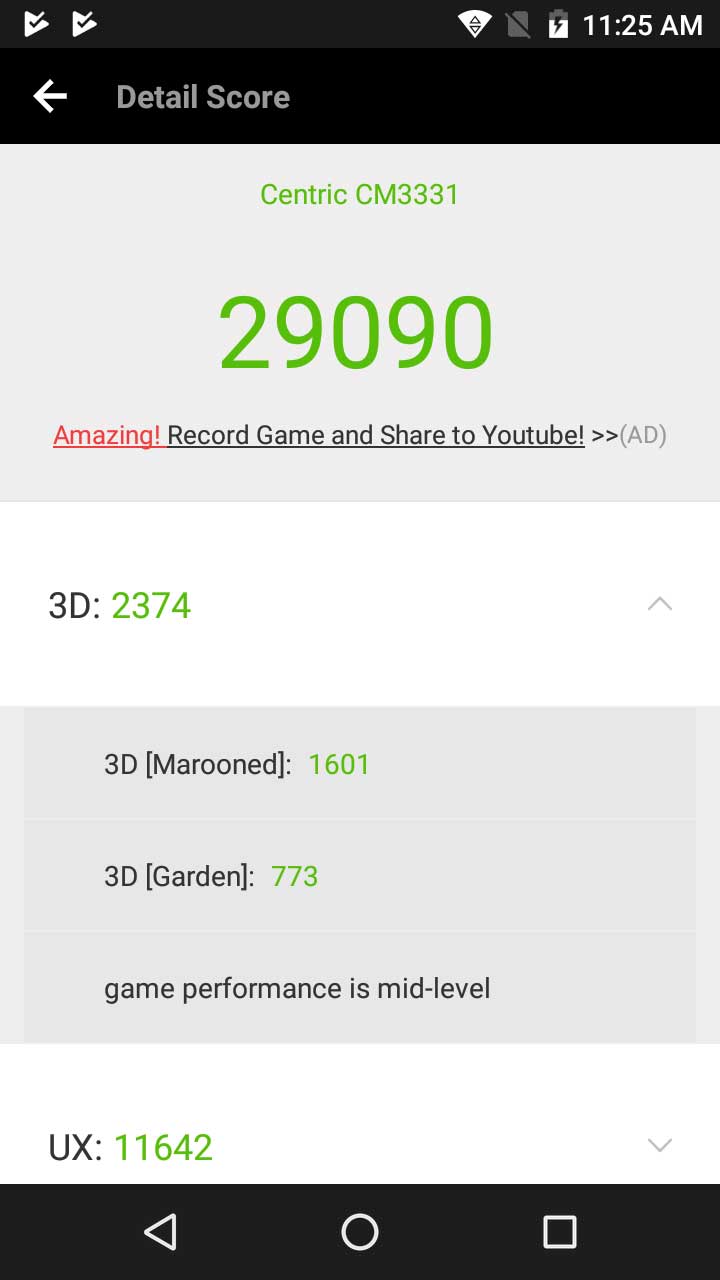
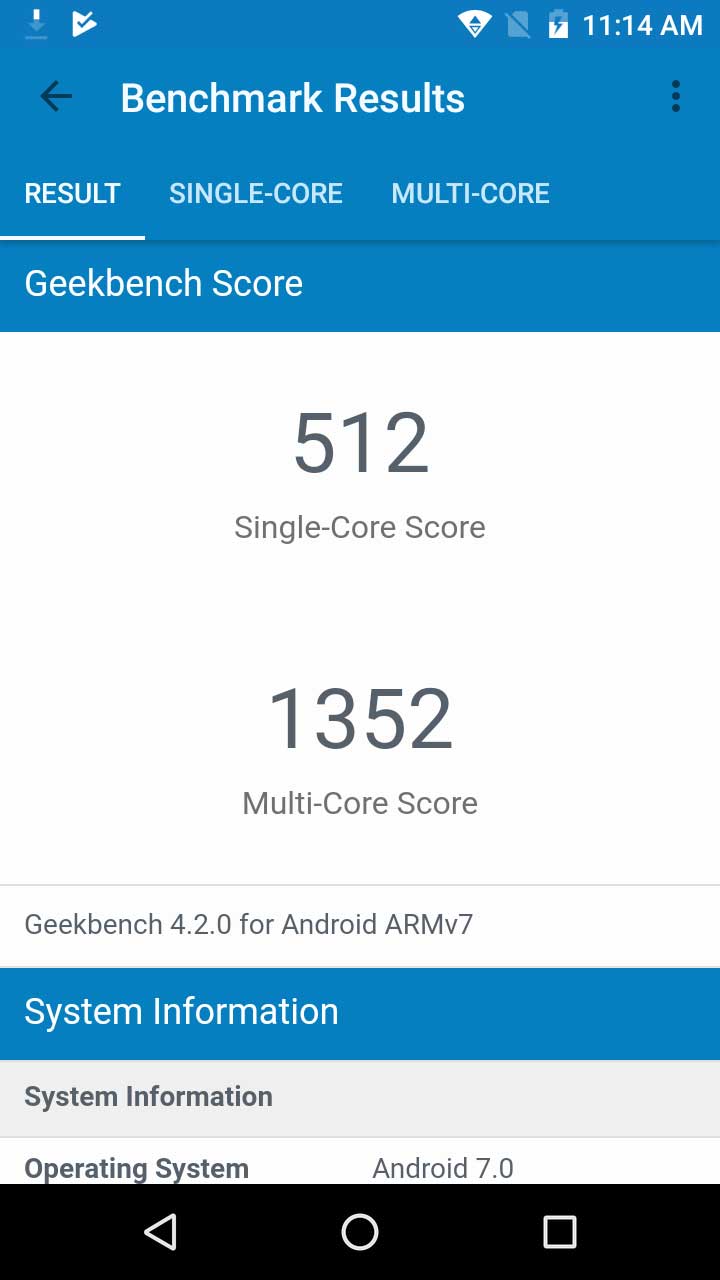
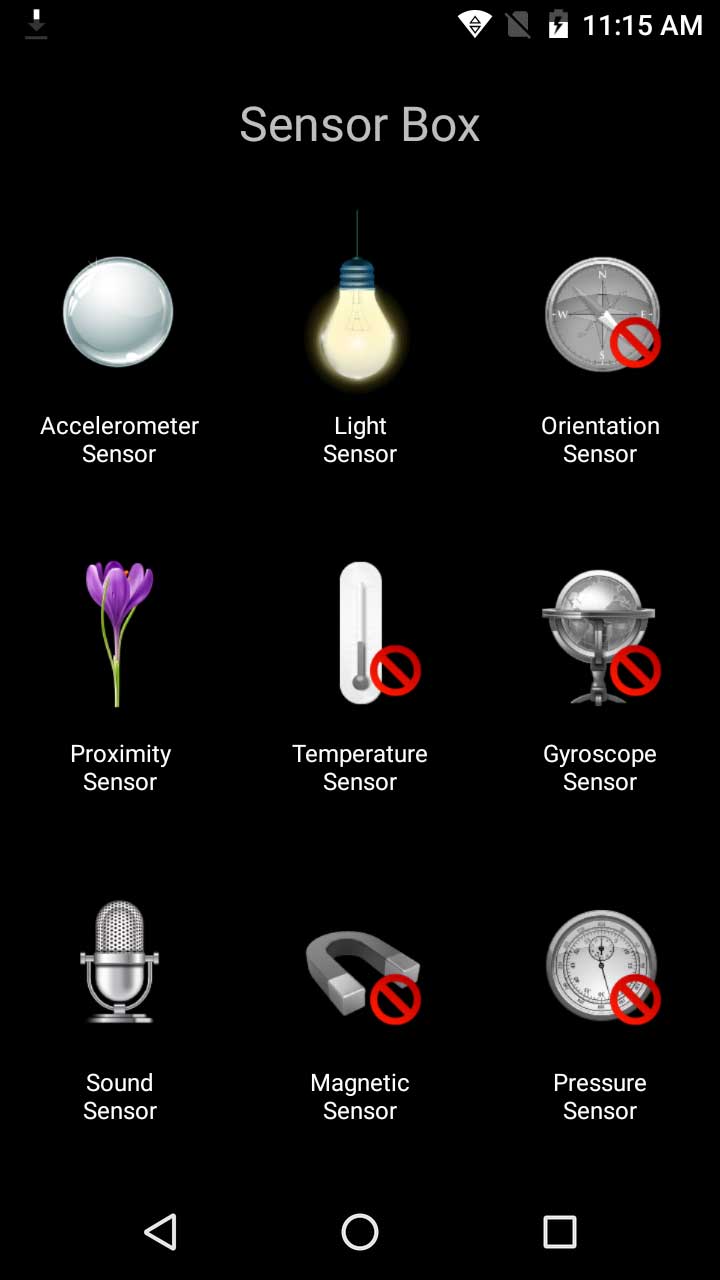
We get Antutu Score of 29090 and certain other scores are ok. With this screen size and average selfie, they have also given nominal sensors which are required by any normal person.

Coming to the gaming part, we can play almost all games but at very low setting. In my use, we can play Asphalt 8 but at low setting. Mali T-720 GPU actually support the processor a lot. I have also not seen any heating issue while long gaming in DELHI, INDIA Temperature.

Camera

Centric-L3-Camera-Techniblogic

CENTRiC L3 comes up with 13 MP rear Camera which comes out quite good with this price range. The rear camera seems to be even better than what we get in Xiaomi Redmi 4. We get better clarity and better bokeh with this price. Focusing on the device is good with the rear camera. The images came out really good with some great colors and saturation. Rest, I have already posted some camera shots downside. Coming to the Low light images, it comes up with a little bit noisy.

Coming to the front part here we get a 5-megapixel large sensor for selfies with a front LED flash in it. I would say taking selfies in good light will be decent but in low light, I would say Nah.

Rest, we have a different option in the camera app which we can use and fiddle up with to get better shots.

Camera Samples

Software

CENTRiC L3 out of the box is loaded with Android 7.1.1 which is Android Nougat as of now and we have no info about when they are going to roll out Android Oreo on this device. The software seems to be stock and almost no bloatware in it. Some basics applications like Word and Excel is present in the device which can be further used in daily use for basic office work. The best thing is the Stock android which we are getting. Many of the users will surely be going to love the clean UI which they are offering at this price.

Battery

Coming to battery part of the phone which is its 3050 mAh Battery which works really well. It took me approx 1 hour 50 minutes to charge from 0 to 100% using its default charger. Battery usage of the device is good. It will easily go to last you more than a day because of good software optimization.

ALSO READ: Best Smartphones with Longest Battery Life 🔋 in India

Coming to the battery performance, on high usage, it will easily last you for a day and on normal usage, it will easily slightly more than a day. Rest, battery usage varies from person to person and their usage.

Verdict

Overall I think for the normal and basic user this can be a choice.

Pros

  • Above average Camera
  • Stock Android
  • Very Handy
  • Affordable pricing

Cons

  • Processor can be bit above to get into more competition
  • Front camera is average
  • No IR Blaster

Buy Here

Top 5 Best Cool Gadgets You Must Check on Cafago [Coupons Inside]

Are you waiting to buy something online? Want to buy the best product at a cheaper rate? Then here is the best time on which you can buy flow rate products and save a lot of money. Yes, it is true… you can save a lot with Cafago Coupons which is for Limited Time only so be quick to grab your favorite Product before they become out of stock.All these gadgets priced very low on cafago. So Let’s Start with Top 5 Best Cool Gadgets Deals on Cafago Right Now!

1. Wireless Bluetooth Laser Projection Keyboard

Wireless-Bluetooth-Laser-Projection-Keyboard

On the top our list, we have a futuristic gadget that now become real. There have been many scientific movies where people type on projection and the computer detects it. But now it comes in reality. You can buy the Mini Wireless Bluetooth Laser Keyword which Virtual projection keyboard & mouse for smartphone, pad, tablets, laptop. And it comes with LED screen that displays the information that matters. You can get this watch for just $31.99 Only, Here is the Link to Buy.

2. Andoer Bluetooth Headphone

Andoer Bluetooth Headphone

Music is a super companion for humans, which can make you relaxing and enjoy colorful life. This Wireless Stereo Bluetooth Headphones is specially designed for music lovers and sports enthusiast, which features Advanced Bluetooth 4.1 technology, 3.5mm Audio Port, Built-in high-grade Microphone & Speaker, TF Card MP3 Player, FM Radio, hands-free function. Isn’t it Great? Here is the Link to Buy at Price of $12 , no Cafago Coupon needed.

3. JJR/C H47 RC Quadcopter

JJR/C H47 RC Quadcopter

If you like to fly a drone or you want to buy a good drone in your budget then this drone is for you. This JJR/C H47 comes with aerial photography beauty mode and 720P camera can help you take more beautiful photos and videos. Here is the Link to Buy at Price of $34.59
after using this Cafago Coupon: L8675RM

4. NES Video Game

NES Video Game

If you born in 19’s then this is the Must have gadget or we can say video game. This video game console have 500 different built-in classic games in it. Playing it, you would gain the fun of your childhood and the fun with your family, which is very suitable for amusement and recreation in family. Here is the Link to Buy at Price of $17.98 after using this Cafago Coupon: L1604FE

5. TWS-K2 True Wireless Bluetooth Headphone

TWS-K2 True Wireless Bluetooth Headphone

K2 Bluetooth Headphone is specially designed for music lovers and sports enthusiast, which features Advanced True Wireless (TWS)Bluetooth 4.1 (CSR4.1) Technology, Built-in high-grade Microphone & Speaker, hands-free function and lightweight design. It’s a great companion for your daily life, office time, driving or travel. Here is the Link to Buy at Price of $13.69, Cafago Coupon needed.

To stay updated with awesome deals, please subscribe to our website to be First to get News and Deals in the field of technology.

Samsung Galaxy A8+ (2018) Launching in India Soon: Expected Price, Specs and Release Date

The electronics company Samsung which has millions of users worldwide is launching the Samsung Galaxy A8+ and the Samsung Galaxy A8 in India. The phones will be released during the launch event going to take place in New Delhi on Wednesday, 10th January. These smartphones are being called “The year’s first big innovation” by the company itself and invites have been sent to the above-mentioned event. Amazon India has set up a special microsite for these products which allows one to view its special features such as glass and metal design and an 18:9 ratio based Infinity Display. Both these phones will be an Amazon exclusive throughout the country.

The Samsung Galaxy A8+ includes a Full HD 6 inches Super AMOLED display featuring the Infinity Display Design with 18.5:9 aspect ratio. The resolution provided is of 1080 x 2220 pixels and the device is powered by an octa-core processor which constitutes two 2.2 GHz cores and six 1.6 GHz cores. The back camera of the A8+ is of 16 megapixels with f/1.7 aperture and PDAF whereas the front one includes a dual camera having a 16 megapixel and 8-megapixel sensor both with f/1.9 aperture.

It’s available in two configurations – 4 GB RAM with 32 GB of built storage and the other one has 6 GB RAM with 64 GB inbuilt storage. It supports fast charging on its 3500 mAh battery and supports microSD cards up to 256 GB. It features MST for Samsung-Pay based payments and the dimensions of A8+ are 159.9 mm x 75.7 mm x 8.3 mm and weighs 191 g.

Its smaller kin, the A8 has almost all the similar features of the Galaxy A8+ apart from a few variations of the screen size which is 5.6 inches and it works on a 3000 mAh battery. It comes only with 4 GB RAM and measures 149.2 mm x 70.6 mm x 8.4 mm weighing 172 g. The A8+ will cost approximately INR 38,040 and the A8 will be roughly priced at INR 30,980.

Wix SEO Wiz Review: Easiest and Best Tool for SEO

Almost anything can be done digitally these days. Whether it is shopping, or watching television, everything can be done from the comfort of your computer. Even if you are a small business owner, you should be actively creating an online presence for yourself.  However, building and managing a website can be a difficult task. So, we’re going to look at an easy and great way to get started with your own website.

We have found an almost magical solution for creating your dream website in minutes. Wix.com is a professional website builder that provides an amazing web designing tool that can create any website, even if you don’t know web designing languages like HTML, JavaScript, PHP etc. You Just need to drag and drop all of your necessary fields, and you are ready to get started on your site.

Wix.com has a simple editor that has revolutionized the concept of website creation. In addition to making websites simple to build, they also offer some of the best Search Engine Optimization tools. If you are looking for a guide to SEO, then you should check out the Wix SEO Wiz. This tool will give you a personalized plan, keyword analyzer, walkthroughs and tutorials and many more.

SEO is just as important for your website as the design and overall experience of the site. Making adjustments to your own page SEO will help your website to rank on a conventional search engine such as Google, and bring more and more engagement on the website. The Wix SEO Wiz will help you learn how to make sure your website stays at a top. Let’s break them one by one:

Get found on Google:

Firstly, the SEO Wiz will help you to learn about Keywords. Keywords help to define the relevancy of your pages and help Google to know that your site is relevant to a query. The SEO Wiz will prompt you to choose keywords based on your location, what you are site is about, and other terms that are already ranking in your market.

Keyword Analyses:

This feature helps in evaluating your website’s keywords, it keeps checking the viability and the distinctiveness of your keyword. The keyword analyses feature also suggest essential keywords that could improve the website ranking, which is very helpful when you’re new to website building and you’re looking for something quick and reliable.

Get indexed by Google:

Google is an amazing search engine; they provide the basic structure for how to optimize your site so that you can reach a higher website ranking. One of the most necessary steps for your website is to be indexed by Google. Until you index your site, you cannot even get found on good. So, its critical that you start with site indexing so that Google can help find your site in the search! The Wix SEO Wiz makes getting your website indexed by Google very easily. Just follow the instructions and drop your website URL into Google Index submission.

Track your success:

The Wix SEO Wiz also provides a traffic analysis report, which includes clicks on the website from Google or other conventional search engines and from direct clicks. It also shows regional engagements for a deeper analysis and better traffic report.

SEO guide:

The more you know the better you are with SEO. With that motto, Wix.com provides simple SEO guides so that anyone can understand SEO. There are some amazing tutorials that you can find on Wix, and on the internet to help you figure out the basic concepts of SEO, and how to increase your website ranking. You can also try to learn more advanced SEOs concept to make your website rank even better.

Verdict:

So far, we love the Wix SEO Wiz, it’s the best SEO tool for a new startup to get easy engagement. It has a friendly user interface and a very subtle UI, which makes it more convenient in use. You can log in from anywhere and check your status and analytics report. The best part is the drag and drops feature of the website editing, which helps you to quickly create a beautiful site. The folks at Wix.com also offer premium features that include more services and more storage options and some premium templates. One of the best things about the SEO Wiz is how simple it is. They take you step by step through the stages so that you don’t forget to optimize any of the important details of your website.

Thanks for hanging out with us guys. Please do drop your suggestions and ideas in the comment section below. You can also check Tayloright for any query regarding SEO. Feel free to share your thoughts and questions, I would be happy to answer them. If you want to keep tabs on more websites like Wix then subscribe to our website, and don’t forget to give your reaction.