Home Blog Page 272

5 Quick and Helpful Tips to Small Business SEO

2

Search engine optimization (SEO) may sound like rocket science for those who are not familiar with it. It may be complicated at some level, but it really doesn’t have to be that way, especially when it comes to the basic steps. There are SEO techniques that anyone can easily do, even for those who are not highly technically savvy. You can also find a small business SEO company that can help you improve your online presence and help you develop an effective SEO strategy for a successful online campaign.

Among the many steps and strategies used in SEO, there are some that you can easily do to start your online presence campaigns, here are some of them:

  1. Setup a Google My Business Account

By creating a Google My Business Account, your register your presence to the biggest search engine in the online world.  This is the first step to be recognized by Google and have bots crawl on your site, Make sure to provide complete and accurate information. This is how people will reach and find you. So ensure that you provide full information on your business operating hours, exact location, and other relevant information that will help people find you easily.

  1. Ensure Your Site Works for Mobile

The number of people using their smartphones is increasing over time so there are higher chances that people will search for you through mobile. Additionally, Google favors sites that are easily accessible and works well on different devices; so make sure that your site is also fit for mobile use. Use website development templates that are also fit for mobile, as there are already a lot of them available.

  1. Create a Social Media Presence

Social media is a great way to reach different people, as the number of social media users is already reaching billions, especially on big platforms like Facebook and Twitter. Social media is already a proven effective channel to drive traffic towards your site. They are also great platforms to make announcements, announce events, and interact with you customers.

  1. Create Good Content

Content is king. It has always been and will always be for quite some time, especially now that search engines favor good content. By doing content that adds value for your readers, you can easily make it on top of search engines. As well, the use of keywords is very important and you need to incorporate them into your content so they become searchable.

  1. Optimize Your Content

Optimizing content means using the right titles, headers, and meta descriptions on your content. These make it easy for search engines to index your site and feature its contents on search results. This must be consistent across your pages for better ranking.

There are much more SEO techniques that you need to learn and apply for your business to flourish in the online world. To save time and effort, hire an SEO company that will deliver good results for you and you will enjoy a lot of benefits from it.

Asus ROG Zephyrus Gaming Laptop With GTX 1080 Launched in India

ASUS Republic of Gamers (ASUS ROG) announced the launch of Zephyrus, a gaming laptop at only 16.9 mm which makes it to be the “world’s slimmest gaming laptop with an NVIDIA® GeForce® GTX 1080”. It’s powered by a seventh-generation Intel Corei7 (Kaby Lake) processor and also features the Windows 10 Creators Update which enhances the performance of the PC games.

ALSO READ: Top 10 Best Cheap Gaming Laptops

This laptop comes with a 15.6-inches full HD display (1920 x 1080 pixels) having a frequency of 120 Hz. Its display also supports Nvidia’s G-Sync technology which allows smoother gameplay. It contains ROG- exclusive Active Aerodynamic System (AAS) for cooling and a fast 120Hz panel with wide-view technology. The AAS uses a unique Aero Accelerator (AA) technology to provide better airflow throughout the laptop. This device supports up to 24 GB of DDR4 RAM and comes with 256 GB, 512 GB and 1 TB of M.2 PCIe NVMe SSD storage options. The ports provided on the Zephyrus comprise of Thunderbolt 3 Type-C, four USB 3.1 Type-A, HDMI 2.0 and includes a 3.5 mm headphone jack.

Nvidia introduced its WhisperMode technology in the Zephyrus which makes laptops run quieter while gaming. This technology helps in increasing the frame rate along with configuring the graphic settings for optimal power efficiency. The ASUS Aura RGB lighting technology allows dynamic and customizable lighting effects for the keyboard. The keyboard is placed at the front of the chassis for better cooling and consists of ergonomically designed keys for better typing and comfort.

ALSO READ: Best Laptop with Nvidia GTX 1070 Graphic Card in India

This Super laptop is Priced at INR 2,99,990, the ASUS ROG Zephyrus will be displayed in Bengaluru, India on 20th August at the ROG Masters South Asia finale.

The Perfect Solution for Hearing Loss 👂 – Nuguna Neckband

0

Hearing loss, also known as hearing impairment is a partial or total inability to hear. According to a survey conducted, it is clear that presbycusis is the third most common health problem in the US and it can affect the quality of your life and relationship. Just to help people with hearing disorders, we have a technically advanced device named NUGUNA NECKBAND. It is designed to detect high pitched sounds and informs the user to its direction.

How does Nnuguna Neckband Works?

The built in microphone measures the surrounding noise. If the sound has a higher pitch than the level is set on the left Side. If the sound has a lower pitch than the level is set on the right side. Basically, both sides of the NECKBAND indicate the direction of the sound through the vibration.

You can connect the NUGUNA NECKBAND with your smart phone through a mobile application. You simply have to turn on the neckband then go for the mobile application installed on your smartphone. Scan through the app until it gets paired with the neckband and then go the settings option and set the threshold as low as possible, so that it is sensitive to hear. You can also change the intensity and number of times vibration takes place.

Features / Specifications:

  1. Not only these neck bands keep wearers safe but also allows them to connect and socially engaged through the social media alerts, notifications, phone calls and messages.
  2. The indoor sounds like the voice of doorbell, microwave alarm, ringtone etcetera and the outdoor sounds like sounds of car horns and bicycle horns can be perceived through vibrations.
  3. From USGS survey conducted, it is also noticed that NUGUNA NECKBAND can provide natural disaster alerts.
  4. The battery charging time takes less than 40 minutes.
  5. The battery after being charged last for around 50 hours.

Why should one go for Nuguna Neckband?

The Perfect Solution for Hearing Loss


Many people who go through hearing loss problems find awkward in wearing hearing aids. So, these NUGUNA NECKBAND keeps the wearer safe, engaged and aware. It also looks stylish and allows users to be aware of the environment through the vibration alerts.

Availability:

The product is available on the site of kickstarter.com. The price of Nuguna Neckband is 108$. It will probably be shipped later this year. Grab it now to avail the special discount.

Buy Now

Thanks for hanging out with us guys. Please do drop your suggestion and ideas in the comment section below. If you want to keep tabs on a more innovative product like this, subscribe to our website and don’t forget to give your reaction.

8 Awesome Android HACKS that Don’t Need ROOT

Rooting is the process of allowing users of smartphones or tablets to attain privileged control over various android subsystem but rooting can create problems for you. It can prevent some apps from working and it risks exposing your phone to potential security problems. As the years have gone by, we don’t need root.

8 Awesome Android HACKS Apps

DU Screen Recorder

It is a free, stable, high-quality screen recorder for android that helps you record a video of whatever is happening on your screen. You can adjust the video’s quality options and also you don’t need to root in order to record. It provides an easy way to record screen videos like game videos, video calls, live shows and more. You can DOWNLOAD this App from HERE.

No Root Firewall

noroot firewallIt requires no root. It notifies you when an app is trying to access the internet. It protects your personal information from being sent to the internet and allows you to create filter rules based on IP address. It lets you block any app from accessing the internet and can manage domain filtering. It may not work with LTE because it doesn’t support IPV6 yet. You can DOWNLOAD this App from HERE.

Parallel Space

parallel space multiple accounts and two facebookIt is an application that allows you to manage two different user accounts of any app installed on your Android device. It creates virtual space that is completely independent and separates it on your device that allows you to run other apps inside. It doesn’t require rooting. You can DOWNLOAD this App from HERE.

Nougat UI for Android Beta

nougat UI for Android BETAIt is an application which contains its own shutter and the status bar, launcher, pops up notifications, setting device etc. The uniqueness of the project is the existence of those who make the similar interface of a shell. All this works on almost any version of Android without any rooting. You can DOWNLOAD this App from HERE.

Color Status Bar

It is an application developed by the Thirsty star. It will give a little life to your device’s status bar. It is a free and awesome tools app which support Color mixing and changing. There’s no need of rooting. You can decorate as desired colours and shapes. You can DOWNLOAD this App from HERE.

Muviz-Navbar music Visualizer

It is a first of its kind app that will display a music visualizer on your phone’s navigation bar while you’re listening to your favourite music. It plays live music on your phone which will bring your music experience to life with floating visualizer beneath your on-screen navigation bar. No root required. You can DOWNLOAD this App from HERE.

Pixoff Battery Saver

It saves battery by applying a filter that turns off pixels of the screen, also incorporates the possibility of making a filter night, decreasing the damage and further battery consumptions. It helps in extending battery life on your phone and has tools for enabling the time range of the night filter and adjust red, blue and opacity options. It has a feature for enabling a black wallpaper whenever the battery runs below a certain level. No root required in this. You can DOWNLOAD this App from HERE.

Blackr-AMOLED Screen off

It is an application that works by showing a black overlay on the top of the screen and on modern AMOLED displays, this turns off all pixels effectively turning the screen off. Blackr stimulates a locked screen like state over any app and doesn’t stop them from running. The simple and smart design makes it easy to operate. Rooting is not needed. You can DOWNLOAD this App from HERE.

Verdict

My personal favourite is parallel space; it lets you use two accounts at the same time. Very beneficial for WhatsApp user. The no root firewall is so far the best free security app out there, the problem with it that you need to manually configure it in order to work for you, very good for networking geeks but confusing for others. I also like Nougat Shell UI and Status bar apps, they are pretty good for personalization.

ALSO READ: 6 Incredible Way To Use Your Mobile Camera!

At last but not the least, if I missed your favourite app and you like me to check out, please mention them below. Also, feel free to share your experience with these apps in the comment section.

Increase the View for your YouTube Videos for Promotional Matter

0

If you want to make yourself famous and as well want to make some money out of the fame or just for the reason that you would like to share your talent with the world then it is absolutely necessary to increase the views related to the YouTube videos that you are going to upload. Here the videos are being liked and shared and thus the chance of getting more recognition within this virtual world would be easier. But there are some really important strategies that would require you to make the best out of the You Tube videos and their rankings. There you will also get more possible ways to increase the number of viewers and thus will get more facilities that would help you to gain fame within a short period of time. But before you choose one it is always recommended that you go for those companies that will facilitate you to buy the potential and highly useful views for your You Tube videos.

Better recognition

YouTube Channel Optimization Techniques

In general it may seem to be an easy task to get the views without any effort but then you will not be able to reach the targeted mass through which you want to get more recognition. Moreover there are these facets that will make sure that you will get the fixed amount of views each day or over a period of time. Nothing can be more important that getting the views without much hassle. You may not be an expert to find out the best strategies for making people aware of the videos but on the other hand there are these companies which will make the task easier for you besides taking the best charges as per the industry standards. You can be quite sure about the fact that your account will be absolutely safe at their hands and hence you can easily concentrate on the actual job or making the video for which you will get more likes and shares. The companies also make sure that the YouTube views are of good quality and for this they depend on the slow speed of uploading as it will help them to get the high definition videos which will again prove to be profitable for you.

Choose the experts

As YouTube forms the finest and the best free form of social media through which people get to see the different videos that have been uploaded by others irrespective of the location boundaries, it makes the whole process even more reliable in terms of sharing and viewing. The best companies would try to buy the views which will definitely promote your videos to a greater extent. YouTube views forms the most important part of this strategy just because if we do not target those who would be interested in particular videos then there is a little chance of sharing which again will not be profitable for the videos. The tools and the features of the You Tube videos are taken into account while making your video gain the fame.

Is Google Sandbox Helping or Destroying the SEO on your New Website?

0

While it sounds silly, the Google Sandbox phenomenon is real and happens all the time. If you are new to this verbiage, Google Sandbox acts as a filter for new websites, as if they are sifting sand. The Google Sandbox theory was created as the temporary filter that is placed on a brand new website is done so that Google can thoroughly evaluate the site. Believe it or not, there are scammers out there who build websites that are destructive and while they have everything that they need to be a high ranking site, they are in essence just spamming up the internet. In this article we will discuss why you may be in the sandbox and how it can positively or negatively affect your online statistics.  

Before we can even begin to determine why your website is being placed in an online time out, we will need to look at some reasons as to why your website was targeted in the first place. Why might you be affected by the sandbox? Consider these items as potential culprits:

    1. Low quality links
    2. Redirects
    3. Copied content
    4. Over-usage of keywords
    5. Spam

There are ways that you can work your website out of the sandbox and here are some things to put on your to do list. The sooner you take care of these tasks the faster you will be able to rank in Google search.

  1. Remove low quality links and replace with pertinent high quality links. If your site offers low quality images, you should update those as well.
  2. Get rid of redirects. Google will consider the use of redirects to be spammy as the page will redirect to another webpage that is unrelatable or malicious.
  3. Replace, delete, or add a source for copied content. If you have any copied content on your website, you will want to get rid of it or at least provide credit to the resource in which the information derived.
  4. Over-usage of keywords is not a good idea. To avoid this, do research on SEO strategies or hire a professional such as Las Vegas SEO to assist you.
  5. Rid your website of anything that google considers to be spam. Google considers web pages that are malicious or phish for important information to be harmful and of a “spammy” nature.

When building a new website, you will want to ensure that you are using white hat SEO and marketing strategies. This will ensure that your website does not fall victim to quicksand or the sandbox. One of the best ways to do this is by the utilization of “no follow” links. Other suggestions include offering guest post opportunities, producing high quality content that your users will want and enjoy, and creating outreach campaigns that are genuine in targeting your ideal customer base. The best way to avoid the sandbox is to create a genuine, high quality website with great content that provides helpful images and does not spam the user.

Play Smartly with the Artificial Intelligent Bots Alive Robot

0

Based in Austin, the “bots_alive” is headed by Dr Bradley Knox who has researched artificial intelligence and human-robot interaction at the MIT media lab and UT Austin. bots_alive is being supported by a National Science Foundation SBIR Grant. Its aim is to create robots which resemble an animal and it does so by using a Hexbug Spider and its bots_alive kit.

How does it work?

The motive is to make the bots appear alive than any other machine. The creatures are controlled by using a unique character Artificial Intelligence. The world as the robot would see would be shown in your smartphone i.e. the augmented reality. The phone’s camera will perceive the bots and the nearby vision blocks. bots_alive converts the Hexbug spiders into smart, lively and independent creatures.

Features

  • They are autonomous as they make their own decisions.
  • The 2 bots play provides one kit for two robots.
  • It continuously learns and develops itself using the artificial intelligence.
  • The kit includes Vision Blocks and Markers to help you build obstacle courses.
  • IR Blaster gives your phone the control over Hexbug Spiders
  • Companion App which acts as a guide for playing with your robot.
  • It’s supported by both iOS and Android.

Why should you buy it?

This product has been built for kids of age 6 and more. It acts a decent way to inspire children to embrace technology. These bots are smart and playful creatures as they tend to make mistakes and learn. They are very easy to set up and provide the children unpredictability and a challenging environment while building mazes, obstacle courses or towers. These bots also promote group play. “Could be the most fulfilling $35 you’ve ever spent on a robot,” said Evan Ackerman, IEEE Spectrum.

Availability

The product is available on the official site of Kickstarter. The price of bots_alice  is just 35$. It will probably be shipped later this year. Grab it now to avail the special discount.

Pre-Order Here

Thanks for hanging out with us guys. Please do drop your suggestion and ideas in the comment section below. If you want to keep tabs on a more innovative product like this, subscribe to our website and don’t forget to give your reaction.

Take you Smart Personal Assistant Anywhere you want with Plen Cube

0

We all are indeed familiar with drones that act as a personal assistant, but now we have another technological marvel to add in that category; PLEN CUBE. The PLEN CUBE is a small palm sized, portable personal social robot. Plen Cube features a camera and automation skills, plus you can carry this device with you wherever you go.

Buy Here

How do the Plen Cube works?

In order to set Plen Cube up, just push a button and your Plen Cube will start working. You can customize your settings, services and devices, using the Plen Cube mobile app and use IFTT or the developer API to create custom automated actions.

Features:

  1. Plen Cube can amalgamate your device and web services making them simpler to use and automation.
  2. With plen Cube’s smart camera you can also capture moments that tracks your wave and motion.
  3. This device also gives weather information. Photos and videos sharing is also possible via Bluetooth and WiFi features available and you can also hear the music.
  4. The hand’s free camera follows your movements.
  5. You can also use voice commands to take a photo or video.
  6. Plen Cube can even rotate 360° to take a panoramic photo

Why should one go for Plen cube social robot?

Assistant anywhere you want with Plen Cube

If you are always in need to know weather reports or your appointments, fitness stats, news alerts, social media and etc. and etc.  then you really don’t need to hire a personal assistant, because for this kind of chores the PLEN CUBE is best. It will serve its best by becoming your personal assistant and will also follow you to the places wherever you go.

Availability:

The product is available on the site of kickstarter.com. The price of PLEN CUBE is 199$. It will probably be shipped later this year. Grab it now to avail the special discount.

Buy Here

Thanks for hanging out with us guys. Please do drop your suggestion and ideas in the comment section below. If you want to keep tabs on a more innovative product like this, subscribe to our website and don’t forget to give your reaction.

Learn Why the E-Scooter is the New Savvy Mode of Urban Transport

0

The mere fact that I am writing an article for a global audience from a computer is a testament to some of the technological leaps made within this remarkable period. But that’s just the tip of the iceberg, we’ve made strides in medicine, communications, aeronautics, engineering, energy, transportation, you name it.

As with all things imaginable, there are advantages and pitfalls associated with progress. As the world has gets richer and the standard of living of people continues to rise coupled with drops in the prices of vehicles, it’s no wonder that city dwellers can’t seem to get to their destinations on time.

Traffic congestion has become an inescapable reality, one that seems to be plaguing all metropolitan areas around the world.

As income levels rise, the number of cars on the street seems to be multiplying faster than bunnies. Correct me if I am wrong, but, it does feel a bit ludicrous doesn’t it. All the while, physical space simply isn’t growing fast enough to keep pace with it.

Rise of the Electric Vehicle

The technological advancements in the storage of electrical energy have literally opened a Pandora’s Box of opportunities/problems. The problem of how to electrify everything we’re created so far. We’re a funny bunch aren’t we?

Needless to say, we now have electric vehicles which have far greater implications for our future than just congestion but let’s not get ahead of ourselves.

Recently we’ve noticed a new trend, an exciting trend of electric vehicles zipping through the hellish streets of major urban centers. And, it makes absolute sense. Not only is it economical, but it instantly solves most of our issues of mobility and traffic congestion.

This amazing new trend isn’t merely exclusive to some parts of the world; rather, it’s a globalized trend that seems to transcend the general boundaries of culture. It’s a truly transformative trend, one that certainly has the potential to shape our views on urban transport and the way our cities look in the future.

The Technological Implications

In the most basic of terms, e-scooters are a hybrid between a bicycle and a motorcycle. As the name suggests, they are powered by electricity and are connected to lithium ion batteries or nickel-cadmium batteries, the same technology fueling the greater revolution in electric vehicles. These new e-scooters for daily use are chargeable and as the adoption of electric vehicles grows the number of charging stations are also proliferating.

Now, e-scooters may not be power enough for long-distance commuting or travelling on the highways, but then again, they weren’t exactly meant for such purposes is the first place. These vehicles help to cut down on the costs of transportation and help clear up the congested roads and radically cut our time spent on the roads. What more could we possibly want?

Some of the Popular E-Scooters

Razor E-300

Razor E-300Razor could be considered as the original pioneer for this specific style of scooters. The E-300 is their biggest adult-oriented scooter is their basic E-range. Although, they have a wide range of collection for both kids and adults, the E-300 deserved a mention for its role in this particular mode of transportation

The E-300 is ideal for short distance commutes. It’s barely weighs 220 lbs., goes up to 15 MHP and can travel for 40 minutes at a time. It’s clearly not the ideal product for serious commuting but a wonderful product none the less.

GenZe 2.0

GenZe 2.0The GenZe 2.0 is a far more serious machine. Unlike, the previous scooter, GenZe 2.0 is far more powerful and capable of going up to much greater speeds, but is electronically capped by the manufacturers at a speed of 30 MPH due to regulatory requirements. It boasts a range of 30 miles and is fully rechargeable within a mere 3 hours.

It offers quite a bit of cargo room for practical purposes and comes with a sophisticated operating system, which can be linked to a smart phone using its app. The e-scooter is available for around $3,000, which is anything but cheap, but absolutely worth every penny.

GigaByke Groove 750w

GigaByke Groove 750wGigabyke Groove is another practical e-scooter that’s indicative of how quickly the mode of transportation is advancing. Priced at around $1,400, it’s cheaper than the GenZe but no less in terms of utility.

It offers a top speed of around 20 MPH but an astounding range of 35 miles. Interestingly, the scooter also has a pair of backup peddles should you run out of battery. Its batteries take only six hours to fully charge and an excellent choice for sub-urban commuting.

Well, there you have it, some of the more popular e-scooters you’ll be seeing in increasing numbers as more people opt of convenience over the waste of space we fondly call SUVs. If you’ve been thinking of getting one of these, yourself, feel free to comment below with any questions or stories you might have. We would love to hear from you.

How to Reset Windows Login Password in 2 Ways

If you have ever come across a situation when you forget the password to your PC, then it is not only a mistake but can also lead to potential troubles. If you cannot recall your password immediately then you will not be able to access you important files, documents, worksheets on an emergency basis. Thus recovery of the password is what we are concerned about here in this article.  Read below to know the methods that would help you to reset your Windows password.

Method #1: Use Super-Admin Account

Method 1 Use Super-Admin AccountHere we would use super admin account which is a hidden default account. Read below to know how to use it to recover forgotten Windows password.

Step 1.Enter your admin account password 5 times wrong subsequently, and then press “Shift” key 5 times in a row. You will automatically be directed to the super admin account.

Step 2.With the help super-admin account, you can reset the password for the account you forgot from tools like computer management.

CONS: if you have not enabled the Super-admin account on your system before you forget the password, you will not be able to access this account and in most cases people do not even activate this option.

Method #2: Use of iSeePassword  Windows Password Recovery Pro

When you forget your Windows password, iSeePassword Windows Password Recovery Pro is one of the most convenient utilities to reset your password.

This software is very much effective in resetting your Admin account password and normal user account passwords as well. It can reset password for mostly all the Windows operating system such as Widows 7/8/10 and even the older versions like Vista/XP as well. Not only that, the feature of this software extends further to support Windows server 2000/2003/2008/2013 in an appropriate manner.
Basically, iSeePassword does not require the locked computer but a different computer to do the task. Thus it saves you the trouble of performing the task on the locked computer which is very difficult to access.

The only pre-requisites for the proper usage of this software are a USB drive or CD/DVD disk with the software installed in it and a separate computer that you can access other than the computer which is locked.

In order to know the complete functionality of this powerful iSeePassword Utility, read below to know the method description:

Step 1. Firstly, download and install the Windows iSeePassword software on a separate computer that can be accessed perfectly with admin privileges unlike the locked one. Once the software has been installed appropriately with all the terms and conditions during installation, launch it with admin privileges.

Step 2.  In order to launch it with admin permission, right-click on the software icon and select “Run as Administrator”. You can now see the main interface window of the software.

Use of iSeePassword Windows Password Recovery ProStep 3. Now; insert a USB drive or CD/DVD. When you enter any of the drive as mentioned above, and run the program, you will be asked to select any particular media type to create the recovery disk.

Step 4. Let’s choose USB drive here for the disk creation, thus we would select “USB Device” button. From the context menu, select “USB drive” and click on “Burn USB” to start burning the ISO image files to the USB drive.

Step 5. When the burning of the disk process is finished, a pop up message will turn up as “Burning successfully” notifying that the disk is ready, click “OK” to finish the process. Now; insert the bootable USB drive to the computer that is locked.

Step 6. Boot your computer, and go to the BIOS settings by pressing the keys set for your computer system, such as F8 or F12 etc. depending upon the computer model you are using.

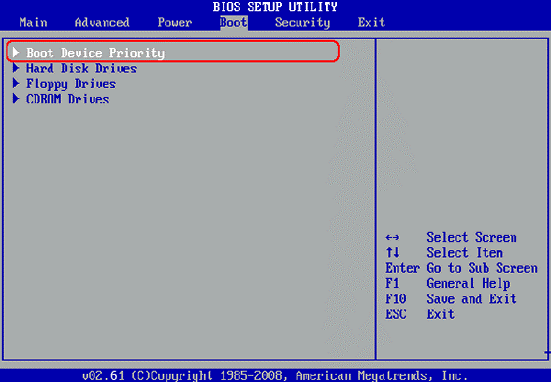
Step 7.Once you enter the settings choose from the “Boot Device Priority” drop down list, the type of media mode you are using here to carry out the resetting process. Choose USB or CD/DVD option.

windows biosStep 8. After you have changed the booting mode, reboot the computer, and this time the system will automatically start the Windows password recovery procedure. From the following Window that appears, select the account which you wish to set the password of, and click on “Reset Password” below it.

iSeePassword Windows Password Recovery ProStep 9. Click “Yes” when pop up message appears. Actually the password box for the target user will be blank. Now; click “reboot” to allow the computer to eject the disk, and click “Yes” to restart your computer. The computer will be started without the login password this time, and you can set the new password later on once you successfully enter into the system.

PROS:

  • Instead of the locked computer, separate computer is needed to perform the function.
  • It supports mostly all the versions of Windows operating system.
  • It supports desktops, laptops, tablet PC’s like Dell, Toshiba, HP etc.
  • It can add and remove users from your computer permanently.

Cons:

  • You can check all the usernames on your computer for free but if you want to unlock your computer then you will have to get a license to register the software.

Conclusion:

As you can see password resetting for your OS is so important thus you need to rely on a way which has got no hassle and is user-friendly. Of the two methods discussed above in this article, the implementation of iSeePassword is comparatively the most effective choice if you safely and quickly want to reset your Windows password.

The other methods would too help you resolve your issue, but the degree of assurance that this product provides to the user is 100 % as you do not need to go through laborious technical complexities which is usually the case with other methods.

If you are satisfied with the article, feel free to subscribe to our website to know more wonderful software like iSeePassword and many more.

3 Tips to Setting up a Computer Office

0

There is quite a bit to think about when setting up an office for your company. Between choosing the type of furniture to get, setting up the internet and phone service, and hiring skilled employees, it can be overwhelming at times. This article will highlight some cost effective ways to set up your company office so that it is efficient and offers a good workspace for your employees and clients.

  1. Make a list of everything that you need for the office. Some items on your list may include a printer, copier, computers for your staff members, telephones, and other office supplies. Jot down a list of services that you need to look in to and leave room to write down pricing for each. You may find that while it is helpful to invest in a service such as a cloud, you may decide that it is actually more fiscally responsible to invest in something else that could do the job and will serve you better.

  • Invest in a server. Investing in your own server is not out of reach like it used to be. Servers such as the ibm 8202 e4b model can be purchased at a reasonable price point. There are many reasons to invest in your own server and one of the biggest reasons is the vast amount of RAM that you will have access to. In addition, you can have peace of mind as you can likely manage it yourself and some even offer custom setup options. Your data and informational files will be secure and privacy will not be a concern when you have your own server.

  1. Determine if you need an alarm system. If you are setting up shop in an area that is considered to be safe, hiring an alarm company will not be as necessary as it would be if you were in a part of town that was known for break-ins and other mischief. It is also important to consider the type of business you are opening. For example, if you are setting up an office building that will sell products out of a distribution center, you do not have to consider an alarm as much as if you were going to have a great deal of cash stored the building at any given time. Carefully decide on what you need and make your decisions based on budget and not want. Setting up a new company can be costly and the last thing you want to do is run out of money.

Setting up an office can take a lot of time because there is a lot to think about. While you may not have as much time as you need to clearly think decisions through, you will want to try to do so as much as possible. Making quick and rash decisions can leave you in a dilemma down the road and it is best to avoid as many challenges in the beginning as possible. There will be enough of those that come up on their own.

4 Reasons Magento e-Commerce support is worth the Investment

The internet today has undoubtedly become the world’s most reachable and popular space for almost everything. From various information up to the latest news, the internet has become the people’s go-to source for information. Even businesses today must expand their market into the online marketplace in order to stay afloat and keep up with customer demands and competition. That is why if you are running a business, it is very important that you have an online platform to present your products and services.

While WordPress is the most popular content management system or CMS on the internet, it isn’t really the perfect online platform for businesses. This where Magento comes in, Magento is an open-source platform that has been developed through the years by experts with the sole purpose of catering businesses. If you are thinking of expanding your business online, then you should definitely invest in Magento Support. To further convince you, below are 4 reasons why Magento support packages are worth your money.

  1. Created specifically for business

Businesses have a lot of aspects that needs to be covered unlike other things that only needs a simple space to present their ideas. With Magento support, you can carefully set-up your business and cover the most important aspects such as;

  •    Accounting
  •    Inventory Management
  •    Shipping (Purchases and Selling)
  •    Financial reports
  •    Customer Support
  •    Tracking
  •    Inventory and Customer Data and;
  •    Regular updates on your day to day operations
  1. SEO – Friendly

In the internet, visibility is very important. In order for your business to attract visitors which can potentially be converted into customers, your business website must rank high on search engines like google, bing and yahoo. And in order to do this, your website must be highly SEO friendly. SEO or Search engine optimization are techniques and specific formats that needs to be followed in order for your website to rank high on the search engines. Titles, Meta tags, images, captions, targeted keywords and other SEO factors are all covered within the Magento Support System. This way, you will surely be able to get professional and expert help and advice even if you don’t have the proper knowledge about SEO.

  1. Mobile Friendly

According to studies and surveys, 60% of the people worldwide have smartphones. Furthermore, it has been proven that more and more people have been using their smartphones to access the internet than their desktop computers or laptops. Thus, it is safe to say that majority of the visitors of your website will be accessing from their smartphones. By investing in Magento support, your website will be highly optimized in order to cater to the mobile visitors. You see, there is a big difference in the loading time of a website that is optimized for mobile use as compared to a website that hasn’t been optimized. Those few seconds will be the deciding factor on whether the visitor will continue to your site or just cancel and move to a different site.

  1. Wide Support Community

Magento, being the most popular e-commerce content management system has a wide community of users, developers and other concerned parties. Thus, their forums will be filled with advice, troubleshooting tips, and other rooms of improvement for your website. With the wide community of users, you will be assured to have access to the latest news and updates about the CMS which will definitely be very advantageous for your business.