Home Blog Page 338

Wondershare Data Recovery Review : Best Recovery Software

Sometimes, we all face a problem when our important documents or files get deleted accidentally or when our system get crashes without saving it. Once it happens, it can disturb your whole business and day-to-day life. Wondershare Data Recovery Software is 100% safe and easy to use software in the whole market. This Software helps you to retrieve your lost videos, photos, music, documents, emails, etc. from your PC’s hard drive as well as from USB drives, external hard drives, and other storage devices. Depending on how you lost your data, you can select any one of these 5 Recovery modes.

5 Recovery Mode for All Situations

 Recovery Mode for All Situations
  1. Wizard Mode
  2. Lost File Recovery
  3. Partition Recovery
  4. Raw Recovery
  5. Resume Recovery

Recoverable Files Types

  • Documents
    DOC/DOCX, XLS/XLSX, PPT/PPTX, PDF, CWK, HTML/HTM, INDD, EPS, etc.
  • Image
    JPG, TIFF/TIF, PNG, BMP, GIF, PSD, CRW, CR2, NEF, ORF, RAF, SR2, MRW, DCR , WMF, DNG, ERF, RAW, etc.
  • Video
    AVI, MOV, MP4, M4V, 3GP, 3G2, WMV, ASF, FLV, SWF, MPG, RM/RMVB, etc.
  • Audio
    AIF/AIFF, M4A, MP3, WAV, WMA, MID/MIDI, OGG, AAC, etc.
  • Email
    PST, DBX, EMLX, etc.
  • Archive
    ZIP, RAR, SIT, etc.

How to use Wondershare Data Recovery

To start using Data Recovery for Windows or MAC just Download first.

WINDOWS                                                            MAC

after that just install the application on your windows or MAC, like i have attached the screenshot below. Here you can select the different drive where you want to install it by clicking on custom install and just agree the agreement and move further.

Also Read: Benefits of Using Top MDM Software for Your Kiosks

1-Wondershare Data Recovery

After that just start the installation. Then it will ask you to select a trial version or the activate version. Here if you have purchase the product just put the code over there and start over the installation.

2-Wondershare Data Recovery
3-Wondershare Data Recovery

After that you just need to start the application and you will see the same window which is being attached below, and just select Next over here.

4-Wondershare Data Recovery
5-Wondershare Data Recovery

It will open up the below window, where you need to select the Media which you want to recover like photo, video or document. whatever you want to recover just select it and press next.

Also Read: 6 Selection Criteria for Nonprofit Accounting Software

After that just select the drive where you want to recover the files or data like C drive or something else. After that just select next.

6-Wondershare Data Recovery

And at last start it. You can select Deep scan or raw file recovery which ever you want.

It will take a little bit time and recover all the data which it can retrieve from your hard drive.

7-Wondershare Data Recovery

Conclusion

The last word which i wanna say about it is that, the easiest software till now i have used for recovering your data file and it actually work pretty fine. If you are a needy of it and most of the time use such software just buy it. Don’t think twice about it.

WINDOWS                                                            MAC

Vivo V3 Max Review – Faster Performance with Smart Design

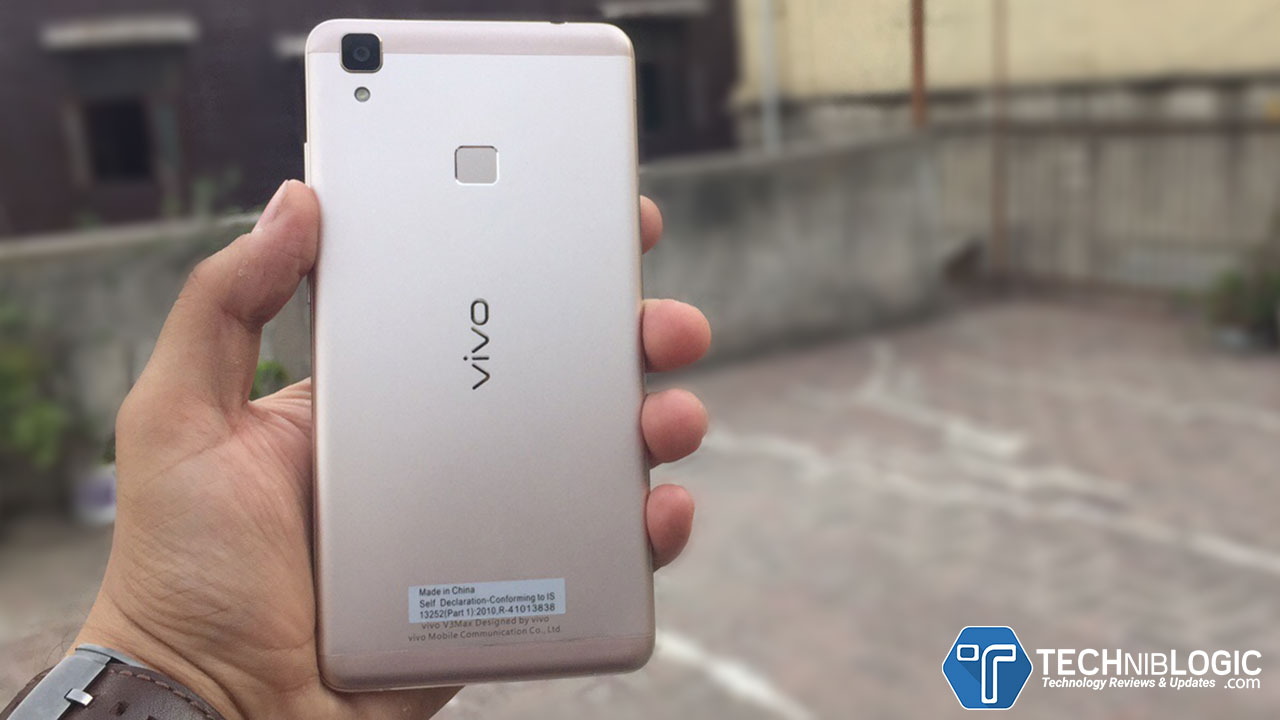
Vivo V3 Max is a great smartphone with a faster user experience and Smart Design. It offers you cool design with full metal built. Vivo V3 Max comes with Snapdragon 652 Octa-core Processor, which make it super fast phone .Vivo V3 Max was launched in India for Rs 23,980.The Vivo V3 Max has a 5.5 inch full HD display with 3000 mAh battery which helps to use your phone for a whole day.

Buy Here

Build Quality and Design

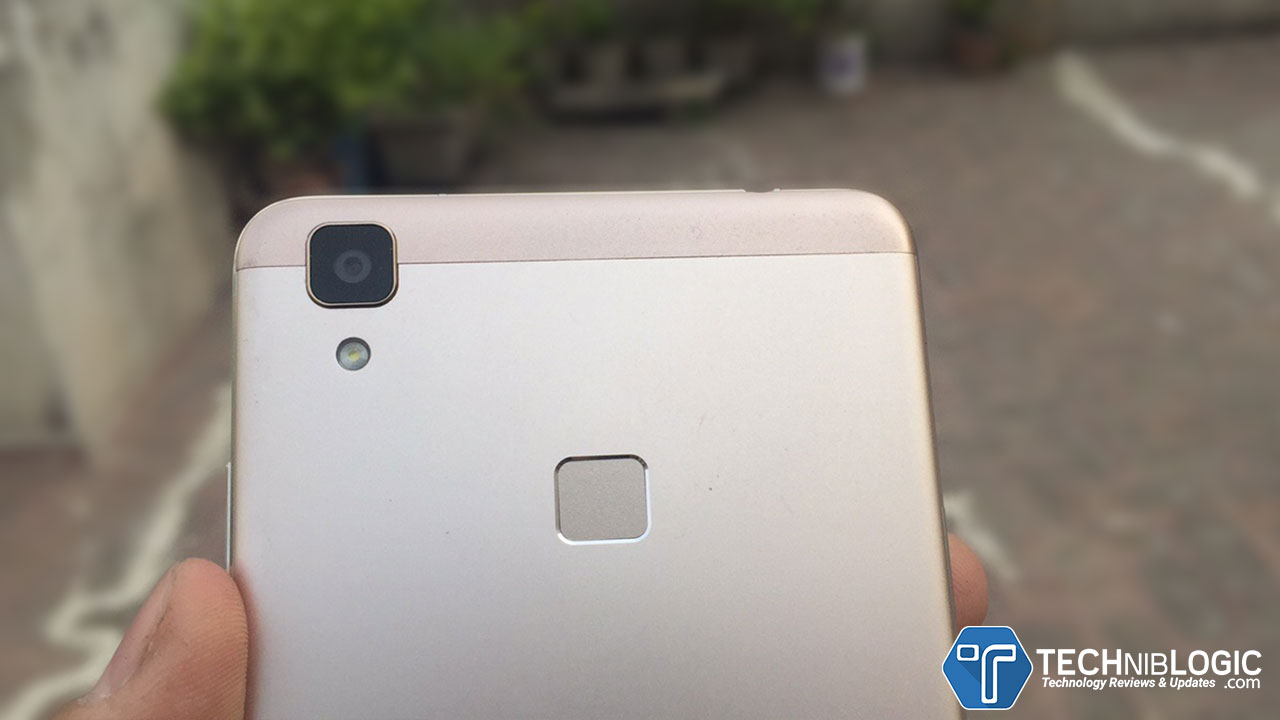
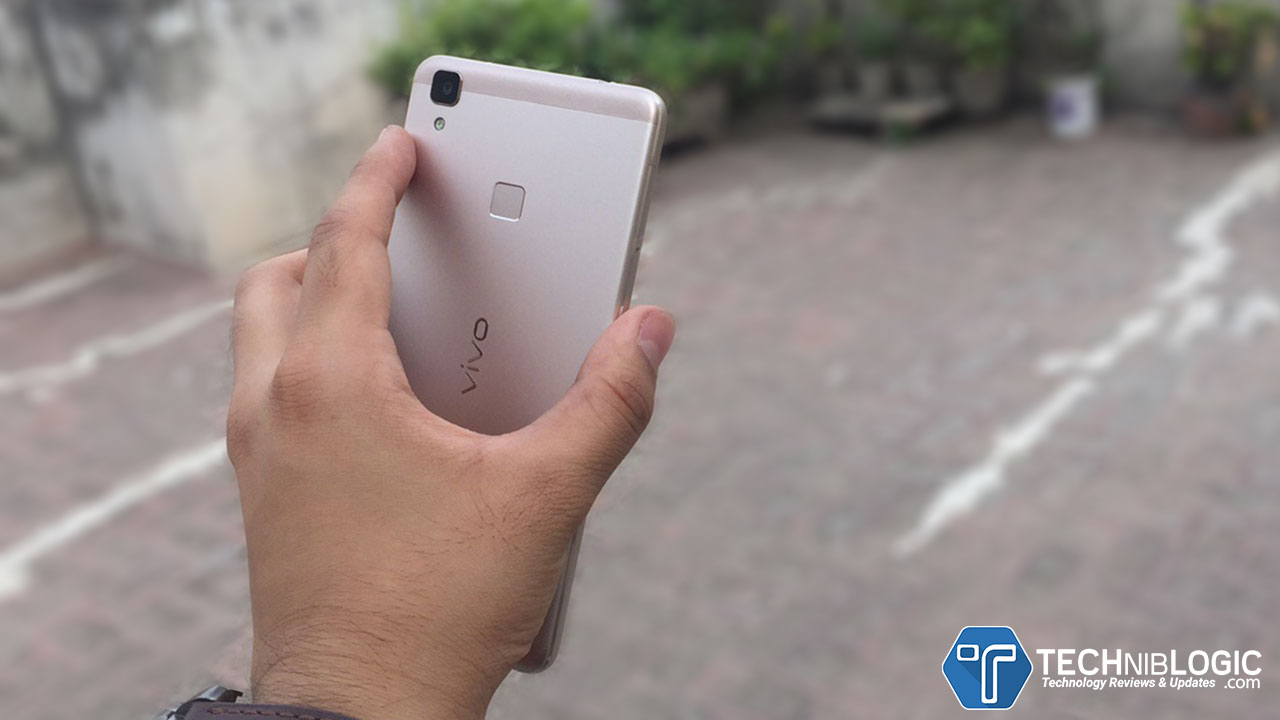
vivo-v3-max-techniblogic--fingerprint

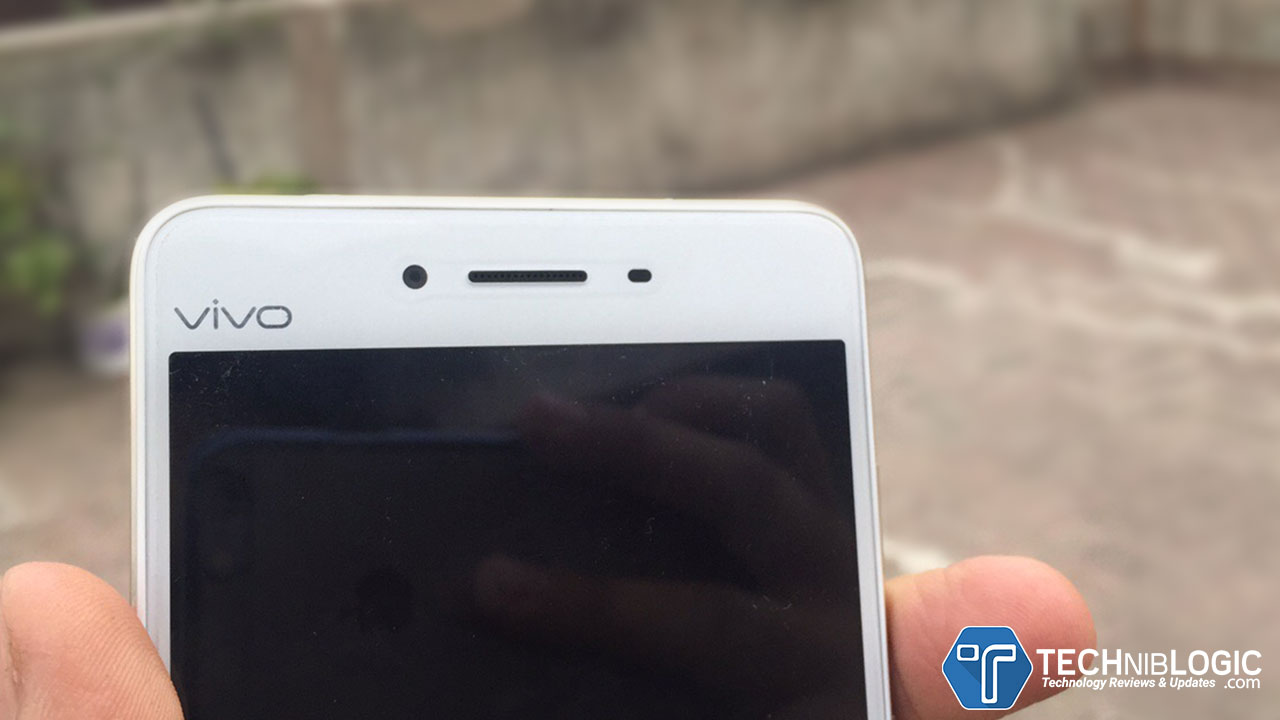
V3Max is being marvelously designed with side panels that curve gently to perfectly complement the curvy 2.5D tempered glass front cover. It is offering a Full Metal Built which looks great. When we take it in our hand it feels very premium and light.

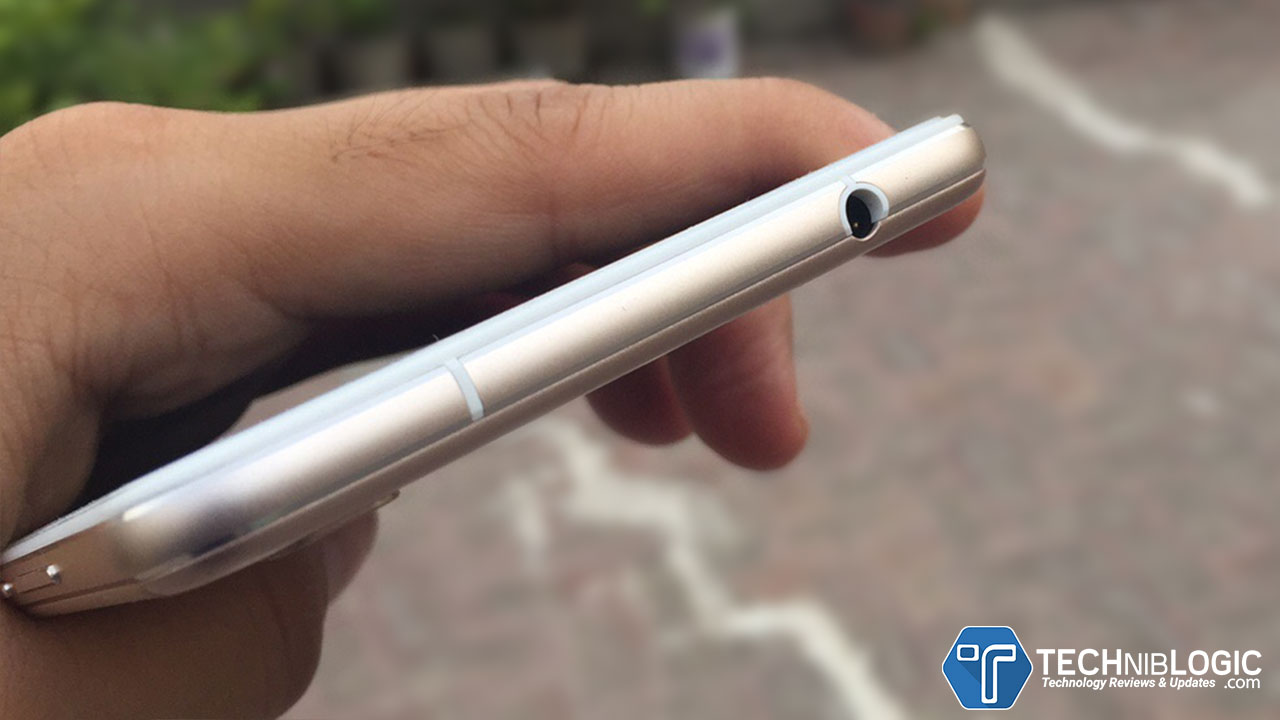
vivo-v3-max-techniblogic-headphone-jack

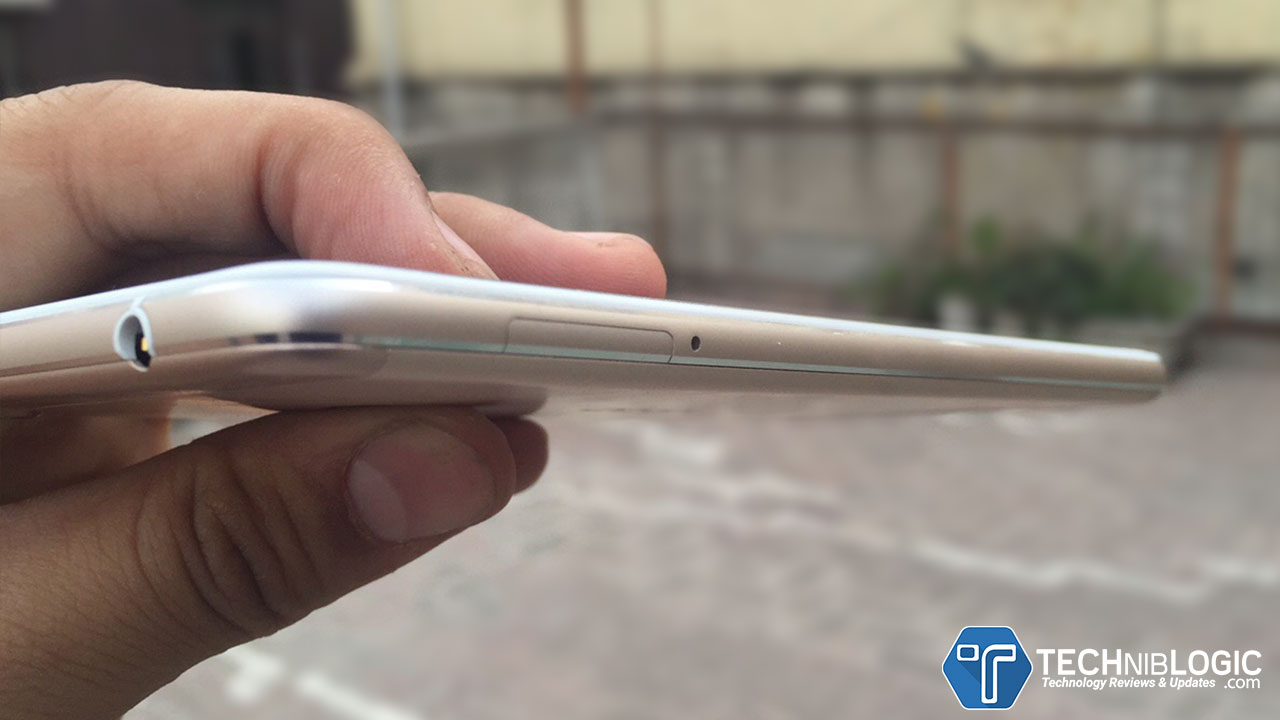
Coming to the top side of the smartphone,you will get a 3.5mm jack, which has the outputs of HiFi audio. The Sound quality feels great, and you will love to listen songs using it. Just a drawback, you need to buy your own earphones or headphones in it. As the in box earphones are just too bad. vivo-v3-max-techniblogic-volume-buttons

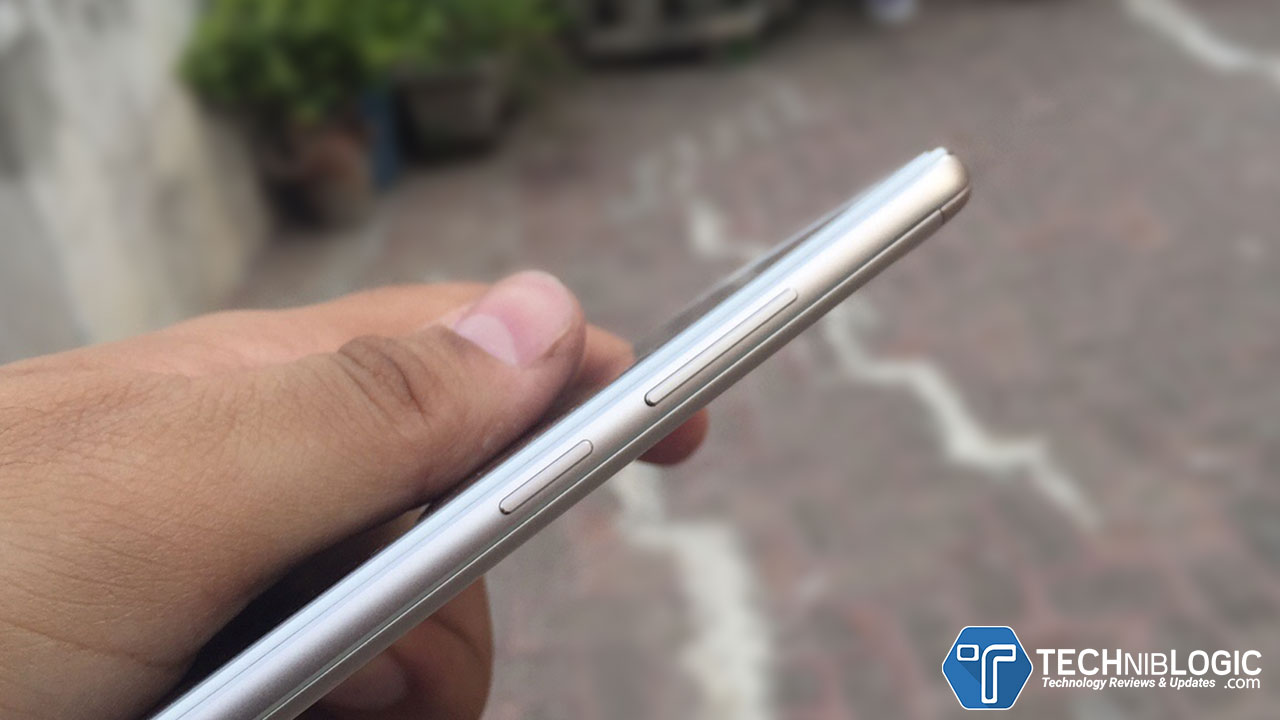
Now coming to the right side of Vivo V3 Max, you will get a power lock button as well as volume control buttons, which give quite good haptic feedback and are very pressy and feels clicky.vivo-v3-max-techniblogic-charging-port

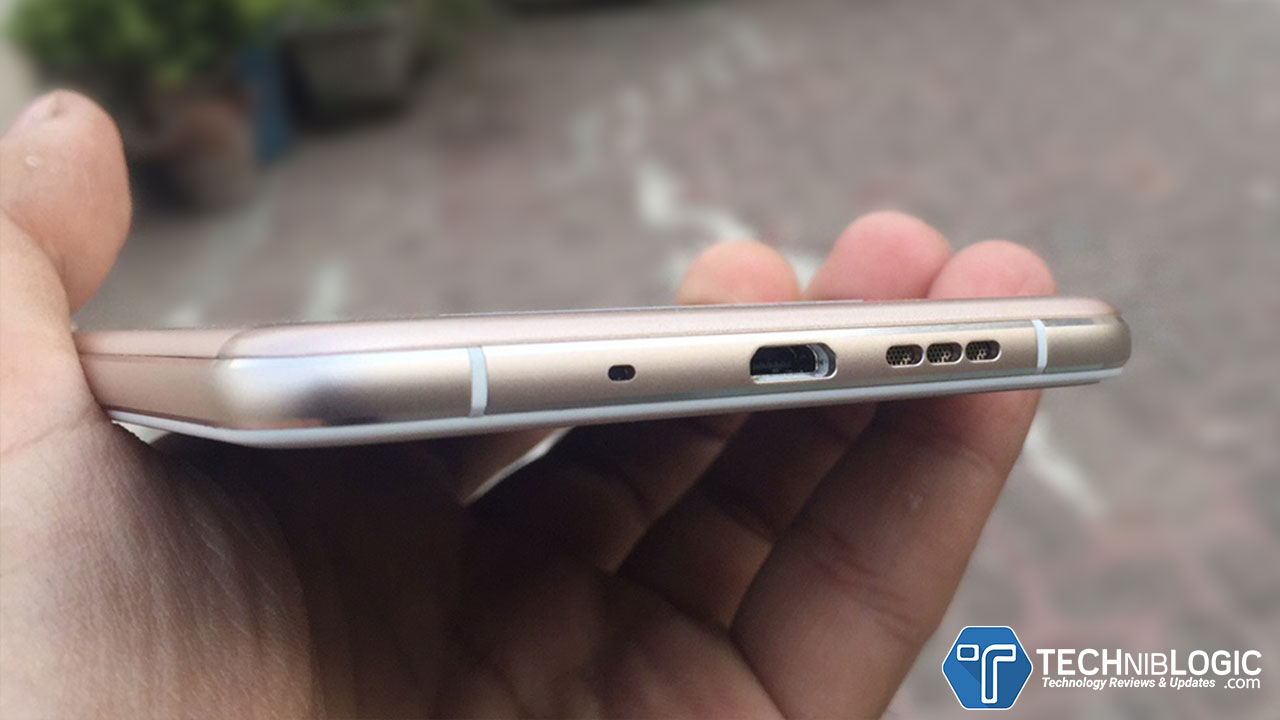
Coming to the down portion of V3 Max, you get a Micro USB Charging port and a Powerful Speakers with decent audio quality. It comes with Dual fast charging circuits with a high-capacity fast charging battery boost your charging speed which Charge your phone for 5 minutes and you can enjoy 2 hours of music. Vivo V3 Max offers a phenomenal audio experience with powerful, crystal-clear audio and a completely immersive feel because of its Hifi Audio Platform.vivo-v3-max-techniblogic-sim-slot

At the the left side of this smartphone, you will get a Dual sim slot which is a Hybrid SIM Tray, which means you can insert two SIM’s at same time or 1 Nano Sim + 1 micro SD card in it.vivo-v3-max-techniblogic-buttons

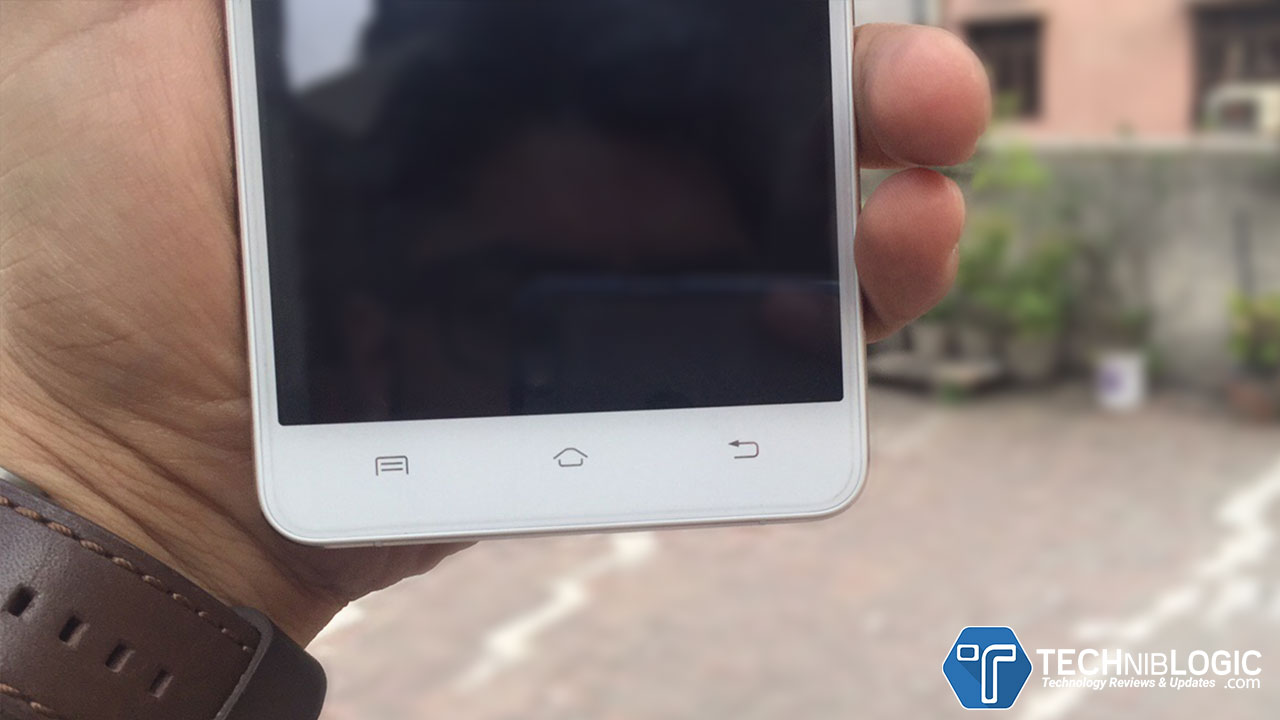
You will also get a fixed capacitive button at the front, and they are not having back-light in it.

Display & Performance

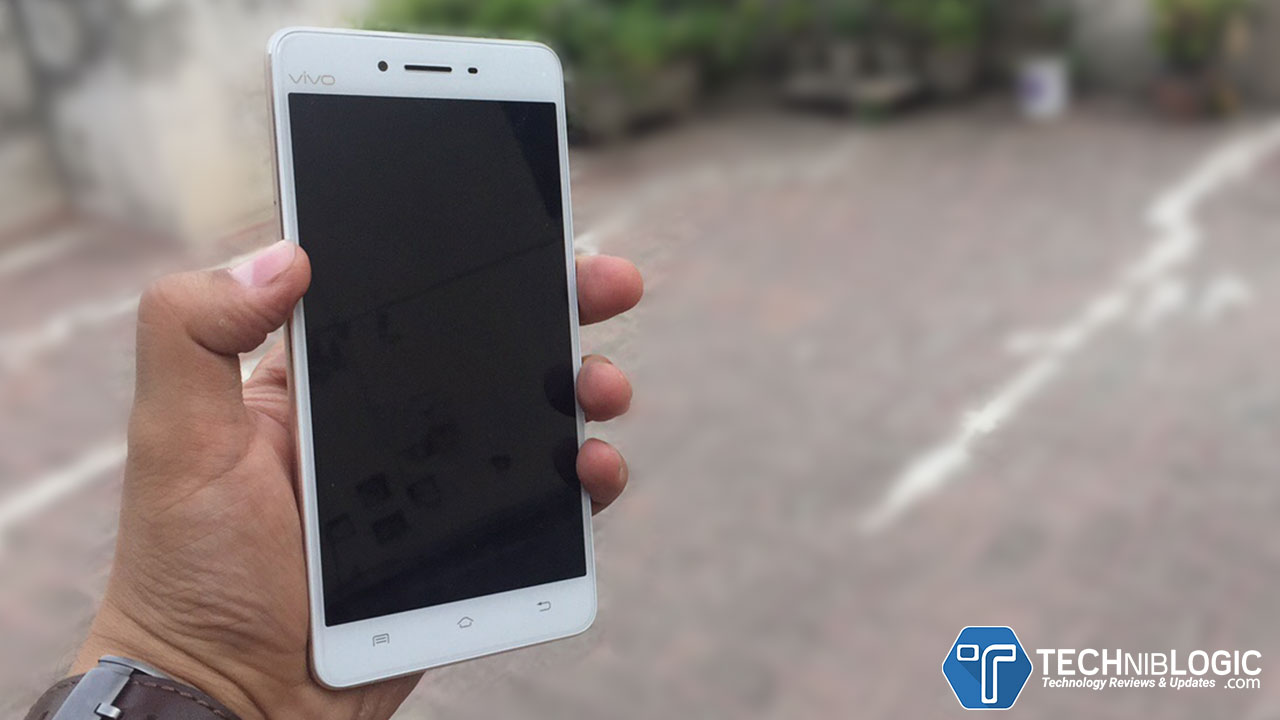
vivo-v3-max-techniblogic-front-display

Coming to the display it comes with 5.5″ FULL HD IPS Display with 401 ppi. It also offers a curvy 2.5D tempered glass in front. V3Max combines a staggering 4GB RAM, with a Snapdragon 64-bit Octa-Core CPU that make the phone faster.

Camera

vivo-v3-max-techniblogic-front-camera

It comes with 8MP which takes really awesome pictures at different situations. It is loaded with some really good features such as Ultra HD, Night, Voice Shutter, Touch Capture, Palm, Timer, Gender Detection, Filter, Watermark.

vivo-v3-max-techniblogic--back-camera

The Rear camera of this V3 Max comes with 13MP Camera with DUAL tone LED flash. The rear camera can be activated as fast as 0.7 seconds and is loaded with PDAF technology.

VIVO V3 Max Specs

[aps_product_specs id=”3455″]

Gallery

What is CDLA? How it Works? Can it replace 3.5 jack in future Phones?

Before you ask what is this feature and what it does? I want to let you know that the first smartphone without the headphone jack have been launched, and the devices are Le2 and LeMax 2 which are a product of LeEco, a Chinese manufacturer. The company said that these devices comes with an incredible Type-C technology in terms of audio experience, which is known as CDLA.

What is CDLA?

CDLA stands for Continual digital lossless audio, which basically gives an end-to-end true lossless audio sound. Forget 24-bit audio, beats audio or Dolby digital this is the new immersive audio experience in town. In CDLA the audio is precisely correct and attenuation-free because the power that needs to amplify the digital signal and boost it up to the headphone is available than the needed power. The rest is taken care by the Type-C port, Aftermath is a true lossless audio output.

What is CDLA techniblogic
via i.imgur.com/jJJi9cx.png

How is it different than 3.5mm jack?

The music file that is stored on our smartphone are mainly in Mp3 or Wav format, now these formats are stored in digital form, but when it goes to the headphone a DAC (Digital to analog converter) converts the digital signal into an analog signal so it can transmit to the headphone. The point here is that the converts need to be very precise in converting the signal and if it’s not optimized to that level it adds up interruptions or noises into the audio. Even if you manage to fully optimize the DAC you’ll still not be able to hear a lossless sound because on the way to the output the signal will drop average 20db of bandwidth.

Is there any particular audio format for Lossless audio?

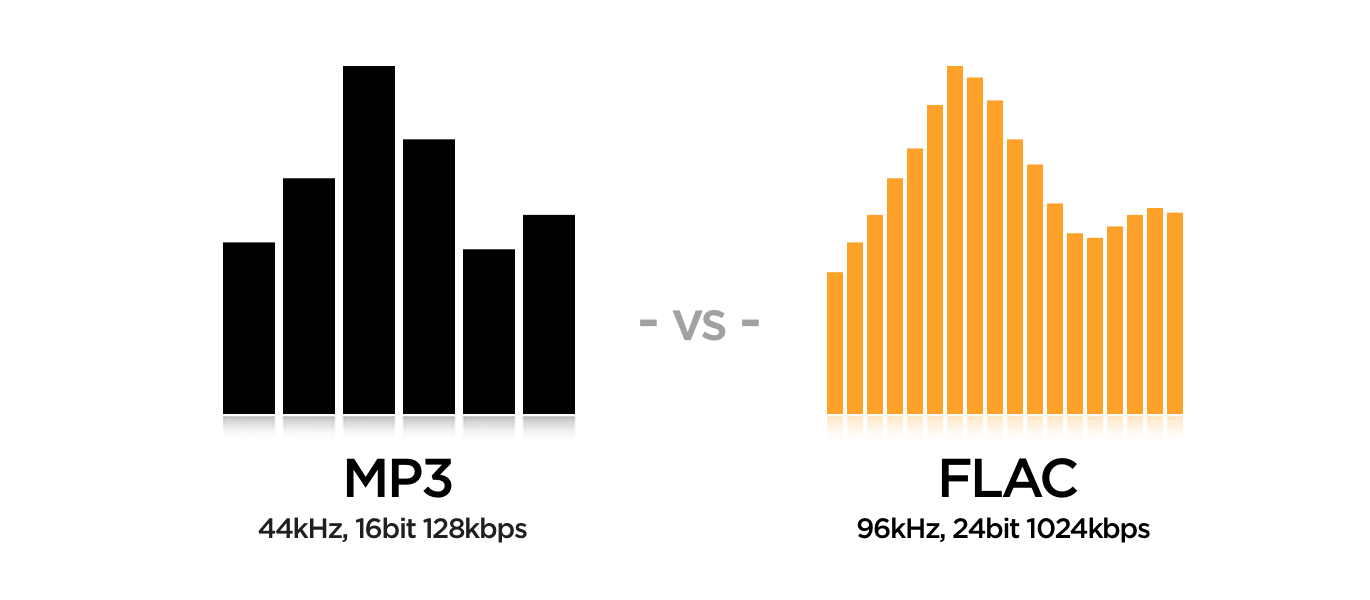
The concept of Mp3 was to compress the raw audio file into a short and more reliable format so people can share music and save some space for other music files. But what happened when you compress a file, obviously the converter will lose some of the data signals so it can reduce the amount of memory the file is taking. What happen when you convert a 1080p full HD video into a 3gp file, the converter reduces the picture quality and sound, but you’ll still get the full video; probably in less MB. The same thing happened when a raw audio file is converted into an MP3 file, some amount of audio will definitely get loosed.

mp3 vs flac
via coppertino.com

The audio recording companies have tried very hard to make a lossless audio file, so no matter how much you increase the volume, the audio should not get distorted and can give a true audio experience. There is an audio format which is known as FLAC or Apple Lossless audio format. Which are deemed as lossless audio files, these files are larger in size? Simply because they store much bandwidth of signal than the casual MP3 file. The .flac files are pretty good in hearing and are very much close to the lossless audio but if you listen into a 3.5mm jack of headphone, it may not give that immersive audio which you’ll get in the new USB Type-C port. So, voila the Type-C is the new better and efficient audio port. We will probably see most of them in the coming year.

The World’s first Type-C CDLA earphones were launched by LeEco.With Type-C integration, CDLA is taking things to a new level of convenience and New Audio quality.

new CLDA earphones launched by LeEco
via forum.le.com/in

You may also Like :

[Deal Alert] Geekbuying 4th Anniversary 72h Seckill Crazy Sale Offers

Are you waiting for buying good electronic products at Cheap Rates? So Now you can Buy Good Quality Smartphones ,tablet PC, tv box, VR headset, RC toy, or other wearable devices on GeepBuying 72 hours Crazy Sale.On Geekbuying 4th Anniversary, they are offering a huge amount of Discounts and Offers on various different electronic Products as well as massive discounts on Top Brands such as Chuwi, Elephone, UMI, Tronsmart, and Xiaomi.Let’s See what Crazy about this 72 Hours Massive Flash Sale by GeekBuying.

Grab your Deal

Geekbuying.com is giving two coupon codes as follows:

GKB4TH– Applying this coupon code you can avail a discount of $20 to $350. It is valid across all products and expires on 17:00 (UTC+8) on June 14.

4THOFF– Applying this coupon code you can avail a discount of $10 to $350. It is valid from 17:00 (UTC+8) June 14 to 17:00 (UTC+8) June 17.

You must Check their Crazy offers such as

tv box

Now a days ,TV Box is widely saling in the market you can get huge amount of discount on GeekBuying.

Deals you Must Check out :

  • MX PLUS II RK3229 4K KODI Preinstalled TV BOX
  • R-BOX Android 5.1.1 RK3229 2G/8G KODI 16.1 Pre-installed 4K TV BOXtablet

Deals you Must Check out :

  • Jumper EZpad Mini3 Windows 10 8.0 inch 2GB/32GB Tablet
  • Xiaomi MiPad 2 Android5.1 2GB/16GBsmartwatches

Deals you Must Check out :

  • Xiaomi Mi Band 2 Smart Bracelet
  • Makibes F69 Sports Smart Watch IP68 Heart Rate Fitness Tracker
  • Haier Iron Bluetooth 4.0 Smartwatchsmartphone

Deals you Must Check out :

  • MEIZU M3 Note 5.5inch FHD 4G LTE
  • Xiaomi Mi4S /Mi 4S 4G LTE 5.0inch FHDrc toys

Deals you Must Check out :

  • MJX X901 Nano Hexacopter 2.4G 6 Axis Gryo 3D Flip One Key To Roll Mini Drone
  • JJRC H22 3D Inverted Fly 2.4G 4CH 6-Axis Mini RC Quadcopter RTFvr headset

Deals you Must Check out :

  • V3 All In One VR Headset
  • HAPOW 3D Immersive VR Virtual Reality Headset

outdoor

Deals you Must Check out :

  • F71 12MP 170HD Wide Angle 1080P 30FPS Action Camera
  • Allwinner V3 4K Ultra HD DV Sport Cameraconsumer electronics

Deals you Must Check out :

  • YI Home Camera 2 (Official E.U. Edition) with 32GB Micro SD
  • OVEVO Fantasy Pro Smart Focus LED Speaker Light

There are many more awesomes Crazy Deals and offers running on GeekBuying.You must check out.

Grab your Deal

Stay tuned for more Deal Alerts ?

Download DOOM on Steam for FREE [ Limited Period ] Hurry Up !

DOOM is a challenging modern-day shooter experience Game which is loved by all the hardcore Gamers.Recently Company Added a “shareware” demo to Download DOOM so that anyone can give it a try for FREE.It is an official Demo of the Game – no hacks or cracks are needed.

System Requirements for Playing DOOM

Minimum:

    • OS: Windows 7/8.1/10 (64-bit versions)
    • Processor: Intel Core i5-2400/AMD FX-8320 or better
    • Memory: 8 GB RAM
    • Graphics: NVIDIA GTX 670 2GB/AMD Radeon HD 7870 2GB or better
    • Storage: 55 GB available space
    • Additional Notes: Requires Steam activation and broadband internet connection for Multiplayer and SnapMap

Recommended:

    • OS: Windows 7/8.1/10 (64-bit versions)
    • Processor: Intel Core i7-3770/AMD FX-8350 or better
    • Memory: 8 GB RAM
    • Graphics: NVIDIA GTX 970 4GB/AMD Radeon R9 290 4GB or better
    • Storage: 55 GB available space
    • Additional Notes: Requires Steam activation and broadband internet connection for Multiplayer and SnapMap

How to Get it for FREE?

  1. Go to Steam Official Game Page
  2. Click to Download Demo Button,at the right side of the page.
  3. Steam Application is needed ,Download Steam if you don’t haveSteam Application is needed ,Download Steam if you don't have
  4. Start Download and Installing the game
  5. Have FUN!

This Offer is applied for this week only,players can login in through their platform of choice such as PC through steam, Xbox One, or PlayStation 4.And Download DOOM for Free.For now, only the  first level of the game is totally free,but then also it will be great to experience this awesome game.

Download Now

GeekBuying 4th Anniversary Sale – Top Brands Deal & Discounts

GeekBuying 4th Anniversary Sale this year that involves huge discounts and super deals on a large selection of gadgets from top best saling brands in the market for instance UMI, Elephone, Chuwi ,Xiaomi etc.We aready share the GeekBuying 4th Anniversary Sale great products in different categories.You must check out CLICK HERE

There are Various Top Brand Products in this GeekBuying Massive Sale such as Chuwi, Elephone, UMI, Tronsmart and Xiaomi. You must check out their products as  they offering very huge amount of Discounts and Deals to you.

Chuwi Products

chuwi sale

Chuwi have been engaged in designing,developing and producing our own brand tablet pcs, smart robot cleaners and some other digital electronic products.On Geekbuying you will find a lot of tablet models from Chuwi Promotion Sale Page

Deal you must Check Out :

  • CHUWI Hi8 Pro Dual OS Windows10 + Android5.1
  • CHUWI Hi12 – 2in1 Ultrabook Tablet PC
  • CHUWI Hi10 Dual OS – 2in1 Tablet
  • CHUWI HiBook Dual OS – 2in1 Ultrabook Tablet

Grab you Deal

Elephone Products

ElephoneAnother well-known brand is Elephone,which builds great quality smartphones with high performance.On Geekbuying you will find a lot of phones models from Elephone Promotion Sale Page

Deal you must Check Out :

  • Elephone M2 5.5inch FHD
  • Elephone P9000 with Helio P10 MT6755
  • Elephone S3 5.2inch Bezel-less 2.5D Arc FHD Screen
  • Elephone P9000 Lite 5.5inch FHD

Grab you Deal

UMI Products

umi sale

Umi is a Chinese mobile phone manufacturer based in Shenzhen in China.On Geekbuying you will find a lot of phones models from UMi Promotion Sale Page

Deal you must Check Out :

  • UMI Super 5.5inch FHD
  • UMI TOUCH 5.5inch 2.5D LTPS FHD
  • UMI ROME X 5.5inch 2.5D HD

Grab you Deal

Xiaomi Products

xiaomi sale

Xiaomi products have great build quality as well as performace .This time on Geekbuying you will find a lot of products from Xiaomi Promotion Sale Page

Deal you must Check Out :

  • Xiaomi Mi Band 2
  • XIAOMI Mi Box 3 Pro
  • Xiaomi Yeelight RGBW Smart LED Light WiFi Connection

Grab you Deal

Tronsmart Products

tronsmart saleTransmart giving a great deals and offers on thieir products .On Geekbuying you will find a lot of product from Transmart Promotion Sale Page

Deal you must Check Out :

  • Tronsmart MXIII Plus Android 5.1 (Mini PC)
  • Tronsmart Quick Charge 2.0 18W USB Car Charger
  • Tronsmart Quick Charge 3.0 USB Rapid Wall Charger

Grab you Deal

Stay tuned for more Deal Alerts ?

LG X BOOM Pro – CM9960 Party Speaker are here

If you are a party holic LG’s has latest audio offering for you,the X Boom Pro Speaker – CM9960. X Boom Pro assures you for the great entertainment with powerful sound while maintaining excellent audio quality. These power packed speakers are loaded up with some wonderful features that give you soul entertainment, which you will love.

It will make you, your own DJ and let the party going with X Boom Pro’s DJ effect and DJ Mixer options. You can enjoy music and sing along with the Voice Cancellation option which is really nice and innovative feature.

Features of the X Boom Pro which would ‘bring your party’ to life are:

  • Powerful playback – LG X Boom Pro Speaker features a CD player for you to spin your favorite playlists as well as enjoy the tracks on the discs your friends bring over. It supports multiple formats including CD, MP3, and WMA

Also Check : http://techniblogic.com/lg-g5-era-modular-phones-started/

  • Multi Connectivity – Multi connectivity option gives you the freedom to connect almost any music device whether it’s your laptop, smartphone or your tablet. Just plug in and enjoy the music. With the X Boom Pro speaker you can connect up to three devices wirelessly. It supports 2 Mic In , Portable In , 2 Aux In, H/P Out and 2 USB
  • Impressive sound – CM9960 – X Boom Pro has an impressive 4800 Wattage RMS output which delivers powerful sound with excellent audio clarity
  • Wireless sound sync via Bluetooth – Enjoy your favorite music by wirelessly syncing the music on your device with the speaker via Bluetooth. This enables you to enjoy a seamless music experience
  • Sound Sync – This feature allows you to link your LG audio system with your LG HD TV wirelessly via Bluetooth. Hence, it cuts down on cable clutter.
  • Music Flow Bluetooth App – Download the LG Music Flow Bluetooth Application (available for both Android and iOS) control your CM9960 via your smartphone. The Music flow Bluetooth is more than just a remote, it enhances the features and the functionality of the speaker
  • Pro LG DJ Mixer – Be your own DJ and make your parties rocking. This feature allows you to mix audio files like a professional DJ and create seamless party playlists with LGs Auto DJ mode. It blends each song into the next seamlessly, making it the perfect option for parties and the cross fader function helps you to create your own mashups
  • Party Thruster – This speaker comes with a lever which you can slide to ramp up your parties
  • X Boom Plus – Connect your Pro to another compatible speaker either wired or wirelessly to expand the sound and rev up the volume
  • DJ Effect – Enjoy great sound effects like flanger, phaser, wah and delay which can be created through the scratch/level control or the search knob. The user can download more sound effects via the Music Flow Bluetooth app
  • Sampler Creator – Record sound effects on your smartphone and sync them via Bluetooth to the system. Let your creativity flow
  • Multi Juke Box – Increase your entertainment three fold by connecting up to three Bluetooth phones at the same time. The Juke Box feature also enables you to make a playlist of your favorite tracks. You can store up to 100 files and play the tracks seamlessly
  • Voice Canceller – Now make your parties even more interesting with the voice canceller function of the speaker. This option reduces the audio level of the vocals of the singer and with original background music intact, enjoy singing along to your favorite songs.
  • Key Changer – This feature allows you to adjust the key to suit your vocal range. You can adjust the key ether 4 steps higher or 4 steps lower than the original key
  • H/P Mode – Headphone monitoring Mode. When mixing music, press H/P MODE to select a monitoring mode. You can listen to the music being mixed or played in Source A or Source B.

OnePlus get partnered with Uber to giveaway Loop VR Headsets

OnePlus, who is almost here to launch its another flagship beast in the world comes a partnership with Uber, which is another one of the largest multinational online transportation network company. It will make it more convenient for fans to get their hands on the OnePlus Loop VR Headset at their doorsteps within minutes of booking on Uber app.

This is on-demand OnePlus Loop VR Headset, with delivery service is being brought to 8 major Indian cities namely, New Delhi, Bangalore, Mumbai, Bhubaneshwar, Pune, Kolkata, Chennai and Chandigarh by two of the coolest global technology startups that have quickly become most loved brands in India.

Also Check : http://techniblogic.com/Arena/oneplus-2/

Fans can order their OnePlus Loop VR Headsets from June 14, 3 pm onwards by logging into the Uber app. The doors to the Loop, OnePlus’ new office in space, will open at 10 PM IST on June 14 and the most awaited public sales for the OnePlus 3 will begin soon after on Amazon.in at 12:30 AM IST.

Following is a step-by-step guide for fans to get their hands on the OnePlus Loop VR Headset:

  • Fans need to download the Uber app and sign in/ log in
  • Enter the PROMO Code ONEPLUS3VR in the “Promotions” tab in the Uber app
  • After successfully entering the code, head back to the main screen and click on the ‘UberVR’ icon on 14th June, 3 PM onwards onwards
  • Once your request is accepted, an Uber cab will be on its way with your OnePlus Loop VR Headset – absolutely FREE.

So, guys it is a nice way to get this, who all haven’t get it till now. Just use the UBER app and try it. This kind of method they have also used earlier at the time of Oneplus 2 launch when customers can buy oneplus 2 when they use Uber in some particular cities which are selected.

Data Loss: When Your Inbox is Empty

This is perhaps some of the oldest advice in the history of computer software and IT – backup your data! Despite repeated warnings and precaution taken, many businesses fail to employ any strategy to deal with this anyway.

It is important that you backup your files and emails. Not only this, it is also equally important that you do this at regular intervals because this way you will have the most recent files and in case of a breach or loss of data due to any other reason, you will know that your data is safe and secure.

data loss - techniblogic
Image – nokiarevolution

As already mentioned, many businesses fail to backup their data. This is why there is a need to call in the data recovery experts to recover lost data such as emails and other attached files in case of a breach, hacking episode, or disk corruption.

Let’s understand the concept of data recovery service providers and how they come to save the day when something terrible happens.

Data Recovery Service Provider

A data recovery service provider is a company that comes into the picture when you have lost all your emails, and you are not sure what to do next. They are the folks who will help you resolve this complex problem and help you get you back on track. They have a team of experts who have the required knowledge and necessary software to help you get your business back on track.

Even if you do have a backup, in the event of a disaster whether natural or man-made, it is possible that the backup is rendered unusable. This is a rare scenario but it may happen all the same, and it is necessary that you prepare yourself for this worrisome possibility.

A data recovery service provider makes sense here. They will not only shoulder the responsibility and streamline the entire process but also complete the job in a short amount of time, helping you get back online and back to business as soon as possible.

Technology Involved

  • Firmware repair equipment for hard drives and solid-state drives
  • ACMT certified engineers for mac data recovery
  • Proprietary file utilities for intensive data repair
  • The industry’s highest rated data recovery cleanroom
  • RAID data recovery stations

These are some of the features and technology that you need to look into before you hire the services of a data recovery service provider. It is paramount that they understand their roles and responsibilities and take their job seriously. They must be properly equipped with the latest technology and software to combat new and emerging threats in the IT world. After all, it is your precious data that is at stake here.

Check their recovery rates and make sure it is more than 90 percent. This way you will get an idea of where they stand and what their success ratio is. Check and verify if the company has SSAE 16 Type 2 credentials or not. This is vital. These are telltale signs that this business knows what they are doing and takes their work seriously. If they do not, then their services should be much cheaper than their competition, and if they fail to do the job, they need to know ahead of time they should not be expecting full pay – not even close.

It is better to deal with the right people at the outset for many reasons.

Advantages

There are several advantages of hiring an expert such as:

Saves Time – this is perhaps one of the best advantages of using a professional recovery service provider. You have enough things to worry about. Adding another to the list is not going to be helpful. In fact, it will only waste precious time especially when the company is facing a data loss crisis. Hiring a professional team of recovery people who know what to do will only reduce the time it takes to get your business back online. They will be able to recover your emails and corrupt data in no time.

Makes Sense Financially – unlike the popular belief, hiring a professional service is more economical in the long run. It is affordable, and you have the option to customize these services according to your specific needs and requirements such as from SMBs to high-end enterprise level solutions.

Versatile – not only just emails but these service providers are able to work with pretty much any and all kinds of data loss and different types of storage services and products. This says a lot of about their versatility and their ability to tackle a wide range of issues and contingencies.

Available Online and 24×7 – Disaster is not going to knock on your doors before it hits you. It will come uninvited, and it can hit hard. You can lose your data and/or emails at any point in time, either in the middle of the day or on the weekend when no one is around. Your in-house IT guy or team did not stand a chance. This is when professionals come in handy because they are available 24×7 and 365 days a year. No matter when and where, they will be able to reach your servers remotely, assess the situation, and concoct the best possible solution for your

Lenovo Vibe K5 – A budget Device

So here it is the new add up in Vibe smartphone portfolio, Lenovo launched Vibe K5 in India, which is a direct successor to its highly successful A6000 smartphone. Coming and Retaining the same price as its predecessor A6000, Lenovo Vibe K5 comes with power packed 64-Bit Qualcomm Snapdragon 415 Octa-core CPU combined with a 5″ high-definition display.

Lenovo-Vibe-K5-techniblogic

The 5″ HD display is having 720×1280 pixel resolution, which gives crisp content streaming and viewing experience. This display also adds up two high performance stereo speakers which produces the best multimedia experience in its price segment. The Dolby Atmos, enabled speakers to minimize noise and voice distortion when playing different voice clips and songs, it also automatically fine-tuning for good audio experience for listeners. With the beautiful display and power packed entertainment consumers can have an experience like never before within the budget.

The device is being crafted for maximum comfort with some tapered edges to fit it into your palm, Vibe K5 is not only the most stylish but also the only smartphone in its price segment to have metal construction.

For multitasking capability Vibe K5 comes with 64-bit Qualcomm octa-core processor adding 2GB DDR3 RAM combining to deliver performance, gaming, multimedia, and social experiences. It is also being equipped with a 13MP rear camera and a 5MP selfie camera,

Taking multimedia experience to the next level, Vibe K5 also supports Lenovo’s TheaterMax technology. TheaterMax turns all your existing media and games into an immersive large screen experience when combined with the AntVR headset (which is sold separately).

The Vibe K5 will go on registrations on 13th June starting 1PM exclusively at Amazon.in and the first flash sale will take place on 22nd June 2PM. Priced at Rupees 6999, the K5 will be available in Gold, Silver and Grey color options.


Kernel for Windows Data Recovery Review

There are billions of users operating Microsoft Windows across the globe. It has been ruling the computing world from decades by providing user desired solution consistently. It is a trendsetter and has always offered innovative and user-centric solutions that turn hectic business activities simplistic. The simple database storage environment of MS Windows enables user to store every type of data on one platform.

However, this advantage becomes a nightmare for users when Windows data become inaccessible. Inaccessibility of MS Windows data can cost a fortune to businessperson, techies, and various other entities in few hours. To liberate user from such drastic losses, Kernel data recovery has developed Kernel for Windows Data Recovery software, which recovers corrupted Windows data instantly. The intuitive nature of the software lets user resume all the former activities within few minutes without any complications. The software offers comprehensive MS Windows data recovery solution. Its latest edition possesses the following functionalities:

Scanning Modes:

Kernel for Windows Data Recovery software provides three different data scanning modes that inspect the corrupted database thoroughly to trace and eradicate data corruption issues then reinstate data in original format and constitution. The three scanning modes are Quick Scan, File Trace, and Extensive Scan mode. The user can opt any of these modes depending on the intensity of the damage.

Detailed data scrutiny:

The software produces fresh FAT and NTFS files after resolving corruption issues from the corrupted files. After recovering required files, user can make use of file preview functionality for verifying the credibility of the recovered data. The preview function enables user to select and view each Windows data items in detail.

Inbuilt file tracker:

Kernel for Windows Data Recovery software is integrated with comprehensive file trace functionality that enables user to trace required NTFS and FAT files among huge amount of data files from the selected drive. The software also avails file filters function to obtain filtered data files to be only recovered.

Advanced recovery operation:

Kernel for Windows Data Recovery software’s advance recovery mechanism avails instant outcomes. It formidably recovers FAT and NTFS partitions damaged due to abrupt formatting or virus intrusion. It also supports various types of drives such as EIDE, DATA, SCSI, PEN, USB, ZIP and IDE to carry out recovery process. This software enables user to recover all types file formats such as graphics file format, archive file formats, email file formats etc.

Understanding Interface and working methodology of the software:

The software interface is simple and self-explanatory. It doesn’t require any additional assistance to operate this software. The user can follow few simple steps to recover their corrupted Windows data through this software. These steps are explained briefly as follows:

Step 1: Analyze the level of data corruption then select the recovery mode accordingly:

  • Quick Scan: For recovering recently affected files.
  • Extensive Scan: For recovering corrupted hard drives.
  • File Trace: For recovering both recently affected files and hard drives.

 Picture1 Kernel for Windows Data Recovery Review

Step 2: After choosing the recovery mode, select the drive to be repaired to initiate the recovery procedure. The software will automatically display the selected drive’s information. Click next to proceed ahead

Picture2 Kernel for Windows Data Recovery Review

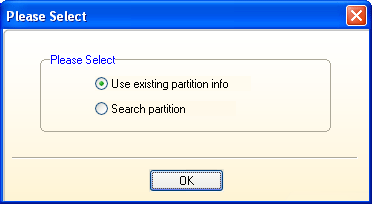
Step 3: The software will prompt a please select dialog box asking user to select partition to be recovered. Select existing partition info to recover data form an existing partition else select Search partition to trace the required partition. Click OK button to proceed.

Picture3 Kernel for Windows Data Recovery Review


Step 4: The software will display hard disk partitions in the left pane and its detailed information in the right pane. Select the required partition and click next to continue.Picture4 Kernel for Windows Data Recovery Review

Step 5: The software will start recovering the data from the selected partition. User can see the recovery in progress.

Picture5 Kernel for Windows Data Recovery Review

Step 6: After completing the recovery of selected partition, the software will display the recovered data in hierarchical manner in the left pane. User can select any of the enlisted file to preview it in detail. The preview of the selected data item will be displayed in the lower right pane of the software. Upon verifying the files, select Recover button to restore the data files on desired location.

Picture6 Kernel for Windows Data Recovery Review

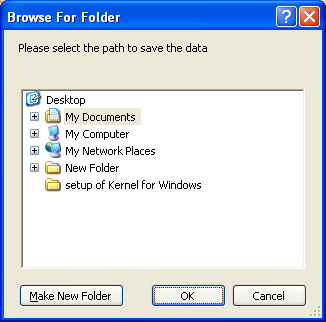
Step 7: The software will prompt Browse for folder dialog box. Select the required destination and click OK.

Picture7 Kernel for Windows Data Recovery Review

Step 8: The software will start restoring the required files at desired location, then display a successful file restoration message promptly.Picture8 Kernel for Windows Data Recovery Review

Software Specification:

Supported File Systems Operating System Windows Server Hardware Requirement

FAT16

FAT32

NTFS

NTFS5


Windows 10

 Windows 8.1 and 8

Windows 7

Windows vista

Windows XP

Windows 2000

Windows 98 and 95

Windows Server 2012

Windows Server 2008 R2

Windows Server 2008

Windows Server 2003 R2

Windows Server 2003

Atleast 64MB of RAM


Conclusion:

Kernel for Windows Data Recovery software is a cost effective product that succeeds in recovering corrupted windows data in every sort of condition. It helps in resolving all the errors without affecting original data and let user obtain all the files in intact form. The software comprehensively supports all the associated software. The user can download the free demo version of the software to testify all the above-discussed features and credibility. The technical team is just a click away to resolve any query of novice or non-technical users. The team can be contacted round the clock through live chat, phone or email. Live demo of the software is also available on request

Download Now

OST to PST Converter: Recover OST File and Migrate OST File to PST format

Outlook offline storage data file is a sole local repository of data created when working offline with Exchange account. Therefore, the cache replica of an Exchange mailbox is a highly vulnerable repository that commonly encounters data loss scenarios. However, a couple of tools in the online market claim to provide a solution for the same and one of the many are OST Recovery. Based on the testing of respective application the following review has been prepared with detailed information regarding OST to PST file recovery tool to discover its true potential.

Detailed Analysis of the OST Recovery Tool

Environment Used: The application was tested in the following environment:

  1. Operating System: Windows 7 Ultimate
  2. Processor: Inter Core i3 CPU M350 @ 2.27 GHz
  3. Installed Memory: 2.00 GB (1.87 GB usable)
  4. System Type: 32-bit Operating System

As far as the testing procedure is concerned, the software ran perfectly well in the respective environment without any trouble. No server environment was provided to the software for operating it, yet no issues were encountered.

Working With The Software

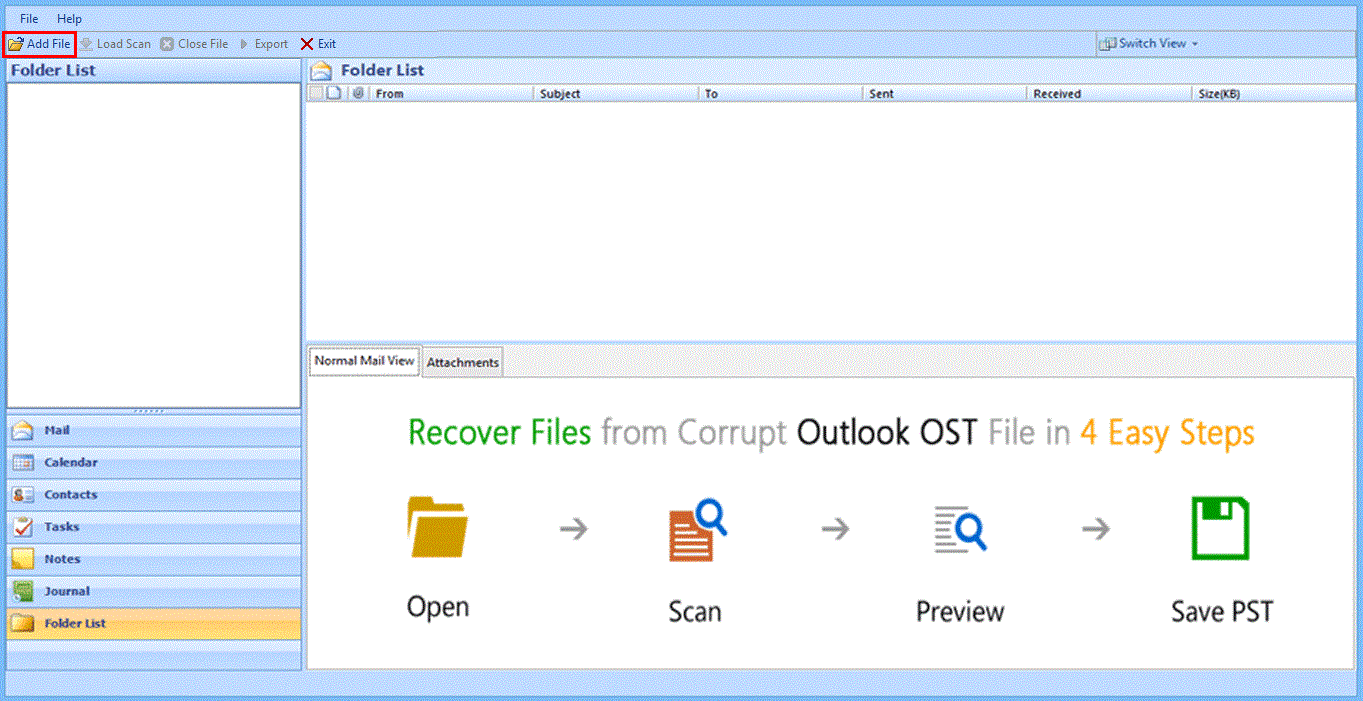
  1. The first screen of the software represented a user interface completely similar to that of Microsoft Outlook. On clicking the Add File option, the option to add and load OST file on software was provided.

It was very easy to get used to the UI as it was exactly like that of Outlook.

load-ost-file

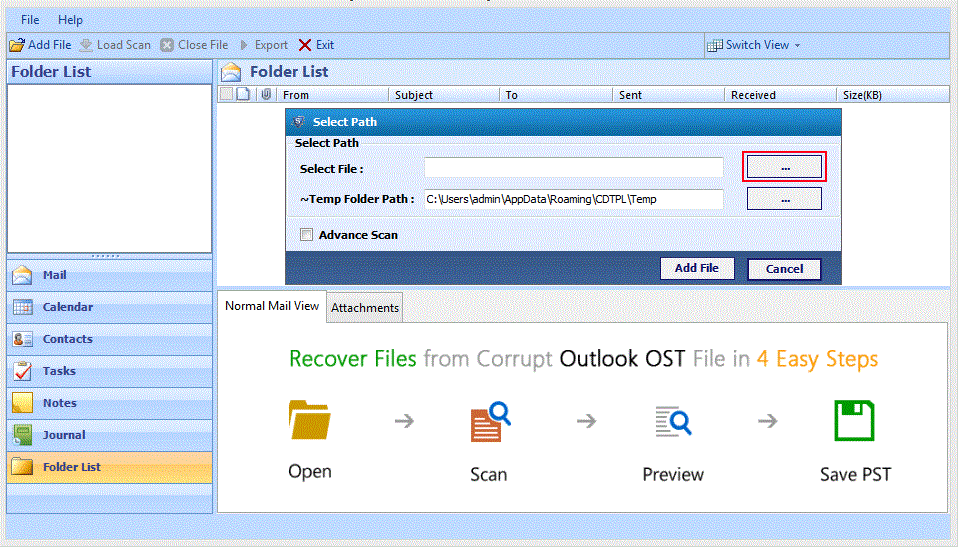
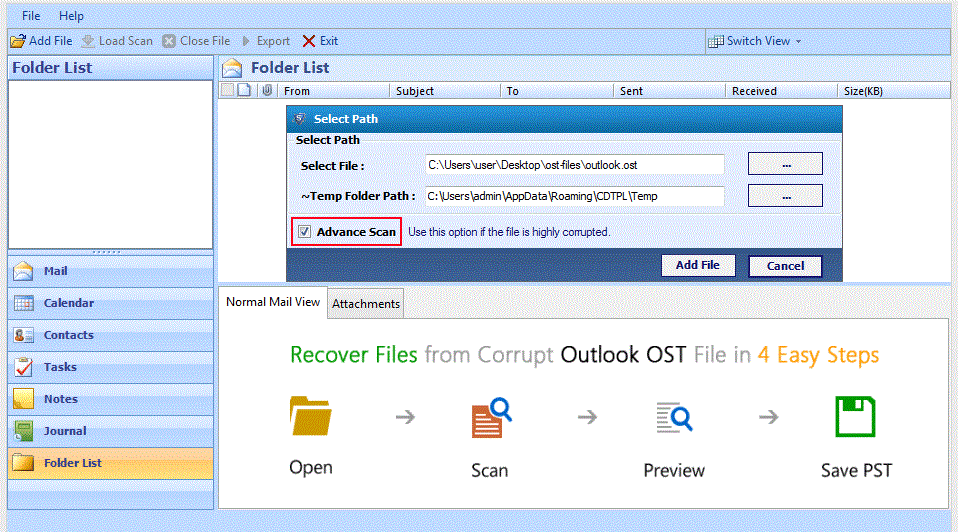
2. The next popup provided the option to browse the OST file to be recovered along with an option to Advance Scan the contents. Once done Add File button has to be clicked to start processing the file.

The only disappointment about the software was that only one file could be processed at a time, which could turn out to make the software quite a time consuming.

browse-ost-file

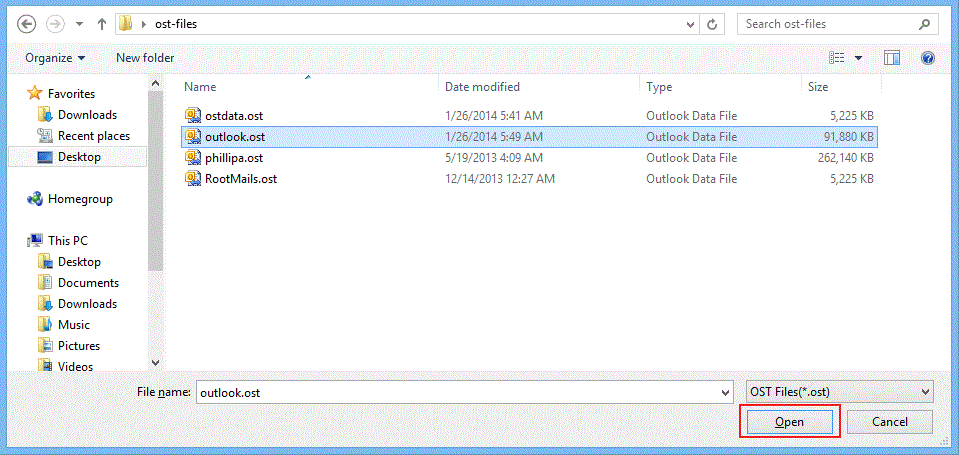
3. On the Open window, the file to be recovered needs to be browsed on the machine and selected open by clicking on Open button.

open-ost-file

4. The advance scan can be selected for recovering contents from a highly corrupted data file.

The additional quality of this option is that it recovers deleted items as well.

add-ost-file5. Once the scanning of OST file begins, a live status providing window will appear on the screen to let users keep track of the file scanning process.
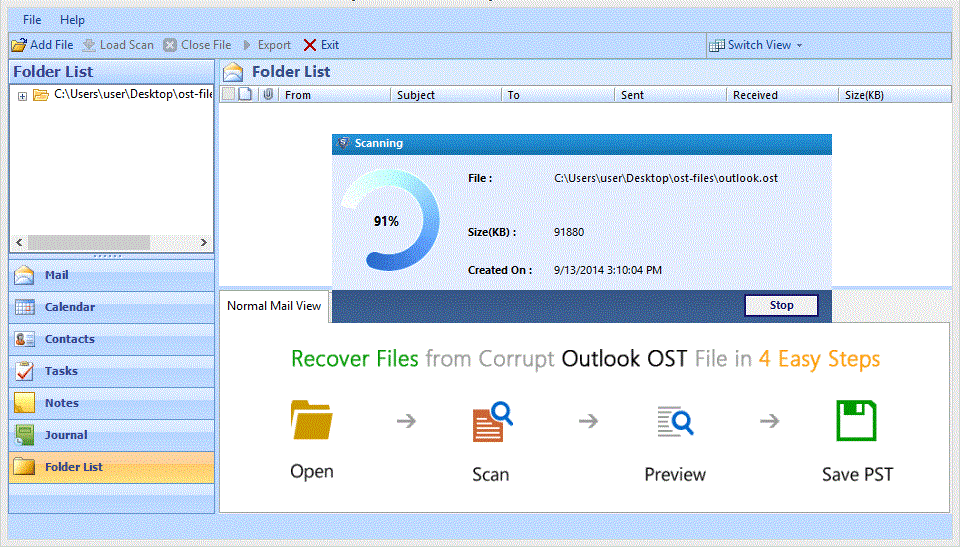
scanning-process-of-ost-file

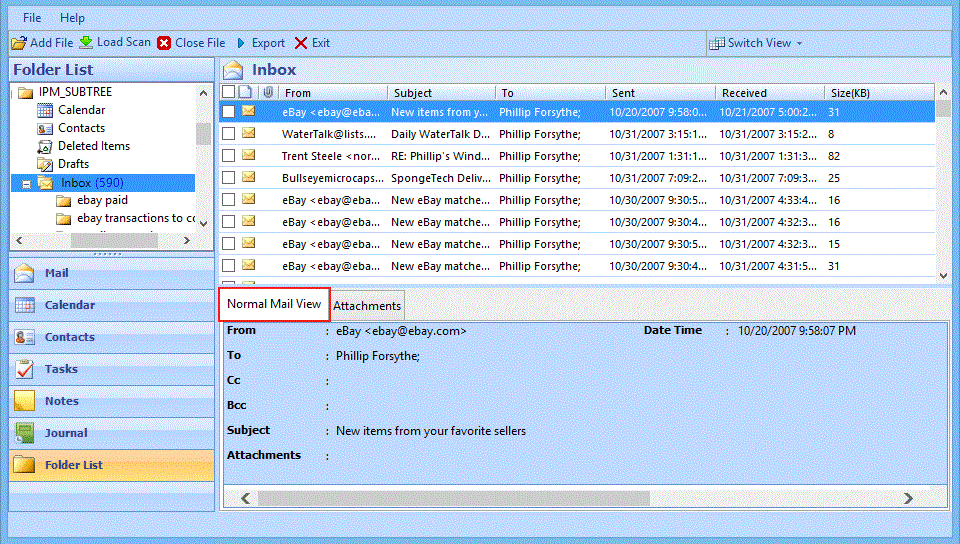
6. The data gets loaded with contents listed categorically in the software once the scanning finishes. Normal Mail View tab provides a preview of the email message while Attachments tab offers a preview of the corresponding attachments.

This makes it easy for users to look at the contents individually in an organized way, which was a great experience.

normal-views-of-ost-mails7. Post previewing recovered items of the OST file, clicking on Export enables saving the data in any of the featured output formats.
This provides wider accessibility options for the contents of an OST file by generating an output in different formats that are further supported by server independent applications.

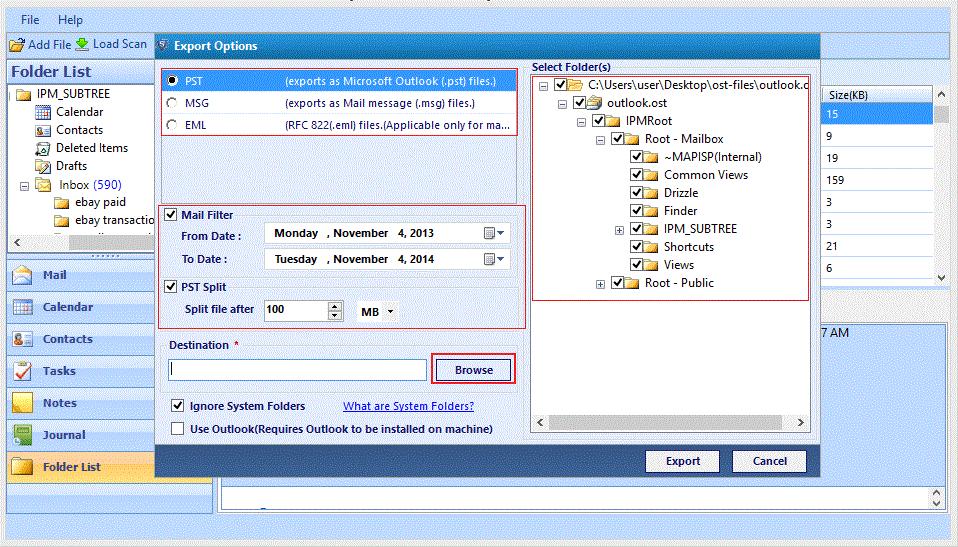
8. On the Export Options window, users can find the illustrated below options, i.e. featured output formats, mail filter (based on date range specification), PST splitting option (for generating PST based output), destination path selection, folder selection area, and other additional options for further defining the export requirements in detail.

export-options

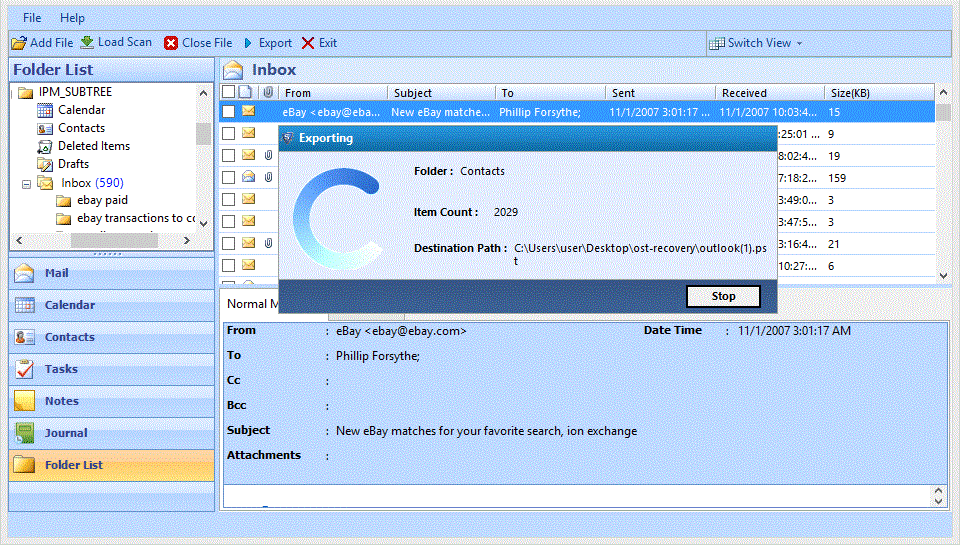
9. On clicking the Export button at the end of the Export Options window, users will be redirected to an Exporting window where a live report of the process will be displayed.

export-process

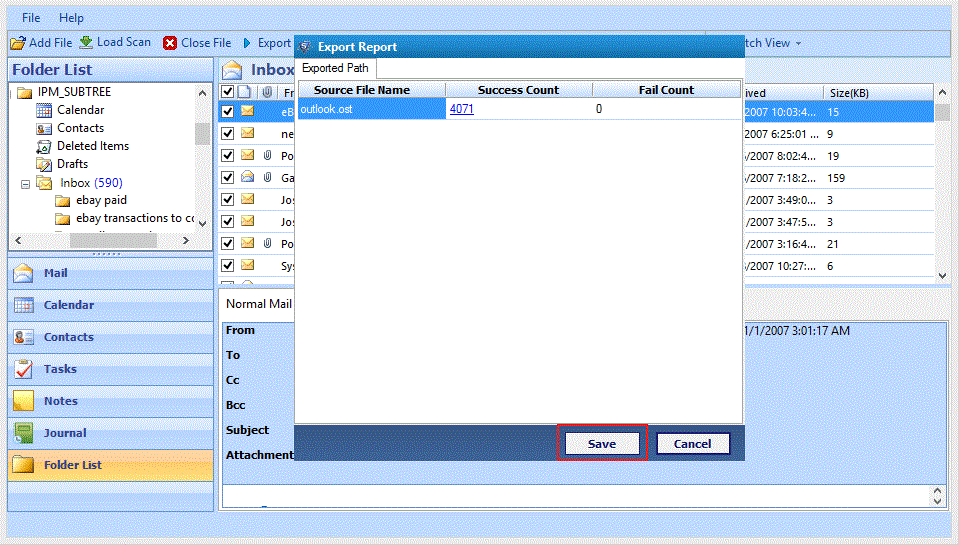
10. Once the export completes, a report will be generated by the software, which can be further saved by the users as a CSV file for future reference purpose.

save-exported-report

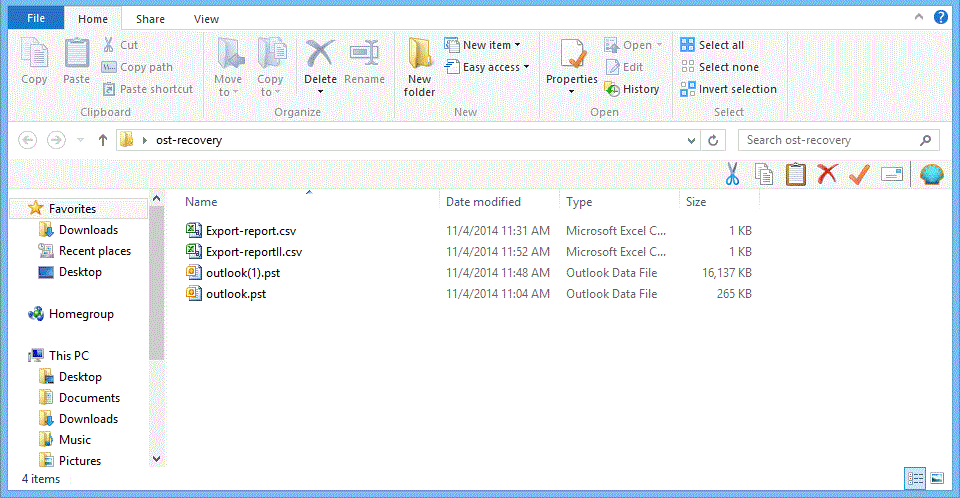
11. The output generated by the software can be cross checked at the defined destination path along with the report if saved.

converted-ost12. In order to be sure of the output, it was also accessed on Outlook platform which successfully reflected the converted data on the client in the same folder structure.

Conclusion

Considering the working of the application and successful output generated, the OST to PST Converter software can be rated 9.5 out of 10. The 0.5 percent rating has been deducted due to certain inefficiencies of the software like, inability to process more than one file at a time and generating a report with only a