The advancement in technology has led to a competition between gadgets industries. The companies are manufacturing more affordable gadgets which are packed with lots of functionalities just to be on top of the gadgets industry. Whether it be a smartphone company, an automobile industry, laptop industry or any other gadget manufacturing company, they all are working to provide the customers with a cheaper gadget without compromising with the build quality or their functionalities.
The drone manufacturing companies are also facing the same kind of competition. The latest drone which is yet to be shipped is Kudrone. This is a very affordable drone which may look tiny in size but is packed with dozens of impressive functionalities. This device has a 4K Camera with panoramic shots for precision photography. Not only this, it has a replaceable battery, auto follow system, and precision hovering, and with all those features Kudrone lets you capture your world like a pro.
Features of Kudrone
1) 4K Pro Aerial Photography- Take a 4k photo, selfie or video with this tiny drone. Kudrone provides you with a perfect 360° spin for aerial panorama photos. It also has a live stream technology for instant sharing.
2) Precision Vision Positioning Hovering- To give you a perfect stable shot every time, Kudrone is equipped with GPS, intelligent vision sensors, 3-axis gyro accelerometer, magnetic compass and barometer.
3) Interchangeable battery- Swap out Kudrone’s battery when it dies for a freshly-charged one.
4) Hands-free Auto follows- Set Kudrone to auto-follow your GPS location, or fly it from your smart device. Thus, you don’t have to carry the main controller everywhere.
5) Syncs Automatically- Your photos and videos immediately sync to your iPhone/Android storage.
6) Pilot- launch your app and begin flying.
Technical Specs:
Weight including battery: 3 oz
Controlling Distance: 0 to 262 ft
WiFi: 2.4 GHz.
Battery Capacity: 650 mAh
Image Sensor: Sony CMOS 1/3.2
Lens: F2.8 / H100 V78.5/ D:120
Image Resolution: 3280 x 2464
Video Resolution: 4K / 2.7K / 1080p / 720p
Internal Storage Capacity: Up to 64GB
Why should you buy it?
Kudrone: 4K Camera Nano-Drone With GPS Auto-Follow
Kudrone is by far the most affordable drone available in the market right now. But its affordable price doesn’t mean that there is a compromise in its quality or functionalities. This palm-sized drone has professional-grade specs for all skill levels. With its 4K camera, you can take photos or record videos like a pro. The picture quality is really very good. Features like a magnetic compass, sonar hovering assistance, vision positioning sensor and GPS make this device a must-have for everyone.
This drone might be cheap but it is fully loaded. With its tiny frame and nice design, it looks quite good and eye-catching. It’s a waterproof device. What else can be expected at such an affordable price?
Availability:
Kudrone is up for pre-order on site indiegogo.com. Indiegogo is offering a special price of $99 USD for the Earliest Birds, plus free US shipping to first 1000 backers. Hurry and order now to grab the offer. It is available in the standard black edition. It will probably be shipped in July 2017.
Thanks for hanging out with us guys. Please do drop your suggestion and ideas in the comment section below. If you want to keep tabs on a more innovative product like this, subscribe to our website. And don’t forget to give your reaction.
Intex Technologies has announced its latest smartphone to compete for the budget segment devices in India, The Intex ELYT E7. The device is available at a competitive price of INR 7,999. The Intex ELYT E7 will be available to buy at the offline market with an exciting metallic gold cover and a sleek design, which is easy to handle and let your phone look stylish.
Switching onto the most important feature of a smartphone. It has a 1.25GHz quad-core processor that provides you with an unmatched experience. It can divvy up the work you’re asking the phone to do. Also, it has 3GB DDR3 RAM, 32GB ROM and Android 7.0 Nougat that lets you do everything. It comes along with audio features and usable version of Android. It allows us to do multitasking and gamers can play heavy games without any disturbance.
It has 32GB storage and has an expandable storage up to 128GB as well. It will help to store large files, movies, music, apps etc. To capture the real life moments, it has a 13MP rear camera with auto focus and flash that keeps the moment pristine along with 5MP front camera which can be a shooter for selfies.
It has fast connectivity with 4G VoLTE along with 4020mAh non-removable battery that provides a long battery life with which we can do what we love without any pause. Immerse yourself with the display of 13.2cm(5.2inches) HD IPS display with 720×1280 pixel-resolution. Get hold of all your favourite moments with the help of it.
It consists of 2 nano sim card slots which support 4G. There are some connectivity options like WiFi, FM, Bluetooth, GPS available. It has fingerprint sensor at the back along with the proximity sensor located at the top.
That’s all for this guys, stay tuned for next update.
Which are the Best Tablets under Rs 10,000? You must be confused in finding Best Tablet under 10000 Rs in India Rs in India? If you’re planning to get the Best Tablet under 10000 Rs, you must look at these Top Best Tablet under 10000 Rs in India 2017. This list covers all the best possible tablets in the Indian Market with such price segment which you can buy and use. After checking and researching out a lot of tablets in such price segment, we have filtered only the best to reduce your time and effort of finding the tablets manually one by one.
We have combined a list of the best tablets in India with price of Rs 10,000 for this month that will take care of your normal gaming, reading, and Internet browsing needs with good battery life. So here is the list of the best tablets under 10000 Rs for this month in India.
[toc]
Best Tablet under 10000 Rs in India
iBall Slide Nimble (Rs 9,999)
iBall Slide Nimble 4GF Tablet
The iBall Slide Nimble is the best tablet under 10000 INR. The device delivers a very good performance and packs the most promising feature in a budget pack. It is Dual Sim device, with connectivity features like Wi-Fi, Bluetooth, 4G.
Coming to the specification of the device, it’s packing a 1.3 GHz Cortex A53 Quad-Core processor, which is backed by a 3GB of RAM. The tablets pack 16GB of internal storage, which is expandable up to 64 GB via micro-SD card. The device has a beautiful 8-inch HD display with a pixel resolution of 1280 x 800 pixel.
In the camera section, we have a 5-megapixel shooter and a 2-megaxpixel front shooter for video calling. The device is powered by Android 6.0 Marshmallow with iBall custom UI on top of it. The device is action packed with a 4300mAh battery, to deliver a long-lasting performance.
The Lenovo Tab made to the second best tablet in our list and it is the best Lenovo tablet that you can buy in the market right now. The device is available on several different e-commerce websites and comes with WiFi,4G LTE connectivity option.
So far this is what we know of the Lenovo Tab 3 7. The device features a plastic body design, which will be available in Dark Gray color option. Coming to the specification of the device, it’s packing a 1 GHz MediaTek Quad-core CPU, which is backed by a 2GB Ram and 16 GB of internal storage. The external memory is also expandable via microSD card up to 64GB.
The Lenovo Tab also features a beautiful 7-inch HD display, with a pixel resolution of 1024 x 600. The device is powered by Android 6.0 Marshmallow with Lenovo custom on top of it. The device has a 5-megapixel rear camera with autofocus; the front camera of the device is 2-megapixels shooter. The device is action packed with a 3,450mAh battery, to deliver a long-lasting performance.
The Swipe strike is the third best tablet in our list and it is a new competition in the budget oriented smartphone category. it delivers a sleek performance. Overall, the device is a plastic body design but they have used a fine material.
The device has a 7-inch HD IPS display with a screen resolution of 1024 x 600. The device will we running on Android 6.0 Marshmallow with Swipe custom UI on top of it. It also has a 5-megapixel rear camera and a 2-megapixel front camera for video calling.
The Swipe Strike is packing a 1.3 GHz Quad-Core processor, which is backed by a Mali-400MP GPU. The device comes with 2GB RAM and 16GB Storage. The internal memory is expandable via a micro SD-card up to 32 GB. The device features a 3,000 mAh battery, for a long lasting performance.
The Lenovo Tab made to the forth best tablet in our list and it is the best Lenovo tablet that you can buy in the market right now. The device is available on several different e-commerce websites and comes with WiFi only connectivity option.
So far this is what we know of the Lenovo Tab 3 8. The device features a very fine plastic body design, which will be available in Dark grey colour option. Coming to the specification of the device, it’s packing a 1 GHz MediaTek Quad-core CPU, which is backed by a 2GB Ram and 16 GB of internal storage. The external memory is also expandable via microSD card up to 64GB.
The Lenovo Tab also features a beautiful 8 inch HD display, with a pixel resolution of 1280 x 800. The device is powered by Android 6.0 Marshmallow with Lenovo custom on top of it. The device has a 5-megapixel rear camera; the front camera of the device is 2-megapixels shooter. The device is action packed with a 4,290mAh battery, to deliver a long-lasting performance.
The iBall Slide Snap is pretty decent tablet to buy in the budget section. it is the second best iBall tablet in the market. As usual, it is a dual Sim device, with connectivity features like Wi-Fi, Bluetooth and 4G.
Coming to the specification of the device, it’s packing a 1 GHz Cortex A53 Quad-Core processor, which is backed by a Mali-T720 GPU and 2GB of RAM. The tablets packs 16GB of internal storage, which is expandable up to 32 GB via micro-SD card. The device has a beautiful 7-inch HD display with a pixel resolution of 1024 x 600 pixel.
In the camera section we have a 5-megapixel shooter that features a LED flash and a 2-megaxpixel front shooter for video calling. The device is powered by Android 5.1 Lollipop with iBall custom UI on top of it. The device is action packed with a 3500mAh battery, to deliver a long-lasting performance.
We hope you had an amazing time checking out these Tablets. All the Tablets in this section are great on their own prefer field. We do recommend you to buy the iBall Slide Nimble, which is the Best Tablet under 10000 Rs in the market right now, it delivers such a very good performance in a budget package. The Lenovo Tab 3 7 and Lenovo Tab 3 8 are for a brand lover, who are looking for a good performance in a branded trust. You can also choose Swipe Strike, which is so far the most value for money tablet in this series. The iBall Slide Snap is also a good tablet that covers all the important feature.
If we missed anything, please mention them below. Also feel free to share your view in the comment section below. That’s all for this guys, stay tuned for next update.
You must be confused in finding Best Ultrabook under 80000 Rs in India? If you’re planning to get the Best Ultrabook under 80000 Rs, you must look at these Top Best Ultrabook under 80000 Rs in India 2017. This list covers all the best possible ultrabook laptops in the Indian Market which you can buy and use. After checking and researching out a lot of ultrabooks in such price segment, we have filtered only the best to reduce your time and effort of finding the laptops manually one by one.
If you are a traveler or normal User that want to do continuous work without big carrying power cables, then you can buy ultrabooks as it provides huge battery life with slim design. So if you want to buy Best Ultrabook under 80000 Rs budget with a Good performance and battery life, then this list will really help you and save your searching time. So here are the Top Best Ultrabooks around Rs 80,000 which are available in India:
[toc]
Best Ultrabook under 80000 Rs in India
Microsoft Surface Pro 4 (Rs 72,732)
Microsoft Surface Pro 4
The Microsoft Surface Pro 4 is an amazing device to buy. It delivers a smooth performance and has a very attractive design. The Surface Pro 4 is powered by Intel Core i5 processor and features an Intel HD 520 graphics, which is quite good for everyday use. The sole reason Surface Pro devices are famous is for their build quality and feasibility. You get a detachable screen, which can also be used as a Windows tablet. The device also features Bluetooth 4.1 and give a 9-hour screen on time. It is a touchscreen LapTab with a Surface pen, which is very useful for designing and other stuff.
So far, the disadvantage of this laptop is that it is a little expensive. Well, a more RAM would have been a blessing. Otherwise, the laptop is the best for professional work.
Key Specifications:
Processor: Intel Core i5 6th Gen
Graphics Card: Intel HD 520 Graphics
RAM: 4 GB DDR3
Hard disk: 128GB SSD
Display: 12.2 Inch Full HD (1920 x 1080)
OS: Win 10 Pro
Battery life: Up to 8-9 hour
HP 13-U135TC (Rs 70,900)
HP Core i7 7th Gen
HP 13 is the second Ultrabook in our list. The device is good for everyday use and can deliver astonishing performance. The best feature of the laptop is the Intel Core i7 processor and 8GB DDR4 RAM, which is amazing considering the price of the device. It also has pre-installed win 10 and gives an amazing 9-hour of battery life. Overall the device is a really good device for everyday usages. It has two USB 3.0 and one USB 2.0 port, it also features Bluetooth 4.2 and WiFi ac for connectivity.
So far, the disadvantage of this laptop is that it doesn’t have more storage option, except that what you’re paying is what you’re getting. Overall, it has 8GB DDR4 RAM and Core i7 processor, which is the key selling point.
Dell 7000 is the 3rd laptop in our list for only two reasons, it features an awesome core i5 series processor and an 8GB of RAM. The device also has pre-installed win 10 pro and gives a decent 7-hour of battery life. The display of the device is excellent, 512 SSD is just exceptional in all way. and you’re also getting Dell one-year accidental warranty. It features three USB 3.0 port, Bluetooth 4.2 and WiFi ac for connectivity.
ASUS Zenbook is a good Ultrabook to buy if you want a decent performance in a compact price bracket. The laptop delivers a quite good performance that is sufficient for everyday use. The device will give an excellent performance with its 2.5 GHz Intel Core i5 processor, which is also coupled with an 8GB DDR3 RAM. The Full HD screen gives a great viewing experience. It also has Bluetooth 4.0, WiFi-ac and two USB 3.0 port, 1 HDMI port, 1 USB Type-C port and a Headphone jack. The device is equipped with Asus own cooling technology, making the device ice cooled every time. It also has a very good battery that gives approximately 12-hour screen on time.
So far, the disadvantage of this laptop is that it doesn’t have a better processor, well a more storage would have been a boon but that’s ok. The laptop is good for official uses with a compact size.
Key Specifications:
Processor: Intel Core i5 7th Gen 2.5 GHz (Turbo Boost up to 3.1 GHz)
Graphics Card: Intel HD graphics
RAM: 8 GB DDR3 1866 MHz
Hard disk: 256 GB SSD
Display: 13.3 Inch Full HD (1920 x 1080)
OS: Win 10
Battery life: Up to 12 hours
Conclusion
We hope you had an amazing time checking out these Laptops. We do recommend you to buy the Microsoft Surface Pro 4, which is the Best Ultrabook under 80000 Rs in the market right now, it delivers such an exceptional performance. You can buy Asus Zenbook you’re looking for a laptop with a great battery life and ok to pay a high price. You can also consider HP 13-U135TC and Dell 7000, which covers all the essential feature in a decent package.
If we missed anything, please mention them below. Also feel free to share your view in the comment section below. That’s all for this guys, stay tuned for next update.
You must be confused in finding Best Ultrabook under 70000 Rs in India? If you’re planning to get the Best Ultrabook under 70000 Rs, you must look at these Top Best Ultrabook under 70000 Rs in India 2017. This list covers all the best possible ultrabook laptops in the Indian Market which you can buy and use. After checking and researching out a lot of ultrabooks in such price segment, we have filtered only the best to reduce your time and effort of finding the laptops manually one by one.
If you are a traveler or normal User that want to do continuous work without big carrying power cables, then you can buy ultrabooks as it provides huge battery life with slim design. So if you want to buy Best Ultrabook under 70000 Rs budget with a Good performance and battery life, then this list will really help you and save your searching time. So here are the Top Best Ultrabooks around Rs 70,000 which are available in India:
[toc]
Best Ultrabook under 70000 Rs in India
Apple MacBook Pro (Rs 62,990)
The Apple MacBook Pro is a good laptop to buy if you want a performance with a class. The laptop delivers a lightning fast performance, that is very good for everyday use. The device will give an excellent performance with its 4 GB DDR3 RAM, which is also coupled with an Intel i5 processor. The HD screen gives a great viewing experience. It also has Bluetooth 4.0, WiFi-ac and features a back-lit keyboard. The Macbook Pro has some of the best battery life, giving up to 7 hours of screen on time.
So far, the disadvantage of this laptop is that it outdated and is very expensive. Otherwise, the laptop is good in this price bracket, if you’re into Apple you’ll love it.
Key Specifications:
Processor: Intel Core i5 2.5 GHz
Graphics Card: Intel HD Graphics 4000
RAM: 4 GB DDR3
Hard disk: 500 GB
Display: 13 Inch HD Screen (1280 x 800)
OS: Max OS X
Battery life: Up to 7-8 Hours
Microsoft Surface Pro 4 (Rs 63,990)
The Microsoft Surface Pro is a quite different Ultrabook to buy. The device delivers a sleek performance and has a very beautiful design. We know that the device doesn’t feature the top notch specs but it’s worth checking out. The Surface Pro 4 is powered by Intel Core M processor and features an Intel HD 515 graphics, which is quite good for everyday use. The sole reason Surface Pro devices are famous is for their build quality and feasibility. You get a detachable screen, which can also be used as a Windows tablet. The device also features Bluetooth 4.0 and give a 9-hour screen on time. It is a touchscreen Ultrabook with a Surface pen, which is very useful for designing and other stuff.
So far, the disadvantage of this Ultrabook is that it is expensive. Well, a more RAM would have been a boon. Otherwise, the Ultrabook is the best for basic office work.
Key Specifications:
Processor: Intel Core M 6th Gen 2.3 GHz
Graphics Card: Intel HD 515 Graphics
RAM: 4 GB DDR3
Hard disk: 128 GB SSD
Display: 12.2 Inch Full HD (1920 x 1080)
OS: Win 10 Pro
Battery life: Up to 9 hours
Asus UX360CA (Rs 61,990)
Asus Core M 7th Gen
The Asus Ultrabook is an amazing laptop for a professional user who also seeks performance a compact size. The display of this laptop is very amazing, the full HD resolution is just awesome in every way. It has 4GB of RAM, which perfectly sums up all the work. It has two USB 3.0 ports and one USB Type-C Port. The device also delivers some of the best sounds with its integrated dual stereo speaker. The device has an amazing 5-hour screen on time, so you’re always ready on the go. The key feature of this laptop is that it can turn up to 360 degrees, in resultant making it a 13.3-inch tablet.
So far, the only disadvantage of the Ultrabook is that it’s a little bit expensive rather than that, it is okay. The 512GH SSD is just exceptional in all way.
Key Specifications:
Processor: Intel core M-7th Gen 1 GHz (Turbo Boost up to 2.6 GHz)
Graphics Card: Intel HD graphics
RAM: 4 GB DDR3 1600MHz
Hard disk: 512GB SSD
Display: 13.3 Inch LED Full HD (1920 x 1080)
OS: Win 10
Battery life: Up to 5 hours
Conclusion
We hope you had a fantastic time checking out these Laptops. We do recommend you to buy the Apple MacBook Pro, which is the Best Ultrabook under 70000 Rs for professionals in the market right now, it delivers such an incredible performance. You can buy Surface Pro if you’re looking for something portable and professional. You can also consider AsusUX360CA, which covers all the essential feature in a decent 2 in 1 package.
If we missed anything, please mention them below. Also feel free to share your view in the comment section below. That’s all for this guys, stay tuned for next update.
You must be confused in finding Best Ultrabook under 1 Lakh Rs in India? If you’re planning to get the Best Ultrabook under 1 Lakh Rs, you must look at these Top Best Ultrabook under 1 Lakh Rs in India 2017. This list covers all the best possible ultrabook laptops in the Indian Market which you can buy and use. After checking and researching out a lot of ultrabooks in such price segment, we have filtered only the best to reduce your time and effort of finding the laptops manually one by one.
If you are a traveler or normal User that want to do continuous work without big carrying power cables, then you can buy ultrabooks as it provides huge battery life with slim design. So if you want to buy Best Ultrabook under 1 Lakh Rs budget with a Good performance and battery life, then this list will really help you and save your searching time. So here are the Top Best Ultrabooks in Rs 1 Lakh which are available in India:
[toc]
Best Ultrabook under 1 Lakh Rs in India
Apple MacBook Pro (Rs 95,990)
The Apple MacBook Pro is the best Ultrabook to buy if you want a performance with a class. The laptop delivers a lightning fast performance, which is very good for everyday use. The device will give an excellent performance with its 8 GB RAM, which is also coupled with an Intel i5 processor. The UHD screen gives a great viewing experience while watching a movie. It also has Bluetooth 4.2, WiFi-ac. The device delivers a sleek performance with its Mac Os x, which is really great for everyday use. The Macbook Pro has some of the best battery life, giving up to 10 hours of screen on time.
So far, the disadvantage of this laptop is that it outdated and is very expensive. Otherwise, the laptop is good in this price bracket, if you’re into Apple you’ll love it.
Key Specifications:
Processor: Intel Core i5 2.7 GHz
Graphics Card: Intel Iris Graphics 6100
RAM: 8 GB
Hard disk: 128GB SSD
Display: 13 Inch UHD HD (2560 x 1600)
OS: Mac Osx Yosemite
Battery life: Up to 10 hours
ASUS UX305UA (Rs 93,990)
Asus UX305UA-FB011T 13.3-inch Laptop
The Asus Ultrabook is an amazing laptop for a professional user, who desire performance in a compact size. It has 8GB of RAM, which perfectly sums up all the work. It has two USB 3.0 ports and one USB 2.0 Port, HDMI and Headphone jack. The device also delivers some of the best sounds with its integrated dual stereo speaker. The ASUS Ultrabook has a whopping 10-hour screen on time, so you’re always ready on the go.
So far, the only disadvantage of the Ultrabook is that it’s a little bit expensive, and doesn’t feature a touchscreen display like other Ultrabook. Rather than that, it is okay. The 512GH SSD is just exceptional in all way.
Key Specifications:
Processor: Intel Core i7 7th Gen-6500U 2.5 GHz
Graphics Card: Intel HD 520 Graphics
RAM: 8 GB DDR3
Hard disk: 512 GB SSD
Display: 13.3 Inch Full HD (1920 x 1080)
OS: Win 10
Battery life: up to 10 hours
Acer ASP R13 (Rs 91,900)
Acer ASP R13 R13 R7- 371 T-5022 Ultrabook
Acer ASP R13 is the 3rd laptop in our list for only two reasons, it features an Intel i5 series processor and good battery life. The device also has pre-installed win 10 and also features 8GB of RAM, which is perfect enough for everyday use. The stereo speaker of the device is amazing and delivers a quite good performance. The device also features two USB 3. and one USB 2.0, HDMI ports and Headphone jack. It also has Bluetooth 4.2 and WiFi ac for connectivity.
So far, the disadvantage of this laptop is that it doesn’t have an i7 processor, except that what you’re paying is what you’re getting. Surely, a more storage would have been a boon but it has 10 hours of battery life and delivers a good performance, which is the key selling point.
Key Specifications:
Processor: Intel Core i5 5th Gen 5200U
Graphics Card: Intel HD Graphics 520
RAM: 8 GB DDR3
Hard disk: 256GB SSD
Display: 13.3 Inch Full HD (1920 x 1080)
OS: Win 10
Battery life: Up to 10 hours
Dell XPS 12 Ultrabook (Rs 95,199)
Dell XPS 12 Ultrabook 12-inch Laptop
Dell XPS 12 is the 4th laptop in our list for only two reasons, it features an awesome core i5 series processor and gives a good battery performance. The device also has pre-installed win 10. The display of the device is excellent with more PPI. The key importance of the device is the Dell one-year accidental warranty. The wave max audio system is also good for listening. It also features one USB 3.0 port, Bluetooth 4.2 and WiFi ac for connectivity.
So far, the disadvantage of this laptop is that it is highly expensive, and compare to the Ultrabook in this series this is silly. The only thing good in this Ultrabook is the battery life and 360 display.
Key Specifications:
Processor: Intel Core i5 2.6GHz
Graphics Card: Intel HD 4400 Graphics
RAM: 4 GB DDR3
Hard disk: 128GB SSD
Display: 12 Inch Full HD (1920 x 1080)
OS: Win 10
Battery life: Up to 8-9 hours
Conclusion
We hope you had an amazing time checking out these Laptops. We do recommend you to buy the Apple MacBook Pro, which is the Best Ultrabook under 1 Lakh. You can buy ASUS UX305UA you’re looking for an Ultrabook with a great performance. You can also consider Acer ASP R13 if you’re okay with less storage option. The Dell XPS 12 Ultrabook is just for fun; we simply don’t recommend that.
Thanks for hanging out with us guys. If we missed anything, please mention them below. Also feel free to share your view in the comment section below. That’s all for this guys, stay tuned for next update.
You must be confused in finding Best Ultrabook under 60000 Rs in India? If you’re planning to get the Best Ultrabook under 60000 Rs, you must look at these Top Best Ultrabook under 60000 Rs in India 2017. This list covers all the best possible ultrabook laptops in the Indian Market which you can buy and use. After checking and researching out a lot of ultrabooks in such price segment, we have filtered only the best to reduce your time and effort of finding the laptops manually one by one.
If you are a traveler or normal User that want to do continuous work without big carrying power cables, then you can buy ultrabooks as it provides huge battery life with slim design. So if you want to buy Best Ultrabook under 60000 Rs budget with a Good performance and battery life, then this list will really help you and save your searching time. So here are the Top Best Ultrabooks around Rs 60,000 which are available in India:
[toc]
Best Ultrabook under 60000 Rs in India
Apple MacBook Air (Rs 55,993)
Apple MacBook Air MMGF2HN/A 13.3-inch Laptop
The Apple MacBook Air is an excellent choice to buy if you want performance with class. The laptop delivers a lightning fast performance, that is very good for everyday use. The device will give an excellent performance with its 8 GB DDR3 RAM, which is also coupled with an Intel i5 processor. The HD screen gives a great viewing experience. It also has Bluetooth 4.0, WiFi-ac. The device is a very lightweight Ultrabook that packs a good performance. The Macbook Air has some of the best battery life, giving up to 12 hours of screen on time.
So far, the disadvantage of this laptop is that it outdated. Otherwise, the laptop is good in this price bracket, if you’re into Apple, you’ll love it.
ASUS UX305FA is a good laptop to buy if you want a decent performance in a compact price bracket. The laptop delivers a quite good performance that is sufficient for everyday use. The device will give an excellent performance with its 2GHz Intel Core M processor, which is also coupled with a 4GB DDR3 RAM. The Full HD screen gives a great viewing experience. It also has Bluetooth 4.0, WiFi-ac and three USB 3.0 port, 1 HDMI port and a Headphone jack. The device is equipped with Asus own cooling technology, making the device ice cooled every time. It also has a very good battery that gives approximately 10-hour screen on time.
So far, the disadvantage of this laptop is that it doesn’t have a better processor, well a more RAM would have been a boon, but that’s ok. The laptop is good for official uses with a compact size
Key Specifications:
Processor: Intel Core M-5Y10 2 GHz
Graphics Card: Integrated Graphics
RAM: 4GB DDR3
Hard disk: 256GB SSD
Display: 3 Inch Full HD (1920 x 1080)
OS: Win 10
Battery life: Up to 10 Hours
Conclusion
We hope you had a fantastic time checking out these Laptops. We do recommend you to buy the Macbook Air, which is the Best Ultrabook under 60000 Rs in the market right now, it delivers such an incredible performance. You can buy Asus UX305FA if you’re looking for a Ultrabook with pre-installed Win 10 and ok to pay a high price.
If we missed anything, please mention them below. Also feel free to share your view in the comment section below. That’s all for this guys, stay tuned for next update.
You must be confused in finding Best Laptop with Nvidia GTX 1070 in India? If you’re planning to get the Best Laptop with Nvidia GTX 1070 Graphic Card, you must look at these Top Best Laptop with Nvidia GTX 1070 in India 2017. This list covers all the best possible laptops in the Indian Market which you can buy and use. After checking and researching out a lot of laptops in such specifications we have filtered only the best to reduce your time and effort of finding the laptops manually one by one. As many high end laptops in market but many of them are not available in India, Therefore, we have filtered all the possible laptops with Nvidia GTX 1070 which are available in India and you can buy it right now.
If you are a Gamer or a Video Editor and want to buy Best Laptop with Nvidia GTX 1070 Graphic Card for a Extreme performance to play games or to edit Videos, then this list will really help you and save your searching time. So here are the Top Best Laptop with Nvidia GTX 1070 Graphic Card which are available in India:
[toc]
Best Laptop with Nvidia GTX 1070 Graphic Card in India
MSI GT83VR 7RE Titan (Rs 3,49,990)
MSI GT83VR 7RE Titan SLI 18.4-inch Laptop
The MSI GT83VR Titan is a miraculous laptop for game lovers and one of the Best Laptop with Nvidia GTX 1070. The laptop features two unprecedented 1070 GTX graphics card in a single pack. That makes the laptop a gaming beast. The device features an exceptional 32GB DDR4 RAM, which gives a mind-boggling performance. The best part of the Laptop is the 3.8 GHz HK series i7 processor, which extends the processing performance of the device to its limit. And with the help of MSI Shift technology, you can overclock the CPU to 4.2 GHz. The laptop features MSI’s Super Raid 4 storage technology, which can give a writing speed of 3300MB/s on SSD. The 3rd generation PCI-E SSD is also faster than average market SSDs. The laptop is inbuilt with Triple Fan and 15 heat pipes for extreme gaming performance. The laptop looks fantastic with the Backlit keyboard and delivers an amazing 6-hour screen on time, so you’re always ready on the go.
The Alienware 15 delivers an amazing performance. The Nvidia GTX 1070 graphic card that the device feature is amazing for gaming. The device will give an exemplarity performance with its i7 HQ series processor, which makes the device a 4 Core (8 Threads) processing beast. We have here is a 16 GB DDR4 of RAM, which is insane. The device comes with Alienware gaming technology and advances cooling feature, which can maximize the performance. The device also features Bluetooth 4.2 and give a 6-hour screen on time. It also features Exclusive cooler booster technology, which will keep your laptop cool in heavy gaming. The build quality of this laptop is astonishing.
Display: 15.6 Inch Full HD (1920 x 1080), Nvidia G-sync enabled
OS: Win 10
HP Omen 17-w250TX (Rs 169,990)
The HP omen is the 3rd laptop in our list for only two reasons, it features an Intel i7 HQ series processor and a whopping 17.3-inch display. The performance of Nvidia Graphics is an exception in gaming. The device also features some Omen gaming technology, to cool down the laptop while gaming. The Dragon red backlit key looks awesome in gaming. The PCI-e SSD gives a superb performance, compare to the traditional hard drives. It has Bluetooth 4.2 and WiFi ac for connectivity. The build quality and the audio system of the device is awesome.
The MSI Apache delivers an amazing performance. It has an HQ series i7 processor, that boost up the performance. And with the MSI Shift technology, you can also overclock the CPU, to up to 4.5 GHz. The Nvidia GTX 1070 graphic card gives an exceptional performance, while gaming. The device also features Full HD LED screen, which looks really nice while gaming. It also has Bluetooth 4.0 and gives a 5-hour screen on time. And not just it, you’re also getting some exclusive MSI gaming technology, like advanced cooling management and gaming mode and temperature control.
Key Specifications:
Processor: Intel core i7 7th Gen-7700HQ 3.5 GHz (Turbo boost up to 4.5)
Graphics Card: Nvidia GeForce GTX 1070 8 GB DDR5
RAM: 16 GB DDR4 2400MHz
Hard disk: 1 TB 7200 rpm/ 256 GB SSD
Display: 17.3 Inch Full HD (1920 x 1080)
OS: Win 10
Conclusion
We hope you had an amazing time checking out these Laptops. We do recommend you to buy the MSI GT83VR 7RE Titan, which is the Best Laptop with Nvidia GTX 1070. You can buy Alienware 15 you’re looking for a laptop with astonishing build quality, specially designed for gamers. You can also consider MSI Apache pro and HP Omen, they will not let you down in any gaming.
Thanks for hanging out with us guys. If we missed anything, please mention them below. Also feel free to share your view in the comment section below. That’s all for this guys, stay tuned for next update.
Tired by one armed selfie or the selfie sticks? Need not to worry, just say thanks to the technology because now we have an extraordinary and a reliable replacement for selfie sticks and the traditional way of taking pictures. The replacement is none other than a device called AirSelfie. With Air Selfie you can not only get pictures but also the person who sees your picture is going to live the moment in all that pictures.
AirSelfie is basically a third portable flying camera for your smartphone. Actually, it is more than a flying camera. It is about taking pictures that will tell your story and create images that are truly out of this world.
How does AirSelfie works?
Slip your flying camera from the sleek case attached to your smartphone and switch it on. The device comes with an air selfie app (Android and iOS), just press the lift button and watch your flying camera hover to heights up to 20m.
To adjust the height and direction of the device just use the app installed on your phone. For taking HD pictures and shooting videos press the proper button. It is important to land your air selfie with safety and smoothly on to your open hand, or you can just grab it.
After you are done taking pictures, put the device back into its case. The case has the charger attached to it so as soon as you put the device in its case the device gets recharged for further usage.
Features:
Robust and sleek i.e easy to carry wherever you go.
5 MP HD video camera that ensures the highest quality of images.
4 turbofan propellers powered by brushless motors, safe to grab it while it’s still hovering.
Thinnest and lightest HD flying camera.
Comes in anodized aluminium case, just to protect your flying camera from wear and tear.
AirSelfie Camera Samples
Why should I buy it?
AirSelfie is the only portable flying camera integrated into your mobile phone cover
Air selfie is for those who love taking pictures, who wants their pictures to be one of the best quality photograph and for those who wants to capture the entire world while capturing themselves. Air selfie is one remarkable change in the world of selfies that has lead “picture taking “at a different level. A level where photography is technically advanced, and on an amusing note a person can have fun taking pictures.
Availability:
The device is a commercial success; it was first a Kickstarter project, but with numerous funding, it became successful. The device is available on its official site with a shipping charge. The retail price of the device is 279.13$.
Thanks for hanging out with us guys. Please do drop your suggestion and ideas in the comment section below. If you want to keep tabs on a more innovative product like this, subscribe to our website. And don’t forget to give your reaction. It’s fun, I promise.
There is much more to being a DJ than mixing a few songs together or creating a great playlist that you share with friends and family. It actually takes a great deal of skill and talent to be a talented DJ. Creating new music, sound effects, mixes, and new beats is done by using a cross-fader DJ mixer and at least two turntables. All you have to do is plug the mixer into a PA system for live events or if you want to broadcast live over the internet, you can plug the mixer into broadcasting equipment. This article will share what technology goes into making a DJ mixer and how it all works together to create great music.
You could be a DJ that specializes in the nightclub scene, weddings and birthday parties, or on the radio. Depending on what type of DJ you want to be, you will need a variety of items to get you started. It’s important you acquire the best DJ mixer as part of your repertoire.
A mixer allows the DJ to route the sound from the decks to the mixer which is what gives the DJ the ability to mix audio signals. The mixer has 2 channels which hook up to the player inputs. Some examples of inputs include vinyl turntables, CD decks, or a laptop. Basic mixers have two inputs such as phono for hooking up a vinyl turntable or Line In for connecting to a CD player or computer. The switches will allow you to select the channel input.
There is a knob that the signal from the turntable will come into contact with that is called the gain or trim. This will set the level of sound on the channel. The purpose of this is to ensure that signals that are moving through the mixer are producing about the same amount of volume. For example, if you are playing a song and the sound is too low, all you have to do is boost up the level of gain.
From the gain, the sound signals go to the EQ. The most common mixers have three-band EQ with knobs for hi (treble), midrange (mid), and bass which is also called low. These knobs will allow you to adjust the level on the frequency band. EQs with channels are typically used if you want to mix in a smoother manner. Once the EQ has done its job, the sound signal is then transferred to the level meter. This meter will show you the signal volume after the gain and EQ. This is helpful as you can determine if the sound is being heard well on the dancefloor.
Lastly, the sound signals will find their way to the channel upfader. This mechanism has the ability to turn off the signal, reduce the sound, or blast it to the fullest with the fader opener. The DJ will change the volume on channels with the faders while transitioning from one track to the next.
If you are interested in being a DJ, check out this nice list of DJ mixers which will help you choose the best one for your needs and level of ability.
Are science and technology only about inventing something beneficial to mankind? Maybe yes or maybe not buy according to me, science and technology are sometimes about inventing a device that is amusing in use, it should also be ease and fun. Don’t you think?
Wallet Drone is the world’s smallest drone, also known as the tiny quadcopter with 4 cm in size and comes in a wallet size controller with an inbuilt charger. A perfect device that provides fun, ease and convenience.
Features:
Only quadcopter that docks and charges inside the controller.
The size of the controller is same as the size of a wallet so it is portable and designed to provide a secure transport and storage.
Wallet drone features smaller and lighter PCB with gyroscope and flight stabilization.
There is an extra antenna for extended control range.
Bright LED lights are on the underside of the wings not at the ends for night flights.
The quadcopter has battery housing on the bottom i.e., rectangular which allows better performance and handling.
The technology behind the device:
Patent-Pending design allows the drone to charge while docked inside the controller.
3 speeds pre-programmed for the desired level of flight sensitivity.
6-axis gyro-stabilization keeps drone stable and centered.
Pre-programmed “Trick mode” algorithm provides amazing flips and rolls.
Verdict:
You may think that why should you go for this device. Well, First of all, it is the world’s only drone that you can use anytime and anywhere and most importantly, you do not require a separate charger or charging point in order to charge this device. Just take it from your pocket and connect it to your smartphone and fly. That’s it.
Availability:
The device is a commercial success; it was first an Indiegogo project, but with numerous funding, it became successful. The device is available on Amazon.com with a shipping charge. The retail price of the device is 19.99$.
Thanks for hanging out with us guys. Please do drop your suggestion and ideas in the comment section below. If you want to keep tabs on a more innovative product like this, subscribe to our website. And don’t forget to give your reaction. It’s fun, I promise.
Samsung India has launched the new Galaxy J7 Max and Galaxy J7 Pro today. The new successor of the prevalent Galaxy J Series. The dual-sim device Galaxy J7 Max and J7 Pro comes with a chic metal Uni-body design and features technologies like Samsung Pay and all-new Social Camera. Both of the devices will be available in two colours Black/Gold.
Galaxy J7 Max:
The New Galaxy J7 Max is packing an Octa-core 1.6 GHz MediaTek processor, which is backed by a Mali T880 Mp2 GPU. The device comes with 4 GB of RAM and 32 GB of internal storage, which is expandable up to 256 GB via micro sd card.
The device gives a perfect luxurious look and feel. The Galaxy J7 Max has a 5.7” Full HD PS LCD Screen with a screen resolution of 1920 x 1080. The device also packs a 2.5D curved glass protection.
The J7 Max has a 13-megapixel rear camera with LED flash and a splendid f/1.7 aperture for better imaging. The device also packs a 13MP front camera with a f/1.9 aperture that delivers a bright and sharp picture. The device is action packed with a 3,300mAh battery which gives a long-lasting performance.
Galaxy J7 Pro:
The New Galaxy J7 Pro is packing a Quad-core 1.6 GHz Exynos 7870 processor, which is backed by a Mali T830 MP2 GPU. The device also comes with 3 GB of RAM and 64 GB of internal storage, which is expandable up to 256 GB via micro SD card.
The device has premium metal finish with a 2.5D Gorilla Glass. The Galaxy J7 Pro has a 5.5” Full HD Super AMOLED screen with a screen resolution of 1920 x 1080. The J7 Pro has a 13-megapixel rear camera with LED flash and a f/1.7 aperture, the device also has a 13MP front camera with an aperture of f/1.9. The Galaxy J7 Pro packs a 3,600mAh battery for everyday use.
Both of the devices are powered by Android 7.0 Nougat with the latest TouchWiz UI on top of it. The devices also have a fingerprint sensor on the front home button. Samsung has also inbuilt some unique feature like S Power Planning, S Secure, S bike mode, Ultra data saving, Samsung pay, Social camera.
The devices are part of the make in India campaign, so they convey some exclusive feature, for example, the S Power Planning will reserve battery for calls which enable the user to allocate a certain percent of the battery for calls and messages. The S Secure feature will allow the user to hide or lock apps, it will even let you create Secure encrypted network while using public WiFi.
The Samsung Galaxy J7 Max is available for 17,900 INR while the Galaxy J7 Pro is available for 20,900 INR.
That’s all for this guys, stay tuned for more update and don’t forget to subscribe the website and our YouTube channel.
You must have heard and seen many kinds of drones. But Micro Drone 3.0 is different from all others we have seen. Micro Drone 3.0 is the first fully customizable personal drone. Earlier drones were made for a particular group of people like in military applications, scientific, recreational, and other applications, such as peacekeeping and drone racing. But this revolutionary device can be used by anyone from a kid to a specialist. So, whether you are an expert pilot or a first timer, Micro Drone 3.0 is for you.
1) Capture fantastic aerial shots- Micro Drone 3.0 streams self-stabilized HD footage to your phone.
2) A drone for everyone- Micro Drone combines expandable modular technology, sensor assisted flying and a micro gimbal for live streaming video. With a host of customizable features and functions, it is a drone suited for everyone from video enthusiasts to kids.
3) Flight-
Micro Drone is incredibly stable. No amount of pushing, prodding or poking will keep it from flying.
It uses a combination of intelligent motion sensors which allow it to hover and fly in perfectly straight lines, without deviating from its fixed axis. This allows you to focus more filming and less on flying.
Sophisticated sensor programming lets you fly in winds of up to 45 mph!
Micro Drone 3.0’s companion app lets you control it with your phone. So you can use Micro Drone 3.0 with or without having to carry around the main controller.
With modular design technology, It’s super fast to connect and prevents any broken wire issues. Simply hold the camera close to the battery and snap, you’re connected.
Expansion packs.
Multiple devices controls.
3D printed customization.
Technical Specs:
Weight: 56g (71g with Camera)
Battery: 550mAh Lithium Cell
Magnets: Neodymium Nickel Coated 1.8kg Magnetic Pull
Flight Time: Up to 8 minutes
Range: 150ft (smartphone) 500ft (2.4Ghz radio)
Speed: 45mph
App: iOS and Android
Dual Control: Smartphone WiFi Tether and RF
IEEE 802.11 WiFi Protocol
CPU: ARM Cortex Processor
Why should you buy?
Micro Drone 3.0 is packed with so many functions despite having such a tiny frame. It is the most advanced drone we have seen so far. This device has brought new technology and functionality in the world, that too in a minuscule package. Features like dedicated long range remote, smartphone control access, HD video recording, FPV mode and social media integration are enough to convince any gadget lover to buy it. And not to forget the modular design technology which can allow anyone to use it without any hassle.
Pricing:
This device is available for order on indiegogo.com. Its pricing starts from 1309$. If you are in love with this device like several others, then why wait. Go and grab it now.
Thanks for hanging out with us guys. Please do drop your suggestion and ideas in the comment section below. If you want to keep tabs on a more innovative product like this, subscribe to our website. And don’t forget to give your reaction.
These days getting fingerprint in any device is common. We are getting fingerprint in almost every phone. We are getting fingerprint in even our pendrive which most of time has very important data but why not we cannot add fingerprint in our windows device. Why need to add third part big large fingerprint sensors, why not small fingerprint in affordability ? So, to answer all these question Cobo a well know brand brings their new device in the market with a smallest fingerprint sensor which can be used in any of your windows platform device.
Cobo is having many model which can be selected as per the budget as quality differs according to the price. But the best one which i loved with top notch quality is Cobo C1.
So, starting with What is this COBO C1 USB Fingerprint Module?
It is basically a portable and a smallest fingerprint sensor module. It comes with a USB port and runs on Windows 8.1 and Windows 10. Basically, COBO C1 USB supports laptop and PC that run on WIndows operating systems.
The COBO C1 USB Fingerprint Module is one of the cheapest and smallest fingerprint sensor available. It give you additional security to your PC or laptop. Using this you can set your password as hard as you want and keep it noted anywhere you want. Even after that you don’t need to remember the password just place the finder on fingerprint sensor and it will work like ease.
Starting with the Setup Of Cobo C1 Fingerprint module.
Search setting in your windows and open PC Setting.
Open Account and click on Sign In Option and add password if not already set.
Set Pin also, as per your support.
After that get the Drivers for the Cobo C1. (Download Drivers)
Once you install the driver, in some of the HP Laptops it don’t support fingerprint. So, to make it work install a plugin HP Simplepass (Download Here or you can get it from HP website as your HP model)
How to Activate Biometric FIngerprint Option in Windows
Once everything is done, Restart the Laptop or PC you will get the option for fingerprint in Accountsign in Setting or still if in HP laptop you don’t get the option use simple pass normally and it will work by going into control panel in windows 8.1.
Wireless technology is in boom these days, we have seen so many bluetooth earphones previous but the thing is that they always have one single wire which is connected with both the earphones to give power and to give better sound and which also help you to put those earphones hanging in your neck, but since apple launched there apple iPhone 7 and iPhone 7 plus they have also launched newly true wireless earbuds which have no wires in it but the design which they have used is very clumsy and uneasy to handle. I tries them and most of the time apple earpods just run away from your ear.
After that Samsung come up with Samsung Gear IconX, which are quite conformable and easy to use as well as gives better audio when we compare to apple earpods. The thing is that Samsung Gear IconX is really very costly just like apple earpods.
So, what if I would say you can get these kind of earpods with same audio quality and other stuff that too in very cheap. So, here today we have QCY Q29 Wireless Earbuds which are wireless as well as has no physical wire connected to it. The best thing i liked is they can also be used as two independent earpieces that can be used together (stereo) or separately (mono), depending on your needs. You can get these earbuds in retail for between $73 and $100, depending on where you get them.
Q29 True wireless earbuds comes with a small carrying case that also works as a charger. You can charge it using a micro USB cable via a power brick or you can even use a powerbank to charge them.
I have no complaints regarding it because of it size. You can charge the earbuds as they fit snuggly and charge quickly. It took me about 30 minuted to charge the earphones from 0 to 100%. Battery backup is also quite good and give me about 4 hours of playback time.
Design
The earpieces which we get is having a oval-shaped and really very small when we compare other cheap earbuds available in the market. One thing which i love is that they are available in multiple colors like white, Green, Blue and finally my favourite one Black. On the top side of the earbud we get a LED light which is used for different notification and a small white LED is always blinking which indicate you the status.
This is not enough as i have already mentioned we can use both earbuds at the same time as well as in mono mode which adds an integrated microphone in both of them, so it doesn’t matter which side of ear you are using it. You can talk using any one.
Functions
There are many other functions also which we can use with these earpods like we get alerts on incoming calls and the it even reads out the phone number from which we are getting the call. Pressing the button on the earpiece you can easily answers the call, and pressing it again you will ends up with the call.
First time connecting the both earpiece seems to be mess but quite easy. First place both the earpiece in the charging dock, then take the right ear piece out, turning it on and connecting it to the phone, then removing the left ear piece from the case and waiting for it to connect to the right earpiece automatically, and you are done. We also get a manual way to connect both of them in which we need to press the button on both the earpiece for about 8 seconds and til they flash white, then moving them close together until they connect.
Confort
According to me they fit well in my ears and I’ve not even a single issue which i have faced while using them. They are tight enough and won’t fall out easily from your ears even when you are shaking your head well. I also like the charging and the carrying case which can be slipped into our pocket very easily. I’ve used the Q29 in mono mode as well as in stereo mode and they work well in both the scenario.
Audio Quality
Coming to the audio quality i was thinking because of these price point and wireless technology they might have low down the audio quality and won’t be getting enough bass. But surprisingly i was getting some great audio quality out of it. Much better what we can expect with this price range. As i am the bass lover and getting base in wireless earbuds are myths in this price but in these earbuds the bass was really strong.
Verdict
I was pleasantly surprised with this audio quality in this price. why would anyone will go for samsung earbuds, just because of the brand else Q29 are here to give them huge competition because of their affordable pricing. The earpieces are very small in the ears and not at all feel heavy on long uses.
Overall, if you are gadget addict and want yourself to be free from all kind of wires then this futuristic gadget is for you. You can also use it for show off purpose 😛
Huawei well know brand is almost ready to launch its next generation dual camera setup with Honor 8 Pro in India. The device as per the brand is expected to launch in July.
Honor is always on top in making top notch camera phones. We have already seen huawei P9, Honor 8 and the best out of it in price is Honor 6x. Honor is the most selling phone in India from Huawei. Honor 6X comes with dual-lens rear camera with a wide aperture range and produces really great and professional shots.
Expressing his thoughts on Huawei’s continuous innovation, Mr. Allen Wang (Director, Product Center, Huawei India Consumer Business Group) said, “In this industry, we need to constantly innovate to serve our customers better. Our focus is to bridge innovation and technology, create an elite ecosystem of industry visionaries and offer products that significantly enhance the way people connect with one another. Our success, which is backed by three pillars – passion, collective wisdom and meaningful innovation, has made us one of the top three global smartphone brands. As a part of our strategy, we will leverage on our innovations to shape the next era of consumer technology.”
The upcoming Honor 8 Pro, is going to come in best of its class hardware and software as they have already rolled out EMUI 5. With 4rth generation of camera i think they are going to change the market with their camera and its quality. So, lets see how it is going to perform in the world once being launched in July.
Do you like Xiaomi Products? Do you want to Buy any Xiaomi Products but due to lack of availability in your Country or Out of Stock you are unable to purchase your favorite Mi product, Then time has come to get your favorite xiaomi products in your hands.Now you can buy any Xiaomi Mi Product in 1 click from Gearbest. That’s not all you get, you will also get a huge discount on it as Gearbest having a big Xiaomi for Sale Offers on their website where you can order Mi products in cheaper rate with international shipping. Isn’t it is Great?
You can also Pre-order new Xiaomi Products on this Sale as the Best deal you can take is Xiaomi Mi 6, which is the best smartphone in its price segment and it will be the killer smartphone you can get by Xiaomi on this Xiaomi for Sale Offers. You can do an international shipping and enjoy the smartphone experience before it launched in your country. So here I listed some of the products you must check out. So let’s begin the Xiaomi for Sale Offers…
No one whats to spend more money and always like to save as much they can. In this Gearbest Xiaomi for Sale, you will get great offers and deals. You can buy some exclusive products as well like Xiaomi Mi 6 or Xiaomi Mi Pad 3 which is best for its price.Here is the Xiaomi Mi 6 page Link if you what to know more about it.
Other than smartphones or tablets, Xiaomi sales many products which people are not aware of. You can check some Xiaomi New Products and buy if you like it.
There are many Smart Devices this Xiaomi Sale which may not available in your country but now you buy these products on this Sale and save lots of money. Isn’t that great! So Hurry Up and grab the best Deal Now…
As we sum up all the deals and products, you surely will save a lot of money out there. And get the best possible deal on Xiaomi Mi Products. To know more about these products or Sale, you must check out the link given below:-
Social media marketing could be scary. Yes, we are warning you here! If social media campaigns are handled wrongly, they can ruin your brand impression on a large extent. Different people interpret things differently. It is crucial to keep your brand ethos intact while promoting on social channels. With time, social media marketing has changed immensely with respect to the way and extent a post reaches its potential audience.
Despite that, do not worry, the top Digital Marketing Company in Mumbai is here to introduce some practical methods and tricks that you can use for your social media campaigns to generate optimal leads.
All we want from you is that you stick with us for next couple of minutes to discover further.
Create and run a killer photo contest: The idea is to initiate a fun engagement of customers in the business. People love when they are challenged positively. So, let us make use of this technique and ask customers to join a photo contest where they will have to use their creative skills and come up with photos as per the guidelines mentioned by you. Such practice encourages customers to dwell in your business. In addition, you get a collection of some creative photos that you can use for your marketing purpose later. The catch here is, do not promote something that will not help your business in turn. Think about what you really would want to achieve from the contest and then move ahead.
Separate the post and the main page: When we consider conversion rates through something that we own than through a third party tool or platform, it is always higher. The concept is to create a post on social media about some free stuff which when clicked will redirect the customer to an altogether different link, referred as a landing page. Landing pages so far, have proven to be the best lead conversion sources. In addition, they help you collect additional information like customer’s name, phone numbers, email addresses etc. Landing pages are created with a clear goal in mind; hence, results are always favorable as compared to any other platform.
Encourage your customers by providing some worthy freebies, vouchers or even a free trip: So, there is no contest here as such. The secret is that here you involve customers by asking them a very simple question, “Why do they need the gift and why do they think they deserve it”. Easy, right? This is a great and effortless marketing technique where you get two things. First, you get a huge number of customers opting for the prize and second, customer generated content that can be used in future promotions. Do not miss shouting aloud on other platforms like blogs, forums, and across different social media platforms. Doing so will help you increasing the conversion rates.
That is it! That is all you have to do get targeted leads through social media channels. The formula is to keep a fixed goal in mind and run contests or other genuine boosts and then test them. Later analyze what had worked the best for your business and simply change the theme and reuse quarterly.
Xiaomi is always on top notch when they start offering some great smartphones that too in budget. The price which they offers always packs up with the specs which you can never imagine or get in some other brand. This time Xiaomi launched Redmi 4 in India which is named as Redmi 4x globally. The device offers some great specs on the papers and when we see the price at which they are offering it, they are insanely affordable.
On papers Redmi 4 seems to be the best budget device of 2017 because i don’t think so any other company is going to come better than this that too in this pricing. So, lets see how it actually works in real world with all intense and basic test.
4G LTE with VoLTE, WiFi, Bluetooth, GPS, USB OTG, 3.5mm audio jack, Hybrid SIM tray
Price
INR 6,999 / 7,999/ 9999
Box Content
Xiaomi Redmi 4
Manual
Sim Ejector Pin
USB Cable
Charging Brick
Rest nothing within the box.
Design & Built
Xiaomi Redmi 4 is available in two colors Gold and Black and personally i like black one rest color is always a personal preference we cannot recommend color to anyone. Rest color choice is a never ending discussion.
Starting with the front part here we get a 5-megapixel shooter beside an earpiece and different sensors.
Coming below we get 5” HD Display, which is covered with 2.5D curved glass which gives additional looks to the phone and rest as per the brand they have not mentioned which gorilla glass protection is added to the device but atleast they have added gorilla glass.
Sliding little bit down here we get Back capacitive keys which are printed and don’t light up in night. One more thing above the home button we also get a single color LED notification light. it seems to be bad that they have used single color LED and not the multicolor one like we get in other xiaomi devices.
Coming to the bottom portion of the phone here we get Dual Speaker grills which are properly crafted and left speaker grill is actually having a primary Mic in it, where as the right speaker is actually has a speaker in it. The Phone is not having fast charging as per the brand but i when i used my qualcomm quick charge 3.0 charge it charges pretty fast. Rest i will test it more once i get my power meter which we just ordered.
Turning to the top we get a 3.5mm audio jack and IR blaster which is good and beside it a secondary noise cancellation Mic.
Turning to the left side of the phone, we get Hybrid Sim tray slot which support Dual Sim or Single sim + micro sd card which support up to 256GB of expansion.
Turning the phone towards right here we get Volume rockers and power lock key which give quite good haptic feedback. The buttons are also made up of metal.
Finally coming to the back panel of the phone here we get 13-megapixel camera beside that a Single LED flash, below that a Fingerprint sensor which really works pretty fast. Below that we get MI branding. The back panel is made up of metal but the upper portion and the bottom portion of the phone are made up of plastic which as a antenna for network.
Xiaomi Redmi 4 is built out of metal AND glass and feels perfectly premium in hand.
Display
Xiaomi Redmi 4 comes with a 5-inch HD with a resolution of 720 x 1280 and pixel density of 297 ppi. The Display colors are more towards artificial tone with too much blue light tint on it. Still after that watching movies and playing games looks awesome. While watching a movie on to the phone give immense experience but if you use the same in dark it may stain your eyes a bit because of artificial lights. The Sunlight legibility is also good because of its brightness.
Viewing Angle is good, and blacks are decent enough. While watching movies from odd angle won’t affect you in any way. There are different color modes, which you can change by going into the setting panel as per your usage. Overall no complaints with display. still they can make it to Full HD but to get better battery out of it they have decreased the resolution.
Performance
The phone comes with Snapdragon 435 processor which features a 2/3/4 GB Ram. This combo makes it a decent purchase in this price. Out of 32GB of internal storage you get about 25 GB free after that also you can expand it to up-to 256 GB as the phone support Hybrid SIM tray, which means whether you can install dual sim at the same time or you can install one sim and one micro SD Card in it. Rest you can choose different model as per different internal storage 16/32/64GB.
1 of 3
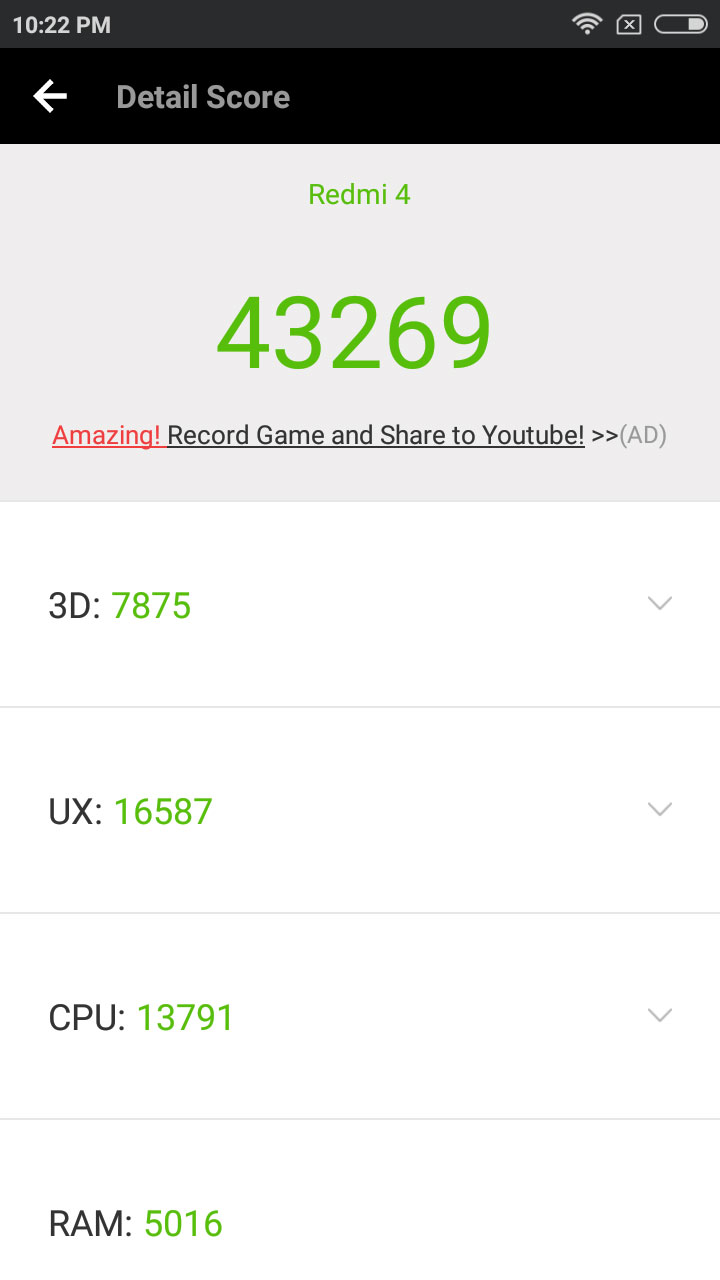
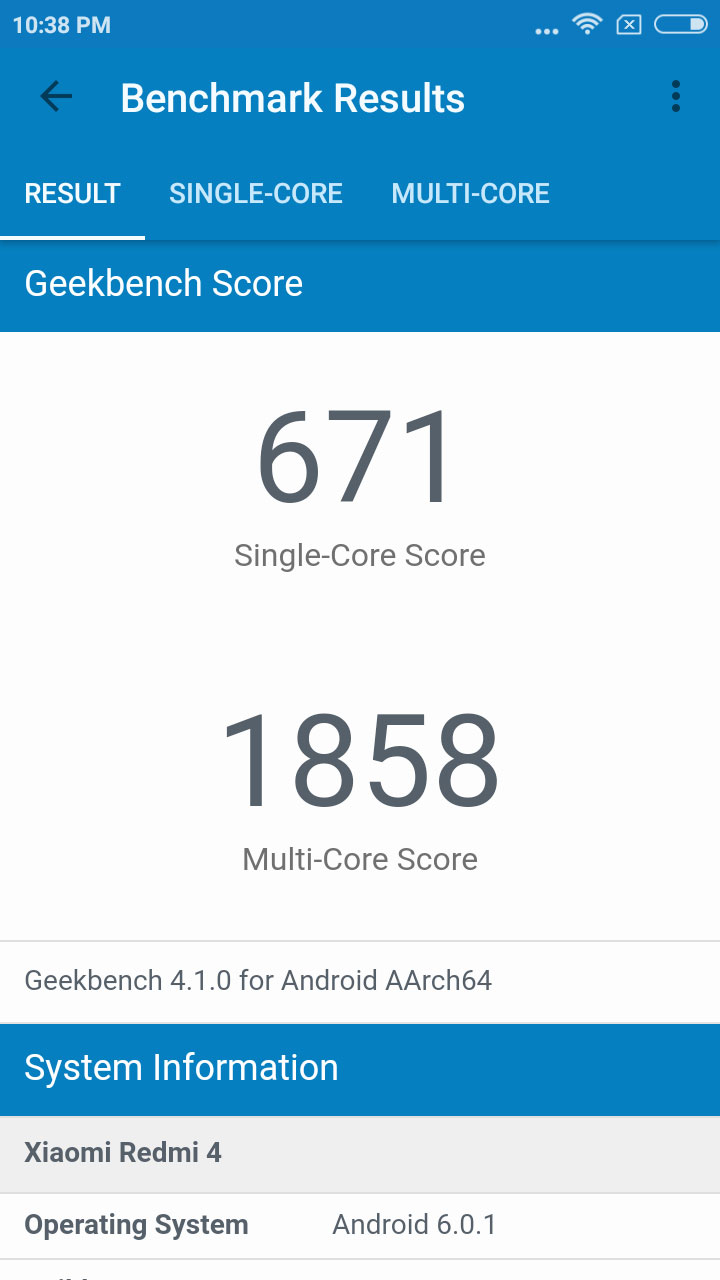
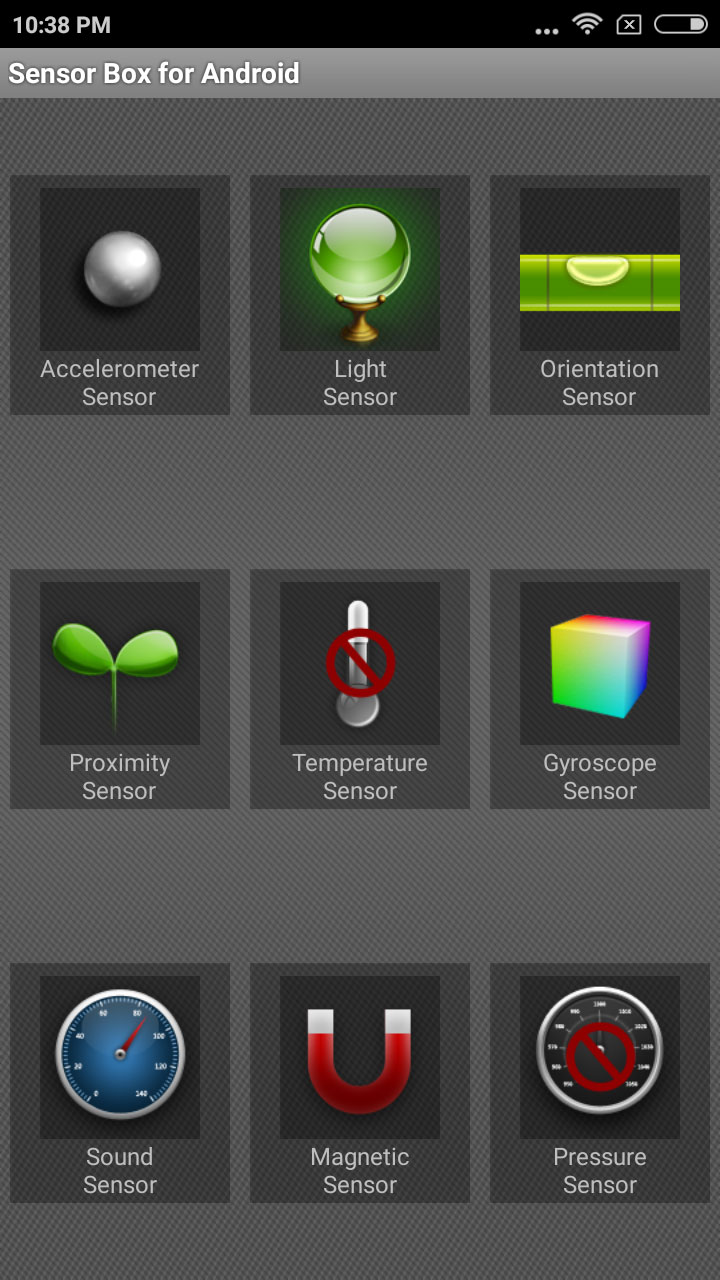
We get Antutu Score of 43269 and certain other scores are also great, because no other device in this price is getting this high score. We are all the sensors which are required in a phone. I have attached all the images which you see over here.
I have also made a gaming and heat test video which will showcase you the overall performance of the phone.
Camera.
Xiaomi everything is good but they always compromise on camera quality with their budget segment phone. This time also the camera is decent but not as good as it should be. Xiaomi Redmi 4 comes up with 13 MP rear Camera which capture really great images in outdoor light but as the light goes down the images came out really very noisy and black. Rest, i have already posted camera review on my YouTube channel. Photo Clarity has proper details and natural colors, you wont find any over saturation in the images. Focus is decent. Macro shots came out really good.
Coming to the front facing camera of 5 MP, which captures decent selfie shots but not very good. It give you some overall saturation sometime, and in low light you cannot even get to know that it is really you same like redmi note 4 camera.
The camera UI is same as always what we get in other xiaomi phones no difference is their. Still when we get pro mode in camera we expect more from it not only white balance and ISO, We also need shutter speed and manual focus. I don’t know why xiaomi always remove it from their default camera setup. We need to install third party application to get better camera performance out of it.
Software
Xiaomi Redmi 4 out of the box is loaded with MIUI 8 which is the latest release from Xiaomi as of now. It is loaded with some really awesome features, and the best among them I like is the Dual app mode and Dual System using which you can live you personally and office life in two parallel ways.
We get android 6.0 out of the box and promised to get Android 7.0 soon. Get we have already made separate video on all feature explained for MIUI 8.
Battery
As we all know Xiaomi always offers some great battery life to there device, so as this time. Xiaomi Redmi 4 is packed with a big battery at 4100mAh, as well as the software is enough power for optimizations under the hood that makes it last really long. As redmi 4 comes with HD display it gives me really great and intense battery life with great stand by time too. In heavy usage you can easily last with this phone for 1.5 days and on normal use it will easily last you more than 2 days for sure.
As per the brand they have not mentioned whether the device support fast charging or not as the phone comes with normal charger. Still when i used qualcomm quick charger 3.0 it charged the devices really fast. So, to confirm it i bought power meter, and hope it will deliver to me soon.
Verdict
The Redmi 4 is a pretty decent smartphone for its price. It performs pretty well with no complaints. Overall, for normal as well as for heavy user it is the perfect device. But coming to the selfie lover, I will just say no to them.
Everyday technology is evolving and improving, making the lives of many easier to navigate and more efficient. Businesses, corporation, and small businesses have all be able to reap the benefits of recent technological advancements. This has increased revenue and streamlined processes. While technology can often eliminate jobs allowing the company to save a bundle of money annually on staffing costs, there are still many positive aspects to how business continues to thrive regardless of the economic climate. This article will explore some tech solutions to improving corporate governance.
Board Portals. A board portal is a platform that can be accessed online or offline. It is typically utilized by executives and other high-profile leaders within a corporation. In addition, administrative staff members can easily access files and make needed edits on documents in a fast manner. In fact, administrative staff members can make edits in real-time so that the document is then instantly available to be used.
Monitor performance. Many companies are moving towards streamlining HR processes to save money on personnel and keep better track of employee paid time off, benefits, and performance. Performance can be monitored annually or more often depending on the company preference. This can be done in the form of evaluations or employee performance plans that can be accessed by both the employee and the supervisor at any given time.
Accounting. New online platforms have been created so that executive leadership can keep track of expenditures and revenue numbers from their smartphone. No longer does a CEO need to wait for a period of time before the accountant can crunch numbers and provide an updated excel file. With the use of cloud services and software platforms, this information is readily available whether you are in the office or traveling all over the world.
Communication. The ability to communicate with staff members from a remote location is a huge perk. Working remotely can save a company a great deal of money on overhead expenditures. By allowing employees to work from home, you can spend less on providing office space, supplies, and utilities to make the space functional. If you have staff that can easily do their work from home, perhaps consider allowing them to work remotely so that you can save some money and improve employee morale. Communication with these employees can still occur through email, google chats, conference calls, or go to meeting face to face sessions.
Training. Technology has advanced training mechanisms for companies in a vast array of topics. For example, many corporations are requiring their employees to complete online trainings about cyber security, sexual harassment policies, and other policy changes that are pertinent to the organization. The ability to offer training online saves time and stress on the HR staff as they no longer have to manage the logistics of training every employee.
Perhaps one of the greatest solutions to improving corporate governance is by utilizing a board portal or cloud service. While this is a great idea, it does take time and research to determine if this service will work for your business. Note that understanding board portals is imperative before signing a binding contract for service.
OnePlus 5 which is almost set to launch on 20th june globally and on 22nd june in Indian. There are so many images leaks and news which are available on internet. Company has start rolling out many details about the product on their different social media platforms. This time a fan can also attend the Oneplus Launch just by purchasing a normal ticket which will start rolling out from 12th june. A day back Oneplus has also unveiled its first official render image of their new upcoming device, giving us a small glimpse that how the device will actually look like.
Now, a new information is out as a leak as per different publication. If True Tech’s source is to be believed, then OnePlus 5 is going to be priced with the start of Rs. 32,999 in India. OnePlus 5 is already expected to launch in two variants, with 6GB and 8GB variant. Both storage variants are going to be priced at Rs. 32,999, while the 8GB RAM/128GB variant will be priced at Rs. 37,999. These pricing seems to be really very eye catching, if it is going to be true.
Oneplus is always a brand which offers top notch specification in the market that too in very affordable price if we see other brands in same scenario. Oneplus one was the beast at the time of its launch then Oneplus 2 was not so great, then oneplus 3 and oneplus 3t both are one of the top notch products with top notch specs and affordable pricing with premium built.