Home Blog Page 194

Oppo K1 with 25 MP Selfie Camera launched in India for Rs 16990

Oppo K1 launched in India with an in-display fingerprint sensor, 25-megapixel camera: price, specs India launch details.

Highlights:

  1. The biggest highlight of Oppo K1 is that it is the cheapest phone with an in-display fingerprint sensor.
  2. The smartphone sports a 6.4-inch full HD+ display with a resolution of 2340*1080 pixels and a 91% screen to body ratio.
  3. The phone will be available on Flipkart starting February 12 and will be available in two colours.

Oppo, the Chinese electronics company has astonished us with the new Oppo K1, which flaunts its water drop display and gradient colour design, along with a powerful midrange Snapdragon 600 series chipset. The smartphone is part of a new series from the company and it will be available online in India. This is a strategic approach, where the company is looking forward to strengthening its online as well as offline presence.

The Oppo K1 boasts of an edge to edge to display with a waterdrop notch along with glass and metal finish. The device encapsulates a 6.4-inch FHD+(1080*2340) AMOLED display with 19.5:9 aspect ratio. The cheese on the cake is the 90 % screen to body ratio and Gorilla Glass 5 on top.

Also See: Asus OMG Days Sale on Flipkart Sale 2019

The phone includes 16 MP primary sensor with f/1.7 aperture and a 2 MP secondary sensor for depth sensing. On the front, it has a 25 MP Selfie camera with f/2.0 aperture. The in-display fingerprint sensor at an affordable price is the USP of the device. This is the only phone under ₹ 20,000 to offer an in-display sensor, which makes it pretty unique and amazing. Qualcomm Snapdragon 660 AIE offers new gaming experience supporting popular games like PUBG.

The handset contains a 3600 mAH battery with support for 10W charging over a micro-USB. Pricing of Oppo K1 in India has been set to ₹16990 for 64GB of internal storage and 4GB of RAM. Flipkart will be the online store for the phone and the device will be available from February 12 in two colour variants: Piano Black and Astral Blue.

You May Also Like to WATCH:

Asus OMG Days Sale on Flipkart Sale 2019 – Biggest Discounts on Smartphones!

Asus OMG Days sale has finally stated on Flipkart today. The celebration will include amazing offers on the entire range of ZenFone. This Flipkart sale will continue till February 9 and you will get great discount offers.

Some Offer details:


ZenFone Max Pro M1

3|32GB4|64GB6|64GB
Original Pricing99991199913999
Pricing Offer150015001500
ASUS OMG offer price84991049912499
No COST EMI*3 & 6 months
Complete Mobile Protection (Worth 799)₹99
 

ZenFone Max Pro M2

3|32 GB4|64 GB6|64 GB
Original Pricing129991499916999
Pricing Offer100010001000
ASUS OMG offer price119991399915999
No Cost EMI*3 and 6 Months
Complete Mobile Protection (Worth 1299) 99
 

ZenFone Max M2

3|32 GB4|64 GB
Original Pricing999911999
Pricing Offer10001000
ASUS OMG offer price899910999
No Cost EMI*3 and 6 Months
Complete Mobile Protection (Worth 799)₹99
 

 ZenFone 5Z

6/64GB6/128GB8/256GB
Original Pricing29,99932,99936,999
Pricing Offer800080008000
ASUS OMG offer price21,99924,99928,999
No Cost EMI*3 and 6 Months
Complete Mobile Protection (Worth 2499) ₹399

Also Read: Flipkart Upcoming Sale 2024: Expected Sale Date, Best Deals

ZenFone Lite L1

Original Pricing5999
Pricing Offer1000
ASUS OMG offer price4999
No Cost EMI*3 and 6 Months
Complete Mobile Protection (Worth 399)₹9

ZenFone Max M1

Original Selling Price7499
No Cost EMI*3 and 6 Months
Complete Mobile Protection (Worth 399) (also covering theft)₹99

That’s all for this guy stay tuned for more update.

What is Fuchsia OS? Is Fuchsia OS the Future?

Fuchshia is one of the newest or the hottest entry in the operating system market. Why it is in so many rumours, and what makes it different, is what we’re going cover in this article. First of all, this OS is powered by none other than Google, which makes it sound way more promising and reliable. But let’s not jump into conclusions because it hasn’t been officially introduced, and is still a work in progress. Let’s have a look at what Fuchsia has got it in for us.

Tell me something about Fuchsia OS

Google Fuchsia OS logo techniblogicFuchsia was first introduced in 2016 as a part of a GitHub project. Since it is an open source OS, every now and then it has been into rumours, whenever there is a slide change in its core functionality. Google currently has two distinct operating systems; Android for mobile devices and Chrome OS for desktops and laptops. But now the word is, that instead of optimising code differently for different devices, they are trying to integrate all into one OS, which will work on every device without any hassle.

Features

  • Chrome OS and Android work on Linux based kernel, but Fuchsia will work on new a microkernel – Zicron (earlier known as Magenta)
  • Like Apple, now even Google is looking to push OS updates directly to the devices which are running the OS without waiting for different OEMs and network operators.
  • Fuchsia is written with a help of Flutter, a Software development kit which allows cross-platform development for it.
  • It is said to work from FAR files, the android equivalent of
  • It might be more focused on voice-based interaction instead of just relying on touch-based interaction.

Is Fuchsia OS the future?

If you’ve questions regarding when it will be launched, then we may suggest you wait a little more. Since it’s a work in progress and no official comments have been made yet, we need to wait and see what it holds in for us. Whenever it comes, it will not be like any Android update, since its working is completely different from that of Android. It may or may not replace Android but it will be a great successor to it. It will surely revolutionize the experience operating system users, who prefer Google rather than Apple. Don’t forget to comment, share and subscribe.

The Benefits Of Coworking In New York City

0

Coworking has a variety of benefits for professionals, as worldwide the workspace design has shown that the mix between work and networking and collaboration has been very helpful and successful. In places such as New York City, the coworking space has been a haven to businesses and professionals for a variety of reasons. For one, in a city where space is premium regardless of the location, coworking has alleviated the stress of finding space in a prime location.

One of the reasons NYC and other large cities have benefitted from the coworking landscape is because it has provided businesses with practical office space that meets a number of needs. In addition to supplying professionals with workspace, the coworking office is a great place to raise your business’s platform. Workspace complemented by a community are the makings of a very fertile business climate. See for yourself all of the benefits of the coworking space by clicking onto the following link

http://www.servcorp.com/en/coworking/locations/united-states/new-york/one-world-trade-center/.

As you can tell by Servcorp’s menu, the coworking space can offer businesses a lot in terms of value, but let’s look at some of its other benefits for New Yorkers.

Proximity To People And Resources

NYC is a large area containing a lot of people. Look at any avenue in the city, and there is always someone standing around. However, the best locations in the city can give you access to the people and resources needed to build your business. In Brooklyn, Soho, Manhattan, and the Lower East Side to name a few places, your business is accessible to foot traffic and resources.

Conventional leasing in the same locations requires a great head for business, experience, and in some cases, a real estate lawyer. The costs to lease space in these areas, furthermore, is excessively high. Smaller businesses who need access to these locations are not shut out simply because it costs so much to lease in these areas.

The Jelly Scene

When looking for a coworking space, pay attention to the events calendar. It will tell you whether there is a focus on community or not. The benefit of working in NYC is that the coworking spaces are highly evolved versions of the original concept offering businesses and professionals an events calendar that can be both functional and fun.

In NYC, look for the Jelly, another name for an event that started out as a meeting in an office or a home with an office but is now a working event. They also are held in coffee shops, but they are just another type of coworking event held in the city. These events are also important because they hook you into the business community, and everybody knows that most businesses are the result of good relationships.

An Easy Way To Move Up

As a start-up, everything is expensive, so the coworking space takes care of most of your office needs outside of supplies. Its all-inclusive menu reduces overhead for the business owner. However, at some point as your business flourishes, you are going to have to move your one-man show into bigger space. The coworking space allows your business both the luxury of transitioning your business grew slowly, but if working with a larger leasing office, then you have access to other office plans. In many cases, you can modify your lease with a simple phone call.

Why Choose Coworking In NYC

There are so many reasons why coworking in NYC can benefit your business, but the main reasons relate to space’s functionality. In a city, this large, the coworking space provides businesses with a mini-community within the larger city to make connections that generate other opportunities. Coworking is also one of the best ways to raise your business profile.

Coolpad Cool 3 with waterdrop notch display launched for Rs 5999

Coolpad, the Chinese smartphone manufacturer today launched its new device In India. The Coolpad Cool 3. With the new device, the brand is planning to capture the budget segment market, they have also introduced the new teardrop drop display as per the 2019 trend. As far as we know the device will come with a price tag of 5,999 INR and will be available in online stores by next week.

Coming to the specification of the device, we have a dual Nano-sim support running on Android 9.0 Pie, which is based on Coolpad official UI. It has the new teardrop notch with 5.7-inch HD+ display. The device is powered by an Octa-core 1.3 GHz and features 2 GB of RAM with 16GB on internal storage.

On the camera section, we have an 8 Megapixel and 0.3 Megapixel dual camera. The front camera is not so bad also, it is 5- megapixel shooter with quite a good aperture, for the awesome selfie you take. The device is packing a 3,000 mAh battery, which will surely give you a day-long power. Connectivity options include 4G with VoLTE, Wi-Fi 802.11 as/a/b/g/n (2.4/5 GHz), Bluetooth 4.1, GPS.

As per the official information, the device is preliminary meant for the budget segment audience that is looking for a trendy yet pocket-friendly smartphone, its main focus on design and notch display satisfy that job. The smartphone will be available in Midnight Blue, Ocean Indigo, Teal green and Ruby black colour option.

That’s all for this guys, stay tuned for next update.

How to Launch a Successful eCommerce Website?

Online retail sales are increasing year after year, and the upward trend shows no signs of slowing down. People adore purchasing from the comfort of their home or via a mobile device. On the other hand, retailers are investing time and money in shaping superb digital storefronts, determined to maximize the amount of traffic. This is not an easy task, though, and there are a lot of moving parts to keep an eye on.

Website

Set the stage

The industry you operate in and products you select to showcase on your website matter a great deal. However, here we will focus on your digital branded environment. The art of planning your steps ahead is what allows you to jumpstart web building and enter the lucrative world of eCommerce with flying colors. It is a good idea to come up with a “Coming Soon” page, and spark some interest even before the launch date. Also, do not fail to carry out extensive market research and do the spadework.

The first step towards pulling together a stellar e-store is picking an eCommerce platform (Cart). It manages products, categories, and the checkout process.  A wide array of possibilities can be overwhelming, especially because functionality and features overlap. Some of the most favored platforms are Shopify, BigCommerce, WooCommerce, Magneto, OpenCart, and one basically cannot go wrong with them. Consider the price, specific business needs, and technical skills required.Measure twice and cut once.

Get the show on the road

After that, depending on the platform of choice, you might have to handle domain name and hosting. Hosted solutions, like Shopify, do the work for you, while open-source platforms such as OpenCart require you to do it yourself. Now, entrepreneurs must go for a branded, business-related name, but also host an account, and get an SSL certificate for data encryption. If you want to make your life easier in this stage, opt for a web hosting company in the league of BlueHost.

The next step is to muse on web design and let your branding take place in the online realm. You can hire a designer and receive a custom-designed website, but this could cost you an arm and a leg. Fortunately, there is a multitude of online marketplaces that offer templates (themes). Moreover, many eCommerce platforms offer them at affordable prices. In any regard, a template must be able to echo your brand identity, be mobile-friendly, and possess built-in customization options.

At last, choose a versatile platform like Promise Pay to provide both the choice and convenience to customers. Seamless integration of various gateways is what makes your website work like a charm, so weigh your options carefully at this point. Beyond that, you should strive to optimize the user experience of customers, and pay special attention to your landing pages. Maximize the revenues with the flawless checkout process, and turn your attention to crucial website elements, like calls-to-actions (CTAs) and product images.

e-store

Lay the store by your vision

The drive for success and killer plans do not cut it in the landscape bustling with competition and well-designed e-stores. Rise above the noise and design a website which captures the imagination and provides great user experience to your target audience. To get it up and running, you have to find an eCommerce platform which is right for you, design an appealing website, and tailor the content to the needs of a particular target audience. Done right, you will be able to get the operations off the ground in no time and start growing your business.

If you want your ecommerce website to succeed, you need your conversion rates to be high. Increasing them requires using the best possible visual web merchandising techniques. You have to arrange your products in a way that makes sense and causes visitors to take notice, much like how shelves in brick-and-mortar stores are arranged using certain layouts and color combinations. To make your website visually appealing, you need the right combination of images, videos and detailed product descriptions. Creation of organizational techniques like the ability to sort products by function is also part of successful online visual merchandising. Your visitors are more likely to make purchases when information is accurate and images are displayed in an orderly fashion.

VPS Hosting Tutorial: What is Virtual Private Server?

0

As your website grows, the demands on your hosting plan become too big for shared hosting. If you have loads of traffic, maybe it is time to give your website a more powerful hosting with additional protection. If your business is bringing in good money, it deserves an upgrade.

What is a Virtual Private Server?

Hosting companies have several thousands of servers in their network. To maximize its utilization, companies may run several instances of virtual servers on their physical servers. So, each physical server could be home to one or ten or a hundred virtual servers. Each virtual server could have a different operating system and configuration, depending on the needs of the client.

Though multiple virtual servers exist on the same machine, they will not have any effect on each other’s function. Each virtual server is private and thus all the data they hold is secure from other sites and software located on the same hardware.

Why use VPS Hosting?

 VPS hosting fills a big gap that exists between shared hosting and dedicated servers. Shared hosting is one of the cheapest options for WordPress hosting. But as the site grows, it will need more resources. For example, when you have 10,000 visitors on the site at the same time, the bandwidth provided by your shared hosting plan will not be enough.

Dedicated servers are quite expensive since the hosting company has to reserve an entire server for one business. And let’s face it, your site is still not ready to get such a major update, based on your traffic and other requirements. Figure out the baseline requirements of your site and get the hosting that meets those demands. Apart from the bandwidth, you also need to consider the amount of RAM needed to ensure all the apps on your site function as expected.

For most small businesses, VPS Hosting offered by companies like GreenGeeks is sufficient to meet their day-to-day needs. And since the Hosting provider manages the servers, you need not worry about hiring dedicated staff to run it.

Advantages of VPS hosting over Shared Hosting.

VPS hosting guarantees a more reliable chunk of shared space for your sites. So even when there are other VP servers on the same hardware, you have a minimum performance guarantee. This would not be the case with shared hosting. If one site gets a lot of traffic and takes a toll on the server, your site may also get affected. When you share space, you also share the load.

A VPS instance has better security than a shared host. Even if one VPS instance goes down because of a malware attack, your instance will be safe, since it is logically ‘air-gapped’ from all other instances.

You have better control over the software running on a VPS than in case of a shared hosting service. This allows you better control over how resources are utilized.

ExtraTorrent Shut Down 😱: Top 5 Alternative that you Should know about

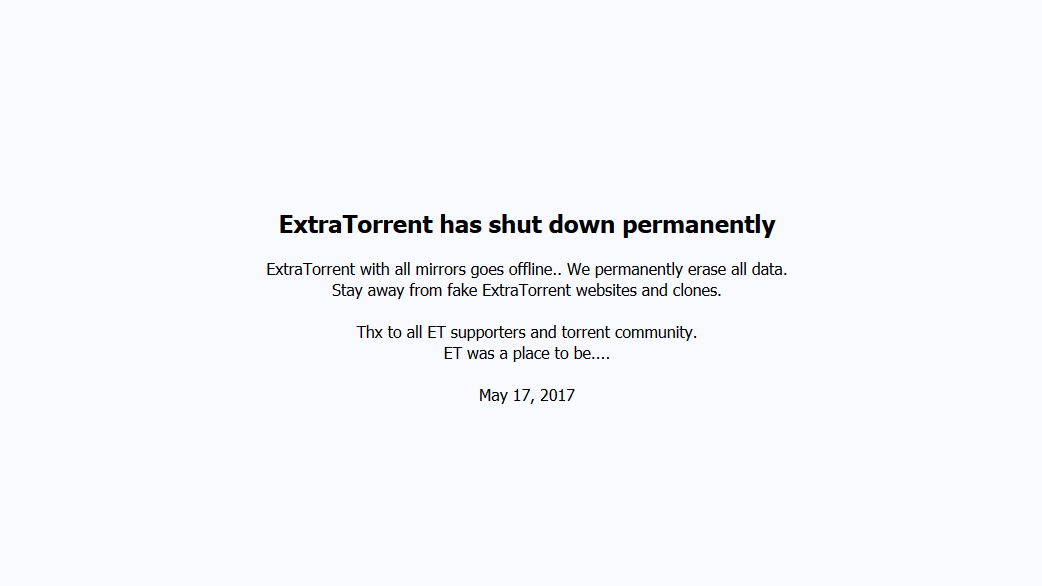
A Sad news for the torrent lovers. The folks of ExtraTorrent have posted an official announcement on their homepage, that they are shutting down the entire ExtraTorrent network, including the mirror sites and the official site. The catastrophic decision was announced today, which has left millions of torrent lover with a huge heartbreak.

Also See: What is Fuchsia OS? Is Fuchsia OS the Future?

Users who are accessing the homepage are getting a short message, which says that the ExtraTorrent website has shut down permanently. Yes! Guys permanently.

Extratorrent shutdown

ExtraTorrent was the second largest torrent site next to The Pirate Bay. After Torrentz.eu and Kickass Torrent, users were already left with few options but with the demise of ExtraTorrent. There is just nothing left to say.

Now, with its shutdown, the users are banging and searching for an alternate option. So, hang on guys because we maybe have some options yet.

1.The Pirate bay

The one and only Pirate bay are still alive. You can find a direct domain name if you search on google. The pirate bay has been very much active since the website like kickass torrent shut down, and all the traffic spread across to other top websites.

Working domain: pirate.trade

2.YTS

YTS movies, who eventually overtook the well-known YIFI movies network is still up and running. You can find domain name easily. The brand is not affiliated with the original YTS or YIFY group, but they have successfully taken over YIFY legacy.

Working domain: yts.ag

3.RARBG

The Bulgarian tracker website has been very helpful for torrent lovers. The site is still up and running. The site was founded in 2008, but in 2015 it made in top torrent websites due to the banning of different popular torrent sites.

Working domain: rarbg.to

4.Torrentz2

Torrentz2 is not the new domain of the original Torrentz.eu. In fact, it is rebranding the previous Torrent.eu and relies on the same concept of Torrent searching in an improved way. The Metasearch engine is still up and running.

Working domain: torrentz2.eu

5.1337X

1337x is not new in the Torrent family. Because of some security and privacy issue in between their moderators, the site was left behind but it is now improved. It is increasing traffic, honestly, it has more that 50Million traffic every month.

Working domain: https://1337x.st/home

Security Suggestion: Because of security issue, we want to suggest you to not open these websites without using a proxy or VPN. Some of these websites could also be banned in your region, so it is always good to play a safe side. You can easily find a free VPN or a proxy of these websites online.

That’s all for this guys and happy Torrenting. And One thing to clear, I will personally recommend you to download only Free software or open source software from torrent sites and buy the paid software from official websites for your use.

Best Ways to Increase a Site’s Position in Google 2019

Google is the number one Search engine of all and it is the mostly used for managing all the content on the internet.But as there all lot of content providers it is difficult to the website owner to get traffic on their website as the website in first position on the google can get much more traffic then on the 2nd page or even in the last entry on the first page.So Site’s Position in Google is a major problem in now a days.As a result lot of people are looking for  tricks or any hacks for SEO and ignore the big picture. You need both. Your SEO (and business) strategy is every bit as important as SEO tactics. There are more than 200 SEO factors that go into rankings, but here are a few of the more important SEO factors that I have experienced, both tactical and strategic.Hope you like it and it will help you to grow your online business :

Ways to Increase a Site’s Position in Google

  • Update Site Regularly :

    When you start a website and post articles or content on the starting or beginning then afterwords you leave it to on its own this shows search engine that your website is not creating new stuff hence it is outdated therefore they shows up the other website over you whose website are regular updated with new and relevant content.At the average you must post at least 1-2 post daily for a starting and maintaining a good niche website.

  • Do some Keyword Research :

    Before you start writing your blog post or your website content you must take some time to research about you are planing to writing this will help you to get the right stats about how much visitors are inserted in that type of content .You must focus on the  unique content which will be easy to get higher ranking on google.You must research on the keyword you want to rank higher in the google.You can use Google Keyword Planner Tool as well as you can use a Keyword Suggestion Tool to get more top keywords suggestions related to your content.You can also check your Keyword position in Google which helps you to get track in your keywords at real-time.

  • Don’t Copy Content :

    In every SEO cases you content must be unique and original.At the end Content is the king ,Your website content must be unique and not copied from other websites this may cause you many problems in future of copy writing .So use your own content rather then wasting your time and effects to copy others content.The Search Engine like Google tracks the copy content and your website can be pluralized for copy the content from the other website.To check the content of the website you can check the Plagiarism by the helps of Plagiarism Checker Tool .This shows you that how much of your content is unique and how much is copied from other website.You can also use the Article Spinner Tool to remove some Plagiarism from the content.It will replace some of the words with same meaning but it leads to the many punctuation mistakes.So after using this tool it will be recommended to check it manually again.

  • Faster Website Speed :

    Now a days,Google is optimizing their search results as per the speed of the website loads .It is a new and increasing criteria to give the user a great experience.So,If your website loads faster it will get more traffic and higher ranking than other websites.You can check your website Speed with Website Page Speed Checker . It will show you the results of your website loading speed.

  • Mobile Friendly :

    As the new generation of devices are spreading out , the user wants it to view and get the knowledge from their phone itself.So Google also optimize their search algorithms for that type of users.So if you have a mobile friendly Website it will be rank higher then other non mobile friendly websites.You can use the Screen Resolution Simulator to check how your websites looks in different screen sizing,It will give you an idea that how the user or visitor will see your webpage.

  • Submit your Sitemap to Google Webmaster Tools :

    Sitemaps are the very important are any website.It is a collection of all the website URLs and links which can be easily submitted to the google search engine to indexed them fast.You can use XML Sitemap Generator Free Tool to generate your Website Sitemap and give you the .xml file to download.It is easy and simple to use.

  • Only Relevant Outgoing links :

    Make sure your outgoing links relevant to the content of your site if it’s not use rel=”nofollow” attribute to link that website ,this tells that search engine that this link is not related to my website.

  • Get your Title Right :

    Your every page title must be unique and have your target keyword in it.This increase the chances of higher rank.It is recommended to have 50-60 letters in the title for full representation in google results.You can use Character Counter tool to check the length of the title.

  • Increase your Alexa Rank :

    Alexa ranking is not a major factor but it also a good task to focus for better ranking in search engines.

  • Use Friendly URLs :

    Urls are the major factors in search engine for rank higher.Adding your keyword in Url help you get increase your chance to rank higher.

  • Good Internal Linking :

    It is the very useful to have a good internal linking.It connects the user on the website for longer time.You can Analysis Internal linking of your website that may help you can get the full report of your website.

  • Update Broken Links:

    You must find and update your backlink before they may create some errors whiles indexing in google.You can Check you website links by Broken link finder free tool.

  • Post Quality over Quantity :

    You must post the quality post rather then focusing on Number of posts that leads to the spam while creating huge amount of pages to index with less content in it.You can check your web page Code to text ratio ,the higher the text ratio attract more the content reads .

  • Good On-Page SEO :

    On-page SEO helps the Search engine to get easy and brief content in the systematic format.It includes alt tag in very image tag as the search engines can not read the image files therefore they get the alt tag text to differentiate there image and index it.There are many more like h1 tags,meta tags etc.You can Analysis your a Meta Tags for better on-page SEO.Auto Generate Meta Tool may help you to generate easy & simple code.

  • Backlinks from High Quality Websites :

    Good quality backlink always increase your ranking in Alexa as well as in Google Search Engine.You must target the quality and related Website backlink only.You can check your Backlinks using Free Backlink Checker Tool . And also Free Backlink Generator can help you to get basic starting backlinking .

  • Good Meta Description :

    To have the good custom Meta description will help you to give a small intro of what is in that webpage and what webpage is about.You can Analysis your a Meta Tags for better on-page SEO.Auto Generate Meta Tool may help you to generate easy & simple code.

  • Use Ping Tools for Faster Index :

    It works to indexed your new webpage in Google faster.As it pings your web page to different urls,your content chances to indexed in search engine increases.You can use Free Faster Index Ping Tool for quick index .For every new content just you have to ping it by this tool and your page will be indexed quickly.This is the best way that are used my many big bloggers are faster response.

Do you have any suggestions of other Suggestions for Ranking in Google ? Please feel free to add them in the comments below 🙂

10 Best Kodi Skins 2024 – That You Must Try

Kodi was earlier known as XBMC. It is one of the most well-built, free and open source media player that works with most of the devices like Windows PC, Linux, Mac, Android, Amazon Fire TV etc. Kodi not only lets you enjoy your favourite music, movies or TV shows but also lets you record LIVE TV. You can also intensify Kodi’s look with the help of various freely available skins. Here is the list of 10 best Kodi skins which are available free for use.

Here are the 10 Best Kodi Skins:

  1. Nebula
Nebula | Kodi | Open Source Home Theater Software

It is one of the simplest and best Kodi skins available. When it comes to design, Nebula is a classic, and this skin has the capability of doing all the work with great efficiency. It presents thousands of customization and works well with the full HD TV screens. It supports Extra fan art, Live TV/PVR, Touch support, cinema experience, skin widgets etc.

Click here to download.

  1. Metropolis
Metropolis Best Kodi Skins

With the release of Metropolis, Frodo support is now available in the media player. This best kodi skins also offers advance media filter and you can fix recently added music video labels on the home screen, reduce the background fanart fade time from 400ms to 200ms. It supports IMDb MPAA certification media flags and allows Clear Art in Logo view type, displays Music Video thumbnail in OSD and various other things.

Click here to download.

  1. Titan Media Browser
Titan MediaBrowser skin for Kodi/XBMC

This is one of the best Kodi skins that has a good user interface. The main key features of this skin are, it is compatible with XBMC 13 Gotham and Kodi Helix, supports the “switch” from XBMC library to third-party add-on like Media Browser, Plex or Netflix, support for video extras, provides support for TV shows, which are going to be aired next, custom and predefined widgets and it is optimized for speed while retaining nice looking graphics and nice looking artwork everywhere in the theme. Here is the DOWNLOAD Link.

  1. Amber
Amber - Kodi - Open Source Home Theater Software

Just like Nebula, Amber is also a lightweight skin, which offers a maximum number of features and runs efficiently on all devices. With the help of Amber, one can customize home shelf either horizontally or vertically as per the requirement. Other main features include, custom home menu, custom home shelf and add a custom background. This is one of the best Kodi skins. Here is the DOWNLOAD Link.

  1. Bello Skin 6
Bello Skin 6

This skin has been well known over the years, which is the 6th generation of Bello, and improves your Kodi entertainment. Every year, it adds a new structure to provide its users with the best streaming service. It also ensures a high customization level along with various features. Here is the DOWNLOAD Link.

  1. Eunique
Eunique kodi skins

Just like its name, Eunique is definitely one of the unique and best Kodi skins because of its bright and vivid colours. You can easily access different media content with the help of Kodi’s main menu. Apart from all this, it has a simple to use interface. Here is the DOWNLOAD Link.

  1. Pellucid
Pellucid best kodi skins

Pellucid has been designed for the living room, and it also provides a simple Kodi experience. Its main feature includes Skin shortcuts addon support that’s available for full menu customization. Pellucid has been created for maximum usability. This is one of the best Kodi Skins. Here is the DOWNLOAD Link.

  1. Black Glass Nova
Black Glass Nova kodi skin

It is one of the easy-to-use and best Kodi skins and offers a lot of features. Its key features comprise of the following, customizing home items, Artwork downloader, skin widgets, clear art and clear logo, etc. It looks best on the full HD TV screens. Black Glass Nova has been ported from Media Portal. Here is the DOWNLOAD Link.

  1. Mimic
Mimic by braz

Mimic generally means to imitate or to resemble with something. While using this skin you can clearly notice that mimic Kodi skin is the resemblance of two other Kodi skins i.e. Aeon Nox and Refocus. It is the combination of both the best Kodi skins and offers features of both Aeon Nox and Refocuses. Mimic borrows great views from Refocus such as Gallery and BigList and feature set and clear navigation from the Aeon Nox. This Kodi skin is now available in a wide range of colours and it allows users to personalize their home items, has touch support, extra fanart and TV shows logos. Here is the DOWNLOAD Link.

  1. Xperience 1080
Xperience1080

Xperience 1080 is one of the best Kodi skins with a width of 1920*1080 and only supports partial touch. Its major key features include custom home items, horizontal home menu, TV shows logos, etc. Its basic aim is to provide its user with decent graphics quality and smooth animations. Here is the DOWNLOAD Link.

Verdict

In the above mentioned Kodi skins, the best Kodi skin which I personally recommend is; Metropolis. The reason for choosing Metropolis is because in this Frodo support is available and it also provides some advance media filters. Apart from Metropolis, Mimic is the one to go for because of its colour scheme that produces a cold techno-oriented feel. Apart from this, Mimic features the attributes of Aeon Nox and Refocus. Bello 6 provides simplicity and ease of use to Kodi users.

Feel free to add your valuable suggestions and opinions in the comments. for more such reads, visit Techniblogic.

Where do I find Kodi Skins?

Kodi skins once installed are located in the userdata addons folder.

What is the default Kodi skin?

As default, Kodi comes with the excellent skin Estuary, but there are plenty more to choose from.

How do I add a theme to Kodi?

In the Settings / System / Interface / Regional / Unit formats menu section you should be able to set up the time factor correctly.

Top 5 Best Weather Apps for Android (2019)

Weather condition is something that we all pretty much need to know but you just can’t toss and predict the weather. With the advancement in technology we now have weather apps and weather widgets that are continuously improving over the years. Every smart phone today has a widget, that forecasts the weather. However, there are plenty of weather apps available for Android and iPhone that can forecast the weather all around the world. But the thing is how to choose the right weather app so that one can get precise or accurate report about the weather. Some apps can show climate and nature change on the planet for the certain time period or to give the current climate data whereas some apps can only detect the temperature. To narrow your search and to save your time, here is the list of top 5 best weather apps that you must go for:

Top 5 Best Weather Apps for Android

  1. Weather Timeline

[appbox googleplay com.samruston.weather screenshots]

Weather Timeline is a simple application with a graceful design that focuses on depicting the next hour, the next 48 hours and the next week weather conditions. Just to provide an ease to the users the it presents the forecast in the form of timeline, so that one can easily glance at the information. This application features bold use of colour to increase legibility. Other major features of this application include- multiple weather provider options, easy to understand graphs and charts of temperature, rain etc, Android wear support and Table layout.

  1. Weather forecast

[appbox googleplay com.graph.weather.forecast.channel screenshots]

Weather forecast application forecasts weather daily and hourly. It is basically a weather channel which has accurate weather information. This app allows you to see weather in any places you like, ex: London weather, Paris weather, San Francisco weather etc. It displays the full report of the weather which includes location, time, temperature, atmospheric pressure, relative humidity dew point and wind speed and its direction. It is very much accurate and reliable application.

  1. AccuWeather

[appbox googleplay com.accuweather.android screenshots]

This application gives you all relevant weather news and also keeps on updating you with minute-by-minute local weather alerts. The top 3 features of this application are- it gives daily weather updates for the current temperature with local weather radar maps, the live weather reports by AccuWeather gives you an insight about the local temperature and daily forecast for whether or not it’ll be rain, sun or beach weather, and the RealFeel Temperature shows you how the weather today actually feels outside.

  1. Weather Live pro

[appbox googleplay com.tohsoft.weather.radar.widget.live.pro screenshots]

This application is not a free application but features all the major features that a weather app must have without displaying any add in between. It is a perfect application with local weather, weather map and weather widgets on home screen. It only provides the current weather in hourly forecast but also forecasts 7 days weather in detail. It also features -Weather red alert, hurricane tracker & more weather warnings, Sunrise sunset time daily in weather next week, and Live weather radar that’s auto-running.

  1. Today Weather

[appbox googleplay mobi.lockdown.weather screenshots]

It is an easy, beautiful and simple to use weather application that can give you the world’s most accurate local weather forecast. This app displays weather forecast clearly and it is easy to understand, the best thing about this application is that the moment you open the application you can see thousands of pictures corresponding to the weather and the day. This app also protects your health with air quality, UV index and pollen count. It also features -daily weather forecast notification, Alert about severe weather and Rain alarm.

Verdict

In the above mentioned weather apps, the best weather app that I personally recommend is Weather Forecast. The reason for choosing Weather Forecast is because it provides live weather forecast for free. Apart from Weather Forecast, Today Weather is also an good option as it allows you to take and share photo with weather information for friend.

Best News Apps For Android 2019 – That Are Free To Download

0

As we all now in every single second a new thing is happening in the world. There are billions of people out there in the real world who are interested in knowing all the latest news and updates happening in the world. It is very difficult for one publishing company to publish or cover each and every News in the world. So there are multiple publishers who cover the news as per their niche or audience. But it many times it makes very difficult for a user to get that information or track these multiple publishers individually. Therefore, here is the place where these Android News App take place of. In this Article, I will mention some of the Best News Apps for Android smartphone till now. This will be more specific to the Android users, I will do another post for the iPhone Users as well so stay tuned for that.

Also See: 7 Best GIF Keyboards For Android

Just track of these listed News app, and you will be getting all the updated news from different sources at one place. You can also follow us on our facebook page, where we are sharing real-time news updates.

List of Best News Apps For Android

Google News

[appbox googleplay com.google.android.apps.magazines screenshots]

The Google News is one of the best News App for Android, which you must have. It delivers quality news, which is filtered as per your interest. As the apps fetch news from not just registered publishers but from hidden blogs, it gives the variety of options in terms of an article. Also, you can subscribe to a particular new publisher, which is good in case you prefer to read only one publisher’s content.

Flipboard

[appbox googleplay flipboard.app screenshots]

It is one of the most popular Android app, which combines the Quality News content with good User Experience. It gathers the News from different sources and combined it in a card-like style that makes the news content more attractive and clean to read.

Feedly

[appbox googleplay com.devhd.feedly screenshots]

It is a very popular News app which combines different RSS feeds and shows you in a structured way. Although it has a very simplest UI, that is smooth and categorised in order to deliver a specific news if you’re trying to find any. You can also search in this app via hashtags. That’s nice!

News360 App

[appbox googleplay com.news360.news360app screenshots]

News360 works exactly like any traditional news reading application. It has got some of the best news providers in the house. Their readable interface is not very extraordinary but it’s quite good for a smooth experience.

SmartNews

[appbox googleplay jp.gocro.smartnews.android screenshots]

They keep check the trending news in the world and make sure you get the right content at the right time. They have got some of the top news providers in the house to deliver quality content on your home screen and not just that, they have the card like design that gives you news headlines.

JioXpressNews

[appbox googleplay com.jio.media.jioxpressnews screenshots]

We have found out that the JioXpressNews is popular among the Jio SIM user only, and frankly that makes sense. Since JIO bounds its user to install its side apps in-order to use free internet, a small price for free internet. Nonetheless, the app is quite good in news delivery since it has a tie-up with popular publishing houses.

Opera News

[appbox googleplay com.opera.app.news screenshots]

So, the reason why the Opera browser was popular among its user because it uses to compress the data of the website in order to give you a fast web experience. The Opera news works on something like that, It also has by-default reading mode settings but you can also view the website post in a web view.

Inoreader

[appbox googleplay com.innologica.inoreader screenshots]

The app is as simple as any news app. The readability is simple and you can also read short news on this app but there is an option to read more, where you can view full article.

Way2News

[appbox googleplay sun.way2sms.hyd.com screenshots]

The stylish young generation doesn’t like to read a long article for single news. They need shortcuts in every field and that’s why there are apps like Way2 News that delivers content in a short segment or card like a design. It is simple, fast, and you get most of the news on a single page. Quite useful.

Newtification News

[appbox googleplay com.tiwaremobile.newtificationspro screenshots]

This minimalist News app delivers content similar to Google News but on a low level. Means, you’re gonna get the news but not that much, just important ones. The reading is simple and you can read the news on different websites.

Tech News

[appbox googleplay it.pinenuts.technews screenshots]

This app is mainly popular among the tech enthusiastic people, like us. It has got tons of segment on the technically related news and a tie-up with almost all popular tech publishers. the only drawback of the app is that it opens a direct website of the publisher, without going on reading mode.

Bundle Breaking News

[appbox googleplay com.dwarfplanet.bundle screenshots]

The modern tile-like design is very attractive these days. The app shows large pictures with a headline and not just that its reading mode is pretty decent too. The one thing that we love the most is the simple yet attractive UI this app has, although they have to work a lot to get more news on a geographical basis.

News Suite by Sony

[appbox googleplay com.sony.nfx.app.sfrc screenshots]

We are guessing Sony’s official news app is only used by Sony smartphone users. Because as much as we like this app for its professional design UI and a huge categorised news segment. You can read short news on this app but there is an option to read more where you can view full article.

Fast News

[appbox googleplay it.pinenuts.rassegnastampa screenshots]

The app UI is fast, the content is readable but the key problem with this app is the constant nudging of ads. Also in terms of news, it has got very limited content and limited premium publication tie-ups, probably they need an upgrade in their database.

Also See: Top 5 Best Weather Apps for Android

Thus, these are some of the best News Apps that you must check to stay updated in the real world. As people are growing at a very rapid rate, It will be very difficult to follow all different blogs and website. Therefore, this is the best way to track all the news in one place.

Hope you like this article and I will be updating you about different technology soon, So till then just make sure to follow us on Facebook and Subscribe to my website. Stay tuned for the next post. 🙂