Home Blog Page 195

Top 5 Best Android Apps 2019 – That You Must Download

0

Android platform provides a variety of applications/games to keep you occupied. Although there are several categories of apps where you can find anything you wish for but there are few Android apps which you must certainly give a try. These apps are not some high graphics gaming application but some software which can help to make your phone work more efficiently and smoothly. So here are the top five android apps that you must give a try.

Here are Top 5 Best Android Apps 2019

  1. Microsoft exFAT/NTFS for USB by Paragon Software

[appbox googleplay com.paragon.tcplugins_ntfs_ro screenshots]

If you’ve trouble transferring your files from your phone to your Windows or Mac device, then you must surely give this app a try. This app by Paragon Software is a universal non-root method for transferring files between the onboard memory of your Android device and Windows and Mac-formatted USB flash drive. Using this app is quite easy. One amazing feature about this app is that you can get access to an external HDD or USB-Stick memory without a PC.

  1. Do not Touch my Mobile Phone – Anti Theft

[appbox googleplay com.redteam.donottouch screenshots]

As the name suggests, this app will totally restrict your mobile access to yourself. Nobody else can check, use or steal your phone if you have this app on your smartphone. With this app, you can customize the alarm sound which will alert you in case of any mishaps. You’ll also have a pin code and fingerprint for super protection of your phone.

  1. TestM – Smartphone Condition Check & Quality Report

[appbox googleplay com.testm.app screenshots]

This app is like a doctor for your phone. Before selling or buying a phone, you must surely check TestM report on your phone. This app does a full hardware diagnosis for your smartphone. The test includes screen, sound, motion, connectivity, hardware and camera test after which you can get your phone repaired if there is any problem.

  1. Trap Nation

[appbox googleplay com.saphira.binhtd.trapnation screenshots]

If you’re a music lover, then you’ll surely love this app. In Trap nation, you can listen to EDM music and that too for free. Here you’ll find a wide collection of all the nation like trap nation, base nation, rap nation, house nation, chill nation, indie nation and lowly palace from which you can select your favourite music and enjoy.

  1. Tubi TV – Free Movies & TV

[appbox googleplay com.tubitv screenshots]

As the name suggests, this is one of those apps which offers popular movies and TV series in full HD for free. Although it has got advertisements they are comparatively less than your normal cable TV. With Tubi TV you can have Chromecast, multi-device syncing and much more.

So, these were the top 5 apps which you must try. TestM is the most efficient app here whereas Microsoft exFAT/NTFS and Do not touch my mobile phone are to make your phone more secure and fast. The remaining two apps will surely entertain you if you love music and cinema. You can easily download all these apps from Google Play Store.

Also See: Top 5 Music Player Apps For Android

Thanks for hanging out with us guys, stay tuned for more update. Also feel free to share your experiences with these apps in the comment section below.

Asus ZenBook 13 (UX333F) Review – Future of Laptops is HERE!

1

The Asus new 13.3-inch ZenBook UX333F is part of latest narrow-bezel Ultrabook family consisting of UX333, 14-inch UX433, and 15.6-inch UX533. Best things which we can see in these new ZenBooks are their narrow bezels with no compromise on any ports.

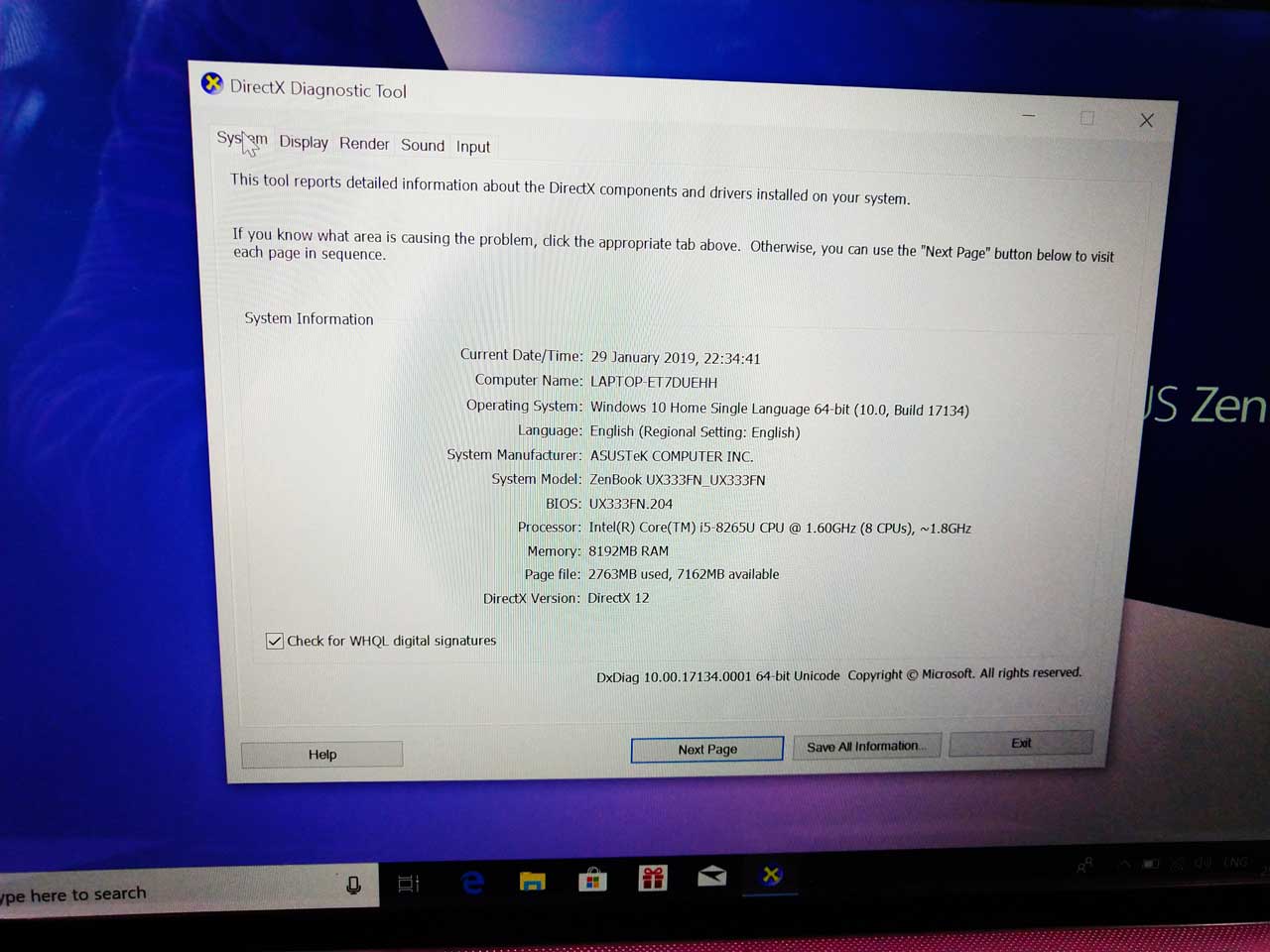
The ZenBook UX333 starts at Rs. 71,990 with a Whiskey Lake-U Core i5-8265U CPU and 8 GB of RAM and a dedicated GeForce MX150 GPU. The 1080p resolution remains fixed across all options. If you are a business person on a nominal budget and don’t want to compromise with any ports then this series is meant for you.

Asus ZenBook UX333F Specification

Price Rs. 71,990
Processor Core i5-8265U
Memory 8GB  LPDDR3
Storage 256GB SSD (SATA3)
Display 13.3-inch Full HD (1,920 x 1,080)
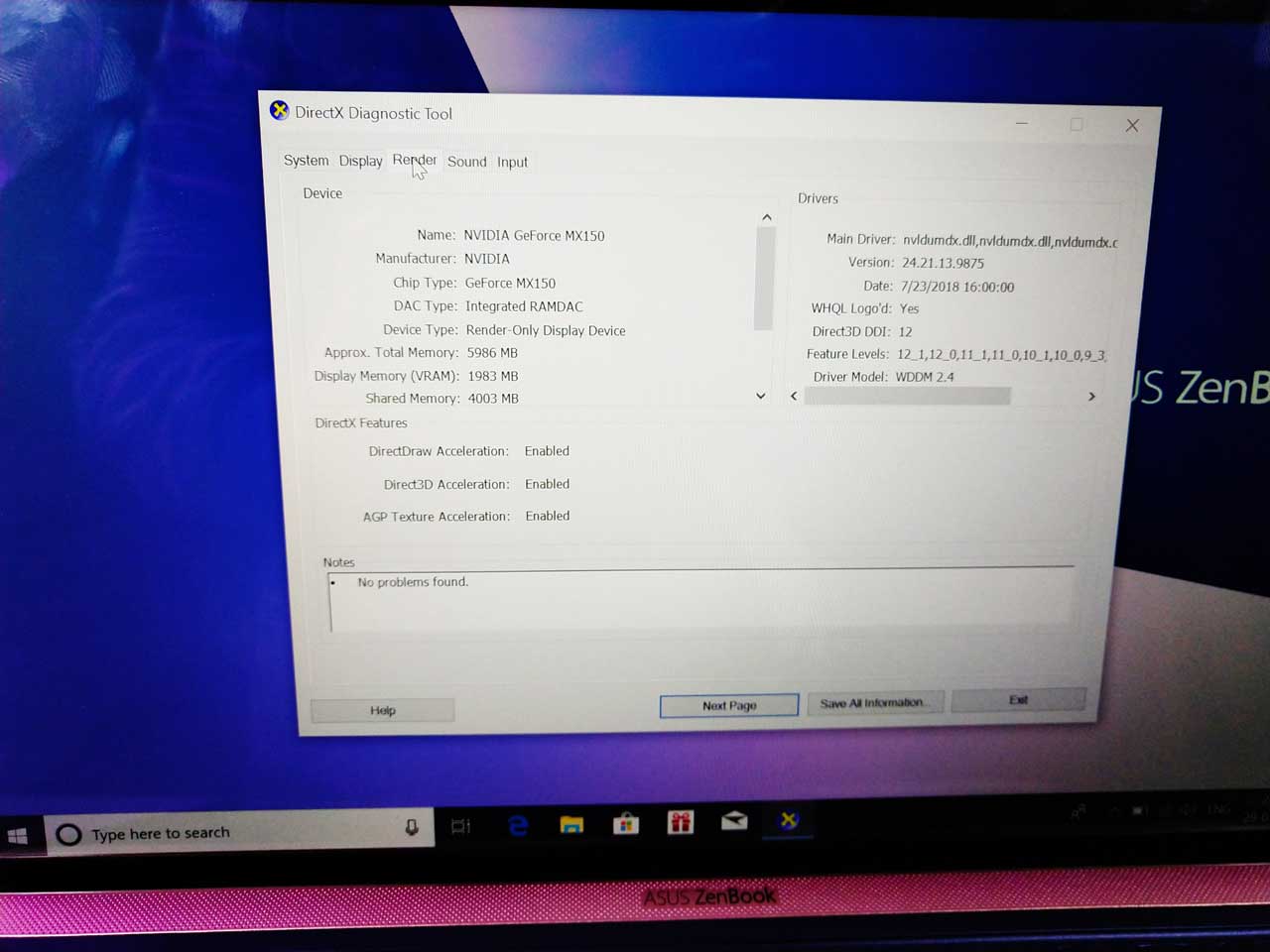
Graphics Integrated GeForce MX150 GPU
WiFi 802.11ac/b/g/n Wi-Fi, Bluetooth 5.0
Ports 2x USB 3.1 and 1x Type-C
Weight 1.19 kg
Operating System Windows 10 Home

Box Content for Asus ZenBook UX333F

  • Laptop
  • Charge
  • Micro Fibre Cleaning Cloth
  • Manual
  • Cover sleeve

Asus ZenBook 13 (UX333F) Review - Future of Laptops is HERE! 1

Design and Build for Asus ZenBook UX333F

Coming to the design and built part of the Zenbook it is impressively thin, light and beautiful. The laptop is incredibly slim and light. The laptop only weighs 1.19kg which is amazingly light when we can see all dedicated full-size ports which will be mentioned later in the article.

The body part of the UX333F is made up of aluminum with proper golden color shades all over. The top side of the lid has a textured concentric signature finish from Asus which is kind of attractive and adds up luxury feel. On the top of the lid, we also get Asus Branding.

Asus ZenBook 13 (UX333F) Review - Future of Laptops is HERE! 2

Coming to the other area of a laptop like a palm rest area, it has proper space which is needed by a person which working on it. We also get a full-sized keyboard which works well. The keys also make a sound while we use them. They are made up of solid plastic and not rubber which makes it way better while typing. The spacing between the keys are proper and are well comfortable while typing. Take my words while using the keyboard of UX333F you are going to love the typing experience.

Asus ZenBook 13 (UX333F) Review - Future of Laptops is HERE! 3

Another amazing innovation that we get in UX333F is under the trackpad. We get proper working trackpad with full-size Numpad feature on top of it. We just need to hard press the trackpad from the top right corner to switch on or off the number pad on the trackpad. Even after switching on the Numpad on the trackpad we can use the trackpad normally. No Numpad on compact laptops was a big issue which is finally being solved by Asus in this new Zenbook series.

Asus ZenBook 13 (UX333F) Review - Future of Laptops is HERE! 4

We also get a 720p webcam which works well for skype call or even for any kind of webinar. In low light, it will struggle a bit, due to which I will suggest you use additional LED light in front of your face.

Ports on Asus Zenbook UX333F

Asus ZenBook 13 (UX333F) Review - Future of Laptops is HERE! 5

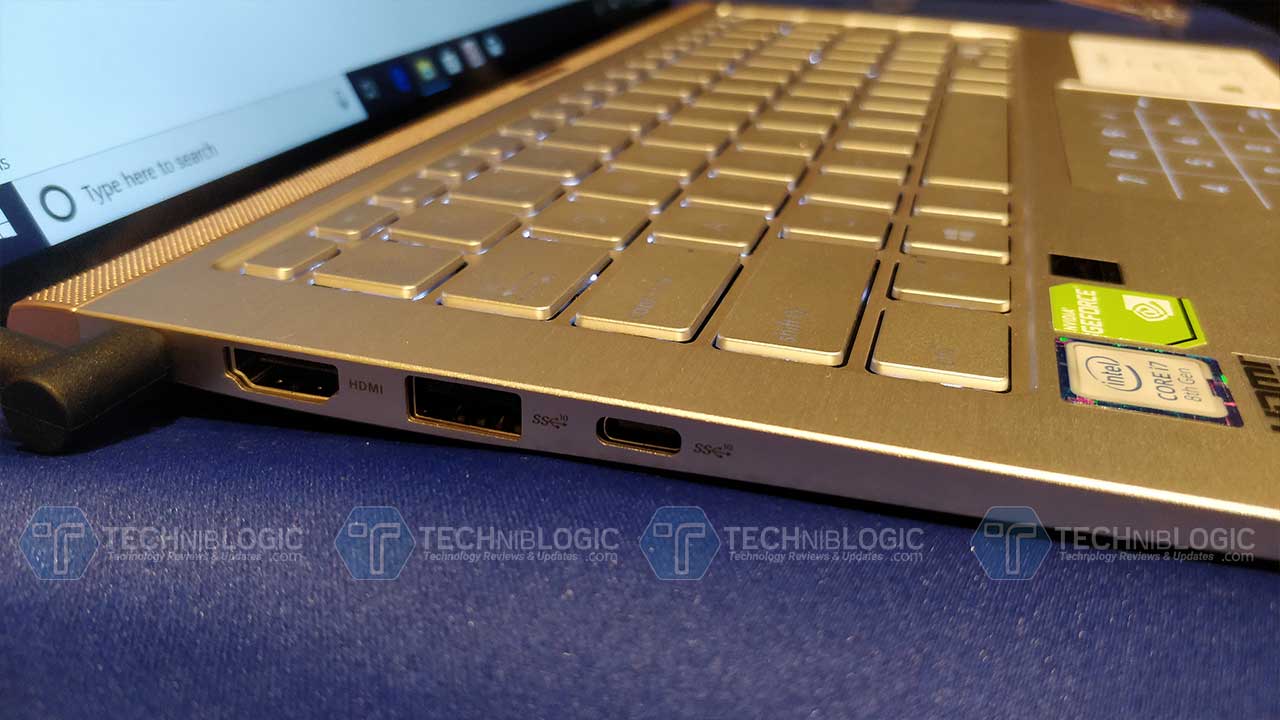
Asus is the also the first to offer all full-size ports in a compact size of a laptop in this series. You won’t be missing any of your regular port while using this one. On the left side, we get full-size HDMI ports + 1x USB 3.1 port and 1x USB Type C Gen 2 port.

Asus ZenBook 13 (UX333F) Review - Future of Laptops is HERE! 6

Coming to the right side we get 1x USB 2.0 port with a Micro SD Card slot and a 3.5mm audio jack. Beside it, we get a different LED light indicator.

Asus ZenBook 13 (UX333F) Review - Future of Laptops is HERE! 7

Backside we get air vents and no option for any connectivity.

Display and Speaker on Asus Zenbook UX333F

on Asus Ux333F we get 13.3-inch Full HD Display with the resolution of 1080p. We also get an IPS screen which is a glossy display. I was expecting to get a Matt Display on top of it. The display is not offering any touch panel feature.

Asus ZenBook 13 (UX333F) Review - Future of Laptops is HERE! 2

The brightness level that we get is just 262 nits which might be proper for some of the users while using in direct sunlight. The display is reproducing vivid colors which offer sharp, bright, and great picture quality. Overall this IPS panel works well on this laptop.

Asus ZenBook 13 (UX333F) Review - Future of Laptops is HERE! 9

The Asus ZenBook UX333F comes with stereo speakers. We are getting two stereo speakers placed on the deck of the laptop. The speakers which we get are from Harman Kardon and are above average in performance rather I loved the sound output. The sound from these speakers gives you above average bass.

Performance on Asus ZenbooUX333F

Coming to the main part which is performance, here Asus ZenBook UX333F comes with Core i5-8265U CPU which is supported with 8GB of LPDDR3 memory, and a 256GB SSD. This all is supported with integrated Geforce MX150 graphics card. With this integrated graphics, we get easily do 720p gaming, Photo, and video editing. We can also watch 4k movies and Web Browsing.

Even with this high-end specification, it won’t heat up much while watching HD movies and editing videos on premier pro. You can also do normal gaming on the laptop. With this lightweight, it is still enough for office usage.

Battery Life on Asus Zenbook UX333F

According to my usage, while working on a word or using a web browser for typing articles and surfing it was leading me about 6 to 7 hours and rest depends on work to work. If you are doing Photoshop, Premier pro and other high-intensity work it will hardly lead you to about 1.5 to 2 hours battery backup. From 0% to 100% the device took about 1.5 hours to charge using default charger. At this price, it seems to be ok to me because you can always upgrade the battery from external market according to your usage and work.

The verdict on Asus Zenbook UX333F

If you want a high-end slim and light laptop which is also having all the ports which are required in day to day usage It is perfectly fine for your daily office use. You can even it for editing 1080p videos using a premier pro.

Pros

  • Built
  • Battery
  • Great Typing Experience
  • Light Weight
  • Full-size Numpad
  • All ports
  • 720p Camera

Cons

  • Price can be reduced
  • Matt Finish display should be added
  • More customizability should be available in this variant.

Asus Zenbook 14 (UX433FN) Initial Impressions: Best Compact Laptop 2019!

0

We have seen so many small size laptops. We have even used so many compact laptops at the only thing we have to suffer from any laptop is its performace and lack of full size numpad which need to be compromised because of the small size build. So, to cover up with this issue also Asus is here with the latest launch in INDIAN Market Asus Zenbook 13/14/15 Series.The new Zenbook 13/14/15 are the world’s most compact laptops you can get in their respective size catergoies. The main special features that differeint this laptop from others are its ultraslim bezels that is 95% screen to body ratio and its New NumberPad dual funtion touchpad. Other than these awesome features you will also get the 3D IR capability face login that speed up your login in your laptop. Isn’t it Great! In this Article, I will be focusing on the 14 inch model (UX433FN) as it is the best size i liked most.

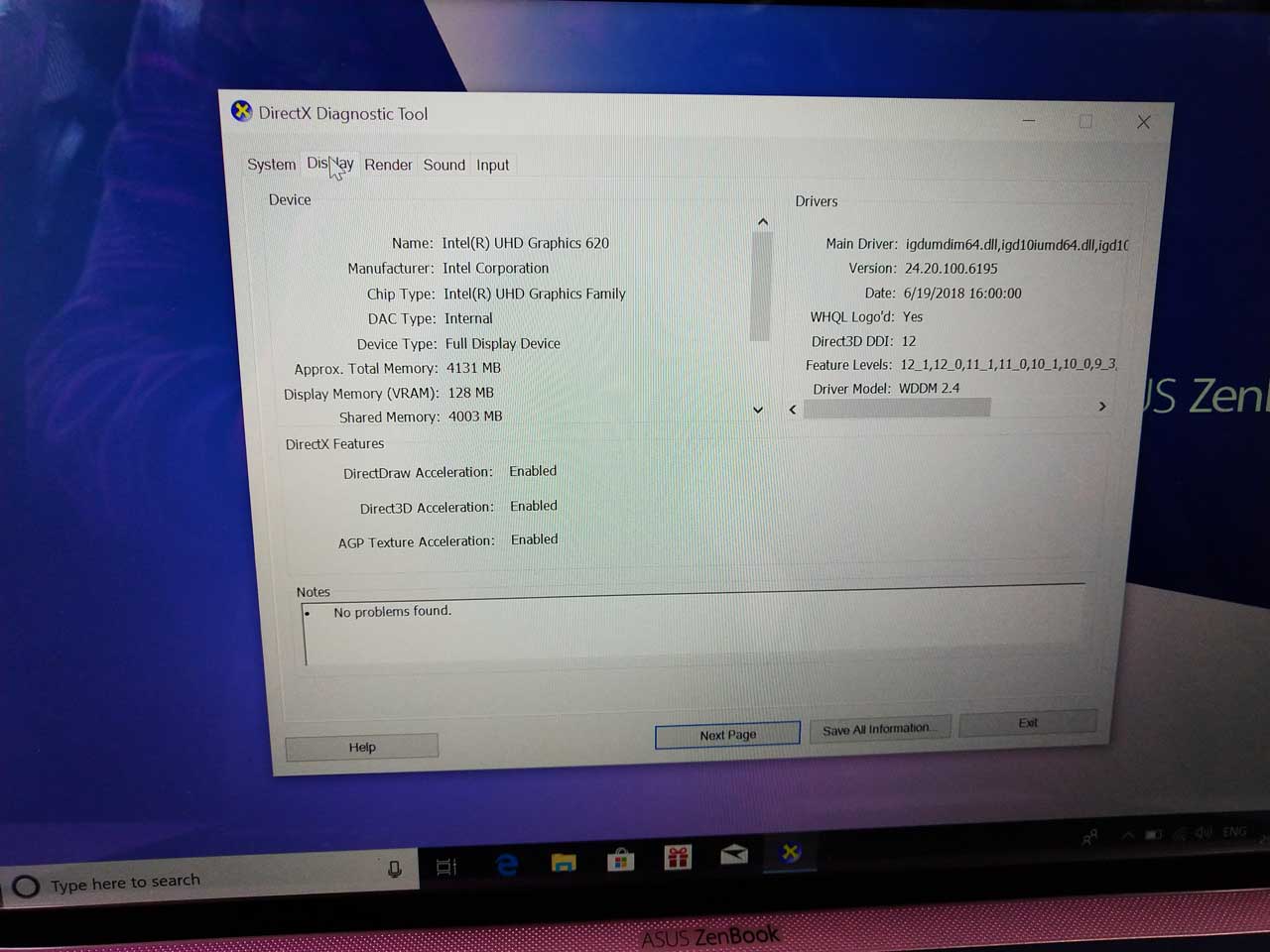
The zenbook 14 is the world’s most compact 14″ laptop and is even smaller than most compact 14″ laptop and is smaller than most 13.3″ laptops as of now. This laptop only weights you 1.19KG with 50Wh 3-cell lithium-polymer battery. Asus laptop comes with a 14-inch Full HD display with four-sided NanoEdge display design and supports 178-degree wide viewing angle and 100 percent sRGB color gamut. The device is powered by an Intel’s 8th Gen processor and supported with Nvidia GeForce MX150,2GB GDDR5 VRAM & have Integrated Intel UHD Graphics 620 in it.

Asus Zenbook 14 (UX433FN) Design

Asus Zenbook 14 (UX433FN) Initial Impressions: Best Compact Laptop

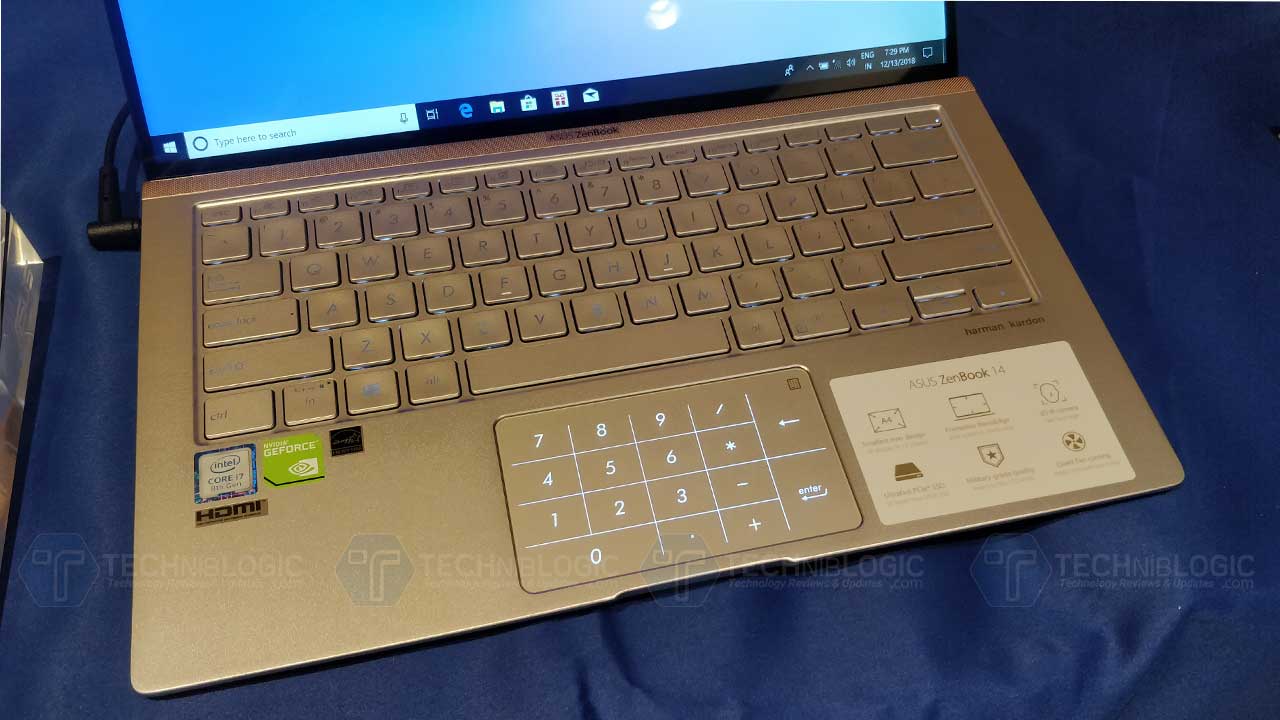
The design is very premium and very smartly designed to get all features in a small size package, after using for few minutes I noticed that the keyboard with Full NumberPad makes the typing more easy and fast.  At 1.19kg, Asus Zenbook 14 is one of the lightest 14″ laptop available in the market.

Also Read:

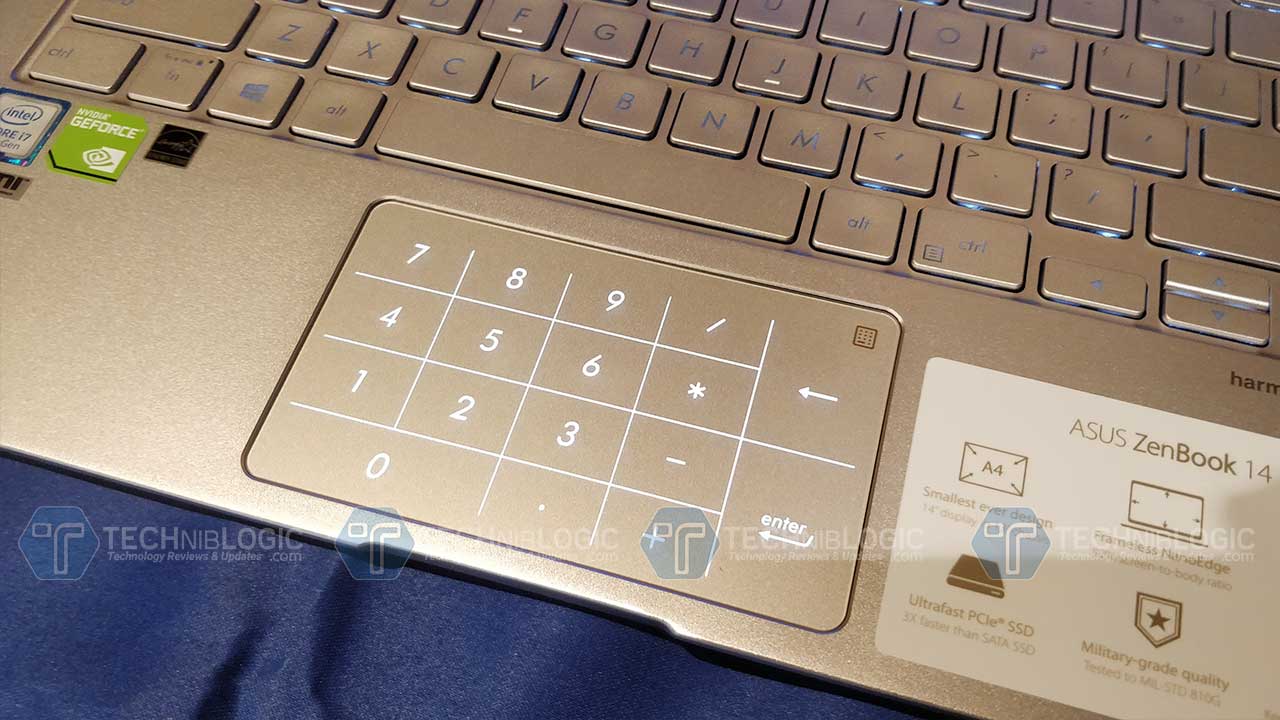
The big focus which is being made by Asus in this laptop is on its exclusive NumberPad which is really a very innovative way to get better typing experience.

Ports and Connectivity

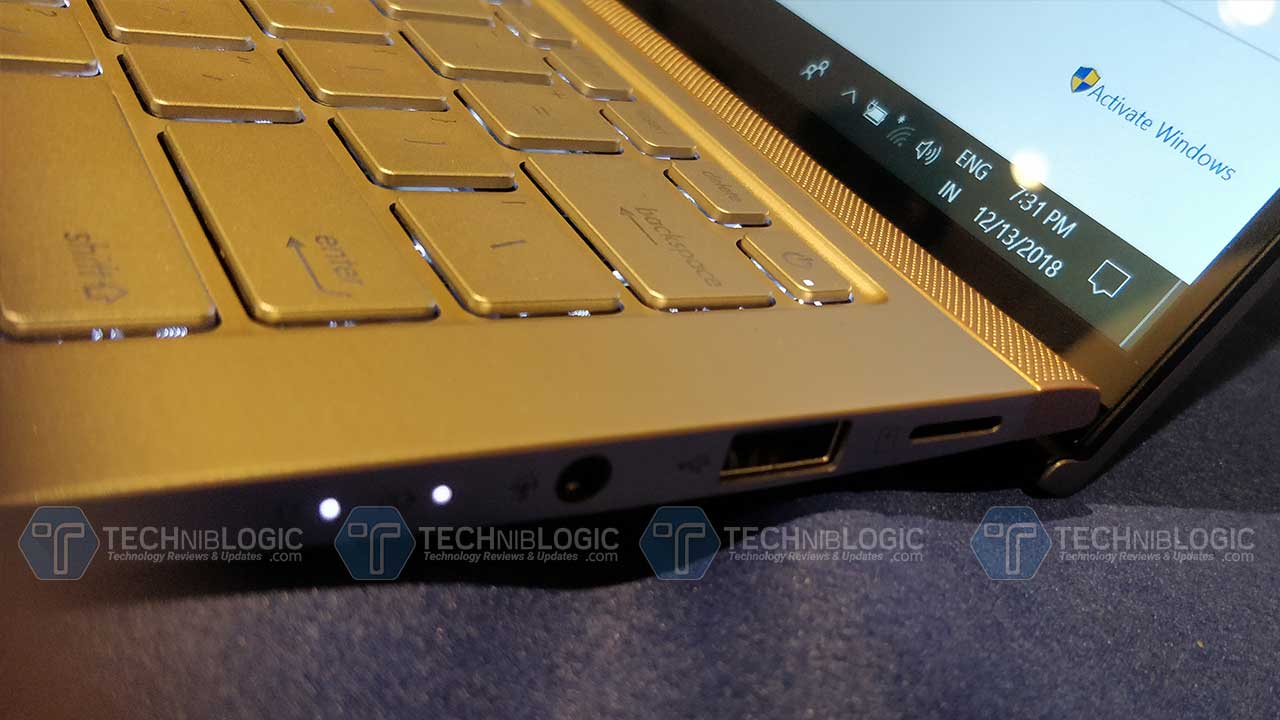
We get all the ports which are being necessary for a any laptop such as USB 3.1 Gen 2 Type-C, USB Type-A(up to 10Gbps), USB 2.0, HDMI port, Micro SD and Audio Combo Jack.Rest coming to the connectivity part we get Bluetooth, Wifi.

Asus Zenbook 14 (UX433FN) Display

Asus Zenbook 14 (UX433FN) Initial Impressions: Best Compact LaptopAsus Zenbook 14 comes with a 14-inch screen with an FHD screen.  The laptop also has a NanoEdge display which adds up 175 degree wide view and viewing experience on the display. According to me, I would say the screen appears to be brighter, with good contrast.

Asus Zenbook 14 Specification

Asus Zenbook 14 (UX433FN) Initial Impressions: Best Compact Laptop

The unit is powered by an 8th generation 8th gen Intel Core i7-8565U processor. The Asus Zenbook 14 is coupled with 8GB 2133MHz LPDDR3 RAM and a Nvidia GeForce MX150,2GB GDDR5 VRAM & have Integrated Intel UHD Graphics 620 in it which is going to provide quite good. We also get a 512GB SSD. This makes this compact laptop one of the fastest in the market.

Also Read:

Asus also claims the battery for more than 13 hours on continuous usage. This means you have a full working day battery life. Sill I have not tested it much so won’t be commenting more on this expect.

Asus Zenbook 14 (UX433FN) Keyboard and touchpad

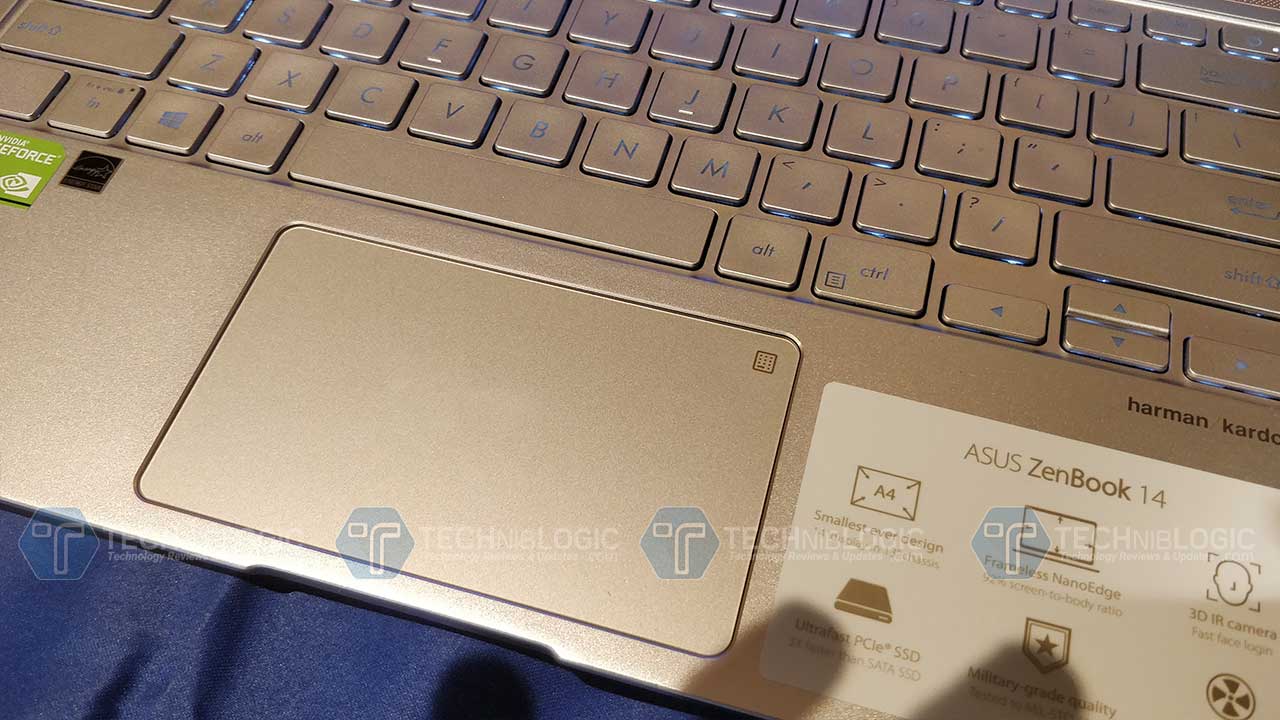
The keyboard seems to be quite good to me. The touchpad which we get is also very responsive and seems to be the best one with an exclusive NumberPad which can be hide and show whenever you want or need. As per my experience, it is the future of laptops as you can get full sized numpad in the minimum area. And the best part is that you can use both numpad and mouse on touchpad at the same time, i have tested it personally and it is working very nicely.

Overall you will enjoy typing on this keyboard.

Verdict

Overall according to me with this specs and innovative NumberPad design, I think this going to be a good deal.

Pros

  1. Lightweight
  2. Battery
  3. Full-size Numpad
  4. 3D IR HD Camera

Cons

  1. Less Storage
  2. No LAN port

10 Best To-Do List Apps for Android 2019

Only a few can master the art of discipline and possess good organizational skills in both personal and professional life. Everything at this stage requires some amount of dedication and discipline to pursue in order every single minute of every single day. Now that sounds like a task and it’s only natural that all of that can’t be kept track of by the power of the mind. It is definite that more productivity comes out of the good organization. So here are some Best to do list apps for android smartphone that will save your time.

Also See: Top 10 Best Video Player Apps for Android

To keep all of that inflow and to maximize productivity, we have here a list of the finest to do list applications for Android.

Here are the 10 Best To-Do List Apps for Android

1. Any.do

Price: Free / $2.09 per month / $2.24 per month / $2.99 per month

Any.do is a basic yet popular to do list app that serves the purpose well. It comprises of the usual array of tasks, subtasks and notes that you can use to keep track of your meetings, chores, and whatnot. Cloud syncing is also enabled on the app that lets you access your tasks from different devices including desktop, web, and tablet. It has a sleek interface and comes with the Cal Calendar if you want to finish two things at once. It’s simple and strong with almost every feature being free for access. It is one of the simplest and most effective to do apps that are there.

2. CloudTasks

to-do-lists-for-google-tasks

Price: Free / $3.49

CloudTasks is a to-do list app in sync with Google Tasks. Which means, you can access your tasks as and when you get access to Google tasks (namely the web), as it is already synced to the cloud. It employs the basic to do list features and also has priority tabs that mark the level of particular tasks as ones that need to get done immediately. It plays an attractive interface along with unlimited and voice task creation. It’s one of those applications that get the task done without too much hassle. Its user-friendly and has built-in support for its sister app, CloudCal.

3. Google Keep

Google-keep

Price: Free

Google Keep ideally functions as a note-taking app but also features a reminder feature that works based on your location or time frame enabling the reminders to pop up when and where required. The app is regularly updated with new features with almost spotless Android Wear support and is already included in most smartphones which is a space saver for sure. The app is completely free for use and is one of the finest ones present.

4. GTasks

Gtasks

Price: Free

GTasks is one of the widely used and highest rated to do list apps that also fall under the simple free-paid profile. The app is synced with Google Tasks and the free version comes with quite a few features including the basics, widgets and quick adding for tasks using voice. The Pro version will give you batch task adding, theming and a pattern lock for security. Google Now can also be used to add tasks. It works extremely well as one of the simple effective applications.

5. Tasks: Astrid To Do List Clone

Tasks

Price: Free with optional subscription

As stated blatantly on the title itself, Tasks is an Astrid To Do List Clone. A little trip down memory lane will tell you that Astrid was initially developed as a task manager that was pulled off by Yahoo in 2013. Tasks came into the picture as a sound replacement. The app uses Material Design in an easy well-read format that has the unit covered by all standards. Tasks is an open source application. Good news for all the tinkerers out there is that the app comes with Tasker support. The app is basically free with some advanced features set up for unlocking.

6. TickTick

TickTick

Price: Free with optional subscription

TickTick is yet another incredibly strong to do list application. It has all the basic features and is cloud synced so you can keep account of your tasks on different devices. The app introduces a tag system enabling easy sorting through tasks, widgets, priority levels to pick out more significant tasks and also includes location reminders. The Pro version offers enhanced task management, improved collaboration support and more. It is a sturdy app with simple but effective functions and you would have to upgrade or subscribe to access the pro features.

7. Todoist

todolist

Price: Free / $28.99

This app does almost everything that a to do list app can be expected to do. It covers the basics and also has offline modes, tags, and inboxes for easier task sorting. The app also innovates in terms of its Android Wear support, integration with other apps and most specifically, its unique karma system that lets you have a look on how much you have been able to perform. Along with its mobile apps, its native versions are also extended on Google Chrome, desktops and a few other points for cross-platform support. You would need to upgrade to the Pro version to access all its features but it is definitely worth it.

8. To Do List

to-do-list

Price: Free / $2.99

This app is least innovative in terms of its title but is suggestive nevertheless. The app, however, is very fine and effective with simple, basic features along with perks such as reminders that make for jobs getting done. The interface sort of resembles Wunderlist but that does not have to be a bad thing. It is simple, clean and highly user-friendly. It also serves some secondary purposes such as adding tasks using voice command, widgets and more. The basic version is free for use while the Pro version will cost you $2.99.

9. Trello

trello

Price: Free

Trello is completely free for use as of now and is one of the champion names that you will come across in the category. It brings in all the basic features and a card based interface where you can create tasks on ‘boards’. Google Drive, Dropbox support, Android Wear support is also included along with collaboration support and the scaling feature that helps you create preps for something as small as a grocery list to a full-fledged group venture. The app has a cool vibe and a strong foundation. It was initially bought through in early 2017 by Altassian. We are not sure how that would work in the long end but as of now, it seems to be doing fine.

10. Wunderlist

wunderlist

Price: Free / $4.99 per month

Wunderlist is known for bringing storms as it did when it was first purchased by Microsoft in 2015. Fortunately enough, Microsoft kept running with the project and the results right now are more than impressive. The app is basic in its approach but also brings features like the cross-platform support, collaboration factors, attachment options and the folders feature which helps you with your to do lists. Also present and highly appreciated is the Material Design perk.
It is powerful when required and simple and basic when at ease. Depends entirely on you as to how much you want to get out of it.

Also See: Amazon Fire TV Stick Vs Google Chromecast 2

So hope you like best to do list apps for Android and you never forget anything ever and hey, in case we did forget to mention an app or two – feel free to remind us in the comments section below!

Taiwan Excellence makes its presence felt at Convergence India 2019

India is looking forward to strengthen its tech initiatives from the Convergence India 2019 expo, the event took place today at Pragati Maidan, New Delhi. Like past two years, The Taiwan Excellence has also participated in the Expo, showcasing some of the top Taiwanese Tech for Indian consumers.

As we know, India is an emerging tech industry and thanks to government initiative like Digital India, Make in India, Start up India, Skill India and Smart cities project. India is grabbing a lot of attention in the foreign soil, including lots of tech giants. Taiwanese Tech companies have equally invested and invigorated these initiatives.

Taiwan Excellence has showcased some top-notch products from company like Asus, Avision, Gigabyte, Edimax. The brand Avision launched their Self-service copier that can scan 40 pages per minute, and have full support on network and FTP servers. They also introduced the Avision’s PaperAir 10, Edimax’s EdiGreen Air Quality detector with PM 2.5, Temperature and Humidity Sensors AI-1001W V3 etc.

“Taiwan has been supporting the Government of India in its various ground-breaking initiatives like Make in India, Digital India and Skill India. This is our third consecutive year at Convergence India, and we are extremely happy to share our prowess in the field of ICT with other Indian as well as global brands.” Said, Chung—Kwang, H.E. AmbassadorTien, Representative of TaiPei Economic and Cultural Center (TECC).

 The expo also featured brand like BXB electronics, a manufacturer in PA system and conference system. Storage device manufacturer like Apacer, Transcend and ADATA were also present showcasing their products, such as rugged military grade eternal storage devices and triple band WiFi router that works on 60GHz frequency. Brand like Gigabyte and Asus were also present at the event, the company that manufactures some on the best motherboard also introduced a new BRIX product- a small pc box featuring Nvidia GTX 1060 and intel Core i7.

ASUS also introduced its powerful ROG gaming laptop, that were recently launched in an event- the SCAR II and Hero. The laptop supports 8th gen intel processor and DDR4 RAM and also have integrated ASUS ROG features such as overclocking and fan boost.

Convergence India is an innovative platform for foreign tech giants to showcase their tech products in the Indian market. The Expo feature variety tech products, including Telecom, Broadcast, Cable, Satellite TV, Cloud and Big Data, IoT, Digital Home, Film and Radio, Management and Delivery etc. More Details of some awesome Products will be updated in Next Post. Thank You.

How to Choose the Right Survival Knife. Learn from Experts

There are situations we all get into in life which are unexpected, unfriendly, and ultimately life-threatening. If you’ve jumped the queue at Walmart or shot into a parking space just as someone else was preparing to reverse into it, the chances are you (hopefully) won’t need a survival knife.

However, when you’re heading out to camp, hike, fish or hunt, any expert will tell you that a good, dependable survival knife should be the first thing you pack into your kit, as it may potentially be your last line of defense against the elements. Let’s look at what makes a knife one of the ultimate survival tools that should never be far from your side.

Your primary survival tool

OK, you’ve got yourself a new machete, or a multi-tool which has a fold out the blade on it. Maybe a sleek looking new fold-out which you can’t wait to use. While these are without doubt useful additions to your kit they are secondary to what you should class as a survival knife.

Remember that a survival knife is an essential piece of survival equipment, and must be robust enough, and the right size and strength to stand up to any rigors you might face in the unforgiving arena of the great outdoors.

If you’re going fishing or hunting, you may want to consider a rugged knife like the Urban Camo. This automatic knife is forged to fight with no apologies.

Fixed vs. Folding Blade

It’s simple mechanics, really. A joint of any kind can be a weakness. This is why a fixed blade will always have the upper hand when it comes to choosing a survival knife. You don’t want your one of your primary survival tools breaking when you need it most.

The Korudo offers the biggest bang for the buck. This fixed blade cleanly cuts through ropes and twines without the need to saw with a serrated edge. The knife is optimized for survival situations and has a clean-cut shape with no bells and whistles. Perfect for cutting and cleaning a kill.

You should always base your choice on strength, durability, and versatility. Some folding tactical or survival knives do come equipped with other useful features such as built-in flashlights, so, you shouldn’t overlook them entirely.

Versatility

It goes without saying, but if you’re left with just one piece of survival equipment, that piece needs to fulfill a wide range of purposes. From chopping wood for building a shelter to gutting a fish, to hacking your way through thick vegetation, you need something that can do the job quickly and without sustaining damage.

Remember that the handle and the point of your knife are as important survival tools as the cutting edge of the blade, and should be sharp and sturdy enough to withstand heavy usage, rough weather, and all situations.

Tekto Mirage is positioned as the most versatile high-performance endurance knife. The knife offers a smooth double-edged Damascus blade with a serrated saw, a glass-breaker, and clip.

  • Size, shape, quality

We’ve established that a fixed blade survival knife or a very sturdy fold-out is ideal for your needs. And when it comes to choosing your survival knife size definitely does matter. Your blade should be in the 4” – 6” range, with the handle roughly the same. If the knife is a fixed blade it should be full tang (which means that the blade extends through the handle, strengthening it further).

Whatever type of survival knife you go for, remember that the grip should be top quality, the handle should be sturdy and solid and the tip should be sharp. While most experts recommend a fixed blade, if you do go for a folding blade you need to ensure that it also has these qualities.

The saying goes that ’the best knife you have is the one you have with you’ – but it goes without saying that the sturdier and more durable your survival knife is, the better.

  • Sleek looks

Ok, we all love a great looking knife, a decorative handle, the latest features. But let’s not forget what we’re looking for here. This is a piece of survival equipment, and you might be alone when you’re using it to survive. If you’re lucky enough to have a companion in such a situation, they probably won’t be in the mood to admire your knife’s good looks, but they will appreciate its functionality in getting you both to safety.

  • Knife care

It’s important to look after all the knives you own, but seeing as this one is your survival knife, take extra care in keeping it clean and sharp. A good sheath is a must, and also keeps your knife close to hand.

SCISHION AI ONE Android TV Box – Best Smart Android TV Box of 2019?

TV Box are like a min PC these days, you don’t just get to watch and stream premium video but you also get a smart TV feature right in your TV. And thankfully, the Chinese company are replacing the traditional set-top-box with the futuristic TV box and the same kind of brand has launched yet another device in the market. Scishion is a Chinese company which has launched Scishion AI One Mini Pc TV box with the Android support with Rockchip 3328.

Buy Now

It has Android 8.1 OS for fast running with LED display for clear time displaying. 4GB RAM and 32GB ROM will be available for fluent data process and storage. The device is equipped with Voice control function for convenient operation and USB 3.0 for quick data transferring and low consumption. It has the HDR technology for 4K display which turns out to be a smart feature offered by the company. It supports Bluetooth of 4.0 and 2.4GHz WiFi for a better connection.

SCISHION AI ONE Android TV Box - Best Smart Android TV Box of 2018?

The gadget supports Multi-languages having 2.0 HDMI Version. It includes 3D Games,3D Video,DLNA,etc. The power supply of this device has charge adapter which won’t allow any inconvenience to its customer. It runs on GPU- Mali-450MP2 and CPU- RK3328 having 1.5GHz, Cortex A53, Quad Core processor. It has RAM type of DDR3 for better efficiency with TF card that can be expanded up to 32GB.It comes with the Media Support Decoder Format of 4K VP9, H.264, H.265, HD MPEG1/2/4. It is enriched with 1080P,4K,H.264,H.265,VC-1,VP8,VP9 video format coupled with AAC,FLAC,MP3,OGG,RM,WMA audio format. It reinforces the photos in JPEG, JPG, PNG format. The device has 5.1 Surrounded Sound Output.

Also See: Buy Xiaomi Mi Laser Projector 4K with Huge Discount

Scishion AI One Tv box has 64Bit of system bit provided with External Power Adapter Mode Dimension and Weight power type. The weight of the product is 0.0950 kg with product size (L x W x H) of 10.00 x 10.00 x 1.70 cm / 3.94 x 3.94 x 0.67 inches whereas the weight of the package is 0.3400 kg with package size (L x W x H): 17.50 x 13.50 x 6.40 cm / 6.89 x 5.31 x 2.52 inches.

Buy Now

1 TV Box, 1 Power Adapter, HDMI Cable, 1 IR Remote Control, and 1 English User Manual are contained in the package.It has been marked up with the price of $89(Rs.5934 approx.). Hope you like this Android TV Box Deal, for more quick deal alerts Subscribe to our Website.

Top Free Best Blogging Sites for High PR Blog Creations 2024

7

Blogging is posting and spreading your knowledge to various readers or visitors. A blog is a frequently updated online personal journal or diary. There are many platforms where a non-technical blogger can blog and share his/her information.

This article helps newbie bloggers who are thinking of starting their own blogs. In this Article, We try to short list the best blogging sites for newbies bloggers. Nowadays, there are many CMS websites that make blogging easy and simple. It increases the online content which may a user is searching for in the search engines. Thus, Blogging is a great source of quality content.

You may also like :

Best Blogging Sites List 2024

S. No Blog Sites PR
# Join Techniblogic (Guest Posting)
1 wordpress.com 9
2 jimdo.com 8
3 tumblr.com 8
4 weebly.com 8
5 wix.com 8
6 Blogger.com 8
7 livejournal.com 8
8 storify.com 8
9 merchantcircle.com 8
10 academia.edu 8
11 sfgate.com 8
12 Bravenet.com 7
13 angelfire.lycos.com 7
14 squarespace.com 7
15 about.me 7
16 visual.ly 7
17 blog.com 7
18 quora.com 7
19 webnode.com 7
20 webs.com 7
21 wikispaces.com 7
22 newsvine.com 7
23 wattpad.com 6
24 vox.com 6
25 wikia.com 6
26 disqus.com 6
27 ucoz.com 6
28 care2.com 6
29 migente.com 6
30 redbubble.com 6
31 Blogster.com 6
32 Softcup.com 6
33 Zoomshare.com 6

If you have More Websites that you think must be on this list, Add a link in the Comments.

Thanks for taking the time to read this post, and if you like this post, subscribe to the blog 🙂

Top 8 New Car Racing Games for iOS / iPhone (2019)

0

According to research, a person who is more adventurous is more inclined to take the risk, and thus is more fascinated by racing games. Racing games have changed and evolved a lot over the years not only because of the advancement in technology but because of its growing demand among children of all ages. Calling all speed demons! These New Car Racing Games will have your heart beating fast!

Also see: Top 7 Best iPhone Security Apps

Top 8 New Car Racing Games for iOS / iPhone

Here is the list of top 8 new car racing games for all the adrenaline junkies:

  1. Asphalt Xtreme

[appbox appstore 971233157 screenshots]

Asphalt Xtreme is the second spin-off and the first off-road multiplayer racing game in the Asphalt series, developed by Gameloft. This racing game offers a line up of rally cars, snowy tracks with dirt and monster trucks. This game resembles the MotorStorm video game series in terms of visual interface, angular camera view and vehicular design. In order to play this game, all you need is your instincts, real skills, and a fearless desire for speed. While playing this game you can customize your own ride and you can have plenty of wonderful experiences like – you will race around sand hills and you will have to drift across the dirt and climb past your opponents to reach the finish line.

  1. Real racing 3

[appbox appstore 556164008 screenshots]

This game is developed by Firemonkeys Studios and is compatible with iOS, Android, Nvidia Shield and BlackBerry 10 devices. This game is fun to play and requires patience as it is a game which consists of various series, and each series is then subdivided into several tiers, and each tier is divided into one to three individual races. The game is based on rewarding system and rewards from 5 to 100 coins of the premium currency after the completion of a certain level.

  1. Need for speed: no limits

[appbox appstore 883393043 screenshots]

It is a free to play a 3D racing video game for iOS and Android, developed by Firemonkeys Studios and published by Electronic Arts. This game focuses on street racing and avoiding the police. It features a vehicle customization feature which allows you to choose from the dozens of different options. It is one of the best game with an amazing graphics and the default controls of this game are also smooth and polished.

  1. Riptide Gp: Renegade

[appbox appstore 1090577736 screenshots]

It is a water racing game for iOS that features super-realistic water physics, real-time reflections and attractive high-detail vehicles and surroundings. One can easily win the game if he uses his skills, stunts, and speed in the best viable way. This game offers the players to earn boost by grabbing massive air and performing dramatic stunts. This game is available in 3 modes- Race, Hot Lap, and Championship. The game is enhanced for quad-core devices and it provides Gamepad support for Bluetooth and USB gamepads, Moga, and Xperia Play.

  1. Absolute drift

[appbox appstore 1356770278 screenshots]

It is an elusive drifting game with 24+ levels and is developed by Funselektor. It is a racing game in which you will master the art of drifting. It is compatible for Windows, iOS, and Linux. For this game, you just need to build your skills and then you can compete in drift events like Driftkhana or Mountain Drifting. It offers the players to drive and customize up to 6 drift cars and is available in 3 game modes – Driftkhana, Drifting, & Mountain Drifting with full controller support.

  1. Drag Racing

[appbox appstore 470867961 screenshots]

It is a typical nitro-fuelled racing game for your iPhone and iPad. It is one of the most addictive games available and is ranked as the number 1 racing game. It is a competitive multiplayer game in which you can challenge other players online and you can have a 1 on 1 race. With drag racing, you can get a chance to drive 50+ real licensed car like BMW, Dodge, Honda etcetera. You can also participate in a cash play tournament where you can win your CashPlay real money bonus.

  1. CSR Classics

[appbox appstore 598603610 screenshots]

It is a free to play the racing game but contains a lot of additional items that you can purchase if needed. This game allows you to participate in a race and offers 50 of the greatest cars ever made. You can also customize your vehicle from rusty unloved shells to gorgeous icons of driving. This game Is not compatible with the 3rd or 4th GENERATION iPod TOUCH, iPad 1, AND iPhone 3GS. It requires iOS 7.0 or later.

  1. Traffic Rider

[appbox appstore 951744068 screenshots]

It is one of the simplest racing games that is made of a combination of perfect graphics and tight accelerometer controls to deliver a pleasant, free-to-play and two-wheel racing experience. This game will help you to retain the old school fun and simplicity. There are 26 motorbikes available and players can choose the bike of their choice. It also features detailed environments with day and night variations. While playing this game the players need to understand this that the faster they ride, the more scores they will get.

Verdict

In the above-mentioned racing game applications, the best racing game application that I personally recommend is Asphalt Xtreme. The reason for choosing Asphalt Xtreme is because it has each and every control mode you would like to have. It also has an option of manual acceleration and deceleration. Apart from Asphalt Xtreme, CSR Classics application is also a great option as it gives users the ability to modify their cars from gearbox to carburettor.

Teamviewer Alternatives: Best Remote Desktop Software for Windows (2020)

The remote desktop program is an operating system feature, which enables users to view a computer’s desktop and control it remotely. It is a great way to keep in touch with the files and manage them from anywhere. Team Viewer is a tool for you to start on the remote desktop. Even though Team Viewer has many functionalities it still keeps you away from some premium feature. Security is one of the major issues that cause many users to go for an alternative and also it charges a hefty fee for the business version. Besides TeamViewer, there are several free and better remote desktop software alternatives that are available for Windows, Mac, Linux, Android and browser-based to help with your remote desktop access needs.

Best Teamviewer Alternatives You Can Download

Supremo

Supremo

Supremo is one of the best alternative of teamviewer out in the market. Supremo is easy to use software which designed for users who wants remote desktop control like functionalities. It is a very light weight software which means your desktop doesn’t have to be high end to get such functionalities. And the another great thing is that Supremo is completely free for personal use while you have to select a plan for commercial purposes. But again if you are not using it for commercial purposes you are Free to experience all the functionalities with no lag. You can Download it from HERE.

Any desk

anydeskAny desk is a faster remote desktop program possible. It ensures secure and reliable remote desktop connections for the users. It has low latency, fast data transmissions, frame rates of 60 fps. It ensures low lag even at high screen resolutions or bandwidths of 100 kbps. It works across multiple platforms and operating systems. It provides bidirectional remote access and works on TLS 1.2 banking standard technology to make sure that your computer is protected from third party access and RSA 2048 asymmetric encryption to confirm every connection. It is the totally free solution for private users who need efficient, fast and reliable remote access. You can Download it from HERE.

Real VNC

Real VNC is a software that consists of a server and client application for the virtual network computing protocol to control another computer remotely. For desktop-to-desktop connection, real VNC runs on Windows, Mac OS and on many Unix-like operating systems. Moreover, the Real VNC client also runs on the Java platform and on your Mac, Windows, Linux and Google Android devices. It uses RFB protocol and defaults to TCP port 5900. The VNC protocol is pixel based which leads to great flexibility. You can Download it from HERE.

Chrome Remote Desktop

Chrome Remote Desktop If you want to have a remote access to another computer, chrome remote desktop will provide you with the connection through chrome browser or a Chromebook. It is fully cross-platform that provides access to Windows, Mac and Linux users all from chrome browser. It has support for both remote assistance mode and remote desktop mode that allows the user to remotely control another computer through a proprietary protocol developed by Google. It transfers the keyboard and mouse events from one computer to another computer and also helps in broadcasting the graphical screen updates back in the other direction over a network. You can Download it from HERE.

Ammyy Admin

Ammyy Admin Ammyy admin is one of the best solutions for remote desktop software, which is fast and reliable. You can do remote desktop sharing and distance education from any place in the world using Ammyy admin. There is a high standard of data transfer security and it is very easy to use. It is very much affordable for a broad range of users. It supports HTTPs proxy with 100% secure connection. You can even communicate with your partners, who are at the remote desktop using Ammyy admin voice chat feature. You can Download it from HERE.

WebEx meeting

WebEx meeting WebEx meeting provides on-demand online meeting, Web conferencing and video conferencing and collaboration. All WebEx applications are constructed on the basis of media tone platform and supported by the WebEx MediaTone Network which is a global network intended for use with on-demand programs. All WebEx products are part of the Cisco Systems collaboration portfolio. You can Download it from HERE.

LogMeIn Pro

LogMeIn Pro LogMeIn Pro is a software that can connect to any device in seconds. You can use it from any location and can access your computer from any device. You can store, share and collaborate on files which makes it easy to access and manage computers. It has all its sessions protected with TLS 1.2 transport security with AES-256-bit encryption. You can Download it from HERE.

Join.me

Join.me Join.me offer a top video conferencing pick for Small businesses as it has a modern interface that’s very easy to use. It displays up to 10 video streams at once. It includes scalable options and is cost effective. Its user interface is friendly and modern. It offers many affordable plans. The paid plans include VoIP and Dial-in conference calls, screen sharing and video chats. You can Download it from HERE.

Splashtop Personal

Splashtop personalSplashtop personal is one of the easiest, fastest, secure remote desktop app for accessing your computer with your phone. It is free on the local network to access your home computer. You can get full access to all your applications, documents, emails, Java support and games. You can also get full access to your entire media library. Also, it has remote camera feature that allows you to keep a check on people, places and things with the live video streaming from your computer’s webcam remotely. You can Download it from HERE.

Verdict

These are some of the best Teamviewer Alternatives applications. All these applications are quite good in their perspective field but what I personally recommend is AnyDesk, because it gives you the fastest possible connection and also boasts the impressive quality of images. It has been designed to provide you with unbeatable services. If you want to save money and want high performance, you can go for AnyDesk or Supremo. Although you can try any one of these, they will definitely not disappoint you.

TOPVISION Mini Projector with Mirror Display – Best Mini Projector For Mobile 2019

TOPVISION is an upgraded portable mini projector comes with a mirror display that offers a top home cinema experience. It is relatively smaller in size compared to other LED projectors and is easy to carry anywhere. This TOPVISION projector provides a superior quality image and is convenient to use with iPhones or Android phones. It is one of the low price and Best Mini Projector For Mobile.

Buy Now

The mini portable projector adopts a contrast ratio of 2000:1 and 16:10 aspect ratio. In the projector, the user can choose the distance between 1.5 to 5.2 meters but the recommended viewing distance is about 3m. The projection size can be applied to 50-176 inches. This mini projector has a built-in HI-FI powerful Speakers that provide a surround sound style experience and gives a full-spectrum sound even watching movies, sports outdoors or playing mobile casino games. It’s a top choice for parties, football nights and movies with family where you can enjoy your home cinema time happily. TOPVISION projector is also equipped with an innovative cooling system that provides very efficient heat dissipation. It also has a powerful noise-reducing capacity that makes the noise lower than the other comparable LED projectors.

TOPVISION Projector with Synchronize Smart Phone

This projector has upgraded to 2200lumens, brighter than another 1800lumens projector. With the environmental lamp, the lamp life is more than 50000hour, which means you can enjoy the home theatre last for 30years without changing the lamp.

Coupon Code: 94LKFAO6 for $59.99  (40%off)

You can connect TOPVISION projector to smartphone or laptop by USB cable directly, without HDMI adapter or Wi-Fi environment. You can use the original USB cable to connect your iPhone/iPad to this projector USB Port directly. For Andriod Phones, you have to download an APP called “EZCast” in google market, then open the APP and connect your smartphone to this projector. This projector is compatible with Amazon Fire TV Stick/smartphones/tablets/TV/laptop/USB sticks/TF cards (max 32GB)/DVD players.

Buy Now

You can buy this TOPVISION portable mini projector at a price of $99.99 on www.amazon.com but you can use 94LKFAO6 Amazon Coupon and Buy this product at  $59.99   (40%off). You will also get an extended 24 months warranty if you register your product after receiving.

Cheapest Drone with Camera on Amazon – Best Drone 2019

0

We all are aware of the major advantages of the drones. Earlier drones were used in military applications but now drones are useful in policing, surveillance, product deliveries, and aerial photography etcetera. You can discover a whole new world using a drone. TOPVISION X39-1 is one of that kind of drone that one must be aware of because of its excellent features, which helps users to train themselves as a pilot. It is an intelligent RC Quadcopter equipped with more than 13 kinds of functions. It is one of the Cheapest Drone with Camera on Amazon.com. TOPVISION is available on Amazon at a price of $69.99 but you can use OAOT2U64 Amazon Coupon and Buy this product at  $34.99  (50% off).

Buy Now

How does Topvision RC Drone work?

Cheapest Drone with Camera on AmazonIt is easy to fly a drone, which only needs one key to getting started. It uses some of the top drone technology. TOPVISION supports longer flight time up to 12 minutes.

Features:

  1. It is equipped with all the flight features i.e.

– 120° wide angle and a 480P camera.

– APP control

– 3-speed adjustment

– Emergency stop

– Gesture photography

– Altitude hold

– 3D flips and Rolls

– 3D VR mode.

  1. It only needs one key to get started. And, also the same key is needed to land the DRONE.
  2. It is a portable, foldable, and a palm-sized drone.
  3. It consists of 2 powerful 3.7V, 380mAh batteries.

Why should one go for Topvision RC Drone?

It is easy to fly a drone with all the essential features that you seek in other drones. It is comparatively cheaper than other drones available in the market.

Buy Now

TOPVISION is available on Amazon at a price of $69.99 but you can use OAOT2U64 Amazon Coupon and Buy this product at  $34.99  (50% off). So Hurry Up!!!