Home Blog Page 355

Beelink X2 TV Box 4K Review

Guys are you looking for Android TV box through which you can make a normal Television into a Smart TV which support full Android Platform on which you can stream music, do Web search, Play any of the Android Games use Play store and many more.

Beelink X2 TV Box Featured

But the main point is you don’t want to invest more on it. So here is a Company named Beelink who has just launched its latest updated model of Android TV Box which also supports 4K videos which most of the other high end TV box does not Support.It comes with the Price of 35$ Only which is very low for such kind of Device. The name of the company is Beelink and the model which does all this things which I mentioned is Beelink X2 TV Box 4K. You can buy this from Gearbest.com

Also Read: Beelink S1 Mini PC with Windows 10, 4GB RAM and Voice Control in $199 Only

On this TV Box you can run the full Android 4.4 OS which gives you the ability to run any Android App on your TV. The powerful H3 quad core processor with the Mali400MP2 graphics engine provides Steady and good performance for high definition video playback. XBMC runs smoothly with 4K x 2K hardware decoding from local media and your favorite XBMC streaming add-ons. Using this you can enjoy high performance HD streaming from the internet and local media to your TV from now on!

Beelink X2 TV Box Ports

Main Features:
KODI pre-installed: Over 50 most popular Add-ons installed in your KODI.
XBMC supported. XBMC can be used to play almost all popular audio and video formats.
● True 4K x 2K Quad Core XBMC H.265 decoding. High performance quad core cortex-A7 CPU paired with the powerful Mali400MP2 GPU graphics processor which provide the best TV box experience.
● Features 1GB DDR3 RAM 8GB ROM (with maximum external capacity up to 32GB).
2.4GHz WiFi, connect effortlessly in a world without wires.
HDMI connectivity for the best 4K x 2K FHD multimedia experience.
Full HD 1080P supported.
● Comes with a RJ45 port for 10 / 100M Ethernet which provides a strong network extension.
Support Miracast.
Multi-language supported for multiple regions and dialects around the world.

Beelink X2 TV Box Suppot 4K

Note: Local upgrades should via USB 2.0 disk or copy the files to your Beelink X2, can not use TF card.

Also Read: Beelink Mini MXIII Review (New Model)

The X2 TV Box is available from GearBest.

Also Read: Beelink GT1 Ultimate Overview – Best Android TV box ?

ZOPO Speed 7 4G Review – Best Smartphone Under $200

So what’s up guys hope you all are enjoying the article at Techniblogic.com. In india these day there are so many Smartphone’s which are coming. Every one or another day there is some device which is launching which has just capture all the big Brands Market like Xiaomi and micromax has already captured SONY, SAMSUNG market with a very large scale.

Zopo-Speed-7-Plus- techniblogic

As there are so many competitors in the market, there comes another Xioami and Samsung Competitor in Market ZOPO. It just launched its new device ZOPO Speed 7 4G which is till now only available in China but if you want to buy it you can buy it from the link given below. They just Ship you the device anywhere in the world with almost free shipping all the places.

ZOPO Speed 7 4G

Now, I will share why this is gonna again change the market by its specs and price which we will get after ordering it from china also.

Despite being cheaper than the other market players it also has powerful specifications. The Zopo Speed 7 Plus 4G is one of the best phablet in the market which is available today.

Build Quality & Features

The build quality of the phablet is pretty good when we compared it as a budget device. The phablet has decent plastic finish and metal sides looks (Not metal Sides) and pretty slim when we compared to other phablets. The front and rear panel has slightly curved edges on the top and bottom sides. The Zopo Speed 7 Plus 4G is powered by a MTK6753 64bit Octa Core, 1.5GHz with 3GB RAM.

The phablet also comes with 16GB internal storage from which about 13GB is available and the advantage is that you can also expand the storage via micro SD card up to 64GB which is a very good point as new devices which are coming in the market does not support Micro SD card.

The front panel has a 5.5inch FHD display and comes with usual sensors along with a front camera of 5 MP. It is from one of the few devices to come with a 1080p display around $200 prices. Overall, the design and build quality looks decent for a budget fr4iendly phablet. The power and volume keys are on the right side and 3.5mm audio jack on the top and micro USB charging slot is at the bottom.

Performance

The performance of the Speed 7 Plus is quite satisfactory and good. There aren’t any lags while using apps like Facebook, Twitter, Flipboard, Google Maps,  and Instagram. It can easily handle daily activities with ease. The Speed 7 Plus comes with Android 5.0 Lollipop out of the box, and Z-UI Launcher is also user-friendly. The display is also sharp and has good viewing angles too and the screen visibility is good.

The display does not comes with any additional protection like Corning Gorilla Glass, so you need to be careful while handling the device by adding some screen protector on it. The phablet can run most games very easily, it can run most games quite well without over-heating or hanging. The Speed 7 Plus has a 13.2 MP rear Camera along with a 5 MP front Face Beauty 4.0 powered selfie friendly camera like the once comes in Xiaomi Mi4i. The device gives a good signal strength indoors as well as outdoors, audio quality on the call is quite clear. The Speed 7 Plus packs a 3000mAh battery, which is powerful enough to give one and half day regular usage.

How to Buy Xiaomi Redmi Note 2 and Redmi Note 2 Prime in India

Hey guys back with another article about Xiaomi. As you all know recently in China Xiaomi has announced its new Android skin which is MIUI 7 with two new devices which is Xiaomi latest budget phablets – the Redmi Note 2 and Redmi Note 2 Prime and you all must be thinking how to Buy Xiaomi Redmi Note 2 and Redmi Note 2 Prime in India as it will not going to be sold in India. These devices were went on flash sale in China on August 16 and just made a world record by selling around 800,000 units in just 12 hours. The devices are officially not sold till now outside China, however, you can globally pre-order them now On gearbest.com. 

Buy Redmi Note 2

Redmi Note 2 Prime

Xiaomi-Redmi-Note-2-Black-techniblogic
Image – Xiaomi

Xiaomi Redmi Note 2 Specifications

The Xiaomi Redmi Note 2 features a 5.5-inch (1920 x 1080 pixels) Full HD IPS display with a 178-degree wide viewing angle. It is powered by 2 GHz octa-core MediaTek Helio X10 (MT6795) 64-bit processor along with PowerVR G6200 GPU. It has 2 GB of LPDDR3 RAM and 16 GB of internal storage which can be expanded via microSD card. It runs on the in-house MIUI 7 OS based on Android 5.0 Lollipop.

Xiaomi Redmi note 2 - Techniblogic
image – Gearbest

On the camera front, the Note 2 has a 13 megapixel rear camera with LED flash, Samsung / OmniVision Sensor, 5p lens, f/2.2 aperture and 78-degree wide-angle lens. It can record 1080p Full HD videos. The rear camera has Phase Detection Auto Focus (PDAF) technology that allows it to focus on a subject within 0.1 seconds. It has a 5 megapixel front-facing camera with OmniVision sensor, 1.4 micron pixel for selfies and video calling, which can also shoot HD videos (720p). It supports dual SIM feature with dual standby mode. It has a 8.25 mm thick body which has a magnesium alloy metal frame around it and weighs 160 grams.

The Note 2 comes with 4G LTE (TDD – B38/B39/B40/B41 & FDD – B1/B3/B7) on both SIM cards, 3G HSPA+, WiFi 802.11 b/g/n/ac (Dual Band), Bluetooth 4.0, GPS, GLONASS and USB OTG as connectivity options. It also comes with an infrared sensor for controlling TVs, Air Conditioners and more. The phablet has a 3,060 mAh removable battery under the hood.

The package contains Cell Phone (1), Battery (1), Power Adapter (1) and USB Cable (1).

Xiaomi-Redmi-Note-2-Techniblogic
image- Xiaomi

Xiaomi Redmi Note 2 Prime Specifications

The Xiaomi Redmi Note 2 Prime features a 5.5-inch (1920 x 1080 pixels) Full HD IPS display with a 178-degree wide viewing angle. It is powered by 2.2 GHz octa-core MediaTek Helio X10 (MT6795) 64-bit processor along with PowerVR G6200 GPU. It has 2 GB of LPDDR3 RAM and 32 GB of internal storage which can be expanded via microSD card. It runs on the in-house MIUI 7 OS based on Android 5.0 Lollipop.

On the camera front, the Prime has a 13 megapixel rear camera with LED flash, Samsung / OmniVision Sensor, 5p lens, f/2.2 aperture and 78-degree wide-angle lens. It can record 1080p Full HD videos. The rear camera has Phase Detection Auto Focus (PDAF) technology that allows it to focus on a subject within 0.1 seconds. It has a 5 megapixel front-facing camera with OmniVision sensor, 1.4 micron pixel for selfies and video calling, which can also shoot HD videos (720p). It supports dual SIM feature with dual standby mode. It has a 8.25 mm thick body which has a magnesium alloy metal frame around it and weighs 160 grams.

The Prime comes with 4G LTE (TDD – B38/B39/B40/B41 & FDD – B1/B3/B7) on both SIM cards, 3G HSPA+, WiFi 802.11 b/g/n/ac (Dual Band), Bluetooth 4.0, GPS, GLONASS and USB OTG as connectivity options. It also comes with an infrared sensor for controlling TVs, Air Conditioners and more. The phablet has a 3,060 mAh removable battery under the hood.

The package contains Cell Phone (1), Battery (1), Power Adapter (1) and USB Cable (1).

In case you’re a Xiaomi fan and would love to get your hands on the Xiaomi Redmi Note 2, pre-order them from Gearbest.

Buy Redmi Note 2

Redmi Note 2 Prime

Full Specs

Lenovo K3 Note Review

hhey guys back with new kind of tech review. As we all know there was a early time when there used to be a clear difference between the high-end, mid-range, and entry-level/new, devices in terms of specifications, features, and most important there, price, these lines are now getting blurred, with the upcoming new and great affordable smartphones released in 2015. A lot of these devices are to be found in markets like China and India, manufactured by various local OEMs, and one of such smartphone in mid-range offering from Lenovo which is Lenovo K3 Note.

Design

Lenovo K3 Note Front
Image – kimovil

Lenovo K3 Note comes with quite a simple design, with a kind of its rectangular design with rounded edges which in result gives a boxy feel while taken in the hand. The edges aren’t sharp becuase they are curved, and the device is easy to grip with no slippryness because the plastic it comes with is a matte finish, which makes it a fingerprints and scratches resistant.

When we come around the device, the power button is below the volume rocker on the right side of the device. The buttons are positioned in such a way that they are easy to reach, and come with a good haptik feel. The back cover is removable, giving the users to access there replaceable battery, the microSD card slot, and the SIM card slot.

Lenovo K3 Note Micro USB port
Image – kimovil

The microUSB port is surprisingly found at the top, which is next to the headphone jack, which may be and incovinience to some of the users.

Another placement that is also different from other devices in the market is the rear speaker that is found at the top right corner, instead of at the bottom. The capacitive navigation keys which is below the display do not illuminate, but there won’t be any problems in finding them as they are having somekind of white paint on it. Finally, there is a notification LED Light above the display next to the front-facing camera, with red showing when the device is charging, and green indicative of a missed call which can be set by the user also by the UI or by using third Party App.

The device comes with the thickness of 8 mm and weighing 150 grams, the K3 Note is not the sleekest device in the market, but does feel very comfortable in the hand like Xiaomi Redmi 2 or Redmi 2 Prime.

Display

Lenovo K3 Note Full HD Screen
Image – kimovil

The Lenovo K3 Note comes with a 5.5-inch IPS LCD display, with a 1080p resolution, with a pixel density of 401 ppi.All this in just $200 which is a huge plus, the display is a good with accurate color reproduction, and great sharpness and viewing angles. Unfortunately the brightness isn’t the best, which does create some issues with outdoor visibility. The device comes with Dragontrail protection.

Performance

Under the Device, the Lenovo K3 Note comes with an octa-core 64-bit MediaTek MT6752 processor, clocked at 1.7 GHz, and backed by the Mali-T760MP2 GPU and 2 GB of RAM. This processing package is really impressive when given at such price point.

Hardware

The Lenovo K3 Note comes with 16 GB of internal storage, which can be expanded via microSD card by up to 64 GB. The device also features a standard feature of connectivity options like Wi-Fi and GPS. The device also come with 4G LTE support.

Image - kimovil
Image – kimovil

The K3 Note comes with a 3,000 mAh removable battery, which provides for a far better than average battery life.

Camera

The device comes with a 13 MP rear camera with a dual LED flash, and makes for some good looking shots and the dual LED flash is very bright.

Software

On the software side of things, the K3 Note runs Android 5.0 Lollipop out of the box, with Lenovo’s Vibe UI 2.5 on top.

DVD Ripper by WonderFox Review

Hey Guys back with another review of a awesome software which is used to RIP your DVD’s by WonderFox which is DVD Ripper by WonderFox. Recently, I just receive a mail from one of their colleague to make a review of their software especially the free one. After that I thought it must be like the other DVD Rippers which are there available on the internet on different websites, but after installing and downloading the software from WonderFox Website, and installing it there are many things which is new in their software which is a addition to other software’s which are there on the internet for the same thing.

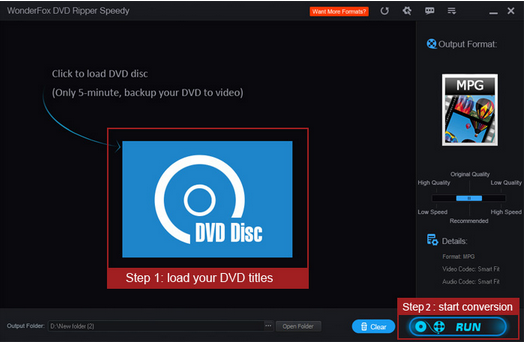
So let’s start with the Opening Screen

WonderFox Free DVD Ripper 7.1 - techniblolgic

Now,

Let me explain you what is DVD Ripping

The DVD Ripper enables you to easily rip any DVDs to AVI, MP4, MPG, MKV, WMV, MOV, MTS, M4V, ASF, DVC, MTS, M2TS, WEBM, FLV, SWF, VOB, F4V, 3GP and 3GP2. And the main thing in this software is that you don’t have to care for losing the quality of the video after ripping the DVD.
It also supports rip DVD to MP3, AC3, AAC, WMA, WAV, MKA, OGG, AU, AIFF, FLAC and M4A audio file.

Also Read: Hitachi Vantara Leads And Moves Unstructured Data Management For Third Year On GigaOm Radar

The Reason to Rip DVD

Ripping your DVD is used  convert and make the DVD content to be seen on iPad, iPhone, Android Tablet, Samsung Galaxy and Note, Apple TV, HTC cell phone, Nokia Lumia, Blackberry cell phone, Sony cell phone and PS, TVs, XBox,Wii, Kindle Fire, Surface, etc.
while you are on the go.

Ripping Speed

As we know, there are many so called fast DVD ripping tools on the market. However, have you seen any tools able to backup a DVD less than 5 minutes but in really they don’t where as WonderFox DVD Ripper lets you to backup a DVD to MPG video within 5 minutes but sometimes it also depends on the Speed of the GPU you have installed in your System. According to the company they claim to convert DVD to AVI/XviD will take about 20 minutes, DVD to MP4/H264 will take about 40 minutes.

Decrypt CSS and Region Code Protections

This Software can also decrypt the “Copy-protected” DVD’s that means you can’t copy any content from the DVD. WonderFox DVD Ripper can help you remove/bypass any protections such as CSS protection, Region Code Limitation, Sony ARccOS Protection, Disney X-project DRM but this feature is not included in the free version of the WonderFox DVD Ripping.

Edit, Enhance, and Personalize DVD Movie

This software also has a simple DVD editor is embedded in which there are some common editing features and effects, and just few clicks you can personalize your DVD movie and this feature is also not included in the free version of the software.

Also Read: How to Choose the Right Data Visualisation Tools

Flexible Settings

It offers flexible choices to fine-tune and adjust parameters to tailor the output videos, in terms of video audio encoding, bit rate, frame rate, aspect ratio, resolution, audio codec, audio channel number, sample rate, etc. You can customize and apply your own settings to all, you can also save all of the settings as a single profile.

The Free version of the software you can download it from the given link below:

Download

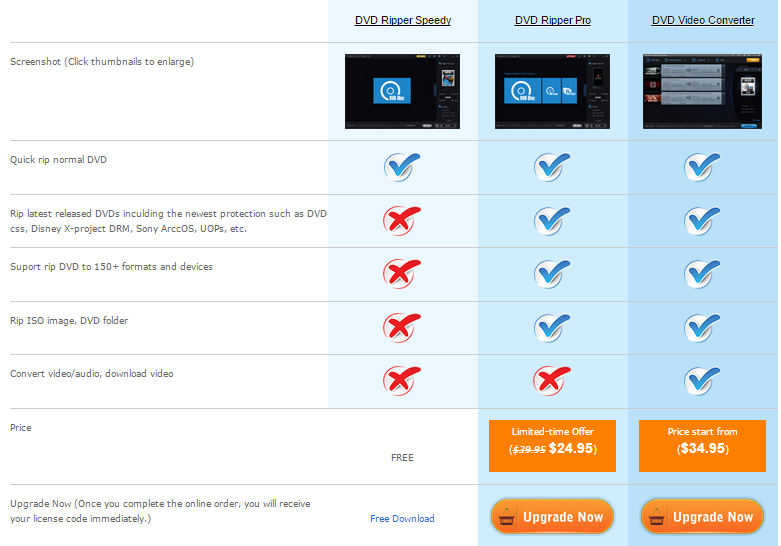
Comparison between different versions:

WonderFox Free DVD Ripper Different version comparison - techniblogic

Snakes and Ladders Free Game for Android and IOS

0

Recently one of company Zebrito contacted us buy giving the link of their new game which is being based on the old arcade gaming as well as old physical playing game which you all know is Snake and ladder. There are different variants of Snake and Ladder game which are there in Play Store as well as on ITunes for IOS devices.

We thought this is also a Normal game with a normal basic board and a dice which we need to roll to get the number and play it normally like other free and paid once, But i decided to download (Snakes and Ladders Free Game for Android and IOS) it and use it for few days so that there will be no practicality done with any of the developers. The best thing a found was the smoothness of the games with an awesome colors and graphics. Other games which are there in different stores lack of this combo which offer a lag free family or friends gaming experience.

The games consist of different functions like: It supports 4 Players which is with CPU as well as with the family or friends you want to play with.

The game is really very great and is totally free to download. Playing the game is really a fun with a great experience of playing a board and a arcade game in a new way.

The description of the game which is given by the developer is:
Best looking Snakes and Ladders FREE game compatible on android & IOS devices.
More colourful, more interactive with flawlessly animated characters – one game for the whole family.
A classic family board game – Snake and ladders (called Cute and Ladders, Ludo, Parchis, Parama Patam, Moksha Patam or Vaikuntapaali in some places) up to 4 players on a single devices.

Rules: The game is a simple race contest. The aim of the game is to be the first player to reach the end by moving across the board from square one to the final (100) square. If you land exactly on a square with the base of a ladder, your player climbs up the ladder to the square at the top of the ladder. If you land exactly at the top of a snake, your player will slide to end of snake. If you roll a six – you take an extra turn.
Snakes and Ladders Paint offers:
– Two games mode – standard and quick
– Easy to play – one tap gameplay
– Hotseat multiplayer – up to 4 players on some device
– Beautiful and colourful graphics with great animations
– Great tablet support – excellent for hotseat game

So, download the game, enjoy with your friends and family – it’s FREE and fun.

Android                 IOS

 Game Trailer


OnePlus Cardboard VR Headset Setup and Full Review

Hey guys back with a amazing setup guide and review of the Oneplus Cardboard which was launch Last week in India and i just recieved it yesterday. It is basically a copy of a google cardboard if you don’t know what exactly it is, basically a virtual reality headset from which you can play your phone with and obviously is made of cardboard, when we make it out from the box it comes with the never settle logo which is the main moto of the company a way to create hype.

It comes with Velcro on it sides and some kind of touch sensitive padding on the top and somekind of lenses fixed from where we are going to see out headset.

The Cardboard has been especially designed for the OnePlus One, but it is also compatible with devices up to 6 inch screen size. It meets Cardboard 2.0 features along with few more improvements like 20 percent smaller than Google’s Cardboard, but offers the same amazing visual experience.

oneplus-cardboard-setup-instruction-techniblogic
For navigating or making selections inside VR apps, Google Cardboard has a magnetic button the side. On OnePlus’ headset however there is an indent on the top-right corner that can be pressed to make selections. One thing missing however is a strap for your head, which would have helped free your hands. Currently, you need to hold the headset to your face as long as you are using it.

As for the apps, OnePlus has yet to release its own app that will host the launch event. In the meantime though, there are quite a few apps you can try out including the Google Cardboard app. The overall app experience is still quite good, and despite using a flagship smartphone, they are full with lags. This is however more to do with the software themselves, rather than the headset. OnePlus then has created quite a decent headset, especially when you consider how ridiculously cheap it is. It may not be perfect, but virtual reality as a concept has a long way to go. While OnePlus’ intentions are for people to use it for the launch event.

Once you receive your Cardboard

To get the best out of your OnePlus Cardboard, we highly recommend that you calibrate your phone with our “Official Viewing Profile QR Code” given below which works hand-in-hand with the original specs of the cardboard. These settings are made to provide the best viewing with our stock software, and have been tweaked by our staff.

Official Viewing Profile QR Code for oneplus cardboard- techniblogic

Because everyone’s eyes are a little different, and some of our users use custom software, not everyone might find the stock viewing profile which we have provided above to their liking. In this case, we encourage users to make their own custom profiles by clicking on the following link – Viewer Profile Generator.

One last thing, if you are running custom software and seeing double, we have found that changing your DPI to 400 may help mitigate issues.

VR App for the launch of the OnePlus 2 – Coming Soon

For OnePlus Cardboard VR Headset Setup and Full Review Watch below Video

MiniTool Power Data Recovery Version 7 Review

Hello guys your computer system, sometimes due to miscellaneous crashes and hardware failure don’t boot, which may cause a problem which means if you have never take up a system backup, you will lose a large amount of critical data or a Windows re-installation. Most of the companies ship there system with one or another system recovery applications like:

  • Lenovo One-Key Recovery
  • Dell Backup and Recovery Manager
  • HP Recovery Manager

and so on. But some of them are really very complicated to use for new users, or do not work on the latest operating systems like Windows 8.1 or any of the new version which is newly available in the market. Besides, different brands of computer have different backup and recovery tools. What’s the solution? If you have your own system by assembling it youself or any of the company charging a lot for a particular application, so for those there is a free application which is available online to Create a Custom Windows Recovery Partition Using MiniTool Power Data Recovery.

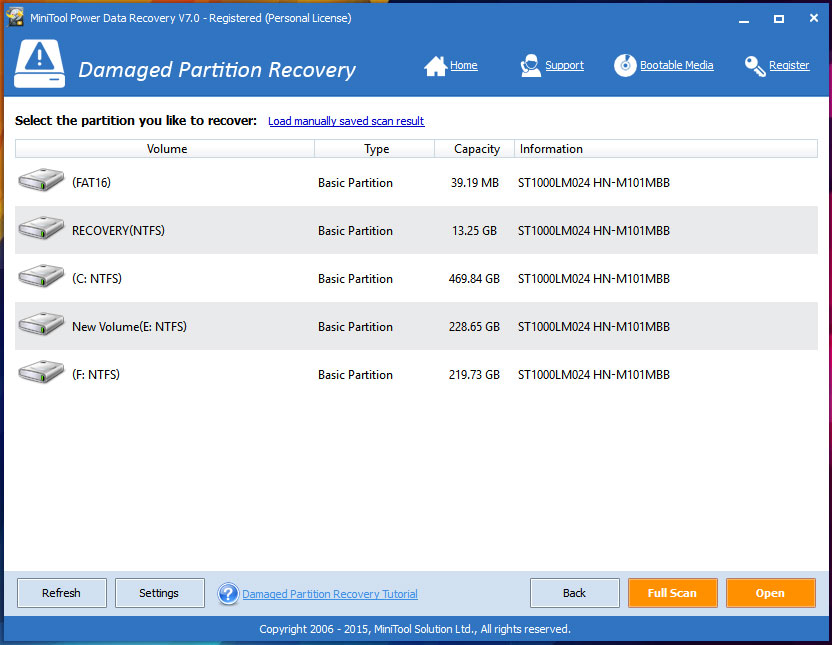
MiniTool Power Data Recovery 7 - Techniblogic (2)

MiniTool Power Data Recovery is free if there’s no physical damage to your hard drive and you don’t need to recover more than 1GB of data. If your loss amounts to more than that, you’ll have the plop down $69 for the pay version which is for the personal Licence version.

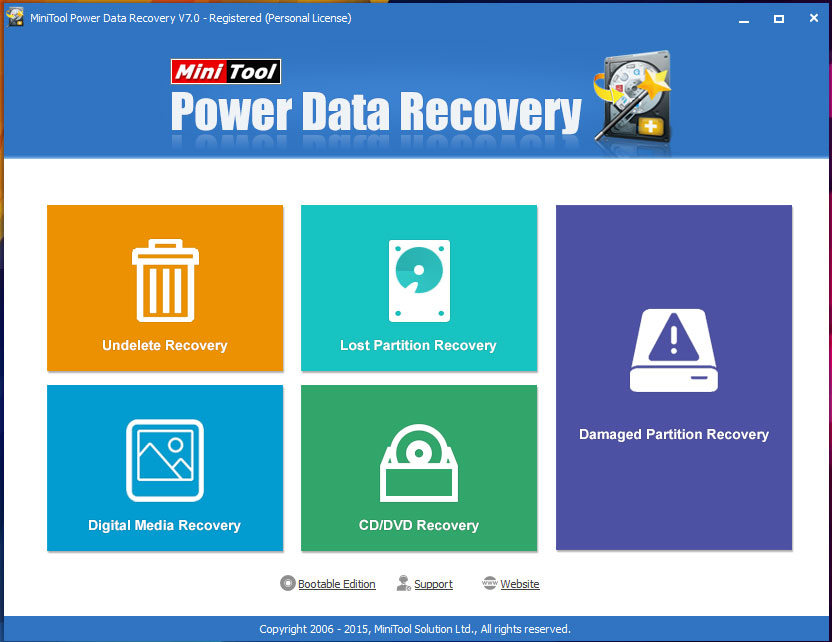
MiniTool Power Data Recovery’s interface is clean and Simple. If you know what a partition is, it will be good and easy to move on it. The program offers a simple file undeleter, lost and damaged partition recovery, as well as recovery of files from digital media (SD Cards, etc.) and CD/DVD. It can recover a large variety of file types (word processing documents, images, video, etc.), but has no sector editor for recovering snippets or pulling off raw data.

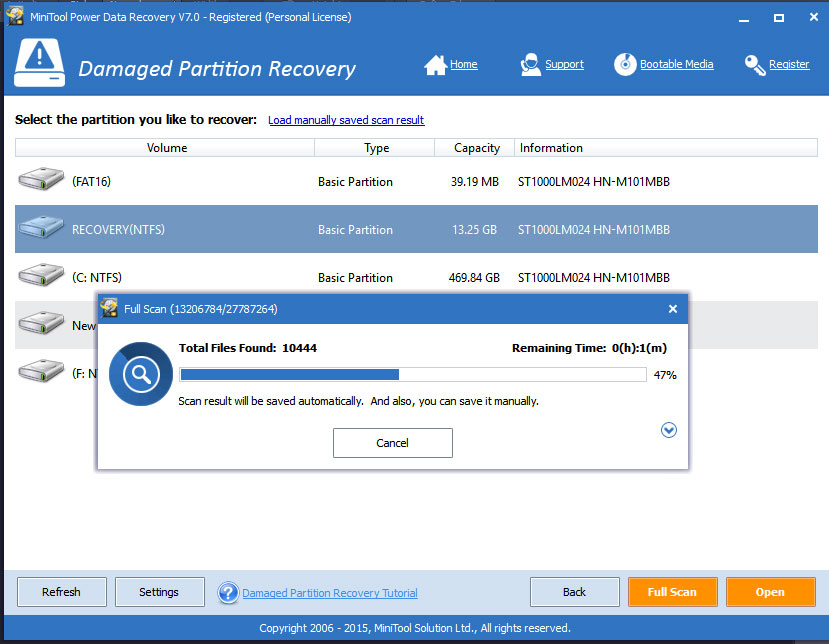
MiniTool Power Data Recovery 7 - techniblogic

The Main drawback i was able to find was, Power Data Recovery provides no way to delegate to start and end locations of a scan or to skip bad sectors. Bad sectors often cause recovery programs to hang.

MiniTool Power Data Recovery 7 - techniblogic (3)

Other recovery programs hang on this particular drive as well, but can be set to scan around the damaged sectors.

Another minor issue which was there in there earlier version 6 of Power Data Recovery, was it can’t be minimized while it’s in operation. Scan operations can take a long time, and working around the Power Data Recovery window and dialog is annoying, but now in new version it can be minimized easily but the CPU usage is a bit high.

For free, it’s well worth a shot if the files you need to recover total less than 1GB. You have to pay different amount of money for different versions Power Data Recovery is providing. The $69 Personal Licence, $119 for Commercial License, $299 for Enterprise License and $499 for Technician License.

MiniTool Power Data Recovery’s is one of the most powerful data recovery software& is a risk-free and READ ONLY data recovery utility that helps you in recovering your all important data lost after accidental format, virus problems, software malfunction, file/directory deletion, or even a sabotage! It is an easy to use data recovery utility that examines your inaccessible hard drivesfor damages and corruptions and recovers the data back. Recovery Ability Recover deleted files even if emptied from the Recycle Bin. Recover formatted partition. Recover your files after a hard disk crash. Get data back after a partitioning error. Recover from hard drive, camera card, USB, Zip, floppy disk or other media.

So therefore it depends on you which one you really want to use, it depends on your usage and how you want to handle all such things.

PROS

  • Recovers up to 1GB of data for free
  • Easy to use
  • Recovers from flash memory cards and optical media

Download

Access all your cloud storage services in one place with Multcloud

Most of us often have multiple cloud storage accounts – Google Drive, Dropbox, Amazon S3 and so on. Have you ever felt disappointment, when you forget where you transferred those important files? Especially in the case of power off. Today we will tell you a cool cloud management tool MultCloud 3.2.0, MultCloud 3.2.0 supports still transfer even after power off, MultCloud uses the new background of transmission technology, making the files transfer doesn’t need to start the computer, that is to say, in the case of power off, MultCloud can also realize the transmission from a cloud drive to another. You only need to Copy and Paste, then MultCloud server will achieve everything for you!

MultCloud  3.2.0:

  • Added the “replacement” option.
  • Upgrade OneDrive API, and remove some limits.
  • Enhance SFTP service: Support logging in with Private key.
  • Modified the bug of amazon cloud drive.
  • Optimize transmission environment.

Application Steps :-

Step 1: Registration

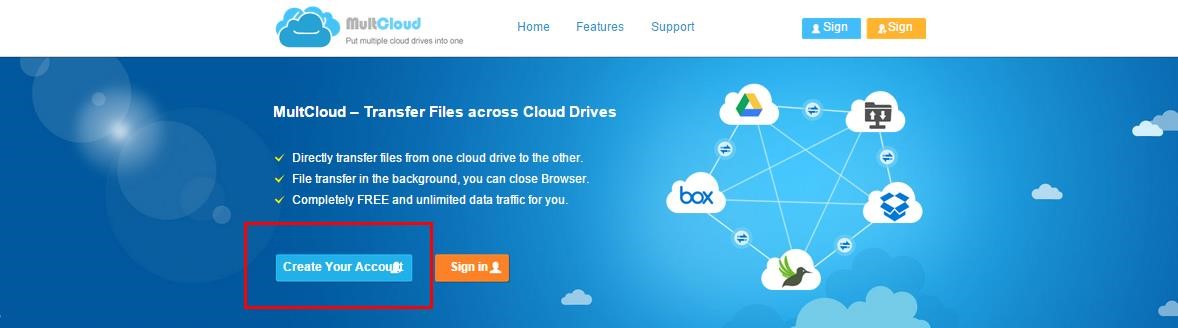
Enter the website: www.multcloud.com, registration is very simple, click “Create An Account” to get started. Then you just need to activate your account in your verification email. This means that you have already finished the registration.
Step 1 Registration-techniblogicVisit Now

Step 2: Add Your Cloud Drives


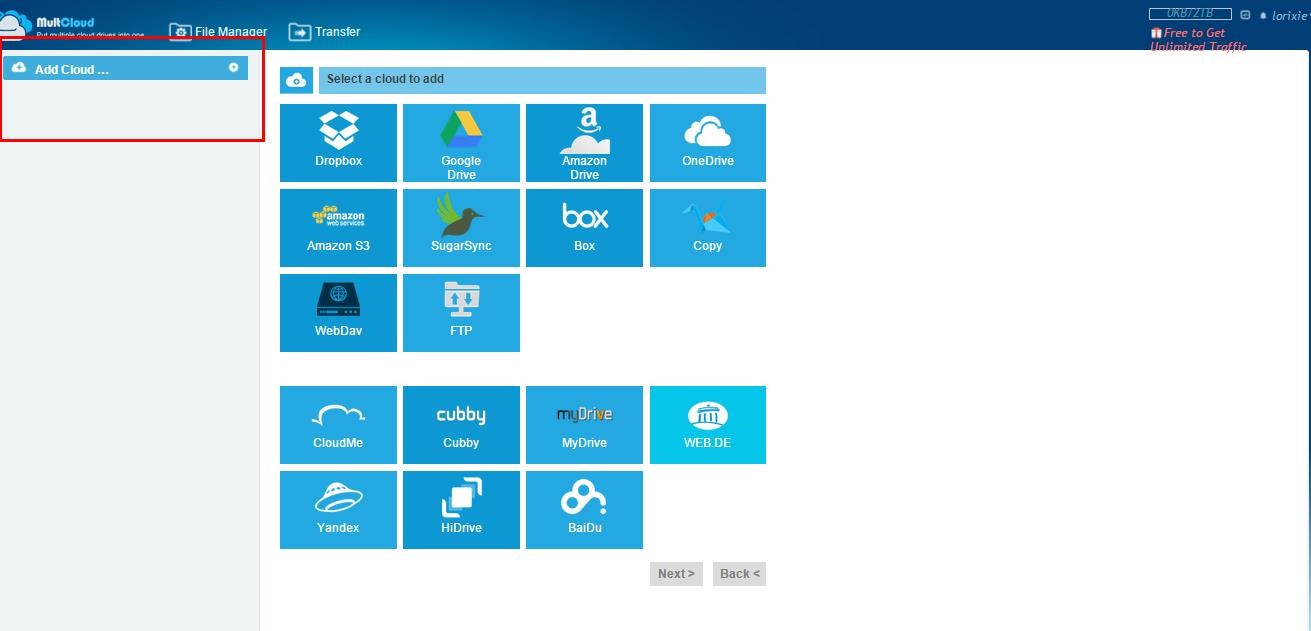
This step needs you add all of your cloud drives accounts in one place,  if you click to add a cloud drive, rename this cloud drive for identify this account simply in MultCloud,  then you can use the same way to add another cloud drives.

Add Your Cloud Drives-techniblogic

Step 3: Free Transfer Your Files

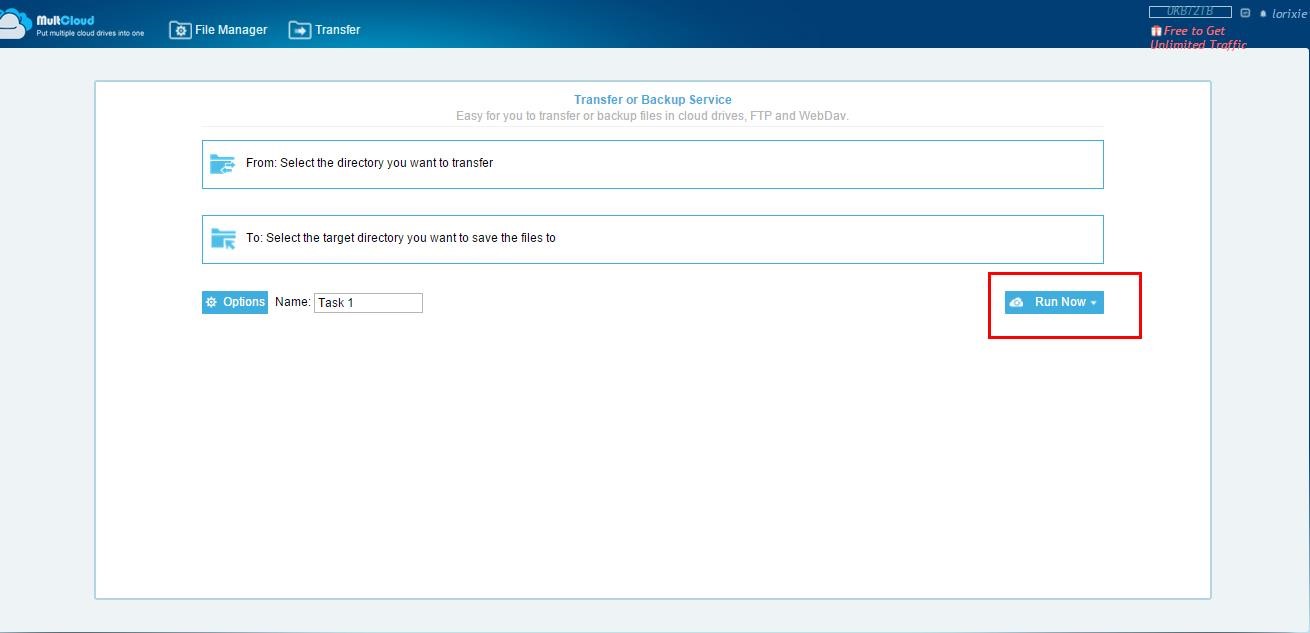
MultCloud can move or transfer files form one cloud to another for better realizing the file transfer operation among multiple cloud drives without downloading to local.

Free Transfer Your Files -techniblogic

Step 4: Scheduled transfer

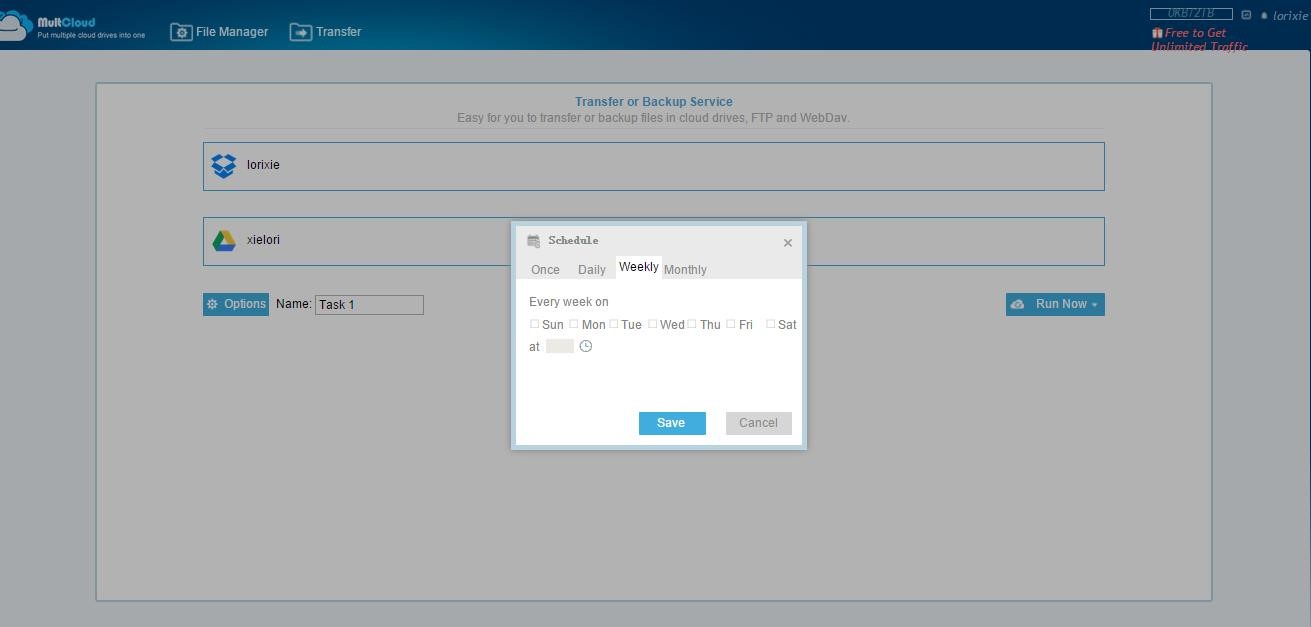
MultCloud supports scheduled transfer function. It allows you to set the daily, weekly or monthly in the specific time for data transmission. It also supports to send an email to you after completing the transmission and inform the result.

Scheduled transfer-1-techniblogicScheduled transfer-2-techniblogic

Step 5: Free to Get Unlimited Traffic

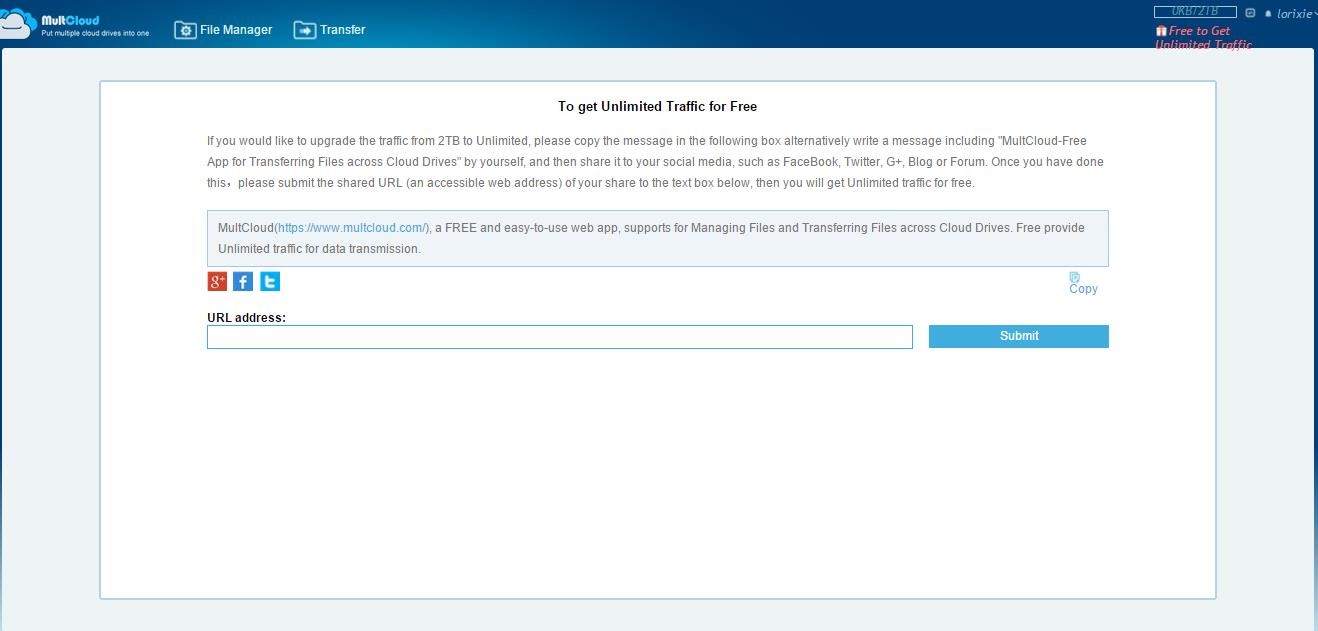
If you need to extend the traffic from 2TB to Unlimited, this need you to copy the message in the following box or write a message including “MultCloud-Free App for Transferring Files across Cloud Drives” by yourself, and then share it to one of the social media: FaceBook, Twitter, G+, Blog or Forum. At last, submit the shared URL to the text box below, then you will get Unlimited traffic for free.

Free to Get Unlimited Traffic-techniblogic

Many people have multiple cloud storage accounts – Dropbox, SkyDrive, Google Drive – but managing them all separately can be a chore. Here’s how to control your different services from a single interface using MultCloud.

MultCloud is 100% free now, I must say this app will be your good helper, I really like MultCloud 3.2.0. It can manage all of your cloud files in one place. It allows you to easily transfer files back and forth between your accounts. So register to use it today!


Dazen takes Direct attack on Xiaomi Redmi 2

Again there is a bang by Dazen takes Direct attack on Xiaomi Redmi 2, Coolpad’s new flagship, taunts the Xiaomi Redmi 2 on getting its price right but not the specifications. Earlier in last week of April 2015 Huawei makes the direct attack on Xiaomi by its specifications “Huawei Honor 4X Direct attack on Xiaomi Mi4i

This attacks takes place when Xiaomi makes the hype of price cut in Xiaomi Redmi 2 by Rs 1000 from Rs. 6,999 to Rs. 5,999/.

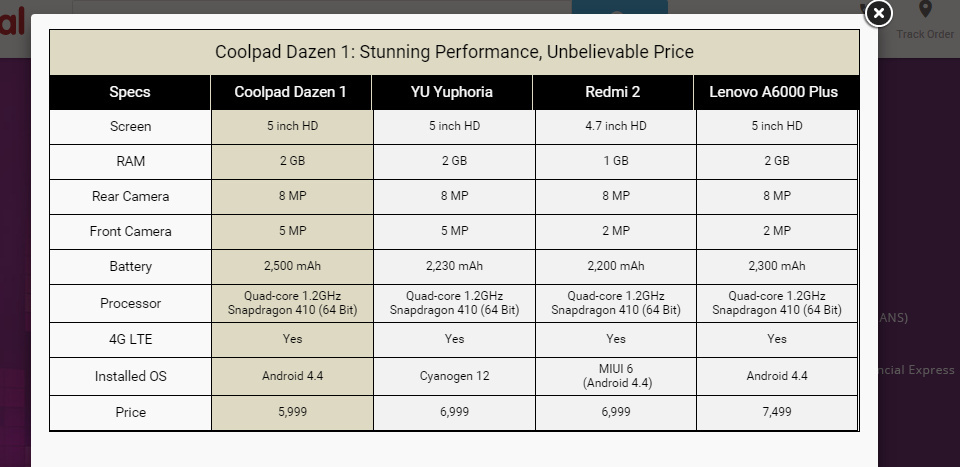
On opening Snapdeal you get the following compare sheet:

Dazen takes Direct attack on Xiaomi Redmi 2 - techniblogic
Image – Screenshot snapdeal

Now, after looking at the compare sheet on snapdeal, you can clearly see that Coolpad’s Dazen is superior to Xiaomi’s Redmi 2 in a lot of ways. The screen size is bigger being 5 inches as compared to 4.7 inch screen on the Redmi 2.

Dazen comes with a 2GB RAM while Redmi 2 has just 1GB of RAM to offer. The device is also superior in terms of Battery size and front camera quality too.

Xiaomi is a company which saw success and fame in very short period of time. The company now has a strong hold in the Indian market and is keen on launching new devices at regular intervals.

Coolpad, a Smartphone manufacturer, which has seen the worst of days is now coming up good with the launch of their Dazen. This device comes at an extremely cheap price compared to any other device with the same configuration.

After Xiaomi dropped the price tag on their Redmi 2, the people at Dazen just couldn’t hold their hype and just posted this pic online which is a direct attack by them on Xiaomi Redmi 2.

This kind of advertising is not legal according to the Indian law, But don’t know how this is going on in the Indian market. This is for sure that it will ultimately benefit the consumers only.

Five products Xiaomi is going to launch in India soon

Xiaomi when first came to India with its budget device Xiaomi Redmi 1s which was a huge success to them in the market. They just changed the trend of doing marketing in the Indian context. They come up with the first flash sales, which become so popular that other companies also get inspired from it and they also start doing the same.

Now in India Xiaomi is one of the largest company in India selling their thousands of products daily in the market and capturing the market on large basis.

Now according to the rumors xiaomi is going to launch its different product in Indian market which till now are only available in their home country which is China.

So Five products Xiaomi is going to launch in India soon are

  1. Xiaomi Mi TV 2

Xiaomi MI Tv2 - techniblogic
Image – Xiaomi

One of the most popular offerings from Xiaomi, this television set which will defiantly going to change the way people look at purchasing mid-range TVs in India.

Bringing a 4K capable screen and smart processing capabilities, the Mi TV is an amazing buy at its current price of around $625 (Rs 40000).

And it will be launched in India before Diwali according to the xiaomi Forum.

  1. Xiaomi Game Controller

Xiaomi Wireless Game Controller - techniblogic
Image – xiaomi

The another Xiaomi Product which is Designed to work with the Company’s Mi Pad and Mi TV, but will work with every other device which is having Bluetooth connectivity and has android platform on it.

This controller is aggressively priced by about Rs 1600 and if you guys want to purchase it right now you can visit BUY.

  1. Xiaomi Mi Note and Note Pro

Xiaomi Mi Note - Techniblogic
image – xiaomi

Xiaomi recently skipped the Mi series and released their newest flagship devices, the Mi Note and Mi Note Pro. With specifications that include 4GB RAM, Snapdragon 810 processor, 2k UHD screen, the Mi Note Pro is currently the pick of the season and will remain so for a long time to come.

Rumored to be released alongside the Mi TV, both these smart phones are coming to India really soon.

  1. Xiaomi Yi camera

xiaomi-yi-action-camera-techniblogic
image – xiaomi

With the new and famous Go Pro Hero miniature cameras, Xiaomi wasn’t to be left behind and they came out with a similarly designed and spec camera at 1/5th the price of a Go Pro.

Priced at around a price tag of $87, the Xiaomi Yi camera is a contender to be looked out for, with its 4k video capabilities and 120 FPS of capturing movement.

  1. Xiaomi Air Purifier

Xiaomi Air Purifier - techniblogic
image – xiaomi

A really unconventional offering from a purely tech startup, the Air Purifier was launched in China after huge news uproar over the condition of air quality in the country.

This product is a part of the company’s ever-expanding ‘SmartHomes’ range and will continue to become a hit in China due to its size and compatibility.

Last month, New Delhi was ranked as the city with the worst air quality in the world. So, maybe, India needs this device more than any place else in the world!

So, guys what you think about all these devices by Xiaomi which are soon going to be there in the Indian market.


MiniTool Partition Wizard Review : A Great Hard Disk Partition Tool

MiniTool Partition Wizard is a another tool like other Hard Drive partition making tools beacuse of which it is highly competitive partitioning toolkit and  it looks and feels just like a half dozen others in the market like: toolbar, list of functions to the left, and drive information to the rightof the application. The interface is particularly focused for making the application easy to use for basic operations which means Good for experienced as well as for less experienced users. However, its interface also approach to some advanced operations such as merge and re-size.

Different Versions

There are different versions of the partition wizard available so that the users can select the right version according to their need the versions available are

  • Home Edition– This freeware helps home users to manage complicated partition operations of their hard disk. The functions performed by this software include: resizing partitions, Create partition, Copying partitions, Extend Partition, Delete partition, Format partition, Set active partition Split Partition, Convert partition, Explore partition, Hide partition, Change drive letter and Partition Recovery etc.
  • Professional Edition– This is the version for business environment and cost you about $39 and also comes with advanced features such as Merge Partition, change cluster size and convert dynamic disk to basic disk apart from the features in the home edition.
  • Server Edition– This edition is specially designed for the advanced users and will cost you $129 which will help system administrators to manage the server and non- server disk partition needs.  This edition is capable of performing basic to advanced partition operations on your servers without causing any data loss.
  • Enterprise Edition– This edition is extremely useful to governments, different organizations, companies, schools and other enterprisesand will cost $399. This edition can be easily used on multiple computers within an organization to create and manage disk partitions. This low cost software can be used for server and non-server systems.
  • Technician Edition– This edition is the most appropriate partition management software for technicians who provide consulting services to multiple companies or clientswith the cost of $699. This edition of the partition wizard can be used on desktops, workstations and servers regardless of the size of the network and the architecture.

This is a windows based software and supports MBR and GUID partition tables with 32/64 bit operating systems such as Windows XP, Vista, Windows SBS, Windows 7 and 8 and Windows server 2000, 2003, 2008, 2012, etc.

Interface

pro-partition-management- techniblogic


The software is very well organized which helps the users to complete the required task which they want to do without any difficulty. All the options are seen in the left window and the important operations are located on the top horizontal menu.  You can select the desired task to perform.

If you want to copy or clone an entire Hard Drive, you can use the “copy disk” option. If you want to create more space in a partition, you can enter the new space needed and from where the space should be taken. It is also possible to recover any accidentally deleted partition using this partition management software.

If by using any of the other application you are not able to use it or you want an easier, more tool, then by all means download MiniTool Partition Wizard and take a look. The free version is fine for the basics, and if you want more advancement you can download by purchasing different versions from : partitionwizard

Pros

  • Easy to use
  • All features from basic to advance

Cons

  • Not able to find any of the CONs