Modern life cannot be imagined without different technologies. They have become an inevitable part of our everyday life. A lot of specialists are engaged in the technological sphere. They design and create new technologies, develop innovative approaches and do various modifications.
Nowadays, a lot of universities and other educational establishments prepare the specialists of the field of science and technology. It is a pretty difficult task that requires a lot of effort and time. The students should prepare the essays on various technological topics. And they should do that well. They have to keep not only grammar rules but the requirements to the essay structure, content and formation.
Besides the actual technical knowledge, a good essay needs to be well-written according to specific norms and requirements. Despite the direct topic of the essay, for example, the work about space technologies, IT, nano technologies, military technologies and so on, the essay should include the obligatory parts and possess particular characteristics.
What Are the Main Attributes of Technology Essay?
Information value
Content integrity
Actual continuity
Proper spelling and grammar
Well-planned structure
Data accuracy
High level of comprehensibility
Valid data and facts
Enough supporting materials
Outstanding features
Of course, this list is not full. But the above-mentioned items are considered to be the basic ones. It is very important to realize that you write for other people so the text should be easy-to-comprehend. The essay should not contain many unknown and difficult notions and terms. In such a case, nobody will understand anything.
It is recommended to write simply and clearly. But at the same time, do not oversimplify the technical matters and scientific facts. Provide the concepts and ideas with supporting materials, for example, provide the data of some research. Do not forget that it is a scientific paper.
Pay special attention to your writing style and the size of the essay. It should not be too short as you will not be able to fully cover the selected topic. And at the same time, the paper should not be too long. The obligatory parts of every essay are the introduction, main body, and conclusion. The middle part of the main body will be bigger that the other two parts.
On one hand, you can be very interested in technologies and you like to write different essays and get something new. But on the other hand, despite all interest, sometimes it is rather difficult to cope with the task. Fortunately, many different options are available nowadays.
There are special providers of the services of essay writing. You can just enter the site, for example, EssayShark, and order online the essay on the required topic. It is pretty simple and the quality of ready paper will not be poor. The essays will be written by the technical specialists according to all requirements and norm of writing.
Sometimes you should have some experience and skills for creating an informative and impassive essay on technology. And without such an experience, you will not be able to fulfill the task. In such cases, it is better to apply to the expert in order to reach the success.
Google mail is one of the best webmail application used all over worldwide, which allow the user to send or receive a message, videos and much more. With the help of it, the user can stay connected with their old friends and families. It offers many features to its user to better the experience.
What should you need to do if your account has been hacked? First, you immediately need to modify the password of your account and also need to modify the security question. Here we will provide you some essential steps in Gmail account security.
You need to check your computer’s security. Most cyberpunks take password data using different software’s that has been already installed on your desktop or mobile phone if you are using Smartphone. No matter which Operating System you use, make sure that you are using updated anti-virus programs. You need to choose the configuration that will update automatically your system when solutions of new security issues are available. You can also go for the free security software available. To find these, you need to type “free security software reviews’ into the search field of the Google.
You need to review that all OS are well installed and working properly. To find these, you need to enter the name of the OS and check for the updates in the Google. You need to configure your system to update automatically for new updates so that your system gets secured from new attacks as soon as possible.
You need to change your password immediately. Execute this after updating your anti-malware programs else hackers will again gain your new password as well. So, modify your password to recover hacked Gmail account.
Configure Strong passwords have to be hard to guess.
Configure your account password which is at least 10 characters long, and use capital or lower case letters, numbers and symbols in your password.
Don’t use words that can be easily found in a dictionary then, it’s simple for hackers to break.
You can also make shortcuts of phrases which help you to configure a strong password for your account, for example, Go8upGo8up2Day! Translates to got up, got up, today.
You must need to notify your contacts by sending an email to your contacts saying that your account is hacked. When you get an email which comes from your known then you will definitely access it and click on links within it – even if the subject sounds peculiar.
No prestigious bank or company is ever going to ask about your detail online: If you get any mail in your inbox with a link to one of these sites, then don’t click on it, instead of it use your search engine to visit on the site own your own and log in it. If the message was authorized, and then it will be waiting for you in your Gmail account. These are some important things which you should need to take care when your account has been compromised.
Why should every business know how to rank on YouTube using SEO? The quick answer is summarized in six words: 1 billion viewing hours per day. In February 2017, Youtube ownerGoogle announced that people are now watching a billion hours of YouTube content every single day.
“Around the world, people are spending a billion hours every day rewarding their curiosity, discovering great music, keeping up with the news, connecting with their favorite personalities, or catching up with the latest trend,” according to the world’s largest search engine. With YouTube’s immense power to reach out to consumers, should you not be rolling up your sleeves and driving traffic to your YouTube account?
Explore this helpful guide to YouTube SEO, including exciting optimization tactics and other tips to produce engaging video content.
The power of video keywords
To win any game, you should know the rules well. Millions of videos are posted online every day, whether in YouTube, Vimeo or other platforms. How can you generate a top search result ranking?SEO expert Brian Dean shares a four-point guide on how to drive traffic to your YouTube video or website via SEO:
Find “video keywords”
Make your (awesome) video
Upload your video with YouTube SEO in mind
Get video views
“Video keywords” are those that have YouTube results on the first page of Google’s search results page. These types of keywords include how-tos, reviews, and tutorials. Google also tends to rank high those videos that are fitness or sports related and those with funny content (“cute animals”). By using these recommended keyword types, you’ll generate traffic not only from users searching on YouTube, but also those searching via Google.
After choosing a video keyword, Dean suggests checking whether it gets at least 300 Google searches per month. “If a keyword boasts of at least 300 searches per month, then you know it also gets a decent amount of searches within YouTube itself,” Dean shares. If you get your video to rank in Google, you get a huge chance of earning high-quality visitors to your video and website.
“Make your video awesome” was quite easy to achieve for a beginner just some decades ago because Youtube gave inbuilt video editor where you could make very simple video edits like adding text to video, adding track, shorten a video length or cut out unnecessary part. Bad news: it is no longer available. Good news: you can use Windows Movie Maker with the same level of simplicity or Freemake Video Converter – for working with even exotic file formats. I found this guide on how to make video cuts amazing. It also allows rotating clips if you upload some videos from your phone and this is quite a common problem for smartphone (iPhone for sure) clips. If you know how to work with the Movie Maker – go for it just bear on mind it works with WMV files only. If you are working with some other file format, go for Freemake.
Google’s signals in ranking videos on YouTube
Ultimately, the quality of your content would drive your SEO. If your video is unoriginal and unappealing, keywords can do little to help you. Google uses 200 signals that can guide you in creating video content. The most important of these “clues” are title tag information, audience retention, description tag keywords, tags, video length, number of subscribers after watching, and interactions, which include comments, likes, and dislikes.
According to ComScore, an average YouTube video is 4.4 minutes. The statistics suggest that people prefer watching shorter videos over longer content. Wistia also reports that fewer than 65% of viewers are still watching a video after 4 to 5 minutes. The challenge is in breaking your content into digestible parts, which are still interesting and informative. You can create a series of short videos to keep viewers’ attention and build anticipation.
Keep it personal
You may have watched one of Thai Life Insurance’s viral sad videos. “Unsung Hero”, which is about a young man who performs various acts of kindness, has earned more than 29 million views in less than three years. Instead of the casting celebrities, the production team worked with people with “more relatable features” and used a simple script with a simple message: kindness offers intangible benefits.
Campaigns focus on highly personal issues that leave a lasting impact on people. One notable example is Dove’s Real Beauty campaign. The beauty brand used a study on 3,000+ women from 10 different countries as the core of their campaign. They found that fewer than 5% considered themselves beautiful. Dove created inspirational ads focusing on women’s unique characteristics that make them beautiful in their own right. Create videos in which your target audience can relate.
Optimized metadata for your YouTube channel
After creating an appealing video, what are the next steps for your YouTube channel optimization? Optimize your metadata or the information that clearly define the subject of a video. These include the title, description, and tags. In creating a title, use key phrases that incorporate long tail keywords. The description provides details about the video and includes a relevant URL to your website. SEO experts recommend adding 10 to 20 tags per video in words and phrases. These tags may be relevant keywords that you cannot fit in the title or description and should be predictive of what people may use in searching such a video.
“Optimizing your metadata helps your videos get discovered by a relevant audience who will more likely to watch your video. The more views a video gets in a short period of time, the higher it will rank for a variety of key phrases related to its subject,” says Brian Honigman, social media account manager at LunaMetrics.
Advance SEO YouTube tactics you should know
Here are 8 least known YouTube optimization techniques from SEO experts you should explore:
Choose a jpeg file for your YouTube channel image. Make sure to edit the title of the file, its description, and author properties;
Add links in the header section of your main website, social media pages, and other websites you run;
Boost video views by sharing your video in online communities;
Use the keyword in the video’s filename;
Place your keywords at the beginning of the video title, but avoid keyword-stuffing by keeping the title at least five words;
Add your video links in your email signatures and embed your content in blog posts;
Build internal links by creating sub-playlists; and
Add a few popular and authoritative channels in your Favorite Channels.
YouTube is just beginning to change our world. People can influence others’ political views and encourage social reform through a powerful video. How many “ordinary” individuals have turned into instant celebrities via vlogging? For businesses, YouTube is an important marketing platform. Understand how it can help you achieve your business goals.
Snooze, as the name suggests; is something like an alert or a reminder that is given for the accomplishment of a specific purpose. The same applies with Google email account inbox where a reminder makes the user aware of the message by taking the message out of the inbox in the form of a popup at the time of snooze. Once, users check the reminder or snooze, the same email goes back to the exact location in the inbox; where it was placed. Snooze or reminders are set on a temporary basis to remove the messages from your inbox on a temporary basis to gain the user’s attention. It can come back to the top of the inbox as per the requirement of the user. The snoozed items can be seen any time in the category ‘Snoozed’ shown on the menu with three line icon.
There are certain options to set the Snooze in Gmail account:
Snooze until Suggested Time: Snoozing the notifications accumulated in Email inbox message that contains date and time, will provide the option to the user to get the alert or notification through snooze at a suggested time on a specific date such as a date on which concert is organized or package will arrive. Details are automatically derived from information in the email messages stored in the inbox.
Snooze till specific time: Once the snooze is selected, certain ways are available to snooze to a certain time and date until a user turn-off the snooze.
Today, tomorrow, this week, this weekend or next week are the quick default options available to set snooze till specific time period and date.
How to pick date and time: Choose the date and then the specific time. As per the time is concerned, choose the preset time options in which Custom or Silent is available.
At last, choose the custom time you recently used to set another snooze or reminder for another email to arrive from specific email or reminder.
Default snooze times can be modified by navigating to the settings option and change it to morning, afternoon or evening.
Modifications in Weekend. In many countries like USA and Canada, weekend generally means Saturday and Sunday and in other countries, it’s something other than this. In order to avoid those complexities, days of the week can be changed and marked as weekends. If you are not able to do so, then nothing to worry as Google; by default, can set your weekends with the country specified.
Snooze Until Someday: For some message or emails regarding which you as a user, are not sure about what to do with them, can get the best fit in the option ‘Snooze until someday’ and later, can take a decision regarding what to do with them. Every bit of detail can be seen in the someday list by navigating through the Menu and then select Snoozed. The someday section can be seen at the bottom that needs to be selected for those specific messages which have to read again for taking further actions. The email or reminder will stay in snoozed option until you take a specific action or move it to your inbox.
Snooze until you arrive at a place: The snooze can be set for message and reminders to come out of the inbox in the form of pop-up until a user is at the destined place such as home or work, where he/she can check the messages in the top of the inbox as well as get notifications on the mobile even if alerts are turned off.
Here are the steps to set a snooze for the particular email; until you arrive at a place:
Open an email message from the inbox or a reminder set in the calendar and then click snooze.
Now click or tap on pick place
When the section is displayed to pick a place or to enter a new address, choose the options amongst home, work or new address.
Add a Reminder to an Email Before Snoozing: Before you start snoozing an email for a specific date or some day later, then add a note or reminder alongside what to be done with this email. This can be done by following an appropriate procedure.
Open a specific email from the list being reflected in the inbox.
Click or Tap on pin
Type where it says “remember to……” on the top of the email
Click or Tap on Save
Now again Tap on Snooze and select the option
Create A Repeating Reminder: If there is something, you need to do on a regular basis, there is a regular snooze or a reminder that can be created at your will, which keeps on repeating until you disable the same. Here are the steps that you need to perform for creating a repeating reminder.
Open inbox and go to create option by clicking or tapping on the icon.
Then click or tap on the reminder.
Now type the text what action has to be taken upon reading the email message.
Then type in your reminder.
Then again, click or Tap on snooze option.
Now select the option, pick the date and time.
Now choose the first day of your reminder and then choose the time
Once it is done, tap or clicks on the option “Does Not Repeat” and choose the one option among items in the sub-menu.
Again, click or tap on the reminder button to save the settings.
The snooze icon will only be reflected in your web browser if you are using an upgraded version of Banana tag for Chrome or Mozilla Firefox. The shiny snooze button will appear above each message you receive in the inbox. It’s just a matter of click and you will find preset times for sending a reminder about specific email. In case, you are one amongst those users facing issue while creating a snooze, Gmail helpdesk servicescan be availed anytime; dialing Google email toll-free number for quick communication with certified experts to get the instant help of any kind.
It is very important to fully comprehend the difference between a personal and technical or technology essay. The general structure of both these types is the same. They include a brief introduction, a main body and a constructive conclusion. But if to talk about the content, then they are totally different. And do not forget that the technology essay has several requirements that should be obligatory met.
First of all, the technology essay is dedicated to the particular technical subject. This may be some technological innovations, new approaches in some technical area, etc. Its main goal is to inform about a specified technology topic. You can find special websites that will help you to write a good technical essay, for instances, https://gpalabs.com/college-paper-writing/buy-college-essay.html. Such sources will show you the main tricks of effective writing about technology.
Essay Layout
As it has been mentioned before, the essay consists of three obligatory sections: introduction or beginning, main body or middle part and the end or conclusion. It is necessary to clearly introduce the subject of your essay. It should be a brief input of what you are going to write in the main body. Sometimes it is better to write the middle part of your essay and only after that add the introduction and conclusion. In such a way, it will be easier.
The beginning of the essay should prepare your reader of what will be next. It should contain some background of the topic, necessary information for further understanding of the essay, etc. Besides that, the obligatory parts, it is better to divide the main body into several sections too. This will help to easily comprehend the topic, especially if it rather difficult. In total, the whole essay will contain 4-5 sections.
Essay Style
The formal style is the suitable one for writing technology essay. It is recommended not to use ‘I’ – use the impersonal style. All paragraphs should be interconnected – at the end of every paragraph, add the logical link to next one. In such way, the whole text will be comprehended as a single entity. Always mind your grammar. Avoid personal critics and evaluations.
Essay Content
The main content will be written in the middle part of your essay. Here, you should demonstrate your reader all your knowledge of the topic. Use only checked data from the authoritative sources. You should double check all the information that you use in your essay. If you are not sure in some statements, it is better not to use them. It is rather good practice to add some schemes, tables or graphs. The visualization of your content will help the reader to better understand your topic.
Essay Formatting
But you should remember that every university or college as well as every professor has their own requirements for essay formatting. Usually, all works are written in a serif font. The general size of the selected font can be 11-12 points. Mind that every page should have a proper number.
Businesses around the globe are always trying to find more efficient means of establishing a better and far more potent position in their industry and the market. Some of these transformations are usually shaped by new technologies and software solutions, as well by the new trends in the marketing industry.
At the moment most of the efforts are being focused on the customers. As a result of this we now have customer centric marketing, new developments in the customer relationship management field and excelled customer support.
Out of these three fields, the one with the highest impact on ROI and customer retention is customer support. And good and efficient customer support is something that can provide a business with that edge it needs to surpass other competitors on the market. If one wants to provide an excellent customer support service, having a good customer support knowledge base is very important.
Here are some tips that could help businesses build customer support knowledge base and raise the customer satisfaction to a whole other level.
Set the Goals for Customer Support Knowledge Base
“Documentation empowers reproducibility of results.” – Eric Anderson, Information Manager.
Customer support knowledge base consists of big chunks of data presented through text. It usually contains valuable information on the company’s products, services and procedures. But all this information can quickly become a trap for anyone to fall into. This is why it is important to set your goals right at the start.
Is the main reason of building and having such a knowledge base just to provide additional information to customers? Do you want to the documentation to be interactive? Will it contain in-depth manuals and guides?
Will it focus only on common issues and problems an average customer might experience when using the company’s product or service? Should it also contain helpful information for the company’s employees and will it be used to speed up the onboarding process?
What will the Knowledge Base Contain
Once there are answers to the questions from the chapter above, it will become much easier and clearer to decide what to document. Since creating documentation and building a knowledge base is a heavy lifting process, in most cases it is strongly advised to have it done in such a way that it contains data that is useful to both customers and employees.
For instance, procedural information related to business processes and employees’ responsibilities can speed up the training process during the onboarding process. When it comes to customers, in-depth guides and answers to FAQs that are within two clicks away are certainly going to improve your customer satisfaction rates.
This way a company will have a knowledge foundation that will increase efficiency and productivity and at the same time serve as a unique and powerful customer support tool.
Take Care of the Document’s and Knowledge Base’s Structure
The general rule here is to start by documenting the simplest of things and work your way towards the most complicated and delicate instructions and guides. Why is this important? Well, this is the best way to make sure there are no gaps in the information a customer support knowledge base contains. Another great bit of advice for this occasion is to bring some diagrams into the picture, because they make it much easier for customers to recognize the items they are reading about.
Also, by grouping documents into categories it will be much easier for anyone to browse through the knowledge base. By having all the data properly structured, you ensure that there will be no frustrated customers.
Use Knowledge Base Software
In the Internet era it is impossible to make something efficient and useful without putting it online. As a matter of fact, it is considered a must for any business that wants to stay competitive. This online documentation is also known as a help center or support center. And the best way to put it to use is to integrate it with an official business website or with any other means a business is using to establish online presence, such as a mobile app or different types of widgets.
This is where knowledge base software solution comes in handy. It can be used as resource center, where employees can share and find information and it can also serve as a help center for customers. What makes knowledge base software so good is that it also supports a search option where customers can look for anything that interests them and quickly access all the necessary information.
On top of that, this software solution is mobile friendly. This means that all of the documentation can be clearly viewed on any screen size.
Implementing Online FAQ Software
Frequently asked questions is usually the first bist of documentation that a customer or employee refers to when an issue with a product or service pops up. This documentation should always be kept updated and it should contain the most frequently asked questions and answers based on the support team’s experience.
What makes online FAQ software and knowledge base software work perfectly together is that businesses can have an insight into what customers are searching for and quickly add those answers to FAQ pages, and also add them to tutorials or guides in different categories, according to the topic.
Make the Help Center User-friendly
When considering using knowledge base software as a help center, it is strongly advised that a business goes with a theme that is pretty simple, yet very functional. There is no need to make the help center complicated. It should serve customers as a problem solving solution, not vice a versa.
The most common outline of such a help center consists of a clearly visible search box, followed by the most popular categories that can allow an average viewer to get started quickly. Also, it is always better to present the documentation in order, based on the complexity of the issue. To make it even more efficient it is best to make “getting started”, “advanced tips and tricks” and FAQ subcategories for each topic separately.
Seeing all these tips on one place might be something that makes building a customer support knowledge base seem like a very hard task. And, yeah, it might be hard in terms of time and effort invested, but in the end a business establishment will have a perfect tool that has impact on several important business relevant issues: customer retention and satisfaction rate and ticket deflection. If this topic has your attention, feel free to expand your knowledge by reading other online articles on this subject
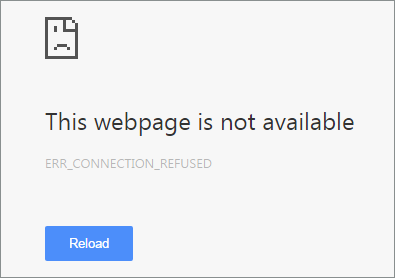
Now, we are going to fix the error code ERR_CONNECTION_REFUSED, which we recently encountered with the chrome browser. The error state ‘This webpage is not available’ with the error code ‘ ERR_CONNETION_REFUSED ’. The error occurred when we tried to access web pages like Google, YouTube.
ERR_CONNECTION_REFUSED error in Chrome
Basically, the error is shown due to the problem in internet connection or a misconfigured device’s network setting. So, here are two solutions that you can try to rectify the error in your browser.
Solution 1: Via Command prompt
Step 1: Open CMD (Command Prompt). It is mandatory that you run the CMD application in the Administrator mode.
Step 2: Execute these commands one by one.
ipconfig/release
ipconfig/all
ipconfig/flushdns
ipconfig/renew
netsh int ip set dns
netsh winsock reset
Step 3: Restart your computer.
Step 4: ERR_CONNECTION_REFUSED Error Solved
Solution 2: Change TCP/IP4 Proxy
Step 1: Open Network Connection.
Step 2: Right click on your preferred using connection.
Step 3: Select properties.
Step 4: Select internet protocol version 4 (TCP/IPv4).
Step 5: Change the DS address into following.
Preferred DNS server: 8.8.8.8
Alternate DNS server: 8.8.4.4
Step 6: Save the setting.
Step 7: Restart.
Step 8: Now ERR_CONNECTION_REFUSED Error has been removed
In our research, we found out that these solutions are working very fine with error code ‘ ERR_CONNECTION_REFUSED ’. So, in order to solve the problem, follow these above steps carefully.
Well, we hope you liked hanging out with us and if you have any query feel free to drop your suggestions and views in the comment section below. Till then, that’s all for this guys and stay tuned for next update.
Choosing the right HR software for your company or organization can be a daunting task. Companies likeadvance systemscan help you automate payroll administration, attendance tracking, workforce scheduling, performance management, and so much more. The software will also enable you to recruit the best employees through applicant tracking systems (ATS), screening, and onboarding. Now that you know the benefits of HR software, the question you may be asking is, “How do I select the right HR software for my business?”
How to Select the Right HR Software
Identify the needs of your organization – Businesses and organizations may have unique requirements specific to their industries. For example, banks, manufacturing companies, and government institutions have different needs. When choosing a Human Resources Management System (HRMS), consider the size of your workforce, work processes, and record keeping requirements.
Compare the various HR software available on the market – After identifying the needs of your company, the next step is to compare the features and capabilities of various HR software. Also, know beforehand how much you are willing to spend for HR automation so you won’t go over budget. To have a better perspective, you can ask around. Find out what other companies are using and get feedback from them.
Ask for a demo – Contact the software providers that satisfy your requirements and price criteria. This one is important – before buying, request for a demo. Test the software’s features, functionality, and compatibility. Data entry should be simple and straightforward. See if your company’s core HR, workforce management, and strategic HR are in-line with the capabilities of the software. Analyze the performance, reporting capability, and flexibility of the HRMS.
Check if it is easy to implement – The application should be easy to learn, not requiring constant outside intervention or help from the software provider. Also, software implementation should be seamless and completed within a reasonable period. The HRMS should be fully integrated into the workflow of your organization. Implementation is also useful in checking for bugs and other unexpected issues that may arise during the process.
Make sure that the software provider has an excellent after-sales service – If and when problems do arise, it is crucial that you can count on the vendor’s technical support to provide assistance. Aside from the help page from their website, you should be able to call, email, or live chat with their technical support team. The relationship between customer and seller must not end with the purchase; after sales service is an integral part of the customer life cycle.
So to summarize, when selecting the right HR software for your company, make sure you do the following things: identify your needs, compare various HR software, ask for a demo, check if it’s easy to implement and make sure that the vendor has an excellent after sales service.
To create beautiful presentation you need to follow a few main steps. It’s important to choose a high-quality background for presentation, which corresponds to the theme of the presentation. Selecting the appropriate background for the presentation, which don’t too distract from the main information (in this case text), you will make your Powerpoint slide show, presentable and impressive, having achieved the main goal – to convey to the audience the essence of the work and will not leave anyone indifferent to Your performance
Why we need PowerPoint templates?
Everyone, who is going to create a great presentation believes, that his presentation won’t be like an uninteresting and unreadable set of slides. At the same time, we always don’t have sufficient time to prepare, and we become to make it, when the deadline is really near.
What if you want to do everything in the most beautiful way and at the same time as soon as possible? The only solution is to use the PowerPoint templates!
Presentation templates significantly simplify and accelerate the work:
Allow to assign the same style for all future presentations.
They have the “right” colors and sets of font, because they created by professionals,.
Names exist in a huge number of options where you choose what you need.
In other words you just have to add to the template content: text, graphics, tables, images.
How to choose a presentation template?
It’s important to remember, that the template’s style must match to the topic of the presentation. For example, if your presentation is devoted to some business issues, then the background must match. It must be strict, serious, have soft colors and unobtrusive pictures.
So you can find background Powerpoint, specially designed for businessmen, executives and corporate personnel who need to keep their presentations at a high level.
There is nothing easier, than in the running PowerPoint to open the menu document and click the “Create”. Such easy manipulation will call sheet templates.
Any of the templates can be previously seen, so you can decide if it fits you. Some are created as if explicitly for learning, and others more suitable for strict operational reports.
And where to get more templates for PowerPoint?
Templates for presentations are available to all owners of the licensed PowerPoint .It is enough to enter one of those themes into the search box and select templates being online. The program will find all you need.
However, you can download them from other websites: in this case, it is enough to move the template files in folder located on your computer at:
C:\Users\Username\Documents\Custom Office templates (for windows 8)
In the same folder , there are the PowerPoint templates downloaded from the official website by the program.
It’s not necessary to go manually to this folder. If you try to open the template presentation, PowerPoint will open it as a normal file and you will need to just resave it in the desired format.
In this rapidly growing smartphone industry, there are plenty of things to buy. Every day there is a new tech in the market. The key problem these day users have is the one related to storage. You have to admit that the more technology expands, the more you have the data. Back in 2000’s, you were satisfied with the mere 1.44 MB of a floppy drive, but now it is impossible to use the floppy drive as your daily storage solution.
And what came after that? Pen drive, Memory Cards. I remember using a 16MB memory card, it had lots of GIF images and songs converted in .m4a format. Well, we are not here to stroll down on the amnesia lane of tech. So, let’s talk about some of the important factors of storage devices.
There are many things in a storage device that people tend to ignore. Obviously, because they are not aware of that certain factor while buying them. Such as Memory Cards. When you order a memory card do you actually know what you’re buying or you just see the Storage capacity and select them. Well, no worry because we are here to help you understand those factor in a jiffy.
What are Storage types in Memory Cards?
There are basically three types of cards.
microSD (Secure Digital): These cards can store data up to 2GB. As we know that the devices these days support both SDHC and SD we can say that they are compatible in every micoSD card slot out there.
SDHC (Secure digital high capacity): These cards can store data up to 2GB to 32GB. If your device specification state ‘Expandable up to 8/16/32GB’ then it is an SDHC card slot. In that case, we Strongly recommend you to not buy a higher capacity storage device, it will not support your device.
SDXC (Secure digital extended capacity): These cards can store data up to 32GB to 2 TB. Although, the biggest storage card currently available is only 512GB. We will still recommend you to buy the memory card by checking your smartphone’s storage specification, and clearly, do not buy any memory card with higher capacity than the mentioned one.
What is a class?
These are not your study class, obviously. However, classes are divided into four main section regarding the memory card. Every class defines writing and reading speed of the memory card. The reading and writing speed are not always precise as they have mentioned but they deliver near about performance.
Class
Write Speed
Read speed
Class 2
2 MBps
8 MBps
Class 4
4 MBps
15 MBps
Class 6
6 MBps
20 MBps
Class 10
10 MBps
30 MBps
Also, note that there are faster cards. These cards are specifically marked with the reading speed in large letters. Such as 45MB/s and 95MB/s.
What is UHS?
UHS basically stands for ‘Ultra high speed.’ There is only two UHS standard out there. These cards are used in high-end devices, especially those devices which can capture 4k and 2k videos.
UHS 1: Writing speed up to 10 MBps.
UHS 3: Writing speed up to 30 MBps.
Understanding the biggest myth of all
Most of the time people get confused in between MBps and Mbps. The first thing you need to keep in your mind is that these are not same. They both have a different meaning.
MBps: It stands for MegaByte per second.
Mbps or mbps: It stands for Megabits per second.
8 bits are equivalent to 1 Byte. So if they write the speed in bits per second. For example 80mbps. If the card state 80mbps then actually they are talking about bits per second. You can always calculate the speed in MegaByte per second dividing the value by 8, which means the speed, in this case, is 8 MBps.
Well, there are many things to consider, but once you understand things like speed, specs. It becomes much easier to make a choice. We recommend you to buy specific Memory Cards for specific tasks. This way you can guarantee the best combination of speed and capacity for your hardware.
If we missed anything, please mention them below. Also feel free to share your views in the comment section below. That’s all for this guys, stay tuned for next update.
When you get your shiny new iPhone, or upgrade to latest iOS system, it’s always wise to backup all your data to free up iPhone space for installing new software and preventing data loss because of some bugs, or transfer old iPhone backup to a new one.
In these cases, it may be more convenient to rely on a program like MacX MediaTrans, which is designed to store all the photos, music, voice, ringtones, books and videos on your Mac in a snap. The lifetime license for this software is on special offer for only $ 29.95 and allows you to install it on two Macs and free updates to higher versions, especially the compatibility with new Apple devices and seamless support for future iOS systems.
Data transfer operation could be done with iTunes, however, it does not seem to be a simple approach. Especially when you intend to use it to transfer and synchronize media files which often require format conversion through other software to guarantee the videos or songs are playable on your Apple devices. Recently we have conducted some tests of MacX MediaTrans, and it proves to be a better alternative in terms of ease of use and file transfer speed. Even for inexperienced users, it looks like an effective tool.
This software allows you sync photos, videos and music from your device as easy as drag and drop. When you start the latest version app, it shows you an intuitive user friendly GUI with a few quick buttons to access photo, music, book, voice & ringtone, video, flash drive and remove DRM panels, which allow you to quickly manage different kind of synchronizations by type of file.
For example, on the ‘Photos’ panel, you can quickly make a backup of all photos contained in the phone, thus making sure you do not lose the nice picture or maybe just keep a copy on your computer. The transfer is very fast; around 100 photographs with 4K resolution are transferred in merely 8 seconds.
The ‘Music’ panel will save you from the tedious slow music synchronization through iTunes. You just drag the folder or several songs to the software, and then you could witness how fast it can get music transferred from Mac to your iPhone. In the similar way, you can export the songs from your iPad or iPhone to Mac. Meanwhile, you will also be able create new playlist, edit music information, make iPhone ringtones and so on.
Similar functions are also guaranteed on the ‘Video’ panel, where you just drag all desired movies into the screen, and then the videos can be automatically converted to the correct format supported by your iPad or iPhone. Likewise, you can also export the videos stored in your Apple mobile phone to computer with only some simple clicks.
‘Books’ panel goes the same way to help you transfer and make a backup of e-books, not only including the EPUB books and PDF files, but also the audiobooks as well. You can imitate the music or video sync process to backup e-books from iPhone iPad to Mac, and then transfer and recover your books from Mac computer to your new iPhone 7.
As for ‘Voice & Ringtone’ panel, it’s mainly designed for your important voice memo or favorite ringtones backup. When switching to a new iOS device, retaining the significant voice memo and your favorite ringtone is so quite common. And this iOS file transfer makes the task so much easier to export and import book from iPhone iPad iPad to Mac.
An interesting gem is the ‘Flash Drive’ panel, which literally turns the iPhone and iPad into a USB drive. You can transfer any type of file in the phone memory, such as Word, Excel, but also PDF, DMG files, and so on and so forth.
Ultimately we could safely conclude the MacX MediaTrans meets Apple users’ needs for a new user-friendly data manager utility that keeps a good balance between simplicity and powerfulness. In this sense, we can certainly consider this program currently among the best available alternatives to iTunes.
We all recently woke up to a changed WhatsApp format and the feeling so far has been bittersweet. Of late, much focus is being laid to the idea of the ephemeral status update with the photos and short videos hogging the limelight. The idea is futuristic and the implementation, sudden and uncannily similar to that of its rival company, Snapchat. The newest feature from the Facebook owning messaging service hasn’t just added a new tab for the status in the screen top menu but has also placed a camera right in the middle of stuff for you to use to update a contact, status or even a group. It’s a simple change to most but to some of us, it’s the kind of change we don’t appreciate when sudden. For those and everybody else, here’s all you need to know to deal with the post-surgery New WhatsApp Status Update system.
Where did my old text WhatsApp Status go?
The neglected, scrawny line that mostly read, ‘Hi there, I’m using WhatsApp’? Yeah, that’s gone. Most people cannot see that no more and those of you, who still can, need to update the app and restart your device. Rumour brings news of the old status comeback as ‘taglines, twenty-four’ but that should take a while to surface.
How to set a photo or video as the new WhatsApp status?
There are quite a few ways of doing that –
Let’s take a look
Create a WhatsApp Status using the Status option:
1. Open up WhatsApp
2. Press Status
3. Tap on My Status and if you already happen to have one of those, tap the tiny circle with the + sign on the top right
4. Hold press for a video or light press the shutter for a picture/select from the camera roll at the bottom of the screen
5. Add your caption and press send
6. To view the update, just tap on it and press the menu on the right to forward and check how many contacts viewed the update. Press the eye icon to get their names.
Twenty-Four status and disappears in a day
Another WhatsApp Status Update Method:
1. Open up WhatsApp
2. Press the camera icon on the top left
3. Pick a picture from the camera roll or click/record
4. Add your caption and touch the green click to confirm
5. Update your status through My Status or send it to a contact. Forward status by tapping the send icon at the bottom right.
6. Go to the Status tab to view status and views
Something doesn’t seem right! How do I delete my WhatsApp status?
It’s one of those blunders, is it? Don’t worry about it! Delete it. If you are not happy with it then the world does not have to see it. Farewell, mishap status update and here’s how you do it.
1. Open WhatsApp
2. Go to your Status tab and scroll down to the one that you want gone
3. Check out the eye icon to get a sense of how many views it got
4. You will find yourself a list of the people that viewed your status
5. Get to the Trash icon and tap Delete to confirm
You cannot yet delete multiple status updates at one go, so try to limit those mistakes, guys.
Edit privacy settings of WhatsApp status
Through this, you get to decide who gets to view your status and who doesn’t.
You can pick those who are allowed to see your status post and some who aren’t or just keep status update visible to all contacts.
Privacy settings:
1. Open up WhatsApp
2. Go to the Status bit and press the three dots menu on to Status privacy.
3. Or you could just tap on the menu button in the main chat screen and open Settings > Account > Privacy > Status
4. Three options rule this space – My Contacts (All Yours), My Contacts Except (exclude contacts here) and Only Share With (Contacts To Share With).
We will fill you up with more surprises as they come but for now, this is all there is on the Big New WhatsApp Status Update Change!
Designing and developing a website can be easy if you have the proper tools with you. Choosing the right software is essential especially if you feel that you do not have enough experience to come up with a professional looking website. If you try searching for the best design software online, you might get intimidated by all the choices presented to you. To make it a little bit easier, here are some Windows software programs that you need to know.
CoffeeCup Free HTML Editor – you can try the free version, but it will not have all of the features you might need. This software can be used by beginners, and even the free version can help you build a website. What’s good is that if you are a beginner, it has a Help feature that can assist you if you are not yet that well-experienced in programming.
Page Breeze – if you are a beginner and little to no programming experience, then this software is for you. It’s very basic but it will get the job done. This is perfect for those who only want a simple, basic website and the program will guide you through every step of the way.
Adobe Creative Cloud – this is something new that Adobe is doing. Doing away with software licensing and instead introducing a membership fee per month wherein users can have access to an array of programs such as Animate, Dreamweaver, After Effects, etc. Photoshop and Illustrator are also included, and the latest versions can actually generate CSS code if you trying to make web graphics.
Adobe Dreamweaver CS6 – if you feel like you do not need the other programs offered in the Creative Cloud, you can opt to just buy this standalone software. Despite being the old version, this still aims to blend visual design and coding.
Balsamiq Mockups – think of it as a digital equivalent of your very own sketchpad. You can create a mockup of the website you’d like to develop and contains customizable palette. Because it’s part of a community of users you can actually download some of the templates contributed by fellow web developers.
These are just some of the programs that are deemed essential to creating a professional-looking website. But, if you are not sure that you can still learn how to use these programs, don’t worry, there are affordable professional web developers that can assist you in your goals. You can check outWebCreationUK LTD Reviews to see that this design company can cater to your need.
This UK-based business has been in existence since 2005, and boasts of more than 9,000 clients. You can see their sample works for yourself and you will find out that their works are truly exceptional. The reviews for their services reveal that company truly desires for quality service.
You can contact their website to get a free quotation. They have many satisfied clients and you will not be disappointed in getting their services.
Search Engine Optimization or SEO is one of the most efficient and reliable strategies utilized to maximize website traffic and improve the profitability of a business. Setting up a successful SEO campaign is often a complicated undertaking, especially for small to medium-scale businesses that require much time and attention to management and operations alone. Some companies might have a basic knowledge of the concepts and techniques involved but not to the extent of professional search engine optimization companies such as Dominate With SEO.
With the regular updates in algorithms employed by top search engine companies including Google, Bing, and Yahoo, it is imperative for SEO campaigns to be able to adapt and stand the test of time. Listed below are the four key factors involved in an effective SEO campaign. Learn how these elements work to maintain a high search ranking for your business and maximize its online exposure.
Content
High-quality page content is considered as the core of an effective SEO campaign. The content does not only pertain to the main article containing the topic of interest but to the entire web page including the header descriptions, banner text, and the footnotes. By providing page content with accurate, up-to-date and relevant information, you can generate more traffic to your website and gain more subscriptions in the future. Having high-quality content is also an important consideration that webmasters use to link their pages to websites.
Keywords
Well-written page contents should contain targeted keywords to achieve a better search ranking. The most successful SEO campaigns are founded on intensive keyword research. To bring long-term success to an SEO campaign, one must be able to collect all relevant keywords to the products or services of interest. The most general keywords are usually highly competitive whereas long-tail keywords are unique and typically generate the best results. Lateral keywords or terms with similar meaning are also taken into account when researching for targeted keywords.
Links
A popular and effective way to bring more traffic to your site is by building links. The technique is to incorporate links from reputable websites of relevant content into your web pages. It could be an informative blog, an entertaining video, an eye-catching image, or anything of related content. To maximize link building, it is highly recommended to include websites that rank on top of the search engine results. Link building requires patience and great attention to detail in able to improve the search ranking of your business. You may also consider posting your own content in off-site blogs as a guest or try article marketing instead.
Social Media
To be able to set up a complete and effective SEO campaign, one must consider going beyond the realm of their own websites and explore traffic different from social media platforms. People nowadays are more active in social networking and media sharing sites such as Facebook, Twitter, Instagram, and YouTube. It is also easier to connect with your followers and to share links and content from your business on different social media platforms.
So. last year we have seen Huawei Launching Huawei P9 world first phone with dual Lenses that too with Leica sensors in it. This year also Huawei come up with P10 and P10 Plus MWC 2017. The Huawei P10 is the successor of P9 with same Leica powered dual rear cameras, but this time we also have Huawei P10 Plus with us, with a bigger display and a added curved screen.
We have already seen Huawei P9 with its incredible camera capabilities. This time with P10 we also get a bunch of color options which will include rose gold and mystic silver. Both the phones come with Corning Gorilla Glass 5 protection and a added 2.5D glass on top of it.
The Huawei P10 Specifications:
The Huawei P10 houses a 5.1-inch Full HD display with the resolution of 1920 X 1080p and a added 2.5D curved glass display which is powered by Kirin 960 processor with Mali G71 GPU. The phones pack with a 4GB RAM and 64GB storage and with a MicroSD card slot. Out of the box, the device runs on Android 7.0 Nougat with their latest EmUI 5.1.
Coming to the most highlighted part of Huawei P10 i.e. 20-megapixel (Monochrome) + 12MP (RGB) Dual rear cameras from Leica. They are also giving you dual-tone LED flash, Laser AF, OIS. Coming to the front, it has an 8-megapixel shooter.
Huawei P10 also packs up with a 3,200 mAh battery with fast charging technology built in.
The Huawei P10 Plus Specifications:
The Huawei P10 Plus which is the high-end model houses a bigger 5.5-inches Quad HD AMOLED dual curved display which is powered by Kirin 960 processor with Mali G71 GPU. It is going to be available in two variants, one with 4GB and another one with 6GB RAM that too with 64GB and 128GB storage respectively. Here also we get a microSD card slot for memory expansion to up to 256GB. The P10 Plus out of the box comes with Android 7.0 Nougat out of the box.
Camera compartment of Huawei P10 plus is almost same that we get with Huawei P10. There we get a combination of 20-megapixel (Monochrome) + 12MP (RGB) Dual rear cameras from Leica with added dual-tone LED flash, Laser AF, OIS. Coming to the front panel, it has an 8-megapixel shooter. P10 Plus is packed with a 3,750mAh battery with fast charging Technology.
The pricing is as follows.
€650 for Huawei P10 (64 GB storage with 4 GB RAM)
€700 for Huawei P10 Plus (64 GB storage with 4 GB RAM)
€800 for Huawei P10 Plus (128 GB storage with 4 GB RAM)
Did you like this New Huawei phones? Let us know in comment section down below… 🙂
Personalizing your smartphone is a new way of keeping with today’s fashion. People have trendy back covers for their phones. There are smart cases, with an extra battery on the back and much more. The smartphones keep getting stylish and trendy day by day. So we thought why don’t we bring some trendy changes into the smartphone itself.
Well, we found these amazing apps to change the complete view of your smartphone. Try these top 5 Best Customization Apps for Android that are amazing apps to change your phone’s avatar as the way you like, it will never disappoint you.
Here are the Best Customization Apps for Android
[toc]
APUS Launcher
The APUS Launcher is the smartest and a petite android launcher out there. The app has almost every feature that is lacking in today’s popular launchers. To boost the performance of the phone it has a Cleaner, an integrated browser, integrated search engine and an integrated system tuner. You don’t get that many features in one single app, which makes this simply amazing.
After installation set the app as the default launcher.
Font Changer
Font changer pro is a new app that can change your keyboard’s font into a new and stylish look. The app has unique and beautiful fonts that you can use in your daily typing habit. You can use these fonts on Instagram comments and other places. Please don’t misjudge this app by the default font changer, which changes the entire text font of the smartphone.
We recommend you to install the Pro version of this app, which has more features than the free one.
Are you bored of the same default boot animation? If your answer is yes, then you’re at the right place. We have brought a new boot animation app for your android phone that will change the old boring boot animation in a swift. The app has lots of free animation screen for your mood.
When we talk about personalization, the one thing that comes to our mind at first is wallpapers, and they should be because they are beautiful. So, we check out some of the top apps for you and this is the best wallpaper app out there. It has some of the best trendy wallpapers, which can use as your smartphone skin. The app in itself is categorized so you can have an easy friendly experience.
The Swiftmoji keyboard is a product of the famous SwiftKey developers. And like the Swiftkey the Swiftmoji is amazing. The app has a beautiful interface and works very fine with normal chats. The key feature of the app is the emoji prediction; which is amazing for emoji lovers. Every line is analysed by the keyboard and as you type emoji is predicted so that you can spice up your chats. Awesome isn’t it?
We had a lot of fun trying these apps, and what we experienced were amazing. APUS launcher and Font changer are awesome apps and we do recommend you to try them out if you haven’t. Swiftmoji is a unique concept but the prediction is lacking at some point, although the app interface and performance is very good. We found Boot Animations app unique because it gives the user a lot of cool boot animations, which does seem awesome.
If we missed any amazing app, please mention them in the comment section below. Also feel free to share your view about these Apps. That’s all for this guys, stay tuned for next update.
The Telegram Messenger App has been in the game for the past couple of years. The app has a very user-friendly interface and tends to work as similar as WhatsApp Messenger. So what makes it different from WhatsApp? Well, most people don’t know, but the app has some impeccable security features. The app is available for multiple platforms even for Linux and stores all your chats on the Cloud. To be honest, there is not just one reason to keep an alternative messenger app for WhatsApp. So, if you are using the app, here are some cool Telegram Messenger App tricks you should know about.
To download the Telegram messenger app, click here
Here are the Top 10 Features of the Telegram Messenger App
[toc]
Open links within the app
The new update lets Telegram messenger app users open any link within the app itself, which really saves a lot of time. To turn on the feature, go to Settings/in-app Browser and enable it.
The next time somebody sends you any link, just click on it and it will open in the app itself.
No annoying Message preview
Some people do admit that the message preview feature gets annoying, especially when you are playing a game on your phone. Well, Telegram has a solution for that means you can turn off the message preview in the app.
To turn off the message preview, go to Settings/Notifications and Sounds/MessagePrevieww and disable it. You can also disable the message preview for the group text message, which is there in the group notification section.
Telegram Secret chats
Secret chat is the key feature of the Telegram messenger app so far. The secret chats are protected with end-to-end encryption technology, which basically means that the telegram server will not keep any record of the chat. The chats also have some additional security measures, such as No message forwarding & Self-destruction timer. The secret chat doesn’t allow the user to forward the secret messages to another user because then it will get recorded by the server.
The self-destruction timer gives the user the feasibility to delete their chat records, users can set their desired time for the message to self-destruct by pressing the three dots on the top. Once the timer is set, all the messages that you have sent and received will be deleted.
In-app notifications control
We have to admit that redundant notifications are irritating, especially when you are chatting with someone and there is a cold war going on in your friend’s group. The Telegram messenger app lets you escape from those notifications in one single step.
To turn off In-app notifications, go to Settings/Notifications and Sounds in the in-app notifications section the app has a bunch of options for notifications management. From here you can disable or enable your desired options as you need.
Keep-alive service
The keep-alive is a newly introduced feature in Telegram, which basically stands for activating the Telegram messenger app in the background. That means even if you run a smart RAM cleaner or an app like Greenify. The Telegram messenger app will automatically start and keep your notifications up to date.
To activate this feature, go to Settings/Notifications and sound in the Other section, you can enable the Keep-alive service from here.
Last seen management
The Telegram messenger app is bundled with privacy features, and one of them is the management of your last seen status. The app lets you customize your last seen based on your priority, with an exceptional feature that lets you add a particular user, somebody whom you never want to share your last seen with.
To add a particular user; go to Settings/Privacy and Security/Last Seen in the AddExceptions section you can simply add your desired user.
Setting a Passcode Lock
One of the many features that most app has these days is the app locking system, which is a great security measure for distinct apps but maybe not for Messenger. You simply get tired of unlocking the app over and over. Luckily, the Telegram messenger app comes with an option to separately lock a chat.
To set a passcode, go to Settings/Privacy, and Security/Passcode Lock to enable it. Here you can enter your new Password. You can also set a lock time so that the app can automatically lock the chats. However, the app doesn’t allow to lock a specific chat.
Managing media downloads
Media and MMS are amazing in the chat, it just seems boring chatting without emoticons, GIFs, and photos. The app lets you send files up to 1.5 GB, which is a very large amount of data. So, people who have a limited amount of data on their phone, would not be very happy if 1GB of cat videos were automatically downloaded on their smartphone.
To configure media downloads, go to Settings/Data and Storage in the Automatic media download section, here you can choose what type of file you want to download automatically or not. The app also gives you additional security on your media files, so that it would not be visible in your default gallery. To enable this feature, you need to turn off the Save Gallery option from the main settings menu.
Telegram bot
The The
The Telegram bot is remarkable. Certainly, it is not as chat-friendly as Google Assistant or other chat bots, but it does add more functionality to the messenger. The Telegram bots are completely customizable means you can add your desired bot to your list of actions. For example, @weatherman_bot will tell you the weather report of your city, you can also set weather notifications. You can add Telegram bots to your list by simply going to the website storebot .me, the website has several bots for your daily use.
To chat with a bot, tap on the new chat button and search for the bot name, you can also add a bot to a specific group.
Supergroup
The Supergroup is nothing but an extensive version of the normal group. It can hold up to 1,000 members and give morefeaturese to users. Such as a new user will be able to see all the previous chats, and if you delete a particular message that you send it will disappear from all chats.
To activate Supergroup, tap on the three dots on top and select the Convert to Supergroup option. This action is non-reversible.
In the coming days, we will see more customizations and features in the Telegram Messenger App. So till then keep reading and don’t forget to subscribe. If you have more suggestions about the features of the Telegram App, you can also comment down as well. To read more such content, follow Techniblogic.
What is so special about the Telegram app?
Telegram’s end-to-end encryption, customizable themes, and media-sharing capabilities make it a popular choice for personal and professional communication
What do you need to know about Telegram?
Telegram is a messaging app with a focus on speed and security, it’s super-fast, simple, and free.
Are all Telegram chats secret?
Not all Telegram chats are equally secure. Regular chats are not end-to-end encrypted. Only secret ones are. No other messenger does this
So, finally, Nokia is back in this MWC 2017, with the new renowned brand name HMD. Nokia is back their first Android phone in the Global Marketplace. They have already introduced their Nokia 6 in CES 2017, and the device is already being on sale in China with some insane response, and now they are introducing two new models, Nokia 5 and Nokia 3.
As per the Brand, these phones are made under CNC manufacturing technology with an anodized process for coloring. These Nokia phones are going to give you a perfect finish. As always Nokia is putting their focus more on the build quality of the phones, as that was the only USPs which we get in past from the company.
As these Nokia phones have Android Operating System, they will be giving you the pure Android experience with proper security by added monthly security updates, which will be sent by Google itself.
Nokia 6
Nokia 6 as of now is only available in China and from Q2 will be available globally. As of now the pricing of Nokia 6 is set at 229 Euros, whereas they are also coming up with some special edition version for Nokia 6, and that model with being on sale at the price of 299 Euros.
Nokia 5
The Nokia 5 is going to sports a 5.2-inch display with the added lamination of 2.5D curved glass. The body of the phone seems to a perfect 3D shape which is made of aluminum. The design of Nokia 5 seems to be inspired by their previous Lumia series, but this time it seems to be more elegant. The Nokia 5 is going to retail for 189 euros and will be available in four colors.
Nokia 3
The Specs for Nokia 3 is not out yet still will try to update it soon. The pricing at which Nokia 3 will be available is at 139 euros. Nokia 3 is also made of the aluminum body which we see in other Nokia phones. They have also added a gorilla glass protection on the display just like we see in other Nokia Android Smartphones.
Availability
The Nokia phones will be available in Q2 2017 and will be priced as mentioned above.
Did you like these New Android phones by Nokia? Share your Views in the comments section down below… 🙂 And if you want us to Review these phone Let us know in the comment section.
The brand which is over favorite from the past. The brand which comes with innovation. So, this time Nokia is back with updated model of always wanted and most demanded phone in the world Nokia 3310. As we all know Nokia 6 was the first smartphone under HMD Global only which was till now only available in China.
In the past, anyone or I would say everyone was trusting Nokia, because of their best basic phones. Due to which Nokia is coming back with the most nostalgic return of their Nokia 3310 with 30+ software and a 2.4-inch QVGA display. This time they have also added a 2-megapixel camera and even dedicated MicroSD slot.
Nokia 3310 will be available in most attractive colors; Glossy red, yellow colors, matte gray and dark blue colors. This looks something incredible and awesome. They have combined the feels a past Nokia with a smartphone and a feature phone. These all changes looks too good with added Snake game, which we always love to play.
This is not enough, they have also increased battery with 22 hours of talk time which is 10 times more than what we get with original Nokia 3310. Nokia has also bundled Opera mini within that small bomb.
The price for Nokia 3310 is set at 49 euros, which is may be all set to launch in with the pricing of about 3500 INR (We are Not sure about pricing and launch in INDIA).
Do you like New Nokia 3310 Featured phone? Share your views on this phone in comment section down below… 🙂 And you if want us to Review this phone Let us know…
So, finally the wait is over, Lenovo the well-known brand owned by Motorola is out with their next-generation smartphone under Moto G-series, Moto G5 and Moto G5 Plus at Mobile World Congress in Barcelona. This time, finally Lenovo has this line up a bit change in its design. Now Mogo G5 and G5 plus seems to be more like Moto Z and Z Play. This time both the smartphones sport an all-metal body with a Lenovo branding on panels.
This time on both the phone’s houses fingerprint sensor at the front with a home button which also housing a fingerprint scanner.
The Moto G5 comes with a 5.0″ FHD display with a resolution of 1920 x 1080 pixels. It is being powered by Snapdragon 430 processor which is clocked at 1.4GHz. Coming to the camera department, there is a 13-megapixel rear camera with a LED flash and a 5MP front-facing camera. The smartphone houses a 2800mAh removable battery and also supports rapid charging technology.
Now coming to Moto G5 Plus, it comes with a 5.2″ FHD display, with a resolution of 1920 x 1080 pixels. The screen size is slightly larger from Moto G5, but the resolution of both are same. It is powered by Snapdragon 625 processor which is clocked at 2GHz.
At the back, it comes with a 12-megapixel rear camera with a added dual LED flash. I don’t know why the higher model has lower megapixel count when we compare it with Moto G5. But still as per the company the camera sensor is much better. The front camera is same with the 5-megapixel lens. The phone houses a 3,000mAh battery that also supports rapid charging technology, but this time it is a non-removable battery.
Moto G5 comes with a 2GB RAM and 16GB storage, whereas the Moto G5 Plus has two options available — 2GB/32GB variant along with 4GB RAM and 64GB internal storage model. There we also get a microSD card slot, allowing you to expand storage up to 128GB. On the software side, both the phones are running on latest Android 7.0 Nougat with company’s skin on top of it.
Both the phones will be available in Gold and Gray colors. The Moto G5 will be available for €199 with 2GB RAM/16GB storage across Europe and Latin America from early March, while Moto G5 Plus will be available for $229 for the 2GB/32GB model in U.S, and $279 for the 4GB/64GB version.
So did you Like these phones? You can share your opinions in the comment down below. And stay tuned for more updates.
There are so many brands who are manufacturing earphones or are just rebranding the same. But, at the end what a consumer what is the best earphones with great audio quality and too in a budget.
We have so many luxury brands with high-end earphones, we have budget earphones, we have low-end earphones. But today we are going to review BW-ES1 Earphones which is just launched by Blitzwolf globally. We have been testing these earphones from about 2 weeks now and I would say as a bass lover in this price they have nailed my previous Skullcandy earphones.
Blitzwolf BW-ES1 Package
First of all, I would say I have never expected such great package that too in that price. They have nailed it, take my words, a Hard Box, then inside it, you will get a pouch that too made up of very good quality, which feels rubberish and surely going to protect your earphones while carrying to different places.
Inside the package first, you will get the earphones with a manual and some different size ear tips. Rest there is nothing in the box, but I am impressed with the quality of package there are offering.
Design
Now, coming to the design part of Blitzwolf BW-ES1 looks similar like we see in other earphones. We are only getting angles design for a better feel in ears, and a patterned brushed metal feel at the back. Rest what we get is normal plastic. The angled tips which we get feel way more comfortable when we compare it with normal earphones one. We are also getting three pairs of different size ear tips which can be used as per your comfort.
The quality of wire which we get with Blitzwolf BW-ES1 is quite good and feel very rubberish and strong. We also get triple button outlet, which contains two buttons for volume up and down and a center button for call pic and some other functions and also a added MIC on it. The best part is that we can now control the audio volume buttons mounted on it. Black color for Blitzwolf earphones will suit everyone with added brushed metal finish at the back.
Audio Quality
So, as I have already mentioned above “Bass in Budget.” Yes, it is true, we are getting insane bass in this budget earphones. I am a bass lover in any music and take my words i have tried these earphones in my iPhone, Asus Zenfone 3, Samsung c9 Pro and quality of bass and proper treble is great. Overall, the bass lover will love it. We are getting proper treble great bass and proper Mid’s and Highs. Everything was perfectly fine, and I have no complaints with them.
Overall, the audio experience that is being delivered by these earphone was pretty good. You can try any kind of music on these earphones, and they won’t give you any complaints.
Verdict
So, now the point is whether you should get one for you or not at a price for 14$ or not. Then I would say at this price this is going to be an awesome buy.


![How to fix ERR_CONNECTION_REFUSED error in Chrome [Solved]](https://techniblogic.com/wp-content/webp-express/webp-images/uploads/2017/03/How-to-fix-ERR_CONNECTION_REFUSED-error-in-Chrome-techniblogic-768x432.jpg.webp "How to fix ERR_CONNECTION_REFUSED error in Chrome [Solved]")