Make Me girl is the latest offering by PhotoAppsZone, which is available for absolutely free on Google Play Store that allows both men and women to transform their ordinary-looking face into an entertaining and fabulous appearance with exciting and fun features. This brilliant photo editor app allows men to become women by applying cosmetic items such as lipstick, foundation, eyeliner, brushes, etc. on their faces along with inserting other girly accessories such as celebrity hairstyles, earrings, nose rings, piercing pins, sunglasses, and much more. This app is considered one of the best camera apps for android due to its highly amusing features that definitely bring a smile to the face of people who are using it.
Some of the best features of Make Me Girl makeup photo editor
Give a stunning appearance to your face regardless of your gender with this amazing photo editor app
Decorate your male friend into a completely different avatar of a female and upload it on his Facebook wall to surprise him
Highly flexible user interface to edit the pictures with ease
Include funny and exciting clothing, accessories and cosmetic items to give additional charm to the picture
Easily import pictures from the gallery or click an entirely new photo for editing. Zoom in and out, scale up and down, rotate the picture to give a perfect look
Add stickers, emoticons, texts and color shades to the pictures
Download or share the converted picture on social media sites such as Facebook, Google+, Instagram, Twitter and WhatsApp
With such remarkable specifications and functionality, the user of this outstanding app is certain to be entertained and amused along with people whose pictures will be transformed using it. It not only help the user to change his or her male friend into a woman but also allows women to give their facial expression an extraordinary charm which was not possible with their smartphone camera. This photo editor app can also be used to provide their normal face from the ordinary picture a truly gorgeous emergency just by spending a few moments.
They can also add different hairstyles of distinct colors, thicken their eyebrows, lash out their eyelashes, darken or recolor their eyes, adjust their nose or chin, adjust the brightness and contrast their face, sharpen the image and much more to make sure the concluded image comes better than the expected.
Make Me Girl is relatively new in the market, but it has managed to outdo most of the similar apps that have been around for years. The reason behind its major success is certainly the hard work of its makers who have analyzed several makeup photo editor apps to develop one with much better functionality, user interface and of course entertaining features. Thus, if you are also looking for the best camera app for Android, then look no further as your search has officially come to an end. Install this free app on your Android Smartphone and explore endless possibilities of making your or your friend’s facial expression into either a charming one or an amusing one.
itel Mobile is an innovative brand for Indian consumers from Transsion Holdings Conglomerate. The company has added an another milestone to their list of achievements. The brand has been chosen as the ‘Emerging Brand’ in the ‘Mobile Phone Segment’ at the GLOBE Platinum Awards 2016, organized at the Grand Hyatt, Hong Kong, on December 11, 2016.
itel Mobile India CEO, Mr. Sudhir Kumar was also named as an ‘Emerging Leader’ at the conclave held to celebrate Asia-Pacific’s success stories.
The GLOBE Platinum Awards is a podium where brands are appreciated for their excellence and emerging success across Asia-Pacific. The recognition was won by itel Mobile, including achievement and durability, by one of the top international auditing firms and the editorial team at the World of Business magazine.
Speaking on the achievement, Mr Sudhir Kumar, CEO – itel Mobile India, said, “The GLOBE Platinum Awards is one of the most prestigious and credible platforms in the Asia-Pacific region. Being handpicked for such an accolade amongst so many entries is a moment of great pride for all of us at itel Mobile, and motivates us to keep up the high standards that we have set for ourselves. We at itel look forward to building on this recognition, as we empower every aspiring Indian mobile phone owners across geographical and social barriers with the value added mobile solutions needed to be an active part of the digital revolution and claim their ‘Right to Progress’.”
The itel Mobile fourfold growth which was reported in Q3 as mentioned in the Quarterly Mobile PhoneTracker report by International Data Corporation (IDC) and strong business plans. itel is looking forward to associate with much more consumers in the coming year.
Atlanta Healthcare and Britain’s Cambridge Mask Co. by a collaboration has introduced a military grade anti-pollution Mask in India. This mask is introduced against the rising concern of pollution in India. By using this mask it can quickly fix out your pollution problem. This Mask is not an ordinary mask which we can buy from any medical store for Rs. 10 or Rs 50. It is a high quality mask which contains different layers or filters for extra protection and filtration of air while breathing. The best part of this mask is that, it is washable and it won’t harm the fibre and filter.
As per the company, they claims that the mask which they are introducing and manufacturing uses some kind of military grade technology which is giving extra protection against any kind of dust pollution up to the level of about 0.3 microns, and it can even going to save you from gas pollution, nearly for about 100%. At the end your health will be way better with no bacteria and flue infecting your body. This was only be possible due to the 3 layers of protection, company has added in it.
The primary filter which is also a layer of the designed cloth filter out the larger particles, such as dust with the level of PM10.
Coming to the second layer, it is a Three-Ply Micro Particulate Layer, which is specially designed to block pollution for level up to PM2.5. Now finally the third layer which is military grade Carbon Layer which can filter the particles to the level of about PM0.3. The textile which they have used is a three-ply non-woven melt-blow polypropylene, a thermoplastic polymer.
The masks is claimed to be used to provide 340 hours of usage time which is expected to expire after a time period of over four years. The masks are available in different patterns and design which you can select as per your taste.
There are also different sizes which are made available by the company. The sizes mask can be measured by different weight of the a person. There are total number of five sizes.
Additionally, to get some more variety as per the consumer there are different options which are available i.e., No Valve (low physical activity), 1 Valve (mild physical activity) and 2 valves (for people engaged in strenuous activities like running, bicycling, walking etc.) and are hand washable.
It will be available on sale via different e-commerce websites like Amazon, Snapdeal, and Paytm. They have also collaborated with some of the local chemist shops and soon going to expand it. The masks is priced at Rs. 1799 (for no valve), Rs. 1999 (for 1 valve) and Rs. 2199 (for 2 valve).
Karbonn Mobiles a company based in India is all set to launch few new devices in the 4G segment. The devices are the successor of the much successful K-series; The Karbonn Aura Note 4G, K9 Smart 4G, Karbonn Titanium Vista 4G and the K9 Viraat 4G. The company initial targets are the budget oriented smartphone buyers, with an aim to connect the next billion consumers. The devices will we available at all the retailers and official Karbonn store.
Karbonn Aura Note 4G: 6,490 INR
K9 Smart 4G: 5090 INR
Karbonn Titanium Vista 4G: 5,790 INR
K9 Viraat 4G: 5,790 INR
Karbonn Aura Note 4G
Karbonn Aura Note 4G is the first ever handset by the brand with a fingerprint sensor. The device features a 5.5 “HD IPS display and a 1.25 GHz Quad core MediaTek MT6737 chipset. It has a 5.0 MP front and an 8.0 MP rear camera. the device comes with a 2800mAh battery and Android 6.0 Marshmallow. It comes with a 16 GB ROM and a 2GB RAM. The device is a 4GVoTE enabled handset.
K9 Smart 4G
The K9 Smart 4G features an unbreakable 12.7 cm (5 “) FWVGA tough glass. The device is integrated with Indus OS and facilitate local language search. K9 Smart runs on a 1.2 GHz Quad-Core MediaTek processor backed by a Mali-T720 GPU and 1GB of RAM. The device has a 5-megapixel camera on both the rear and front. It also features a 2300 mAH battery and runs on Android 6.0 Marshmallow.
Karbonn Titanium Vista 4G
The Karbonn Titanium Vista 4G offers a high-definition 12.4 cm (5’) screen. The device features a 1.25 GHz quad core processor that runs on a MediaTek MT6737 chipset. It smartphone has an 8.0 MP rear camera and a 5.0 MP front camera and features 8GB ROM and 1GB RAM. The device comes in two attractive colors, Champagne White and Black.
K9 Viraat 4G
The K9 Viraat comes packed with the 3D apparatus and a 13.97 cm (5.5’) HD screen. The device is powered by Android 6.0 Marshmallow and runs on a 1.25 GHz Quad Core Mediatek MT6737 chipset. The device has an 8.0 MP rear and a 5.0 MP front camera. It also comes with a 2800mAh battery. The device is available in two color variants- White Champagne and Black.
The photo editor is a new offering by photo media apps which allows the user to edit photo online through their Android smartphones. It is a completely free and highly remarkable photo editing application which offers many features and groundbreaking editing effects. This photo editor can be used by both girls and boys in order to beautify the ordinary looking images captured by their smartphone camera.
There are several photo editing applications available on Google Play Store, however, only a few of them offers free services. But they are not able to give your pictures the kind of innovation and creativity that you desire. This is absolutely not the case with photo editor online as it consisted of extraordinary and highly functional features that will transform your picture into a royal and professional art. The best thing about this application is you don’t need to be technically advanced to understand and use it as all the important features and functions are available right in front of you. Even a child can use it to beautify their picture after using it for a couple of minutes.
Latest talk about some of the most interesting features of online photo editor
1. Incredibly user-friendly interface which allows the user to easily import and navigate pictures from the gallery in order to edit. All the editing options and futures are available right in front of you. You don’t need to search in submenus for a specific feature.
2. Outstanding editing effects that include adjustment of contrast, brightness, colors, sharpness and much more using just your fingertips. The user can easily rotate, resize, zoom in and out, scale up and down, crop and align their photos with much ease.
3. The user can also include different frames, text, stickers, stars and other accessories on their pictures to make it up your more beautiful and elegant. It only takes a matter of seconds that transforms your ordinary looking image into a work of a professional.
4. Choose girls and boys accessories from a huge collection of sunglasses, celebrity hairstyles, formal Apparels and casual apparels, contact lenses, earrings, nose ring, piercing pins and much more to give your face and image a completely different look.
5. Add highly creative and stunning background to your image which you have only seen in Internet and televisions with your favorite stars.
6. Create beautiful collage photo grid and other decorative photo items with the help of online photo editor.
7. Enhance the quality of your picture in one tap with the help of its automatic adjustment tool.
8. Share your beautiful creativity with your friends and family over social media networks such as Facebook, Twitter, Google + Instagram and Whatsapp.
Conclusion
All these amazing features are available in this photo editing tool for absolutely free. So confidently share your pictures on your Facebook page or with your friends and let them know about this remarkable photo editor so that they can also make a special use of it.
Overall, the rules of SEO are not different from one site to another, but here, an e-commerce site has specificities. Some are beneficial, others may be disabled. Let’s see some mistakes to avoid and actions to optimize the positioning of an online store.
An online store has a distinct advantage over many other types of sites, it will help generate many specific pages since in general, and there is one page per product sold. A boon to the referrer.
However, this advantage can turn into a nightmare for several reasons. The two large black spots being the risk of duplicate content with other sites, and the lack of optimized pages for generic terms.
Optimize its product detail pages
It is common to find online shops on which the content of pages of product detail is an exact recovery of the photo and text description provided by the manufacturer. Same punishment for the title product.
Why Google should he proposes on its first page of results 10 times the same content on 10 different sites? On the contrary, he does everything to avoid this scenario and does not place in this case AS sites whose pages are authoritative.
To overcome this problem, writing a unique title and a single description is almost indispensable. To go further and take no risk, you can even create a second description that will be transmitted only to shopping engines.
Optimize pages of headings
That contains the pages of entry in most e-commerce sites? A series of inserts which are excerpts products that allow visitors to choose the category presented. Not easy in terms of its position the site in Google’s results on the class titles.
Yet these more generic queries are often those typed by users!
An effective solution is to write an introduction optimized for each page of entries. It then offers a true Google optimized textual content with whom he will love and your page will be favored in comparison with those of your competitors.
Beware, if your pages Topics include a paging, do not post this textual THAT on the first page, to avoid the risk of duplicate content.
Create themed pages
Your traditional pages are perhaps not sufficient to position yourself in the general expressions. A good way to create space for you to develop an editorial that can be optimized for these expressions is to create a special section of tips, advice or assistance.
This section may contain multiple pages. Example for a bike shop: Choose an ATV How to choose a woman bike? The man bicycles and their uses, etc..
Each of these pages will allow you to write unique content and perfectly optimized. It just remains to incorporate links to your pages of entries for “push” them. Of course, these help pages will also benefit from an external net linking.
Design a FAQ
It’s crazy what people can turn to Google as a person. They ask him questions as they would with a friend. But Google is a big beta, when you ask him a question; he seeks the issue in the pages it has indexed, not the answer.
A FAQ so you can position yourself on these issues and to drain the corresponding traffic. A small example, type in Google “what is a hard link” you will see that the site does Axe net up not too bad.
Set up a blog
We mentioned already last year with concrete examples of blogs associated with e-commerce sites. This strategy is actually very profitable. The blog makes it very easy to position themselves on hundreds of requests for strategic activity of the shop.
It will however not too smart “blurrier” in terms of commercial items. The blog will be better received if he gives advice or relevant information about the universe, why not try to systematically sell something. He brings a kind of professional bail while to drain a portion of traffic to the store.
Asus is all set to launch its Zenfone Go 4.5 LTE in India. The Taiwan-based company announced the device today at a groundbreaking price of 6,999 INR. The variants of Zenfone Go 4.5 LTE will be available online from today, December 27. The device will be coming in two kinds of back cover finish version, the matte polishes Glamour red and the hairline finish silver blue, gold and silver color.
Asus Zenfone 3 is powered by Quad-core Snapdragon 410 processor with 1 GB of RAM & 8 GB of internal storage, which can be expandable up to 128 GB. To ensure that users are able to store all their data, ASUS offers an additional Free 100 GB of Google Drive storage for 2 years. The device features a 4.5-inch FWVGA IPS display with a pixel resolution of 854×480. I
The Zenfone Go 4.5 LTE also supports an 8-Megapixel rear camera and a 2-Megapixel front camera, which is integrated with a low-light photograph mode and a custom beautification mode. The device features a 2,070 mAh battery.
The device features an improved ASUS ZenUI, which comes with multiple options for personalization and privacy with ZenMotion for a greater user experience. The device also comes with dual microphone for noise cancellation.
TECHNICAL SPECIFICATIONS:
Product Name
Zenfone Go 4.5 LTE
Model
ZB450KL
Operating system
Brand-new ASUS ZenUI with Android 6.0
Processor
Qualcomm® Snapdragon 410 MSM8916 1.0 GHz quad-core CPU
We already know that the LeEco’s CEO Jia Yueting is now the new Coolpad’s Chairman. The company has announced together with a new handset as Cool1 in India today. The device is the first variant of the Cool series. The device is priced at 13,999 INR. The device is expected to go on sale from the first week of January on the popular e-commerce websites, as well as the official LeEco Store in.lemall.com.
The Primarily feature in the Cool1 is the 13-megapixel camera lens with aperture f/2.0, which is integrated with a PDAF sensor, a dual tone LED-Flash with 4K recording and 720p slow-mo, also a dual camera setup, it definitely looks promising.
Going to the specification, we have a dual nano sim support running on android 6.0 marshmallow which is based on EUI 5.6, a 5.5-inch full-HD (1920×1080 pixels) IPS in-cell display with 450-nit brightness and 72 percent NTSC colour gamut. The processor which is used in this is powered by Qualcomm Snapdragon 652 octa-core (quad-core 1.8GHz Cortex-A72 + quad-core 1.2GHz Cortex-A53) with Adreno 510 GPU.
The front camera is not so bad also, it is an 8-megapixel shooter with an aperture f/2.2 and an 80-degree wide angle lens, for the awesome selfie you take. The dimensions are 152×74.8×8.2mm and weigh 167 grammes. Connectivity options include 4G with VoLTE, Wi-Fi 8802.1111 as/a/b/g/n (2.4/5 GHz), Bluetooth 4.1, GPS, and USB Type-C port. The device is available in Gold, Silver and Rose Gold colour variants.
That’s all for this guys, stay tuned for next update… 🙂
There are so many phones which are there in the market. They all has different market segment as per the price and their demand in the market. Recently Asus as well as Vivo has launched their latest devices in the market which seems to be a bit overpriced but when we see as per the Indian Offline market, they seems to be really great. Past this year Asus has already released their premium flagship in the market, Asus Zenfone 3 series and now with Zenfone 3 max they have added a new model to their line up Zenfone max. Whereas Vivo is always focusing on Selfie with same look and design.
These days built and design plays a very important role while making any buying decision from the consumer. They want high-quality built which some great design and performance, that too in low price. Now coming to both the phones, Asus Zenfone 3 Max has some great full brushed metal finish whereas Vivo V5 this time has full high-quality plastic built which looks like brushed metal but is actually plastic. Both the phones give to great grip while in hand because of curved edges.
This time Asus has worked a lot on their design with great built and metal, but Vivo seems to be having the same look and design and no use of metal in it, which seems a little bit cheap when we consider it as a buyer.
As we come to the right side of both the devices, they both has power lock key as well as volume control buttons with a good metallic finish on it. These buttons provide proper tactile feel while you press them continuously. Asus Zenfone 3 Max is having patterned feel on buttons, which makes it feel more premium whereas on Vivo v5 it seems to be simple with no Patterned feel on it.
At the bottom portion of Asus Zenfone 3 Max is having a Micro USB port, Speaker Grill, and a primary MIC, whereas when we come up with Vivo V5, it contains Micro USB port, beside it speaker grill, primary MIC and a 3.5mm Audio Jack. Both the phone has micro USB port which does not support fast charging which is considered as a negative point in both the phones.
On the top portion of Asus Zenfone 3 Max there is a 3.5mm audio jack as well as beside it fits up secondary noise cancellation MIC whereas in Vivo V5 there is nothing which needs to be considered.
Coming to the left hand side of both the phone, they both has a hybrid sim tray slot which support Dual sim or single sim + Micro SD Card. The only difference here is Vivo V5 can only support the expansion of 128GB whereas Zenfone 3 Max can be expanded up to 256GB which is again a positive point for Asus over here.
Turning around to the back side of both the phones, Asus Zenfone 3 Max comes up with a 16MP Camera with Laser Autofocus and dual tone LED Flash. Below that you can find a fingerprint sensor which works pretty fine and can recognize your fingerprint in 360 Degree. Below that at the rear panel there is Asus branding and Antenna Lines, which also act as a highlighter to the design. Now coming to Vivo V5 at the back it comes up with 13MP camera with single LED Flash and no Laser AF. Below that you will get Antenna Lines and Vivo Logo which looks pretty dope.
Moving finally to the front panel of both the phones, Asus zenfone 3 Max comes up with 8MP camera beside it some sensors and nothing else whereas when we move towards Vivo V5 it has a 20 MP front facing shooter with a moonlight flash which is not at all ordinary flash like other LED flash. This is the world’s first phone that comes up with 20 MP front Facing camera and take my words it really is awesome.
Coming little bit on both the phones in front, Zenfone 3 Max comes with Back navigation keys which do not light up and seems little bit cheap whereas Vivo V5 has backlit keys and in center a home capacitive key which does not press up and works as a fingerprint sensor. But this fingerprint is little bit faster compared to Zenfone 3 Max, but if you are a normal user you won’t be able to find any difference between them.
Display
Now here is comes up a huge difference between both the phones, Asus Zenfone 3 Max comes up with FHD display with Pixel density of 403 ppi whereas Vivo V5 comes with a normal HD screen that will give you the pixel density of 268 ppi. Due to better software tweak on Vivo v5 you won’t find any big difference in the display, but as soon as you will start watching movies and playing games, major differences can be noticed very easily. Color, brightness, pixels, saturation, clarity all are much better on Asus Zenfone 3 Max. Viewing Angles of both the devices seem to be same and no color fade is there when you are using the device from off angles.
So the clear winner in Display part is Asus Zenfone 3 Max.
Performance & Speed Test
1 of 2
vivo-v5-antutu-score-techniblogic-png
asus-zenfone-3-max-antutu
The Performance of any smartphone depends on a processor, so over here Asus zenfone 3 Max comes up with Snapdragon 430 Helio Octa-core processor which is clocked at 1.4 GHz which features a 3GB Ram, whereas Vivo V5 comes up with MediaTek 6750 octa-core processor with the support of 4GB RAM, both the processor are almost on the same line up, but here Ram and UI plays up a very vital role in their performance and speed.
Benchmark
Asus Zenfone 3 Max
Vivo V5
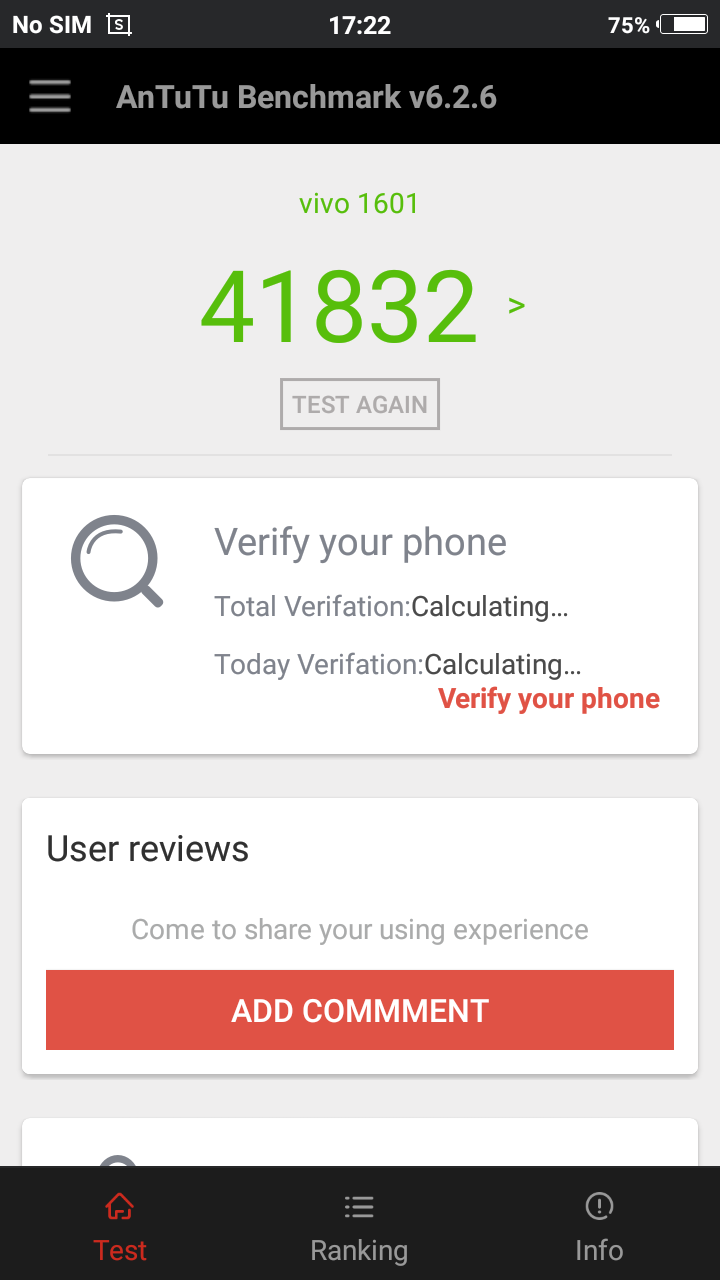
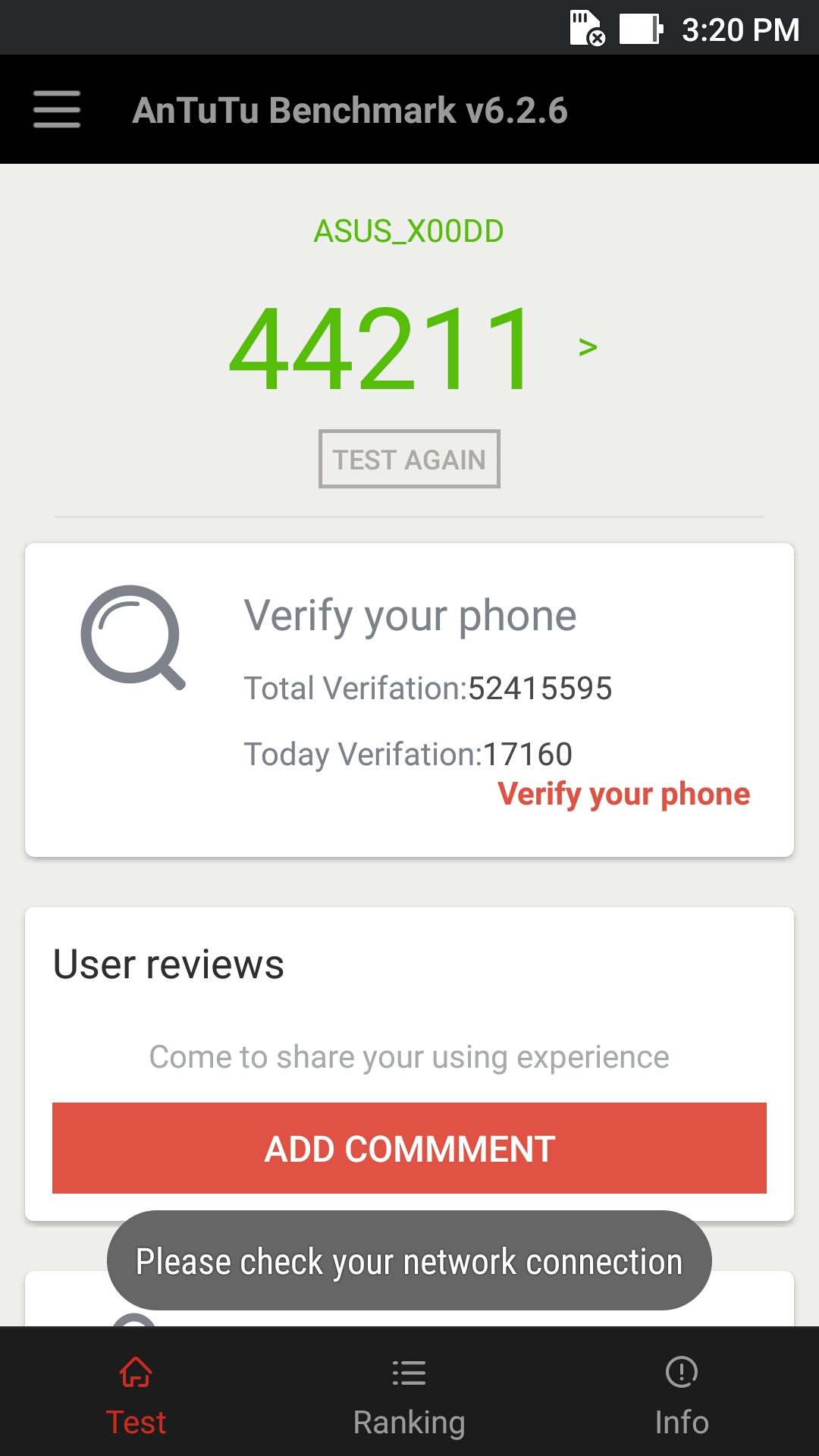
Antutu
44211
41832
Gaming performance on both the phones are decent and you won’t be finding any kind of lag, snappiness and frame drop on normal gaming, but while doing in aggressive gaming Vivo V5 gives you some frame drops in Nova 3 and Asphalt 8 High Graphics whereas on Zenfone 3 Max no frame drops were there while playing Nova 3 and Asphalt 8 at high graphics.
It is all because of the GPU they have used in their phones. Asus Zenfone 3 comes up with Adreno 505 whereas Vivo V5 comes up with Mali-T860.
Coming to the daily usage and multi-tasking, in heavy multitasking Zenfone 3 Max may show you some snappiness, because of its UI they have used whereas Vivo V5 has a well optimized and stable UI as well as also has 4GB Ram which gives it the power to handle any kind of multitasking on there phone. But still Zenfone 3 Max works pretty fine for daily use and this all can be fixed in later updates.
Camera part which is nowadays the main part for any smartphone which is available in the market. Starting with Vivo v5 at the front it comes up with a 20 MP shooter with a moonlight flash which continuously light up while taking the image like a torch and not just blink like other smartphones, also it has a white light not a light with a yellow tint in it which ultimately makes the selfie looks really good with great colors and clarity. Vivo v5 is the world’s first phones which come up with a 20 Mp front facing camera. And now it is obvious that Vivo USP for Selfie is always a winner with Zenfone 3 Max 8Mp front shooter.
Now coming with the rear camera of both the phones, Zenfone 3 comes up with a 16MP camera with dual tone Led Flash and a Laser fast laser AF whereas Vivo V5 comes with a 13 MP camera with a Single LED Flash. The focus, clarity, color, dept of feel all are way better on Zenfone 3 Max compare to Vivo V5.
SO, now if you are selfie lover just go for Vivo V5 whereas if you want to capture others with your phones you may consider Asus Zenfone 3 Max over Vivo V5, the choice is all yours.
Battery
Now coming to the battery part of both the phones, Asus Zenfone 3 Max as the name suggest comes with a 4100mAh battery which is really very well optimized and will easily last you more than a day on heavy usage. Vivo V5 comes up with a 3000mAh battery which is also well optimized but not as we see on Asus Zenfone 3 Max. Vivo v5 will easily last you a Day just because of its better well-optimized software but Asus Zenfone 3 Max is the clear winner over here. Bigger Battery and well Optimized software (only considering battery in optimization, not the different bugs.)
Verdict
After testing both the devices, I will consider Vivo v5 more for smooth multitasking and best selfie phones till now in the market. Coming to the Asus Zenfone 3 Max it is having some great built, great battery and can handle almost everything but lags with their software which is full of bloatware (which can be removed.)
If you are a selfie lover, go for Vivo V5 and for battery move towards Asus Zenfone 3 Max.
If you need any other info about these phones, you may comment down below asking your questions over there.
Asus with the launch of Zenfone 3, enters into the luxury segment. They no more, want to be the part of lower end market because of too much competition. They launched Zenfone 3 with some really great and excellent unique design, but with some really high price. Recently, Asus has launched Zenfone 3 laser which is the upgrade to their previous model zenfone 2 laser, and this time they have worked a lot with design and other features.
Also Check: 3D View (Coming Soon)
The Phone is available in both offline and online market with the price of Rs. 16,999.
5.5-inch 2.5D Curved Glass
1920 x 1080 pixels with Gorilla GLass 3
Processor
Snapdragon 430
RAM
4GB
Internal Storage
32GB
MicroSD up to 128GB
Battery
3000mAh
Rear Camera
13MP with Laser AF
Dual Tone LED flash
Front Camera
8MP, f/2.0
Dimensions
149 x 76 x 7.9 mm
Weight
150 g
Design & Built
When we previously reviewed Zenfone 3, it was made up of with premium glass and with some unique and luxury looking design. But this time zenfone 3 Laser design has been redesigned by removing the glass and adding brushed metal finish to it, which make the device look simpler. This time still they have worked a lot on the design and built. Even after using full metal body the device only weight’s you 150 gm. So starting with the front they have added a 2.5D curved glass on its 5.5″ FHD Display panel which adds extra protection and some looks to the phone.
On the top portion of the phone, you will be getting a 3.5mm audio jack and beside it a secondary noise cancellation MIC.
Turning around to the down portion, it houses single Speaker grill, beside it a normal Micro USB port and a primary mic. Micro USB port supports OTG feature and no quick charge.
Coming to the left side of the phone you will get a supports of a Dual Sim tray which supports single sim + Micro SD card up to 128 gigs or Dual Sim which make it a hybrid SIM tray.
Turning around to the right side of the phone you will get volume rockers and below that power lock key which give quite good tactile feel and also has a premium patterned feel on it which we see in Zenfone 3.
At the front top side you get a 8MP, front facing camera and different sensors beside it.
Coming little bit down you will get navigation back keys, which are printed and wont light up.
At the back panel of the phone you will get a 13MP camera beside it Dual Tone Triple LED Flash and a Laser AF sensor which is the USP for this phone. The laser AF works pretty fine and camera samples are already included below in this post. Below that you will find a Fingerprint sensor which works perfectly, even 360 Degree recognition is working perfectly. No complains regarding it.
At the back panel you will also get two antenna lines and Asus Branding.
Display
Asus Zenfone 3 Laser comes with a 5.5-inch FHD with a resolution of 1920×1080 and pixel density of 403 ppi. The Front is covered with 2.5D curved glass as well as a Gorilla glass 3 which adds up double protection to the display. The colors are more towards natural side and as of my usage i haven’t found any color shift while watching the screen from odd angles. Watching movies and playing games won’t be disappointing you in any way.
Coming to the Sunlight legibility, before getting the update i was disappointed from outdoor visibility, but as of now after update they have fixed that issue and brightness level is increased. Now, i am facing no problem while using the phone in sunlight.
Rest you can always tweak around with different color modes, and adjust it as per your eyes.
Performance
1 of 2
The Zenfone 3 Laser comes with an Octa-Core Qualcomm Snapdragon 430 with 4 Cortex A53 and 4 Cortex A53 cores that are clocked at 1.2Ghz and 1.5Ghz respectively which gives you decent performance and some great battery life to the phone. To support some high intensive games, the phones is powered by Adreno 505 GPU a 4GB of Ram which adds up decent and smooth multitasking.
While in daily use you are not going to find any lag in the phone, but as you push it a bit hard like chatting and at the same time watching movie and browsing it may lag or may not, it will depend on how you are using the device.
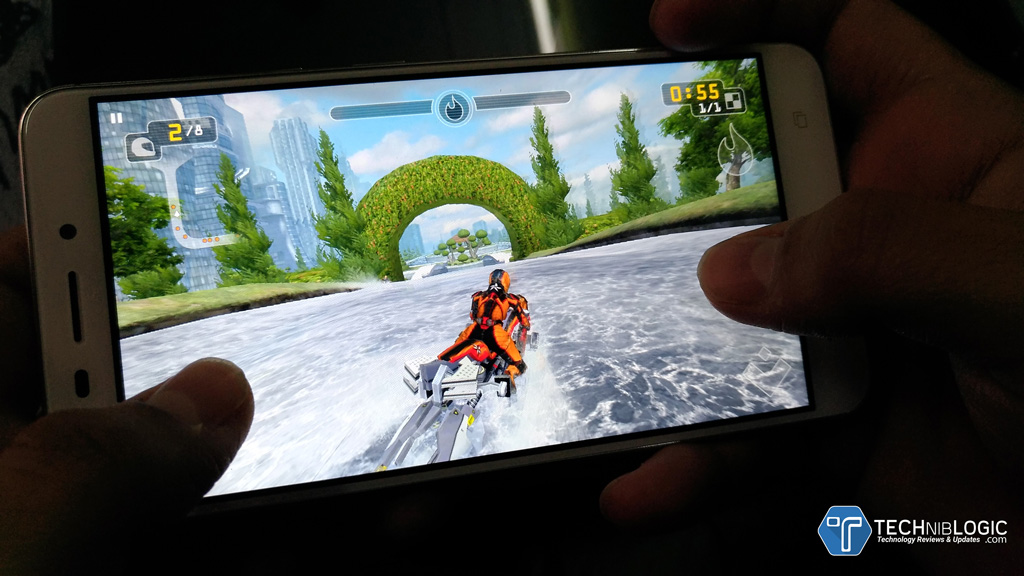
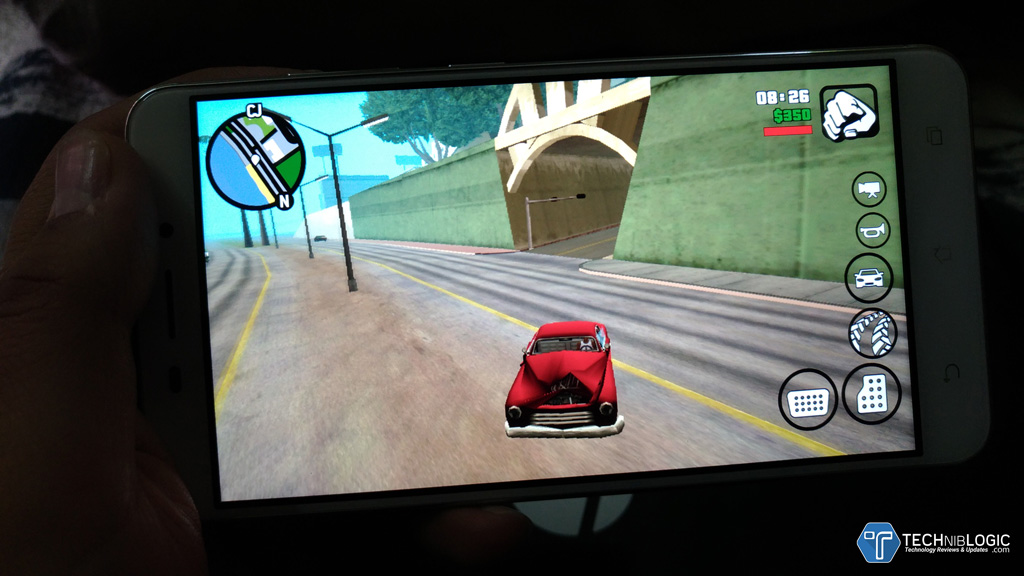
Rest, it can handle any game, i have played GTA, NOva and many other and no lag or frame drops were found. It heats up a little bit, but it is Okay with this thin metal body and long time game play.
1 of 2
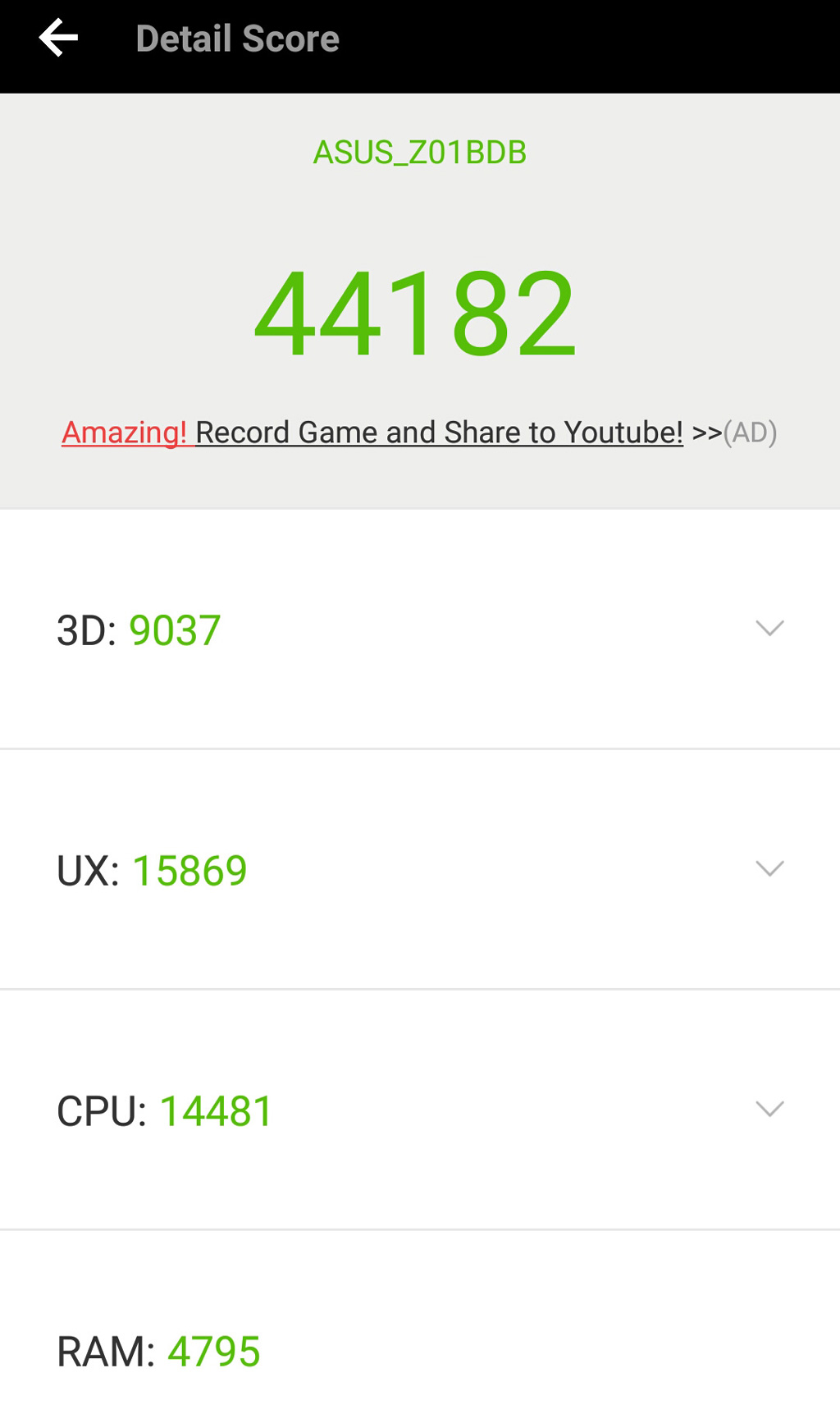
Antutu
44182
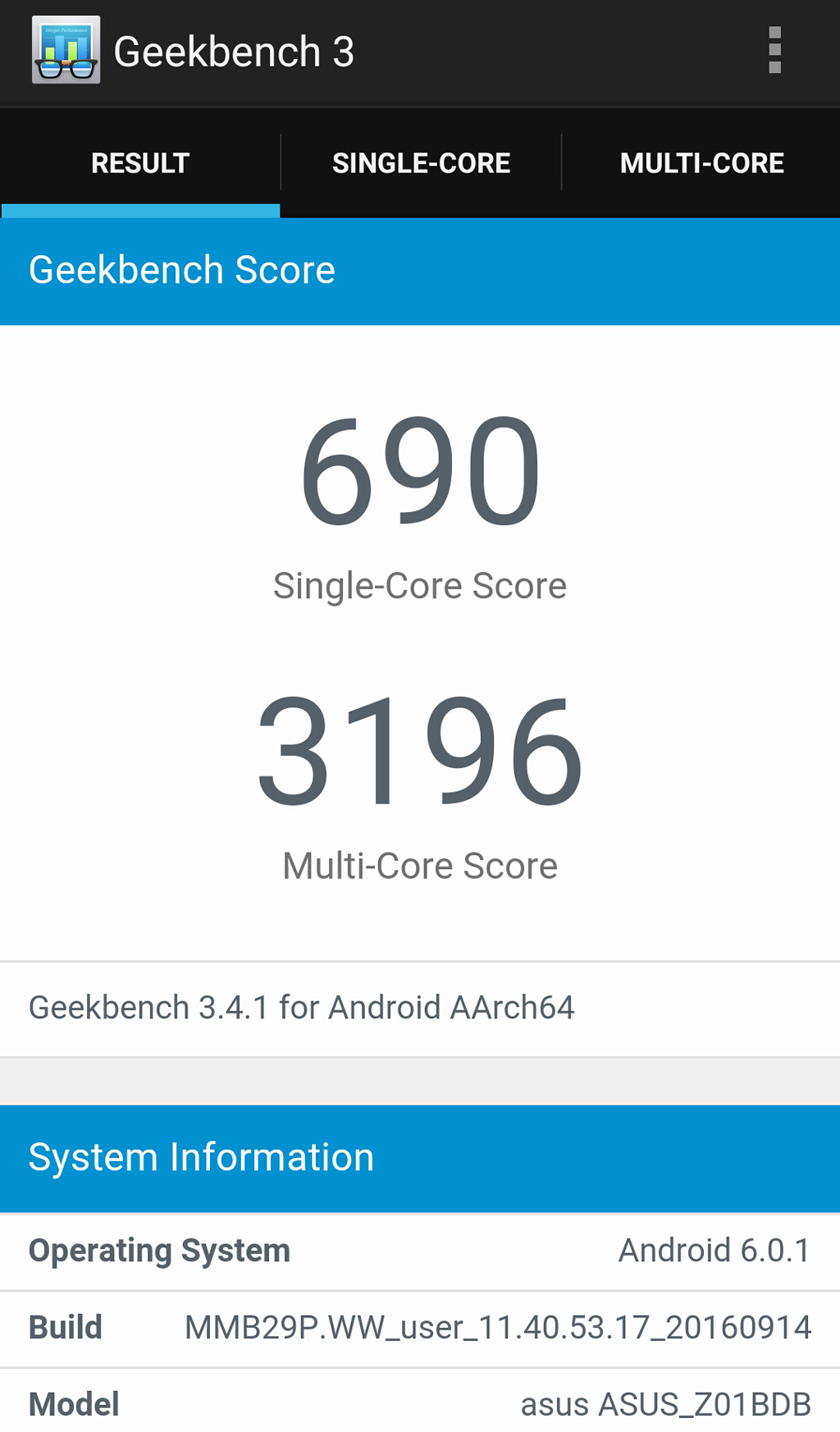
Geekbench
3196 Multi-Core
Camera
As the USP of Zenfone 3 Laser is its camera and its focus, it performs quite average. The Focus works pretty fine after the update but still there is noise in every image which need to be tweaked by software. I think this is due to the some bug in their camera software which can be fixed in other updates. Rest while recording video you have electronic image stabilisation which works pretty fine but still Zenfone 3 is better in it.
The camera software is quite good if we don’t think about that noisy bug which we get in every picture we click from any Asus phone. The best part of the software is their manual mode that offers a number of options like manual focus, shutter speed etc. There’s huge range of inbuilt options that includes Nightshot, Super Resolution, Beautification and many more. Using all these modes you can always play with them and get some perfect shots.
Camera Samples
1 of 7
Software
Same as always, Asus zenfone 3 laser comes up with same Zen Ui 2.0 on top of Android 6.0 Marshmallow. The UI is full of Bloatware and so many apps preinstalled on it, but the good thing is that we can always uninstall them.
Both the homescreen and launcher are customisable and include lot of options for icon packs, themes. Rest the UI is pretty smooth but they need to work a lot on their UI or just simply opt Stock android with customisation.
The best part of Asus UI is there software optimisation and tweak which gives you best battery in any smartphone. Even with low power battery any asus device will easily last you a day or more. Overall, the software on the Asus Zenfone 3 Laser is well optimized and will give you lag-free experience.
Battery
Zenfone 3 Laser comes up with 3,000 mAh battery with some great battery optimisation in their software. Still their is no support for fast charging support. The phone can easily lasts you more than a day or even more. This is with a regular use, which includes managing email, social networks, WhatsApp and youtube videos and some small gaming.
In heavy gaming and immense usage, the battery will still last you a day very easily.
Verdict
Overall, the device performs pretty fine. If we compare in online market or with the offline market, there are few other brands which is going to give competition to zenfone 3 laser. But, the built, battery and camera focus is much battery from other.
The price at which zenfone 3 Laser is available is Rs. 16,999 is quite good because the release price was Rs. 19,999. As of now Vivo V5 and oppo F1s is the only offline competition of the phone.
The tech arena witnessed the much-awaited update iOS10 a few months ago, now Apple has surprised the industry with its latest minor update iOS 10.0.2. The move is considered as a safeguard from the issues cropping up in EarPod and iPhone7 even right since their launch. Users filed a number of complaints, especially the users of the two devices. The major issue was in accessing songs and the absurd way the song functionality of these devices was behaving. Moreover, these issues were piling up for many iPhone app development companies in India. With this updates, Apple has sparked a number of questions, for instance, is this update for every iPhone device holder? What impact it will have on my device?, etc.
We have compiled this brief study to answer all the queries you have regarding this 10.0.2 update.
Whom Does iOS10.0.2 Update Target?
Please take a heed of a few aspects before getting your device updated to 0.2 as not all need to bring up to date. We have to understand that it is designed for the iPhone 5 or greater, iPad 2 or greater, iPad mini 2 or greater, iPad Pro range and the 6th generation iPod touch or greater. You do not have to worry if none of the above mentioned devices is owned by you. If yes then you will receive these updates automatically; however, if you don’t receive, it can be initiated from the ‘Settings’ option in your phone. Why iOS 10.0.2 Is essential?
After identifying the issues, Apple took an instant action to clear bugs from the whole line of devices. Once you upgrade to iOS 10.0.2, bugs get automatically fixed, you get improved stability, etc. In addition, this update eliminates any issue that could prevent headphone audio controls from temporarily not working. Fixes up the trouble causing Photos to quit for a few users as soon as they try to access iCloud Photo Library. This updates also resolves the problem, which does not allow users access some app extensions.
How Apple Dealt with the Issue
This move is considered as the quickest in figuring out the issue by Apple and providing proper aid to the issues. Some time ago, Apple released the official statement mentioning a new software update for the treatment of bugs as soon as possible. The whole result is very satisfactory as Apple turned up with the solution without keeping the matter suspended for weeks or months. Experts are considering the new update crucial from the users’ point of view because a few functions encountered a trouble and due to this users are not able to utilize many app extensions smoothly.
Size and Other Features of the Update
The latest 10.0.2 is very light on your phone as well as on your monthly data pack and it allows you easily upgrade to 0.2. It weighs only 33MB, a very light-weight update. This shows its Apple’s concern for its valued customers. With this update, the company is expecting that the upgraded version will automatically eliminate bugs and other issues. If you are using iOS10, you can easily upgrade. Now, listen to songs using earpod with a lot of control on your device. Once you upgrade, the songs will be played with a lot of ease.
A Big Step by Apple
As considered, this is one of the major updates on iOS featuring a new lock screen as well as having the maps updated. Apart from these, there are an array of features including Siri SDK for developers and you will be able to access this through this update. Refurbished messages app are now highly supportive. Apple music is also giving an attractive feel.
What Is Next Now?
Considering the pace Apple has got in updating iOS 10, there would not be any surprise if they push out back-to-back updates with having 10.0.3 lined up as the most upcoming one. As we all know that iOS 10.1 brought a fresh Portrait mode to the iPhone 7 Plus which used the phone’s dual camera to brilliantly blur its background. With this impact, portraits pop and simulates the effect you receive from a premium SLR camera. Similarly, 10.0.2 will also carry on the the same action or might go one step ahead for delivering excellence.
Conclusion
With this latest update, a number of things have got their perfect treatment. Empowered by 0.2, your devices will now be more responsive with an improved interface providing users the exalted experience. To run this update (in case you have not got the notification), you simply have to tap to ‘Settings’ then ‘Software Update’. You will see it as ‘new update’ in the box if you are using iOS10. The all new update looks reliable as iCloud Photo Library parts and a number of features are also functioning perfectly. Thanks Apple for pushing out the long-awaited update.
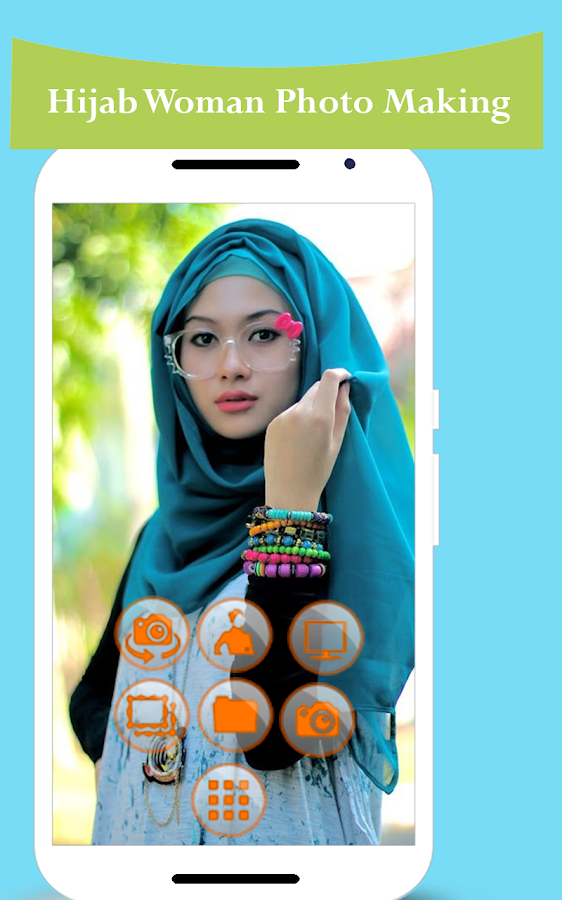
Are you looking to buy yourself a new Hijab dress, but don’t know what kind or color of Hijab dress would look good on you? Well, worry not as the Muslim women clothing app will help you find out what kind of Muslim women hijab dress for you. There are several women clothing applications available online that allows the women to dress digitally in different sorts of unique apparels and other accessories. However, none offers Islamic clothing for women to wear, which seems to be the only type of clothing for many Muslim women. Thus, Muslim women hijab dress app comes very handy for them as they can try out from a huge collection of different Muslim Women clothing and see how they appear in it.
This can help them buy the most preferred clothing for them. It saves both time and money as they don’t need to walk to their nearby apparel store, change one Hijab dress after another to find out what would look the best on them. They can easily wear such dresses with different colors, designs, and sizes on their face to get the best appearance possible.
Hijab Fashion Suit
Another reason to use this wonderful application is it is quite a fun to use. Surely, it can help the person to discover the best Islamic clothing for women on them, however, women who are not Muslim can also make use of it to know how they would appear in a Hijab dress as surely their religion don’t allow them to wear one. They can sit with their Muslim friends and try out numerous Hijab dresses on their face and save it in their gallery.
Some of the best features of Hijab Women dress app:
* Select hijab dresses from different colors, designs, patterns and sizes on your face for absolutely free
* Best camera option that helps the user to try out all the hijab dresses on your face.
* An outstanding user interface that allows the user to easily edit and save the pictures in the gallery
* The user can also share the created image on Facebook, Google+, Instagram, Twitter and WhatsApp.
Wear several best Islamic clothing for women through your smartphone. Easily import pictures from your gallery or click a new one from its camera feature. Try out different clothes just by tapping your fingers.
There may be several interesting cosmetic and apparel applications for women on Google Play Store, but the only hijab dresses app allows them to try out Muslim women clothing on their face and body. It certainly is a must have application for Muslim women, but other religion women can also install it on their phone for some change. They can also wear some traditional clothing other than their religion and share it with their friends or make their profile picture. The best thing about this app is it is available for absolutely free, means the user can use all of its features without paying a single penny.
In this day and age of always showing signs of change innovation, the way individuals experience their lives has additionally gone under a sensational change. Whether it is your office work, transportation or even form, innovation has given a superior and moderately simple answer for every one of our needs. What’s more, with regards to the design business, the development of Smart telephones and Android gadgets has likewise adjusted the way how we pick new garments applications for both ourselves and our babies. There are a few from clothing apps and clothes shopping apps particularly intended to assist grown-ups, both male, and female, to choose mold array that suits them as per their shape, size, highlight, and inclination. Nonetheless, they appear to disregard their kids clothes and baby clothes who are generally given anything that can be seen either in the front of an attire store or on the highest point of the online design garments shopping applications.
Must have clothing apparels:
Bodysuits & T-shirts in Size 3-6 Months
Pajamas & Booties
Shoes, Socks & Hats
Baby Outerwear
Everyday Wear
Be that as it may, now, times are changing, and baby boys are as much in form as any grown-up would be. Presently even kids wish to put their baby boy clothes and dresses that would permit them to feel predominant and pleased when teaming up with different children and neglect anything that doesn’t run with their taste. Moreover, having your infant kid show up in an unimaginably beguiling children’s clothing would likewise make you feel pleased with whatever point you plan to visit a gathering with your child. Along these lines, it is the duty of the guardians and more seasoned skin to get themselves garments that would help them upgrade their appearance positively. For that, fashion apps are the most ideal and requesting a versatile application. Like some other form suit application, it likewise helps you to locate the most fitting dress according to the shape, size, shading and other preference. The main contrast is, not at all like the greater part of these baby boy dresses online shopping, which manages to improve the presence of grown-ups, infant kid dress manages hunting down boys dress clothes that would enlarge your kid’s identity. When shopping for shoes fit for kids or toddlers it is also important that your child will wear something sturdy and comfortable, while still remaining stylish. For this reason, you will need to check for other online resources for reviews and guides before purchasing something on any fashion apps and sites.
The following are given some heavenly elements of Baby kid from suit portable application:
Click your infant kid’s photo from your cell phone and look over an enormous gathering of more than 30 design suits that would suit your body the best.
You can without much of a stretch select and keep away from various suits simply tapping in a matter of seconds.
Baby kid mold suit offers a noteworthy and inconceivably simple realistic UI that can be utilized by anybody.
Try distinctive sizes, shapes, hues and example and deal with the most ideal picture for your kid.
Also, attempt diverse photograph impacts that you have just observed in most appreciated photograph altering applications to give the best impacts the photo of your child.
You can without much of a stretch product, pivot, resize, zoom in and zoom out the photo to get the best appearance.
Once you have settled the mold suit for your infant kid, you can without much of a stretch spare the photograph in your exhibition.
You can likewise share the photo via web-based networking media stages, for example, Facebook, Twitter, Instagram, and so on.
Furthermore, spare the created photo of your child kid as the backdrop of your telephone.
While you need to keep your child warm and comfortable during the evening, it’s critical not to give him a chance to get too warm. Overheating your child is connected to an expanded danger of Sudden Infant Death Syndrome (SIDS), also called cot death.
It’s uncommon for a child’s space to need warming amid the night, however, ensure you keep the room at an agreeable temperature. The room ought to be between 16 degrees C and 20 degrees C, with 18 degrees C the perfect temperature. Utilize a room thermometer to keep your infant’s room at a protected, agreeable temperature. It ought to feel about appropriate for a gently dressed grown-up.
To keep your child overheating, keep his dozing place far from radiators, warmers, fires, or direct daylight. Try not to put a boiling point water bottle or an electric cover in his bed either.
Asus has announced their new ZenWatch 3 in India today. The beautiful ZenWatch 3 is a luxurious watch, designed specifically for the top-notch users. Asus ZenWatch 3 is a high-end device with an affordable price tag. Pre-booking of the device has been started since today, exclusively on Flipkart. The device is also available on zero cost EMI below RS 2000.
The device is crafted with premium materials and is powered by Android Wear and the brand-new Qualcomm Snapdragon Wear 2100 processor. The device is equipped with HyperCharge technology, which provides enhanced power efficiency.
ZenWatch 3 is also an accurate activity tracker that helps wearers keep their lives in balance and achieve fitness goals. The round case is designed from 316L stainless steel & pairs perfectly with a strap.
The device features a 1.39-inch AMOLED display with 400 x 400 resolution and 287 PPI of pixel density. The display is also protected by curved 2.5D Corning Gorilla Glass. The device comes with a strap made of Italian leather and High-quality rubber.
Availability:
Model No.
Case
Strap Material
Colour
Price (in INR)
Availability
WI503Q-1LDBR0015
Gunmetal
Leather
Dark Brown
18,999
Available for pre-order on 23rd December 2016
WI503Q-2RBGE0007
Silver
Rubber
Beige
17,599
Available for pre-order on 23rd December 2016
WI503Q-1RGRY0007
Gunmetal
Rubber
Brownish Grey
17,599
Will be available in January 2017
Specification:
Processor
Qualcomm® Snapdragon™ Wear 2100
Operating system
Android Wear
Compatible OS
Android and IOS
Memory
512MB RAM LDDR3
Storage
4GB eMMC Flash
Display
1.39in AMOLED
400 x 400
287ppi
Touch: 2-finger
Communication
Bluetooth® 4.1
Wi-Fi
Communication Functions
Built-in Microphone, Call and Messaging supported
Watch crystal
2.5D curved Corning® Gorilla® Glass 3
Sensors
6-axis (G+A), ambient light sensor
Battery
340mAh with quick-charge (15 mins for 60% battery)
Battery life: 1–2 days
Charging
Magnetic charging cable
Water resistance
IP67
Color
Silver, Gunmetal
Strap
Rubber or leather
Size
Diameter: ≦ 45mm
Height: 9.95-10.75mm
Warranty
1-year warranty
That’s all for this guys, stay tuned for more update and subscribe to our YouTube channel for more awesome video 🙂
Taking care of your home is often the most demanding task you face with. The main issue here is that proper home maintenance is something you have to do daily. However, sometimes you just can’t find inspiration and strength to perform those repeated, dull actions. Luckily, some of those actions can be automated or planned in a better way with some cool apps.
Grocery IQ for Shopping
On some occasions, you go to the grocery store more than once a day. And if you don’t live alone, but with a partner or children, the need for various groceries only gets bigger. The Grocery IQ app can help you direct and focus your shopping sessions. The app relies on its resourceful database that contains a wide range of products. Shoppers can search the database via voice search and barcodes, in addition to text searches. When the list is finished, you can save it for later use. That way, you can always have a ready-made list for routine purchases, made at regular intervals.
CareZone for Healthcare
When you have to take care of your children or elderly relatives, it might happen that you forget to give them medicines or miss an appointment in the hospital. The pressure and stress induced by everyday tasks can create a chaos in your head, no matter how responsible a person you really are. However, the CareZone app will remind you about the most important health information on your dear ones. You can take photos of pill containers or medicine bottles and store them in this app. In addition to that, you can note down every important date in the app’s calendar and keep yourself organized.
The Bark for Dog Care
Having a dog is a widespread trend in many developed countries. They’re loyal and easily maintained pets, which makes them suitable for all sorts of households. So, if you have a dog and want to master some simple or more complex skills regarding their training, treatment and socialization, The Bark app (and the eponymous magazine) is the right option for you. You’ll get regular updates on the latest findings related to those beautiful animals. Besides that, it usually brings practical vet tips, as well. The app is free, but subscription on the magazine and downloads are charged.
Apart from The Bark app, you can use other handy pet apps that can help you a lot in treating your pet with greatest care.
Smith: Home Remodel, Improvement and Repair
Home maintenance is a special set of exhausting works. Some of them are to be done daily, while some more demanding ones can be performed annually or once in a few years’ time. For instance, when you decide to give your walls a new coat of paint or improve the staircase, you’ll need software assistance in searching the contractors. The Smith app will inform you on the available local contractors for your needs, as well as on their rates. From skillful carpenters to reliable builders, to experienced shed movers and other workers, this app can connect you with professionals for a variety of house works. Just upload the photo of the area you want to redo, add a short description of all the works you’d like to do and wait for the most affordable offers.
You Need a Budget (YNAB) for Finances
If you want the previous four home management features to function properly, you have to ensure enough assets. The YNAB app has a user-friendly interface that makes the entire process of keeping track of expenses and planning a home budget fast and simple. The user allocates funds for loan installments, monthly bills, special expenditure or any other category they add to the app. When an unplanned expense appears, you can redirect that amount of money from another category.
What’s more, when you cross the limit in a category, the app paints the problematic category red. Now, you have to redistribute assets from another category, to regain the balance. That way, you have an instant insight into your financial perspective at every single moment.
Home management doesn’t have to be a pain in the neck in the modern times. These apps will help you reduce the amount of stress you’re exposed to and organize your life in a simpler, yet effective way. Also, it will free some space for me-time and increase the general quality of your life.
This year, Mobile game have so far been our companion in solitude. I mean let’s admit it is fun, entertaining and it passes a lot of your free time. And we all have that friend who has a high score in that arcade game and someone who have finished the entire RPG game. As a smartphone user, we love mobile games, simply because they are compact and entertaining. So, let’s have a look at the Best Top 10 mobile games of the Year.
1: Clash Royale
https://youtu.be/skHbLHkS5LE
Clash Royale was launched earlier this year and it created a lot of hype in between the player of Clash of Clan. The one on one battle seems so much fun than the actual clash of clan. There are dozens of cards and all are great. So, go on and download it if you haven’t, the game is great.
When Pokemon go launched, people went mad. Celebrity came out of their comfortable zone and started searching for Pokemon on the streets. Well, in short, Pokémons are out there, and you need to find them. As you walk around your neighborhood, your smartphone will notify when there’s a Pokémon nearby. Take aim and throw a Poké Ball. You’ll have to stay alerted, or it might get away! As you level up, you’ll be able to catch more powerful Pokémon to complete your Pokédex.
EA must be a champion in the Racing game series but I think the most loved racing game in a smartphone is Asphalt. Select your car from the garage and start racing, the game has multiple levels and features stunning cars. The graphics of the game is great, the most exciting thing about the game is the achievements, which in no doubt is to brag about.
Candy crush has been in the gaming segment from a very long time, and in no doubt the game is appreciable. The game has now become the favorite past time of people these days. Join Tiffi & Mr. Toffee on their sweet adventure through the Candy Kingdom. Travel through magical lands, visiting wondrous places and meeting deliciously kooky characters. Switch and match your way through hundreds of fun levels in this puzzle adventure.
Modern combat 5 is one of the best FPS game out there, with some marvelous graphics and stereo sound. It also has a single player campaign mode so you can have some fun with the story mode. While in multiplayer you can create a squad, add your friends and test your individual and team skills against other squads in dynamic multiplayer warfare. It requires an internet connection to play even in story mode.
When we talk about multiplayer games, the one game that comes to our mind is Clash of clans, it is that famous. There are several strategy games on the play store but it seems that Clash of clans has beaten all of them with its amazing barbarians and dragons. The game doesn’t need any appreciation it in itself is an epic.
Doodle army 2 is an online gaming shooter app, where six people can play in one room. You can also change your avatar and train with the Sarge and sharpen your skills in offline Training, Co-op and Survival modes. Shoot a multitude of weapon types including the sniper, shotgun and flamethrower. Features explosive online and local multiplayer warfare! Intuitive dual-stick shooting controls. Open world maps utilising rocket boots for extended vertical flight. Overall it is an amazing multiplayer experience.
A small arcade game, bringing back the classic snake game of 90’s. You can play against other people online and become the longest player ever. The game rules are simple if your head touches other players, you will explode & then the game will be over. But if others move into you, then they will be explode, and you can eat their remains. You can swerve in front of a much larger player to defeat them, no matter how big you are!
Colour switch is the best arcade game out there, with more than 100 million downloads. The game is exciting and fun in a short package file. Game rules are simple, tap the ball carefully through each obstacle and your ball will switch colour with some power-ups, you must follow the colour pattern on each obstacle to cross it. and become the winner.
Mekorama is a beautifully created puzzle game, specially designed for a puzzle lover. The game has two version the normal and the Mekorama VR. The VR game is an exciting new game, which was launched recently. You can enjoy the Mekorama in the world of real-time or VR and solve the puzzle in your own way. The game rules are simple, you have to Help a tiny robot stumble home through 50 puzzling mechanical dioramas.
MBOX to PDF Converter is the perfect solution for users by which they can easily convert MBOX to PDF format with their attachments. It is the widely searching query by users where they are searching for the perfect solution which can easily export entire email data saved in MBOX file and print it into PDF format easily. Now, this will be your last exploration where you got the ultimate solution which can easily solves all the queries related to the migration of MBOX files to PDF format.
Before discussing anything let us first know about the MBOX and the PDF file format and their suitable applications. MBOX is the most common email client which is widely used by more than 25+ email clients. It stores all the entire email data like email messages, contacts, attachments, several email folders and more. Basically it is supported by Mozilla Thunderbird whereas PDF file format is the document file which keeps all the data safe and secure. It is supported by only one application which can read all the PDF files easily i.e. Acrobat Adobe Reader. It sores all the email data in it with their corresponding attachments in their original structure.
Why We Need to Convert MBOX to PDF Format?
Mostly, lots of users are using the MBOX supported email clients which stores their mailbox data in MBOX files format. To access the MBOX files and need to convert it in PDF format, then it is required to configured the any MBOX supported email client in system. Whereas PDF format is so simple which can easily open by the Adobe Reader. Also, MBOX and PDF both are different file format and it will not be easy for all the users to convert MBOX to PDF format easily. Some of the users choose to use the Manual method but it will be always a risky move. The manual method always leads to the corruption of the data. If any user wants to export multiple MBOX files to PDF format, then it will always a risky and time consuming process. Before using any manual method, be careful during the file conversion and take the backup of your original MBOX files and then perform any migration process. So, it is a better option to choose the third party application.
Straightforward Method to Migrate MBOX to PDF Format
It is always recommended to use the best MBOX to PDF Converter for batch export of MBOX files in PDF format. It is the prominent solution for users which can easily extracts all the entire mailbox data of MBOX files in PDF format. It is the best tool which enables the user to access their MBOX data in safe and secure file format. It is easy to use application which can manage by any user and batch export MBOX to PDF files in few seconds.
Some of the Interesting Features of the MBOX to PDF Converter are: –
It is the perfect solution for users which can easily convert the entire email data of MBOX files and their corresponding data items like email messages, attachments, contacts, notes, etc.in PDF format.
Users can easily batch export MBOX to PDF format. It is a time saving process by which users can easily migrate multiple MBOX files to PDF format at once in few seconds. It is one of the best useful feature which is helpful to export multiple MBOX files in PDF format.
It is a user-friendly application which is easy to handle and can be handled by any novice users. It is easy to manage all the email messages and convert MBOX to PDF format. It is a simple 3 step process which can easily migrate the MBOX files in PDF format.
It offers dual options to user where users can easily convert their single MBOX files to PDF format or multiple MBOX file containing a single folder and convert it in PDF format.
If anyone wants to convert the selected email messages of MBOX files in PDF format, then this application also offers selective conversion of MBOX files and import MBOX data in PDF format.
Preview of email messages and their attachments are also offered by this utility which allows to read the entire email data before saving it in PDF format.
Although it is possible that some small business owners are still running “pen and paper” offices, this is definitely not the norm. Business owners overwhelmingly understand the need to invest in technology as a part of the cost of setting up and doing business – at the same time, they may find it difficult to evaluate their technology needs, and may find the idea of setting up their systems to be quite overwhelming. It goes without saying that any business will need at least one computer, and most will need more than one. But beyond that, it may not be clear what is needed. However, it doesn’t have to be difficult and it doesn’t necessarily require a lot of technical know-how. Here two basic hardware components that, in addition to computers, should be all a small business requires to get itself out of the gate.
Server
If a business has several computers, it may eventually need to use a server in order store shared files or manage things like email. A server is basically a program that provides specific services to other programs which may be located on other computers that are linked together in a network. These services can include sending and receiving mail, managing files so that other computers on the network can access them, printing services, or passing on requests for services. Servers are also important for backing up company-wide data. There are several different types of servers, each of which has its advantages depending on what it is that you need them to do. For most small businesses (under about 25 employees), a tower server may be the best option because it is relatively inexpensive and doesn’t require a lot of expertise to set up. There are many Zazco tower servers to choose from as a way to get started.
Wireless Router
A router is a device that receives information from your modem (which is typically connected to the internet via cable) and delivers it to your computer; a router can do this simultaneously for more than one computer, which means that if you are running a small business with more than one computer, you will need a router unless you want to have a separate internet account for every computer! Routers also add a layer of security to the internet connection by requiring a password. A wireless router allows devices – like smartphones, printers, or laptops to connect to the internet without being physically connected to the modem.
Servers and routers may sound complicated to the small business owner, who may be tempted to do without them as a result. However, as you can see, each of these hardware components performs tasks that are vital in any office with more than one computer.
Online shopping and ecommerce has significantly increased its net worth by billions and experts around the globe are expecting for it to grow by 20% this year. 80% of the netizens (online population) has bought something online and 50% of it has bought something on the internet twice or more than that. This success wouldn’t have been possible if not for e-commerce platforms.
These e-commerce solutions such as PrestaShop provide online shops with tools to help them customize their online stores. Add-ons such as the PrestaShop web to print addons can provide themes and tools that will change the appearance and functionality of their business website depending on the nature of their products and their line of business.
PrestaShop web to print addons can certainly help you increase your company’s value and sales profits. However, choosing the right web to print add-on is a dilemma that has puzzled a lot of people. With that being said, this article will not only inform you a lot about PrestaShop but will also tell you 6 of the most popular web to print add-ons offered by PrestaShop. So, read on.
What is PrestaShop?
PrestaShop is an open source ecommerce solution like Magento. Like magento, it is also written in PHP and is distributed under the OSL (Open Software License) including the support for a database management system called MySQL. This open source ecommerce solution started out as a project for the EPITECH IT School which is located in Paris. The open source ecommerce solution mentioned above was initially launched in two languages, namely: English and French. As of today, PrestaShop is now translated in over 15 languages and is spreading rapidly like wildfire. PrestaShop is among the finest eCommerce platform that is included with a couple of powerful features. You will find multiple plugins which are also called as modules and addons that will help you increase your PrestaShop store’s value. Already interested? Check this set of the most popular plugins that you might find useful for your online business.
PrestaShop SEO manager and PrestaShop SEO Booster
When a person is looking for a service or a product, he is more likely to search for it on search engines than asking a real person. On a study made by imFORZA.com, it has been known that 75% of the users never get past through the first page of the search results. In order for you to be on Google’s (or whatever search engine for that matter) search result’s page, you need SEO or search engine optimization. Two of the most well-known add-ons for this specific matter are the PrestaShop SEO manager and the PrestaShop SEO booster. These two add-ons differ in function. The first one manages your SEO needs and the other boosts your SEO ranking.
PitchPrint
According to the most recent Bain study, it has been revealed that out of the 1,000 online shoppers who participated in the survey, a hundred of them have tried customization. On the other hand, 25 to 30 percent of them are interested in doing so. According to experts, if these numbers are true, this equates to more than 2 billion in profit increase. PitchPrint can help you tap into this expanding industry. It can produce vector PDF ready outputs while being an awesome photo editor at the same time. It also has a Facebook module embedded in it and design templates to choose one if you are having a hard time with the designs.
Librasoft
As a business and a website owner, security should be one of your priorities. You must shield your online business and website from hackers, malwares, viruses and worms. This might be a tedious job, but it will bring stability and security to your business and will ensure that you will not encounter problems such as identity theft and the likes. One well known add on used for security is the Protect my Shop add on, made by LIBRASOFT. This kind of security component enables you to safeguard your business from threats that might not only harm your reputation as a business owner but might cost you a lot of money as well.
PrintCommerce
PrintCommerce is a good one and most rated web to print addons. PrintCommerce PrestaShop web-to-print plugin provides to customize online products from bags, tshirts, mugs, caps, shoes to business letters, visiting cards, greeting cards, labels and many more. This addons mostly used in eCommerce store and printing market segment to give super functionality to premium clients, customers or end users. By using PrintCommerce as online product customization you can create online portal by connecting designers, print brokers, printers and end users in single line alignment. So, you can create new channel to your online store to expand business by generating good revenue.
Yotpo
According to kissmetrics.com, 55% of online shoppers are influenced by reviews. In much simpler terms, a customer will buy a product more likely if it is reviewed. It is either because nobody buys or uses their service (that’s why it doesn’t have reviews) or the reviews are so bad they’d rather not post them. Luckily for you, there are PrestaShop web to print addons that might help you with this need such as Yotpo. Yotpo is utilized by more than a hundred and fifty thousand merchants worldwide. This is because it helps online merchants to generate reviews and utilize these reviews to attract traffic which usually leads to sales.
Everybody uses social media and that is almost an accepted fact. That alone makes social media a very powerful tool that you might be able to use for your online business. The cool thing about social media is that you don’t have to try hard just to market your product or service. On a study made by the Wharton School of Business, it has been revealed that 84% of the shoppers use at least one social media website to tell people about the product they purchased online. Two of the most famous PrestaShop web to print addons that specialize in social media are the Facebook Connect + Paypal, Amazon, Google, Twitter Module and the Fb, Tw, G+1, etc. Connects 15 in 1 + Statistics Module. These extensions will surely help you with your social media needs and will help you harness the power that lies beneath it. In addition to that, these add-ons are not only good for the web to print businesses but are also applicable to most kind of businesses in general.
In last, since your business is unique, the problems that your online business might be facing might be different from others. However, there are so many add-ons that are available in the market today that might help you. So, just continue to push boundaries by experimenting on them – who knows, you might become the next big thing because of that.
Hello, friends! In order to celebrate the coming Christmas and New Year, iCare Recovery has launched a completely free giveaway of its famous iCare Data Recovery Pro for everyone to recover deleted, invisible, erased, inaccessible, missing and lost files from commonly-used hard disks, USB portable hard drives, flash drives, Micro SD and SD memory cards from Dec, 21, 2016 to Jan, 3, 2017.
iCare Data Recovery Pro, as an comprehensive file recovery program, has been upgraded into 7.9 version and designed with more powerful features and less bugs:
Here the key feature that you must check:
1). Deleted File Recovery mode to help process different deleted data loss troubles, like emptied Recycle Bin data recovery, shift deleted data recovery, deleted file recovery after virus attack.
2). Lost Partition Recovery mode to help recover data from computer partitions with different data loss troubles, including unrecognized partition file recovery, deleted partition data recovery, raw format partition data recovery, etc.
3). Deep Scan Recovery mode to help cope with nearly all data loss troubles caused by delete, shift delete, format, reformat, virus infection, RAW file system error, not formatted error, drive corruption, PC OS crashing, computer crashing and more.
4). Help recover data from all widely-used storage devices, like internal/external HD, SSD, USB drive, thumb drive, Micro SD card, SDHC or SDXC card, CF card, TF card, Mini SD card and more SD memory cards.
5). Help recover data from storage devices without overwriting the original device information so that it will cause no worse or permanent data loss troubles generally.
6). Works well under all Windows operating system environments.
Overall, no matter whether you do have applied this iCare Data Recovery Pro software before, merely go download it for free and it will help you a lot when you do have really encountered the similar device file loss troubles unexpectedly in the future.
Get Free 2016 Christmas and New Year Giveaway of iCare Data Recovery Pro
Step2. Like iCare Recovery on Facebook and download the giveaway version.
Step3. Launch the giveaway version on your PC and enter the giveaway code to activate it.
Step4. Recover deleted or lost data on your computer.
Notes and Tips:
*The giveaway code works only on the giveaway version, so, remove all other versions on your PC before you install the newly downloaded giveaway version.
Nokia is planning to return with a bash in the coming year. The company is expected to unveil two to three devices. As we know, one of them is rumoured Nokia D1C, the device is expected to come in Gold, White and Black colour variants. It is also expected to have a fingerprint scanner underneath the home button, it is rumoured that the device will be a waterproof smartphone and will feature a metal unibody design.
via ndtv
According to a report, Nokia’s upcoming smartphone will feature the Snapdragon 835 processor and 6GB of RAM. The device is also rumoured to feature a 23-megapixel rear camera with Zeiss lens. One of the highlight features devices was said to be the Zeiss lens for the primary camera, which we have seen on earlier Nokia devices.
Another report also suggests that the high-end Nokia smartphone may feature a 5.2-inch or 5.5-inch screen, and will have a 2K(QHD) display. The device is expected to run Android 7.0 Nougat out-of-the-box. From the leaked images, the device seems to have a glass back casing. However, the source of the images are not reliable so we can’t trust those.
We will hear more about the upcoming details about the Nokia smartphone, as we come close to the MWC 2017, which will take place on Feb 27 in Barcelona. HMD Global, the finish company also confirmed that the first Nokia-brander Android smartphone will come in the first half of 2017 and the launch will happen at MWC 2017.
That’s all for this guys, stay tuned and Follow us for more update 🙂



















![Nokia D1c Android Phone may comes with Snapdragon 835,6GB RAM [LEAKED]](https://techniblogic.com/wp-content/webp-express/webp-images/uploads/2016/12/Nokia-D1c-Android-Phone-may-comes-with-Snapdragon-835-6GB-of-RAM.jpg.webp "Nokia D1c Android Phone may comes with Snapdragon 835,6GB RAM [LEAKED]")
