hi guys have you ever heard about iPhone premium cases, i know your answer it will be yes. But this case is something special, special because of its unique material which they have used.
As you all know Otterbox is pretty well known for offering durable phone cases that give top notch best protection for your phone. What Otterbox is not so well known for is style. But after this case your mind will change.
OtterBox finally comes with Symmetry Series Crystal Edition Case for iphone 6 / 6s. Each and every individual piece is the result of highly skilled and passionate craftsmanship compiled with creativity and innovation. Otterbox Crystal Edition case is actually a Limited Edition with only 7500 made.
This OtterBox Premium Case is being embellished with Crystals from Swarovski. The crystals from Swarovski® perfectly fits fashionistas and for the person who just want to gift something great and limited to there love once. Crystal Edition case remains true with style and protection. The dedication and alignment to quality can be seen in every crystal as they have placed in such a manner and you can feel them on to the case with the combination of beauty.
You can see how bright and clear are the crystals.
In the Packing of the case it is just huge you receive the case with premium box in it you receive the card which says you are among 7500 to get this one and one Shattered prof alpha glass with some wiping.
It is worth to buy the case for the gift purpose and if you love to have something luxurious in the hand just go and buy this 140$ case from Otterbox.
You can also watch the 360 degree view of the case at : http://goo.gl/ov77zz
Spocto, an analytics marketing platform, provides businesses to successfully communicate and make relations with customers by understanding their behavior even after multiple digital channels and by reducing reducing spam. Its hyper-local digital monitoring system tracks the consumers by different most frequent channels, favored time and interests, and after that they creates customer profiles based on proprietary logic, called ‘spocto profiles’, which provide clarity on their changing behavior across platforms. Using these insights, spocto advises brands on the preferred platform and time to communicate with relevant audiences, thereby, optimizing marketing budgets and increasing conversion rates, as stated by the company in its press release.
Spocto’s expertise extends them across various marketing channels that include social media platforms like Facebook, Twitter, Linkedin, emails, voice and Text. While it provides 360 degree changing insights into the preferences of the urban population, spocto’s multi-lingual platform vigorously delves into the semi-urban and rural sections, a current difficulty for most brands, to guarantee a success rate across geographies.
Key services offered by spocto:
Multi-lingual and multi-channel customer engagement platform: Expands the brand’s view of the customer and helps connect with rural and urban audiences effectively across channels and platforms
Data analytic engine: Get real-time actionable insights to improve marketing-mix
Digital footprint: Map and monitor the continuously changing customer digital footprint while simultaneously engaging in conversations online across social media
360 degree of view of customer: Customer lifecycle understanding and management
Analytics for all digital channels: Hyper-local tracking of all customer engagements and global reach of campaigns with geo-fencing reporting
Single Application Program Interface (API) integration: Integration with multiple databases and file systems
“Customers lead multi-device, multi-platform lives and the digital touch points to reach them are constantly changing. They are bombarded with a constant flood of marketing messages from a single brand, across platforms. In most cases, instead of communicating a positive message, this leads to brand noise,” said Sumeet Srivastava, Chief Executive Officer, spocto, “Through Spocto, we aim to ‘unspam’ the customer and enable businesses to communicate with them in a budget efficient manner. Our thorough monitoring ensures streamlined communication so that a brand’s message reaches the relevant consumer only at the time and on a platform that is most suitable for them.”
Spocto has received investments of over USD 2 Million from its parent company, Intelligentia and is planning to raise funding of around USD 7-10 Million by Dec 2016 for acquisitions and technology Integrations. Its clientele includes a large number of brands like Future Retail, Motilal Oswal, Wunderman, Lupin, CarDekho, CenturyPly to name a few.
On April 5th, 2016, Google announced that anyone in India searching for health
information and you can now get it more quickly and easily with the launch of new health cards in the Knowledge Graph format.Google worked with Apollo Hospitals and Columbia Asia Hospitals to review the content, and the health information covers over 400 health conditions including those common to India like malaria and dengue fever.
Now when people ask Google about common health conditions they will see information cards with typical symptoms, as well as details on how common the condition is, whether it’s critical, if it’s contagious, what ages it affects, and more.
India is the third country after the US and Brazil to have health information in the Knowledge Graph,and the content has been specifically designed for the Indian context. The cards are available in Hindi and English, and cover common local conditions.
“Around the world, health conditions are among the most important things that people ask Google about. In fact, one in 20 searches are for healthrelated information,” explained Prem Ramaswami, Senior Product Manager at Google. “We worked closely with a team of local and international doctors to curate and validate this information including Apollo Hospitals and the Columbia Asia Hospitals here in India. During product development we also consulted the All India Institute of Medical Sciences and ASHAs who are community health workers to ensure the information on the cards is useful and accessible.”
“Apollo Hospitals is very proud to be working with Google on this initiative. Apollo Hospitals has a long history of using technology for the benefit of patients. We’re looking forward to building on this track record and being able to provide quality healthcare information to potentially a billion Indians,” Ms Sangita Reddy, Joint Managing Director, Apollo Hospitals Enterprise Limited said.
People will be able to see these new cards when they search for conditions with the Google app on Android or iOS phones and tablets, as well as mobile and desktop browsers.These search results are not intended as medical advice, but for informational purposes only. People should always consult a medical professional if they have a health related concern. Google will keep working to bring more conditions and useful health information specifically for India to your fingertips, whether in the Google app or on desktop.
Recently on 5th April 2016 ,OPPO brings to India the second camera-focused F series,F1 Plus phone at Rs.26,990.It is an upgraded version of the Selfie Expert F1, the F1 Plus is taking selfies to a new level with a world leading 16MP front camera.The 5.5-inch, all-metal unibody 4G device runs amazingly fast with a powerful octa-core processor, 4GB of RAM and 64GB of ROM on the all-new ColorOS 3.0 system. It also comes with a lightning fast, intelligent fingerprint sensor on the front side as well as OPPO’s patented VOOC flash charge.
According to Mr Sky Li, OPPO Global VP, “Today, we are very excited to launch the second device of our photography-focused F series in India after our Selfie Expert F1, which created great market acceptance with demands pouring in from every corner of the country. Camera Phones are always our focus and we plan to bring out the best camera experiences to our consumers.”
At the launch, OPPO also announced Indian cricketer Yuvraj Singh as its First Sports Ambassador for this cricket season. The F1 Plus is the first OPPO phone to come equipped with the all-new ColorOS 3.0.
The F1 Plus 16MP front-facing Hi-Light Camera has been purpose-built for catching clear, vivid photos in any lighting condition. The F1 Plus’s unique strength in front-facing shots lies in its special sensor, which arranges pixels in a unique pattern designed to maximize image quality, resulting in photos that are clear, bright and strikingly rich in color.
The new Selfie Panorama feature which will be perfect for capturing group photos.The OPPO F1 Plus MediaTek Helio P10 2.0GHz 64-bit Octa-core processor also comes equipped with the world’s first TrueBright Image Signal Processor (ISP) engine, for enhanced color resolution and detail.The OPPO F1 Plus has ultra-thin 1.66 mm bezels.
Oppo also gives fast-charging technologies with low-voltage approach.This is a new concept which helps to reduce the heatup issue while charging your phone.It is able to recognize a fingerprint to unlock the phone in only 0.2 seconds.
On April 5th 2016 , Vivo Launches V3 and V3 Max with Ranveer Singh as Brand Ambassador.They claims that their phones is ‘Faster then Faster‘ unbeatable speed with premium features i.e. faster RAM,faster charging and faster fingerprint unlocking.The Vivo V3 and V3 Max will be available at Rs 17,980 and Rs 23,980 respectively.Both phones sport a metal body and run FunTouch OS 2.5 based on Android 5.1 Lollipop.
Ranveer Singh, the current heartthrob will feature in the brand’s new TVC in early April. He will also be a part of various customer engagement activities that the brand has planned for the year.
As we comes to V3 Specs, Vivo V3 comes with a 5-inch display and powered with an Snapdragon 616 processor and also have 3GB RAM. It includes an internal storage of 32GB and can be expanded up to 128GB via microSD card. The V3 comes equipped with a 13MP rear camera with dual LED flash and 8MP front facing camera.The fingerprint unlocking allows the user to unlock the phone as fast as 0.2 seconds from and 0.5
V3 Max, the high-end phone features a 13.97cm (5.5) full HD display with the resolution of 1920x 1080 pixels. It comes with 2.5D Corning Gorilla glass and a metal body which gives it both elegant and strong appearance and protects it from accidental falls. The phone is equipped with a powerful Octa-core Qualcomm Snapdragon 652 processor and paired with 4GB RAM and 32GB ROM which is expandable up to 128 GB. The device runs on Funtouch OS 2.5 based on Android 5.1 which stabilizes the whole system and makes it run fast.
QuickBooks Online is a cloud-based accounting solution developed by Intuit, the designers of QuickBooks that are originally desktop-based installed software. It has a massive amount of users due to the popularity of its predecessor QuickBooks. QuickBooks Online has features that are not found in the desktop version. The business model is also slightly different as it uses a subscription fee rather than an upfront fee.
via quickbooks.intuit.com
Most noteworthy of the features of QuickBooks online is the unique platform that allows third party business apps to populate QuickBooks Online. It then merges seamlessly with whatever function is being used. Business owners now have the freedom to choose which applications are most appropriate for their businesses. This degree of customization is a huge plus for business owners because they are only able to use applications that are relevant to them.
QuickBooks Online is supported by all major browsers like Firefox and Google Chrome and can be accessed through any type of mobile device and tablet.
There are about 30 or more applications that work well with QuickBooks Online. Here are 5 of the best apps:
This scheduling app will enable the business to schedule customer bookings, make cancellations, and create reminders and payments with just one click. What is wonderful about this app is that it allows transparency on both sides. Clients are also able to see the company’s real-time calendar, informing them of actual availability of the person they are meeting.
This calendar coordination app notifies the business every time a new appointment is booked and automatically updates and syncs with all other calendars. Of course, it syncs seamlessly with QuickBooks, keeping clients’ list updated and creating new invoices as needed.
The business is also able to customize the look of email reminders and text messages. Acuity Scheduling’s “battle cry is “Schedule Clients without Sacrificing Your Soul”.
2. Shopify for QuickBooks Online
QuickBooks Online has teamed up with leading online store software Shopify so that all the Shopify sales of a retail or trade company can be directed immediately to its accounting software. With a single click, all online sales of the company on Shopify will be exported seamlessly to QuickBooks Online.
All other information will be synced too, like customer preferences and historical sales data. The company also has an option to automatically export payments and fees for Shopify transactions. The payments and fees calculated already include all taxes generated as well as shipping costs. Another great thing about this collaboration is that the export summary and account balances will be generated. A retail business can even generate a report that details the breakdown of products and how much sales were generated for each of them.
Since taxes and shipping costs are already calculated, the company can also generate a report, looking at just how much tax they paid for or how much money they spent on shipping costs. They are also able to generate a report on how much Shopify sales were generated by the company for certain periods.
BodeTree’s motto is that it simplifies business finances. It provides financial tracking services and analytic tools. It provides great help to business owners who are not comfortable with numbers but are confronted by them on a daily basis.
In BodeTree, facts are given in a light, fun way. It provides business valuation, comparative analysis with the competition, metric testing with various scenarios and reports that are ready with one click.
At anytime, owners and their partners are able to view their business’ financial health.
4. Bill.com
Dubbed as “magically-simple business payments”, Bill.com takes the tedious job of business payments to the simplest level. It is a paperless payment system that syncs with several accounting software, including QuickBooks.
It streamlines both accounts payable and accounts receivables functions by automating them online and automatically syncs with both the Online and Desktop versions of QuickBooks.
5. Stitchlabs
For businesses that delve in multi-channel retail, Stitch is a great app because this online inventory control manager syncs sales across all channels, inventory, and orders. This solution simplifies how retailers run their businesses and provides them with a bird’s eye view of their own company.
Stitch syncs all retail accounting functions into QuickBooks online. It also makes reports on current stocks in the inventory and tells the retail business owner what products to place in stock and what stocks are not moving. Online sales channels are also monitored and synced, always making sure that the product is available in real time.
All online retail channels will be under one operational umbrella, so that the business owner can determine which stocks are to be packed, billed and shipped right away.
All retail-related reports are easily accessed through this app, including reports that are beneficial for determining purchasing requirements, marketing, and pricing. Other data that can be culled from over 30 reports include profitability and product sales forecasting.
Applications in android have become a very banal entity in living. Most people will tell you that their entire life runs on apps only, for example WhatsApp, Facebook etc. These social messaging applications are really good in terms of communicating with people and friends, but these applications don’t really fulfill the general criteria of using a smart phone. So, here are the top 10 must have application that will let you enjoy your smart phone with a new horizon.
1: Google now launcher
Now, most of you have heard about it but you are still muddled of using it, simply because you are stuck in your smartphone’s UI. Well, in that case let me assure you that, most people are using it and trust me they love it for example Nexus and Motorola user. The google now launcher doesn’t just give a materialistic UI, it also come up with google now feature. Which is simply amazing.
What’s new
Vertical scrolling A-Z apps list with fast scrolling.
Search for apps on your device or new ones on the Play Store from the A-Z list.
App Suggestions use on-device intelligence to bring the apps you’re looking for to the top of your list.
Folders can be larger, and can have more than one page.
Opera max is a great app when it comes on saving the data. It basically uses a VPN to funnel all your traffic through, compress it and then get it back to your device, resulting in lower data uses. This is extremely recommended application for those who have a limited data uses.
In other hand Opera max is so well design, that you can see every data uses by any application, it even keeps record of background data uses and the plus point is you can also restrict any app data even background data.
What’s New
Smart Alerts to help manage sneaky background data usage by unused apps
Background Usage access section in App Management
New Opera Max icon: a crisp and modern design
App launcher on boarding, for a better user experience
When it comes to file transfer, SHAREit is the best beautifully design application. It transfers the file with the speed of 20M/s. It also supports Cross-platform sharing for phones & computers & tablets, Android & iOS & Windows Phone & Windows XP/7/8.
What’s New
Add app lock and photo vault function-need activation in the app
Forget the old Gmail, it’s time for inbox. Inbox not only just receive mails and send them. It also organize them in a very precise manner. You can get the most important information without even opening the message. Check-in for flights, see shipping information for purchases, and view photos from friends right up front.
Inbox is built by the Gmail team, so all your messages from Gmail are here, along with the reliability and spam protection of Gmail. All of your messages are still in Gmail and always will be.
Those people who don’t know what Greenify is. It is an auto hibernation application that basically force stop the application, which we don’t use frequently. That help saves lots of background battery consumption, resultant more batter to use. So, do Install this application.
What’s New
2 new experimental features for Android 6: Aggressive Doze (no root req) & Shallow Hibernation (root), pushing the power-saving beyond Marshmallow.
Seamless auto-hibernation experience in non-root mode. (no flicking on-screen any more)
New option to toggle “screen off” implementation. (root)
Improved the “working” state detection.
New wake-lock-free hibernation engine.
If you want to know more about Greenify, please do check out our Techniblogic post regarding battery optimization.
In terms of reading, Moon reader is a phenomenal application. It doesn’t just support .pdf file like adobe reader or epub file like Aldiko book reader. It supports a vast majority of extension including epub, pdf, mobi, chm, cbr, cbz, umd, fb2, txt, html, rar, zip or OPDS.
It is also a well design materialistic application, that have numerous feature and lots of visual customization. The paid version has more customization; it is available on play store for 331 Indian Rs.
What’s New
New Mobile Read Catalogue, easy to add more free eBook sites to Net Library
Restore reading progress from history automatically for same filename books
Swipe to change tabs directly (Recent list -> My Shelf…)
When it’s about bill payment or mobile recharge, paytm is a great app. The mobile recharge receives in seconds. You can also use Paytm Wallet, which is basically an e-wallet. You can also avail Paytm Wallet option on Paytm and also on various other sites like BookMyShow and many more.
They have online recharge options for all Indian Telecommunications like Airtel, Vodafone, Reliance, Idea, Aircel & MTNL and etc.
You can also apply various coupon while making payment. They also offer cashback on certain days.
True caller has been a great app in identifying unknown call and blocking them. You can also see names and photos of people who call, even if they aren’t saved in your phonebook. Making your calling experience smarter. True caller is based on a community guideline spam list of over 200 million users. Well they say about true caller is, it is the only phone app you’ll ever need.
Pocket is a really amazing app, when we talk about reading any article or news segment. Here you can quick save and also recommend the best interesting story on the web.
The best feature that Pocket have is the Save for later, So the next time you find an article, video or link you want to read or watch later, just save it to Pocket. It’ll sync across your phone, tablet, and computer so you can come back to it whenever and wherever you’d like, even when you’re offline.
What’s New
Recommend the most interesting things you’re reading and watching in Pocket to those that follow you, by tapping the Recommend button on any item in your List.
Important Note: Your saves to Pocket are (and always will remain) private. Only items you recommend will appear in your profile and in your followers’ Recommended feeds.
You have maybe used several music players like play music, Spotify or Power amp. But let me assure you that Musixmatch is slightly different from that. It not just plays the music but it also shows the lyrics with them. Musixmatch has also its own equalizer and with its materialistic UI It looks more attractive.
Musixmatch is the world’s largest lyrics catalogue, that lets you enjoy diverse music with synced lyrics.
It has been featured among the “Best Apps 2014 and 2015” selection on Google Play Store.
Additional key features
Cast music and lyrics to your TV with Chromecast
Advanced features like Sleep timer and Equalizer
Create and share awesome Lyrics quote with Lyrics Cards
Automatically fetch song info and cover art for your songs
Clash Royale is a new game by Supercell, yes you heard it right. It is made by the developers of top grossing game Clash of Clans. And like the previous game it’s a real-time multiplayer game.
The game features your same favorite Clash characters, collect and upgrade dozens of cards like Clash of clans troops, spells, buildings and much more. The objectives are pretty much similar, Fight and win a battle, conquer trophies, you can also create your own clan or rather choose to join your friend’s clan.
Tv Royale is a feature that provides you the replay of the top most battles so far. You can also participate in the weekly Clash Royale championship but for that you need to achieve a higher level. Friendly battle is an option that you’ll get when you join a clan, so you can have a little bit of practice session with your friends, you’ll not lose any trophies in it. So, start making your own strategies and get ready with your spears and dragon.
Marvel contest of champions is a one on one battle game. With 10 million download it got its name in the editor choice list. The foremost attraction of the game is graphics and it will not let you down. Talking about Marvel, it includes all the character of the Marvel series like Iron Man, Captain America, Hulk, Wolverine, Drax, Deadpool and more. You can also team up with your friends and other Summoners to build the strongest Alliance, create strategies to win. As far as it is a great marvel experience with awesome graphics and some amazing fight scenes.
Piano tiles 2 is an arcade game. It is the sequel of the game don’t tap the white tile. Methods of playing the game is very easy, you have set your board and start playing your piano with a little bit of twist of not tapping the white tile. With every tap a very soothing music plays in background which sounds relaxing. Over all it’s an amazing game with 3 million download.
Swing is a new game which have been able to grab the attention of gamers. The 27 mb game not just promise you fun but with its minimalistic design it becomes exquisite. Game play is simple, tap the screen when the rope is long enough to reach the next platform and see how long you can survive.
Traffic rider is a first person bike riding game. another masterpiece from the creators of Traffic Racer. This time, you are behind the wheels of a motorbike in a much more detailed gaming experience, but also retaining the old school fun and simplicity. Traffic Rider takes the endless racing genre to a whole new level by adding a full career mode, better graphics and real life recorded bike sounds. The essence of smooth arcade racing is still there but in the shell of the next generation. Ride your bike in the endless highway roads overtaking the traffic, upgrade and buy new bikes to beat the missions in career mode.
Alto’s adventure is new game which is getting appreciation for its minimalistic design and soothing background sounds. With a new concept of snowboard endless running and fully dynamic lighting and weather effects, including thunderstorms, blizzards, fog, rainbows, shooting stars, and more. The game has been able caught some top reviewer’s eyes.
“One of the best mobile game- The Verge”
For immersive audio experience they have recommended headphones, which you’ll not regret. The only difficulty to master is one button trick system.
This spring season you can get the great deals for your mobile & Computer Accessories by Everbuying.net. This time you will get the huge discounts and great deals of the accessories. Grab 50% Plus Discounts on computer accessories such as TV boxes , Office Electronics etc.
Everbuying is providing great deals and discounts in this spring flash Sale 2016. The e-commerce giant has organized a very good flash sale of brand new products including
Chiptrip MXV S805,MXQ-PRO TV Box,Excelvan CL720 LED Projector and 32GB Samsung Micro SD card.
Here are some killer deals products you must buy :-
Chiptrip MXV Smart Multimedia Player TV Box
Chiptrip MXV S805 TV Box is that you can enjoy Full HD and 3D movies by connecting storage media like flash drive, external HDD and TF card. It also works as Online streaming player to enjoy online movies through NETFLIX, XBMC, YouTube, QQ, Skype etc.
MXQ-PRO TV Box can provide you with smooth experience to watch video or play games. With 8G ROM memory, you can download whatever you like, keep them and enjoy them. MXQ Pro has also HDMI 2.0 (with HDCP 2.2) and runs on Android 5.1. It is nice offer to buy this awesome Android TV box.
This is a powerful wireless handheld keyboard with a touchpad mouse. You can hook this small, portable device up to your TV Box, XBOX, PC, or other device, so you can work and play from the comfort of your couch or favorite lazy spot. This powerful device has a full QWERTY keyboard, multimedia and gaming controls, and a touchpad mouse for easy and simple usage.
Its hard to find on market such cheap router with such good functionality – 2.4 ghz, 5 ghz, usb port.Three times faster than traditional wireless routers. The real 2X2 dual band AC antenna, support ghost mode .Mi really create the best products in it field and this router is worth to buy.
One and finally word , just go and grab the deals and save your money by getting the best offers and discounts from the Website. There is a huge numbers of products which are on sale but in limited quantity, so before you loose some product just go and grab them.
Sachin Tendulkar unveils the Ultrabook convertible tbook & premium Smartphone tphone of SMARTRON. Smartron, India’s first true global IoT brand with “designed and engineered” in India for India and the world, today announced the launch of its first ever range of products, t.book, the impressive high performance Ultrabook convertible, t.phone, the lightest 5.5” Smartphone, and tron.x, its unique Smartron experience.
On March 31, 2016,Sachin Tendulkar legendary cricketer, shareholder and brand ambassador of Smartron along with Mahesh Lingareddy, Founder & Chairman unveiled these devices, platforms and services in the presence Narsi Reddy, Co-Founder & Managing Director, Rohit Rathi, Co- Founder & President, Smartron and its global partners, customers and vendors.
Tron.x seamlessly integrates all the devices, software, cloud, crowd, hub, services and care platforms to deliver highly intelligent and personalized experience through hubtron. Hubtron comes with every Smartron device and customer can access all his or her profile, data like documents, content like pictures and music, services like professional and payment, care, community as well as can manage all other IoT devices.
Smartron t.book, the perfect mobile workstation is priced at Rs 39,000/- will go on sale exclusively on Gadget360.com starting April 8th, 2016 and the t.phone booking will start on April 18th, 2016. All Smartron devices come with hubtron to enjoy the amazing tron xperience (tron.x).
Speaking on the occasion, Sachin said, “We are moving towards Internet driven experiences and Smartron’s vision in unlocking the potential of IoT will bring compelling experiences to people, making their life more productive, safe, intelligent and convenient. An Indian brand making a great leap into technology product innovation is commendable. I am delighted to be associated with Smartron, a global technology brand from India.”
Speaking at the launch, Mahesh said, ‘The success formula for making India globally competitive and respected is to ensure a holistic approach to the products and services and ensure they go hand-in-hand. Realizing the need for developing products and global brands from India for a global market, Smartron aims at innovating in this sphere’’.
Powered by Intel® Core™ M processor and a Microsoft Windows 10 Operating System, the t.book aims at enhancing the user experience. The device comes with Hubtron, a one-stop destination to access all the data, content, services and care and to shop for all other devices and accessories and to be participate in the community and to enjoy the amazing tron xperience.
The world of SEO is speculated to having witness major advancements in the year 2016. These latest SEO trends are surely going to influence a large section of web development industry.
No other words except Evolution can define the introduction of these new SEO trends in 2016. Undoubtedly, the advancement in technology has inspired manifold inventions and improvements in the web development industry. Major updates like Mobilegeddon and 3-pack results algorithm by Google, W3C compliancy, content quality update, etc. have significantly helped in paving way for the futuristic growth of web development industry on the basis of web ranking.
Moreover, there have been a lot of inventions introducing new technologies and devices that have assisted in shaping the future of search option. No wonder this year 2016 too is speculated to experience some landmark shifts in the realm of search.
Are you still unaware of the predicted latest trends? No worries, we have tried to cover up the top 10 SEO trends that will dominate the web in 2016.
1. Higher Indexing Of Social Content
According to some sources, Google has already set its deal with duo social media giants namely Facebook and Twitter for indexing. Don’t be surprised if you see tweets in your result suggestion box. Posts carrying social contents will now be considered same as that of other SEO generated ones.
2. Prioritizing Mobile Optimization than Desktops
Over the past few years, the number of net mobile users have significantly increased that has indirectly led to the rising figure of mobile searches. Evidently, mobile searches surpassed the number of desktop searches this year. And, this figure of mobile searches is definitely going to grow with the increase in number of mobile devices. Moreover, the tech-giant Google has also claimed that it is not just necessary to own a desktop-specific website instead it’s better to have a responsive one that provides uniform experience on all devices.
Take a look at these convincing stats:
It has been reported by Convinceandconvert.com that 4 out of 5 consumers actively do shopping through smartphone.
A survey by Socialmediatoday.com says that approximately 70% of mobile searches have given outputs within an hour of search.
Mobify.com over suggests that more than 1.2 billion people are accessing web on their mobile devices.
According to Newtarget.com, out of the total Global mobile traffic, 15% is due to the Internet only.
3. Videos Are Expected To Reign The Race For ROI In Comparison With Content
Considering the current trends, videos are significantly considered more influencing than the written content. Though we cannot deny the fact that a good content in the form of infographics, videos, images, etc. is still a baseline for many leading brands. But as the trends suggest, visual content is going to outpace written content in terms of proximity to customer, user-engagement, and scope.
4. Digital Assistants Redefining The Search Query Features
The modern search engine assistants like Siri, Cortana, Google Now, etc. are now getting more popular among people these days. They have simplified the search for users and made it complex for developers as it will be easier for the user to give spoken commands rather than writing it and for developers, it would get complex to provide supportive data for all spoken languages and keywords in term of SEO. This trend would help pages with conversational and audio content to get indexed over the SERP.
5. Deep Links In Apps Will Be Prioritized
Nowadays, almost all businesses from a small enterprise to a big commercial set up are heading on to possess their own personalized apps linked to their main website. Links are created to redirect a user to the app page from within the content, these are called deep links. Optimizing app is simpler and more influencing than websites.
6. Aggregation Of Content Will Get Better
85% of the total Google search results come from the social media, Wikipedia, local, news, images, maps, etc. And as far as data aggregation is concerned, users are looking forward to one stop information solution that gives them all desired information at one place. This intensified aggregation of data should be done from authorized & high-quality sources.
7. Local Search Option By Google Will Expand
For a long time now, Google has been fervently working to provide improved local search features. And being a successful businessman, you need to be known by the Google of your location and offerings. To simplify this task, local pages are created to exhibit your address, business, etc. on SERP. According to the latest surveys, almost 50% of mobile searches are done to find local results, which totally reflects that local pages can readily improve the customer engagement and ranking of the business.
8. Interactive Content Will Be More Prioritized
Interactive contents like infographics, quizzes and contests are supposed to gain huge popularity among the users and on the searches. These type of contents would engage more people to interact with the brand. No wonder using such interactive content would definitely improve the indexing of your website.
9. Direct Answers Are Becoming Popular
Direct answers to the questions is a preferred SERP feature in current time. See below an example of how and what direct answers work. The marked content in the box is a direct answer to the question “What is web design”.
10. Google’s Penguin Algorithm To Be Introduced
This algorithm pattern of Google was first introduced in 2012; however, it didn’t get famous that time due to untimely updates. The penguin algorithm is expected to go “real-time”.
Conclusion: Being a businessman, you should know of these top SE0 trends to leverage your business presence at the top of various search engines. A good ranking website enhances your business’s credibility and influence in the market. It is highly advised to get updated with these latest trends in order to pace up your website for future run. Moreover, the better your SEO strategies would be, more will be the benefits.
There was a time when HTML5 apps and native apps ruled the mobile app ecosystem. Although they are still very much relevant, another kind of app has increased tremendously in popularity. We are talking about the Hybrid apps that are actually the blend of HTML5 and native app rolled into one. In case of a Developing HTML5 Hybrid Apps, the HTML5 source code is wrapped inside a native container and exhibits most of the virtues of the native apps.
The best part of having a hybrid app developed is the ease of development that comes along with HTML5 as compared to native apps where complex programming languages like Objective-C, Java, Swift, etc. are used. Frameworks like PhoneGap/Cordova use wrapper technologies to compile the HTML5, JavaScript and CSS code to native operating systems like iOS, Android, Windows and others. These frameworks also let the Hybrid apps access the device’s hardware and software functionalities through APIs.
Although HTML5 Hybrid apps are a great choice for having the business register an eventful mobile presence, there are some precautions that are needed to be exercised while developing them.
Some of the do’s and don’ts have been discussed here in detail.
Do’s
For apps that rely on data, you must use a JavaScript MVC framework that does use a heavy library. Frameworks that are best suited for the purpose are Angular JS, App.js and Backbone.js as they all rely on lighter libraries like Thorax.
To make the app lighter, you are required to decrease the file size but not at the cost of efficiency and performance. For compressing the CSS and JS files, there are tools like cssminifier.com and jscompress.com that work the best. However, after you have compressed the files, you must test the app to ensure that it works fine.
Just like the HTML, CSS and JavaScript, the graphics used in the app also need to be optimized. Tools like tinypng.com let you compress the images that you use in the app without losing the quality and sharpness and thus, contribute in making the app lighter for the users.
Make sure to use the local storage for the app to facilitate offline access, re-render the screens and also reduce the service calls from the users. When it comes to hybrid apps, speed becomes a crucial issue and local storage helps in enhancing the performance and efficiency of the hybrid apps.
Use of a UI library is also recommended as it syncs well with Angular JS and provides native like transition abilities to the hybrid app.
Don’ts
Do not consider going for the Hybrid way for apps that have a lot of functionalities and can be described as complex at best. If you are thinking of cramming complex logic and expect a whole lot of data-handling, Hybrid apps are not suitable. It is better to assess the features of the app before choosing the app type.
Never use heavy libraries like jQuery for Hybrid app development. These libraries including jQuery Mobile have an adverse impact on the performance of the Hybrid apps. Likewise heavy plugins and frameworks must also be avoided.
All the views that make the screen of your app must not be loaded at once. If the screen is a combination of both texts and images, the text needs to be loaded first and the images later through separate data call in a sequential manner. This leads to faster app loading and hence, contributes to a better user experience.
Although Hybrid apps are touted to be “right once run every where”, the reality is quite different. You must not publish the app on all operating systems without adjusting the CSS code and other factors like image optimization.
You must not go for Hybrid app development if you are trying to build an app that is high on graphics and animation. Such apps require different engines like Unity and such others that are not compatible with Hybrid app development.
Closing Remark
Hybrid apps can surely take your business to new heights provided the app is build with care. The do’s and don’ts of developing hybrid apps discussed here must be kept in mind while you get your hybrid app developed from an offshore agency or do it yourself.
The best feature of an Android Smartphone is its gives the power of full customization of its Interface as per the the user’s interest.You can make your Android Phone look like iphone IOS or you can add new features of other smartphones in any android phone.To convert your smartphone in iPhone iOS ,you need 6 individual Applications to fully change your android phone interface it includes home screen,lock screen, icons, animations, keyboard, notification drawer etc.
It’s tough to make any Android phone operate exactly like an iPhone iOS in every way, but there are a some applications that make it possible and gives you a complete iOS experience on your Android device.So Lets Check out all the Application which make it possible.
1. iLauncher
iLauncher is an elaborate, smooth, beautiful launcher which completely changes your home screen into a IOS device Screen.It also gives short touch on an icon in editing mode displays individual customization menu.
Apple iPhone is mobile phone that many people want to have,but not every one has the ability to own it,now this OS8 Lock Screen can realize your dream, you can experience the iPhone lock screen with this app.It helps to Simulate the best iPhone Lock screen experience.
The Apple Keyboard is a cool, fast, smart keyboard for Android smart phones. It’s the best smart keyboard for Android for fast SMS, chat, text and email.
GEAK Camera provides you with the powerful Real-time Filters and iPhone iOS Camera experience in your Android Smartphone. A clean and easy interface allow you to take gorgeous photos anywhere and anytime.
iNoty is a status bar replacement which provides translucent status bar and additional notification counts when used with iLauncher.It gives the clone of the iPhone iOS notification drawer.
Control Panel is A Swiss Army Knife Tool for Your Android Phone. Control Center contain commonly used switches of Android system and all installed apps, you could quickly toggle your switch and open your favorite apps with control center.
URL re-writing means reformatting the webpage URL and turn your long dynamic URL into a shorter and static one.It gives a better representation of your URLs.To accept GET arguments through a URL we need to modify the .htaccess file in root website folder.Which helps to convert your Page Urls into well organized form.e.g.
http://techniblogic.com/?tag=SEO
to
http://techniblogic.com/tag/SEO
Generally this is nothing more than enabling the mod_rewrite module (you likely already have it enabled with your host), and then adding a .htaccess file into your web-directory. mod_rewrite is used for rewriting a URL at the server level, giving the user output for that final page.
There are two ways of Respresention of your URL ,they are :-
Type 1 – Single Page URL
Generated URL
http://techniblogic.com-tag-seo.htm
Example URL
http://techniblogic.com-tag-(Any Value).htm
Create a .htaccess file with the code below
The .htaccess file needs to be placed in techniblogic.com
Options +FollowSymLinks
RewriteEngine on
RewriteRule -tag-(.*)\.htm$ ?tag=$1
Type 2 – Directory Type URL
Generated URL
http://techniblogic.com/tag/seo/
Example URL
http://techniblogic.com/tag/(Any Value)/
Create a .htaccess file with the code below
The .htaccess file needs to be placed in techniblogic.com
Options +FollowSymLinks
RewriteEngine on
RewriteRule /tag/(.*)/ ?tag=$1
RewriteRule /tag/(.*) ?tag=$1
You can use SIMPLE .htaccess URL Rewriting Tool for Regenerate URL rewrite rules for your Apache .htaccess file. It takes a list of dynamic URLs and converts them into SEO friendly static URLs.
On 23 March, 2016 ,Vivo a premium global smartphone brand, launched its upgraded smart phone Y31L.Vivo launches Y31L upgraded model adds a new dimension to the Y Series and comes with all improved classy features with superior quality experience.
Expressing his delight on the launch, Mr. Alex Feng, CEO of Vivo India said,
“We are pleased to announce the launch of Y31L, another brilliant addition to Vivo’s smart phone portfolio in the affordable segment. Y31L is a stellar example of our endeavor to set benchmarks in the industry by offering products with magnificent features at attractive prices. This gives our valued customers new ways to capture and relive unforgettable moments.”
Y31L comes with 4G LTE enabled model features 11.94cm (4.7) qHD display with the resolution of 960×540 pixels. It is powered by Snapdragon 410 processor and paired with 1GB RAM and 16GB ROM. The device runs on Funtouch OS 2.1 based on Android 5.1 Lollipop.
Y31L is equipped with 8MP rear camera and 5MP front camera with amazingly dynamic features like Palm Capture and Voice Capture.Y31L comes fully equipped with face recognition technologies, which identifies your gender and accordingly gives you a personalized makeup every selfie.
VIVO Y31L – Key Specifications
4G LTE Network
11.94cm (4.7) IPS qHD Display
Snapdragon 410 (Quad core)
1GB RAM/16GB ROM (Expandable upto 128GB)
8MP Rear Camera & 5MP Front Camera
Battery 2200 mAh
Vivo also adds some unique features like smarter photos with the completely new Palm Capture and Voice Capture features.VIVO priced Y31L for Rs. 9,450 and it would be available in white and black colors variants.It is equipped with features like Smart Wake that allows the user to simply swipe an F on a dark screen to go to Facebook, e for your browser and ‘m’ to play music.
Stay Connected for more information regarding to this awesome smartphone 🙂
To celebrate Easter, WonderFox team up 8 other acclaimed software developers running a grand Easter giveaway to offer people around the world great presents (Value $440).It is a great opportunity to grap all that useful software.All the Software are very useful and productive.
The giveaway programs include:
WonderFox DVD Video Converter
Designed to ensure you can rip copy-protected DVD, download YouTube videos and convert video & audio.
There are some specific Rules for this Giveaways :-
All of software are legit and authorized by official.
All of software are safe and clean without virus, plug-ins, etc.
You can get free all software during the Easter giveaway.
Giveaway version works the same as full version.
All the software are Partner with different 9 Developers.
This post is written for giving you a quick detail of these software ,if you want more information related to these softwares you can go to the main Easter Giveaway Page.
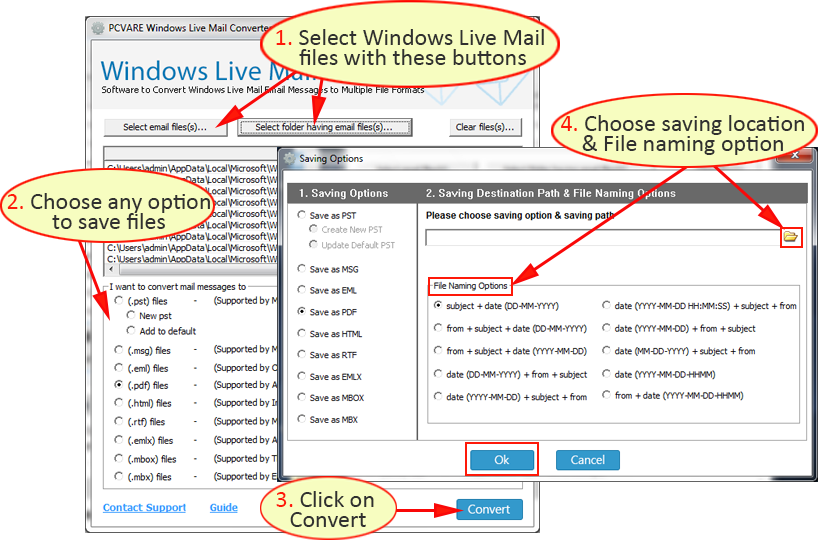
Email clients are very popular nowadays like Windows Live Mail. According to a recent survey, the usage of email client is enormous. Nearly 1.21 billion emails are opened every day. Email clients are an epitome of communication and are the most safest and easy way to communicate with other users. There are many email clients who are popular and users now basically look for new email clients, great features.
Users tend to move to new email clients when there is a new improvement available and the mind of the user fluctuates very often. So, they are not loyal to a single email client. Email clients offer a simple way to send/receive emails with so ease. Plus they offer other features apart from only sending the emails.
File formats is useful as they are used in email clients and other applications. File format only decides the format in which the data is saved.
Windows Live Mail:
Windows Live Mail is the popular format which is started by Microsoft. It provides the option to access you emails, calendar and contacts in the offline mode. That is a major plus point of using Windows Live Mail. It also allows the user to organize motile accounts- Gmail, Hotmail, etc. Other features of Windows Live Mail are that there is an event reminder, shared calendars, etc.
File format which is supported in Windows Live Mail:
It supports EML format. EML is a simple format and a single file of email message is known is EML. The emails present in the Windows Live Mail is saved in EML format. These EML emails are stored in MIME RFC 822 format. The EML messages are in ASCII text.
Why there is a need to transfer Windows Live Mail Files?
As there are too much of email applications which users can use and each email application needs a different format which will easily work with that application or email program. If we talk about file formats then EML does not stand a chance when compared to other formats. The longevity of other formats and the usage of formats are much greater than EML.
Windows Live Mail also has its issues and users have experienced some issues, below are some reasons why users want to migrate Windows Live Mail emails:
When Windows Live Mail stops working after you have upgraded to a newer version of Windows Operating System
Freezing of Windows Live Mail
User not able to receive and send messages
Best possible way to convert Windows Live Mail messages?
The only and the best way is to use the converter which will do the conversion process within minutes. User can find and there are other ways which help in Transferring Windows Live Mail to new computer. Using a converter tool will allow the user to do the conversion in a more simpler, accurate and precise way. The tool is also very fast with its conversion. Other methods fail miserably because of their complexity and long process.
About the Windows Live Mail Converter tool
The converter tool will simply transfer the Windows Live Mail emails to the other formats such as (MSG, RTF, PST, MBOX, HTML, MBX, EMLX and PDF). The files which are converted in Outlook can be opened in the 32 & 64 bit of Outlook versions.
The Windows Live Mail Converter runs on both Windows 64 & 32 Operating System perfectly. There is no problem in transferring Windows Live Mail emails to other formats which is beneficial for Home & professional users. The tool has an option to transfer the multiple emails easily and there is no virtual limit on the number of emails user can convert. There is also a file naming option and the folder structure also is same.
According to the 2015 Ascend2 report, more than 70% of marketers worldwide said relevant content creation was the most effective SEO tactics. However, another set of statistics shows that 94% more total views on average are attracted by content containing compelling images than the one without any. With this in mind, it is evident that even though quality content plays an enormous role in website traffic increase, there are other influential factors.
In the following article we will provide you with the most essential website design features to consider improving in order to increase organic traffic.
Design
Depending on the nature of your work and the industry you are in, the design of your website will greatly vary. It is essential for a design to compliment the content of your website. While a multitude of colors and animations have their charm, flashy and in-your-face images might not be suitable for your line of business.
image found on: stocksnap.io
If you are looking to achieve a certain dose of professionalism – opt for minimalism. If you’re looking to setup your website fast, then skim throughWordPress’ rich theme collection and select the one that best describes you and your brand.
The Instagram Effect
Since you have only 15 seconds to capture your visitors’ attention, it is of utmost importance to make your content as appealing as possible. People are visual beings, what is proven by the fact that there is a 14% increase in page view when press release contains a photograph. The number is known to climb even up to almost 50% when videos are included. For this reason, ensure that each image you upload on the website is of the highest quality.
With the appearance of Instagram, the use of filters has grown rapidly, and the imperative should be put on the choice of the photograph for an article. For example, if you are running a coffee shop, first-class picture of a delicious cup of mocha latte is guaranteed to capture every coffee lover’s attention. The same goes for the travel websites: there’s no better motivation for a travel than putting up several sunrise images from Bora Bora to make people browse around the website more and eventually opt for a vacation themselves.
Visualize Your Words
Despite the fact that people are there for the content, they find it far easier to cope with the information load if it is presented on the graph. Fortunately, WordPress is a reliable partner for all newbie website owners who are looking to present the most important information in the chart.
image found on: stocksnap.io
Powerful WordPress Charts and Graphs plugin is easy-to-use tool that will help you incorporate interactive chart in any of your posts. It is quite flexible and customizable, so regardless of your website design, you are bound to find the one that will fit in the best. Infographics are another great way of driving traffic to your website, as they are can display even a large amount of complex data.
It’s All About the Little Things
Although you might find it insignificant, visitors pay attention to even the smallest things. Buttons from any post or page from your website are something people are bound to notice. Since you are looking to get your content shared across a number of social media platforms, aside from having enticing sharable content, you need eye-appealing buttons that will attract visitors and inspire them to click.
When looking for the best possible buttons to suit your overall website design, opt for WordPress Button Plugin MaxButtons, a plugin that aids website owner in generating outstanding CSS3 buttons with ease. They provide you with an opportunity to create an unlimited number of buttons in wide variety of colors.
Finally, don’t forget about thePin It button that enables people to share interesting image from your blogpost fast and easy. As the popularity of Pinterest is constantly growing, you will certainly see a significant increase in your content exposure.
Creative design, interesting images and videos are essential for website traffic. Nevertheless, you shouldn’t forget that the initial purpose of a website is to provide visitors with interesting and informative content. Ensure that your website is pleasing to the eye as well as memorable.
So, from a last few months there is increase in demand of more battery pack devices because of it most the devices get shut down till evening, due to this there are so many companies in the market coming with new huge power-banks which we can carry easily and be used to charge our device on the go.
But finally ASUS last year launched a device with 5,000 mAh Battery backup named ASUS ZENFONE MAX, which can even charge other devices using its huge battery.
Asus Zenfone Max UnBoxing & First Look
Asus Zenfone Max packing is done very clean and simple. The Smartphones comes with a Normal Micro USB cable + Charger, manuals, warranty card and a OTG cable so we dont need to buy a separate cable for it. There is no earphones in the package as now a days it is a trend for budget devices.
Built Quality and Design
When we come to the overall built and design the Zenfone Max comes with is, it is available in two color variants: black and white. The white variant is having a dull, smooth finish at the back panel, where as on back variant has a leather-like textured finish. The phone has a rounded gold plastic strip bezel running along all the sides.
The 3.5mm jack and Micro-USB port are at the top and bottom respectively, while the notification light is at the front, just next to the earpiece.
The power and volume keys on ZenFone Max is on the right side of the phone. The back panel is removable, and the Dual SIM with microSD slots fits over there, the battery or we can say a beast of battery is not removable.
At the back of the device there is a speaker grille at the bottom, the flash, camera and laser autofocus window on the top. The Asus and ZenFone Max logos are being printed on the back for the white variant, where as on the black variant the Asus logo is being embossed. I personally prefer the black variant, just because of its texturing.
The screen size of the Asus ZenFone Max is a 5.5-inch HD display. The screen has decent brightness and colors. The device comes with Corning Gorilla Glass 4 which adds up extra amount of protection to its front.
The package includes a 1A/5V charger that is just worse as it make the device charge in more than 4 hours with this battery size. The Fast Charging capability is just necessary for this huge battery device.
Memory, Storage and OS
The Device come with 2GB RAM and 16GB storage. On the first boot you will get around 9 GB free space and 0.9GB free RAM. OTG is supported. Apps are getting installed on the internal storage, there is an option to move them to external storage (some apps can be moved). But on the first boot there a whole lot of apps which just get update till 3 hours. and i need to uninstall most of them.
The zenfone Max is running ZenUI 2.0 based on Android Lollipop 5.0.2 and soon there will the update for it by ASUS.
Performance
Zenfone Max come with MSM8916 Snapdragon 410 quad core chipset (64 bit) clocked at 1.2GHz, coupled with Adreno 306 GPU. Overall performance is smooth, lag free and handset does not heat up. Max temperature I got is 36 degree with Full HD game play.
Benchmark
Quadrant – 14486
Antutu (64 bit) – 1st time 25853, 2nd time 24200
Nenamark 2 – 53.7fps
Multi Touch – 10 Point.
Camera
This Zenfone Max comes with 13MP laser AF camera with dual tone LED flash and front camera it comes with is a 5MP shooter. Laser AF is very fast and UI of the camera i just love the pixel master camera app. Camera quality is average. Rear camera can shoot FHD videos. The Video samples and the night shots are included in the video:
Battery
Zenfone Max is loaded with 5000 mAh non-removable battery. Battery backup is really very good, and with a single charge it can easily be used for 5 days for light usage. For heavy usage it will easily last for up to 2 days. The drawback of battery is, it take more than 4 hours to charge up the device because of no fast charging capability in it.
Hey guys if you are just frustrated by using your keys in old way then this Key chain is for you. As we all know carrying so many Keys on daily basis is a real pain, as it often makes our sitting uncomfortably. The Alternative, hanging keys from your belt is also a option but it always gives you a jiggling sound and will make you feel annoy. So, the KeySmart 2.0 is being designed and made to just remove the old way of handing keys. You must be wondering what is it? how it will work? what will be the price? so let begin.
The KeySmart 2.0 converts your whole mess of keys into a small, thin portable assembled solution which can never be possible in traditional keychains. By, the use of KeySmart, most standard size keys are being layered on between two aluminum handles, which makes your keys looks like a “Swiss Army Knife”. The base model fits up to four keys, but in my case as i am having a bit thick keys they are only able to handle two keys in it.
Fewer keys require small spacers while assembly, where as if you increase the keys you need to get an additional expansion pack from there website. The frame can also put up Metal USB drives in the space of two key slots. As the Keysmart is handling different keys with different sizes it need to be tighten by using the screws which they are having on the top of it.
I just love to use Keysmart 2.0 on my daily basis and will refer you as well if you are getting annoying by using the old key chains. This Keysmart is being a hand made product and is available in different colors. you can also buy different accessories with this from there website.
In the package they also include a hook using which you can also attach this keysmart with your old key chains like with belt etc.
Pros:
Simpl way for storing multiple keys silently
Easy-to-carry-frame with slim finish.
Expansions are available so thatmore keys can be added.
In these 5 years, everyone has witnessed a dramatic boost in the e-commerce market. Earlier, there were a few online stores that provided the limited product. Now, there are numerous e-commerce stores that provide fabulous deals for different kinds of products. Due to the presence of multifarious online stores, the competition level among them has become quite aggressive.
Every owner of online store wants to deploy the e-commerce website that can help them establish their business effectively. Here effectively means a lesser investment and a better return. In a bid to help a new and an already established business to set up the qualitative online store, this blog presents some interesting tips. That will not only enable the business runners to make their website for online store successfully but help them grow business for a long-term.
Lets have a glance over the effective tips:
Develop Customer-Centric Online Store: While deploying the digital store, you should focus on the customers’ experience. You should test the website from every angle to checkout the following things:
1. Broken links in the navigation menu
2. Compatibility with different platforms
3. Responsive to varied screen sizes
Along with this, it is imperative to keep the sign up form (for creating the account) easier and shorter. While shopping online, the e-commerce stores ask the customer to fill their details for developing account at their store so that they can shop easily. However, this is a one-time sigh up, it frustrates the users and lead to drop the plan for shopping that product. Hence, it is better for online stores to make the sign up form a lot easier that demands a little data.
SEO Optimized Architecture: The architecture of the website should be SEO optimized in order to maintain the presence in the search engine result page. Behind every successful website, SEO strategy plays a key role. Therefore, every business owner should never rush in deploying the website. From content to the layout, everything should be implemented with SEO-friendly attributes.
Adopt Mobile First Approach: The layout of the e-commerce store should be developed with the mobile first approach. The soaring usage of mobile to access the internet has compelled the major search engines, like Google to introduce change in the algorithm for ranking the website. Now, the search algorithm gives plus one to the mobile-friendly website. There are various renowned companies (like CSSChopper and others) that can help you deploy mobile websites and others. You can also hire the developer to craft the website for you from the companies.
Make Engaging Contents: The content in the online store should be engaging. The content can only be engaging, if it provides every information that visitors want to know. During shopping, most of visitors face confusion in selecting the relevant product, owing to this they drop the plan for purchasing the product. Hence, it is better, if you provide every description of the product in an easy language and readable format.
It is also better to feature a blogging space with the website. The blogging will be helpful for you to promote your newly launched sale, product and services. Moreover, you can also provide the imperative content through the blogging that helps your customers make the relevant decision.
Integrate Social Media Button: There are billions of users on social media. It can be a great platform for anyone to channelize the people from all ways of life toward the online store. Hence, never forget to integrate the social media button with the online store so that your visitor can share the information about your store with just one click.
Also, you should have a fan page on social media, where your followers and fans can connect with you and share the feedback related to your service. This can back the healthy relationship between you and your customers, which is good for long run of the business.
Structure Engaging Design: Layout is the most imperative element of the website that can render awesome experience. Whether it is typography or navigation menu, the website owner should take care of everything associated with the layout of the web page. The white spacing, background image and the whole theme reflect the content and product in such a way that visitor will never face any problem while exploring the products.
Even the structure of landing page should be structured with a conversion-centric layout. It should be designed in such a way so that the visitors do not get distracted easily and process the activity. Moreover, it should be also taken care that design is responsive.
Conclusion
Hopefully, these tips will definitely help you set up the online store that can take your business to a new level and ensure a better prospect in the future. If you like to share your experience, then you can write to us in the comment section given below. Stay tuned with our blogs, we will soon come with a new idea, concept and trending technology.


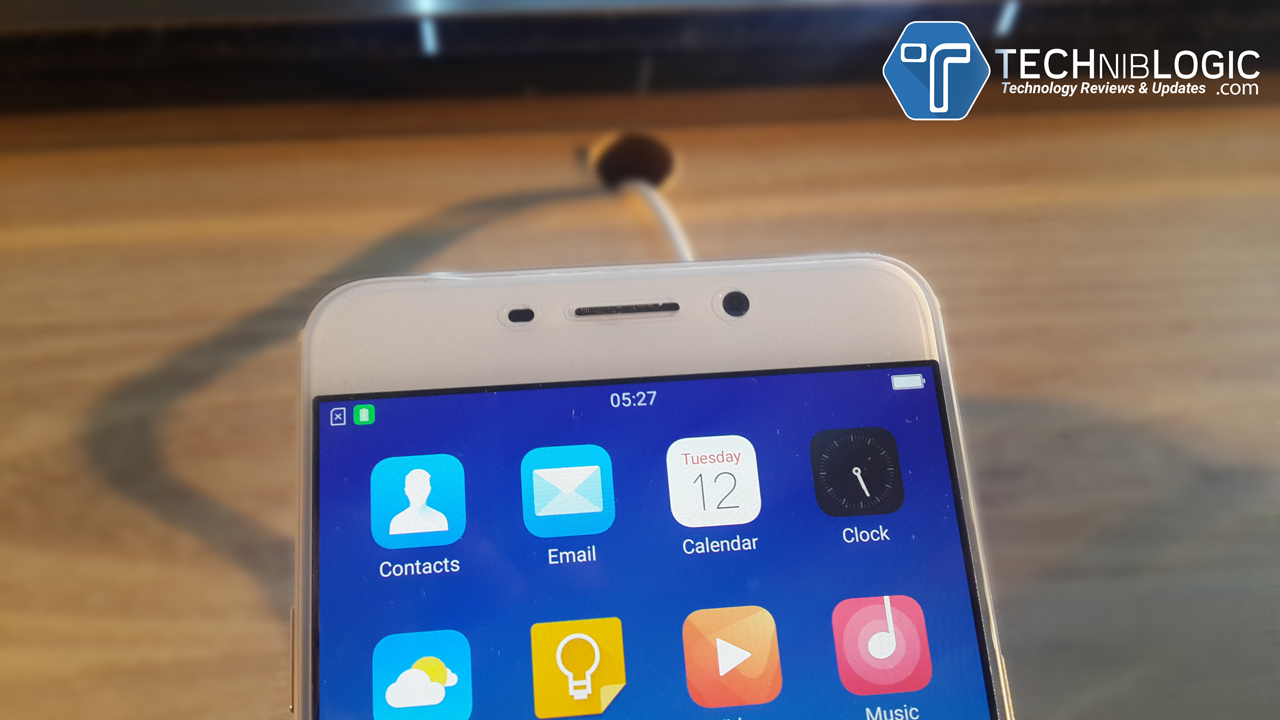


 Over the past few years, the number of net mobile users have significantly increased that has indirectly led to the rising figure of mobile searches. Evidently, mobile searches surpassed the number of desktop searches this year. And, this figure of mobile searches is definitely going to grow with the increase in number of mobile devices. Moreover, the tech-giant Google has also claimed that it is not just necessary to own a desktop-specific website instead it’s better to have a responsive one that provides uniform experience on all devices.
 For a long time now, Google has been fervently working to provide improved local search features. And being a successful businessman, you need to be known by the Google of your location and offerings. To simplify this task, local pages are created to exhibit your address, business, etc. on SERP. According to the latest surveys, almost 50% of mobile searches are done to find local results, which totally reflects that local pages can readily improve the customer engagement and ranking of the business.
 Direct answers to the questions is a preferred SERP feature in current time. See below an example of how and what direct answers work. The marked content in the box is a direct answer to the question “What is web design”.
![How to Make your Android Phone Look Like iPhone iOS [NO ROOT]](https://techniblogic.com/wp-content/webp-express/webp-images/uploads/2016/03/How-to-Make-your-Android-Phone-Look-Like-iPhone-iOS-768x432.png.webp "How to Make your Android Phone Look Like iPhone iOS [NO ROOT]")