Home Blog Page 60

Improving Your Business’s Internet Connectivity

Practically every business these days relies on the internet. Whether it’s storing important files on the cloud, promoting your brand online, or conducting sales, businesses rely on the internet for a wide range of functions to operate. This is why it’s essential that your business has a strong and fast internet connection. If your business has been struggling with the internet lately, such as regularly dropped connections or slow speeds, it’s time you did something about it. Below are a few simple strategies you can follow to improve your business’s internet connectivity.

Talk to Your Service Provider

One of the simplest things you can do is talk to your Internet Service Provider (ISP). Tell your ISP that you’re experiencing some issues with your internet, such as low speeds or dropped connections. Your ISP can then recommend steps that may help to resolve the issue. They may also be able to upgrade you to a faster internet connection for an increased price. You’ll have to decide if you need the increased speed and if it’s worth the cost.

Also Read: Green Soul Raptor Gaming Chair Review

If the suggestions from the ISP don’t work, they may send someone to your location to investigate the issue further. Whether you’re working at an office or from home, it doesn’t hurt to talk to your ISP and see what they recommend.

Upgrade Your Equipment

A common reason for a poor internet connection is the equipment you’re using to connect to the internet. To connect, you’re likely relying on a modem and a router. If either of these two items is older, they may no longer function as well as they once did. In addition, some equipment works better than others when it comes to numerous connections. If you have a lot of people connecting to one router, for example, it may be that your router isn’t capable of handling that many connections. To improve your internet connections, consider upgrading to better equipment throughout your office.

Change Your Network Architecture

Network architecture refers to how all your different internet devices connect to one another. There are various potential setups, some of which may be more suitable for your environment than others. For example, many businesses rely on a LAN setup, as this is best for devices that are within the same building. However, if your business grows larger, you may find that an SD-WAN application is more suitable for you. With an SD-WAN connection, you’ll be better able to handle all your enterprise applications and dynamically route traffic. Explore the different network architecture possibilities and see which one would work best for your business.

Monitor Internet Usage

The issue with your network may be that something is using more of your bandwidth than you realize. It’s a good idea to monitor your business’s internet usage and track when you’re experiencing issues. For example, you may discover that you experience slow internet connections at a certain time of day, which just happens to coincide with when your servers update. Knowing this, you could then adjust your server update times and free up bandwidth during the day. There are many network monitoring tools that you can use – pick one and see if you can identify the problem yourself.

Enhance Your Cybersecurity

If there is a virus or unauthorized access to your network, it could result in problems with your internet. Sometimes you don’t even realize that you’re experiencing a cybersecurity threat until it’s too late. To ensure that a cybersecurity attack isn’t the source of your network issues, it’s best to enhance your security protocols. Simple things like regularly changing your passwords and updating your firewall can go a long way toward keeping your network safe and healthy.

Implement Usage Policies

Finally, you may need to implement some usage policies throughout your office. Your employees may be using the internet for other things besides work, such as streaming music throughout the day. If your network is struggling, you may want to restrict the hours during which employees can use certain internet functions.

Also Read: Amkette EvoFox Shadow Gaming Mouse Review

There may also be work-related functions that you need to restrict to certain times. For instance, request that employees back up their files at the end of the day, rather than during working hours, to limit the amount of bandwidth being used. Some simple policies like this may be enough to lighten the load on your network.

Make Internet Performance a Priority

It’s hard to work efficiently if your internet has problems. Whether it’s a slow connection or problems connecting at all, each issue can lower your productivity and hurt your business. Make it a priority to explore the suggestions above and hopefully, before long you’ll have a stronger internet connection throughout your business.

The Differences Between Converged and Hyper-Converged Infrastructure

Consider the beginnings of your IT management infrastructure. When did a true plan emerge? Networking, data storage, computing, and server virtualization are all examples of infrastructure components. Four of these were most likely created to meet the demands of a certain assignment. For a given quantity of files and other parameters, a specific method of storing would have been selected.

Also Read: 14 Best Website to Watch Cartoon Online

However, these initial infrastructures are challenging to manage. Because more than one provider handles your components, it will likely cost you a high fee and become too complicated. Multi-tiered vendor systems will also make data migration to the cloud more difficult. The core IT solutions are converged infrastructure (CI) and hyper-converged infrastructure (HCI).

But what exactly is right for you? CI or HCI? Read this post to find out.

What Does Converged Infrastructure Means?

At its core, CI is a cost-effective, strategic, and simpler means of meeting your IT needs. This infrastructure strategy offers server appliances in a single compact piece of hardware. Your IT team will only need to work with one provider for support. You’ll also avoid investing in a lot of physical space for various equipment since CI is a single-box solution.

What Exactly Is Hyper-Converged Infrastructure?

In contrast, HCI uses intelligent distributed software to integrate pools of storage and server assets into a 100% software-defined solution to help business applications. It replaces outdated infrastructure components, such as individual storage arrays, storage networks, and servers, with a single distributed architecture, resulting in a highly scalable data center.

While converged and hyper-converged infrastructure aspires to address the pain points associated with outdated infrastructure, the two approaches to those difficulties vary significantly.

The Difference Between Converged and Hyper-Converged Infrastructure

Though HCI and CI address multi-tiered IT infrastructure issues, they differ. CI is hardware-based, while HCI is software-based. Because CI comprises several hardware components, it may be disassembled and utilized as a stand-alone device. 

For example, the server may be removed and used alone, and individual storage units can be isolated and used individually. Because hyper-converged infrastructure relies on software, all of the components must be handled in tandem. They’re generally less adjustable, and consumers give up some choice over what they receive from the first installation.

Also Read: 10 Best Casual Game for Android

However, employing software allows you to start with a small amount of storage and scale up as required at a reasonable cost. When an additional room is necessary, CI hardware must be acquired and installed, which may be costly. To begin with, HCI will be more costly since software licenses and the like must be purchased. However, use HCI if you desire a greater initial cost but significantly cheaper ongoing maintenance expenditures.

The Benefits of Converged Infrastructure

When the main benefits of CI are reviewed, it is clear why so many firms are embracing this technology. Among the most convincing advantages of CI are the following:

  • Reduced maintenance and support costs. Because CI significantly lowers duplication, maintenance and support expenses are significantly lowered. IT professionals do not have as many repetitive duties to maintain the system working. This saves the firm a lot of money, mainly when introducing new infrastructure components.
  • Compatibility concerns have been resolved. Compatibility difficulties are easily avoided since everything is provided by a single vendor or a supplier and its partners. This is another way CI helps save expenses and simplify data center administration.
  • Eliminate silos. CI removes technological, process, and individual silos. CI is a significant step toward managerial simplicity and comfort.
  • Plug and play solution. Converged infrastructure is a ready-to-use solution. It comprises independent components that may be detached from the infrastructure and utilized independently. Individual blocks may be snapped together to form larger structures. This method is less expensive than the a la carte method.
  • Improved efficiency and agility. IT components are combined into a single, streamlined platform with centralized administration using CI. This increases agility as well as efficiency. It also aids in cost reduction owing to higher use.
  • Purchase, deployment, and usage have all been simplified. Compared to conventional, non-converged architecture setups, procuring, installing, and utilizing CI is simplified since all components are contained in a single box.
  • On-demand growth model. While enabling an on-demand expansion strategy, CI enables enterprises to design, create, and manage individual pieces of a virtualized stack.

Also Read: 10 Free Instagram Reels Video Download Online

The ability to swiftly and easily expand data center demands is critical for any corporation.

The Benefits of Hyperconverged Infrastructure

To have a better understanding of the technology, consider the following benefits of HCI:

  • Streamlined productivity. Streamlining the solution’s procurement, implementation, maintenance, and administration decrease costs while increasing staff efficiency, thereby improving profitability. This simplification also allows for faster application development, which is another benefit.
  • Easy scaling. HCI offers a scalable, building-block approach that is simple to scale—add additional units.
  • Extreme efficiency. HCI enables exceptionally effective resource use by reducing IOPS, removing redundant devices and services, and offloading intense work off x86 processors, guaranteeing that maximum CPU resources are always accessible.
  • No third-party replication and backup. HCI eliminates the need for third-party duplication and backup hardware and software and third-party backup experts due to virtual machine-level backups and backup data replication across locations.
  • Lower cost. Reduced operational expenses (and total cost of ownership) also minimize or eliminate interoperability and complexity difficulties.
  • No discrete IT components. Because there are fewer moving components, there is less potential for hardware problems. Under the hypervisor, all IT services and infrastructure are merged into a common pool of x86 resources.
  • Centralized management. You may control all virtual environments worldwide from a single interface. This reduces the effort required to maintain the system, enhancing productivity. It also reduces the possibility of over-purchasing and over-provisioning.
  • Greater mobility. HCI moves management to applications and virtual computers, resulting in more mobility.

Conclusion

Converged infrastructures are increasingly common among businesses that must swiftly expand their systems and wish to spend less money per growth unit. However, many organizations choose hyper-converged infrastructure for life cycle and cloud applications, app development environments, and big data analytics.

Also Read: 6 Best Youtube Tools to Grow your Channel

Smaller organizations that seek to transition away from conventional IT systems prefer hyper-consultancy to converged solutions. The scope of your IT needs and your budget will determine the best option for your organization.

EvoFox Elite Play Wireless Controller Review

0

Are you a professional gamer, or just play games for fun? You must love to play games with a wireless Controller. But it is very difficult for everyone to buy these expensive consoles and experience gaming with their handy controller. So here comes an awesome gadget that will fulfil your budget needs: EvoFox Elite Play Wireless Controller.

Also Read: Green Soul Raptor Gaming Chair Review

As technology is involved day by day, wireless controllers still have their own place in the gaming community. Everyone likes to play with a wireless controller, whether you are a PC gamer, Mobile gamer or Console gamer. The new generation EvoFox Elite Play Wireless Controller is loaded with all the features you need to play games on any gaming platform. It is a universally compatible device that can be connected to PS4, PS4 Pro, PS4 Slim, Android Phones, iPhones, iPads or even Windows. Isn’t it Great!

Let comes to EvoFox Elite Play Technical Specifications first,

EvoFox Elite Play Specs

Weight0.25 kg
Dimensions17.2 × 11.6 × 7.2 cm
ColourBlue, Red
Battery Capacity600mAh
Playback Time8-10 Hours
Charge PortMicro USB
Charging Time1.5-2.5 Hours
ConnectivityLow Latency Bluetooth 5.0
ButtonsD-Pad Up-Down-Left-Right, 4 Action Buttons, 2 Bumper Actions R1-L1, 2 Joystick/3D Buttons, Share, Options, Home Buttons.
Operating Range10m
CompatibilityPS4, PS4 Pro, PS4 Slim, Android Phones/ TVs, IOS 13 Onwards
Model NameEvoFox Elite Play
Warranty1-Year Manufacturing Warranty

You must get some technical insides; now let’s open the box.

EvoFox Elite Play Box Content

EvoFox Elite Play Wireless Controller Review 1
  • 1 Wireless Controller
  • 1 Charging Cable
  • User Manual
  • Warranty Card
  • Brand Stickers

Now you know what all you get when you buy it, Let’s come to its design & build quality,

EvoFox Elite Play Design & Build Quality

EvoFox Elite Play Wireless Controller Review

When comes to its build quality, it has premium PVC with a rugged matte finish on top of it for better grip while holding. It is very lite weight, and its design is similar to Sony’s DualShock 4. You will get 2 joysticks and other buttons. Overall it has every button that you may need.

Also Read: Amkette EvoFox Shadow Gaming Mouse Review

One thing that is unique in this segment is its big touchpad at the top with the brand logo. This Touch Panel is mainly designed for iPhones/iOS devices as well as PS4. It may lack some accuracy, but its button can be used in some way.

EvoFox Elite Play Wireless Controller Review

When it comes to the top side of the gamepad has 4 traditional game controller buttons that make your gaming fast. Apart from that, you will find a LED light that works as an indicator for charging and connectivity. Just below the Led light, you will find a micro USB port that is used to charge this device and help connect it as a wired gamepad, which is an extra bonus feature you can play with.

EvoFox Elite Play Wireless Controller Review

There is nothing at the bottom of the gamepad, just an EvoFox company sticker with some details.

EvoFox Elite Play Wireless Controller Review 2

At the bottom, you will get a PlayStation docking port along with a 3.5 mm audio jack. And it makes the gamepad more special as you can add your wired gaming earphones or headphones with the controller without lag.

EvoFox Elite Play Performance & Features

EvoFox Elite Play Wireless Controller Review 3

We have tested this game controller on many different platforms. It works fine and gives you an awesome gaming experience. It works perfectly with my iPhone 14 wirelessly with no lag, and it feels very handy. This gamepad is mostly made for iPhone or PS4 but also works on all other platforms, making it special.

If you are an iPhone user or a PS4 user, then this Gamepad is for you!

EvoFox Elite Play Wireless Controller Review 4

This EvoFox Elite Play Wireless Controller is loaded with many features, like Low Latency Bluetooth 5.0. Apart from that, you will get 6-Axis Gyroscope and Dual-Rumble vibration support, even a Built-In Speaker only for PS4.

EvoFox Elite Play Wireless Controller Review 5

Let’s talk about its battery; it has a 600 mAH in-built battery, which lasts about 8-10 hours per the company, but while testing it, I can say it can last about 6 hours plus that is a good number. And you can also play games with wire as well. I tried it on my Laptop, and it also works great.

EvoFox Elite Play Review: My Thoughts

Overall, it is a great value-for-money product for gamers that you can buy. It is an Over all package Game Controller that can work with almost every device, and if you look at its pricing, you will really shocked at how a brand is giving such a product for just 2500 INR. So if you are buying a game controller on a budget, you can go for it.

Also Read: Cellecor Actfit A3 Pro Review

It is available in 2 colour variants, red and blue. I personally like blue, but it is all about your choice.

You buy EvoFox Elite Play from Amkette.com or Flipkart or Amazon

Hope you like this EvoFox Elite Play Review; if you have any questions, you can ask in the comments or from our Instagram page.

4 Reasons Why Going Digital With Your Business Is an Investment You Won’t Regret

“Going digital” means moving away from analog systems and processes. Fully digital businesses have opted for speed and efficiency over increasingly-archaic systems. They have installed technology, software, and platforms to maximize accuracy, quality, and customer experience. And many have used web development companies to reach their goals.

Also Read: 14 Best Website to Watch Cartoon Online

Businesses and other organizations are rushing towards complete digitization. The cost and commitment to digital platforms and processes may vary with the business’s size, goals, and sector. But going digital with your business will be an investment you won’t regret! Your business will fall behind and out of markets in a climate of global competition unless you move now.

4 reasons to go digital:

Going digital does require an investment in time and money. But it also creates business value. It offers a reliable way to compete across global markets, enhance customer experiences, and expedite revenue streams. 

  1. Make better business decisions –

Digitization transmits the data at the center of all business decisions. Decision-makers will find consistent and reliable data resources increasingly essential to healthcare, engineering, and marketing. Analytic tools mine multiple data layers, driving business processes and operations and producing the foundation for faster and sounder decisions.

  1. Improve business performance –

Digital manufacturing processes speed up production outputs. But it ensures quality outputs. Digital office processes reduce paper, increase data accessibility, and improve employee accuracy and efficiency. Web development companies even build future scalability, flexibility, and success for entrepreneurs.

  1. Reach wider markets –

Businesses must go digital if they hope to perform reliably and consistently across global platforms. Digitalization enables and empowers connections, relationships, and sales conversions. It makes remote work possible and practical. And it helps a business respond and adapt to customer interest and feedback.

  1. Engage employees and end users –

Workers have lived in “the digital age” for some time. Raised in a world of smartphones, they expect to work with digital tools. Their work performance depends on the quality and relevance of your automation and digitization. 

Customers expect a robust website. They value one that captures the company’s products, purpose, and people. And they choose to do business with easy-to-navigate portals.

Also Read: 10 Best Casual Game for Android

Employees use internal systems for multiple reasons. They interact with systems that report their performance. They appreciate the ability to communicate with related functions, including Human Resources, Shipping & Receiving, and Quality Control. 

Make your own list –

Plant Engineering published research indicates that any strategic business budget must prioritize a continuous digital transition. You can list the reasons your business should go digital, reasons specific to your operation. In addition to those highlighted here, you could add money-saving justifications unique to your business sector.

Digitization may require an investment of “time, talent, and treasure” at the start. But it will pay for itself in the end. It will return the investment with improved and increased revenue channels, paperless functions and operations, and engaged internal and external customers. Going digital — with its flexibility, reliability, and scalability — ensures your business’s future.

Western Digital launches SanDisk Pro-Grade Storage Solutions for creators, professionals

Recently, Western Digital introduces its SanDisk Professional Pro-Grade Storage for creators in India. All products are designed to help creators do better and faster content management. Newly introduced products include SanDisk Professional PRO-G40TM SSD, G-RAIDTM Shuttle SSD, G-DRIVE™ Enterprise-Class Desktop Hard Drive, and PRO-DOCK 4, a 4-bay reader docking station.

Western Digital launches SanDisk Pro-Grade Storage Solutions for creators, professionals 6

Sandisk Professional helps the creator from capturing and transferring to editing and archiving the content. SanDisk Professional brand offers a range of purpose-built storage solutions to for every step of the content creation process with professional-grade performance and enterprise-class reliability.

Also Read: Green Soul Raptor Gaming Chair Review

Jaganathan Chelliah, Senior Director-Marketing, India Middle East and TIA, Western Digital, said, “Western Digital believes digital content is the voice of the content creator manifested through technology. Captured or created content needs to be saved, transferred, off-loaded, shared, and archived. Our newly introduced SanDisk Professional brand enables content creators and professionals to ‘Create the Incredible’. SanDisk Professional offers a range of purpose-built storage solutions to harmonize every step of that process.”

Western Digital launches SanDisk Pro-Grade Storage Solutions for creators, professionals 7

SanDisk Professional PRO-G40 SSD comes with super-fast speeds of up to 2700MB/s3 read3 and 1900MB/s write3 with a Thunderbolt™ 3 (40Gbps) interface. It is priced at Rs 34999 in India with a 5-year limited warranty.

SanDisk Professional G-RAID Shuttle SSD comes with Thunderbolt™ 3 (40Gbps), and USB-C™ (10Gbps) interfaces with Transfer rates up to 2800MB/s3 read deliver incredible speed. It is available now for MSRP starts Rs 3,99,999 in India with a 5-year limited warranty.

Also Read: 10 Best Casual Game for Android

SanDisk Professional G-DRIVE Enterprise-Class Desktop Hard Drive comes with speed data transfers up to 280MB/s read3 and 280MB/s write3 (22TB capacity) using the USB-C (10Gbps) port. It is available in 4TB, 6TB, 12TB, 18TB, and 22TB capacities with pricing starts Rs 19,999/- and is available with a 3-year limited warranty.

SanDisk Professional PRO-DOCK 4 comes with 4 different SanDisk Professional PRO-READER devices. It is available now for MSRP Rs 34,999/- in India with a 3-year limited warranty.

Khalid Wani, Senior Director- Sales, India, Western Digital said, “At Western Digital, we are constantly innovating and introducing storage solutions to help creators at every step of the process to capture the extraordinary. Our professional-grade portfolio under SanDisk Professional Brand allows us to offer premium solutions to the growing community of creators.”

Availability

You can purchase all these newly introduced SanDisk Professional products through the Western Digital Store (Andheri West), authorized SanDisk Professional retailers, or official Sandisk distributors.

Unmissable Free Unattended Remote Access Software

What is unattended remote access?

Unattended remote access means remote access to a computer when there is no end-user located at the computer to accept the remote access. Then, your employees can access all necessary content saved on office computers from anywhere and at any time without going to the office.

Also Read: 10 Best Casual Game for Android

And IT assistants can offer remote support without requiring customers fixed in front of the computers. All in all, unattended remote access bring great conveniences to our life and work.

AnyViewer: The most recommended free unattended remote access software

Actually, there are various options for unattended remote access software and many of them are famous and popular like TeamViewer. However, many free license users reported that their connections are detected as commercial. 

Thus, AnyViewer, a free unattended remote access software windows 10 with rich features and without time limit is highly recommended. Now, let’s have a comprehensive understanding of the most-recommended free unattended remote access app. 

How does AnyViewer protect data safety during the remote connection?

During the remote access, AnyViewer employs powerful algorithm – Elliptic Curve Cryptography for end-to-end encryption to ensure safety. 

How to use AnyViewer for unattended remote access?

AnyViewer offers two ways for unattended remote access: One-click control and security code access. After set up, the first way enables you to access each other with one click, which suitable for your own PCs. The second way requires to input device ID and security code of the PC that you want to access; it is more suitable for offering remote assistance when your customers isn’t on the other end. 

What can you do during the remote session over AnyViewer?

Once remote connection is established, you can use the remote PC as you want. And AnyViewer offers various useful features in the remote session. 

On the Controller Toolbar

  • Adaptive: You can use this feature to adjust the screen to fit the current window size. 
  • Resolution: You can change the resolution to the one that you want and the offered resolution varies from  800 x 600 to 3840 x 2400.
  • Image Quality: Three options are provided: High Quality, Balanced and High Speed, to fit different network conditions. The first one is available in Professional or Enterprise plan and Free plan doesn’t support it.  
  • Chat: Click the Chat button and you can enter chat window to communicate with the one on the other end conveniently if you need. 
  • Files: To transfer files between the remote PC and the local PC, click the Files button to enter File Transfer window.  
  • Shortcuts to essential operations: It offers shortcuts to Ctrl+Alt+Del, Lock, Logout, Restart and so on. It also offer auto-lock function when you close the remote session. 
  • Full screen mode: You can enter the full screen mode to maximize the remote desktop window.

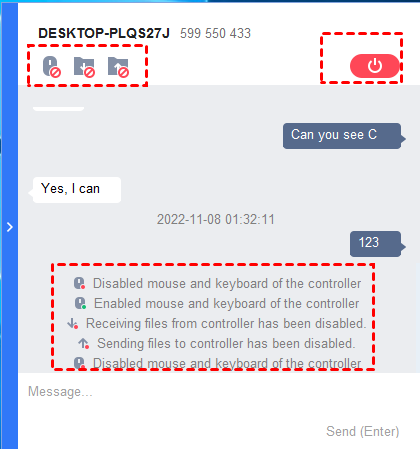
On the Recipient Toolbar
Once the remote session built, there’ll be Recipient Toolbar on the controlled computer. In the Recipient Toolbar window, you can chat with the one on the other end, disable/enable mouse & keyboard control from the controller, and disable/enable sending /receiving files, and end the remote session. 

Unmissable Free Unattended Remote Access Software

Step-by-Step Guide: Unattended remote access with AnyViewer

Can’t wait to try the free unattended remote access software, AnyViewer? Keep reading to realize detailed steps. 

Step 1. Download, install and run AnyViewer on both computers.

Note: It’s available to access unattended computer from Android or iOS over AnyViewer, you can download the mobile app from Google Play on Android devices or App Store on iPhone/iPad.

Also Read: 10 Top Web Series on Netflix in Hindi Dubbed

Step 2. On the client PC, click Log in > Sign up to create an AnyViewer account and make sure that both computers (the client PC and the host PC) have logged into the same AnyViewer account. 

Unmissable Free Unattended Remote Access Software

Step 3. On the client PC, go to Device, and locate the host PC. Click it and click One-click control. Immediately, you can achieve unattended remote access. 

Unmissable Free Unattended Remote Access Software

Conclusion 

AnyViewer won’t let you down, if you are looking for an easy and reliable unattended remote access freeware for remote work or remote assistance. AnyViewer can be used for attended remote access. If there is one on the other end to accept your remote access, you can use AnyViewer to send remote control request after AnyViewer installation and launch on both PCs. 

How to Hire and Retain Startup Executives

Running a startup has to be one of the most challenging tasks any entrepreneur can take on. From managing a budget to developing relationships with customers and investors, there’s no shortage of moving parts that you must address to ensure success. Finding the right executive team is one of the most important elements of running a successful startup.

Also Read: 14 Best Website to Watch Cartoon Online

An experienced executive team will have the skills and knowledge required to navigate the ever-changing startup world, but just as important is having an executive team that deeply understands your business and its mission and will work together with you to guide the company toward future success. Here are some tips on how to go about the process of finding and retaining the right startup executives.

  1. Partner With Recruitment Agencies

Finding top talent in Canada can be expensive and time-consuming. That’s why partnering with recruitment agencies specializing in executive search Toronto for startups is important. These agencies have the resources and knowledge required to find you the right executive team members quickly and efficiently. They also often have access to a larger pool of potential candidates you may not have considered otherwise.

  1. Take Your Time

Finding the right executive team for your startup is a process that takes time. Don’t rush into making any decisions, as this could lead to costly mistakes down the road. Take your time when searching for potential executive team members, and make sure you understand their skills and experience before bringing them on board.

  1. Build Long Term Trust

Strong relationships don’t just happen overnight. It takes time to build trust with potential executive team members, which needs to be done well before the hiring process begins. Executives need to feel as though they are part of a startup that is focused on their success as much as it is their own. You can build trust by having open and honest conversations with potential executive team members. Make sure they understand your vision for the company and get them involved in decisions that could impact its future.

  1. Offer a Competitive Salary and Benefits Package

This is one of the most important steps when hiring startup executives. You must ensure that you’re offering a competitive salary and benefits package to attract the best talent. Not only will this help you land the right executive team members, but it will also help ensure they stay with your startup for the long haul.

  1. Prioritize Diversity

The most successful startups are ones that embrace diversity and inclusivity. This means hiring executives from a variety of backgrounds with different perspectives and experiences. This will help ensure your startup has the right mix of people to help it achieve success. Diversity does not mean that you should ignore qualifications, but it does mean you should be open to the idea that different perspectives can bring unique solutions to your business.

  1. Create a Culture of Learning

Your startup executives need to be lifelong learners if you want your business to succeed. This means providing learning opportunities for your executive team, such as attending conferences and workshops or giving them access to the latest industry information. It’s also important to create a culture of feedback within your company. Make sure executives feel comfortable offering their input and ideas and foster an environment where they can ask questions and exchange ideas with their peers.

  1. Provide Opportunities for Growth

A successful executive team is constantly growing and evolving. You need to ensure you’re offering your executives opportunities to grow, such as giving them additional responsibilities or allowing them to take on new projects. This will show your executive team members that you value their contributions and are dedicated to helping them achieve their goals. Consequently, they will be more likely to stay with your startup in the long run and focus on streamlining your business operations.

Also Read: 10 Best Casual Game for Android

Finding the right executive team for your startup is essential for success. It’s important to take the time to build relationships with potential members, offer a competitive salary and benefits package, create a culture of learning, provide growth opportunities, and partner with recruitment agencies to ensure you find the best possible fit. Doing so will help ensure your startup has the leadership needed to succeed.

6 Cutting-Edge Strategies for Promoting Your Brand Online

Driving interested eyeballs to your online brand takes a lot of forward thinking. You can buy short-term visitors with heavy marketing, but it won’t help your long-term goals. That is why you need expert strategies for online promotion to become part of the modern success story. 

1. Guest Posting

Guest posting services are one of the easiest ways you can improve your online brand. Depending on your choice, it can be the most hands on marketing strategy, or the most hands off. A guest posting service automates the often-complicated world of guest blogging. Instead of forcing you to vet every minor detail about the post, the actual power comes in letting the brand decide the best fit for content.  

2. Social Media Presence

Businesses will never escape the need to advertise on social media. It is still the #1 way to get people interested in your brand. This is for all ages, and doesn’t even include how big social media is on smartphones!

Also Read: 14 Best Website to Watch Cartoon Online

With ad space now cheaper than ever, social media presence is all about consistent marketing rather than finding that diamond in the rough viral content. If you can keep your social media posts at an acceptable quality, then expect the brand to grow quite nicely. 

3. Email List

Some of the newer online brands laugh at the idea of putting money into email lists. The truth is that the old ways are still viable, even in an industry where branding methods have changed a million times. A reliable email list can be just as powerful as a social media presence.

Also Read: 10 Best Casual Game for Android

A bad email list will get you blocked, and on some email servers completely banned. It’s not a numbers game like it used to be, so put effort into establishing and nurturing an email list for your brand. 

4. SEO

Marketing companies shout about SEO strategies from the mountaintop but leave out a lot of key details. SEO without optimization is like throwing your brand to the search engine wolves. Put yourself in the mind of a potential customer before going deep into SEO strategies. An unbiased look can root out a lot of the problems young companies have with implementing hardcore SEO marketing campaigns. 

5. Content

You can do everything right for your brand and still come up short with the actual content. What is your industry? What does your content say about the brand? And are your backlinks staying ‘On Brand’, or are they sapping your customer base? Promotion gets customers to the website, but the content keeps them there. Good content leads to word of mouth and an improved outlook for your brand. 

6. Partner Up

Partnering up with a business that shares your values is a great way to promote both brands. This is even better if both companies aren’t directly competing with one another. But stranger things have happened, and some of the strongest promotion came from two brands pretending to hate one another for the fanbase. Brands are no different than sports teams, and customers love to see their side winning.  

Stay Ahead of Your Peers

Become a leader in your industry by taking the steps to stand out from the crowd. You have the tools to promote a brand, and it all starts with the right mindset. Customers are always interested, so it is your job to meet their needs. 

Get To Know Shopping Security Measures

How well prepared is an establishment for an emergency if hundreds of people visit it on any given day?

Managers and police officers or even shopping center surveillance in charge of security are obligated to take safety precautions in an emergency. Any establishment’s continuity of law and order depends on its emergency planning and management procedures.

Also Read: 10 Best Casual Game for Android

A shopping center’s strategies for dealing with emergencies often include three stages: pre-opening, during-opening, and post-opening.

Prognoses of the Weather

Keeping an eye on the forecast is important, especially while it’s raining or snowing. In the case of heavy rain, quick snow accumulation, or other natural disasters, security personnel must be vigilant in monitoring weather reports and forecasts.

On the job, guards frequently listen to the latest news and weather updates on their transistor radios. Studying the area’s demographics may gauge the business’s safety.

Knowledge Maintenance

Being responsive entails doing what’s necessary during an ongoing crisis. Security personnel can appropriately respond if they are aware of the circumstances. Each staff member should be familiar with the protocol for handling an emergency.

Meanwhile, the staff should be aware of their role, including how to carry out crowd management, evacuation, and rescue efforts in an organized fashion.

Timing is of the essence when responding to emergencies such as fires, earthquakes, and stampedes. If you have people spread throughout the building, it might be difficult to have everyone in the same room simultaneously.

When this happens, having a reliable radio communication system to issue orders and check on the progress of a rescue mission is crucial.

Responders should prioritize the well-being of the people within a building before preserving its valuables. It will be easier for rescuers to aid employees when they know what to do.

The more time they have to secure the mall’s staff, the less time those people have to help other shoppers or people escape the mall.

Making Room

Malls and other commercial establishments are vested in quickly recovering from disruptions and returning to business as usual. Normal activities may not quickly resume after an incident, such as a fire or an earthquake. 

Since any type of emergency will disrupt business operations and the well-being of the company’s personnel. Preventing loss of life and property requires a well-coordinated emergency response.

Damage assessments and inventory of what is lost or destroyed are common post-rescue activities. When health risks or fatalities occur on the job, it is crucial to take precautions to prevent a recurrence.

Having a Plan

Unquestionably, every group has to be ready for emergencies. Maintaining operations in the face of an emergency depends on preparing the assigned staff or unit/department.

Also Read: 14 Best Website to Watch Cartoon Online

The ability to provide first aid in an emergency is essential to the safety of both employees and customers, even though many first responders lack access to more sophisticated equipment (since most are not rescue units).

Conclusion

Emergency preparation involves continually upgrading skills/training to enable personnel, not just the security personnel, on the basic safety practices during an emergency. The above gives you recommendations on what to do when an emergency happens, and training tests the rescuers’ abilities to keep victims safe and secure property.

How To Get Deleted Files Back? In Windows 11

Microsoft’s most recent operating system has several features that let you recover deleted files that Windows 11 can no longer access or view, even though it is not impervious to data loss.

Also Read: 10 Best Casual Game for Android

Users have many recovery options to choose from when coping with various data loss circumstances because the OS is compatible with many third-party data recovery software tools. 

Top 4 methods to recover your lost data in windows 11

This section examines in-depth the best ways to recover deleted files on Windows 11. To choose which solution to apply, please check the table in the preceding section because each is useful in a distinct data loss situation or you can try third party tools like R-Undelete that helps you with data recovery.

Method 1: Recover all your data from Recycle bin 

The greatly improved Recycle Bin included with Windows 11 allows you to recover recently lost data without requiring any additional software: 

1. Open your Recycle bin from your desktop 

2. Recover the file that you want by selecting it. 

3. By right-clicking on any selected file, you can restore the file just by clicking on the restore option. 

4. Alternatively, you can drag & drop the chosen files to the desired spot. 

Get Deleted Files Back

Method 2: Restore Files Using the File History Feature 

With Windows 11, you may still access your backup drive’s File History backup drive to retrieve stored copies of your data. It has a great feature to recover files that you deleted permanently and are not present even in the recycle bin making this feature excellent. 

1. Enter the start menu and select the option  “Control panel“. 

How To Get Deleted Files Back? In Windows 11

2. Click and launch the Control Panel app.

3. Select System and Security > File History from the menu.

How To Get Deleted Files Back? In Windows 11

4. In the left sidebar, select the Restore personal files option.

How To Get Deleted Files Back? In Windows 11

5. In the left sidebar, select the Restore personal files option.

6. By going back in time and locating a backup copy of the files you can recover lost files. 

7. Select the file and click the green recovery button. 

How To Get Deleted Files Back? In Windows 11

Method 3: Utilize Command Prompt to recover without needing external software 

It is possible to repair corrupted files that cannot be accessed or located using some well-known command-line tools included with Windows 11. 

CHKDSK

You can directly access CHKDSK using the storage device Properties or the Command Prompt (cmd.exe). CHKDSK is the most crucial command-line program for fixing tainted files. 

  • Command Prompt: 

1. Select the Windows Terminal option by pressing Win + X.

How To Get Deleted Files Back? In Windows 11

2. Type in: chkdsk volume: /r ( Replace “volume” with the letter assigned to your storage device).

3. As soon as CHKDSK completes scans and repairs your storage device, press Enter on your keyboard and wait.

How To Get Deleted Files Back? In Windows 11
  • Properties:  

1. By clicking File Explorer, launch it.  

2. Choose This PC from the locations list in the left sidebar.

3. Right-click the storage device you want to repair by accessing the Properties menu. 

How To Get Deleted Files Back? In Windows 11

4. Now choose the Tools tab.  

5. Lastly, click on the Check button. 

How To Get Deleted Files Back? In Windows 11

ATTRIB

Besides CHKDSK, Windows 11 now includes a tool called ATTRIB. With the help of this tool, you can change many “attributes” of a computer file or directory.  For instance, you can reveal files that the virus has made invisible. What you must do is as follows: 

1. By pressing Win + X and selecting the option of  Windows Terminal. 

2. Type in: attrib -h -r -s /s /d volume:\*.* 

(Take note to replace volume with the letter assigned to your device). 

3. Press Enter from the keyword. 

How To Get Deleted Files Back? In Windows 11

Method 4: Recover Permanently Deleted Files from an Older Backup

Backup and Restore are one of the earliest data recovery solutions in Windows 11 (Windows 7). As the name says, you can generate a complete image of your machine and recover lost data using this function from Windows 7 (and Vista). 

1. Click to launch the Settings app. 

2. Search for system> Recovery. 

How To Get Deleted Files Back? In Windows 11

3. Then click the Restart now button.

How To Get Deleted Files Back? In Windows 11

4. Now follow these steps: Troubleshoot > Advanced options > See more recovery options > System Image Recovery

How To Get Deleted Files Back? In Windows 11

5. Choose your system image backup.

Conclusion

Windows 11 represents a significant advancement for Microsoft and its users with its focus on security and updated user interface.

Also Read: 14 Best Website to Watch Cartoon Online

Despite all the improvements, data loss will still be a significant problem for Windows 11 users because Microsoft cannot address many of its sources, including human error and device failure. 

5 Ways That Data Recovery Services Can Help Your Business

According to the UK Department for Digital, Culture, Media & Sports’ Cyber Security Breaches Survey 2022, 39% of UK businesses mentioned cyberattacks and breaches in 2021. The average cost of cyberattacks for large and medium-sized companies was reported to have increased to £19,400, with one in five disclosed to have been adversely affected. Regardless of their size or industry, organizations cannot avoid cyber security and data breaches. It just depends on when it will occur and how well you are prepared.

Data recovery: What is it?

When you experience data loss brought on by unforeseen events like system problems, data hacks, malware, or even human errors, data recovery entails storing your crucial data safely and having the capability to restore clean, undamaged replicas. Data recovery can be done in a number of ways. However, the majority of companies now make investments in cutting-edge, reliable cyber resilience software or data recovery software R-Studio that offers quick recovery options that help minimize downtime and save money.

5 Ways That Data Recovery Services Can Help Your Business

Data loss and cyber security breaches can occur to any organization, at any time, for a variety of reasons. Many companies use a variety of strategies to reduce cyber threats, including training employees and increasing awareness, adhering to governance methods and policies, purchasing cyber insurance, developing risk management plans, etc. But having a recovery strategy is equally important, if not more so. Only using preventative measures is insufficient.

Also Read: 10 Top Web Series on Netflix in Hindi Dubbed

All businesses, regardless of size, need to have a data recovery plan and procedures ready that safeguard all acquired critical data and aid in getting them back up and running quickly.

The following are the top five reasons why your company needs a solid data rescue plan and a quick fix on spot:

  1. Security & Upholding Brand Image

The number of security breaches and thefts has increased over the last few years as sophisticated cybercriminal attacks have persisted. No organization risks losing crucial data, which can result in identity theft and data leaks, costing them a lot of money, harming their brand’s reputation, and costing them customers.

A solid data recovery plan and solution can help organizations get ready completely. Businesses will be able to carry on with minimal interruptions thanks to a secure and rapid recovery process.

  1. Dependable and Clean Data Replication

Businesses need to have a solid data recovery plan in place, as well as an established software program that supports data replication. This enables businesses to recover clear, unaltered copies of trustworthy data, enabling quick recovery without having to endure expensive downtime and contributing to resource conservation.

  1. Competitive Benefit

You have a competitive advantage over your rivals if you have a proven data recovery solution. Businesses that experience data breaches and cyberattacks experience downtime. They lose hundreds of thousands of customers as a result of those customers switching to other operations and maintenance organizations that can guarantee the security of their data.

Also Read: 10 Best Casual Game for Android

The Works’ 526 stores had to be shut down after a hacker gained entry to their computer networks, which resulted in downtime for the company and happy customers making purchases from rivals. This is the most recent instance of this.

  1. Saving Money on Fines

According to reports, a cyberattack happens every 11 seconds, and in 2021, the average cost of one was $13 million, making it impossible for organizations to avoid them. When businesses are poorly prepared and ill-equipped, cyberattacks can become more and more damaging.

Also Read: 14 Best Website to Watch Cartoon Online

Businesses can avoid costly fines and get ready for a changing threat landscape and highly skilled cybercriminals by integrating a sophisticated data recovery alternative that can store data securely and protect it from suspicious cybercrime.

  1. Upholding Compliance Requirements

Organizations are required to securely store any data they obtain from clients, staff members, business partners, and third parties in accordance with the data privacy regulation. If you don’t, you risk receiving a very large fine.

Also Read: 78 Secret Tools used in Investigative Journalism

Every organization is required to implement all of the fundamental cyber security measures, including reviewing backups and having a recovery plan. Organizations can be sure to adhere to and follow cyber security standards by having a solid data recovery strategy and dependable recovery software.

Difference Between Backup and System Image in Windows

Computers are integral to daily life, it is crucial that they be secure to prevent sensitive information from being compromised. So, we realize the fact that we need to back up our precious data. One can use Microsoft’s built-in backup tool through the Settings menu in Windows to back up data easily.

Also Read: Green Soul Raptor Gaming Chair Review

You may quickly and easily make a backup with this function. But you may have seen the option to create a system image and wondered, “What is it?” Where do backups and system images differ? Let’s dive into what makes a system image different from a standard Windows backup.

What is a system image?

The system image is an exact replica of the whole partition (hard drive) on the computer, so it contains the OS, all installed programs and their settings, and any and all drivers for the computer’s hardware. The system image is a sizable file that can be kept on a portable hard drive as well.

Also Read: 10 Top Web Series on Netflix in Hindi Dubbed

You can create a full system image by using the Windows-bundled system image application to copy all of the data from one hard drive to another or you can use third party tools like R-Drive Image with more features to do the same task. Instead of reinstalling the operating system, drivers, installed software, etc., in the event of a system failure, you can simply use it to return your computer to its previous working condition.

What is a system backup? 

Difference Between Backup

It is standard practice to copy all data, including operating system files and programs you’ve installed, to a safe location. You should regularly back up your data, especially if it contains any information that could compromise your identity or cause you financial hardship. You can selectively back up what you want and recover specific files if necessary.

Also Read: 10 Best Casual Game for Android

Compared to a backup, when you create a System Image, it will copy the entire disk. You can restore to the state you were in before you produced the system image, but you won’t be able to recover individual files or settings, such as the one you mistakenly erased from your Documents folder. This is why System Image is so reliable as a backup solution. Your System Image file will allow you to recover your data if your hard drive fails.

What are the differences between a system image and a regular backup?

Speed and storage

The time it takes to create a system image or perform a routine backup is proportional to the amount of data being backed up and the capacity of the computer itself. It will take more time to create an image of the entire system because the system image must also consolidate these files into a single file.

Also Read: 14 Best Website to Watch Cartoon Online

The system image contains a comprehensive snapshot of everything on your computer’s hard drive, thus, in addition to being slow, it also consumes a lot of storage space. In particular, the system image size will not be much reduced even after compression by several system image programs.

Flexibility

There are numerous files on your computer, some of which are required while others are not. So, how does a system image differ from a regular backup? You can save a lot of time by restoring only a few of these files from a backup, provided you have been keeping regular backups.

A system image can be restored entirely, but only if you’ve done it previously. It will take a long time to restore the complete system, as the system image is a copy of the full hard drive. Restoring only selected files is possible, but it is time-consuming and requires technical expertise.

Compatibility

It’s unlikely that anything will go wrong if you routinely back up your computer’s data and then transfer that backup to a different machine. However, problems with compatibility may arise if you try to use the backup image of the system you made on a different machine. The likelihood of successfully restoring the system image to a different computer is, of course, quite low.

Conclusion

It is clear that regular backup is superior to the system image. However, a system image is preferable in the event of a system crash.

Also Read: 78 Secret Tools used in Investigative Journalism

A system image, however, serves a distinct function. The idea is to keep your system safe and prevent the need to reinstall it if at all possible. If your computer has been infected with a virus or other malware and you cannot remove it, a system image can help you rapidly get it back to normal.