There are some smart devices that are not just smart but are unique, we like to call them the multifunctional gadgets. They kind of feature lots of technology in a tiny package. Like this device, which can help you in your environmental researchers.
Pocketlab air is a small scientific measurement device that allows students to record real-time data such as acceleration, angular velocity, magnetic field, pressure and temperature. Pocketlab enables students, educators and makers to explore the world around them. It brings science, technology, engineering and math to life like never before. It turns anybody into a scientist that can explore the world around them through real scientific investigations.
How does it work?
Pocketlab connects with a single button to an iOS or Android smartphone or tablet or Google chrome book using Bluetooth 4.0 You can analyze your data online through the pocket lab cloud and export your data in CSV format to integrate into programs like Excel or Google Docs. PocketLab Air can compute the Air Quality Index (AQI) score by measuring particles sizes of 1 um, 2.5 um, and 10 um.
Features:
Save up to 30,000 data points to memory and operate on battery for 24 hours in continuous mode.
It measures all the sensor parameters ie carbon dioxide, ozone, particulate matter, temperature, humidity, barometric pressure and light.
Bluetooth data transmission up to 250 feet
You can view data on any phone, tablet or computer with Bluetooth 4.0 support.
Portable enough to fit on a drone and go anywhere.
Display your data with geolocation.
Access pocket lab data from any internet connection.
Verdict
Pocketlab is a small wireless sensor that can gather data from experiments. I would recommend it because the ease of use will give the time and ability to explore. It is cheaper than buying multiple devices for measuring various variables. It is very simple to download the data and it will also save your time.
Availability
Pocketlab air is launching on Kickstarter. It will cost around $198. Be one of the first backers of the campaign to avail the offers.
It’s no secret that why recycling is important and that a little change can bring the difference. Recycling helps in reducing the pollution caused by waste. One of the majorly advance appliances that are certainly a boon of technology is Home Biogas. Home Biogas is an appliance used for cooking that helps you to make your own renewable energy from food waste.
This eco-appliance turns your food waste into cooking gas. Talking about the working of the appliance, the food waste or animal manure are fed into the appliance inlet. The digester has the bacteria in it which break down the organic waste and thus Biogas is created. The Biogas is then stored in the gas bag. The gas bag can hold 700 litres of BIOGAS at all times, ready for all your cooking needs. Gas flows to the kitchen and liquid fertilizer is created as a by-product.
Features:
Provides the gas in a huge amount that can be used up to 3 hours for cooking per day.
You can save $300 yearly on cooking gas and fertilizer.
Home biogas makes your life sustainable and allows you to treat your food waste on site.
Slows down deforestation as around 3 billion people around the world burn wood for daily cooking.
The by-product released by home biogas i.e the liquid fertilizer which is free of chemicals and additives can be used to nourish your plants and food garden.
Installation:
Installation is quite easy as you have to only choose the location and then you have to assemble all the parts of the appliance and then you have to activate the appliance in an old-fashioned way using animal manure. After installation, you will be able to feed home biogas 2.0 with your food scraps and practice free renewable energy on daily basis.
Why should one go for home biogas 2.0?
Recycling is important in today’s world if we want to leave this planet for our future generation. The huge waste that used to go to the landfills can now be used to produce Biogas, that will not only make your environment clean but will also help you to conserve natural resources and by buying this appliance, you can save your money.
Availability:
The device is currently available on a kickstarter.com, at a minimal price of 460 USD. So grab it before it goes out of stock.
That’s all for this guys. If you want to keep tabs on more stuff like this then subscribe to our website and don’t forget to give your reaction down below.
Though Mac is packed with various compression tools, not all users understand how they work. That is to say, the work with zips is better on Windows than on Mac. Nevertheless, it doesn’t mean that there is no solution to this problem. In current times, there are an awful lot of high-quality and multi-feature apps that can step up your activities for creating the archived files on Mac. One of them is BetterZip, developed by MacItBetter.
BetterZip is a well-known archiving utility, which provides Mac users with an opportunity to work with different file compression formats (DMG, TXZ, ZIP, DMG, 7-zip files and others. These are the most popular file formats that are used by OS X.
Why should you choose BetterZip?
There are several reasons why every Mac user should start using this software. They are as follows:
• Using BetterZip Mac, you can add zips that were split across different files.
• The app can open more than 30 archive formats.
• You can easily peer inside DMG files.
• The capability to create presets.
• Users can preview files within the archive (there is no need to extract them in order to check what is inside).
• The support of AES-256 encryption.
The app has lots of benefits and can speed up your work with stored documents.
How to Install Better Zip?
The installation procedure of this program is straightforward. You just need to download the app from the official website and add it to your Application folder.
You may face difficulties with the installation only if you need the support of RAR. BetterZipdoesn’t support it. For that reason, if RAR support is of prime importance for you, then you need to download a RAR tool. Otherwise stated, you have to pay $29 for the additional feature and you’ll be provided with the opportunity to work with RAR formats.
Work Features of BetterZip
Having installed the app, you have a fair opportunity to appreciate its functionality. Experts consider this software to be the most worthy tool for Mac users. The biggest benefit is that the software doesn’t automatically extract all files that are stored within it. Users should open the doc and see what is kept there. This is called a QuickLook feature. Its primary goal is to provide users with the opportunity to see what is stored inside the file. The app also has the feature, allowing users to choose what they want to extract and what docs can remain unchanged.
The procedure of creating new zips is also simple – just choose the docs that have to be archived and drag them to a big central window of the app. As soon as you make your choice, you should click the Save button and you’ll see several save features. Just choose the one you need and save the doc. If you wish to speed up this process, you can make several presets that are used for either opening or extracting files.
The interface of the application is very convenient. It comprises a sidebar, which allows users to keep their favorite archives on it (but it is impossible to create new archives on the sidebar).
BetterZip is one of the most widely used archiving tools, used by Mac users. If you deal with archives on an ongoing basis and consider the built-in archiving apps developed by Apple to be awkward, BetterZip will help you forget about all difficulties related to this functionality.
Humankind has come a long way from communicating with drum beats and smoke signals. Since the invention of the first telegraph in 1816 and the electrical telephone in the 1870s, we have worked our way toward faster, more convenient means of telecommunications. From transatlantic telegraph cables that lasted only for a few weeks to radio- and satellite-based communications that allow you to contact anyone around the world (and even in outer space), getting in touch has never been easier.
In 2004, 90 percent of homes in the United States had at least one landline phone. Just 10 years later, that number dropped to less than 60 percent. With an expected 280 million mobile phone users in the United States alone by the year 2020, it’s easy to say that landline phones are on their way to obsolescence. However, various economical and technological factors are still in play, and you’ll be surprised by just how many people still use landlines to communicate and access the internet.
The Rise of Mobile Telecommunications
From a consumer perspective, it’s quite obvious why people are drawn to mobile phones. Beyond just mobility, mobile phones have several advantages such as alternative and more interactive ways to communicate. Smartphones, in particular, merge multiple device functions into one convenient package, allowing users to access the internet, view videos, listen to music, and even handle their finances. Indeed, even the most basic concepts like timekeeping can be transformed into smartphone applications these days.
What’s more, with the help of data replication solutions, telecommunications companies can analyze ever-changing consumer data. This helps in network optimization and product development, among other things, ensuring smooth and continuous service and a truly personalized experience. In fact, new mobile phone applications and features are being developed and added, in part due to the data collected from consumers, like hours spent online, types of website visited, search terms used in Google and other engines, and existing applications and services being used, among others.
Why are Landlines Still Around?
When the first commercially available mobile phone arrived in 1984 (Motorola’s DynaTAC 8000X), the primary (and only) difference between landline and mobile telephones is that the former uses metal or optical fiber wires and the latter uses radio waves for transmission. Mobile phones were just that – mobile. It took a few years before PDAs and multi-featured mobile phones started to appear on the market.
However, even as the use of landline phones continues to decline year after year and as more and more features become available even in the lowest tiers of smartphones, a recent survey conducted by the CDC showed that 45.9 percent of American households still had landlines. And while the study didn’t go into detail why people still keep their landlines, among the reasons cited by the participants are availability (should cellphones get lost or misplaced), convenience (security systems connected to landlines), reliability (copper phone lines have their own power supplies, which come in handy during power outages; landlines also do not depend on signal strength), and a lack of alternatives in their respective suburbs.
Cost is also a big influence on the staying power of landline phones. For example, those who have cable subscriptions may end up paying more for their preferred services if they disconnect their landline service and opt for mobile services. And for those who simply need a way to be contacted without fuss, then the landline is still the way to go.
For some, landlines are a relic of the past and serve to trigger nostalgia for simpler times. But it is undeniable that there are still those who depend heavily on this “old” way of communicating, and some may argue that its reliability is unmatched. On the other hand, mobile phones continue to break new ground in technology and have proven themselves to be versatile gadgets for communications, learning, and entertainment. All things considered, it’s still advantageous to have these two ways to communicate available to us today.
Ancient scholars who existed before the 20th century preferred using Latin when publishing books on Literature, Philosophy, Law, Science, and Theology. During that time, Latin was the preferred language for royalties and elite societies. The prestigious nature of Latin tempted scholars to borrow many words and convert them into English. For instance, the word ‘villa’ is a direct derivative from Latin. ‘Sub’, which means under in Latin, appears in English words such as subway and submarine.
The undeniable popularity of e-learning has made it possible for interested students to learn basic and advanced Latin from online-based Latin tutors. If you’re fluent in Latin and really interested in training students how to become better Latin speakers, you can create your own online course and earn handsomely from it.
Here are four important skills you need to become an excellent online-based Latin tutor.
1.Amazing Fluency
A fluent teacher will always produce students proficient in Latin. Fluency ensures that your students learn the right pronunciations when interacting with other Latin speakers. In addition, one can use past and present tenses correctly when typing academic essays. A teacher with advanced knowledge in Latin will also expand their students’ vocabularies and this makes their speech interesting.
Students under the guidance of a fluent Latin speaker can also understand the various meanings of synonyms when used in varying contexts.
2.Great Listening Skills
Good listening skills enable the teacher to correct students when they pronounce words wrongly. You’ll have to do a lot of listening after giving students oral assignments requiring them to pronounce Latin sentences and phrases. Listening also helps you to notice when students confuse tenses or use the wrong plural words in their speech.
You’ll require a secluded quiet office that’s ideal for listening to audio assignments. It’s advisable to get a decent quality of headphones and sound editing software.
3.Good Time Management
As an online tutor, you should ensure that your lessons start and end at the intended time. You may get tempted to spend an extra 20 or 30 minutes to hammer in points that required clarification. However, doing this could mean that other students have to begin their lessons twenty minutes after the appointed time. It could also hinder you from marking and returning assignments in compliance with your lesson schedule.
4.Good Motivator
Learning Latin requires significant amounts of time and energy. Sometimes a student may be facing personal challenges that make it hard for him or her to focus on the lessons. It’s also common to see students struggling when learning advanced topics such as translation or writing essays. A good teacher will get the best out of each student by speaking motivational words and offering some rewards every now and then.
Now You Know
Adhering to the four tips explained above will enable you to kickstart your online teaching career in the right direction. Your students will definitely appreciate you and get interested in becoming long-term clients.
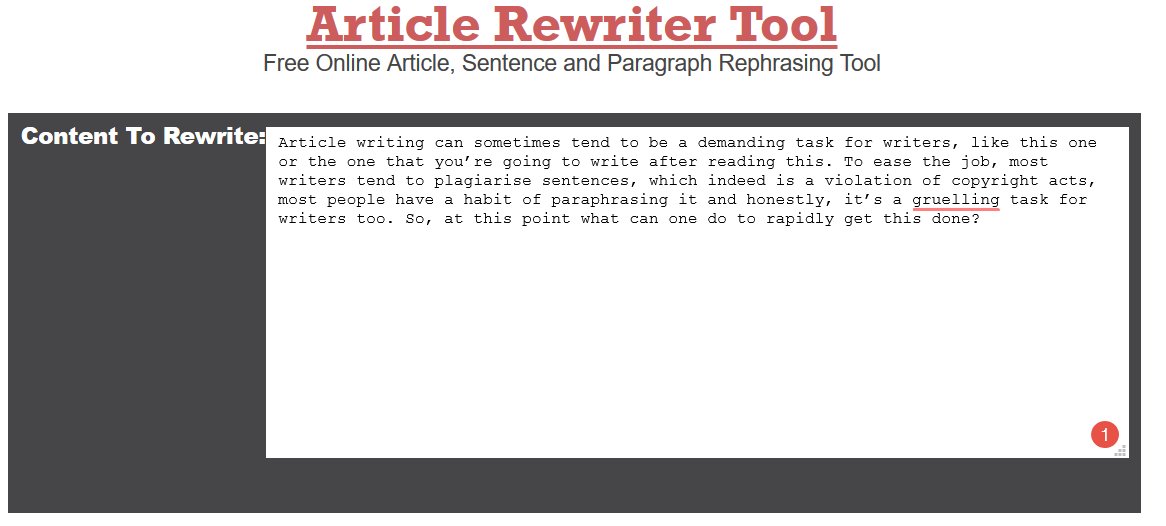
Article writing can sometimes tend to be a demanding task for writers, like this one or the one that you’re going to write after reading this. To ease the job, most writers tend to plagiarise sentences, which indeed is a violation of copyright acts, most people have a habit of paraphrasing it and honestly, it’s a gruelling task for writers too. So, at this point what can one do to rapidly get this done? In this Article I have mentioned Some of the Best Free Article Rewriter Tool Online that you can use.
What is an Article Rewriter?
An article rewriter or spinner is a very simple tool that function of one concept; synonyms. Yeah, we can say that it actually analysis the sentence and changes some words into their closest synonyms. It keeps the original meaning of the sentence but in a new format. Which means avoiding plagiarism and keeping your content unique. The tool works on different technologies including AI, natural lounging synthesis, speech analysis etc. but to get these advanced features you might have to pay a sum of money.
Top 5 Best Free Article Rewriter Tool:
Smallseotools.com/article-rewriter
One of the most widely used SEO tools websites offers a very distinct Article Rewriter. Once you have selected the paragraph it breaks-down it into sentences and change the wording most suitable to the article format. The API smallseotools is using has a very good library to make sure that content doesn’t lose its voice.
The newly founded nimtools.com has a very basic article rewriting tool, it analysis the sentence and change the wording into proper synonyms. What’s lacking in nimtools is some premium API, which could be added in future but so far, they have some of the best free Article rewriting tools.
Spinnerchief.com
Probably some of the best article rewriter that offers a lot of possibility for its user. The software is available free as well as for premium elite version that professionals can use. It offers multiple method and techniques just to rewrite the words. Also, with the premium package, you get some of the best article rewriting suggestion.
ArticleRewriterTool.com
Article writer tool may not be the best tool out there but they have a simple interface, quick results and accuracy in sentences, which is enough for a free article rewriter. You might have to stop your ad blocker to open the website properly.
My Opinion
Okay, article rewriter is not the way one should approach in content writing. It drops the original voice that the writer has, and as a reader, it sometimes creates an impediment in reading and understating. However, if you’re approaching such tools for college assignments or for some particular paragraph that shows a tiny bit of plagiarism, it may be fine to cheat. As per my opinion, I have found the smallseotools article rewriter very pertinent and accurate, professional may use spinnerchief for their feasibility. That’s all for this guys, stay tuned for the next update.
Most of us like to travel. It gives us a sense of relief and a break from our hectic life. Locally it’s not a problem but when you travel abroad some problem may arise. We are talking about the linguistics. There are a variety of languages spoken all over the world and it creates a sort of communication gap between the locals and the tourists. So here we are going to discuss three live translation apps which will surely make your solo trips to abroad a joy.
Google Translate
Google translate is the name which itself needs no introduction. It’s already available on all the Android devices by default. Google Translate acquired Word Lens which was one of the pioneers in live camera translations. With all the embedded features of Word Lens and other functional tools, Google Translate works quite neatly.
Using Google Translate is quite easy, all you’ve to do is click on the camera button in the app right under where it says ‘Tap to enter text’ and it’ll bring up the interface. Now just take a picture of the text you want to translate and done. You can now convert the text from the photo to your desired language. You can also use the shutter button to take a picture and save it for later.
Microsoft Translator
Microsoft Translator is a decent and one of the popular translating app. It too supports instant translation through the camera, although it does not clarifies how many languages it supports. It supports only half of the languages that are available on Google Translate.
Using Microsoft Translator is not that tough, tap the camera icon to begin. Its working is a bit different from that of Google Translate. It does not instantly translate the picture rather than it allows you to take the picture first and then it processes the snap taken. After processing it translates into the desired language. It does the job but it is not as efficient as Google Translate.
Waygo
Last but not the least, our last live translation app is Waygo. It supports only a few languages and converts them to English. Waygo supports Chinese, Korean and Japanese and works efficiently.
Its usage is quite easy, first of all, select the language you need to convert to English. Secondly, above the camera button, select whether you need to translate a single line of text or multiple lines. The camera will adjust accordingly to your response. One of its disadvantages is that it allows only a maximum of 10 translations per day.
All of these apps can be downloaded from Apple App Store and Google Play Store. Google Translate is the most efficient one and supports more languages than the remaining two. Please do drop your suggestions about the given article and don’t forget to subscribe to our website. Keep traveling.
Technology has always been a blessing for men. With technology, there is a lot that we can do which we could not do then. It makes things better, but that doesn’t mean our house should look like a Borg Cube. Keeping this in mind a product is designed that can earn its own space in every room, without being noticed on a first glance. This product is called BEAM. The beam is a smart projector that looks like a lamp and can turn any flat surface into a big screen but when you look closer, you will notice that there is more to this lamp.
Beam, the smart projector can fit in any light socket and it is always connected to the Internet. The beam is easy to set up and the beam can be controlled by Apple or Android app. You just have to download Beam app and you are ready to go. You can use the app to control the beam and do things like setting up your IF’s and THEN.
Features:
The beam can wake you up smoothly in the morning with the news and weather forecast.
The beam can be used to run any application available on your smartphone on a big screen that may include the ceiling of your room or the walls of your room.
You can connect any smart device to the beam.
You can use the beam to view your pictures on the big screen using airplay or Microsoft.
You can also make rules and beam will follow your rules without questioning i.e beam works on the principle of IF this THEN that. And you can define the conditions as per your choice.
You can use the beam to watch TV on your bedroom ceiling and you can play games using your phone or a Bluetooth controller.
Why should on go for Beam?
The beam is a smart projector with all the advanced features. Features that are not present in any other projector. It is a device which is smaller in size and does not occupy the major space in the house. With Beam in the house, you’ll get a digital screen anywhere without any hassle. Not a bad investment to make, right?
Availability:
The device is currently available on a kickstarter.com, at a minimal price of 400 USD. So grab it before it goes out of stock.
That’s all for this guys. If you want to keep tabs on more stuff like this then subscribe to our website and don’t forget to give your reaction down below.
Automated trading, also called algorithmic trading or black-box trading, is the process of running smart applications that automatically create, buy and sell orders on markets and exchanges based on a predefined set of instructions. Automated trading has a lot of advantages over traditional trading which involves human intervention. Some of these include the complete elimination of human emotions and impulses that can lead to trade losses and the speed and frequency of executing orders nowhere near the capability of human beings.
Automated trading is slowly gaining popularity nowadays, especially in cryptocurrency exchanges where individuals can trade freely without the participation of brokers. The operating hours of cryptocurrency exchanges which run twenty-four hours a day even on weekends and holidays increase the demand for automated trading programs even more.
If you are new to automated trading and you’re still hesitant to use this technology to get more profits, then read you better read further on this article. Check out these five tips for understanding automated trading and experience the power of earning passive money first-hand.
Automated trading programs are based on traditional trading strategies.
Although the algorithmic trading application will perform the orders for you automatically, the set of rules that will be used to trade are based on the conventional trading strategies. These include trends such as moving averages, patterns, channel breakouts, and other related technical indicators. Mathematical model based strategies, as well as other non-mainstream techniques, are used in programming trading ‘bots’ too.
These programs are capable of creating arbitrage trading orders.
With the diversity of the exchanges and the assets listed on them, the opportunity to profit from arbitrage trading is also one thing that you should never miss out. Automated trading programs are capable of executing arbitrage trading, which involves buying of a stock at a low price from one exchange and then selling it to another exchange at a higher price in a timely manner.
There are technical requirements when setting up an automated trading program.
Aside from access to market data feeds and stable network connectivity, knowledge on trading and computer programming are also required for you to set your strategies and eventually translate them into codes. While hiring a software developer is an option, creating the program and backtesting it can take a while and may cost you a lot of money in the long run. That is why it is recommended for you to get the best trading programs that can yield the most profits for you at minimal risks. Ethereum Code and the QProfit System are two of the best programs that are specifically designed for cryptocurrency trading. Try them out and see the results for yourself.
Backtesting is a must for automated trading programs.
If you are writing your own codes or if you are asking someone to do it for you, you should never run the program in market exchanges without completing a backtest. You can check the accuracy of your customized automated trading program by running it on a backtesting infrastructure and using the available historical data to predict the price.
Automated trading programs are not flawless.
Just like any other computer programs, automated trading applications are also prone to errors. These can range from software glitches to problems in trading arguments within the codes. That is why it is important to backtest the program repeatedly before using it for real trading. Hardware failure, electrical outages, and unstable internet connection are also some of the other challenges of automated trading.
As a business owner, you are probably always looking for ways to grow your enterprise and drive up its net income. Conventional wisdom agrees that there are two ways to get this done: by reducing your operating costs as well as increasing your sales. That said, sales are everything to a business. If you don’t make enough sales, your company is sure to fail.
In a perfect world, you would be able to access an unlimited budget to market your business and get new customers. You would be able to buy lots of advertising space and do PR to raise your brand visibility.
Unfortunately, we don’t live in a perfect world. Most small and mid-sized businesses run on a tight budget that doesn’t leave a lot of room to implement their marketing ideas. So, how can you use the resources you have to attract new customers and keep old ones? Here are 4 things you can do to increase your sales:
Use a Comprehensive Point of Sale System
Point of Sale (POS) systems is an incredibly important part of any successful business. By automating mundane tasks, they help you reduce your operating costs and overheads. And even better? The newest generation of POS software, systems, and paper rolls can help you make your business more profitable by increasing your sales too.
They do this by offering additional features that can help you raise your geographical reach and sales volumes. With the savings you make off lower overheads, you can then improve your customer service and online sales channels. This approach will help you retain old customers and attract new ones from a wide range of sales streams.
Bundle your Services or Products
Bundling services or products has proven to be a successful sales tactic for many small companies – and it can be for you too. In fact, this approach works much better than offering discounts for individual products or services. That’s because customers equate such bundles with savings. This is true even if the savings are only nominal.
Bundling your products or services makes it easier for you to make a sale. It works even better if you can keep the bundles somewhat flexible. If you make it easy for your customers to choose different services or products to meet various needs, this game plan will work even better for your business.
Leverage Social Media to Your Advantage
Using social media platforms to promote your products or services is a great way to increase your brand awareness. Even if you have a small follower count, social media is a very effective way to increase your sales. Regularly posting featured products and customer testimonials can spark interest in your business and get your phone ringing.
Keep Lines of Communication Open
One of the best ways to raise your sales is by ensuring that your current customers keep buying. After all, it’s much easier to upsell a customer who already knows the features and quality of your work than attracting new ones. While the latter is important if you want your business to keep growing, you should also focus on building long-lasting relationships with your current customers.
The Birmingham virtual telephone number allows you to add a local phone number to your WorldSIM enabling you to receive, as well as make calls to local phone numbers from over 50 countries. The SIM card also allows you to save as many virtual phone numbers that you want since there is no restriction on the number of phone numbers the card can hold.
A Birmingham telephone number is the best alternative for most business owners since the 0121 area code works within the city and all the surrounding areas. It can be used to reach out to a larger number of customers and they can also easily get in touch with you. It’s also simple to use and offers flexibility and can be used for most applications and used for marketing purposes.
How to obtain a virtual telephone number
Online sites
There are numerous sites that have different packages that you can choose from and activate the phone service enabling you to communicate effectively with your customers as well as family and friends. You can get the 0121 number from companies that offer the services like Flower telecom where you can easilydivert 0121 numbers to your mobile or landline. Any incoming calls can also be easily forwarded to any phone that has internet access or your selected existing mobile phone or landline with just a few clicks. You do not have to install a new landline service saving you money for the installation cost. This boosts the marketing services for most businesses, leading to a large coverage, increased sales and growth.
The validity of a virtual telephone number
The virtual telephone number does not have an expiry date nor does it limit you based on the location that you reside in. You can, therefore, maintain your Birmingham 0121 number even after moving to a new location and still be in touch with your customers without them noticing that you are not within the area. This is because your virtual number will still display as the caller ID when you call them.
Pricing plans/packages
Birmingham virtual telephone numbers’ are not free, but their price is similar to other numbers beginning with 01 and 02 prefixes within the UK. Different companies offer different pricing plans depending on the number of minutes, call destinations and amount of text messages. Other companies also offer a different price for extra services such as any additional minutes. You can opt to pay for monthly or annual plans depending on your goals and marketing requirements. Find out from the company that you have signed up with for more information on their pricing plans.
The benefits of having a 0121 number
The 0121 Birmingham virtual phone number provides a great service to many businesses within and outside Birmingham who have business within the city. It’s also advantageous to many businesses since it allows more than one call at once. Another benefit is the ability to get missed call alerts avoiding any chances of you missing a customer’s call where you can make a follow-up.
Find a service provider who has reasonable rates, sign up and activate your number to be able to engage your customers, increasing your sales and business growth.
Smartphones have evolved into one of the most basic necessities of modern life and also our ultimate buddy who keeps a track of everything starting from our favourite playlist to the number of steps walked in a day. Whether or not we need a new Smartphone, we never cease to browse through the technical magazine and blogs on the lookout for newer features and specifications these tech-beauties bring along. So, if you are planning on bringing home a sleek new model or are just simply interested in this topic, then read on to find out more about the top seven things to consider before making a smartphone purchase as recommended by our Bestazy experts.
Build Quality – The smartphones are made using plastic or metal both of which are crucial determinants of its durability. A plastic-bodied smartphone’s survival potential is limited compared to the one made up of metals which can survive two to three-foot drop.
Resolution And Size Of Display – Your usage will determine the size and resolution statistics. A 5.5 or 6.0-inch QHD or full-HD screen will surely suffice if your main motive is live streaming of graphics-rich videos. As the screen gets bigger, the phone gets bulkier. Thus, it is advisable to maintain a balance in between resolution and portability. If your aim is to check emails and chats, then a 5 inch HD or full-HD will be more than sufficient for your requirement.
Camera – With the selfie craze spreading like wildfire, the camera quality has rapidly evolved into one of the pre-determinants of a good smartphone. But contrary to what people usually think, megapixels are not the sole determinants of image quality. Several other factors such as ISO level, autofocus and camera aperture also have an important role to play in painting the final frame. Any smartphone having f/2.0 or lower aperture and a minimum of 13 MP rear cameras will suit the needs of photography enthusiasts whereas f/2.2 aperture and an 8 MP camera will cater to the casual users.
Battery –If you are keen on playing games, watching videos and browsing mobile apps, then you are bound to feel the requirement of a 3500 mAh battery. Similarly, a 3000 mAh battery will suit you well if you are keen on making light and mild usage.
Storage –Mobile companies advertise about various storage options which can take the form of 16GB, 32GB, 64GB and 128GB. But pre-installed applications eat away a major part of the above-mentioned storage leaving only the remaining portion. If you are addicted to mobile applications and can’t pass your day without browsing through social media websites, then it is advisable to opt for a device having commendable storage or one that supports a MicroSD card.
Security Statistics –Additional security features such as iris scanner and fingerprint scanner can aid in establishing your security requirements and protecting the valuable documents and files.
Speakers – Gone are the days when people used to limit the usage of their cellular phones for making calls. The smart devices of modern times can take up much broader functionality. The quality of sound waves emitted by the device which converts it into a wireless smartphone also plays the role of a determining factor while proceeding with its purchase. Phones having front-facing speakers bring along further clarity while using the phone in landscape mode.
The ZenBook lineup from Asus is one of the most popular luxuries and premium series we have ever used till now. They have some unique designs within their high-end laptops with some high-end specs. The best part is the Quality. You will never be going to have a single complaint regarding the built of ZenBook. If you are a business person or have a high budget for top end specs with great built and fees then this is going to offer you the same.
So, today to review we are having Asus ZenBook lineup, Asus ZenBook UX430UA. This is one of the best among the hardware with proper glass body available in the market. The laptop from Asus is priced at 73,299 INR. This laptop is surely going to give a huge competition to other premium segment laptops available in the market.
Asus Zenbook UX430UA
Screen
14″, 1920 x 1080px, IPS, non-touch, glossy
Processor
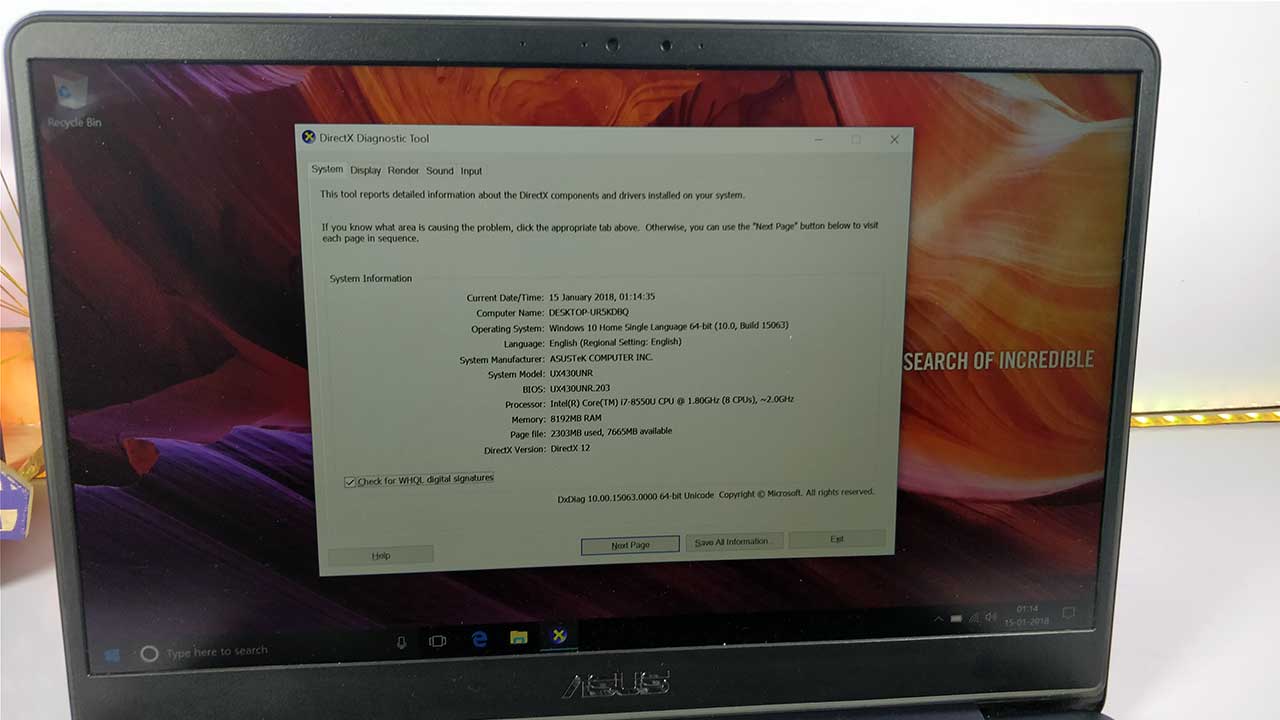
Intel Core i5- 8250U CPU
Video
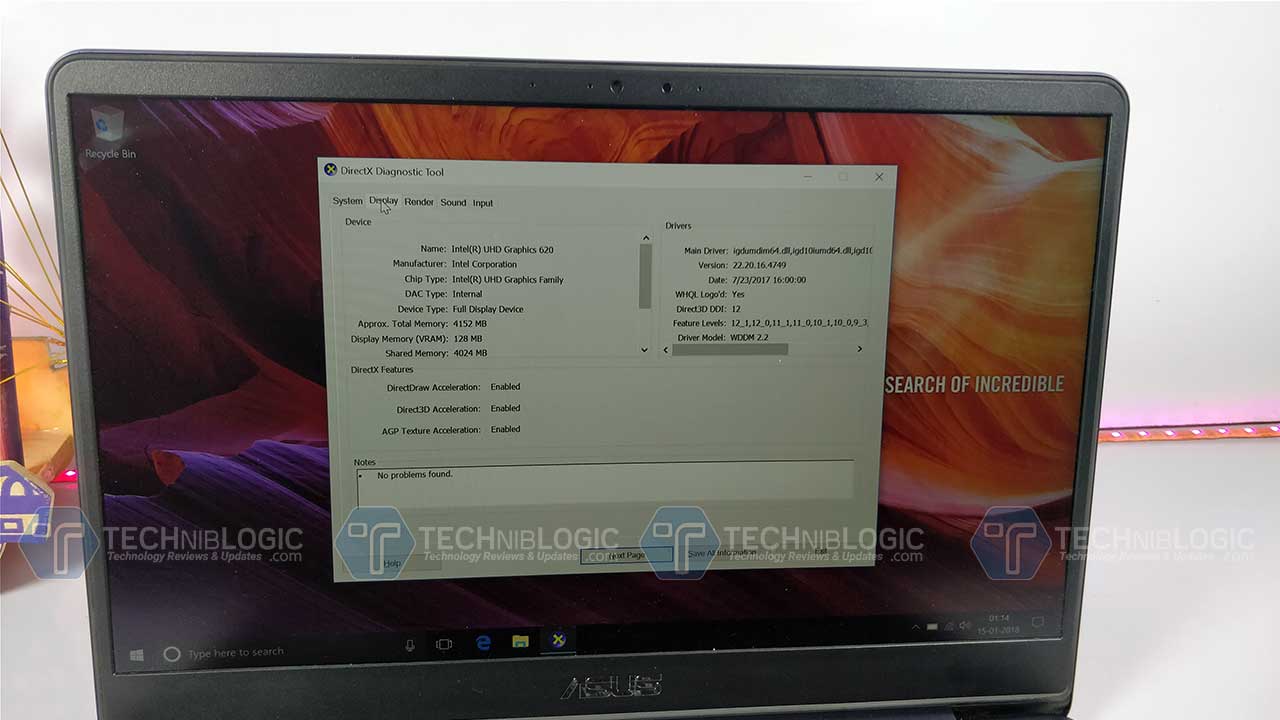
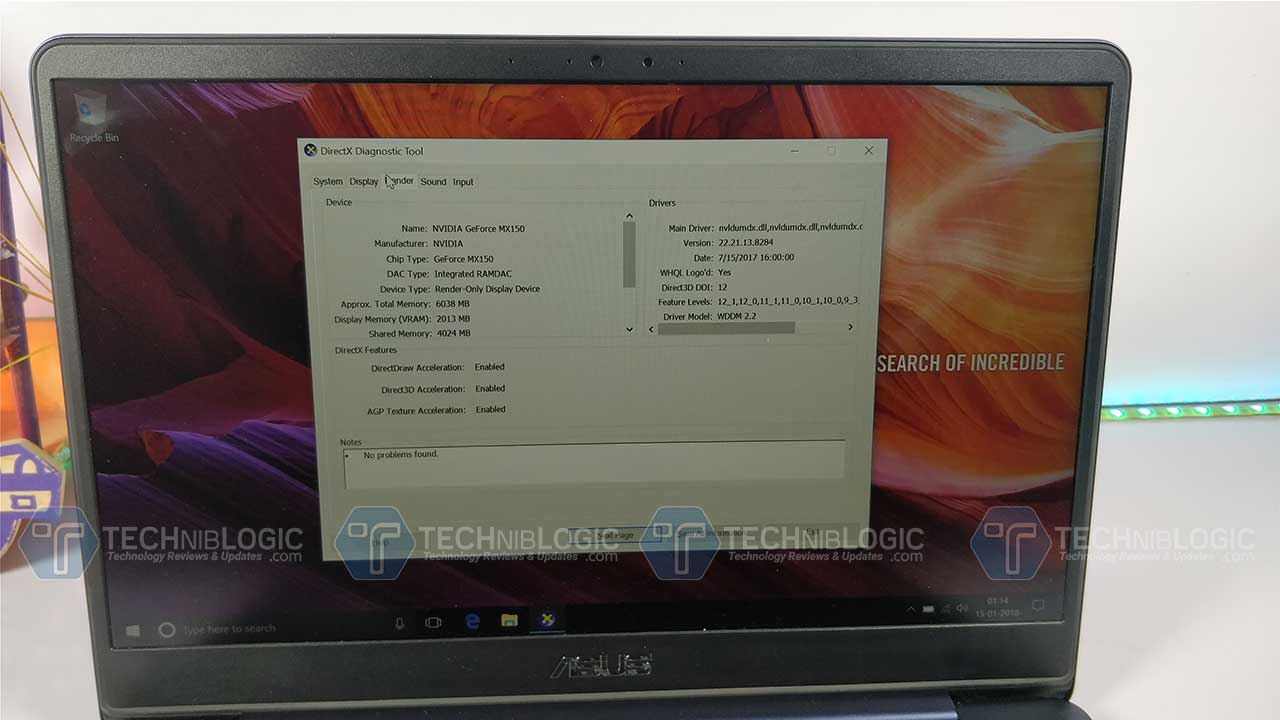
Intel UHD 620 and 2 GB NVIDIA MX150 for Performance
Memory
8 GB DDR4 2133 MHz
Storage
256 GB (SSD)
Connectivity
Wifi, Bluetooth 4.1
Ports
1x USB 3.1 Type-C gen 1, mic/headphone, VGA, HDMI, SD Card, Ethernet, 1xUSB 3.0 and 1xUSB 2.0
Battery
50Wh-3 Cell
Operating system
Windows 10
Design and Built
Coming to the design part, here with Asus ZenBook Ux430UA it comes with a very unique design which we have never seen in any other laptop till now in the market. The Quality which they have used it on top. The body part of the Ux430UA is made up of glass and plastic. The top side of the lid has a textured glass which adds up some pattern feel on it which do attract fingerprints and but give a luxury feel to you.
Coming to the other area of a laptop like a palm rest area, it has proper space which is needed by a person which working on it. We also get a full-sized keyboard which works well. The keys also make a sound while we use them. They are made up of plastic and not rubber which makes it way better while typing. The spacing between keys are proper and are well comfortable while typing. It feels like you are using some kind of ultrabook to type, which makes you work way longer on it.
It has a decent camera for a web face to face chatting with your friends. While doing some live session and for skype video calls the webcam will be working -perfectly. In low light, it will struggle a bit, due to which I will suggest you use additional LEd light in front of your face.
The trackpad which we get in on UX430UA works great. It is as smooth as we get in any Macbook. We also get a fingerprint sensor inbuilt in the trackpad which is a kind of positive as well as negative point and many users need larger space for travel which might affect the fingerprint sensor placement. Still, the fingerprint sensor works well and is accurate.
Ports
The best part of this laptop is we never ran out of ports. We have all the ports which are needed by a person on their regular usage. We get USP Type C 3.0 (USB 1st Gen). We also get 1 USB 3.0 and 1 USB 2.0. We also get a Mini HDMI port which is sometimes necessary for college while giving a presentation. On the same side, we also get 3.5mm Audio jack and power connection. We are not getting an Ethernet port but the best thing is that in the package we will get a USB to ethernet converter using which we can connect out any LAN wire.
Coming to the other side we get different light indicators a USB 2.0 Port and a Full-Size Card Slot. This kind of card slot is mandatory these days as everyone has there DSLR with them most of the time.
Here we are not getting any DVD drive as this premium Beast is so slim we don’t get any space for it. We can always use a USB Drive if needed. Rest, the bottom part is completely sealed off and the battery is not removable unless you open up the screws and take the battery out like we do on other premium laptops.
Display
The ZenBook UX430UA gets a 14-inch FHD display, with a resolution of 1920 x 1080px. The result is we get almost 80 percent screen-to-body ratio and just 7.18mm bezels on the sides, which I loved the most.
Now, this is not enough the display which we get is covered with an anti-glare coating which dismisses the reflections and makes it a worth buy for best display. Watching content like movies will just going to give you an amazing experience. The display is reproducing vivid colours which offer sharp, bright, and great picture quality. Adding to it with matt finish as mentioned above, it also makes the viewing angles great.
This panel adds up the max score till now when compared with another laptop in this premium segment.
Sound
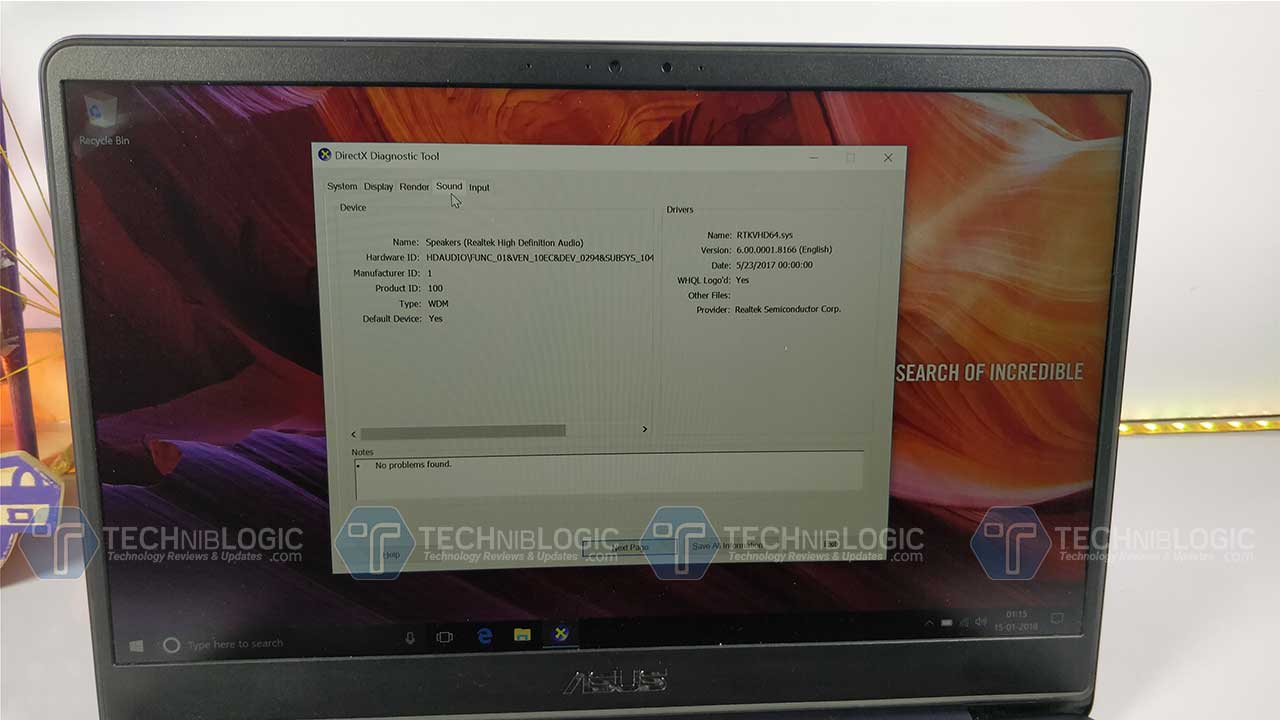
The Asus ZenBook UX430UA comes with stereo 3W speakers. We are getting two stereo speakers placed on the deck of the laptop. The speakers which we get are from Harman Kardon and are above average in performance rather I loved the sound output. The sound from these speakers gives you above average bass as well as quite a loud sound which we get also tweak using the AudioWizard app.
Performance
1 of 4
Coming to the main part which is performance, here Asus ZenBook UX430UA comes with i5- 8250U CPU which is supported with 8GB of DDR4 memory, and a 256GB SSD. We also get another version where we get 8th Gen Core i7-8550U CPU, 512GB SSD. Both the variant is also packed with NVIDIA MX150 with an integrated Intel HD 620 graphics card. With these two cards we get easily do 720p gaming, Photo and video editing, Watching 4k movies and Web Browsing. We can also do normal 4k Video editing in Premiere Pro. I think with this power in portability you will just love it.
According to my usage, while working on a word or using a web browser for typing articles and surfing it was leading me about 8 hours and rest depends on work to work. If you are doing Photoshop, Premier pro and other high-intensity work it will hardly lead you to about 3 to 4 hours battery backup. In this price it seems to be ok to me because you can always upgrade the battery from external market according to your usage and work. We are getting a 50Wh battery which seems to be quite promising this time.
Verdict
Personally, when we consider the premium quality and luxury feel of the laptop with the high-end specification you are going to love it. It is the only laptop with glass panel as well as most of the portable high-end users will surely love it. For the graphics-intensive user, this portability is must buy.
These days in Delhi and even in Indian Air pollution is the most vital problem which we are facing and also going to face in near future if we are not going to start working on it. So, to help us out RespoKare, came up with a very affordable reusable and highly effective anti-pollution mask. As of now this is the only available mask in the market that will protect you from the wearer from both PM 2.5 particles and toxic gases like NO2 and is also reusable. In the RespoKare mask, we also get features of “Pollution Indicator” that indicates the level of NO2 gas.
This Mask is not an ordinary mask which we can buy from any medical store for Rs. 10 or Rs 50. It is a high-quality mask which contains different layers or filters for extra protection and filtration of air while breathing. The best part of this mask is that it is washable and it won’t harm the fibre and filter.
Coming to the comfort part, RespoKare masks come with an adjustable and comfortable noseband which seems to be one of the best part which I got in this Mask. Due to noseband, the mask gives you perfect grip with a perfect fit which at the end ensure you with no leakage of air while breathing. This mask can block particulate pollutants such as dust, pollen, PM 10, PM 2.5, microbes, toxic gases and smoke from entering our body.
RespoKare is priced at Rs. 399 but is available at a discounted price on many e-commerce websites. You can also buy the same from flipkart and other leading pharmacies and convenience stores in Delhi NCR. Until the time we do not understand about the pollution we need to use it.
Overall if you want a reusable mask which can give you best fit with proper protection then this one is for you. It won’t be pulling your pocket down with the heavy money of investment on the mask.
There are a lot of scenarios when you accidentally delete your data, caused by various reasons, be it hard drive failure, system crash, virus attack, unexpected power off, mistakenly emptied recycle bin and many others.
But, hang on! Your deleted files are not gone forever!
However, they are often still at hand on your media card, hard drive, USB, digital camera or smartphones. It seems like a daunting task to get this data back from the dead without any prior recovery experience. But, here you’ve come across the concept of free recovery software. Now, the process of recovering your files happens to be as easy as few clicks with free data recovery software. There are many choices to get your data recovered using free data recovery software and programs out there. But, they also come with some limitations and issues such as portability, need to upgrade, installation and many others. This article will enlighten you some insights and features about EaseUS free data recovery software.
EaseUS Data Recovery Wizard Free Edition is a free file undelete program. It is one of the handy and top-notch files undelete program for both windows (10, 8, 7, Vista, and XP) and MAC users. This free edition enables you to recover up to 2 GB of data. People found it more comfortable working with this data recovery software because of its familiar interface. Their way of display files is structured, somewhat more like windows explorer. It also supports hard drive recovery. The EaseUS website says: “It helps you recover files of all sorts. Whether, it is images, video, audio files, emails and compressed files.”
When you launch this tool, the very first screen that comes will ask you to place the checks on a specific category of files that requires recovery. For example, if you’re searching to undelete music files, you’d go for that option and leave the rest un-unchecked. Or else, you can look for files of all types. Then, you can select to scan either your personal folders or whole hard disk. While recovering multiple files, EaseUS Data Recovery Wizard makes it easy to understand by working on keeping the primary folder in one piece. Also, one of the handy features is its ability to restore and back-up the scanned results for later use.
Pros and Cons of EaseUS Data Recovery Wizard
It prompts you to scan for specific types of file, like images, documents, videos, and music.
The good thing, EaseUS Data Recovery Wizard has its ease of use.
Users can preview the deleted files prior recovering them.
Aside from quick scan, it also takes a deep scan to make sure that all data is rescued from the drive thoroughly. The deep scan is found to be quite effective but it takes longer time than regular one.
The recovered files can be organized by their respective names, date, and file type.
It is one of the best hard drive recovery software, capable to retrieve data loss from both internal and external hard drives. Through this recovery program, you can regain lost data from PCs, laptops, digital devices, hard drive (HDD, SSD, USB, etc.), storage media, server, etc. If your company uses a RAID system, EaseUS free Data Recovery is a way to go as well.
One Con of this free edition program is that it recovers only 500 MB of data for free.
If you’re looking for free data recovery program, I recommend you make EaseUS Data Recovery Wizard your first pick!
GIF or the Graphics Interchange Format is one of the popular media files shared over the internet. These GIFs are like the short version of video files which do not take much memory. GIFs have been popular over the internet because of their short size and detailed content. Now you may have come across various GIFs while surfing the net but have you considered making one of your own. The question is How To Make A Gif From A Video? If you’re one of those Android users, then let us tell you about the top 5 Best GIF Maker App For Android the are Free to Use.
Camera MX is one of the most popular GIF Android app and trusted stock Android camera used. First of all, it’s a camera app, therefore it has got all the features of a camera. In addition to that, you can also create GIF using it. Just record your video/GIF and you’re good to go. It is preferable because it has got various other amazing features like Timelapse video recording, grid lines for a clear composition and many more other features which might not be present in your default camera app.
Footej Camera
[appbox googleplay com.footej.camera screenshots]
Now another great app to make high-resolution GIF is Footej Camera. This one has got some pretty amazing features some of which are dependent upon your device. It has got features like it utilizes Android’s camera 2 API, RAW format, manual ISO, etc. If these features are supported by your device, it would be just incredible. You can also make high-resolution animated GIFs using this app.
Gif Me! Camera – GIF maker
[appbox googleplay com.xnview.XnGif screenshots]
It is one of the best apps to make animated GIFs. Unlike the other two apps, it uses your phone camera to capture small videos as GIFs. It has got some pretty cool features like you can apply real-time filters, make slow-motion videos, wiggle GIFs and so much more. Another great thing is that you can directly share to any social media using this app. You can apply the image filter too.
Giphy Cam – The GIF Camera & GIF maker
[appbox googleplay com.giphy.camera screenshots]
Giphy Cam is one of the few apps available on play store which allow you to add special FX or some unique filters to your GIF. These filters include VHS, 3D stickers, etc. You also get access to Face tracker accessories, text, frames and much more. This is what makes your GIF much more appealing and entertaining than ever. The only downside of this app is that it occupies 148MB on your phone. But with all these interesting features, its worth the download.
This app is the one stop for all your GIF expectations. It includes so many features which will take your GIF making experience to next level. Using this app you can compress Gifs without compromising its size, you can convert GIF to video and vice versa. In addition to this, you can also edit GIFs, search for trending GIFs, etc. The thing which you’ll love about this app is its amazing UI. It’s quite interactive and will surely help you with whatever you plan on doing.
Verdict
All the apps mentioned here can be easily found on Google Play Store. Of all the apps mentioned here, GIF Maker is the one we would highly recommend. After that Giphy cam is quite good if you’re flexible with its size. Gif Me is a decent GIF editor and serves its purpose. Camera MX and Footej camera are basically a camera app whose one of the features is to make GIFs while other specifically focus on making and editing GIFs. Do try this app and let us know which one of these you find best. Don’t forget to comment, share and subscribe.
Oneplus which is a well know Chinese brand and always comes up with amazing devices. The brand is also known as a Flagship killer as they always kills other brands top products because of there high end product that too at very affordable pricing. They started up in the market with Oneplus one and literary crashed the market with there brand and quality. Then comes up other devices every year; Oneplus 2 , Oneplus X , Oneplus 3 , Oneplus 3T , Oneplus 5 and after just few months of there flagship killer they killed up there own flagship by launching another top end model of Oneplus 5 which is named as Oneplus 5t. I have received so many question on previous Oneplus post regarding whats new in Oneplus 5t and why they killed up there own Flagship. So, i only have the answer for 1st question 2nd question need to be answered by the brand only.
You can Buy Oneplus 5t with 8GB RAM and 128GB Storage Available in 549.99$ Only on Discount at Gearbest.com using Gearbest Promo Code: t5plushk
So, finally Oneplus has removed there well known Physical Home button their latest flagship which is Oneplus 5t. They have moved the fastest fingerprint from front to back panel which is also properly aligned and can easily be accessed. Not like other device who just place fingerprint sensor at the back and you just can’t take your finger to the back that high easily. This is not enough in OnePlus 5, we also has an option to switch between the capacitive navigation buttons to on-screen navigation buttons because of highly customized Oxygen OS. With that Home button we also has the power to customize it.
Gearbest Promo Code: t5plushk
Removed Telephoto Lens
Previously in Oneplus 5 they have added the feature of Dual lens where one lens is normal and other one was a telephoto lens. This time they have removed Telephoto lens and replaced it with normal lens of 16-megapixel with increased focal length to f.1.7 for better bokeh and better night shots. Now on Oneplus 5t they have given us digital zoom in camera application and no optical zoom. The device can also record a hi-res videos up to 4K resolution at 30fps and 120fps slow-mo videos in HD resolution.
Face Unlock
After iPhone X, every device is behind face unlock feature and want to add it in there device. So, when we come to android after Samsung, Oneplus 5t came up with world’s fastest face unlock feature in there device. According to them the device just analyse your face and unlock it in hardly nano seconds. It is just so fast. I have not tested it properly at the launch but take my works it was insanely fast. I don’t know how accurate it was but at the time of launch event it was working perfectly.
Bigger & Heavier
Previously OnePlus 5 came up with a 5.5-inch FHD 16:9 ratio display but with OnePlus 5T it comes up with a 6.01-inch FHD 18:9 display. With this big display company also trimmed up the large bezels from the device. When we notice the device properly OnePlus 5T is slightly wider and taller than that Oneplus 5. There is hardly any noticeable different in weight. OnePlus 5T weighing 162 grams and OnePlus 5 just weighs 153 grams.
Gearbest Promo Code: t5plushk
You can Buy Oneplus 5t with 8GB RAM and 128GB Storage Available in 549.99$ Only on Discount at Gearbest.com using Gearbest Promo Code: t5plushk
Thanks for hanging out with us guys. Please do drop your suggestion and ideas in the comment section below. If you want to keep tabs on a more innovative product like this, subscribe to our website. And don’t forget to give your reaction.
Oukitel is a mobile phone brand that is dedicated in delivering trusted devices to people all over the world. It has released a K10 Oukitel 4G phablet with massive battery life. Battery life is always the biggest crutch of every smartphone. Oukitel’s latest phablet is equipped with a 11000mAh battery. It came over as a big player after launching this K10 4G phablet. It is getting future ready by providing exciting features with a huge battery life. It will stand out in the crowd due to a list of great features.
Starting from the display, it has 6.0 inches display IPS FHD with the resolution of 2160×1080 pixels which will provide you high-quality show. The device has MTK6763 octa-core 2.0 GHz. The internal mechanism of this device is better than any other device.
The device has an amazing hardware quality. It supports 6GB RAM and 64 ROM of storage capacity and supports up to 128GB externally. Not just this, it comes with 16MP + 0.3MP (SW 21MP + 8.0MP) dual back cameras along with dual LED flash and AF and 8MP + 0.3MP (SW 13MP + 8MP) dual front camera with single LED flash.
K10 oukitel runs on android 7.0. The performance of this device is quite high. It is quite good to run any application and perform longer operations. Moreover, it comes with fingerprint recognition, gravity sensor, ambient light sensor, proximity sensor, E-compass and gyroscope. It has 2 slots in which 2 nano-SIM can be stored and a TF card can be inserted at the same time.
Oukitel comes with a promise of the long-lasting battery which is gaining a lot of popularity. It has 11000 mAh battery which is non-removable lithium polymer battery. It will easily run for 3-4 days. It supports wifi and Bluetooth for connectivity.
The oukitel K10 is an all in one 4G phablet which is exclusively available on gearbest.com priced at $249.99 after 17% discount.
We can all agree that the internet brought lots of great things and new features in our homes. The most revolutionized moment that changed our everyday lives is the existence of online banking. If you don’t know, online banking is the best way to manage and control your finance through online platforms without waiting in the queue and having the hassle of doing it in person.
This way, you will be able to avoid identity theft any unnecessary paperwork and waiting. You can access the account to pay bills, transfer money and make payments without checking in and doing it from different accessibility points. That way you will be able to access your account from PC, smartphone or tablet.
The central question and problem that occurs is the safety of the process and whether someone could interfere with your connection to get into your account.
We have mentioned above that the idea of online banking is to carry out all financial transaction through your mobile device or PC through the use of the internet. It is simple, quick, and gives you the possibility to finish numerous tasks such as transferring money or paying bills, without waiting long queues in the bank.
At the same time, most banks have their free apps that will allow you to access their service from any iOS or Android tablet or device. According to FCA, more than 25% of bank users transferred online to finish their transaction in the last few years.
Why Choose Online Banking:
You will be able to transfer money to other accounts or pay your bills in a matter of a few clicks.
Check your balance wherever you are
Check your bank statements.
Check any loans, mortgages and savings accounts.
Set up standing orders or direct debits
Check any investment that is linked to your account.
However, we still have the one and the most crucial question about the security of online banking.
Is Online Banking Secure?
As we have mentioned above, the idea with online banking is that you will be able to access your online bank software, app or through an online website. Accessing your online bank account is safe, but you have to follow a few essential rules of safety:
Banks always have additional security when it comes to their clients and their safety. That could mean that your bank has an encrypted website or many authentication processes. We recommend you ask the bank for all details regarding security because that is the most important consideration that you should take before opening an account.
Always check financial statements so that you can check for any strange activity to your bank.
We recommend you to stop replying to emails where someone claims that it asks you everything as representative of a bank. This is the most common way of conning people giving them username and password. With user and password in wrong hands, you can lose hundreds of dollars in a matter of seconds.
Always log out after the session.
When you want to connect to your online banking account, you should never use public Wi-Fi because someone could compromise it. Therefore, always choose secure Wi-Fi or Mobile Data for entering your bank account.
You should keep your anti-virus and anti-malware software and operating system up to date.
You should check your password and choose it carefully. We recommend combining three random words and trying to make them unique compared with other passwords and access codes for other banks and websites.
It is always better to have two-step verification and authentication while trying to enter the account. Most banks offer an extra layer of security to protect their clients. This other factor requires additional confirmation before you can access your account. The best way is to connect your mobile phone or email with it to send you unique code that you have to enter to get in. This is the best way of securing your account from hacking.
Turn off Bluetooth while you are accessing online banking because it could interfere with your data. There is a term called Bluejacking that hackers use to enter other devices that have Bluetooth turned on. You should turn it on only in moments while you need it. As soon as you stop sharing files with other devices or listening to music from Bluetooth speakers, remove the access to Bluetooth, especially if you want to enter the online banking account.
Conclusion:
We all know that online banking as physical banking comes with their own set of risks. The same way someone can mug to the way home after taking money for bills, the same principle lies online. However, these risks that we have mentioned above are mainly due to human factor and dangers. So, the best way to protect your account is to make sure that no human can enter it.
When you find the right password and other steps that will protect your account, you will be able to enjoy in all conveniences that online banking is bringing with itself – from monitoring your balances to sending money to family and friends.
Sally Mann once noticed: “Photographs open doors into the past, but they also allow a look into the future.” Photography is simple yet difficult, light yet meaningful, evident yet complicated. Taking a picture needs a moment, but the photo will cause you to feel that moment forever. A talented photographer is able to find something interesting even in an ordinary situation. It’s not for nothing Elliott Erwitt termed photography “an art of observation.” An artist knows what to see, and when and how to catch that moment.
Photographer without Portfolio Is Like Fish without Water
Each and every man just once in his life needed a professional photographer to depict the most important event: a wedding, child’s birth, birthday, anniversary, and so on. For sure, you did the same. So where to find a talented photographer with a comprehensive portfolio? Today people used to seek any information on the internet because it is convenient, easy and quick. It would be a pity if your profile was out of that search list. The world of photography is a quite competitive niche so that make a maximum effort to become online presented and build a name for yourself.
The web gives endless possibilities for your creativeness. Having an own portfolio website adds credibility to your business and increase your brand awareness. Thus users have a great chance to observe your works displayed in the most attractive way, get info about your service and prices, contact with you as soon as possible, and interact with you through various tools: blog, newsletters, chat, feedback, and so on. When customers have constant access to you (even virtual) they believe and trust your brand. That said, it’s quite difficult to run a successful photography business without strong online presence.
How to Run a Photography Website Based on WordPress
As of today WordPress powers almost 30 percent of all websites throughout the world. This CMS is so popular because of a simple interface, tons of free and premium templates for all occasions, a wide variety of plugins, and more and more. Moreover, the platform has gathered the largest digital community, so it’s easy as pie to get any kind of data about the CMS and ask for help on multiple forums and specific websites. With WordPress, you are not alone on the web. In addition to all those possibilities, with TemplateMonster WordPress templates for photographers, you achieve free, friendly and efficient 24/7 support. All templates are well-optimized for all modern devices with any screen resolution.
Below you can find a list of hand-picked top-notch WordPress themes devoted to photography business of any kind. They feature outstanding quality, comprehensive documentation, handy tutorials, and advanced functionality. Dive into the endless world of digital possibilities right now!
Primrose is an excellent WordPress theme devoted to photography theme. Here is a set of gorgeous homepage layouts that allow creating nine one-page websites. Moreover, to build pages with Elementor tool easy since it doesn’t require special coding skills. Featuring incredible options for organizing and displaying your photography with gallery pages and fast-loading HTML5 coding and CSS3 scripting, Primrose can become a powerful promo weapon in your talented and creative hands.
Welcome to the sleek-looking and professionally crafted theme devoted to different photo purposes. Attractive appearance, advanced functionality, and fully responsiveness make this theme desirable for many photographers who seek ways to share their artistic vision on the web. Zoomix offers different 10 headers and footers, 4 stunning blog layouts and multiple Google web fonts to choose from. With built-in WP Live Customizer and Elementor page builder, the process of customization and content building will be easy and fast.
FrameMe offers true creative freedom for building your online presence. The theme is elegant and purposeful, fully responsive and incredibly adaptive to any size screen of any modern device. FrameMe comes with fascinating, stylish pages for all occasions and customization elements that will help to stand your website out from the crowd. Having bought the theme, you achieve an advanced complex of usable and handy features like Cherry Projects plugins, 4 stunning blog layouts, multiple Google fonts implemented and more.
Zoomin is that digital tool which will definitely help talented individuals express themselves to the full. The theme includes everything you need for convenient and quick website building – from intuitive Admin Panel to stunning Favicon. With drag-and-drop Elementor Page Builder, you will enjoy fast and easy page building because the tool includes full access to all the design features you might need.
If you are looking for a top-notch website for your photo gallery or portfolio, Projector is the best choice. This mobile-friendly, SEO optimized, clean coded and easy-editable theme offers seven gorgeous headers and three captivating footers, a bunch of Google web fonts, numerous outstanding plugins, and four different blog layouts. In addition to all these impressive elements, you get bonus images and life-term support.
Elegant Atelier – Design and Photography WordPress Theme
No doubt, Atelier is one of the most powerful and flexible themes demonstrating an outstanding appearance. The theme is able to adapt to any role of design or photography niche with no effort. Atelier is equipped with handy Visual Composer Builder and efficient WooCommerce package so that it would be easy as pie to turn your website into a successful selling platform. Moreover, with the theme you achieve access to tons of quality images and as extra bonus Booked Appointment plugin to enrich your website.
Falero is beautiful and incredibly functional, deeply tech-savvy and extremely modern WordPress theme that is suitable for photographers’ needs. Organize your website with customizable layouts, tons of Google fonts, different header and footer styles. With this theme, you achieve unlimited field for coming to your dreams true: amazing Revolution slider, wonderful blog page, multiple plugins for all occasions.
If you are seeking a reliable, captivating, modern and extraordinary website for your portfolio, pay attention to Julie Bernerro WordPress theme. It is based on the clean code with HTML 5 coding and CSS3 scripting. This professionally crafted template is stuffed with several header and footer layouts, multiple Google fonts, different blog layouts and advanced functionality. To add credibility to your website the theme comes with an efficient commenting system, TM Gallery and social integration.
Modern Looking Monstroid2 – Multipurpose WordPress Theme
For those who are searching for a fresh-looking, media-savvy, the minimalistic and multipurpose theme for a business website, Monstroid2 is the most suitable choice. The theme is extremely powerful and engaging being designed with flat yet attractive appearance and multiple yet efficient elements. Whatever you want to change or edit there you don’t need to make effort, just several clicks are required. In addition to ordinary features and options, you can enjoy a forum module, online store functionality and a wide diversity of useful web forms.
Fascinating WhiteLight – professional photographer portfolio WordPress Theme
WhiteLight includes Retina-ready collections of icons and fonts, gorgeous header and footer styles, and multiple layout options. For turning your website into e-commerce you need just 5 minutes thanks to Ecwid plugin. WhiteLoght provides an easy panel to maintain the website and edit content in an instant. HTML 5 and CSS3 animations are featured as well.
If you want an affordable, pleasing looking, highly adaptive WordPress theme for your photographer portfolio website, RyamZoom is for you! This template features elegant yet minimalistic design, 25+ modules to build different pages, drag-and-drop functionality. With the ultimate pack of outstanding plugins, it’s possible to enhance your website in an instant.
Impeccable Siena – Aesthetic Photography Portfolio WordPress Theme
Siena is a clean, fresh looking and highly customizable WordPress theme with multiple layouts, fonts, and options. There are unlimited ways to customize the theme to your needs since every title, colour, text and button can be edited as you wish. The theme is equipped with a dark mode that allows underlining your photographs and making them look more impressive. Thanks to gorgeous portfolio page layouts with multiple visual elements, you can significantly increase your exposure.
Impressive Carmen Design Portfolio WordPress Theme
Carmen is a feature-rich and well-crafted engaging website template dedicated to designing portfolio needs. The theme includes outstanding pages for all occasions. In addition to commonly used About and Blog page layouts, you get stunning Skills and Clients page variants that will add credibility to your professionalism. With a built-in Elementor Page Builder block to adjust content to your needs will be easy and fast. Create unique look and feel of your portfolio with the help of Cherry Projects plugin that comes with the Cherry Framework package.
Impressive Anna Solas – Photographer Portfolio WordPress Theme
Anna Solas is an admirable, expressive and full-featured theme designed especially for photographer portfolio. The theme is powered by the latest and cross-compatible HTML5 and CSS3 technologies and based on Cherry Framework 5 that allows building a website in a short term. The collection of Cherry plugins available with this framework will definitely enrich the functionality of your website and make it get noticed by competitors.
Photographers like the sharp and contrasty style for displaying their pieces of art. The theme based on such a colour approach will give a showing to artist’s products and grab visitors’ attention. In addition to standard page modules and functional elements, you get all necessary tools for turning your website into an e-commercial business. The theme is stuffed with a set of advanced visual tools (gallery, slider, icons), social integration and the rich variety of smart customization options.
Truly Remarkable One Page Freelancer Photographer Portfolio WordPress Theme
Looking at this flat yet eye-catching theme you understand that success is dependent upon simplicity. This one-page WordPress template is aimed to showcase all your photographer skills and talented works with the focus on the key point. Thanks to the highly flexible drag-and-drop Power page builder it is possible to create different page elements even without touching a single line of code. Multiple content modules provide your website with an extended set of options to achieve an all-winning online presence.
Niftyfifty is a beautiful and dynamic, fully responsive and easily editable website template with an absolute focus on images and photographs. It is built with a user-oriented, intuitive design that will look amazing through any browser on any device. With Jetpack plugin that comes jam-packed with a number of useful features you no longer have to install a new plugin for every new feature.
The theme is extremely flexible, stylish looking and carefully designed for true photographers. Use the simple and handy drag-n-drop editor to edit content faster since no coding is required. The template runs on Cherry Framework technology that provides easy and fast installation and customization process. With in-built Cherry Projects plugins, it is possible to demonstrate your pieces of art in a stylish gallery.
Focussity makes the building website process a fun game since everything is intuitive and simple. The clean coded theme supports high-quality Retina-ready graphics and CSS3 animations. Focussity offers a bunch of layout options that allow playing with pages structure due to your needs. A set of multiple content modules and widgets helps to improve your website appearance and navigation to the full.
Stunning Landscape – a Photography WordPress Theme
The landscape is a gorgeously looking and perfectly designed WordPress theme that is ready to become a powerful photography website with minimum effort. All functional features of the theme are aimed at focusing on your content first and foremost. Photographers can arrange their masterpieces into beautiful and well-organized galleries (there are 6 gallery types) that will definitely attract visitors’ attention at the first sight.
Just imagine, your artworks can be shared with the entire world instantly if you have your own website. With an online portfolio, you can reach fans, clients, general audience throughout the world and interact with them at any time and place. Building a website on one of the above-mentioned WordPress themes for photographers will be an enjoyable journey to the digital world of unlimited possibilities and endless creativeness. Welcome to the largest community on the web!
Escape games booking service (www.escapetoken.com) recently announced its initiative to deploy world’s first decentralized quests’ aggregator which is going to work with online booking and payment system. Using Escape it will develop a secure marketplace based on smart contracts as part of global quests’ industrial revolution. Using Escape utility Token they can unite the community of quests enthusiasts and VR entertainment on the basis of the blockchain.
Escape token platform will also be going to contribute to quest games popularization by reaching out to more fans and by providing high-level services, developing the original content and creating disruptive technology for integration of VR quests into different facilities, where ever it is required.
The project implies with building an affiliate network to ensure quest technologies global transfer as well as reduce costs for scaling new high-tech quests worldwide.
“According to projections, the quest industry will continue to grow and develop rapidly, though some issues such as constantly increasing CAC, quest reps user intoxication, ideas depletion and product stagnation remain the reasons for the global market scaling mere inhibition,” says Sergey Kartintsev, Escape CEO. “Escape token will develop the world’s first aggregator of escape games with an internal motivation system based on the blockchain, which will bring together existing and new locations.”
Kartintsev also notes that Escape Labs in Vienna, St. Petersburg and Moscow will simultaneously launch quests reservation service with a rating and ranking system and Escape marketplace is also going to start offering new scenarios of quests and riddles to reinvent the industry within blockchain framework and smart contracts. Escape VR quests has already launched in St. Petersburg based on Escape’s Malta laboratory recent quest experience developments.
Escape Tokens can be used by:
• Players – to pay for games, certificates and discount cards to reduce the price of the games;
• Partners/quest rooms – to motivate players within loyalty program and lower aggregator commission;
• Platform – to motivate players within loyalty program.
There will be two ways for tokens usage in Escape ecosystem: as a compensation for aggregator services for platform participants and as a “loyalty card” providing its holder with different discounts and bonuses.
Escape Token pre-sale will begin on January 23 and last until February 9.


 Article writer tool may not be the best tool out there but they have a simple interface, quick results and accuracy in sentences, which is enough for a free article rewriter. You might have to stop your ad blocker to open the website properly.




![OnePlus 5T with 8GB RAM and 128GB Storage Available in 549.99$ Only [Coupon Inside]](https://techniblogic.com/wp-content/webp-express/webp-images/uploads/2017/11/Oneplus-5t-Display-Techniblogic-768x498.jpg.webp "OnePlus 5T with 8GB RAM and 128GB Storage Available in 549.99$ Only [Coupon Inside]")


