Home Blog Page 112

What Every Mac User Should Know About Google Drive

0

Are you a Mac user? Perhaps you’ve just invested in the new MacBook Pro 16 inch with Magic Keyboard.

They can be great but you might be wondering about a set up to ensure that your files always stay protected. Apple computers come preinstalled with the iCloud but are this the file storage system for you?

If you are a Mac user you would do well to weigh up your options including Google Drive. Here’s everything you need to know going forward.

Also See: 9 Best Text Editor in Mac (Free and Paid)

What Every Mac User Should Know About Google Drive

1. Embrace the Cloud

Be sure to embrace cloud computing and cloud file storage. This way you can ensure that you never lose any of your work. It’s also crucial for freeing up space on your computer for you to do other work.

Most companies work with the cloud and this is how most file sharing is done. It means you don’t have to send endless files by email or on a memory stick to each other that could easily be lost.

Cloud computing can – in certain circumstances – also allow you to load entire programs from the internet. You can also buy the amount of storage that you need rather than over or under purchasing memory sticks or hard drives.

iPad and iPhone

Apple is all about its ecosystem and allowing ease of action between its systems and a cloud drive – whether it’s iCloud or Google Drive – allows you to fully take advantage of these features.

By downloading the cloud folder onto your iPad or iPhone you can easily open up files on a new device very easily. If you need to catch a bus or you want to head out to a coffee shop and don’t want to take your Mac with you, this is an ingenious solution rather than having to e-mail the files to yourself.

Being able to work on a document on your iPad also gives you the ability to work with the Apple Pencil and Apple’s latest iPadOS feature: Scribble which can enhance your experience of working collaboratively on documents.

2. A Better Alternative to iCloud

Google Drive is an alternative to Apple’s iCloud. While you might think that Apple’s services are the easiest to use because they are already installed, don’t be lazy.

Investigate all of your options before you automatically decide to go with Apple’s system. It doesn’t take much effort to download the program you want from the App Store and set it up.

Follow your instigates and look at all the features. Think about storage as well and which ones offer the best value for money.

Google Drive offers most of the same features as iCloud but the premium version – G-Suite – can also get you a free, personalized email address that doesn’t end in @gmail

3. Integrates to Google Docs

Google Drive also integrates very well with Google Docs, a set of cloud-based software similar to Microsoft Word or Pages but free.

The best thing about Google Docs is integrational editing. Instead of having to send documents back and forth from each other the whole time you can edit the document together in real-time.

As you edit you can see each other’s cursor and see the changes they are making You can also easily leave comments for each other. You can also save your files in a jointly accessed and managed Google Drive file. This makes it easy for you to collaborate with.

Because of these collaboration tools which only work through Google Drive, Google Docs can provide a much better alternative to the traditional word processing software which hasn’t yet caught up with these features.

4. Set up an on-Desktop Folder

One feature that is great about the iCloud is that you don’t have to go to a web browser, open the Cloud, and insert folders and files within it. Instead, from the moment you open your laptop, the iCloud file is waiting for you in your files program.

Did you know that you can set up the same experience with Google Drive? When you download Google Drive you can set up the shared folder either in your file menu or you can place a shortcut on your desktop for ease of access.

5. Double the Storage With iCloud and Google Drive Combined

It’s easy to think that using Google Drive and iCloud is an either-or. Either you use one service or the other. But you can use both together and get double the storage for free.

By installing Google Drive – a google drive download – and iCloud in your file program or on your desktop you can easily copy and paste files from one folder to the other when your storage gets full.

Another option you have is to make copies of all of your documents so that you have two backups should you be locked out of one of your cloud drives.

Google Drive: A Mac Users’ Dream

Google drive is a Mac users’ dream because it gives the user double the cloud storage space when combined with the preinstalled iCloud. It also gives Mac users the ability to collaborate easily with others using the integration with Google Docs and live editing tools.

You can easily set up desktop folders to make it easier to access what you need and collaborate with other people.

If you are interested in learning more about the advantages of Google over Mac or what every Mac user needs be sure to check out the rest of our site.

10 Best RSS readers 2020

0

RSS reader applications are great as they allow you to follow your favourite writers, channels, and publications. Nothing can beat RSS when it comes to offering trending news from the top sources.  There are many RSS readers available, but, in this article, we have come up with the best RSS reader that you can download.

Best RSS readers

[toc]

1. Feedreader Online

 - 10 Best RSS readers 2020

Feedreader Online is free and easy to use RSS. It features two kinds of viewing modes. One of the features named Starred items is there just for saving RSS feed items, and then we can also see a filter that is basically used for displaying unread items. Overall, all these features make a good RSS reading experience, and since Feedreader online is equipped with all these features, it is an optimal option that you must for sure give a try.

2. FlowReader

 - 10 Best RSS readers 2020

FlowReader is best suited for people who want to see all their content sources in one place. In this RSS reader, users can view their feed in reverse chronicle order. Flowreader is a great tool for you if you want an RSS feed reader that tracks both URLs and social feeds. This RSS reader will keep informing you about the updates on the pages that you have liked on various social media platforms. You can even subscribe to as many blogs as you want, and you can see the headlines of their posts in reverse chronological order.

3. elink RSS Reader

 - 10 Best RSS readers 2020

This RSS reader allows users to add RSS feeds of the publications they trust the most. It enables users to choose from an unlimited number of RSS feeds to make sure that they are updated, and they are on top of the latest information. Moreover, users can easily filter and search for articles based on keywords and sources so that they can quickly discover the content of their choice. You can even click any headline from elink’s RSS Feed Reader to read more details about the article.

4. Feedly

 - 10 Best RSS readers 2020

It is an online RSS reader that comes with a clutter-free user interface, and it has an Add Content feature which helps you quickly find a new content source that you can subscribe to. However, it does come with a paid subscription plan that costs $5 a month. The paid plan is rich in advance features such as integration with web apps like Evernote and Dropbox.

5. Inoreader

 - 10 Best RSS readers 2020

This RSS reader is loaded with a bunch of amazing and useful features with a ton of configurable options. For example, this RSS reader allows you to create custom rules that will perform actions such as “Send to Instapaper”or “Send to email”. It is equipped with four view modes and four UI themes. Users can try the free subscription plan, but to get the maximum benefits, they will have to go for the paid subscription plans that start at $2.99 a month.

6. Feedspot

 - 10 Best RSS readers 2020

It is a free RSS reader, but it does have a paid subscription plan that costs for $24 a year. The paid plan gives users an ad-free experience. It comes with an integrated search feature that allows users to search their content sources. Moreover, this RSS reader can even recommend sites that you should subscribe based on your interests.

7. Old Reader

 - 10 Best RSS readers 2020

This RSS reader is equipped with all the features that a suitable RSS reader should have. It features Keyboard shortcuts, various viewing modes, and all the good stuff. This RSS reader allows you to connect with other users and share content with each other. Moreover, it is free for up to 100 subscriptions, after that you’ll have to upgrade to a premium plan that costs $5 a month.

8. RSS Owl

 - 10 Best RSS readers 2020

With RSS Owl you can subscribe to all your news feeds and then you can organise them the way you want. It comes with powerful capabilities that allows you to search and filter news, so you never miss stuff that matters anymore. It is available for Windows, Mac, and Linux.  You can download it now, and you can use it for free without any limitations.

9. Omea Reader

 - 10 Best RSS readers 2020

It is an all-in-one feed reader, and it is easy to organise and categorise your RSS feeds, using this RSS reader. The Omea Reader’s desktop search functionality allows you to find specific information quickly. You can easily subscribe to feeds, directly from your browser, within seconds. Moreover, if you are fond of podcasts, then you can directly download them through Omea. It is free to download, easy to use and organise. Moreover, it is an NNTP newsreader, and web bookmark manager.

10. Feedbro

 - 10 Best RSS readers 2020

Feedbro RSS reader is equipped with many amazing features. It is a full standalone feed reader that is available as a Chrome extension. It is extremely fast, and it comes with multiple viewing modes and built-in Social Media plugin support (Youtube, Youtube Search, Facebook, Twitter, and many more). It features built-in readability style feature that is capable of converting partial feeds to feeds with full articles. Moreover, the built-in Rule Engine lets you define rules for filtering, border highlighting, auto-bookmarking, tagging, and hiding and regexp highlighting articles.

Conclusion

This sums up the list of the best RSS reader. In my opinion, if you are a person who needs a more comprehensive web-content-reading experience, then you should go with the FlowReader RSS reader.  Moreover, each of the above mentioned RSS readers has its own pros and cons. You can choose any of them as per your need and requirements.

If you have any app suggestions that you think we should add to our list of Best RSS reader app, please feel free to drop a comment, we are always open to new ideas and suggestions. If you like our content, please do bookmark our website and stay tuned.

9 Best Antivirus for Windows 10 (2020)

0

Most of the people worldwide have been having been victims of cybercrime. Every link clicked, email opened, app downloaded, and network joined is an opportunity for hackers to invade our privacy and get the information related to your personal data. There are various threats like ransomware and crypto-jacking, and hence, it is important that our privacy is not invaded and our data is protected. Most of the activities like shopping, banking, and financial planning continue to migrate to the web, cybersecurity stakes continue to rise. We need to have good antivirus software to protect our devices from cyber threats.

We cannot iterate more on the importance of good antivirus software and having said that we would like to introduce the best antivirus for Windows 10.

[toc]

Best Antivirus for Windows 10

1. Kaspersky Anti-Virus for Windows

It offers highly configurable virus scans, self-protection defence, and system watcher module. It is a highly accurate, user-friendly, and works fantastic antivirus engine that works quite well against ransomware. It features some useful bits and boobs like a vulnerability scanner and privacy cleaner. The system watcher module allows Kaspersky to pick up on undiscovered threats like new ransomware. Overall, a right antivirus product that delivers reliable anti-malware protection but doesn’t expect much from this product.

Download it here.

2. Quick heal antivirus

It offers IT security solutions for your PC, Mac, Mobile, and Tablet. It comes with both automatic and customizable scanning modes.  It comes with a rich selection of scanning options, and it even features an anti-keylogger tool, automatic scan scheduler, and a parental control system. The parental control feature is well designed, and it directly gets integrated with your system accounts, which makes it easy to block specific categories of websites. It is easy to use and provides a comprehensive support program through the telephone icon on the bottom of the dashboard.

Also Read: WhatsApp’s New Security Measures: Are You Safe from Hackers?

Download it here.

3. Bitdefender Antivirus Plus   

This antivirus delivers excellent protection, and it is one of the best antiviruses in the list when it comes to blocking malicious websites.  It features Safepay. Safepay is a secure browser that can be used to carry out sensitive tasks like online banking. Some of the other features are a password manager, vulnerability scanner, and a Wi-Fi Security Advisor. It is easy to use and comes with some nifty more in-depth settings, like being able to set up profiles to, for example, keep any background activity to a minimum when you’re on a laptop using battery power. Overall, it is a great antivirus system that is loaded with a bunch of unique features.

Download it here.

4. Norton AntiVirus Plus

https://www.youtube.com/watch?v=3PiSLcTQOzY

This antivirus product is best suited to provide the core malware protection, and it offers a novel touch for more tech-savvy types in the form of the Norton Insight tool. Moreover, this antivirus product offers robust defences at an extremely minimal cost to your system resources. It does a brilliant job by blocking malicious sites on the web. It even comes with an ‘intelligent’ firewall which keeps you well-informed regarding any potential risks to your computer. It offers many useful tools beyond offering simple antivirus protection. It features a backup option and covers a single device.

Download it here.

5. Avira Antivirus Pro

This antivirus product has few highlighting features such as anti-ransomware, banking and shopping protection, and file repair tool. It is relatively easy to install Avira Antivirus Pro and simple to use. However, Avira’s entry-level plan certainly isn’t as feature-fuelled as the likes of Bitdefender and Norton. But, if you are looking for something super easy to use, offers robust virus detection and affordable, then you must give it a try.

Download it here.

6. Trend Micro Antivirus+ Security

https://www.youtube.com/watch?v=Ln6lb3cPPqY

With features like ransomware monitoring, Pay Guard banking protection, and high-quality URL filtering, Trend Micro Antivirus+ Security offers adequate web surfing protection. It is easy to use, and you can simply install this antivirus application, and it will work in the background, and it will keep your computer safe. It is a great choice for less tech-savvy users. However, more demanding users will choose to ignore this antivirus product because of the lack of configurability and options available. The interface of this program is user-friendly, and with this, you even get a good quality antivirus engine. Overall it is a high-quality antivirus package, and while it’s not loaded with more number of features, it does come with a basic feature that is being mentioned in the first line of its description.

Download it here.

7. McAfee AntiVirus Plus   

It is a premium antivirus that offers safe web browsing experience and comes with a password manager and VPN. It defends your system against the latest virus, malware, spyware and ransomware.  Moreover, while you are connected to public Wi-Fi, it keeps your browsing habits and data safe from prying eyes. The multi-faced privacy protection offers gives you the upper hand against digital identity thieves by protecting or shredding sensitive files, deleting cookies, and more. Overall, it is a good antivirus product that offers total protection and is a combination of antivirus, privacy and identity tools and features. It offers multi-device protection.

Also Read: Hackers Targeting Healthcare Data in Droves: What You Need to Know

Download it here.

8. Webroot antivirus

It offers a full-scale antivirus program at an affordable price. You can secure up to 3PCs or Macs and protects you from identity theft. Webroot offers complete protection from viruses and identity theft for all your devices, and the best part is that it doesn’t slow down your device. It takes 20 seconds to check your computer, and it is 60 times faster than the average scan time of tested competitor products. This antivirus product doesn’t take up a lot of storage, and hence you have plenty of room for your music, documents, photos, and movies.

Download it here.

9. Sophos Home Premium

It comes with a very good malicious URL blocking score and helps you protect your device against ransomware, key loggers, and exploits. It even features remote management for up to 10 PCs or Macs.  It is affordable, and if you are a person with technical skills, you can install its protection for your friends or family and manage it remotely. It even comes with a free edition that does not include all the advance features and helps you protect three computers, but even the premium edition isn’t expensive, so, it is better to go for the paid edition to get the maximum benefit. It is very basic, but it offers decent protection at a genuine price.

Download it here.

Conclusion

This sums up the list of best antivirus software. Though our device comes with preloaded windows defender that claims to protect your system from threats. But, additional Security won’t harm. All the mentioned software are worth their price. You can choose any of them as per your convenience.

If you have any antivirus suggestions that you think we should add to our list of Best Antivirus for Windows list, please feel free to drop a comment, we are always open to new ideas and suggestions. If you like our content, please do bookmark our website and stay tuned.

How To Use InVID Video Verification Tool?

1

Doing a Digital investigation might seem like the job of a highly skilled journalist, but what if I say it’s not, what if you need the right tool and the right idea, to begin with. In this how-to article, I’ll give you a step-wise demonstration of how-to-use the most loved digital investigation tool by a journalist- InVid.

Must See: Best Investigative Journalism you must know

This is a free tool that does not require much technical knowledge to work with, it’s merely a browser extension that helps you out in your foot-printing. This tool is made by Condat AG, and its sole purpose was to help journalists verify news-worthy user-generated videos or photos. It’s a European product and has been said the be ‘The swiss army knife’ of digital investigation. And since it has too many features, to begin with, I’ll be instructing how to use this tool in a step-by-step guide in this article.

[toc]

Let’s focus on installing this application first, the addon is available for two browsers, Firefox and Chrome.

Installing-inVid-Investigative-Journalism-tool

Installing InVid on Chrome:

Chrome-invid-addon

Step 1: Click on Add to Chrome button.

Chrome-invid-addon-extension

Step 2:  Click on Add extension to add this as your browser addon.

Chrome-invid-turn-on-sync

Step 3: Click on Turn on Sync, this will enable the extension on other devices that are synchronised with your Google account. I would recommend to not do this for safety reason.

Chrome-invid-extension

Step 4: Click on the Puzzle icon, and you’ll find ‘Fake News debunker by inVid’. Click on the pin icon to add it into your browser toolbar.

Step 5: Now start looking for content to verify.

Installing InVid on Firefox:

InVid-instaling-on-Firefox

Step 1: Download the zip file.

iVid-firefox-zip-file

Step 2: Extract the .zip file.

InVid-open-firefox-file

Step 3: Select the. Xpi file, Right-click, and select open with firefox.

InVid-Firefox-Addon-install

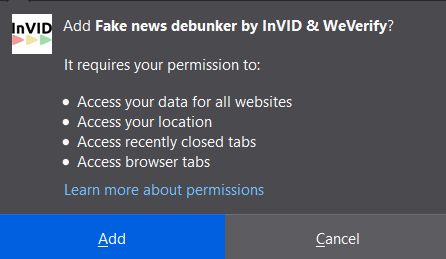
Step 4: A new tab will open, and you’ll see a pop-up for permission. Click on Add button to install the addon.

InVid-Firefox-install-gotit

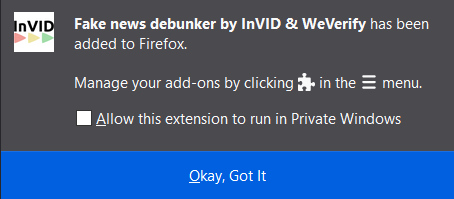
Step 5: Click on, Okay, Got it to finish the installation process.

Step 6: You’ll now be able to see an InVid icon in your browser toolbar.

How to use InVid?

This extension is easy to use once you get the hang of it. And for your understanding, I’ll be demonstrating how to fact-check a misleading video clip in this step-by-step guide. The video I’m going to use is just for demonstration purpose, and it is already verified by several fact-checking websites.

On August 11, 2020, Sandeep Mishra a Twitter user posted a video of two women falling into roadside drainage and claimed that the video is from Delhi, India.

Sandeep-mishra-fake-news

The video went viral and received 1800 retweets and 4100 likes, however when I fact-check this video with InVid, the information is quite surprising.

InVid-page

Step 1: Open InVid page by clicking on the InVid icon at the toolbar.

Step 2: Click on Analysis.

inVid-Analysis

Step 3: Copy and paste the video URL in the textbox, and press submit.

Step 4: Once done, you’ll be able to see results like details of the video, details of the user who posted it and at the end few thumbnails from the video.

InVid-Google-Result

Step 5: Click on Google Image Reverse search, you’ll be redirected to Google, and there will be various search results related to the picture.

Yandex-search

Step 6: Now, it’s research and dedication that will help you find the original source of the video. So, go back and Try the Yandex Images Search, and Tinyeye as well. Explore as much as you can, you’ll find the source.

Via Yandex I found that the video was uploaded by a YouTube channel, Kazmii007 on September 13, 2017, with Title “NA 120… Shameless people of PML N….”, this is the video.

When I search “NA 120” on Google, I found out that it is a constituency of Pakistan. So, I searched a targeted keyword “NA 120 women gutter” and found a news channel Capital TV, that already did coverage of this news, on September 13, 2017.

NA-120

Video of Capital TV-

This video was falsely shared as a recent incident of Delhi, and in a few minutes, we were able to verify its authenticity.

Although I have only explained the Analysis feature of the InVid Browser extension, the application, however, comes with multiple features like Keyframes, Thumbnails, Twitter Search, Magnifier, Metadata, Video Rights and Forensics. I’ll quickly explain those features as well.

Keyframes: InVid-Keyframe

Once you have inserted the link and submitted it, the addon will show you a different timeframe of the video. Clicking on any picture will lead you on Google Reverse Image Search. You can choose a Simple & Detailed view for your extensive research as well.

Thumbnails:

InVid-Thumbnails This feature will enable you to search based on the YouTube Thumbnail of the video, it will divide four critical segments of the thumbnail and will perform Reverse Image Search on those four images in one click. This will immediately open four tabs with varied results, you can choose Google, Yandex, Bing and Tinyeye as per your choice.

Twitter Search:

InVid-TwitterThis is an advance twitter search that will give you various option to search and filter tweets. It’s a keyword basis search tool that works precisely like the Social media investigation tool that I have already mentioned above.

Magnifier:

Invid-MagnifierThis is an excellent tool that will let you zoom over an image, in case you can’t clearly observe. Just copy the link of the image file, and this tool will do its job. Please note that it will not sharpen the image, or do something magical that will improve the image quality. In the end, it is just a simple magnifier.

Metadata:

Invid-MetadataSo far, this tool will show information about the files like .jpg or .mp4,.m4v etc. I would suggest you upload the image via your computer, if the file is captured by phone it will also show the GPS coordinate of the photograph and video as well. You can even click and go directly to Google Maps for the exact location of the media file.

Video rights: 

InVid-CopyrightsIt is one of the easiest ways to check if the image or video is copyright-free or not. Most YouTube video is protected under the standard license, so in case you want to use any clip, you have to take permission from the channel that published it. Some images that come under the creative commons are free to use, but attribution to the author is a must. Copyright is a severe issue, and one must take all caution before publishing any copyrighted material.

Forensic Tab:

InVid-ImageForensicsThis tool is exceptional; it provides image verification to the extent that it can detect digital image tampering. It uses still image forensic software that filters out images in eight different modes/filter, that will help you verify the authenticity of the image file. The filters are a bit tricky and require practice and professional knowledge to verify the tempering with the image, so you might want to take it slow.

Please do drop your suggestion and ideas about this InVid Investigative Journalism tool, let me know in the comment section below. If you want to keep tabs on a more explain series like this, subscribe to our website. Thanks.

The Best PCB Software On The Market Today

PCB design software comes in a wide variety, and the market size only increases with time. Partnering with a professional PCB manufacturer can improve your design process for effective production and high-quality boards.

The finest PCB software for any person or company will vary depending on their unique requirements. However, we have compiled a list of the top choices. These are the top PCB design programs available today. Working with a trustworthy PCB maker also guarantees that your designs are seamlessly integrated into sturdy circuit boards.

Also See: Make the Most of Quarantine with These Top Tips

Altium

Altium is one of the biggest names in PCB design. If there is one piece of PCB software that you have already heard of, it is almost certainly Altium. But if you want to access industry-standard professional software, you will need to be the appropriate price. Altium’s price tag puts it out of most people’s reach.

Anyone studying a university course involving circuit design will no doubt learn on Altium. New iterations of the base product are released frequently, meaning that Altium is always improving.

PADS

PADS has found success as the standard option for businesses that can’t justify the relatively high Altium Designer cost. PADS is the main choice for some serious enthusiasts, but its cost is high enough to keep most non-professional users away.

The PADS layout may take some time to get used to if you haven’t used PCB design software before. However, if you can ride out the steep learning curve, you will find an excellent product.

ORCAD

ORCAD has been around since the 1980s. Since its incarnation, it has been one of the most popular, versatile, and capable PCB design environments available. Its capabilities are not quite as advanced as its main competitor, Altium. But ORCAD boasts a sleek, intuitive user interface and is much simpler to use than most of its competitors.

ORCAD also has a few neat tricks up its sleeve. The component tracking features help you to keep track of all the moving parts in a more complicated project.

Eagle

If there is any PCB design software that can rival ORCAD in terms of usability, it is Eagle. Eagle isn’t free, but it is an excellent choice for people who are relatively inexperienced but eager to learn.

Eagle offers numerous features that have generally only been available in the most high-end software. Eagle is bringing a lot of these features to the low to mid-range markets.

KiCad

KiCad is an open-source PCB design software. Because it is open-source, KiCad is free to use. Not only can you use it without paying, but you can benefit from an enthusiastic community who is always adding new features to the product. KiCad is an excellent option for anyone who is designing PCBs as a hobby or on a budget. You can use KiCad for both simple and advanced projects, incorporating everything from light switches to solid state relays.

Designing PCBs should be easy. Unfortunately, many of the design packages available are lacking in features or priced beyond most people’s reach. Not all of the options listed a move are cheap, but they are all guaranteed to provide the features you need to design PCBs.

7 Expert’s Ways Of Identifying Good Investment Opportunities

0

A good investor is always on the lookout to find the best opportunity and time to invest in an asset. Now, we all know the basics of a successful investment, it is to buy a product at a low price and sell it at a higher price.

Simple right? Well, not really. Not all products are going to have the same value all the time, they also have different values in different regions. So, this buys low sell high method is easier said than done. Hence, it is of utmost importance that investors find an asset that generates a handsome amount of profit. But how can one find these opportunities?

Also see: How to Use Analytics to Boost Your Ecommerce Store?

Here are a few ways by which you can identify how experts manage good investment opportunities

1. Stay Updated With The Financial Trends

A great way to get an idea about what asset is in high demand is to keep an eye on financial news every day.

Many people make the mistake of blindly following a single report on the success of one product and invest in it, which may not prove to be a successful venture later on.

While this will give you a profit at present, it may not be so at a later time. Therefore, keeping an eye on the daily forecast of what products will remain on high demand for a long time is the key to a good profit.

You can also go through financial researches and newsletters that provide the latest information about the financial trends of the world.

One particular research is the 2019 Empire Financial Research was conducted by popular financial investors and financial analysts  Whitney Tilson and Steve Culbertson. You can know more about it in this NoBSIMReviews article.

2. Single Out Open Assets

Now, every investor has their own plan for success. Some plan for investing in a product that would give them a large amount of money in a short time, while some aim to get a low but steady and longer period of profits.

Based on these criteria, they all choose to invest in a product. So, there will be a product out there which may go completely unnoticed by most of the investors, or even if it does get noticed, it will be by a very small number of people. These products usually have a low price so you can invest in them without the fear of loss.

Investing in these assets is a good way to get profit as the competition for these items in the market is very low, so you are guaranteed to get some profit out of it.

3. Consider Alternate Markets

It is a good idea to extend your investment borders. It is easy to get swept away by the success of one particular market and sticking to only one because everyone else is doing so.

But those who have a better understanding, know how to avail more opportunities, and that is to keep an eye out on multiple markets.

Although there is nothing wrong with sticking to only one market by looking at multiple ones gives a higher chance of finding better profit and good opportunities for the future. This is why arbitrage is a safe yet profitable option.

4. Take Advice And Improvise

Not everyone will know how to invest correctly as there is a learning curve for it. It would be very difficult and time-consuming to understand all the perspectives by oneself.

So, get advice from investors who have already achieved success and are continuously growing, even when the odds are stacked against them.

But here’s the catch, Many investors are quite busy and do not have the time to give advice to strangers over the phone or through the internet or on blogs and forums.

So, it is best to get advice from the person with whom you have prior relations and someone you can trust. Otherwise, there is a chance to get misguided and suffer more loss.

5. Learn From Your Mistakes

When investing for the first time, fear can take hold and may give rise to much confusion. To avoid these, it is better to write down the probable profit you want to achieve and also the percentage of losses that you can handle or want to avoid.

Writing down your plan and following them can prevent you from making decisions based on your emotion, which can cost you more. Take note of the investments you have done before and think about what you could do to produce better outcomes in the future.

6. Regret Is A Lost Cause

A large loss can certainly cause you to fall in deep regret. This can also happen when you skip investing in an asset, but the profit and demand of that asset skyrocket, and you cannot invest anymore as the price of it has now gone up.

By taking planned and well-thought-out steps of inventorying and then analyzing your investment options, you can help avoid a negative result. Stick to your original plan with which you started and change when you absolutely need to.

Following and sticking to your own goal and not giving up is the key to success, given the fact that the plan you began with was also well thought out and sorted.

7. Analyze The Market Chart

When you invest in something, whether it be in cryptocurrency or stock exchange, reading the chart data is very crucial.

It is important to spot good investment opportunities. And the best way is to be able to read through the charts. Every asset, stocks, and share have price movements. To make smart and profitable investment decisions you need to be able to analyze the market.

Apart from showing you the perfect assets on which to invest, the chart will also tell you which assets to avoid. So, reading the chart and analyzing it clearly helps out the beginners a lot. You can also hire a professional broker to help you out.

Final Words

Investment choices are crucial and have plenty of risks involved. But the ultimate goal is pretty clear. It is to find a better lifestyle. If you work smartly, good investment opportunities may just be your golden ticket to early retirement or getting rid of an exhausting 9 to 5 job. Whatever the goal or cause, always analyze, plan ahead, and make smart investment decisions.

Exploring the Most In-Demand Capabilities of SD-WAN Solutions

Organizations are transforming their corporate networks for a number of reasons. Therefore, Exploring the Most In-Demand Capabilities of SD-WAN Solutions. In the past, digital transformation initiatives – designed to improve their ability to provide a good customer experience – were the major driver. However, in recent months, the COVID-19 pandemic and the resulting push to remote work have added incentive and urgency to companies’ desire to redesign how their IT infrastructure functions.

Also See: 10 Best Wifi Router for Long Range

A major component of redesigning an organization’s IT infrastructure is performing upgrades to the corporate-wide area network (WAN). Traditional WAN solutions often do not meet the needs of the modern business, prompting a widespread push for the deployment of software-defined WAN (SD-WAN) solutions.

What Organizations Are Looking for in a WAN

A recent survey by Masergy asked companies about their major priorities when selecting an SD-WAN solution. Based on their responses, seven capabilities stand out as important to potential SD-WAN customers.

Also Read: 5 Best Ways to Fix Pink Screen On Your Mobile Screen

#1. Multi-Cloud Connectivity

Almost all organizations are using cloud computing, and 93% of enterprises have a multi-cloud strategy. This enables them to take advantage of the individual benefits offered by different platforms and providers. However, a multi-cloud infrastructure can make network connectivity and security more complex. With SD-WAN, which can optimize routing between an organization’s deployed SD-WAN appliances, this complexity can be decreased.

#2. Variety of Transport/Access Options

Most organizations’ IT infrastructure now uses a variety of transport media. Some of this is due to necessity, with remote devices having limited options for network connectivity. Another major driver is resiliency and business continuity, using multiple transport media to ensure that operations can continue even if a particular transport medium is unavailable or offers degraded performance.

SD-WAN provides the ability to easily aggregate and route traffic over multiple transport media. SD-WAN appliances are designed to connect to multiple transport media and optimally route traffic over them. This optimized routing is designed to be transparent to the applications using the network, making it possible to build in resiliency and business continuity without complex network upgrades.

#3. Embedded Security

Expanding networks composed of a wide variety of different devices introduce new cyber threats and attack vectors. Many organizations address these threats by deploying standalone, specialized security solutions; however, these solutions often do not work across all platforms and are complex to monitor and manage.

Some SD-WAN solutions address this problem well. Secure SD-WAN solutions incorporate an integrated security stack into the SD-WAN appliance. This provides security at the network level, eliminating some of the complexity of securing a diverse set of endpoints without forcing an organization to rely upon a perimeter-based security model.

#4. Rapid Remote Connectivity

Over the past few years, organizations have been slowly increasing their support for telework, and the COVID-19 pandemic accelerated this transition. Companies now highly value the ability to provide secure, usable remote connectivity to their remote workers.

SD-WAN speeds and simplifies remote network access. Instead of the multiple virtual private networks (VPN) connections that an employee may need to choose and switch between to connect to various networks, SD-WAN can offer a single connection to the most convenient SD-WAN appliance. From there, an employee’s traffic can be optimally and securely routed to its destination.

Also Read: 5 Best Feedly Alternatives You Should Start Using In 2024

#5. Centralized Policy and Configuration Management

The complexity of security management has grown with the evolution of the corporate network. Cloud computing majorly contributes to this as each of an organization’s cloud environments has its own security settings that have to be properly configured and managed. Adding in the organization’s on-premises infrastructure and mobile and Internet of Things (IoT) devices makes it difficult for security teams to keep up.

SD-WAN offers the ability to more consistently define and enforce security policies across the corporate WAN. Since all traffic passes through at least once SD-WAN appliance, security inspection and policy enforcement can be performed there, and policies and configurations can be managed from a single console.

#6. Real-Time Analytics and Service Control

Even slight deviations in network performance can have a significant impact on an organization’s business operations. The Software as a Service (SaaS) applications that are used for a growing percentage of business operations is often very latency-sensitive.

The ability to monitor and respond to network issues in real-time is essential for any organization. This is why many companies require real-time analytics and service control functionality of their SD-WAN appliance.

#7. Embedded UCaaS Applications

The use of unified communications solutions has grown as the Internet has proven a useful and reliable platform for corporate communication systems. Rather than deploying a phone line for each employee, organizations only have to provide Internet access, making telecommunications more scalable and portable.

The availability of Unified Communications as a Service (UCaaS) is an important feature of SD-WAN for many organizations. Integrating such a solution into the SD-WAN appliance itself reduces the burden on the in-house IT team and can improve service reliability and performance.

Why Most Companies are Looking Beyond SD-WAN to SASE

SD-WAN is a popular choice among organizations looking to upgrade their corporate WAN. However, by itself, SD-WAN only provides improved network performance. SD-WAN is designed to optimally route traffic over the corporate network, not secure it.

For this reason, 91% of organizations are interested not only in SD-WAN but in secure access service edge (SASE). SASE takes the capabilities of SD-WAN, incorporates an integrated security stack, and deploys as a virtual appliance in the cloud. This enables an organization to achieve full network optimization without compromising security since SASE appliances can be deployed anywhere. Traffic can be optimally routed between these appliances since each SASE appliance performs complete security inspection and policy enforcement.

11 Best Torrent Client for Windows 2021

What is a Torrent? What is the Best Torrent Client? Torrenting helps you to download and manage files as efficiently as possible. It is ideal for downloading huge files quickly. It often happens that when we choose to download large files directly from a host server, it leads to a slow experience, particularly if other people are trying to grab the same file.

But the free torrent clients help you to download fragments of the files you want from different people who already have them. Hence downloading files from torrent clients is fast. Moreover, it will itself work and will combine all the pieces of the file, altogether.  In this article, we have mentioned 5 torrent client that can be useful for you.

[toc]

How to use Torrent using Free VPN?

  1. You can download Opera Browser as it comes with free VPN.
  2. Once it is downloaded, go to settings, then privacy and then select the option of “Enable VPN.”
  3. You can now see VPN option on the top of the screen, toggle it on
  4. Now, your IP address is hidden. You can open Torrent, and it will redirect you to the sites that were blocked earlier.

Best Torrent Client for Windows

1. uTorrent

 - 11 Best Torrent Client for Windows 2021

uTorrent has been on everyone’s list since 2005. It has features similar to that of Bit Torrent, and it is one of the most used torrent clients. There is hardly any difference between uTorrent and Bit Torrent except the logo and theme colour, obviously and a few of the features. Another thing that sets them both apart is the uTorrent web app.

2. BitTorrent

 - 11 Best Torrent Client for Windows 2021

It is one of the longest-running torrent clients, and it features a clean and comfortable-to-use interface.  BitTorrent is loaded with multiple unique features, and it even supports modern torrent client features like magnet links, private torrents, encrypted connections, and many more. You can easily download it and run it on various platforms such as Windows, Mac OS, Linux, iOS, Android, and it supports around 70 languages.

One of the most outstanding features is the built-in search tool.  Currently, there are 3 versions of Bit Torrent Clients available namely; Bit Torrent Free, Bit Torrent Pro, and Bit Torrent Pro+VPN.

3. Tixati

 - 11 Best Torrent Client for Windows 2021

It is a Linux and Windows BitTorrent client sharing function. It provides integral chat rooms with channel chat along with private messaging. Chat rooms can be public or private. Users can share lists of magnet or URL links which are searchable.

Tixati is a particularly good demonstration of how to build a decentralised network application that supports very high throughputs. It is a powerful peer-to-peer system which is 100% free, simple and easy which contains no spyware and no Ads.

4. qBittorrent

 - 11 Best Torrent Client for Windows 2021

It is a free and open source software which is a cross-platform client for the BitTorrent protocol. It uses Boost, Qt toolkit and qBitorrent raster bar library. It binds all traffic to a specific interface and has control over torrents, trackers and peers. It comes with integrated RSS feed reader along with advance download filters and downloaders.

It supports Unicode available on 70 languages. It has a super speeding option which will enhance your downloading speed and support sequential downloading.

5. Vuze

 - 11 Best Torrent Client for Windows 2021

It is one of the best download software on the Internet. It is convenient, efficient and designed to give you total torrent domination. It consists of essential features that increase performance and enhance your torrent activities. You can even control download and upload speed.

It will provide you with ad-free experience with a straightforward interface. It is a lightweight app which will provide you complete torrent experience.

6. Big BT

 - 11 Best Torrent Client for Windows 2021

It is a feature-filled, open-source, ad-free bit torrent client that was first developed in the year 2003. However, it made its debut in the year 2017, and it has everything you need to share content online quickly and easily. Moreover, it features an intuitive, clean interface, and helps users to optimize their uploads and downloads by analyzing their network and internet speeds upon booting.

It is simple to use, but it lets you s   limits on downloads by tag, peer-set, or network.  For security purposes, it comes with an enhanced VPN integration. The proxy search features help you to stay anonymous while sharing.

7. Transmission

 - 11 Best Torrent Client for Windows 2021

Transmission is a BitTorrent client which allows users to quickly download files from multiple peers on the Internet and upload their own files by adding torrent files. It features a variety of user interfaces on top of a cross-platform back-end. Within file selection menus, transmission allows priorities to be assigned to torrents and files within torrents to influence which files are downloaded first.

It supports automatic port mapping, peer caching, blocklists for bad peers. It allows the use of multiple trackers as well.

8. Tribler

 - 11 Best Torrent Client for Windows 2021

Tribler uses an overlay network for content searching and allows anonymous peer-to-peer by default. It doesn’t require an external website or indexing service to discover content. It includes the ability to mark specific users as online friends. Such friends can be used to increase the download speed of files by using their upload capacity.

It has the ability to recommend content and is based on collaborative filtering. It mainly focuses on ease of use instead of a diversity of features.

9. Deluge

 - 11 Best Torrent Client for Windows 2021

Deluge is a cross-platform BitTorrent client that has been licensed under ​GNU GPLv3+ which makes it easy to use in any desktop environment. The features that deluge provides are Protocol Encryption, Local Peer Discovery (LSD), Proxy support, Peer Exchange (PEX), DHT, UPnP, NAT-PMP, Web seeds, global and per-torrent speed limits. It contains GTK UI for the desktop, Web UI for the browser and Console UI for the command line.

Deluge is a fully-featured torrent client that works on Linux, Windows and Mac and it attributes a well-executed daemon-client model to start up. It uses a front and back end architecture which provides the application’s networking logic.

10. BitComet

 - 11 Best Torrent Client for Windows 2021

BitComet is one of a kind torrent client, which renders all the features that an average user may want from such a software. It is available in 52 languages thereby making it convenient for the users all over the world to use it without any abruption. It bolsters up the concurrent download tasks.

Besides, it can allow the user to download any kind of file. BitComet will automatically seize the link and will direct the user to provide a destination to save the torrent files. Moreover, there’s a playback feature, that permits previewing the video which is getting downloaded, giving you the option to decide whether the video is up to your need or not.

11. Torch Browser

 - 11 Best Torrent Client for Windows 2021

It comes with the built-in torrent downloader. It is chromium powered web browser and is a free torrent client that provides an easy-to-use interface to download all your favourite torrent files.  It even lets you play video files before the torrent download even finishes, and it can even show you the overall stats of how much data you have consumed in total.

Moreover, you can set the download speed limit as per your requirement for torrent files, so it doesn’t degrade your browsing experience.

Conclusion

This sums up the list of the best torrent client that you can use. You all might have used the first two ones or twice just for the sale of downloading movies. However, you can give a try to other options that are mentioned in the list. Each of them has their own uniqueness and quirks. But, each one of them is definitely worth your try.

10 Best Discord Alternatives with No Bluetooth Headset Issue

0

Be it gamers, professionals, or an average individual, everyone is now using one or the other voice or text chat applications.  A normal individual won’t give a crap about the chat application that they are using. But, when it comes to professionals and gamers, all across the `world, a good chat app can indeed make a big difference in the collaborative efforts of any team, which is why a million of people use Discord.

A useful chat application such as Discord helps to streamline the workflow and allows each member of the team to stay in touch with each other.  But, as the title says best Discord alternatives, there must be something wrong with Discord.

Right? Well, though Discord is used by tons of people, it does not offer End-to-End encryption. Hence, it does not provide privacy. For anyone who thinks of privacy as their primary concern, we have come with the best discord alternatives. These alternatives will not only offer privacy but will even serve your purpose!

Best Discord Alternatives You Should Try

1. Telegram

Telegram-Best-Discord-Alternative

Telegram is not just a messaging service application. Though it may look like that Telegram competes WhatsApp, however, it is not true. Telegram competes directly with Discord than WhatsApp. Telegram is loaded with multiple features instant chatting, supports hosting communities (both private and public), public channels, endless customization, and much more.

It even supports one-on-one and group video calls. Just like Discord, Telegram can be used to create bots to manage huge groups, integrate scripts, automate queries, etc.  Having said that, one thing that makes Telegram a better fit than Discord is the fact that Telegram at least offers End-to-End optional encryption for private messaging.

The best part with Telegram is that the service is completely free so you will have no issues jumping from Discord to Telegram. Moreover, Telegram is supported by many platforms including Windows, macOS, Linux, Android, iOS, Web.

Download here: iOS, Android

2. Element

Element-Best-Discord-Alternative

Discord doesn’t offer privacy. So, if you are looking for something as good as Discord and even offers privacy, then you must try Element.  It is a text and voice chat app that offers end-to-end encryption, and it even comes in handy if someone whom you want to talk to is using different Matrix-based software. However, this tool is not designed for gaming, but it can be used by gamers to share messages, images, videos, and files of any type within groups of any size. It even comes with support for group video calls and voice calls. It is supported by many platforms like Windows, macOS, Linux, Android, iOS, Web.

Download here: iOS, Android

3. TeamSpeak 3

TeamSpeak-3-Best-Discord-Alternative

TeamSpeak uses crystal clear sound to communicate with team member’s cross-platform with military-grade security. It is the number one choice VoIP communication system for online gaming, and it offers lag-free performance. You can even decide who can talk, who can join channels, and much more. It is a Cloud-based service that enables you to synchronize your servers, settings, and preferences between devices with ease.

Download here: iOS, Android

4. Slack

Slack allows you to upload a file to any channel over HTTPS only by dragging and dropping. It is considered as one of the best team chat software. When compared with Discord, Slack is fare better in terms of integrations it offers. Slack integrates with various third-party tools like Trello, GitHub, MailChimp, and many others. You can notify people to get their attention even if they are not online by ‘@’mentioning them. It comes with a polished and intuitive user interface and definitely an excellent alternative to replace Discord.

Download here: iOS, Android

5. Overtone

Overtone-Best-Discord-Alternative

Overtone is built on VIVOX, the most reliable voice platform in the gaming world, and hence overtone is a powerful, high-quality voice and text chat app specifically designed to enhance your gaming experience. Famous games like Fortnite, PUBG, World of Tanks, and many more are integrated with overtone, and it is trusted by many leading game studios. It is a reliable option and is easy to setup. It supports voice and text chat features, text messages, voice chat, and group chat. Moreover, you can open overtone on a web browser, hence no need to download a separate client system.

Download here: iOS, Android

6. Skype

Skype-Best-Discord-Alternative

Skype is often used by most of us for video call purpose. It allows users to make one-on-one or small group private audio and video calls. So, if you are searching for a simple audio and video chat software that offers privacy without all the advanced gaming features, go for Skype. Moreover, while you are on a voice or video call, you can share your screen with the “+” key. But, in Discord, you get the option to either share the entire screen or just a part of it. Skype even supports the transfer of all file types and allows you to open multimedia files, and it has a recommended bandwidth of 100 kbps for voice calls.

Download here: iOS, Android 

7. Steam Chat

Steam-Chat-Best-Discord-Alternative

Steam Chat has its own messaging and voice chat service for gamers; it is free to use and allows you to create your own groups with friends and talk to them over text or voice chat. Just like Discord, Steam will enable users to share unique URLs that you can click and instantly join a pre-made group. This also allows group administrators to set roles for the members which gives them features to manage group information, kick out other members, and imposed chat restrictions. Steam chat features a web client, which means you can use the service without first downloading Steam on your system. It is compatible with Windows, macOS, Linux.

Download here: iOS, Android

8. Tox

Antox-Best-Discord-Alternative

Tox is supported by various platforms like Windows, macOS, Linux, Android, iOS. It makes use of military-grade encryption, which means that all your conversations on the forum will remain safe from others. You will find it easy to use, and it comes with a clean but dated-looking interface. Tox supports for text, voice, and video chat, along with a neat screen sharing feature that can really come in handy. However, there is a file-sharing feature, which is also a great addition that makes Tox great for professional settings. Tox does not have central servers, and the entire network is made up of its users. Hence, you won’t have to deal with any server outages that might hamper your workflow.

Download here: Android

9. Microsoft Teams

Microsoft-Teams-Best-Discord-Alternative

Microsoft Teams offers end-to-end security, administrative control, and compliance which is all powered by Office 365. It acts as a perfect hub to bring everything together in a shared workspace. It allows you and your team to be on the same page via group chat, online meetings, calling, and web conferencing. It enables users to collaborate on files with built-in Office 365 apps like Word, Excel, PowerPoint, and SharePoint. The best part of this tool is that you can add your favourite Microsoft apps and third-party services to keep the business moving forward.

Download here: iOS, Android

10. Mumble

Mlumble-Best-Discord-Alternative

Last on the list is Mumble. Mumble is an open-source, low latency, high-quality voice chat software that is designed to be used while gaming. It is quite challenging to use Mumble, and it doesn’t include browser support, something that Discord users are quite fond of. However, Mumble allows chat encryption for people concerned about their privacy, and the authentication feature doesn’t let random people o drop into chat rooms. Moreover, there is an impressive voice quality with positional sound features. Mumble is supported by Android, iOS, Linux, macOS, Windows.

Download here: iOS, Android

Conclusion

This sums up the list of the best Discord alternatives that you can try. Each of the applications mentioned above has its own unique features that you can use for gaming or in a professional setting. In my opinion, Telegram is the best. Also, because I have personally used this application and I am intrigued by its interface. But if you want to go for any other app other than Telegram, feel free to choose any of the mentioned apps.

If you have any app suggestions that you think we should add to our list of Best Discord Alternatives, please feel free to drop a comment, we are always open to new ideas and suggestions. If you like our content, please do bookmark our website and stay tuned.

9 Best Text Editor in Mac (Free and Paid)

0

A text editor is a handy tool, and you can use it for writing PHP, or merely taking notes for a project. Some of the text editors are excellent for experienced developers, while others are more for beginners. There are plenty of tools available online. However, in this article, we have listed the top ten text editor that can be used by good editors for collaboration, real-time code sharing, and much more.

[toc]

Best Text Editor in Mac

1. Sublime Text

 - 9 Best Text Editor in Mac (Free and Paid)

Sublime Text is easy to use and is one of the most famous text editors available for Mac. It brings tons of features like syntax highlighting and folding, a high level of customizability, easy to navigate interface, multiple selections, powerful API and package ecosystem, and more. It is a fast and smooth text editor and is compatible with cross-platform.

2. Visual Studio Code

 - 9 Best Text Editor in Mac (Free and Paid)

Visual Studio Code is one of the best text editors that is loaded with features and has been optimized for Mac in such a way that you don’t feel any performance difference. Speaking of the features, this text editor comes with the ability to highlight syntax for more than 30 different languages, a lightning-fast source-code editor, keyboard-centric code editing approach, automatic real-time API description, Git control, IntelliSense for smart completions based on variable types, Debugging support, and more. It is entirely free to download and use and comes with support for most languages. It has a great user-interface and offers good performance.

3. Brackets

 - 9 Best Text Editor in Mac (Free and Paid)

It is an open-source and free platform that mainly focuses on web design. It is one of the best options for front-end developers and web designers than the ones mentioned above. It is designed by Adobe, and one of the best features of Brackets is the “Live Preview” feature. This feature helps users to see any changes that they make to the CSS and HTML of the code that gets reflected live into the chrome’s window. You can even add extra features using Brackets’ extensions which are free to download and install.

4. Atom

 - 9 Best Text Editor in Mac (Free and Paid)

It is open-source software that is both modern and approachable and yet hackable to its core, and it is as good as Sublime Text. This text editor is built on HTML, JavaScript, CSS, and Node.js integration and it runs on Electron. The software is rich in plenty of features, and for more features; you can install thousands of open-source packages to add new features and functionality. Moreover, you can even customize the Atom, and you can install different themes to change its look and feel, you can tweak the UI with CSS. It is entirely free to download and use with no restrictions and comes with a nice user-interface.

5. MacVim

 - 9 Best Text Editor in Mac (Free and Paid)

It is an advanced text editor open-source tool that allows managing your text editing activities with vim editors and UNIX Systems which can be used online. This tool is even considered to be an IDE in it, and it comes with extensive plugin support. Powerful search and replace, and it comes with Support for hundreds of programming languages and file formats

6. Komodo edit

 - 9 Best Text Editor in Mac (Free and Paid)

It is an easy to use and powerful multi-language code editor. It comes with native Unicode support and Unicode compatibility checking that allows you to do debugging, unit testing, code refactoring. It gets easily integrated into the desktop environment and provides code profile, plus integrations with other technologies like Grunt, PhoneGap, and many more. It is compatible with various platforms like Mac, Windows, and Linux.

7. BBEdit

 - 9 Best Text Editor in Mac (Free and Paid)

BBEdit is used on the Mac operating system, and it offers highly advanced features like Git integration and auto-completion. Moreover, features like syntax highlighting and quick lookups are also provided, along with editing windows that you can split up and place next to each other for easier editing.

It even features code folding and text completion, both of which make for a cleaner interface and speedier coding and it works with a wide variety of languages. Moreover, search and replace tools are available for adjusting individual items throughout multiple files, and all files can be accessed and manipulated through SFTP and FTP.

8. Coda 2

 - 9 Best Text Editor in Mac (Free and Paid)

Coda 2 is specifically designed for web developers, and it comes with great search features and some other interesting features like project-wide auto-complete, syntax highlighting for tons of languages, code folding, and many more. Using this tool, users can open local files or edit remotely on FTP, SFTP, WebDAV, or Amazon S3 servers. The tool even comes with an extensive set of plugins that can be used to further enhance its feature set.

9. Text Mate

 - 9 Best Text Editor in Mac (Free and Paid)

It is a versatile plain text editor, especially for Mac that comes with unique and innovative features. It features an auto-intend for common actions, and it even offers support for many programming languages. It features CSS like selectors that are used to find a dynamic outline for working with Multiple Files. It can even be used for writing prose in structured formats such as blogging, running SQL queries, writing screenplays, etc.

10. CodeLobster

 - 9 Best Text Editor in Mac (Free and Paid)

CodeLobster IDE is a smart free cross-platform IDE primarily intended for creating and editing PHP, HTML, CSS, JavaScript files with extended support for Drupal CMS, Joomla CMS, Magento CMS, Twig template engine, JQuery library, Bootstrap, AngularJS, BackboneJS, EmberJS, Laravel, MeteorJS, Phalcon, React, VueJS, CodeIgniter, CakePHP, Symfony, Yii and WordPress. It includes debugger, FTP/SFTP client, dynamic help and advanced autocomplete. This is one of the best text editor in mac.

Link to: http://www.codelobster.com

Conclusion

This sums up the list of Best Text Editor in Mac. Most of the paid text editors on the list offer a free trial option, so check them out before you settle for one. Do let us know if you have suggestion for best text editor in Mac, which is not on the list.

If you have any app suggestions that you think we should add to our list of Best Text Editor in Mac, please feel free to drop a comment, we are always open to new ideas and suggestions. If you like our content, please do bookmark our website and stay tuned.

What is the best text editor in Mac?

With native support for Apple Silicon, Sublime Text is a highly popular choice as the best text editor in Mac. 

What is the lightest best text editor in Mac?

CotEditor is a lightweight plain-text best text editor in macOS.

Is Mac best for editing?

The best laptop for editing videos we’ve tested is the Apple MacBook Pro 14 (M3, 2023).

4 Advantages And Benefits Of SEO To Entrepreneurs

0

We have all heard marketers talk endlessly about how to launch a successful marketing strategy. According to them, the key ingredient is SEO.

SEO in marketing? Confused?

Let me break it down to you!

How do you normally search for information? What would you do if you needed a new phone and weren’t sure which one to buy?

Usually, people resort to search engines and enter their query as a simple phrase.

If you are like them, you would also type “best phones in 2020”, scroll through the results and visit the page that you find suitable. Isn’t it?

The results displayed to you must be based on the keyword you typed, which is “best phones in 2020”. And in most cases, those webpages didn’t arrive in the SERPs by chance; in fact, they used SEO to help search engines understand what their content is all about.

Additionally, those pages invested their time in keyword research and targeted those phrases that users frequently searched.

And if you want to increase traffic, boost conversions, and improve your bottom line, you need to do the same.

Now, let’s look at the benefits of SEO for entrepreneurs.

SEO Is A Cost-Effective Marketing Tool

All marketing tools reap several benefits. However, the thing with other channels is that you continually need to pay for an ongoing campaign, regardless of whether you are getting a return on investment.

But once you use SEO to optimize your website for the search engines, you will reap the benefits, sooner or later.

This doesn’t mean SEO doesn’t require an initial investment. Whether you are searching for relevant keywords or writing authentic content, you will have to put in some money – if employing the services of a firm that specializes in SEO in Greenville, SC, and time, if you plan to do it yourself.

After the initial investment, you will be able to attract traffic for the times to come.

Gives You An Edge Over The Competition 

As mentioned before, marketers believe that SEO is a staple in every marketing strategy. This means your competitors are already using it to improve their offerings and get better results.

Even if you think your business is doing just fine without SEO, you cannot lag. SEO should be the topmost priority, and you should contact SEO & marketing experts to compete with, and stay ahead of your competitors.

Helps Increase The Conversion Rates

With the decline in offline marketing practices, magazines, radio, and television ads cannot deliver promising results. However, the digital marketing world works differently.

Investing in SEO means marketing effectively to reach your target. Since these methods generate organic traffic to your website, they help increase the conversion rates.

As long as you customize your offerings as per the needs of the customers, build a user-friendly website with a responsive design, curate quality content, you will be able to increase traffic and conversions. You will need the help of a website development company to help you create a website that offers the best UX and UI.

SEO Helps Public Relations

SEO and PR usually form two different types of marketing strategies, but together they drive growth.

The factor that binds them together is link building.     Earning backlinks from high Domain Authority sites is a crucial component of a successful SEO strategy. Link building is about forming relationships with industry-specific leaders, influencers, and providing them something valuable in return for a backlink.

Doesn’t that sound like a huge PR opportunity? Well, it does.

When you use link building in SEO to find ways to promote your brand and get the attention it deserves, you will be able to improve your reach and visibility.

Final Thoughts

SEO is the wing wherewith brands can climb the search engine ladder. It is an old yet relevant marketing technique, essential for robust online presence, especially in this fierce world of competition.

100% Free Copyright Images Sites with No Attribution required

0

One of the most frequently asked questions by bloggers or social media influencers is where can you find Free Copyright Images that are high resolution and non-copyright to use for your blog posts or social media content? The fact is that almost every image created in the past three decades is still protected by copyright. However, you can always find a public domain image, a Creative Commons image that might need attribution.

So, now there is no need to rely on cheesy stock photos anymore! You can even create your new image from scratch. In this article, we have listed down Free Copyright Images Sites that feature a collection of beautiful pictures. You can download these images for free, and you can use these images in your social media platform without worrying about the copyright restriction.

Top Free Copyright Images Sites

[toc]

1. Pixabay

Pixabay - 100% Free Copyright Images Sites with No Attribution required

Pixabay is a website that features a huge database of high-quality images and the content offered by this site is often helpful for content marketers, and bloggers and all the images on Pixabay are licensed under Creative Commons Zero (CCO). So, you can use the images without asking for permission. Moreover, the best part of this website is that it offers free vectors and illustrations.

2. Pexels

 - 100% Free Copyright Images Sites with No Attribution required

Pexels is a website that offers both stock photos and stock footage for free. The website stands true to its name and offers photos with high pixels that will look great on any screen. You can download the photos from this website, and you can use those photos for both your personal as well as commercial use.  The website’s list of popular search tab will help you find the most in-demand pictures. It is completely free, allows you to choose the preferred resolution, and allows you to use photos with no watermark or attribution.

3. StockSnap

 - 100% Free Copyright Images Sites with No Attribution required

StockSnap is an online store for beautiful free stock photos. You can download the images without asking for anyone’s permission as there are no copyright restrictions. The website used CCO license so the images are free to download, edits, and can be used for commercials as well as non-commercial projects. Moreover, hundreds of high-resolution images are added weekly on the site.

4. Flickr

 - 100% Free Copyright Images Sites with No Attribution required

Flickr is an app where you can upload, access, organise, edit and share your photos from any device. You can privately store your photos in your Flickr camera roll. You can explore and interact with your family and friends. You can even organise and share hundreds of photos very easily.

5. Splitshire

 - 100% Free Copyright Images Sites with No Attribution required

Designed and created by Daniel Nanescu, Splitshire is a website that offers photos and videos free for personal and commercial use. You can find beautiful drone footage of beautiful outdoor scenes and just by clicking on the title below, you can download the images easily without worrying about the permission. Moreover, the downloaded images can be edited and used freely across all your social media channels, but the use of the downloaded images in projects with inappropriate content such as violence, racism, or discrimination is highly restricted.

6. Gratisography

 - 100% Free Copyright Images Sites with No Attribution required

Gratisography is a website that claims to be the “world’s quirkiest collection of high-resolution free stock images.”The website excels in free photos that are unique and high chances are that you will not find anywhere else. You can download the images, and you can use them without worrying about copyright restrictions. The collection of the images brings something new to the table. Even as an audience, you want something real. This website brings authenticity for the users who crave for authentic images.

7. Reshot

 - 100% Free Copyright Images Sites with No Attribution required

Reshot is not just a website that offers free images in HD quality. It is a community with a mission. This community aims to offer a platform for emerging photographers so that they can easily share their creativity with those who need it. The collections of images are extensive, stunning, and completely free.

You can download the image, and you can use them in any way you want without worrying about the copyright restrictions. Moreover, creators who need visual content can freely explore and license some of the world’s best imagery.

8. Freerange

 - 100% Free Copyright Images Sites with No Attribution required

Freerange is a website where you can find the newest free images daily. You can also browse the most viewed and popular photos and illustrations. It has a great collection of photos from around the world. No attribution is required and it is free for commercial purposes.

9. Unsplash

 - 100% Free Copyright Images Sites with No Attribution required

It is a website that is used to share stock photography under the unsplash license. It has been considered as one of the world’s leading photography websites by Forbes, Entrepreneur magazine, CNET etc. It provides a public API that powers more than 140 million photo requests per month.

10. ShotStash

 - 100% Free Copyright Images Sites with No Attribution required

This website offers free photos for creative professionals. Doesn’t matter if you are looking for photographs for your blog, social media, projects you are working on for yourself or clients, or any other creative use, ShotStach makes sure that you get the right image in the right quality.

You can even browse the collections, or you can simply use the easy search functionality to find exactly what you’re looking for. All of the images are provided free of cost and without any limitations, requirements, or commitment by anyone. The images are offered under a generous CC0 license with absolutely no restrictions.

11. ISO Republic

 - 100% Free Copyright Images Sites with No Attribution required

The ISO Republic offers a free download of the best high-resolution images & videos, for personal and commercial use Life of Pix. The images are offered under a CC0 license with absolutely no restrictions. You can download the images and use them in any way possible. Moreover, every week new images are uploaded, and the collection keeps on updating.

12. Life of Pix

 - 100% Free Copyright Images Sites with No Attribution required

LEEROY creative agency created Life of Pix that features a collection of high-resolution images with no copyright restrictions. The interesting fact is that the life of pix also has a sister site, Life of Vids, that delivers access to public domain videos. All of the images available on Life of Pix are watermark-free and require no attribution for either commercial or non-commercial use.

13. Foca Stock

 - 100% Free Copyright Images Sites with No Attribution required

Foca Stock platform offers a wide range of free photos, videos, and templates for commercial use. You can easily download them from the site, and you can use them on your website, themes, templates, projects, print materials, social posts, and more. The materials from this site come under CCO license.

Hence, you can edit and use the images for personal or commercial purposes without asking for permission. Moreover, using the website, you can create free custom social media graphics with FOCA Editor, and you can create custom stories, photo posts, cover photos, and more, all by yourself.

14. Wikimedia

 - 100% Free Copyright Images Sites with No Attribution required

Wikimedia is a website where you will find featured pictures from highly skilled photographers and illustrators. Every image is under some kind of free license or in the public domain. Content in the public domain may not have a strict legal requirement of attribution.

15. Burst

 - 100% Free Copyright Images Sites with No Attribution required

Burst is a royalty-free photo platform powered by Shopify. It has millions of royalty-free stock photos, illustrations and vectors in the Shutterstock collection. You can use the photos for commercial projects also.

16. KaboomPics

 - 100% Free Copyright Images Sites with No Attribution required

It is a royalty-free service for stock images which has around 6 million impressions. It is one of the most popular sources of free images that fit various types of use such as business, technology, nature etc.

Conclusion

This sums up the list of best 10 websites that can be used for copyright images. All the websites mentioned above feature fantastic resources for stock photography. Over the past years, these websites have been very useful for designers, marketers, and bloggers. Hopefully, one of them will be helpful to you too.

If you have any app suggestions that you think we should add to our list of Best Free Website for Non Copyrights images, please feel free to drop a comment, we are always open to new ideas and suggestions. If you like our content, please do bookmark our website and stay tuned.