The Taiwanese tech giant, Asus has been in the news lately owing to the launch of the latest gaming laptops in its TUF series. The TUF FX505 is priced at Rs. 79,990 and the TUF FX705 starts at a price of Rs. 1,24,990. Both these gaming TUF series laptops will be available online as well as offline. Asus also launched a gaming PC TUF FX10CP which will only be available offline.
The Asus TUF FX505 comes with a 15.6 inch Full HD IPS anti-glare display and 6.5 mm Nano Edge bezels. The display has a 60 Hz refresh rate and is also able to reproduce 100% of the sRGB color gamut. The FX505 features either the 8th gen Intel Core i5-8300H or the i7-8750H processor coupled with a maximum of 32GB RAM. The graphics options include the NVIDIA GeForce GTX 1050, 1050 Ti and GTX 1060 GPU up to 6 GB graphic memory. The device comes with RGB backlit keyboard backed by TUF Aura Core panel to control the backlighting. The laptop is available in three color options – Gold Steel, Red Matter, and Red Fusion.
The TUF FX705 comes with a larger 17.3 inch Full HD IPS display available with two choices- 60 HZ and 144 Hz panels. The processor remains the same as the FX505 and the similar up to 32 GB of RAM. It comes with a two time faster 1 TB FireCuda SSHD storage with the option of opting for an SSD storage between 128 to 512 GB 3rd Gen PCIe SSD storage. The graphics options are same as the FX505 up to a maximum of 6 GB of GDDR5 memory.
Arnold Su, ROG and PC Head, ASUS India, said, “The launch of the latest TUF gaming laptops is a testimony to this vision. Both FX505 and FX705 have been designed to deliver unmatched performance and durability and are perfect for gamers who prefer an immersive gaming experience.” Both the devices are exceptionally well built and are home to similar X-pattern on the rear. The laptops will remain cool during intense workload and even
high-graphic 3D slot games, thanks to the Fan Overboost technology, Anti-Dust cooling (ADC) system and dual fan cooling on both sides.
Just bought your Computer Glasses a few weeks ago? There seems to be no better feeling than to be able to work on your home or work computer without straining your eyes. All spectacle wearers can’t hide the feeling that comes with putting on clear, unhindered visions using crystal clear Computer Glasses.
However, sometimes, this time is usually cut short by smears, streaks, and even fingerprints. Nothing can turn your joyous mood off than dirty Computer Glasses. Makes you just want to pull them off and wipe them using your shirt or sweater or just any piece of clothing that’s around.
But then, this can end up being where all your troubles start. You can’t just use any piece of clothing you find to clean your Computer Glasses. Improper cleaning of these glasses can end up damaging your modern lenses. And yes, even the Computer Glasses with anti-scratch features end up being damaged over time when improperly cleaned.
There are, however, better ways to ensure you clean your Computer Glasses and have them looking as good as new without compromising their integrity.
For optimum vision, follow these Computer Glass cleaning tips
Even if you have no other option, using tissues or any clothing is not usually the best option for cleaning your glasses. The particles of these clothing and tissues usually leave particles of dirt and dust on the lenses. These foreign particles often cause micro-scratches which eventually blur and impair the vision and quality of the lenses. It is crucial to note that scratches cannot be removed whether they are on your plastic or glass lenses. You may think that the defects only appear to be of a cosmetic nature. But when light gets dispersed by these micro-fine scratches, it ends up irritating the eye. And the only remedy to this is only usually to get new Computer Glasses which can be overly expensive sometimes.
Wash and dry your hands first
Before you commence with cleaning your Computer Glasses, it is essential that you, first, wash your hands thoroughly and dry them. This helps to ensure that your hands are free of any dirt, grime, lotion or anything that can easily transfer to your Computer Glass lenses. So, while washing your hands, use lotion-free soap.
Using microfiber cleaning cloths
You can now find many microfiber cleaning cloths that are perfect for cleaning lenses. These microfiber cleaning cloths are scratch-free. They are also lint-free and, thus, are your best first line of defense when planning to clean your glasses.
Good microfiber cleaning cloths work great for day-to-day cleaning. They help provide you a clearer image plus get rid of all the dirt and dust particles and any other debris that may have found their way on your lenses.
You simply need to use these cloths gently on your lenses to remove any debris on your lenses. You, however, need to be careful not to apply too much pressure on your lenses when wiping them using the microfiber cleaning cloths. Lest you end up scratching your lenses instead. You also need to realize that repeated wiping can eventually wear down the coating on the glasses. When this happens, your Computer Glasses will more likely end up being scratched or damaged.
In most instances, you find these clothes being sold with the specialty lenses as well. They also usually come in small sizes. Small enough for you to fit into the casing of your glasses. So, you can always access them whenever you need them. Without having the pressure to use your shirt or sweater to clean your lenses.
So, if you can, you should also fit a good microfiber cleaning cloth in your bill when buying your Computer Glasses.
Using lens cleaners
Some specialized lens cleaners are also available for cleaning Computer Glasses. You can always find them at drug stores or grocery outlets. Individual lens cleaners come with their own sets of instructions that you must follow when cleaning your lenses. It is usually recommended that you only spray each of your lenses directly once and then wipe them off using an appropriate scratch-free, lint-free cloth. You do not need to use the lens cleaners often on your Computer Glasses. Instead, only use them when you haven’t worn your glasses for a particularly long time, and they have accumulated some dust or dirt.
Dish soap method
Yes! You can actually use dish soap to clean your Computer Glasses. Manufacturers also recommend using dish soap for cleaning glass lenses. To successfully use this method, you need to put a single drop of dish soap on each of your glass lenses under running water. As this happens, you can rub your lenses gently using your fingers to remove any dirt on them.
Your next step should then to rinse the lenses using warm flowing water. After this, your last step is to pat your glasses using scratch-resistant and lint-resistant cloth.
Have your glasses cleaned professionally
There are situations where you may not be able to clean your glasses properly. Take, for example, where your lenses are in good shape, but the glass’s nose pads or other components defeat you to clean without damaging your Computer Glasses. In such situations, you need to see an eye care professional.
Here, the professional thoroughly clean your glasses using an ultrasonic cleaning device. In case there are any yellowing nose pads, then those can also be replaced with new ones. It is essential that before you attempt to clean your Computer Glasses yourself, you first check with a professional whether that is possible.
Use the glass’s protective storage case
Almost all eyeglasses, Computer Glasses included, come with protective storage cases where you can keep them safe. It is, therefore, necessary that you always store your glasses in their respective cases whenever you are not using them. Even if you are sleeping, glasses are very fragile and can easily get scratched or damaged if not properly cared for.
Final thoughts
There is a lot to cleaning your glasses. Just about everybody has his/her own way of cleaning their Computer Glasses. However, very few methods are recommended and ensure that you do not damage or interfere with the integrity of your Computer Glasses even as you clean them. They are the ones discussed in this article. Try them out and see which one works best for you.
Huawei Mate 20 Pro is the flagship phone launched by Huawei in India on Tuesday. The highlights of the new Huawei phone is its Triple Rear Camera setup, latest and greatest processor and its premium look. The Huawei Mate 20 Pro is priced at Rs. 69,990 and will be available exclusively on Amazon India from December 4. It will be available for Amazon Prime members from a day before, i.e., December 3.
The Huawei Mate 20 Pro features a 6.39-inch QHD+ (3120 x 1440 pixels) resolution, curved OLED Display with 19.5:9 aspect ratio, DCI-P3 HDR support, and high color saturation. Apart from a notched display, the screen to body ratio is 86.9 %. The phone comes with a ‘Hyper Optical Pattern’ textured glass back for better grip.
The new Huawei phone runs on EMUI 9.0 on top of Android 9.0 Pie, which makes it a good choice for even picky Android mobile casino fans. The smartphone is powered by the latest Kirin 980 octa-core SoC paired with Mali-G76 MP10 GPU and dual neural processing units (NPU) for AI functions. It comes with 6GB and 8GB RAM options and Internal storage options include 128GB and 256GB.
On the optic front, the Huawei Mate 20 Pro is equipped with a triple camera setup that consists a 40-megapixel primary camera with a f/1.8 aperture for wide-angle, a 20-megapixel sensor with a f/2.2 aperture for super wide shots and an 8-megapixel telephoto lens with f/2.4 aperture. The camera setup is coupled with laser and phase detection autofocus and Huawei’s AI image stabilization. There is 24-megapixel selfie camera with f/2.0 aperture on the front side.
Under the hood, the smartphone packs a 4,200mAh battery with 40W SuperCharge and 15W Wireless Quick Charge support. As per the company, the smartphone can charge to up to 70 % in 30 minutes. Connectivity options includes – dual 4G VoLTE, Wi-Fi 802.11 ac, Bluetooth 5 LE, GPS, NFC and a USB Type-C port. The smartphone features an in-display fingerprint sensor with Dynamic Pressure Sensing tech and a 3D face unlock for security. The smartphone has an IP68 certification which makes it dust and water resistant. The phone will come in three color options – Black, Emerald Green, and Midnight Blue.
Images are not only used in our photo albums, but images are used in several other places too, and their sizes matter a lot. Different images have different sizes, and there are some situations when we are allowed with a minimum size, but our picture is way too bigger than it. For example, if you are an owner of a website so to make it attractive, you have to upload various content including text and images and to upload large pictures on a webpage you require more time, and stronger internet connection.
Similarly, many bloggers or writers add pictures in their articles for better content, you all might also be struggling with inserting an image, as large photos take a lot of space as well as do not look good.
A little while back, I wanted to add a picture in my article, but I was facing the same problem, and I tried to crop it, and while doing so the quality was ruined. After I encountered this situation, I started looking for a way to make the image smaller and keeping the quality same. So, after using several tools and apps, image compressor tool by smallSEOTools is the best tool among all others I have across online.
Image Compressor: Compress your images in minutes
Image Compressor is a tool that everyone can easily have access to without paying a single penny from your pocket. Yes, you get all the features at the same time without downloading anything or having to pay for any premium version. This tool is designed specifically for the ones who want to reduce the size of the images but don’t want to compromise on the quality. With image compress tool no matter if your picture is in .jpg, .jpeg, or .png format you can submit it and get a smaller version of the image.
Moreover, unlike many other tools image compressor will enable you to get an image which contains the same quality as the original sized one. No type of date is omitted, and you get the exact duplicated picture as a result of using this image compressor.
Another problem faced by several people is that they have many images that they want to shrink and wish all of these to compress at a time. This image compressor enables us with this feature too. We can submit up to 20 images at one single time, and in a single click, the size of all the pictures will be changed.
The only thing you will have to keep in mind is that the size of your original images must be 5mb or less than it. The photos will be converted into the minimum size, and you will be given with two options by the image compressor which makes it more user-friendly. One is that you can save the smaller versions into Dropbox and the other is that you can download it, for more than one images a choice to “Download All” is also provided to us by the tool.
Advantages you get after using Image Compressor
By using a tool to compress the image, you get reduced sized images with the same quality. As the size gets to its minimum so you can save more pictures in the same space and can save your extra money of buying new hard drives or cards to keep those images. Moreover, you also will not have to delete the old images to save the new ones as by compressing the pictures from image compressor the size will be reduced.
Similarly, due to less size, you can upload the pictures on the websites. The compressed images will not take time to upload so you as well as the visitors will not have to wait for long for the image to load. So, it might help to increase the traffic of your website as well as due to smaller in size and high-quality images the ranking of your site may also be improved in different search engines like Google.
Image Compressor is highly recommended to anyone who wants to reduce the size of the images for storing or using them online, without having any impact on the quality. It is a free and straightforward tool which is available on the internet.
You’re doing that regular exercise in the gym and one bad position and injury. Let’s just say no matter how alert you are an injury can happen anytime. In the probable scenario, one would go to a doctor and he’ll suggest you to therapy such as massage and pressure sensitive exercises, what if you can get a physiotherapeutic exercise at home. Well, that is now possible with Tens Unit Top-vision Mini Pulse Massager.
The electric massager has 10 pre-programmed massage modes, choosing you like for your body relaxation. 20 levels of strength can be adjusted by increasing or decreasing steadily.
The mini massager is built in timer from 10 to 60 minutes, adjustable by using “T” button, default timer: 20 minutes. When time is due, it is automatically shut off.
Simultaneous dual output design for two person or two different body areas, 8 pcs of self-adhesive conductive reusable gel pads, not necessary to use any cream and gel together, allows 4 pads to be applied to the 2 different targeted areas at the same time.
With a liquid crystal display screen, you are able to easily select the modes and settings that are specific to your pain and discomfort. Better view of the screen especially at night or in the dark light.
Coupon Code: LRFGP7D5 for $25.99 (35%off)
The tens unit can excite/stimulate the sensory nerves and muscles, activate specific natural pain gate mechanism, relax your body and have pain management anytime you feel the need with its medical grade tens electrotherapy pulse massager and accessories. The product is simple to use and portable than conventional electric massager. The product is currently available on a discount so garb it before it goes out of stock. That’s all for this guys stay tuned for the next update.
You can buy this Tens Unit TOPVISION Electric Mini Pulse Massager at a price of $39.99 on www.amazon.com but you can use LRFGP7D5 Amazon Coupon and Buy this product at $25.99 (35%off).
Vivo launched a new smartphone in the Y-series known as ‘Vivo Y95’. The smartphone is the successor to the Vivo Y93 which is launched in India on Sunday at a price of Rs 16,990. The Vivo Y95 includes a tiny waterdrop notch on the front, or what Vivo calls it, the Halo FullView display.
The Vivo Y95 features a 6.22-inch HD+ ‘Halo FullView’ notch display. The phone comes with 1520x 720pixel resolution and delivers a massive screen-to-body ratio of 88.6 percent. The phone is powered by Qualcomm Snapdragon 439 and comes in only one variant with 4GB RAM and 64GB of internal storage which is expandable up to 256GB via microSD card. The Vivo Y95 is driven by a massive 4030mAh battery and runs Funtouch OS 4.5 based on Android 8.1 Oreo.
Vivo phones are known for its camera so does the new Vivo Y95 that features a dual camera setup on the rear panel with the 13MP primary sensor and a 2MP secondary sensor for depth sensing. As per the company, the Y95 is capable of shooting professional-grade portrait shots. The phone comes with AI-based 20MP selfie camera that can capture more facial details than ever and is also capable of detecting the user’s age, gender, skin tone, texture, among other things. The front camera also comes with several features like face beauty, portrait mode, panorama and AR stickers. Among all, the phone is also capable of detecting lighting environment to automatically deliver facial enhancements. The smartphone will come in two colors Starry Black and Nebula Purple.
The smartphone is currently available on offline channels and Vivo India e-store, along with online platforms like PromotionTailor, Flipkart, Amazon and Paytm. Vivo is also giving attractive offers on the purchase of the Vivo Y95 both online and offline, which include — No Cost EMI (Up to 15 Months), Lowest EMI starting with Rs 1133, Rs 1500 cashback coupon and benefits worth Rs 4,000 along with 3 TB Data from Reliance Jio.
Fed up with your dog’s misbehaviour? Here is something that can help you to cope up with this. The TOPVISION dog training collar system has been manufactured keeping in mind the common household dog. Features like a static shock, vibration and tone(beep)are provided with the device that will teach your dog basic obedience commands and solve an uncontrollable dog’s behaviour problems. This training device will go to sleep mode automatically to protect your pet if the static stimulation mode started more than 10 seconds.
The e-collar has up to 330 yards of the remote range that will train your dog in the park or backyard and will prevent your dog from barking even if you’re in the room. Adjustable TPU collar sized from 7.4 to 27.5 inches. The collar receiver is upgraded to IP7 water-resistant which allows your lovely dog to swim with it. (Note, the transmitter must be kept away from water).With a built-in led light, you can find your dog in dark environment easily. The controller and receiver enter sleep mode if there is no movement for 20sec, then press the MODE button to wake up the controller. The collar receiver and transmitter can be recharged. Just with 2-3 hours of charging, it can last till 20-25 days.
Coupon Code: 8LDZIG8A for $23.89 (33% off)
Various cautions have to be kept in mind while using it which includes-
Avoid leaving the collar on the dog for more than 12 hours per day. If possible, reposition the collar on the pet’s neck in about every 1 to 2 hours.
Proper fit of the collar is must, a collar worn for a long time or made too tight on the pet’s neck may cause skin damage.
Make sure to use the conductive silicone set that will protect the dog’s skin to a certain extent, but it does not affect the electric shock function.
The package will contain a Transmitter, Receiver collar, Nylon Belt, a Splitter Cable, Charger, Test Light, Wrist Strap, 4 Contact Points,4 Conductive Silicone and a User Manual. You can buy this TOPVISION Dog training collar at the cost of $34.99 on www.amazon.com but you can use 8LDZIG8A Amazon Coupon and Buy this product at $23.89 (33% off) .Moreover,you can get an extended 2 years warranty if you register your product after purchasing.
With the holidays quickly approaching, it can be hard to know what gifts to get for the special women in your life. You don’t want to give mundane presents without any meaning. Whether you are shopping for your friend, sister, daughter, mom, or significant other, this list of Christmas tech gift ideas should help you give the best presents.
Phone Accessories
Who doesn’t like getting new accessories for their phone? With cell phones as common as they are today, it is nice to be able to vary their look and glam them up. There are many phone cases out there that are so pretty and beautiful and will add a nice change to one’s style. New earphones or pop sockets are also great accessories for sprucing up a phone.
Items such like these are perfect because many wouldn’t think to get them for themselves. Even consider getting less glamorous, more useful accessories such as a screen protector or new charger. That way, every time she no longer has to position the cord a certain way to charge her phone, she will think of you and be grateful!
Many people might overlook these simple but meaningful gift options. A great thing about phone accessories is that they are easily customizable. Get the object in her favorite color or design to make it an even more special gift. Perhaps the best part about these presents is the price! Phone accessories such as these generally run pretty cheap and can easily be found in most stores or online.
Kitchen Appliances
If she is into baking or has ever expressed interest in wanting to get into culinary, these are the perfect gifts! They can be on the pricier end but won’t break the bank by any means. If you purchase a good quality piece of equipment, consider it an investment that will be useful and last for many years. She will greatly appreciate you taking her interests into account and helping her further pursue her passion.
There are a lot of good choices on the market to include stand mixers, Instant Pots, and even juicers. Research different brands of equipment and consider what she likes to do in order to pick the right appliance.
If she’s not into cooking, there are other good appliances that you could get her. For instance, if she can’t make it through the day without her morning coffee, get her a coffee maker. Maybe her microwave is old and can barely heat her food; buy her a new one! The possibilities are endless.
E-Reader
Again, you should consider her hobbies when deciding whether or not to get her this gift. If she is a bookworm, an e-reader will be a hit! They can be more convenient and environmentally-friendly than old-fashioned paper books.
This is another gift that is generally more expensive, but don’t let that deter you! If you save up for it and buy it at the right time, it will be worth the cost. She will cherish it and get a lot of use out of it.
For an extra touch, load it up with some books beforehand! Add the ones that you know she loves or has been meaning to read for ages. Maybe even put in books you enjoy – most bookworms love new material and will appreciate the thoughtfulness of adding your own recommendations.
Final Thoughts
In short, the best gifts come from the heart. Cater to what she likes, wants, or needs. Pay extra close attention around the holidays because many are known to drop hints, making the process of picking out a present easier for you. You don’t have to spend a lot of money; just put some thought into the gift. Regardless of what you get her, she will most likely be grateful that you took the time and effort to pick out a gift for her in the first place.
Marketing is now becoming very dynamic, with endless possibilities on how to sell your product or service to a group of people. With the internet and technology today, you are now able to create the most eye-catching advertisements and have a ton of platforms to send it to audiences all over the world. Increasing sales isn’t just in a physical area, but can be through the Internet.
Through the proper digital marketing strategies, you’ll be able to move forward with your business and website, creating a name for yourself and garnering success. But what exactly does digital marketing have to offer for those who want to become a marketer in this field?
I show you the benefits of digital marketing to have a great career!
Digital marketing influences almost all facets of today’s businesses. But what exactly does it have to offer, especially for those who want to become a digital marketer themselves?
Validates Your Skills
When you take an SEO course and have a digital marketing certification, you’ll be able to learn so many new things and acquire a ton of skills that will give you the edge once you decide to work as one. After all, the experience is the key to learning and harboring much-needed skills to improve in the field.
More companies will want to hire you because of your acquired skills in digital marketing, as this is a fast-paced and quickly-growing aspect that can make or break a business in the online world.
Gives You Many Networking Opportunities
Once you have started your career as a digital marketer, you’ll be able to create a wide variety of connections, making the professional network you need to continue growing. Digital marketing, though implemented online, comes with a ton of seminars and lectures to attend to when improving your skill.
Because of that, you’ll be meeting like-minded people who will be able to help you, from finding job prospects down to giving you discounts or the latest news on software. It will also have companies want you more as you have the proficiency in marketing yourself and a business!
Broadens One’s Freelancing Prospects
For those who are freelancers, learning digital marketing and being certified as one will bring up the chances of many clients to hire you as their digital marketer for their business.
Through the proper skill, experience, and certification, companies will trust and hire you without the worry of how much you know and the training you need to undergo. Instead, they save time by discussing their goals and what they want to be implemented.
That way, you have more income and job offers to come as a digital marketer!
You Understand Common Languages
The world of digital marketing would change very quickly. It’s a global industry with many trends and changes that can be done in as quickly as a day! Because of the global competition and marketing worldwide, you’ll need to interact with digital marketing professionals from different places.
Through learning about digital marketing, you are also familiarized with various languages and communication skills that can help you understand and interact with different companies. From programming languages down to communication barriers, you can break them down and save a lot because of prevented miscommunication.
You Have a Structured Learning Approach
When you undergo a digital marketing certification, you will go through a structured learning approach and be acquainted with everything there is to know about digital marketing, from PPC, SEO, social media, to content quality. This will be able to help you visualize and create goals catered to you or your clients’ businesses, which will then lead to success in the campaign, bringing in interested customers and organic traffic.
It’s important to learn all these in a structured manner as this approach will help you understand everything fully and how these factors come to play in digital marketing.
There Aren’t Any Prerequisites
What’s great about learning digital marketing is, there are no prerequisites you need to take when undergoing a certification or when applying as one. As long as you’ve learned the in and outs of the course, you’ll be able to start implementing what you learned in the real world with a company who would want to test out your skills.
It only takes a good certification and school to help you get into the world of digital marketing.
You Keep Up and Adapt to Change
Last but not least, you’ll be able to keep up with the constant changes the Internet and technology bring in all aspects of digital marketing. With new devices, channels, and technologies, nothing will faze you and you’ll always stay updated with the latest news and trends to help you or your clients’ businesses grow.
You are able to learn new systems and rearrange your goals quickly, saving a ton of time and money along the way.
Wrapping It Up
As digital marketing continues to evolve, it’s high time you begin looking into it and creating the best strategies to garner even more success and traffic to your business. With effective strategies, you’ll be able to have the recurring clients that will always rave about excellent shopping experiences to share with others!
Hopefully, the benefits of digital marketing to have a great career encouraged you to look into this aspect of website building. So don’t wait any longer and begin strategizing now!
If you have any questions or want to share your tips and experiences with digital marketing, then comment below. Your thoughts are much appreciated.
Public Wi-Fi can be a lifesaver in those moments where one needs to urgently connect to the Internet and has no other option. Public Wi-FI also serves as a great way for persons on a budget with their Internet subscription plan to connect to the Internet without incurring extra costs. Public Wi-Fi is also readily available, from coffee shops to airports and hotels.
As much as the use of public Wi-Fi comes with the advantage of incurring lower costs and helps with emergency moments, it also exposes users to countless threats. We will be highlighting those threats, as well as sharing tips for staying safe while using public Wi-Fi and choosing the best precautionary measures. For VPNs, for example, it is necessary to go through resources such as VPN reviews when deciding on the best VPN.
Public Wi-Fi threats
Research has established that public Wi-Fi is not as secure as users typically assume. It has been established that the WPA2 encryption which is the standard encryption on a lot of Wi-Fi does not provide a lot of security to users as a hacker with the right skill set can access users’ information and invade their privacy.
Seeing that a lot of establishments that offer public Wi-Fi use the WPA2 standard encryption, it is important to consider taking precautions while using public Wi-Fi.
The common security threats from using public Wi-Fi are highlighted below.
Malicious hotspots and malware distribution
Hackers lurk around public Wi-Fi and even create malicious hotspots to access users’ information. With malware distribution, a hacker entices a user to download a file with malware which gives access to the victim’s device.
Victims cannot generally tell when a malware is on their device and the hacker could gain access to the user’s phone unrestricted for a long period. Malware gives both online and offline access to the victim’s device and the scope of the attack could be unpredictable.
With malicious hotspots, hackers set up a Wi-Fi connection with which they can steal users information and mask the hotspot as a legitimate one sometimes copying the name of a nearby legitimate hotspot.
Snooping, sniffing and man-in-the-middle attacks
These attacks are aimed at intercepting communications between a user’s device and the WIFi allowing hackers to steal users’ information. Hackers concentrate majorly on accessing a user’s information undetected and apply several methods and tools in achieving that goal. One of such methods is the interception of file sharing.
How to stay safe while using public Wi-Fi
While using public Wi-Fi, it is important to take precautionary measures because of the security threats which include those mentioned above. Some of the precautionary measures that can be taken while using public Wi-Fi are highlighted below.Do not enter personal information when using public Wi-Fi
Hackers generally hunt for personal information of users. If the user does not enter any personal or sensitive information while they are connected to public Wi-Fi, even if the hacker employs the best tools, they will get nothing from the hacker.
Such sensitive and personal information include address, credit card information, passwords, social security number, and phone number. This means staying away from platforms that require the information highlighted above while connected to a public Wi-Fi
Use a VPN
A VPN is a necessity for persons that need to use public Wi-Fi consistently. When one uses a VPN, the information they share while using public Wi-Fi becomes encrypted as it goes through the VPN server.
With a VPN, one can thus stay above the security threats associated with the use of public Wi-Fi. Even if a hacker intercepts the information of a VPN user, the information will be encrypted and useless to the hackers.
When choosing a VPN, it is important to consider the different features that tell the level of security and privacy offered. Trusted VPN reviews available online consider the different features and guide intending users in making the best decisions.
Disable file sharing
When file sharing is turned on, hackers are given more room to attack the user. A major precautionary measure for staying safe while connected to public Wi-Fi is to turn off file sharing.
The operating system of some devices turns off file sharing when users activate the public option when they connect to public Wi-Fi. Even if the only option is to turn off file sharing manually, it is important to take that measure to ensure safety while using public Wi-Fi.
Get an unlimited data plan
Public Wi-Fi, more often than not, come to the rescue when one has no other option. To prevent such emergency moments, investing in an unlimited data plan is a great idea. With an unlimited data plan, one would never experience moments where they have no option but to connect to public Wi-Fi and would stay completely safe from the security threats.
The use of public Wi-Fi comes with a lot of risks and it is advised to take precautionary measures against these risks, especially if it is not possible to stay completely off the public Wi-Fi.
The days of manually fiddling with your thermostat, reaching across the bed to turn on the lights in the morning, or spending your Saturdays vacuuming your living room are over. Smart technology is here, and it’s here to stay – and now our homes are becoming more connected than ever.
Smart home gadgets can make your life easier, as well as saving you both time and money. Often, the initial investment more than makes up for the decrease in stress and increase in free time. Here are the five best smart home gadgets on the market, specifically designed to make your life easier.
Wink Lookout
If you’re away a lot for work or travel, the Wink Lookout should be top of your wishlist. This combines their free app with state of the art sensors, monitoring all activity going on in and around your home. The Lookout sends alerts to your smartphone whenever any motion is detected, and the activity is saved so that you can view it at a later date.
The Wink Lookout comes equipped with a siren which can be activated when you are alerted to someone breaking in. It includes two door and window sensors which discreetly track your home’s windows and doors, sending you alerts when they are opened or closed. This sensitivity can be easily adjusted to accommodate the movement of your pets.
The Wink Lookout can also be used to monitor people entering or leaving your house – such as the kids returning from school or the dog walker arriving.
Nest Learning Thermostat
Trying to judge the temperature to have your thermostat at can be a struggle itself, and the Nest Learning Thermostat takes the effort away from getting up yet again to fiddle with the temperature. However, this is no ordinary thermostat. The Nest Thermostat learns the temperature you like when you’re at home, automatically setting itself to that temperature when you get back at the end of the day.
This device connects to your phone, tracking your location so that it can see when you’ve left the house. When you do, it sets itself to Eco Temperatures to save energy and money. You can easily adjust the temperature of your home from your mobile, no matter where you are.
Finally, the Nest Thermostat also lets you control your hot water from the app. If you want extra hot water, you can boost the heat, and the Nest Thermostat will automatically turn it off when you leave. The Nest app then shows how much energy you use every day, as well as giving you tips on how to use less.
Samsung SmartThings Starter Kit
Wink vs. SmartThings has been a hot debate for some time now, but the reality is that they both have their place in a smart home.
The Samsung Smartthings Starter Kit is one of the easiest ways to turn your home into a smart home – allowing you to run your day to day life from your smartphone using the SmartThings app.
The SmartThings Starter Kit includes a motion sensor and connected lights. This means your lights will turn on automatically when you return home in the evening. Create specific routines via the apps, for example, a personal morning routine which will turn on the connected lights and start the radio when you want to wake up in the morning.
Automatically control your home’s temperature, and use the motion sensors to keep your home safe and secure wherever you are. Finally, the SmartThings kit works alongside with Google Assistant and Amazon Alexa, meaning there’s even less for you to do. Sit back and let SmartThings do the work, you won’t have to lift a finger.
Apple HomeKit
Most people have heard of the Amazon Echo, and it remains one of the most popular smart hubs on the market. The Echo is user-friendly, which is excellent if you are a beginner to smart technology. Connect it to Alexa to play music, make calls, set alarms and timers, and add to your schedule. You can also manage to do lists, check the weather and send messages using just your voice, plus so much more.
The Amazon Echo also connects to a range of smart home products. It seamlessly brings all connected products together, allowing you to control your entire home using just your voice.
With such a vast range of smart products available online, many of them at high prices, kitting out your home with all the smartest gadgets has never been easier. Whether you opt for smart weather stations, indoor air quality monitors, colored light bulbs, dimmer light switches or splash out on the whole lot, easily bring it all together with the Amazon Echo.
Ecovacs Deebot-Ozmo 930 Smart-Vacuum
Smart vacuums are loved by many as let’s face it; no one is spending their free time vacuuming! The Ecovacs Deebot-Ozmo 930 is one of the best smart vacuums on the market. It cleans your entire home in the click of a button, with custom cleaning modes to help it get into those tougher spots and tight corners.
This vacuum connects to your smartphone and can be controlled with just a few clicks. Set the cleaning time, cleaning mode and status via the app, and enjoy having all the cleaning done for you! It can also be linked to Amazon Alexa for extra convenience.
With intelligent cleaning for a range of floor types, there’s no need to worry that this smart vacuum won’t do a thorough job. It’ll automatically boost its suction power for carpets, while the vacuum and mop combo will easily clean hard floors. If the vacuum runs out of battery while cleaning, it will automatically return to its previous spot once it has recharged.
Smart homes are becoming hugely popular, and with a huge range of devices and products out there to help bring your home to the 21st century, there’s no need to get left behind. Whether you’re after extra security for the family or want to make your morning wake up a little less aggressive, connected devices learn your habits and routines, automatically adjusting themselves to make your life easier, more energy efficient and far more comfortable. Aicool Smart Trash Can is also a smart home gadget that will make your life cleaner and easier
Jupiter makes high-quality oil cartridges and vape pens. The company currently offers several disposable cartridges and one reusable borosilicate glass cartridge design. Choose from a variety of sizes and mouthpieces designed to fit the Jupiter Liquid 6 and Liquid 9 vape pens. These cartridges have universal 510 threading and are also compatible with a wide variety of other batteries. Find out more about the empty vape pen cartridges made by Jupiter.
Jupiter Liquid 6 Cartridges
The Liquid 6 oil vape features a slim 340mAh Jupiter battery designed for portability. Single-use Liquid 6 cartridges have thermoplastic housing and are designed for one-time use. The refillable Jupiter Liquid 6 Glass Oil Cartridge has a borosilicate glass tank and is available in 0.3ml, 0.5ml, and 1ml capacities. Liquid 6 cartridges are also compatible with the Jupiter Palm Vape Battery. Consider this model if you are looking for an oil vape that has a long-lasting 550mAh battery and a unique profile.
Jupiter Liquid 9 Oil Cartridges
Jupiter also makes empty vape pen cartridges designed for the Liquid 9 Jupiter pen. The 320mAh vape battery in this slightly thicker pen is designed to protect cartridges. Jupiter makes a disposable Liquid 9 cartridge with thermoplastic housing in a 0.5ml capacity.
Other Compatible Cartridges
Jupiter vape pens have 510 threading, which makes these batteries compatible with most oil vape pen cartridges. Jupiter also sells the Klik Dispenser, an accessory designed torelease precise 50mg droplets of oil with a turn-to-dispense clicking mechanism. This toolmakes it easy to refill a reusable cartridge, such as the Liquid 6 Glass Oil Cartridge, while on the go.
Whether you choose a Jupiter vape pen or order the brand’s empty vape pen cartridges, this company makes top-quality oil vapes, accessories, and components. Determine whether disposable one-time use cartridges or a refillable model is the right choiceto meet your vaping needs.
The most effective and moving presentations don’t really require all the bells and whistles. It doesn’t require exploding screens and heart-pumping animations. In fact, some of the best presentations are subtle, simple, and effortlessly inject action and excitement at just the right time.
When you know how to create that elusive balance of information, movement, and design in your slides, then you are on your way to becoming a great presenter. However, we all know it’s easier said than done. And this is why there are PowerPoint templates that can help give you that needed design and creativity boost to get things rolling.
Take Out the Stigma Out of PowerPoint Presentations
PowerPoint presentations, or presentations in general, are widely known to be a drag. Many would rather take a nap or do something else whenever the lights dim and the projector lights start to beam. This is because many people believe presentations are counterproductive and that they’re always in for a dull time watching one boring, ill-conceived slide after another. However, you can change all that when you know how to create compelling, well-made presentations each time.
And you can do these with the help of Free PowerPoint Templates, or FPPT.com, one of the leading authorities when it comes to professionally designed, free PowerPoint templates provider.
FPPT.com is a free resource that offers everything you need to create powerful presentations using PowerPoint, also the leading and most widely used presentation program. FPPT contains over 10,000 free PowerPoint presentation and slide design templates. With this wide and diverse selection, there will surely be something that you can definitely use for any presentation requirement.
Best of all, the resources you can find in the portal are all free. And yet, the designs and themes are all professionally designed so you can be confident that you can create beautiful, dynamic, and powerful presentations that will definitely convince your audience and help to convey your message efficiently.
Choose from Thousands of Different PowerPoint Templates
With thousands of carefully curated PowerPoint presentation and slide design templates, there is definitely something for everyone. Right from the portal’s homepage, you can choose the color scheme that you want. You can go over the hundreds of categories that range from global holidays to school events, corporate financial analysis to personal budgets, and everything in between.
You can also go to the search bar and just type in any keyword and be amazed at just how many results show up. With FPPT, you will always have more than enough options to choose from.
What’s even better is that all these templates are for free. You can go explore the vast collection of professionally designed, carefully curated templates and you don’t have to subscribe or avail of memberships to do so. No obligations, no fees. Just thousands of presentations templates and PowerPoint backgrounds with cool designs at your fingertips, at no cost.
In fact, you can download as many templates as you want so you can have your own personal collection of templates that you can use anytime you need to. And, since it’s in PowerPoint, you can use it with Office Online or store your personal template library on OneDrive so you can access it anytime and anywhere using any device.
With FPPT, you also don’t miss ours on the latest tips and tricks on how to make better presentations. The portal offers resources for amateur and professional presenters alike so that they can improve on their slide creation and public speaking skills, as well as learn more technical presentation tips through the useful tutorials.
You can get started on your own dazzling PowerPoint presentation by checking out the thousands of free templates at FPPT.com.
Online mailing tools are quickly gaining popularity in the UK due to their convenience and ease of use. These apps allow people to send emails, letters and other documents throughout the country direct from their PC. Below are the top 5 online mailing services in the country today:
UK Postbox
Founded in October 2008 by Allan Chester, UK Postbox is a leading online postal service providing individuals and companies with flexible digital mailing solutions. Users can access the website from anywhere around the world provided they have an internet connection, though their emails would be sent through a virtual UK address. UK Postbox is suitable for global companies doing business overseas, international students and even expats.
PHD Mail
PHD Mail is a premier electronic mailing service used by businesses to generate online documents such as e-bills for customers. Their service can help you avoid the costly charges of regular bulk postage, which can be up to 70pct more than electronic delivery. PHD allows businesses to send documents via email, a customized portal or even private customer intranet.
Whistl
Whistl is an online multi-channel communications platform that provides users with a range of 5 cloud-based Software-as-a-Service apps, which can be applied to automate, manage and deliver time-critical documents from any location. This mailing app is also mobile-friendly, meaning you can directly access it from your smartphone no matter the time of the day.
Doc Mail
Docmail is an online print and post hybrid mailing service, where you can send real documents from your PC thus saving you time and cash at the same time. This user-friendly hybrid mail toolkit allows you to send items such as letters, postcards, greeting cards, invoices and newsletters from your computer or digital device. All you need to do is just upload your documents and the respective address-list onto their website, then click on ‘Send’.
Mail Chimp
Mail Chimp is a global online mailing platform that provides businesses a virtual tool for managing their emails, postcards, signup forms, and landing pages. It works as a 24/7 marketing platform to help you locate and interact with customers, therefore growing your business. Mail Chimp also has an automated mailing program for managing tasks such as; order notifications, product recommendations, and welcome series.
Before deciding on a mail server you should always have a look around to find the service which suits your needs the best. For example, if you find mail chimp easy to use but it doesn’t cater for everything you need then I would recommend looking for some alternatives to MailChimp. That way you can find the best mail service which fits your business.
From smartphones to smart TVs, technology is making our lives better every day by modifying the existing items into a smarter version of themselves. But did you ever imagine that even a mirror can be converted into a Smartmirror with the help of the advancing technology? To know more about it, first, you need to understand this scenario.
Sometimes we wake up late in the morning, or we are getting late for the office or we slept late, whatever the reason be but it affects our present day. We have very less time to check up on the day’s news or weather reports or even our train/bus schedule. This is when the concept of Smartmirror kicks in. Imagine you’re brushing your teeth and all the daily updates that you need just pops up on your mirror. Not only saving your time but also everything in one place. Isn’t that great? So let us discuss more this amazing gadget.
How does it work?
It’s working is quite amazing. First of all, it has got a motion sensor which boots it up automatically as soon as you’re near it. You can customise whatever widgets you prefer in the VERSE app in your smartphone. Now you can control it via your voice or you can even use hand gestures, thus preventing it from any sort of spots of touching. Gesture recognition makes it very useful since even a child can use it without any hassle. In order to save power, it automatically goes down when it does not detect any movements for a few minutes.
Features
The frame of VERSE is made up to stainless aluminium steel which is coloured either matt black or matt silver.
It has got a dimension of 55 × 55 × 3.5 cm.
Its smartphone app is supported by both iOS and Android.
It is integrated with OLED area lighting panels to maintain the proper balance of light in between the mirror and the person standing in front of it.
Widgets supported by this mirror are as follows; time, news, weather, YouTube, Calendar, emails, public transports, timetable, reminders, todos, stock market prices, custom inputs.
Why should you buy it?
You should certainly go for it if you’ve got a hectic schedule and can not spare a single moment anywhere. It will help you save a lot of time. In addition to this, you’ll not have to entirely depend upon your smartphone for everything, whether you’re brushing, bathing or doing makeup, etc. , you can multitask all at once. It’s a new step towards our advanced future, so you should definitely give it a try.
Availability
Currently, a functional and an appearance prototype of this product is available. The prototype works well with the alpha version of its smartphone app. You can visit and check verse-smartmirror.com it out.
Most people that leave their homes to move into new cities, consider coliving as it is a cheaper option and offers great benefits to the client. However, coliving and luxury life offer many of the same benefits, at a much lower rate. Coliving is a new form of accommodation that caters to the needs of its occupants, helping them get the most of modern-day living. Companies like Outpost club have made it possible to search various types of shared accommodation to suit any budget and they offer various amenities.
Residents have their own bedrooms and bathrooms but share spaces like the kitchen, toilet and living room. The residents of that particular apartment share in the expenses so that each person pays just a portion of the full amount. This takes away the pressure from one person as expenses become a shared liability.
Coliving vs Luxury
There are so many great benefits of leasing a coliving apartment, the main one being that you get to experience much of the same benefits as staying in an expensive place, at a much lower cost. Many people who have been grouped in the same space, will split the bills amongst each other. Co-living apartments can be really fancy and offer luxury amenities like cleaning services, cable TV, free Wi-Fi and even private gardens/pools. They are ideal for people wanting to save money while still enjoying the benefits of living at a high-end accommodation venue.
The Benefits of CoLiving
There is no lease agreement and you don’t have to commit to any minimum stay when you get a coliving space. You get to decide the time you leave and the length of your stay.
You only pay for as long as you stay there
Unlike renting, you don’t need to pay any security deposit or any advances
You don’t pay commissions or fees to estate agencies
Amenities are included in the price that you pay
You don’t have to commit to water, electricity, cable or Wifi contracts
Like-minded People
Many co-living rental companies like Outpost Club will group people in the same house based on their interests and similarities. This makes it easier for you to socialize and make friends as you are in the same house with people who are very much like you.
Luxurious Living
As mentioned, coliving caters for all income brackets and all needs. You can find high-end spaces that offer the same features that you would get at a fancy hotel, however, you will pay less than a third of the price. These homes are not just affordable and great value for money, but they are also fully stocked up with all the appliances, crockery, cutlery and a fully functional kitchen, which many luxury hotels don’t even have. Consider browsing apartments for rent in seattle wa or anywhere else; the selection available to you on Outpost Club to see which kinds of homes are on offer, as well as how they compare to a regular high-end hotel.
Website building is all about visibility. When your website designer is putting together your website, you need to ensure you do not commit any mistake that will cost you your existence on the Web. It is as important to do things right when you are website building as it is to avoid committing major mistakes. Here is a list of top 3 website building mistakes.
Dating the pages of your website – It might look cool to date content when you are website building, but in the long run, you will soon discover it is a bad idea. Unless you keep updating daily, weekly or even monthly, the website would soon seem outdated just because of the date it bears. This is one of the most common website building mistakes.
Activating automatic date-change feature – Some browsers send emails to those who bookmark sites whenever things are added or changed. In this case, whenever the date changes (every day) the browser would send an alert. Very soon, your site would be de-bookmarked to escape from the ‘false alerts.’
Adding background sound/automatic play video on your site – Some people browse at night when children have gone to bed, or in the office when they have some free time; introducing automatic sound while website building would startle people and force them to shut down the website just to escape from the noise.
You cannot have all the expertise required for website building. There will be times you could do better than anyone else; but in most cases you need to outsource as much as you can. Seek quality above anything else; outsource to experts if you would like certain elements added to a site and you don’t know how to. Website building is not only the process of putting together a great website for your business, but also a method to ensure the highest possible visibility for your site.
A hard drive partition is a space where most of your data is stored. Things can go wrong anytime even if it’s not your fault. There are numerous ways a partition can get affected and end up losing data.
Some of the reasons are:
Accidental deletion: At times we end up deleting partition accidentally and space becomes unallocated.
Partition corruption: Data can be lost from the partition if there is any damage in the partition table due to virus attack or faulty disk operation.
Bad sectors: Bad sectors in the disk will make it difficult for the OS to read the file. Thus files will be missing if there are too many bad sectors.
Power Outrages: Fluctuations, sudden surge or failure in power can lead to inaccessibility of the drive due to the driver’s operation.
When you realize that your data is lost, you need to act immediately, as performing further operations on the hard drive can erase your data forever. When a file or partition gets deleted, it is allocated as free space for other files to get saved and the deleted file gets overwritten and cannot be retrieved. To avoid this, you need to perform the data recovery as soon as possible. You can use software or manual method to retrieve lost Windows partition.
WARNING: But we do not recommend to use the manual method as it can result in permanent data loss and after that, even a software cannot do anything. Data recovery can be done using the manual method with the help of a Hex editor. Using this you can scan the drive, identify the files that you want to recover and recovering the cluster that contains deleted files.
The best way to perform Windows partition recovery is to use a trusted 3rd party software. Remo Recover Windows is a trusted software which can perform lost partition recovery.
Why Remo Recover?
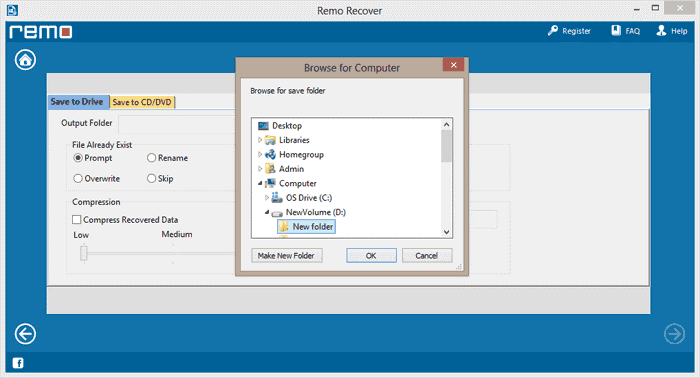
It can easily recover 300 different types of file formats such as PPT files, excel sheets, word documents etc. You can search for a specific file format using the signature option. It can recover formatted RAID partitions and also from file systems like NTFS, FAT16, FAT32, ExFAT etc. You can save the recovered files in CD/DVD or any other accessible drives. Recovered files can be compressed in ZIP format to save space.
Procedure to recover lost partition.
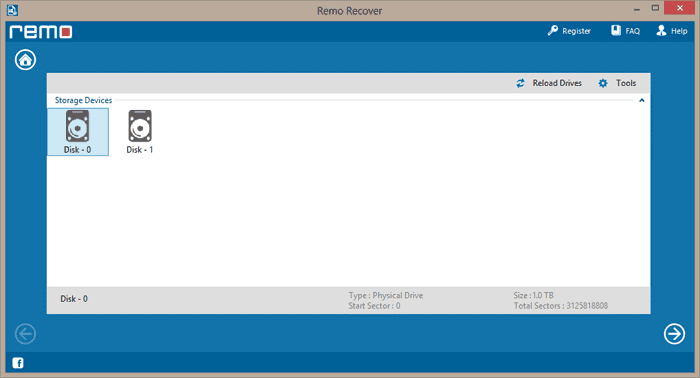
Step 1: Download Remo Recover Windows – Pro and install. Once the application is launched, click on Recover Partition/Drives.
Step 2: Click on Partition Recovery and then select the drive from which you want to recover lost partition and click Next.
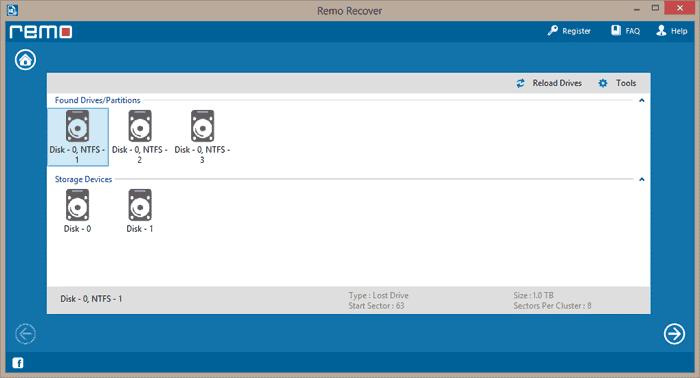
Step 3: The application will perform scanning and will list the partitions. Select the partition and click Next.
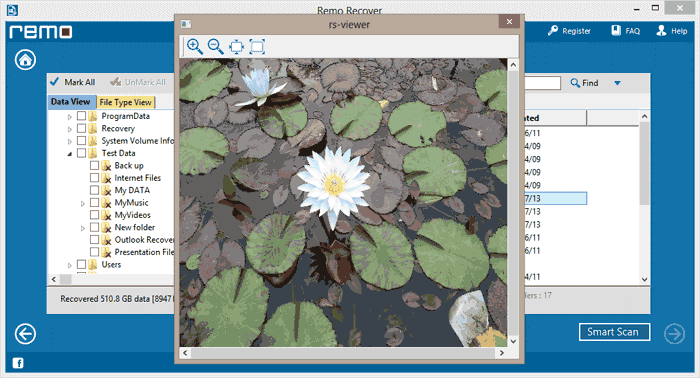
Step 4: Once the recovery is completed, it will list all the files which are recovered. You can check those files using preview option.
Step 5: Once you are satisfied with the recovered files, you can purchase the software and save your data.
The era of computing has entered into a whole new world. Till now we have used keyboards and mouse in a manner that was not much creative but it was good in its own way. But now since technology has evolved, we are witnessing the invention of new gadgets each and every day. Each one is way better and much more innovative than the previous one. Here we’re talking about a whole new concept of technology; Wearable Keyboard & Mouse. Now your gaming experience will be much more real and amazing. We are going to discuss about Tap strap wearable keyboard and mouse.
How does it work?
Using strap is no rocket science, it’s quite easy. All you’ve to do is wear it on your hand on your fingers. Make sure you’ve connected it to your master device via Bluetooth. Master device means your PC/ laptops whatever you’re using it for. Now you can choose whatever you want to use it as. You can use it as a keyboard or a mouse and just tap on a tactile surface. It is a single-handed wearable input which is designed in such a way that you can perform easily without having any sort of discomfort.
Features
It is multilingual; supports a number of languages.
It is portable.
It can act as a keyboard, mouse or a game controller depending upon your choice.
It has a battery life of 8 hours of continuous tapping whereas, in standby mode, it works up to 7 days.
It works on Bluetooth 4.0+ on various smart devices.
It supports iOS 9+, Android 5+, Windows 8.1+ OS X Yosemite+ and many more.
Why should you buy it?
If you’re a gadget freak who loves to try new things, you should surely go for it. Moreover, it has redefined the use of a typical keyboard and mouse making your computing experience worthwhile. Tap not only gives you a number of choices about what you want to use it as it also allows you to play music and you can even customise it and create your own mode.
There is not a doubt as to the world of endless possibilities that technology has brought about for the modern business. Every industry has experienced transformative changes in the past decade especially when it comes to marketing which is the central pillar that ensures an enterprise attains its operational objectives. Consequently, there has been a global demand for relevant skills when it comes to digital marketing which is the platform upon which any organization can utilize to grow their brand and increase their market coverage. The ever-increasing pressures for companies to keep up with the rapidly changing nature of the fast-paced e-commerce environment have further complemented the necessity for having internet marketing skills.
The question today is therefore not whether you should pursue digital marketing courses but on which courses that will be most relevant depending on your position and duties. Long gone are the days when it was only the mandate of those in sales and marketing to look for ways to sharpen their skills as today every employee plays a vital role in brand growth and management. It all starts with the top management whose focus is on how well they can grow the company and without the knowledge on currently trending techniques, all strategies they formulate remains irrelevant. The trickledown effect comes down to everyone involved in media, communication, public relations, and customer care which is largely the face of a company.
As with all other professional skills, becoming a guru in internet marketing is not an overnight success but one that requires dedication and investment of time. A simple but proven technique for building your skills is to sign up for the digital marketing courses at Atton Institute which are tailored to address all current demands. The dedicated institute of professional studies is renowned for their undying passion for filling skills gap which is a must-have in today’s work environment. The marketing courses are not any different and have been a shining star for lots of organizations that want to revolutionize their channels of sales, advertising, and gain insights to consumer expectations.
Since the digital world has several pillars that make it relevant to marketing, the institute has their courses tailored to revolve around a specific element of concern. This ensures that for every class that one completes, insight is gained on a vital principle of internet marketing that can be implemented in real-life scenarios. All the courses as such have an objective which is centered on core areas of interest that every organization, entrepreneur, or marketer requires for excellence.
It is essential to filter the relevance of a course before signing up for it so that the knowledge and skills acquired can be practical to your day to day functions. Atton institute has the content of each course broken down for everyone to analyze before making up their minds to be participants. A point of interest, however, is the broad scope of training which the specialists provide which makes the days dedicated to learning worthwhile. At the end of every course, participants will be provided with a certificate which is verifiable and can be checked for authenticity through their website.
It would be evident to mention that Google Slides is one of the widely used and robust online presentation application in the market. Since its inception, Google Slides have garnered a lot of users and today, people are using the application for their regular presentation endeavors. With an array of tools for users of every type, the platform offers an exuberant & simplified user-interface for everyone. Literally, anyone can make use of Google Slides regardless of the background they’re from, from students to corporate professionals, the application is open and useful for all. Also, the platform is a great tool when it comes to teaching.
Professors and educators around the world can make use of Google Slides to make education accessible to all. Since the platform is cloud-based, therefore ‘N’ number of potential people can access the content, suggest edits and can achieve a mutual understanding. Same goes for corporate giants looking forward to prototyping of applications via Google Slides. Developers can easily access the content on Google Slides and can suggest edits and make alterations themselves. Also, making use of this application is entirely free. Thus, we can say Google Slides is an incredible tool.
Presentation Making Is An Art
What comes as a noting fact is that not everybody is a connoisseur when it comes to making intuitive and engaging presentations. Presentation making is an art and it certainly requires you to spend your precious time. However, what if we say that you can make use of predesigned Google Slides templates and can save your time as well as resources? FreeGoogleSlidesTemplates.com is garnering the limelight by offering state of the art professional range of pre-tailored templates for each kind of user.
You should note that unlike other template providers who require you to sign-up and pay before you can access anything, Free Google Slides Templates is absolutely free to use. Expert professional presentation designers have already done the hard work for you, there are hundreds of quality templates available for a grab on the portal. You can easily make use of these pre-designed templates on Google Slides and can boost your presentation making requirement.
What Really Is FGST (a.k.a Free Google Slides Templates)?
With a zeal to help presentation makers around the world, FreeGoogleSlidesTemplates.com was started by a group of expert designers to make presentations better and actually save time. It’s obvious that not everybody is great with colors, formatting, and graphics. When you make use of predesigned templates, not only you maintain consistency throughout your presentation, but your presentation can actually engage with the audience then. The portal is currently offering hundreds of customizable presentation templates which can be altered as per specific needs without any extra effort. Without spending a single buck, without hiring any designer, you can now make your dream presentation and pitch ideas to executives in an unparalleled manner. This is great for instance if you are preparing a pitch deck PowerPoint template.
What Makes Free Google Slides Templates Unique?
Since templates available on this portal comes free of cost, let’s move ahead and know more about the features of the same:
Each and every pre-tailored template comes with a description of its own. Benefit? Well, you can analyze whether the presentation template will suit your presentation’s crux idea or not.
You’re not required to download a presentation when it comes to trying. You can always preview every template and watch every slide contained by it before jumping on the conclusion.
Free Google Slides Templates can be used with Apple’s Keynote as well as Microsoft PowerPoint. The scope of excellence is not just limited to Google Slides. You can always download the pre-designed template as a .pptx file. Here is explained how to Export Google Slides to PowerPoint
You’re not even required to make an account in order to unlock your access to impressive presentation templates. Therefore, FreeGoogleSlidesTemplates.com is your out of the box pick.
Example of a business process flow in a Google Slides presentation template.
Types of Presentation Templates Available
Looking forward to a template which can help you pitch an idea in a Google Slides presentation? Or you want to convey your business plan? Free Google Slides Templates have readymade templates suitable for every occasion, you name it. The platform has three major categories of presentation templates: simple, formal and creative one. For business and industry related presentation requirement, one can explore the plethora of presentation templates available under this domain.
You can get your hands on some of the famous templates such as UX template, Flat Corporate template, Blue Technology template and many more. Students and graphics enthusiasts can make use of the other two categories to find what they’re looking for. The platform maintains a pool of innovative and high-quality presentation templates, FreeGoogleSlidesTemplates.com can be a great resource for you.
Further, downloading and importing the template on Google Slides is pretty easy. You can simply load the template by opening a blank presentation and importing the slides. Also, you’re not required to worry about 16:9 or 4:3 aspect ratio, the ready to use templates can be adjusted with added ease. In a nutshell, Free Google Slides Templates does half the work when it comes to preparing for your next presentation.


![Best Electric Mini Pulse Massager for Pain Relief [Coupon Inside]](https://techniblogic.com/wp-content/webp-express/webp-images/uploads/2018/11/Tens-Unit-TOPVISION-Electric-768x432.jpg.webp "Best Electric Mini Pulse Massager for Pain Relief [Coupon Inside]")


![[Amazon Coupon] Best Dog Training Collar with Remote & 3 Training Modes](https://techniblogic.com/wp-content/webp-express/webp-images/uploads/2018/11/Best-Dog-Training-Collar-with-Remote-768x432.jpg.webp "[Amazon Coupon] Best Dog Training Collar with Remote & 3 Training Modes")