Apple is back in the hype with their new 2018 smartphone lineup to be released soon. According to various leaks, the company is planning to launch three new models this year. Various sources claim that Apple will be pricing its devices aggressively in all markets. One of the recent leaks suggests at a 6.1-inch screen and another 6.5-inch model.
Many are already calling the 6.1-inch screen device to be the new iPhone 9. This is supposed to be a successor to the iPhone 8. This should be a cheaper device compared to the 6.5-inch screen model that is supposed to be the iPhone X Plus. The company has been leaking a variety of details of their new smartphones.
via forbes.com
Recently Apple accidentally released the new iOS 12 beta 5. This mistake happened again which was picked up by a Brazilian website iHelpBR which revealed that the iPhone X Plus will have a massive 6.5-inch display which will make the device work more like an iPad. Some precious leaks had suggested a screen resolution of 2688 x 1242 for the iPhone X Plus. So, iHelpBR used Apple’s Xcode iOS Simulator to run the iOS 12 beta 5 that revealed secret landscape modes and many new interfaces for core Apple iPhone applications. Apple had been working on the landscape mode for some time and from the looks of it, it will finally make its way in the iPhone X Plus.
This substantial feature will make the iPhone X Plus more productivity-focused, which will make up for a major selling point for Apple. The company might not provide the landscape mode for their iPhone 9 to boost the sales of the iPhone X. Apple will be aiming at different price levels of the market where iPhone 9 will be a budget-friendly offering. Since Apple will be pricing aggressively, iPhone X Plus will be a device to look out for.
The Chinese smartphone maker Xiaomi, known for its premium feature and affordable pricing, launched a couple of new feature phones – Qin1 and Qin1s. The phones are launched under the Youpin crowdfunding platform and presently available for funding at CNY 199 (roughly Rs. 1,990).
Both the Xiaomi phones – Qin1 and Qin1s come with a real-time voice translation that supports 17 languages based on artificial intelligence (AI) and machine learning. There is also a built-in IR blaster to transform phone to universal remote which can be used for controlling your television sets, air-conditioners, and other home devices. Unlike other phones with a touchscreen, the Xiaomi Qin1, Qin1s feature phones sport a T9 keypad along with a D-Pad which works as a navigation key. The handset also comes with an alarm clock and live weather report feature.
Both the phones are equipped with a compact 2.8-inch IPS screen having a resolution of 240x320pixels. The screen has a Corning Gorilla glass protection. The handset packs a 1480mAh battery which is claimed to deliver 15 days of standby time. The phones are available in Black and White colour options.
The dual-SIM(Nano) Qin1, which is a 2G model, runs the Nucleus operating system. It is powered by a dual-core MediaTek MT6260A processor, coupled with 8MB of RAM and 16MB of storage. Connectivity options include – Bluetooth v4.2, Wi-Fi, and USB Type-C port, however, there is no 3.5 mm jack.
The 4G variant Qin1s, on the other hand, runs Android-based MOCOR5 and is powered by a dual-core Spreadtrum SC9820E processor, coupled with 256MB of RAM and 512MB of storage. Connectivity options include – 4G VoLTE, Wi-Fi, Wi-Fi Hotspot, Bluetooth v4.2, GPS, and USB Type-C.
The Xiaomi Qin1 and Qin1s are currently on pre-orders on Youpin in China at CNY 199 (roughly Rs. 1,990), while their shipments will begin from September 15.
There are several websites that we use regularly, like our favorite Gmail, Facebook, Instagram etc. The one thing that is vital about all of this is they we handle information on such platforms, and these services are not just for entertainment purposes, but they are a part of our life. And as much as important a person’s data is, it’s also important that we keep that data secure and safe, well in this digital word everything heavily relies on privacy and security, and that directly relates to passwords. A report suggests that two-thirds of people normally use one password for all of their online account, which is highly un-secure. We get it passwords are complex to remember and since you do not have just one but multiple accounts, it’s hard to remember all those IDs and passwords. So, what exactly a solution for that?
Password manager… A password manager is a software that holds all your accounts, IDs and passwords in a secure encrypted storage, which only you can access. They play a big role in securing all our accounts information in one place and give a sense of security to the user. Now there is plenty of password manager that promises so many different feature and security services one can use, but which one is actually viable?
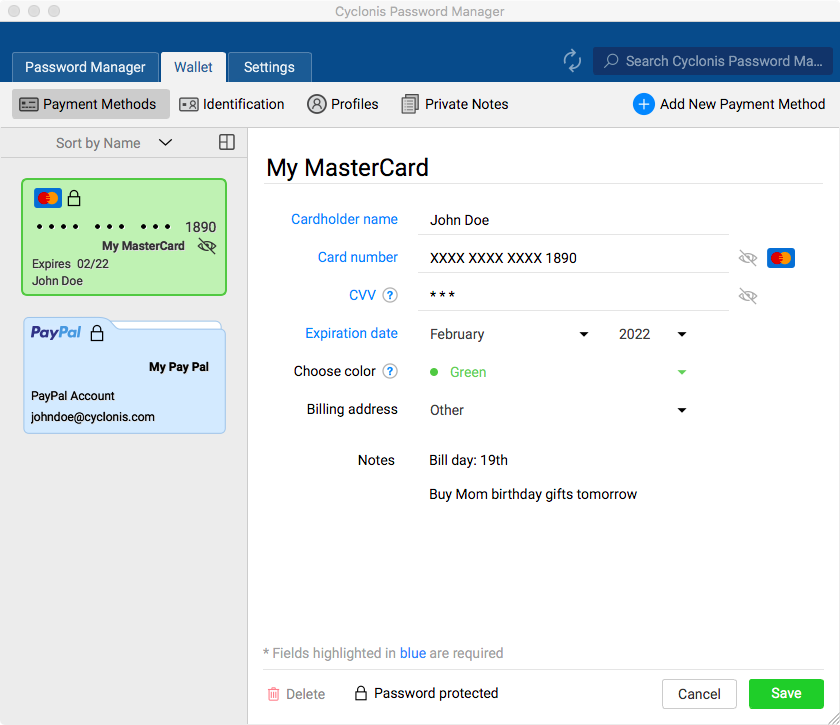
So, we searched and found a really interest password manager that promises some premium feature but comes free of cost. The Cyclonis Password Manager; the software is free of cost and has features such as encryption technology, cloud synchronization, vault, bank detail security etc. So, let’s see how much good are these features actually and how safe our information is?
What is Cyclonis Password Manager?
The Cyclonis password manager is as similar to any conventional password manager that you have seen or used, but it comes with a perk. IT’s FREE and offers an approximately equal level of security in terms of data encryption and security. Well, we personally used the software and we were surprised to see such feature in a tiny package.
Features We Liked
1 of 5
As far as we have seen and used the software, there are few features that we really like. Let’s see them.
AES-256 Encryption- Advance encryption standard 256 stands for encryption security on your data. This level of encryption is so advanced that even top security agencies like NSA, use it for their cryptographical module. It’s nearly impossible to break that level of encryption even for a supercomputer. Cyclonis uses this level of encryption to create a vault, in which all your IDs, passwords and bank details exist, which can only be unlocked with one master password. This is a highly secure method of protecting any kind of information.
Password Generator- Probably the most rated feature of this app makes this a unique application to use. The password generator is used to create a random password for your online accounts, it can be anything, mostly all these passwords are very complex since they are created randomly by the application itself. So, it’s better to let the manager takes care of it.
Cloud synchronization- if you’re using your accounts on multiple devices, you would need this. Cloud synchronization uses your cloud services like One drive, Google Drive, Dropbox etc. services to upload the privately accessible vault, where all your passwords are kept secure. With it you can access your information from any internet enabled device.
Data import/export- This feature allows Cyclonis to import data from different browsers, so you don’t have to manually enter every account detail. Which becomes very simple for the user and also at the time of exporting into the browser. It also imports CSV files from another password manager.
Password analyzer- The software comes with a dedicated password analyzer, which analysis all your accounts password and tells you how much secure the password is. It categorizes every password in various sections, instructing you to increase the password complexity, reused password, old passwords and passwords that can be compromised easily.
Private notes- The software also comes with some individual feature, such as secure notes. Where you can create a note and it will be saved in the vault. The vault will only be accessible by a master password, that will be requested to create at the installation process.
Browser integration- A browser integration is nothing but an add-on extension of the browser itself. The Cyclonis browser extension allows the user to access their accounts and IDs in a much secure way, even when you have saved the password within the browser. You can also set to automatic login when you open the desired page, which is quite handy.
Why do I need a password manager?
Initially, we were not very fond of passwords managers and till now they are not really popular among net users, and there is a certain reason for that. The conventional password managers are either fake or don’t offer a higher security, the only ones that are highly recommended and used are paid application. That creates a stigma around users and they don’t usually trust in a third-party application with their passwords or bank details.
Most users have the same passwords for their Facebook, Gmail, Instagram etc. But as a user, everyone should have a certain level of security on their accounts, especially on the internet. It’s not just because you keep forgetting passwords but it’s more about keeping your accounts secure. The preliminary reason why people get hacked easily is that their password is very easy to guess. A password manager helps keep your password complex and secure at the same time, giving you a sense of relief.
Our Opinion
As a freeware, the Cyclonis password manager achieves our expectation mark. It has a really easy-to-use UI, the installation process is quick, it has got a higher level of encryption, you can even integrate with cloud services, create a vault for your personal files and can even integrate with browser add-on for quick and secure user login. The only downfall that the product has that it’s not available on mobile devices such as Android or iOS, so you have to manually enter the IDs and passcode into your app. Although the folks at Cyclonis are working on an Android app until it’s not launched users may have to face some issue. What seems like a Freeware Password manager, Cyclonis may turn some user attention and make them browse the web more securely.
That’s all for this guys, stay tuned for next one.
Security isn’t an inherent trait of the internet. At the same time, it is full of distractions and time-wasting things for everyone. Therefore, it is better to use LAN Messenger during LAN Chats within the same office. You’ll say – Going to someone ten seats away from my seat, or maybe in another block, is tiring and time-consuming. Well, yes; it is. So, we’ve got a solution for you:
Use LAN Messenger instead of Skype, Slack or any online tool.
In this article, we will tell you which Messenger you should use, how to use it and why.
First things first –
Why Do You Need to Use LAN Messenger?
Every office needs software for messaging and data transfer – online or offline. Due to the arising issues of data theft faced by internet users and lack of other security protocols, LAN appears to be the most secure medium of data transfer, provided, you are using a reliable Messenger for LAN communication.
Local messengers won’t be affected by internet disconnection, online congestion, slow speed, high data costs due to enormous data transfers and more. And for obvious reasons, people use LAN Messenger as it works super fast too.
Which LAN Messaging Software will suit your Requirements?
Take a look at Softros LAN messaging application.
Use LAN messenger( Sofrtros) as it ensures effective communication through its instant messaging and file-transfer facilities. For companies with a large number of employees working on LAN, it is the fastest network messaging solution to implement. Softros LAN Chatting tool has been devised which ensures secure and unhindered communication with least efforts.
It works on all Intranet / LAN / WAN network and acknowledges all Windows XP/7/8/10 user accounts. It is endowed with a multiplicity of features and languages to make communication more comfortable and reliable. Having robust encryption options to safeguard your incoming and outgoing messages from unlawful usage, it is more secure as compared to any other messaging apps.
How to Install and use LAN Messenger? (Softros)
Its installation and usage don’t require any specific training or IT assistance; it can be done by anyone who has little knowledge of computer operations. Moreover, you need no training to operate it too.
Here’s the quick and easy installation procedure with all screenshots and process details:
Visit Softros LAN Messenger website. Now, download it as per your system’s requirements. The software supports Windows, Mac OS, and Android platform.
Softros offers 30-days of free trial for its users. This duration is well long enough to check the efficiency and usefulness of the tool.
Click on ‘Download your Free Trial Now!’ and you will be forwarded the main download screen –
3. Click on Download and the page will redirect you to CNET’s software directory.
4. Finally, click on ‘Download now’ here.
5. Let the process complete and open the .exe file, once it is downloaded.
6. Click on ‘yes’ when this app permission notification appears.
7. Select your language.
8. Read the terms and conditions and select ‘I accept the agreement’ before you click on ‘Next”.
9. Click on ‘Next’ again, and your Softros app will be installed.
10. Launch the app to get started with this Messenger for Intranet. You may do it later too.
Ask all your employees/LAN users to follow the same procedure so that everyone in the network could use LAN messenger.
How to Use LAN Messenger?(Softros)
As you have already installed the Softros Messenger for office chats, you can now avail of all its benefits for free. The trial version will remain free for 30 days, with all the features accessible to you. After that, you will have to upgrade to its premium version if found useful.
To get started, open the software. A screen will appear, showing all details related to online users, such as –
Now, let us explain all its major features one by one.
How to Use LAN Messenger to send messages?
The application supports individual, i.e. Person-To-Person Communication; group chats and broadcast messaging. It allows the user to leave messages, which will be delivered when the recipient goes online. It works without any server and is a P2P based software that is a standalone solution.
Here’s how you can perform these operations:
Person-to-person
To start a one-to-one chat session, just click on the username of the person, with whom you want to talk. This will open the chat slot.
Type the message and send.
The message will be delivered within seconds if the recipient is available on the LAN network. It is as comfortable as you want.
Group chat
To add other users’ the conversation, you can press “invite” on the chat window.
Broadcast
To send message or files to a large number of users at once, you can use the broadcast feature of Softros LAN Messenger. For this:
Click on Settings.
Go to Network.
Add the broadcast address of single IP, subnet info or a range of IP Addresses and click on ‘Add”.
Start sending Broadcast messages.
File Transfer Procedure
With it, sharing a file on the LAN is easier than ever; it takes the minimal time too.
You can just drag-n-drop files to share them with your peers. These files can be accepted manually or automatically, as per your settings.
Files can be opened from Within the chat anytime:
It not only assures the safety of the sent document but also saves the history to check it anytime you want. Ypu can use LAN messenger to transfer files on multiple LAN networks with different subnets by combining them all together to create the single messaging environment.
Remote Desktop Access
This feature lets one LAN user share his/her desktop screen with another LAN user. As it requires the consent of the system owner, so it is safe to use RDA feature of Softros. The process to utilize RPA differs as per your user role.
For Normal LAN Users
Click on “Desktop Sharing” and request access from the other LAN user, whose screen you want to control.
For System Admins
If you are the network administrator and have access to all the systems in the network, you can just use ‘Remote into ….. Computer’ option. After filling the credentials in the windows that just popped up, you can access the screen of that particular user.
This feature is particularly helpful when you want to carry out unnotified audits or need data from someone’s system when he or she is not present.
Other essentialfeatures of Softros LAN Chat Messenger
Restricting User Access
Importing, Exporting and Pre-configuring User Settings
Network-Wide Group Policy Deployment
LAN, WAN, VPN, and VLAN Support
Active Directory and Domain Support
Terminal Services Support
Remote Desktop Sharing
What can you do with this tool apart from Office Chats (At a Glance)?
Creating User Groups
File Transfer
Offline Messaging
Group Messaging
Individual and Group Conversations
Serverless Architecture
View Users Information
Maintain Security, Privacy, and Safety
Trace Message History
Reasons to use LAN Messenger
Companies are always in search of secure ways of data transmission, and information exchange. Online is definitely not the super-secure way for this. So, LAN chats come into the picture. For this, tools are available but either they are highly-priced or lack features. That’s where Softros looks reasonable.
The LAN messenger program permits individual and group messaging, file transfer, offline messages, and encryption. It assures the security of communication and the entire conversation is logged, reducing the risk of losing any message.
It is available for free for 30 days. Be it a large organization or some small company working with LAN; anyone can access it with a simple subscription later.
Softros Messenger is a perfect intra-messaging office solution for companies working using LAN, which comes with a variety of features. It assures no interference of your private data by any unauthorized person due to its secure encryption, which will not let your file or message leave the LAN. The tool has an intuitive interface for faster response, remote assistance, files transfer, group, or private messages with notification alarms, emoticons for effective communication.
To use the Softros messaging application, download it from here.
Do drop your suggestions below, and to read more such content stay tuned to Techniblogic.
What is the use of LAN Messenger?
LAN Messenger is used for sending private messages, file transfer, chatrooms and graphical smileys.
Is it safe to use LAN Messenger?
The Softros LAN chat software encrypts all data with AES-256 and works strictly within your company network as a self-hosted chat.
Does LAN Messenger work with WIFI?
One of the key advantages of LAN chat software is its ability to work without an internet connection.
Vivo India has something exciting for this Independence Day. They have some amazing offers which will be starting from 7th to 9th August (sale starts at midnight of 6th August) exclusively on their official website store, shop.vivo.com/in. During Vivo’s ‘Freedom Carnival’, customers can avail some attractive discounts, coupon deals and cashback offers on selected range of Vivo smartphones and accessories.
On this sale, Vivo will be offering their latest best-sellers – NEX and V9 via flash sale for just INR 1947. Additionally, consumers will also stand a chance to purchase Vivo accessories such as earphones, and USB wires at an attractive price of INR 72 only. The flash for both the smartphones and accessories will commence at 12 noon for all three days and will last till stocks last.
Speaking on the announcement, Jerome Chen, CMO, Vivo India, said, “Vivo wanted to make the 72nd Independence Day special for all its customers. Our Freedom Carnival brings exclusive offers on our latest products and provides the freedom for everybody to celebrate and express themselves through Vivo smartphones and accessories.”
Cashback on all credit and debit card transactions
During the three days carnival, customers can get up to INR 4000 cash back on selected models. In addition, Vivo is also offering 12-month zero-cost EMI scheme on almost all Vivo smartphones. Besides cash-backs and interest-free shopping, customers will also get Bluetooth earphones worth INR 1200, free on purchase of NEX, X21, and V9.
Coupon Deals
Customers can further sweeten their purchase with the help of readily available discount coupons redeemable on select smartphones and accessories. Details below:
In today’s era security is a primarily concern of every individual, and we all know that a proper lock is a crucial component to home security. Locks, whether traditional or modern, smart or dumb, are designed to keep trespassers and other unknown people out while at the same time letting the right person in without much complications. With the increase in the advancement in the technology, we now have a smart lock which is more convenient, secure and smarter. Fipilock 2S is a smart fingerprint lock. No more keys or passwords, just your fingerprint is required to unlock the lock.
Fipilock 2S stores up to 10 fingerprints. All the stored fingerprints are managed within thumbprint padlock, hence no other external device such as computers is needed. By the time no finger is set for unlocking the lock, the smart padlock is in an empty state and any finger can act a key but as soon as the user sets the administrator account, only his/her finger will act as a key.
Features:
Fipilock 2S comes with long battery life and has a zinc alloy body which offers a long-lasting
It is compact, light-weighted and a lipstick-size lock that can be carried anywhere you need.
It is perfect for school, gym, outdoor adventure and travelling and it can be tucked into your backpack, handbag and even your pocket.
It also offers high performance hence, allowing it can be unlocked within 0.5 seconds.
It supports up to 10 fingerprints for shared access.
The IP65 level weatherproof padlock prevents the lock from rain and dust.
Why should one go for Fipilock 2s?
This lock offers security and convenience both at the same time. Your finger is the key for this lock so you need not worry about losing your key again. With this fingerprint lock, you don’t have to worry that the key is copied or the password is cracked. Maybe you can be assured of the safety of your things with this one.
Availability
Fipilock 2S is available on Indiegogo.com, and the price is just $199 USD. So, hurry up before the offer expires.
Thanks for hanging out with us guys. Please do drop your suggestion and ideas in the comment section below. If you want to keep tabs on a more innovative product like this, subscribe to our website.
Reliance Jio undoubtedly is one of the biggest players in the telecom industry in the past couple of years. The company is soon about to start registrations of their broadband connection, named, Jio Giga Fiber on 15th August 2018. They have been testing out this service since 2016 in a few selected cities, which according to the users has been a huge success. This broadband connection is supposed to provide users with download speeds up to 1 Gbps.
The company intends to start this broadband service with 1,100 cities only within India. The broadband service could also work with TV and smart home suite. The company will set up a GigaTV set-top box and provide the users with a voice-controlled remote. This will give users access to “600+ TV channels, thousands of movies, millions of songs, and any other type of content possible”. Accessories such as a video dongle, audio dongle, Wi-Fi extender, smart plug, TV camera, outdoor security camera, smart speaker and lot more will be a part of GigaFiber connected smart homes. The characteristic features that make Jio Fiber unique are:
High-speed internet
Stream 4K content
Connect multiple devices
Manage your account
Experience hassle-free installation
August 15 is the date for registrations only. The broadband service will be provided later on according to the demand in various cities based on the number of registrations. The company will start the high-speed broadband network in areas with the highest demands. Mukesh Ambani in his AGM speech clarified that “we will prioritize our Jio GigaFiber rollout to those localities from where we receive the highest number of registrations.”
No official plans have been confirmed by the company yet regarding the Jio Gigafiber, but a refundable amount of Rs. 4500 will have to be paid by the customers for the router in areas where service is available. The company in their presentation claimed to provide 1 Gbps downloading speed and 100 Mbps uploading speed. One can register for Jio GigaFiber using the MyJio app and Jio.com website which will go live on 15th August.
Blackberry has launched two new sets that will be available soon in India. The BlackBerry Evolve X and Evolve are purely designed and manufactured in India. Both smartphones will be sold in the country by licensee brand Optimus. With the launch of these two, Blackberry has entered into the world of handsets having Face Unlock. The BlackBerry Evolve X will come in the market from mid-September and the Evolve will go on sale by end of August.
Let’s go through the cheapest first! The BlackBerry Evolve has an aluminum unibody design with dual rear cameras and a fingerprint sensor mounted at the back which gives it an elegant look. Having 5.99-inch IPS LCD display and an 18:9 aspect ratio, the Evolve is also protected by a layer of Corning Gorilla Glass 5. It has a dual rear camera of 13-megapixel sensors which are coupled with f/2.0 aperture, dual tone LED flash and RGB+Mono mode. Front-facing camera of 16 MP includes a selfie flash along with fixed focus sensor having f/2.0 aperture, 78-degree FoV, Tetra Pixel technology and real-time bokeh mode. It packs 4 GB RAM with 64 GB of internal storage which is expandable up to 256 GB using the microSD slot. It is equipped with an octa-core chipset and is powered by a Qualcomm Snapdragon 450,1.8 GHz processor. Its battery backup will be of 4000mAh.
Now coming to the Blackberry Evolve X,with 5.99-inch full-HD FullView LTPS IPS LCD display having 18:9 aspect ratio, a max brightness of 500 nits and an oleophobic coating, this device is powered by the 64-bit octa-core Qualcomm Snapdragon 660 SoC, paired with an Adreno 512 GPU.6GB of RAM and 64GB internal storage expandable via microSD card (up to 2TB) has been provided to this model. Evolve X supports a dual rear camera setup with a 12MP primary sensor and a 13MP secondary sensor with a 6P lens and dual-tone LED flash, and 16 MP front focused camera. Moreover, it also supports wireless charging only and a wireless charger will be provided separately for it.
Things common in both of the smartphones are that the camera features including refocus mode, 4X autofocus, and slow-motion video. Both the phones will be available exclusively on Amazon.in.The BlackBerry Evolve X will be priced at Rs. 34,990 while the BlackBerry Evolve has been tagged at Rs. 24,990 in India.
Infinix, a Hong Kong based smartphone maker, launched the latest Infinix Smart 2 in India on Thursday. The biggest highlights of Infinix Smart 2 is a Full View display, Dual VoLTE, Android 8.1 Oreo and front camera with Dual LED flash coupled with an affordable price tag. The smartphone comes with a starting price tag of Rs. 5,999 and will be made available exclusively through Flipkart India from August 10, 2018.
The Infinix Smart 2 sports a 5.45-inch HD+ Full View display with 1440 x 720-pixel resolution, 18:9 aspect ratio and 500 nits’ brightness. The phone also has an Eye Care mode and 83 per cent screen-to-body ratio. In terms of performance, the phone is powered by a 64-bit Quad-Core MediaTek 6739 SoC clocked at 1.5GHz and will be available in two storage options- 2GB RAM+16GB internal storage and 3GB RAM+32GB internal storage. The storage on the phone is expandable up to 128GB via microSD card.
Infinix Smart 2 runs Android Oreo with the company’s own XOS 3.3.0 Lite Hummingbird skin on top. For optics, the handset comes with a 13-megapixel sensor at the back along with a five-piece lens sporting a f/2.0 aperture and phase detection autofocus (PDAF) along with an LED flash. For selfies, there is an 8-megapixel sensor at the front along with a f/2.0 aperture lens and dual LED flash. The front camera is also equipped with 9 levels of beautification and bokeh mode.
The smartphone packs a 3050mAh battery that will provide up to 21 hours of standby time. Connectivity options include- 4G VoLTE, Wi-Fi, Bluetooth, GPS/ A-GPS, Micro-USB, and a 3.5mm headphone jack. Sensors on board include an accelerometer, ambient light sensor, and proximity sensor. The handset also comes with Face Unlock feature but there is no fingerprint scanner on the phone.
The 2GB RAM variant of the Infinix Smart 2 is priced at Rs.5,999 while the 3GB RAM variant will set you back Rs.6,999. Surely, the phone is designed to compete with the Xiaomi Redmi 5A, Moto C Plus, and Samsung Galaxy On5 in the budget section. The smartphone will be available in four colour option– City Blue, Bordeaux Red, Serene Gold, and Sandstone Black.
Being fit never goes out of fashion. We all follow different routines, diet plans, workout patterns just to stay fit and live a healthy life. But the thing is, our body metabolism changes regularly which means our body has different requirements at different times. So how can we know what is optimal for us at a particular time? What is the diet plan that we should follow? Lumen, a device to keep track of your metabolism on regular basis has answers to all the questions mentioned here. So, let us check it out.
Lumen actually measures our metabolism. Metabolism is the process through which we convert the food we eat to energy. Lumen does it by checking our breath. All we have to do is breathe into this device and it will measure the concentration of various gases present in our breath. Depending upon which it will guide us with what is wrong with our body or what diet we should follow to stay healthy. All this information will be conveyed to you through a mobile app which is compatible with both Android and iOS. Now you will easily guide with what to do and what not to do to achieve your goals.
Features:
The device has got a compact and sleek design with a charging dock.
It can be connected to the app via Bluetooth.
It has got Real-time tracking options such as sleep tracking, activity tracking, nutritional tracking, and a work out optimiser.
The device is lightweight and weighs only 95 grams.
Why should you buy it?
If you’re not satisfied with your daily routine and want to do something about your health, Lumen will definitely help you. It will not only give you details about your vitals but also make a detailed meal plan for you. It will track your sleep, your nutritional intake and will let you know the carbs and fats burned by your body. Overall, you’ll get a mini personal trainer who’ll guide to you towards your goal. Thus, you should really consider it if you wish to live a healthy life.
Availability
Lumen is available on Indiegogo.com, and the price is just $199 USD. So, hurry up before the offer expires.
While traveling via car, most of us like to enjoy music. Music adds a flavor to our journey. We often use our phone for doing this but in the process, our device gets discharged. Some of the cars come with features to connect your smartphone via an auxiliary cable to play music or connect USB cable for charging purposes. But there are still a majority of cars which don’t come with the mentioned features. We might have something for you, something which will not only let you stream your favorite music but also charge your multiple devices simultaneously. We are talking about Roidmi 2s, a device to play music seamlessly via Bluetooth. Now let us discuss more it.
Its working is quite simple. All you’ve to do is connect Roidmi 2s into the cigarette lighter of your car. Now open the Roidmi app in your smartphone and connect it to your Bluetooth device. The app will scan for the most appropriate radio channel and you can easily play music without any hassle. Other than this, the device supports multiple two USB supports designed for charging purposes. Thus you can easily play music without worrying about your phone’s battery. You can use Gearbest Promo Code for Extra Discount Coupons.
Features:
Roidmi 2s has got a microphone with noise reduction technology to ensure hands-free communication.
It can also act as your navigation companion to guide you to your destination.
The USB ports are illuminated by different colour lights.
The battery of your vehicle is also monitored to alert you about your vehicle’s battery conditions.
Roidmi app is compatible with both the Android and iOS platforms.
Why should you buy it?
If you’re a kind of person who loves to play music while traveling, you’ll surely love this device. Moreover, if sometimes you’re unable to charge your phone at home, office or anywhere, then you can relax because Roidmi will do the work for you. You can take this device anywhere with you. Overall it’s a decent device with some amazing features which surely make your life a bit more comfortable and tension free.
Availability
So far, the Roidmi 2s is backed by Xiaomi, the Chinese tech giant. The device is priced at just 17 USD. So, hurry up before the offer expires.
If we talk about today’s digital society, the question arises: can paper be abandoned? We all know that in corporate fields while making small notes, we always choose paper and surprisingly, paperless meeting i.e. in meetings where one chooses to document every minute of meeting digitally is more secure and convenient. To make the environment safe and to make less use of papers and to provide more security to documents, an extraordinary and revolutionary 3 in 1 E-writer tablet, power bank and wireless charger is being launched. Yes, Memomate, a product that claims that while using it you will stay: paperless, wireless, and always charged.
Memomate is a portable device i.e. you can carry this sleek and pocket-sized device with you anywhere and you can use it anytime. It uses pressure sensing technology so that you can write without delay or restrictions. While using Memomate you will feel exactly the same as you feel while writing on a paper and it also allows you to erase your notes and hence you are not going to run out of papers.
Features:
It is a portable device.
It is an E-ink tablet and allows you to write comfortably without being interrupted.
You can perform multitasking endlessly without thinking of the shortage of battery as it is a 1000mAh power bank.
It also allows you to charge our device with 3.0 quick charge wireless feature.
It offers 100,000 pages and also provided you with an option of DEL button, with DEL button, you can delete everything, so you can endlessly use the tablet and you will never run out of pages.
Memomate uses pressure sensing technology.
It gives you an opportunity to save and share your work with everyone else with ease.
Why should one go for Memomate?
This device is durable and safe to use. With Memomate you are not only saving paper, but you are also taking one step towards digitalization. You can also make quick notes of valuable information with Memomate e-writer while talking on the phone.
Availability
This revolutionary product is available at Indiegogo.com at a minimal price of just 89 USD. SO, hurry up before the stock goes out.
Tech giant likes Vivo tries their best to come with a product that could catch a user’s eye, and frankly, they are quite good at this job. The recent advancement in technology has certainly pushed the limits of every smartphone manufacturer, and the outcome of that advancement is smartphone-like Vivo Nex or the Oppo Find X; the bezel-less future that we’ll have.
As you know that the Vivo Nex has launched in India, the smartphone which has several hidden features that are yet to explore. So, here we are with some awesome Vivo Nex tips and tricks that you may not know.
Here are the Best 14 Vivo Nex Hidden Tips & Tricks:
Turn Always-On for the fingerprint sensor
You can choose to turn on the fingerprint sensor even when the screen is off and since it uses AMOLED panel so no extra battery will be required for this function. To access this feature, you just have to go to the setting>>fingerprint sensor>> and then turn on “show fingerprint sensor when the screen is off” option.
Customize Always-On display
The AMOLED screen makes it the first Vivo phone in India to provide an Always-On display. You can customize the clock background; clock widget style and you can also choose apps that you desire to see a notification. In order to customize the Always-On display you need to go to the settings then select lock screen, home screen, and wallpapers and then choose Always-on display.
Navigation Gestures
It offers a good display and to make the full use of the entire full-screen, one can replace the navigation bar with gestures. Not only one that but you can also decide the order of navigation gestures and can also eliminate gesture guiding lines that are present at the bottom.
Customize Volume down Shortcut to access apps
The device provides you with a “Smart Click” option. This option helps to customize volume down button to directly access the camera, Facebook, WhatsApp or any other app directly from the lock screen. Smart Click option is present in the setting menu; you just have to scroll down to the bottom.
5. Make use of extensive gesture support
It supports few smart screen gestures like double tap to wake, swipe up to unlock, smart answer and more. These all gestures are grouped under ‘smart motion ‘ option which you can get in <Settings>.
Add Recycle bin back up to the gallery for deleted images
Every one of us has gone through a situation where we might have accidentally deleted our valuable pictures. With this device, you need not worry about losing precious memory because they can always be found in recycle bin. To access this option, go to the <settings> and then choose <albums>.
7.Auto Call recording
Not only you can turn on auto call on the device but you can also choose the option of record calls for specific contacts by selecting the option of <custom call recording>.
Camera Tricks
You can use the Portrait Mode to click pictures with blurred background. You can also alter the intensity of blur by adjusting the F-stop slider. You can also use the AR stickers, just swipe left to access those stickers.
Use Beautify for Video Calls in WhatsApp and Fb messenger
It offers a feature of live beautification to lessen skin blemishes in video calls placed through WhatsApp or on other apps. To turn on this feature, again go to the <settings> and turn on <Face beauty for video calls>.
Keep Dual Apps
Just like other smartphones it also offers the feature of keeping two same messaging apps but they should be logged in using separate accounts. To access this feature, you just have to go to the <setting> and then choose the option of <App clone>.
Blur recent apps for privacy
To provide proper privacy it offers a feature called option to <blur particular apps in a recent app pane>. To get access to this feature you just have to go to the< settings> and turn this feature on.
Turn on Easy to use the floating menu
With 6.59-inch display, it is quite difficult to reach extreme top and bottom ends of the screen. This is the place where the floating button comes into action. To customize this feature, you will need to visit the <settings> and then finally you have to choose an <easy touch> option.
A native True caller on
There is no need of installing true caller app on this device because this smartphone has a native solution for all the unknown numbers. You just have to go to the <settings> and then select the option <phone> and then select <online recognize unknown numbers>. Once this feature is turned on, a database of incoming numbers is being created and downloaded for offline use.
Lock Apps using another password
The device uses another password to lock apps other than yours unlock pattern. You can do so by going to the Settings>> Fingerprints, Face, and Password, and select Privacy and app encryption. Then you can set a new password and select the apps you want to lock.
Vivo a few days back launched an amazing device in the Indian market. The device is innovative in all its aspects. As of now for as a normal user I don’t think so there is any flaw in this device. Even the pricing of the device is quite aggressive this time if we consider the technology which they have used in their device. It is the basically a flagship which is way better and ahead of Samsung and apple. So, here are my top 5 reasons why you should buy Vivo Nex.
The Vivo Nex comes with an all-screen design up front and to achieve that the company had to hide the front-facing camera. As the selfie camera mechanically pops out, which makes the Vivo worlds first to come up with that technology in the world. Vivo has also showcased the durability of the pop-up camera by putting a 12mm glass on a few phones pop up the camera and a dancer dancing on top of it.
Earpiece
Just as we have seen in previous generation Xiaomi Mi Mix, the Vivo Nex also uses next-generation bone conduction technology. Using this technology you can place your ear anywhere on the display and you would be able to hear the audio loud crisp and clear. This next-generation technology is way ahead of Xiaomi Mi Mix as while you are traveling with too much noise you would be able to use this bone conduction audio technology perfectly without any issue.
Biometrics Unlock
Now, this is another amazing technology which Vivo has used in their device. They are using world’s first in display fingerprint sensor. Vivo first came up with in display fingerprint sensor in Vivo x21 which sells up quite well in the market and now this elevated camera they have combined the in display fingerprint which makes this device from the future. Vivo has refined the future with this device.
Hardware and Software
The Vivo Nex runs on Android 8.1 Oreo-based FuntouchOS 4 out of the box. The custom UI on the Nex does bring a ton of features like gesture controls. The nex is packed with snapdragon 845 processor 8GB RAM and 128GB Internal storage which is I think enough to say anything. Beyond these specifications is nothing to explain.
Price
Vivo Nex is currently priced at Rs. 44,990 and will be exclusively available via Amazon India starting July 21. The smartphone as per the technology used perfectly prices if we compare the same with Oppo Find X. Whenever they came up with this in the offline market, they are going to blow up the stock with great sales.
We have seen so many 3-Axis Smartphone Gimbal Stabilizer, but all of them are from Chinese brands. So, to give competition to them Digitek a well known Indian brand came up with India’s first 3-Axis Smartphone Gimbal Stabilizer which also supports in usage charging and face tracking that too in very affordable pricing.
We all are very much familiar that while recording videos or even taking some still shots keeping your hand steady is a big task. So, to overcome with that stuff Digitek comes up with their new 3-Axis Smartphone Gimbal Stabilizer. Now you don’t need to worry about any shakiness in your videos or any blurry images due to unsteady hands. The Digitek DSG 005 is a product which is developed in India and you can buy the same at Rs. 7,499 from Amazon.in
Digitek DSG 005: Specifications
The Digitek DSG 005 is a 3-axis gimbal stabilizer. It is having a joystick which is actually used to control all the actions done by the gimbal. The Gimbal can be used single-handedly. Gimbal can used in any direction and is very easy to take a pan and tilt shots using this gimbal. You have different modes in Digitek gimbal like pan mode, tilt mode, lock mode etc. The best thing I loved is the pricing because as of now we need to pay more than Rs 15,000 to get a good gimbal from Chinese market that too without warranty but with Digitek everything is changed.
You can use a stabilizer with its own application or without it totally depends on you. I will prefer you to use there accompanying app to get better usage of the gimbal. Once your smartphone gets synced and activated, the Digitek gimbal will unlock more advanced features which include face tracking, time lapse functions, smart object track, panorama shooting, and zoom control.
I will be explaining each and every mode in our upcoming review for the same. It weighs only 423 grams. Despite the lightweight, the device also packs about 10 hours of active usage.
The Huawei Nova 3 and Nova 3i India launch in India which are two new mid-range smartphones to the country from Huawei. Both Nova 3i and Nova 3 comes with dual cameras on both the front and the back with AI technology integrated in them. Both the devices comes with a perfect notch on the display with all the sensors installed in it. The front cameras of both phones also have HDR Pro which is quite good. The new Nova 3 and Nova 3i will also receive a GPU Turbo mode via an OTA update for the best gaming experience.
The Huawei Nova 3 is priced at Rs. 34,999 and will go on sale in India on August 23. Coming to the price of Huawei Nova 3i, buyers will have to pay out Rs. 20,990 and sale will commence on August 7. Both the handsets will be Amazon exclusive.
As per the launch, we no-cost EMIs option with extra Rs. 2,000 off on exchange and Rs. 1,000 cashback on pre-booking. Jio customers will get cashback of Rs. 1,200 and 100GB complimentary data.
Specification for Huawei Nova 3i, Nova 3
Huawei Nova 3 comes with EMUI 8.2 skin on top of Android 8.1 Oreo. The device sports a 6.3-inch full-HD+ (1080×2340 pixels) with a 19.5:9 aspect ratio. The handset is powered by an octa-core Kirin 970 SoC, coupled with a Mali-G72 GPU, 6GB of RAM, and 64GB/ 128GB of inbuilt storage.
Coming to the camera Huawei Nova 3 comes with dual rear camera setup with a 16-megapixel primary sensor and a secondary 24-megapixel sensor. The smartphone also has a dual camera setup with a 24-megapixel primary sensor and a 2-megapixel secondary sensor. The front camera also comes with 3D Qmoji, bases on AR-based emojis that iPhone already has.
On the other hand, the Nova 3i sports a 6.3-inch full-HD+ (1080×2340 pixels) with a 19.5:9 aspect ratio and 409ppi pixel density. The smartphone is fuelled by an octa-core Kirin 710 SoC, paired with 4GB/ 6GB of RAM and 64GB/ 128GB of onboard storage. The storage on the handset is expandable via microSD card (up to 256GB).
While your actual web page can extensively cover what your company represents as a whole, sometimes you will want to highlight one feature. To shed light on a given product through a campaign, building microsites is a strategic way to tackle publicity.
Microsites function independently but are linked to the parent site. Having a separate site for addressing a specific goal is ideal to prevent the message from getting lost in other materials on the main site.
Today we are going to cover just a few of the many reasons you should be leveraging micro-sites.
Generate Highly Targeted Traffic
If your business is seeking to get the word out about a campaign, microsites provide an avenue for targeted online marketing. They serve as independent sites and are often built on niche specific domain names such as “dadsdivorce.com”, I am sure you can guess what that site is about!
Microsites often contain articles, videos and visual content to draw in the consumer. They are meant to provide content that is targeting to a very specific audience. Once you have identified who that audience is using tools such as Google Analytics, you can then create messaging that resonates with your key demographic.
If you are at a loss for what type of content is popular among your audience, head to sites such as BuzzSumo. It will provide you with the best performing content so you can model your own strategies after what is proving most effective.
An example of a successful microsite is Domino’s DXP page. It showcases the “ultimate pizza delivery vehicle”. It takes you on a virtual ride while showcasing its unique capabilities. While the page acts independently, it ultimately directs consumers to buy Domino’s pizza.
Create Detailed Content to Boost Conversions
In order to boost conversion rates, it is also important to continually post a variety of content on microsites such as videos, images and other articles. You want to create in-depth content that speaks to your target audience. Don’t be afraid to reference other experts in the field to show you are up to speed on your industry.
Since your microsite should have a narrow focus, the content intended for that specific audience is exactly what they will see. This isn’t always the case on larger sites with multiple avenues of entry.
The information you provide on your microsite shouldn’t be solely promotional either. Red Bull is one example of a company that launched a microsite called the Red Bulletin. It does not directly sell red bull rather features articles on lifestyle, culture, and sports. Its following becomes inadvertent fans of the product by engaging with the content. Companies should realize launching sites like Red Bull’s take time and staffing to be successful which isn’t necessarily cheap but, with a proper content strategy in place, it can be very effective.
Generate Targeted Leads
Microsites enable businesses to capture the attention of those who already have a vested interest in a product. For example, you can lead those who have expressed interest in trying your product to your site.
Prior to giving them more information, you already know they are quality leads. Simply build up the hype with your microsite to convert potential buyers into customers. Many sites do this by zeroing in on those who have explored sections of their sites devoted to those willing to make purchases.
Target Markets Based On Location
After studying Google Analytics, you will have a better understanding of where your customers originate. People from different places have different preferences and interests. It can be hard to target each different geographic area with a single website. Using microsites, you can hone in on users in specific areas. For example, you can tailor the language to a certain location or provide visuals and videos that showcase a particular area.
Car companies are great at using geographic location to their advantage when creating microsites. They change the landscapes in visuals and the language across the page to make it easy for users to learn about their product.
Stand Out From Main Brand
Often times a product may get lost among other features on your site. To boost the conversion rate for a particular item, it’s important to have a place where it can be showcased. Creating a microsite is a good way to set aside a product to attract more followers.
It will provide you with a way to direct those interested to one place where they can find exactly what they are looking for. Driving up interest on microsites is an easy way to access new customers unwillingly to sift through your main page.
This strategy is especially useful when a large company is looking to promote a new product or offer. One good example of this is the microsite for the A350 line of Singapore Air.
Promote Product Contrary to Brand Image
You may have a product that does not represent exactly what your brand communicates. In order to reach an audience other than your already acquired following, you may want to create a microsite.
You can feature the unique qualities of the product while using promotional tactics catered to your target demographic. This allows you to maintain your main brand image on your homepage while offering a new route for showcasing a product or service. Your conversion rate will increase as you attract a different audience who may find your featured product useful.
If you are looking for a way to improve conversions without experimenting with button colors, microsites just may be the tool you have been looking for.
So, After receiving a tremendous positive response on flagship killer ZenFone 5Z, ASUS, has confirmed the availability of the 8GB RAM and 256 GB storage variant on 30th July, exclusively on Flipkart. The device is going to be priced at ₹36,999/- along with flat Rs.2000 off with Axis Bank Credit and Debit Cards.
Offers on Zenfone 5z
Flat Rs.2000 off* on Axis Bank Credit and Debit Cards starting June 28th, 2018
Flat ₹2000 off on Credit, Debit & EMI; in the first 20 days after the launch of this offer
Flat ₹2000 off only on EMI, post 20 days after the launch of the above offer, and valid for 15 days
The Asus’ flagship phone is equipped with a 6.2-inch IPS LCD screen with Full HD+ resolution and 402ppi pixel density. It comes with 18.7:9 aspect ratio and Corning Gorilla Glass protection. The full glass-covered body makes it look stunning. Talking about its camera, the device sports a dual rear camera setup that includes a primary 12-megapixel sensor, with f/1.8 aperture, and a secondary 8-megapixel sensor with f/2.2 aperture, coupled with Softlight LED flash. There is also a selfie camera with 8-megapixel at the front with f/2.0 aperture, an 84-degree Field of View. It also sports a Face Unlock feature.
The Asus Zenfone 5Z is a dual-SIM (Nano) handset and it runs Android Oreo-based ZenUI. It will pack a 3300mAh battery under the hood, which supports AI charging tech. The device has various connectivity options that include 4G VoLTE, Wi-Fi 802.11ac, Bluetooth 5.0, GPS/ A-GPS, NFC, FM radio, a USB Type-C port, and a 3.5mm headphone jack. The handset also has a dual-stereo speaker, DTS Headphone X audio, and a rear-mounted fingerprint reader.
Oftentimes, we don’t consider the choice of a keyboard application and thus, suffer at the hands of limited options and assistance. This is where Facemoji, a world-renowned keyboard application steps in! Packing powerful features in a compact app, it is going to make the world a difference in chatting. Let’s find out more!
When it comes to using emojis, we often find ourselves limited and using the same sort of characters. Over a period of time, the meaning is lost in the repeated usage of emojis. However, Facemoji resolves this challenge by providing over 1200 Emojis, 1000+ stickers, over 50k kaomoji, endless GIFs and plenty of skins. Besides, with its Emoji Maker feature, users can also transform their pictures or short videos into emojis, thus completely personalizing the conversation. Imagine sending an AWW-emoji to your bae in your own avatar. Users can also add filters like a cute bunny or Doge in this personal emojis.
Selecting emojis is really easy, as the Emoji prediction feature of the keyboard suggests different emojis to right away shoot while typing. Most importantly, the emoji prediction is supported in over 30 popular and widely-spoken languages, thus making it quite a democratically accessible option for all.
Speed is one of the key factors in today’s conversation. We needn’t only be witty but also quick with our replies. Facemoji ensures quick replies through super-smart auto-correct, emoji prediction, and next word suggestion feature. Swiping to type or completing half-typed words through auto-complete helps in speeding up texts.
Along with fast typing and auto-corrects, users can also customize the color, fonts and keyboard wallpaper. In addition to available themes and skins, keyboard background can be customized with personal pictures, selfies, and other images. The keyboard app already has themes for IPL, Holi, National holidays etc.
Lastly, Indians users will love the app even more, since Facemoji supports 22 of top local Indian dialects. One can also give input in Hinglish and Hindi (ABC).
In essence, chatting has no longer remained a passive activity that only eats up our time. Smartphones have been growing in their application; from e-mailing to creative writing and chatting, a number of important tasks warrant us to be efficient with typing over smaller screens, thus making it imperative for all to have robust keyboard applications. The Facemoji app is available on both Android and iOS and is completely free to use. Should be enough to say that with Facemoji in your phone, there will never be a dull chat, ever!
Digital marketing requires you to employ specific skills so that you can be ahead of your competition. Digital marketers, whether novices or pros rely on the best SERP tracker tool for SEO rank tracking. If you intend for your site to be at the top, you need to use tools that let you monitor competitor traffic. Such tools will provide you with detailed information, which helps you to improve your website’s performance. If you are looking to outrank your competition, this guide will list some of the best tools that you can use to predict and monitor your competitor traffic.
1. Alexa
If you are looking to check how a competitor website is performing, Alexa is one of the tools that you can use. It is a tool that lets you compare your site with that of your competitors in a precise manner. Interestingly, it allows you to monitor even up to 5 sites. That notwithstanding, it is ideal for monitoring both general and common traffic trends.
To use this tool, however, you need to have installed it in your browser. Besides monitoring the traffic of a competitor site, Alexa also displays the top search queries list. This means that you can use it to see the best keywords. Moreover, you can use it to analyze data from distinctive users by country. Alexa is a free tool, but you will get charged $199 for site audits. A significant downside to this tool is that it doesn’t give traffic estimates for either new or small websites. It also doesn’t provide traffic estimates for sites that are visited a few times every month. All in all, it is effective when you want to compare your site with competitor sites within the same industry.
2. Serpstat
If you are looking for a tool that will help you predict and monitor competitor traffic, you might consider trying Serpstat. It is one of the tools that provide you with reliable data. How so? It allows you to carry out link research, plus it provides you with an update on its index after every 30 minutes. Serpstat is a tool that will keep you in the know of what your competitors are doing because it has a ranking database with millions of keywords from different countries. You are required to pay to use this tool, which gives you access to tons of features, but it also has a 14-day free trial. Additionally, you can use it to check for organic traffic so that you can check what your competitors are doing.
3. Compete
Another tool that you could easily rely on to monitor competitor traffic is Compete. Compete is a tool that has a great interface to enable you to understand and interpret data easily. It also allows you to compare multiple websites, plus it shows you unique visitors and visits to your site alike. Albeit the data you get from Compete may be off, it is an excellent tool for looking at different trends between competitor sites. You could opt for the free version of this tool or the PRO membership that costs $499 a month.
4. Google Insights
If you have been wondering how to check the performance of your competitors and monitor their traffic, Google Insights could be a great tool for the job. Just as its name suggests, this is a tool that could give you insights into what your competitors are doing. You can use it to check for a list of key phrases and general trends about regional information. When you use this tool, you will be able to know of the key phrases and key phrase groups that you can use to improve your site’s ranking. It is a tool that is pretty accurate, showing you the key phrases that drive traffic to competitor sites. Interestingly, it is a free tool.
5. Google Ad Planner
As a digital marketer, you can stay ahead of your competition by using Google Ad Planner to monitor traffic to their websites. It is a useful tool that will show you the keywords that are mostly searched by visitors, plus it gives you good data. That notwithstanding, this tool also ensures to show you what the audience is interested in. You can use this to your advantage to bring more traffic to your site. Additionally, you don’t have to spend a dime to use this tool. However, a downside to this tool is that it does not have data for small sites.
Conclusion
Have you been wondering how your competitors have been managing to outrank you? Well, you can use one of the tools mentioned above to set a niche for yourself. As a content marketer, it is imperative to track the performance of your website and compare it to other websites. By using these tools, you can create content that drives more traffic to your site.
Cameras are everywhere these days. In a word one can say that they are a technological marvel, giving everyone a bioscope of their own. In this technological era the one thing that is rapidly changing is the way these cameras are evolving. Every day you have a new product in your hand, ready to click photograph from a different angle. Well, luckily a diverse camera did catch our attention, which happens to be the first ever 3D scanning and 360 AI camera.
Wunder360 s1 is the latest compact camera by the Chinese innovator that is added to the series of Wunder360 cameras. It is a multifunctional 360° camera that you can be used to build 3D models and create AR/VR content. You can use it while running, working, trekking etc as it is wearable, portable and easy to use. It is a new advanced technology developed for the camera lovers so that they can capture their precious moments more vividly.
Tell Me More About It
Wunder360 S1 is basically based on real-time body recognition and image fusion technology and comes with a fantastic feature like multi-exposure video mode which is named as Phantom Clipper. The AI model is developed to recognise and track the main subjects in the videos. The device uses Electronic Image Stabilisation (EIS) so that your images remain stable and in focus without any shaky movements. The 360° camera creates 3D models which can be used in gaming. It can be used underwater or in the sky.
Features:
It captures 360 videos; no extra post-production software is needed.
It can do easy 3D scanning and enables the ability to create in 3D models.
It has AI-powered smart tracking and built-in EIS algorithm through which you can create sharp videos.
It comes with super smooth stabilisation which prevents shaky shots.
It has all in one powerful cloud service with on-board stitching technology implemented on the CEVA-XM4 imaging and vision DSP.
It comes with 100 ft IP68 waterproof case so that you can use it anywhere.
It can insert real-world objects into augmented and virtual reality.
Why Should One Go For It?
Wunder360 S1 is an all in one camera that supports Android and iOS both. It is the camera which is waterproof with customization. It suits every situation as it is lightweight and portable and is empowered by 3rd reconstruction and multi-exposure video mode. It makes your life more fun and let you capture more incredible memories as it comes with more advanced features.
Availability
Wunder360 S1 is exclusively available on Indiegogo priced at $159 after 42% discount. So, hurry up they might have a limited stock.