Tell me how many times have you went shopping for clothes? The correct answer is infinite. Wouldn’t it be a lot easier if there was a device that can create clothes of your size in a jiffy? Well, don’t worry for that because we might have the perfect solution for clothing and designers. Kniterate is a digital knitting machine that can create wearable cloth just like a 3D printer. That’s just awesome.
How does “Kniterate Digital Knitting Machine” work?
So far, Kniterate is a knitting machine that is digitally connected to your computer. Just like a printer. Now, in order to create your choice of cloth, you have to create your own design. And unlike any other printer, you just have to give an instruction to knit. After a few final touches, your cloth is ready to wear. That’s it.
Kniterate is very different than any normal stitching machine because it doesn’t cut any raw clothes. Rather than that, it actually creates everything from scratch like some digital weaver. So what you need is some different color of yarns, like wool and silk and you’re good to go.
The device will create your designed clothes from scratch via Kniterate software, which will help you in designing the clothes and setting parameters for stitching, creating multiple arts and much more. It basically transmits your design to the machine in a format of K-code, which is nothing but some instruction on where to knit and where not.
Why should I buy it?
Well, if you’re a fashion designer, then this is a must-have product for you. The device is very expensive, so it wouldn’t be the best idea if you’re starting your clothing company just now. We are not sure if this device will be a success in the large manufacturing process but for the early birds, such as designing, it is good.
Availability:
Since it is a start-up. The device is not available at e-commerce website such as amazon but it is available worldwide with a shipping charge from Kickstart.com. The retail price of the device is 7499$ but you can buy in less if you hurry; they are offering discounts.
Thanks for hanging out with us guys. Please do drop your suggestion and ideas in the comment section below. If you want to keep tabs on a more innovative product like this, subscribe to our website. And don’t forget to give your reaction.
With so many different phone plans and providers out there, how do you know which service is right for you and your business? Here are some things that you should consider before deciding on the best phone plan for your small business.
The first step in choosing a phone plan for your small business is to consider exactly what your business needs are. For example, where are you staff based? Do they staff need a landline, mobile phones or both? How much phone time do your staff need? What features do you want your phone system to have? Do you want call forwarding? What about voicemail?
If may also be worth spending some time researching exactly what your company’s phone usage has been over recent month. This can be done by studying your existing phone bills. For example, are you mainly calling local numbers, or making national calls? Are you calling mobiles or premium rate numbers? Where does the majority of your spend come from? Defining exactly what your business needs are will allow you to pick the package best suited to you and help prevent you from spending money on unnecessary features.
The next thing that you should consider is the number of phones that you will want to be included in your plan. You should consider not only the number of phones you currently need, but also how many you are likely to need in the future. If you are expecting your business to grow, it is best to negotiate a plan which allows for this, rather than having to spend time and effort renegotiate your entire contract at a later date.
Another important factor is whether you want to keep your existing number. If your business is already established, or you have invested in signed, business cards and headed stationery, you may not want to change your number. However, if your business is new or, you are in the process of rebranding anyway, then you may be willing to change your number. The answer to this question may limit the number of potential providers, or the kinds of plans open to you. Having an answer to this question before you start looking at plans will save you a great deal of time.
Another factor to consider is the imminent rolling out of the National Broadband Network (NBA) across Australia, which is likely to render the traditional desk phone obsolete. Considering whether you want to invest in future proofing your business is something that every business owner should be considering.
One way to make sure you get the right deal for you is by speak to a specialist, such as one of Commander’s highly trained sales staff. Commander is an award-winning Business Telecommunications and IT Services provider, who specialise in providing state of the art telephone systems, both landline and mobile. You can check out their website here, or contact them to claim a free telecommunication audit and review. Let Commander help you pick the best business phones plans for your small business.
Are you looking for a Smartphone which has a good amount of battery backup? Or Which can last you long for a full day. In this post, I have compiled a list of the best smartphones with the biggest battery size which you can buy in India. These all phones will offer you the longest battery life as compare to other smartphones in the Market. Of course, we’ve also considered other specifications while evaluating and combining the whole list, but our primary focus while making this smartphone list was Best Smartphones with Longest Battery Life in India right now. Given, there are many phones with 3,000mAh battery or 4,000mAh as well, we’ve also considered the smartphones’ screen size and resolution to provide you best realistic smartphone list. Also, the pros and cons have been mentioned according to the budget and smartphone.Let’s check out the Best Smartphones with Longest Battery Life in India.
Best Smartphones with Longest Battery Life in India
InFocus Turbo 5 (Rs 6,999)
Infocus Turbo 5 is a groundbreaking device with an exemplary battery life performance and astonishing build quality. The device will be available on Amazon.in at the price of 6,999 INR for 2GB/16GB Memory and 7,999 INR for 3GB/32GB Memory. This phone will be available in 2 Colour Versions i.e. Pure Gold and Mocha Gold.
InFocus Turbo 5 has a metal body, which gives the user a premium look and feels. The device is packed with a 1.25 GHz MediaTek MT6737 Core processor, which is backed by Mali T720 GPU. The device also features a 2GB of RAM and 16GB of internal storage or 3GB RAM and 32GB of internal storage, which is expandable via micro-SD card.
The Turbo 5 is also equipped with a 13 Megapixel shooter with and aperture of f/1.8, which is integrated with a PDAF and AIS sensor. The front camera is a 5 Megapixel shooter for the selfies you take. In the connectivity section, we have WiFi 802.11 b/g/n, 4G VoLTE and Bluetooth 4.0.
The device is powered by Android 7.0 Nougat with a customised InFocus UI on top of it, it also carries a 5,000 mAh humongous battery and a micro USB port for fast charging. Overall the device is a spectacular phone in this price bracket, with a good performance and a great battery life.
Asus Zenfone 3S Max is the Best Smartphone with Bigger Battery at a Price of 14,999 INR. This phone is powered by a 1.5GHz Octa-core 64-bit MediaTek processor with 3 GB of RAM and 32GB of internal storage, which is expandable. The device having Mali-T860 MP2 GPU and features a 5.2-inch IPS display with a pixel resolution of 1280×720. The smartphone also features a 2.5D curved glass protection.
The Smartphone features a 13-Megapixel rear camera with an f/2.0 aperture and an 8-Megapixel front camera, which is integrated with a PDAF sensor, a low-light photography mode, and a custom beautification mode. For a good audio experience, it has ICEpower enhanced mono 5-magnet loudspeaker, which produced high-quality loud sound.
The device features a 5,000 mAh battery, which is capable of powering the device for two continuous days without charging. It has an improved ASUS ZenUI 3.0 with the latest Android 7.0 Nougat, which comes with multiple options for personalization and privacy with ZenMotion for a greater user experience. The device also features a dual microphone for noise cancellation.
The Galaxy A9 Pro is the Best Smartphones with Longest Battery Life if you’re looking to battery specific phone, which can give a good performance and at the same time deliver a long lasting battery backup. It is a dual-sim smartphone that comes with a trendy metal Uni-body design. The device will be available in three colors Black/Gold/White. The design of the device is a harmonious blend of glass and metal, a premium metal finish.
As far as we know, the device comes with a 6” Full HD Super AMOLED screen with the pixel density of 367 ppi, it delivers a perfect viewing experience to the users. The device also has a Gorilla Glass 4 protection for the toughest environment. Also, there is a fingerprint sensor on the front home button. The device is action packed with a 5,000mAh battery which gives a long-lasting performance.
The New Galaxy A9 Pro is packed with an Octa-core 1.58 GHz Snapdragon652 processor, which is backed by an Adreno 510 GPU. The device comes with a 4 GB of RAM and a 32 GB of internal storage which is expandable up to 256 GB via micro sd card. The device is powered by Android 6.0.1 Marshmallow with the latest TuchWiz UI on top of it.
Galaxy A9 Pro has a 16-megapixel rear camera with LED flash and an 8MP front camera. Both of the cameras have a f/1.9 aperture that delivers a bright and sharp image even in low light. Both the camera has a CMOS sensor and optical image stabilisation. Mostly, smartphone manufacturers don’t really concentrate on the front camera but Samsung here, has just changed the trend, with a f/1.9 aperture and OIS on the front, there is no doubt that the selfies you’ll take will beat any kind of picture taken from any type of smartphone’s front camera.
The Redmi note 4 is second on our list and it the best device with overall performance and battery backup. The device is available in three different RAM options 2GB/3GB/4GB and features a full metal unibody design. It’s also available in two storage variants 32GB storage/64GB storage.
Coming to the specification of the device, it’s packing a 2.1GHz Helio X20 Deca-Core MediaTek processor, which is backed by a Mali T880 MP4 700MHz GPU. The Redmi Note 4 has a beautiful display with a 5.5inch full HD (1920 x 1080 pixels) 401Ppi LCD screen, which is protected via a 2.5D curved glass.
The device is powered by Android 6.0 Marshmallow with Xiaomi’s MIUI 8.0 on top of it. Redmi note 4 has a 13-megapixel rear camera with dual tone flash. There is a fingerprint sensor on the back. The device is action packed with a 4100mAh battery, to deliver a long-lasting performance.
Zenfone 3 Max is a good device in terms of battery backup. Because the device has a small screen, its huge battery can deliver performance for days. So far the device is available in two color variants, Black and gold.
Asus Zenfone 3 MAX is powered by a 1.25GHz Quad-core 64-bit MediaTek processor with 3 GB of RAM and 32GB of internal storage, which is expandable up to 32GB. The device is rocking a 2 core Mali-T720 MP2 GPU and features a 5.2-inch IPS display with a pixel resolution of 1280×720.
The Smartphone features a 13-Megapixel rear camera with a f/2.2 aperture and a 5-Megapixel front camera, which is integrated with a PDAF sensor, a low-light photograph mode and a custom beautification mode.
The device features a 4,100 mAh battery, which is capable of powering the device for two continuous days without charging. It has an improved ASUS ZenUI 3.0 with the latest Android 6.0.1 Marshmallow, which comes with multiple options for personalization and privacy with ZenMotion for a greater user experience. The device also features a dual microphone for noise cancellation.
The main USP (Unique Selling Point) for this phone is the massive 5100mAh battery which also supports fast charging. Which as per the papers seems to be the best in the market. Lenovo claims that the battery will last you up to 3 days on a single charge and even after that you can use power saving switch to get some extra juice out of it.
There is two model of the device available in the market. 3GB RAM and 32GB ROM and the 4GB RAM and 32GB ROM. The device can also be used as a power bank to charge another smartphone. It houses in a plastic back but metal chrome finish frames on the side.
As far as the specification, the device comes with a 5.5-inch Super AMOLED FHD display, which is protected via a Corning Gorilla glass 3. The device is powered by a 2.0 GHz Octa-core Qualcomm Snapdragon 625 processor and backed by an Adreno 506 GPU. Internal storage is expandable up to 256 GB via micro-SD card.
Lenovo P2 houses a 13MP rear camera with aperture f/2.0 and a LED flash. The device also features a 5MP camera in the front with aperture f/2.2. The Home button of the device also acts as a fingerprint scanner. Out of the box, the phone has loaded with Android 6.0 Marshmallow with Lenovo costume UI on top of it.
The Redmi 3S prime made to our list because of its battery life, which is available in the budget section. The device comes with an affordable price tag with two variants and same features. The device is available in three color Grey/Gold/Silver which is full metal unibody design.
Redmi 3S: (2GB RAM + 16GB) = 6,999 INR
Redmi 3S Prime: (3GB RAM + 32GB) = 8,999 INR
So far this is what we know about the Redmi 3S Prime. It is packing a 1.4 GHz Qualcomm MSM8937 Snapdragon 430 Octa-core Processor, which is backed by an Adreno 505 GPU. The device features 3 GB of RAM and has an internal storage of 32GB, which is expandable up to 128 GB via micro-SD card.
The Redmi 3S Prime has a very beautiful crisp display featuring a 5inch HD (1280 x 720 pixels) 294ppi LCD screen. The device has a 13-megapixel rear camera with a f/2.0 aperture and LED flash. The front camera is a 5-megapixel shooter integrated with a f/2.2 aperture sensor.
The device is powered by Android 6.0.1 Marshmallow with Xiaomi’s MIUI 8.0 on top of it. There is a fingerprint sensor on the back. The device is action packed with a 4100mAh battery which gives a long-lasting performance.
The last smartphone in our series is the Selfie phone Gionee A1. The device’s key feature is Selfie camera and a bigger battery. The device will be available in three color Grey/Gold/Black which is a full metal unibody design.
So far this is what we know about the new Gionee A1. The device is rocking a 2.0 Ghz MediaTek Helio P10 Octa Core processor, which is backed by a Mali T860 MP2 700MHz GPU. It features 4 Gb of RAM and 64GB of internal storage, which can be expandable via microSD card up to 256 GB.
The Gionee A1 has a beautiful crispy display with a 5.5inch full HD (1920 x 1080 pixels) 401Ppi LCD screen, packing with a 2.5D curved glass. The device is powered by Android 7.0 Marshmallow with Gionee Amigo 4.0 UI on top of it.
The device features a 13-megapixel rear camera with dual tone flash and an impressive f/2.0 aperture. The most astonishing thing about the phone is the Selfie camera which is a 16-megapixel shooter, along with a customize selfie flash and features like beauty settings. There has a fingerprint sensor on the back of the device, which can unlock the device in less than a second. The device is also action packed with a 4010mAh battery which gives a long-lasting performance.
We hope you had an amazing time checking out these phones. All the phones in this section deliver a great battery life. We do recommend you to buy the Samsung Galaxy A9 Pro, which is the best battery smartphone in the market right now, it delivers such an amazing performance. The Redmi Note 4 and Redmi 3S prime are our second favorite smartphone that delivers a good performance in the affordable price bracket. If you’re a selfie lover then buy the Gionee A1, which the best smartphone in selfie section, all thanks to its sensor and aperture. You can also go to the Lenovo P2 or Zenfone 3 Max, which covers all the important feature.
If we missed anything, please mention them below. Also feel free to share your view in the comment section below. That’s all for this guys, stay tuned for next update.
You must be confused in finding best laptops under Rs 20,000 in India? If you’re planning to get a laptop under 20000 Rs, you must look at these Best Laptop under 20000 Rs in India in 2017.
If you are a Gamer and want to buy Best Laptop under 20000 budget with a Good graphic card to play games, then this list will really help you and save your searching time. So here are the Top 5 best laptops around Rs 20,000 which are available in India:
[toc]
Best Laptop under 20000 Rs in India 2017 List
Lenovo Ideapad 110-15ACL (Rs 18,490)
The Lenovo Ideapad 110 is the best laptop under 20,000. It features a 2GHz AMD processor. The only disadvantage of the laptop is that it has no Windows, apart from that, the laptop is the best in the market in this is price bracket.
Micromax Neo is the second best laptop in our list. The device is good for everyday use and can deliver astonishing performance. The best feature of the laptop is the 4GB RAM and Win 10 OS. The device is ready to go laptop in this budget section.
Key Specifications:
Processor: 2 GHz Intel Pentium N3700
Graphic Card: Integrated Graphics
RAM: 4 GB DDR3
Hard disk: 500 GB
Display: 14.1 inch (1366×768)
OS: Win 10 home
Acer Aspire ES1-523-20DG (Rs 18,165)
Acer Aspire delivers a smooth performance, only because of its 7th generation AMD processor. The device features a 4GB of RAM, which is quite good for daily use. The only things this laptop lack is a Windows OS.
This 11.6 Inch laptop is good to buy if you need something compact and trendy. The laptop features an Intel Celeron processor, which is then coupled with Intel HD Graphics. The laptop will not disappoint you in daily use.
Micromax Laptab 2 is a much cheaper and budget oriented laptop in this series. The device is good for everyday use and with its Atom processor, it can deliver good performance. The device is ready to go laptop in this budget section.
Key Specifications:
Processor: 1.8 GHz Intel Atom 4th gen
Graphic Card: Integrated Graphics
RAM: 2 GB DDR3
Hard disk: 32GB eMMC Flash drive
Display: 11.6 inch (1366×768)
OS: Win 10 home
Conclusion
We hope you had an amazing time checking out these Laptops. We do recommend you to buy the Lenovo Ideapad 110-15ACL, which is the best laptop in the market right now, it delivers such an amazing performance. You can buy Acer Aspire ES1-523-20DG if you want more storage space. You can also consider Dell Inspiron 11 3162, which is compact in size and covers all the essential feature.
If we missed anything, please mention them below. Also feel free to share your view in the comment section below. That’s all for this guys, stay tuned for next update.
You must be confused in finding best laptops under Rs 25,000 in India? If you’re planning to get a laptop under 25000 Rs, you must look at these Best Laptop under 25000 Rs in India in 2017.
If you are a Gamer and want to buy Best Laptop under 25000 budget with a Good graphic card to play games, then this list will really help you and save your searching time. So here are the Top 4 best laptops around Rs 25,000 which are available in India:
[toc]
Best Laptop under 25000 Rs in India 2017 List
Acer Aspire ES 15 (Rs 23,990)
The Acer Aspire ES 15 is the best laptop under 25,000 that features a 6th generation processor. The only disadvantage of the laptop is that it has no Windows, apart from that, the laptop is the best in the market.
Micromax Alpha is the second best laptop in our list. The device is good for everyday use and can deliver surprising performance. The best feature of the laptop is the 6GB RAM and Win 10 OS. The device is ready to go laptop in this budget section.
Asus X540LA delivers a quite good performance, only because of its 5th generation processor. The device features an Intel HD graphics which is quite good for normal gaming. The only things this laptop lack is an OS.
Lenovo 10-14ACL is a good laptop to buy, which features an AMD processor. The laptop can deliver good performance in gaming because of its integrated graphics card. The device is really good for everyday use.
We hope you had an amazing time checking out these Laptops. We do recommend you to buy the Acer Aspire ES 15, which is the best laptop in the market right now, it delivers such an amazing performance. You can buy Lenovo 10-14ACL if you’re into gaming. You can also consider Micromax Alpha it covers all the essential feature.
If we missed anything, please mention them below. Also feel free to share your view in the comment section below. That’s all for this guys, stay tuned for next update.
Samsung finally launched there next level innovative line up. They are saying it a QLED television which comes with some premium specifications, and really premium pricing. These new Samsung QLED TVs is going to available in three different series, named as Q9, Q8 and Q7. We will get different television sizes in different series like 55-inches, 65-inches, 75-inches and 88-inches. Coming to the pricing part, these premium Tv’s starts at Rs 3,14,900 and is going up to Rs 24,99,900.
Samsung is going to open per-booking for its QLED TVs from May 2 to May 21. The main thing which they have highlighted is that whosoever will pre nook the QLED TV will be getting a Samsung Galaxy S8+ free of cost, which is just another way to save some money.
This new Samsung QLED TV sets offers 100 per cent Colour better than any other TV which are available in the market. These TVs will also comes with HDR 2000 functionality which will surely going to give you best viewing picture experience.
This is not enough samsung also comes up with a new “No Gap Wall-mount” and a optional studio stand with it. This Tv is almost has a bezel-less display.
Samsung has also showcased their new innovation which is “The Frame,” which makes that regular TV into a showcase collection which looks awesome. That “Frame” also comes with other customisable accessory.
“Samsung’s QLED TVs are ushering in a new era of televisions, with innovations that are ahead of their time. These televisions reflect our global ambition. Samsung has been the world’s biggest television brand for the last 11 consecutive years. We are also India’s top television brand for the last decade and the most trusted brand in the consumer electronics category,” said HC Hong, President and CEO, Samsung Southwest Asia in a press statement.
One thing which i forget to mention is that it also comes with an “all-new Invisible Connection cable” which keeps cords and wires hidden. Additionally that QLED TV has a “One Remote,” feature using which users can control “all connected Devices to TV.” Samsung also going to launch a Smart View App which let users share content from their smartphone onto their TV.
You must be confused in finding best laptops under Rs 35,000 in India? If you’re planning to get a laptop under 35000 Rs, you must look at these Best Laptop under 35000 Rs in India in 2017.
If you are a Gamer and want to buy Best Laptop under 35000 budget with a Good graphic card to play games, then this list will really help you and save your searching time. So here are the Top 5 best laptops around Rs 35,000 which are available in India:
[toc]
Best Laptop under 35000 Rs in India 2017 List
Lenovo Ideapad 100 80 (Rs 34,990)
The Lenovo Ideapad is an amazing laptop for game lovers. It’s the best laptop under 35,000 that features a Nvidia 920M GPU. The only disadvantage of the laptop is that it has less RAM, apart from that, the laptop is the best in the market.
Acer Aspire is the second best laptop in our list. The device is good for everyday use and can deliver astonishing performance. The best feature of the laptop is the DDR4 RAM and the Nvidia 940M GPU, which is amazing considering the price of the laptop. The only disadvantage with this laptop is, that it comes with a Linux os.
Acer Aspire E5-573G delivers a quite good performance, only because of its 5th generation processor and the dedicated 2GB graphics card, which is very good for normal gaming, the only things this laptop lacks is more RAM.
HP 15 is a good laptop to buy, which features an i5 processor. The laptop has DDR4 RAM and with Core i5 it can deliver a performance that is very good for everyday use. The disadvantage of the laptop is the price and the DOS os, besides that it is good.
It seems like HP is not looking to race in the budget section laptop at all. The specification of this laptop is good but it is a little bit overpriced. The only good thing about the laptop is that it has 2GB AMD Graphics and an 8GB DDR4 RAM. Considering the price of the Laptop we expected more at least Win 10.
We hope you had an amazing time checking out these Laptops. We do recommend you to buy the Lenovo Ideapad 100 80, which is the best laptop in the market right now, it delivers such an amazing performance. You can buy Acer Aspire E5-572G if you’re into gaming. You can also consider Acer Aspire E5-573G it covers all the essential feature.
If we missed anything, please mention them below. Also feel free to share your view in the comment section below. That’s all for this guys, stay tuned for next update.
DVD Video Converter for Windows is a powerful and professional High Definition Video Conversion software solution to rip DVDs of Disney, Paramount, Sony, etc and TV shows by chapters to your PC, smart TVs, plus your iPhone, iPad, and Android phone and tablet. It supports 1080P Full HD Video Conversion as well as stable, flexible and super-fast online video downloading and it builds in 300+ formats and devices including 4K (UHD), 1080P (FHD), 720P (HD), 480P(SD), it can easily support Multi-track HD video M2TS, MKV, AVCHD, HDTV BDAV and MPEG-TS video movies.
It also supports converting all High Definition and HD-Camcorder videos to both portable and console players, such as iPad, iPhone, Samsung Smartphone or Tab, Kindle Fire, Nexus, Android, Nokia, BlackBerry, Sony and any more.
How To Get DVD Video Converter Full Version for FREE!
This great software normally costs $39.95, but WonderFox, the developers of this software is offering it for free to all the readers on https://techniblogic.com/ for a limited time.
To get a free copy, simply head over to the giveaway page at : Click Here
No personal information (email, name, etc) is required! The licence code is visible to you immediately on the giveaway page (use the license code to activate the pro version). The giveaway will last until the 6th of May 2017.
We have only one request to make of you, please share this giveaway offer on any social networking site of your choice – it would really help us out and also help out people who really need to get this software for free!
Last year, Smartron a company based in India launched their flagship device, the t.phone. And it made news in the Indian tech market. Today, the company is looking forward to setting a new goal in the budget section with its second device, the srtphone. The smartphone is available on Flipkart.com from today at the price of 12,999 And 13,999. The device will be available in two different storage variant 32/64 GB.
The device features a 5.5-inch Full HD display with 1920 x 1080-pixel resolution. The srtphone is equipped with a 32/64GB inbuilt memory, which is not expandable. It is backed by an unlimited tcloud storage which ensures the user will never have to delete their data again. The srtphone comes in one single color, which is a metallic Titanium Grey.
The device has a 13MP camera with 1.2µm pixel size, a PDAF sensor and an aperture f/2.0. The company promises zero shutter lag while the image capturing. The front camera of the device is a 5 Megapixel shooter. As for now, the device will be coming with Android Nougat out of the box but the company has promised Android O update in coming days. The device is backed by a 3000mAh battery which supports quick charge 2.0.
The world is getting smarter day by day. People want their gadgets to do multitasking and have several features so that they don’t have to carry a whole bunch of gadgets every day. Zungle is taking this idea to a whole new level.
Just think, wouldn’t it be a lot easier and cool to have a built-in headphone in your sunglasses? Zungle has made it possible guys, with its new sunglasses range called ‘Zungle Panther’.
How does Zungle works?
The Zungle Panther has built-in bone conduction speakers, which can transmit sound waves directly to the skull via vibrations. This means you can listen to music while wearing these sunglasses even though there’s nothing in your ears. It also has a built-in mic with which you can make phone calls. You are not going to need any additional earphones or headphones with these. Just use this cool sunglass and liberate yourself.
These stylish sunglasses look exactly like any ordinary wayfarer sunglasses, but all its functionality are hidden inside very well. It’s working is quite simple. Just wear the sunglasses, connect your phone via Bluetooth, and that’s it. You’re done. You can communicate with your friends or listen to music without hurling your phone out of your pocket.
Features:
All thanks to bone conduction, it is much safer than earphones or headphones which completely block out sound from outside.
It has a built-in noise-cancelling microphone that lets you make and answer phone calls.
It has a touchpad on its right side. And with the touchpad, you can control your playlist. The touchpad will offer you a straightforward guide to using the Panther.
Specs:
Size 147x145x52(mm)
Weight 45g
Bluetooth 4.1 A2DP profile, CSR aptX® audio codec
Wireless Range: 30 feet or 10 meters
Compatibility with any Device (Computer, Smartphone, Tablet, etc.)
Standby time 100 hours’ / Play time 4 hours 3.7v 300mAh Li-Po.
Charging time is Less than 1 hour by Micro USB
Should you buy it?
This gadget by far is very successful. It will really make you “Wear the Beats”. I bet this sunglass is unique and different from all others you have used till date. Although it has so many functionalities hidden inside, still it is very lightweight. It has a good battery backup provided by the battery hidden subtly inside one of its legs.
There are various colors to choose from. The frames are available in 5 different matte shades- black, white, grey, neon green and neon pink. Not only this, the lenses are replaceable with Oakley’s Frogskin lenses. There are also 7 cool colors to choose from while purchasing Panther [Fire, Jade, Blue, Violet, Ruby, Titanium, Black]. I personally think that’s enough reasons to buy this sleek and stylish gadget and flaunt it in front of others.
Pricing
You can pre-ordered it at an early bird price of 89$ at 41% off, which was a huge success and the product got out of stock. Now it can be bought at the price of 109$ at 27% off. Zungle created something which we have never seen before. If you want to try this awesome device, order now.
Thanks for hanging out with us guys. Please do drop your suggestion and ideas in the comment section below. If you want to keep tabs on a more innovative product like this, subscribe to our website and don’t forget to give your reaction down below.
Portable chargers, also known as power banks are among the most useful charging electronics on the market. They’re the fastest growing currently and one of the main reasons for that is because they’re able to go anywhere with us. Most of us use USB wall chargers for most our charging needs and it makes sense as USB wall chargers feature lots of charging ports and fast charging speeds. However, the main flaw with them is that we have to stay close to charge our devices and it’s not possible to go far because the devices that you’re charging are connected by a cable.
Power banks change all that as they’re able to with us and charge our devices at the same time. One of the best parts of a power bank is just how varied they are. That’s because there are many different types of portable chargers on the market and they each have their up and downsides. With that said, there are also lots of companies that now sell power banks because they know that many consumers are purchasing them. However, there’s a good and bad side to that.
The good part of a lot of companies selling power banks is that there’s competition and that drives competition to improve on current products. The downside is that since a lot of people are looking to purchase a power bank, there are quite a lot of cheap power banks that are being sold to make a quick buck. That is why I have created a list of features that you must take note of when you’re going to purchase a power bank.
Knowing the power capacity of a power bank before purchasing it is one of the most important parts because the power capacity can be low enough that it can only deliver a single full charge to a smartphone. Or a power capacity can be so high that is can deliver five full charges to a smartphone. So that brings us to the two main type of power banks on the market. Mini and High Capacity.
Mini Power Banks
Power banks that are Mini in size are the ones that have low power capacity since the power capacity of a power bank will dictate its size and weight. These power banks are among the most used type because they’re so small that they’re able to fit into your pocket and you’re able to hold them in a single hand to charge your smartphone.
As portable as these chargers are, it’s important to keep in mind that they lack quite heavily in the Power department. Since they have low power capacities they’re really only able to charge most smartphones about once or twice with their 3,000mAh to 5,000mAh power capacity. They also only use a single charging port most of the time with a slow charging speed. However, newer Mini power banks are now beginning to feature faster charging speeds.
High Capacity Power Bank
Power banks that have higher power capacities are ones that aren’t nearly as popular as low capacity ones. The main reason being that these type of power banks are a lot larger and heavier so they won’t be fitting into your pocket and neither are you able to hold them for long periods of time. The main reasons that these power banks do sell are the great amount of prowess that they hold.
Since they have high power capacities they’re able to charge most devices like smartphones and tablets numerous times over. They also make use of multiple charging ports and that means that you can charge multiple devices at once. At this point, these level of power banks also features special charging tech like Quick Charge, USB-C and some even have the ability to charge laptops by using DC Outputs ports.
Amount of Ports and Speed
Having multiple charging ports is something that is mostly present with high capacity power banks and the main reason for that is because more power can be split up. However, just because a power bank has lots of USB ports does not mean that it’s a good one.
Instead, you have to know what each of the charging ports is capable of before purchasing. Since a power bank can have 3 ports but if all of those ports are only capable of charging at 5V/1.0A then that is a very slow charging speed for most devices. However, if a power bank has each of its 3 ports at a charging speed of 5V/2.0A then that’s better because most devices are able to charge at or near their max speeds.
The Many Different Types :
I already mentioned the two main types of power banks that are present with all of them. Such as them having low or high power capacities. However, it goes much further than that because power banks are versatile and are able to have other attributes. I’ll just name two quite popular ones.
Built-in Cable Power Banks
Power banks that have built-in cables are ones that are always going to be reliable since they will always have cables. With most stationary electronics like USB wall chargers and car chargers, we have cables that stay with them. That isn’t always true for power banks and there are times when someone might take a power bank on-the-go with them and forget a charging cable entirely.
That’s where power banks with built-in cables come in as they’ll always have the cable that you use the most with them. Not only do some make use of a single built-in cable, but they also have two built-in cables with power banks and make use of USB ports. There are some power banks that also have a built-in way to recharge such as an AC Adapter or a USB cable.
Rugged Power Banks
Power banks, just like any electronic are fragile and if you drop them then they’re most likely going to break. Which is why there are Rugged power banks. These type of chargers have reinforcements that allow them to withstand drops onto hard ground and they’re also resistant to water.
One of the most important things to understand about Rugged power banks is that most of them have different Enclosure levels. Some power banks have their waterproofing level to only withstand jets of water. More high-level Rugged ones are able to be immersed into water. So you must check the Enclosure level that each power bank has before purchasing it or else it might get damaged because it wasn’t built to withstand immersion into water.
Power Bank Brands
You must take a good look at who you’re purchasing your power bank from and the main reason being is that there are a lot of companies that sell power banks without any real value. Which is why you have to know and purchase your portable chargers from reputable companies such as Anker or Aukey. Both of those companies offer some of the best power banks on the market because they feature the latest tech, and their power banks are actually quite small regardless of how high the power capacities are.
Also, they have a great warranty that ensures that they put a lot of trust behind their products so they won’t stop working after just a few weeks of usage.
Department of telecom has launched Tarang Sanchar today. It is a web portal to share the information of mobile towers and EMD emission compliances. The primary goal of the portal is to empower every person to know about working towers in their locality and whether they are a complaint to the EMF emission norms defined by the Government.
“The launch of Tarang Sanchar Portal will definitely help in clearing myths and misconception of public on mobile towers and emissions from them.” Said Shri Manoj Sinha, Hon’ble Minister of State for Communications and Minister of state for Railways.
Basically, the EMF portal is designed to give a public interface of BTSs in their locality. The websites provide easy search mechanism so that people can search the mobile towers in their vicinity. The website will also provide a detailed information about tower site but the information will be sent to the person’s email.
If the persons want an EMF emission measurement of a specific tower in his/her locality. He/she have to pay a nominal fee of Rs 4000/-online. The portal also has EMF overview and learn sections, to educate the citizens about EMF and coverage of telecom service.
“The Government is fully committed to protecting the health of its citizens. To ensure the same, DoT has prescribed standards for Electromagnetic emissions from mobile towers that are ten times stricter than the international standards prescribed by International Commission on Non-Ionizing Radiation Protection (ICNIRP) and recommended by World Health Organization (WHO).” Said Shri P.K. Pujari, Secretary Ministry of Power.
Addicted to surfing, watching shows, checking Instagram on your phone? But is low battery stopping you from doing all this? Or short cable wires are stopping you from sitting on your comfy bed? Not anymore. We now have the perfect solution for all your charging problems.
The MotherBox is a true wireless charger, which doesn’t need any physical contact for charging. It can charge multiple devices simultaneously and is compatible with both iOS and Android devices. No one can stop you now from using your phone. Even when it is charging. Cool right?
How does “The MotherBox” works?
The MotherBox is very easy to use. Place the MotherBox receiver on your device. Connect it to MotherBox with their mobile application and done! Keep your device charged wherever you go.
The closer the devices are to the charging pad, the faster they charge. The MotherBox and the MotherBox mini have ranges of up to 20 inches and 10 inches. The MotherBox should have to be connected to an outlet, while the MotherBox Mini features a rechargeable battery that can be used on the go.
Features:
No point-to-point contact needed; Truly wireless.
It can charge both Android and iOS smartphones.
Works without any hindrance and obstruction.
Can charge multiple devices simultaneously.
Verdict
Technology is advancing day by day. There’s a new invention every now and then, and MotherBox is the perfect example of this. The device will help you stay powered at the places and moments you need your phone charged the most. Isn’t it amazing?
Not only this, the MotherBox Mini can send you notifications when its battery is running low and allows you to set preferences on when you’d like to charge. If you ask me, then I just looked at future of smartphone charging, that’s something.
Availability:
You are getting all these amazing features in a single gadget which isn’t even pricey. What’s else do you need? Preorder now at an early price of 79$ from Indiegogo.com. Yank Tech hopes to ship the first wave of products in September later this year.
Thanks for hanging out with us guys. Please do drop your suggestion and ideas in the comment section below. If you want to keep tabs on a more innovative product like this, subscribe to our website and don’t forget to give your reaction down below.
What is a technological revolution? Is it going to mars or changing a century-old tradition? Well, I am not sure about anyone of that, but I might have found something which can change a century old tradition. The Everlast Notebook is yet another ease to mankind that will surely change the way we take notes. How? Well, it is reusable.
How does Everlast Notebook work?
The notebook works with a pen from the pilot frixtion line, which is easily available online or at any store. Write on the pages and if you want to erase them, all you need to do is wipe the pages with a wet cloth (dry cloth and hand will not work for erasing). The pages of Everlast looks and feels like exactly like a normal paper but they are actually constructed by a polyester composite.
Now, the question that comes to our mind is, when we are writing and erasing to writing something else, then how can we recover of our lost notes? So, the answer is very much simple all the things that your write or draw on Everlast notebook are stored on cloud.
The notebook comes with a matching Rocketbook app. Using patent-pending image capture technology, the Rocketbook app accurately and quickly captures and sends your notes to pre-configured cloud server like Google drive, Dropbox, and Evernote.
Features
EVERLAST NOTEBOOK comes in two sizes
5″× 11″ with 32 pages
6″×8″ with 36 pages
Each page has a special QR code which tells the Rocketbook app about the page number of each scan. That means no matter how or when you scan your Everlast, you can always get your notes in correct sequence.
Each page has a narrow dark border surrounded it. The border allows Rocketbook app to find your page quickly, which means these borders work as a bookmark.
Why should I buy?
If you write down lots of notes and you’re always in constant need of paper & notebooks. Then you should definitely go for this product because Everlast Notebook is the notebook that still gives the users the same traditional feel and ease of paper and pen. It reduces the overall paperwork and a pile of notebooks sitting on your study table. It’s affordable and an environment-friendly, that means now people can save trees for being cut down for papers.
Availability
A single notebook with a black frixion pen will cost $34. The pair of notebooks and pen will cost $95. Which is available worldwide with a shipping charge from Kickstart.com.
Thanks for hanging out with us guys. Please do drop your suggestion and ideas in the comment section below. If you want to keep tabs on a more innovative product like this, subscribe to our website and don’t forget to give your reaction down below.
Don’t we Indians just love bargaining? It is always a good day for us if we manage to get some amount of discount on any product or services we buy. We keep looking for some offers and bargains on anything and everything. The perfect way to grab all the discounts is by making use of the coupons and offers from FreeKaaMaal like the Flipkart coupons.
It is your best companion when it comes to sale and discounts on clothing, footwear, accessories, travel, and much more. Nothing can be more exciting than getting some freebies just like that! FreeKaaMaal is the right place for all this.
Sandra bullocks once said a great line,”I would do anything for a free stuff”. FreeKaaMaal believes in the same concept where you can get the amazing deals and offers of leading online stores like Amazon, Flipkart and much more. It is the perfect place for bargain hunters who do not want to pay full price for stuff. And why should we at the first place? When we know there is a tremendous amount of price drops on the products.
How to Bargain like an Indian?
We Indians are the best negotiators or bargainers. This is so because we are incredibly good at going for our emotions and are very comfortable with numbers. We love street shopping and some of the best products we buy are from the streets at amazingly discounted rates. Just start by asking the vendor for how much will he give the product and there is no looking back. You can reduce the price for as low as 70%. At unbelievable prices, you can take home some of the best products like home decor, ladies fashion, accessories, etc. Technology has overpowered us in such a manner that it won’t make justice if we do not do the same thing while shopping online as well. FreeKaaMaal is the ultimate deal hunting site! Visit this site and take hold of all the amazing deals and offers on all your favourite products.
FreeKaaMaal is your one-stop Destination
Choose from a wide range of top online stores that include Myntra, Jabong, Makemytrip, snapdeal, pepperfry, ebay, nearby, paytm, yepme, shopclues, ajio, abof, wishnbuy, clovia, Flipkart, amazon, and much more. You can choose from a variety of clothing, footwear, accessories, travel, electronics, gifts, freebies, etc.
FreeKaaMaal has one simple goal, help people save money on shopping! The team looks for the best deals and offers across the various sections of the retailing industry and present them to the shoppers. It makes shopping easy and better. It understands the essence of saving money and that is why it does not let your grip loose. Their site holds as strong quarter million members who discuss the loot offers online.
If you want are one of those, who loves shopping and loves to bargain while shopping, then FreeKaaMaal is definitely the right place for you. Check out exciting deals like the Amazon Offers for jaw-dropping bargains and deals.
Want to buy the best phone under 5000 Rs? There are not much options in the market. These best mobiles under 5000 Rs are not just best fit in this price, but some of them can even perform as good as decent smartphones in this price point. No matter which smartphone will you choose, you will find here the best phone in this price category. This list of the best smartphone under 5k Rs in India which offers decent value, and will even hold their own against upcoming smartphones in such price. Let’s check out the best phone under 5000 Rs.
Reliance Jio’s cheapest 4G feature phone the one smartphone to have if your budget is compact. The device is exceptional when it’s about pricing. The registrations are open right now. The device is priced at 1,500 INR.
As far as the specification is concerned, the device is featuring a 512 MBRAM and supports 4G VoLTE. The device also supports NFC, which will be very beneficial for online payments. The device has alphanumeric keys and features a 2.4-inch colour screen. It also has a VGA camera and runs on a custom Android OS.
The device does have a dedicated micro-SD slot for storage expansion. It will be preloaded with all the JIO apps, like JIO music, JIO TV and etc. It also comes with an integrated panic button, which is very helpful in emergency situations. In other specifications, the device has Bluetooth 4.1, FM Radio and a huge long lasting battery.
Pros:
Cheapest 4G VoLTE phone in the market.
Reliance Jio special internet data pack deal.
Cashback of 1500 RS, after 3 years of use.
Sturdy and long lasting.
Very good for only talking.
Cons:
No WiFi or WiFi hotspot.
Can’t confirm on USB or Bluetooth tethering.
No very attractive display.
Not very good for conventional smartphone use.
Redmi 4A (Rs 5,999)
The Redmi 4A is the best value for money device in the market right now but it will cost you Rs 1,000 more. If you can increase your budget a little bit this Redmi 4A will be the best option to buy else you can check other phones in this list. So far this is what we know of the New Redmi 4A. The device features a full metal unibody design, which will be available in three color variants Dark grey, Gold and Rose Gold. Coming to the specification of the device, it’s packing a 1.4 GHz Snapdragon 425 Octa-core CPU, which is backed by a 500 MHz Qualcomm Adreno 308 GPU. The device has 2GB Ram and 16 GB of internal storage, which is expandable via microSD card.
The Redmi 4A has a beautiful 5 inch HD (720 X 1280 pixels) 294Ppi LCD screen. Which delivers a great viewing experience. The device is powered by Android 6.0.1 Marshmallow with Xiaomi’s MIUI 8.0 on top of it.
Redmi 4A has a 13-megapixel rear camera with dual tone flash and an impressive aperture of f/2.2, the front camera of the device is 5 megapixels and CMOS sensor for better imaging. The device is action packed with a 3,120mAh battery, to deliver a long-lasting performance.
The iVoomi Me 1+ is the best smartphone that you can buy under 5,000 INR. The device delivers a good performance in a budget pack. The iVoomi Me 1+ features a 5-inch HD display, with a pixel resolution of 1280×720 and a 2.5D curved glass design. The device is powered by a 1.2GHz Quad-core processor and it is backed by 2 GB of RAM and 16 GB of internal storage, which is expandable up to 123GB via microSD card.
The device features an 8MP rear camera with LED flash and a 5 MP front camera, for the selfies you take. The smartphone is action packed with a 3,000 mAh battery and supports fast charging. So far, it runs on Android 6.0 Marshmallow with the iVoomi official UI on top of it.
The iVoomi Me 1 is the second best smartphone in our list, which is a new competition in the budget oriented smartphone category. The device is available in only one colour, which it the black version.
The iVoomi Me 1 features a 5-inch HD display, with a pixel resolution of 1280×720 and a 2.5D curved glass design. The device is powered by a 1.2GHz Quad-core processor and it is backed by 1 GB of RAM and 8 GB of internal storage, which is expandable up to 128GB via microSD card.
The device features a 5MP rear camera with LED flash and a 5 MP front camera, for the selfies you take. The smartphone is action packed with a 3,000 mAh battery and supports fast charging. So far, it runs on Android 6.0 Marshmallow with the iVoomi official UI on top of it.
The Lava 4G made to the third best smartphone in our list because it is the best-featured phone in the market right now. The device is a unique concept of feature phone and a smartphone. The device comes with a 2.4-inch display and features hardware button and 4G VoLTE.
The Lava 4G Connect M1 is powered by a 1.2GHz quad-core processor, which is backed by a 512MB of RAM. The phone packs 4GB of internal storage, which can be expanded up to 32GB via a microSD card. In the camera section, we have a VGA camera, which is a 0.3-megapixel camera.
The device is packing a 1750mAh battery, and comes with android 6.0 out of the box, with Lava official UI on top of it. It also has a torch and can play FM radio without wire. The device is a single SIM phone and Connectivity option includes Wi-Fi, Bluetooth, FM, 3G and 4G.
Pros:
Value for money.
Best feature phone of the year.
Exceptional battery life.
Cons:
Build quality.
Rough camera.
LYF Flame 7(Rs 3,499)
The LYF Flame 7 is an affordable smartphone, which you can buy in less than 5,000 INR. So far this is what we know about the LYF Flame 7. It is packing a 1.5 GHz Quad-core Spreadtrum processor. The device features 1 GB of RAM and has an internal storage of 8GB, which can be expandable up to 32 GB via micro-SD card.
The LYF Flame 7 is featuring a 4-inch (800 x 480 pixels) 218ppi LCD screen. The device has a 5-megapixel rear camera with a LED flash. The front camera is a 2-megapixel shooter for selfies. The device is powered by Android 5.1 Lollipop. The device is action packed with a 1,750mAh battery which gives a good performance.
We hope you had an amazing time checking out these phones. We do recommend you to buy the iVoomi Me 1+, which is the best smartphone under 5,000 Rs in the market right now, it delivers such good performance and covers all the features. The iVoomi Me 1 and LYF Flame are a very compatible device. You can choose anyone of them, they both are good. The Jio Phone is the best feature in the market. That gives a week long battery life and deliver a very rough and tough performance.
If we missed anything, please mention them below. Also feel free to share your view in the comment section below. That’s all for this guys, stay tuned for next update.
Want to buy the best phone under 25000 Rs? There are lots of options in the market. These best mobiles under 25000 Rs are not just best fit in this price, but some of them can even perform as good as flagship smartphones with the very higher price point. No matter which smartphone will you choose, you will find here the best phone in this price category. This list of the best smartphone under 25k Rs in India which offers excellent value, and will even hold their own against upcoming smartphones. Let’s check out the best phone under 25000 Rs.
Galaxy C7 Pro is the one of the Best Phone under 25000 Rs which you can buy Right Now! It comes with a Samsung trendy design and is available in three colour navy blue and gold. The device features a 5.7” Full HD super AMOLED screen with the pixel density of 386 ppi, it delivers a perfect viewing experience to the users.
The New C7 Pro is packed with a 2.2 GHz Snapdragon 626 Octa-core Processor and not Snapdragon 625 which we get in global version (This shows how special India is for Samsung), which is backed by an Adreno 506 GPU. The device comes with a 4 GB of RAM and a 64 GB of internal storage which is expandable up to 256 GB via MicroSD card.
Galaxy C7 Pro has a 16-megapixel rear camera with LED flash and a 16MP front camera. Both of the cameras have a f/1.9 aperture that delivers a bright and sharp image even in low light. Both the camera has a CMOS sensor and optical image stabilization. Most smartphone manufacturers don’t concentrate on the front camera but Samsung here has just changed the trend, with a f/1.9 aperture and OIS on the front there is no doubt that the selfies you’ll take will have a great picture quality.
The device is powered by Android 6.0.1 Marshmallow with the latest TouchWiz UI on top of it. The device is action packed with a 3,300mAh battery which gives a long-lasting performance.
The Moto Z Play is the first device in Best Phone under 25000 Rs segment and we promise it’s worth buying. The device is professionally designed and has a very fine full-metal unibody, which gives the user a premium look and feel. As far as we know the device is packing with a 2.0 GHz Octa-core Qualcomm Snapdragon 625 MSM8953 processor, which is backed by an Adreno 506 GPU. The device features 3GB of RAM and 32GB of internal storage, which is expandable up to 256GB via microSD card.
The device has a 5.5-inch Full HD Super AMOLED screen with a pixel resolution of 1920 x 1820 and an awesome 401 ppi of pixel density. The screen is also protected via a corning gorilla glass 3. Moto Z Play is also featuring a fingerprint sensor, which is installed on the front button.
The camera in the device is a 16 Megapixel shooter with an aperture of f/2.0 and a CMOS sensor for better pictures. The front camera is a 5 Megapixel shooter with an aperture of f/2.2. The device carries a 3,510 mAh battery, which lasts for more than a day in standby mode. It also has additional features like VoLTE and NFC.
The features of Moto Z play don’t just end here. The device comes with some awesome additional features such as Moto mods. Basically, a modular phone is a smartphone in which you can swap out some parts and install a new one. There are different kinds of mods for such as Hasselblad true zoom, Moto Insta-Share projector, JBL sound booster speaker, Power back batteries and Moto style shell.
Apple iPhone is the style icon of the smartphone industry. I know they are a bit overpriced but, let’s just skip the price tag for a second. The Apple device we want you to recommend is in an okay price bracket and delivers a good performance. The Apple iPhone SE is a very good smartphone for those people who likes to keep it compact and trendy.
As far as we know, the iPhone SE features a 4-inch retain display with a pixel resolution of 640 x 1136 and a decent 326 ppi of pixel density. The device features a 12-megapixel camera with a f/2.2 aperture, the front camera of the device is a 1.2-megapixel shooter with a f/2.2 aperture. It can also record and play 4k videos.
The iPhone SE is packing a 1.84GHz Dual-core Apple A9 processor, which is backed by a PowerVR GT7600 GPU. The device features 2GB of RAM and comes with a 32GB internal storage option. It also features a 1642mAh non-removable battery.
The honor 8 is an amazing device which covers all the essential feature. It’s actually the best camera phone in this price bracket of Rs 25,000. The device is created with an aircraft grand aluminum alloy framed design. It’s available in three attractive colors black, white and gold in the market.
As far as we know, the honor 8 is packing a 2.3Ghz Kirin 950 Octa-core processor, which is backed by a Mali-T880 MP4 GPU. The device features a 4GB of RAM and 32GB & 64 of internal storage, which can be expandable up to 256 GB via micro-SD card.
The device has a 5.2 inch full HD LTPS (Low-temperature polysilicon) display with a pixel resolution of 1920 x 1080 and an awesome 424 PPI of pixel density. The phone has a 3D fingerprint sensor, which has a super fast unlock time. The device also supports NFC and Fast charging, which guarantees 50% of charge in just 30 minutes.
Following the honor p9, the honor 8 is equipped with a dual rear camera, the device has two 12MP rear cameras with Sony IMX286 sensor and a f/2.2 aperture. The front camera is an 8MP shooter with an aperture of f/2.4 aperture. The device is powered by a 3,000 mAh battery, which can deliver a long lasting performance.
The New Galaxy J7 Pro is packing a Quad-core 1.6 GHz Exynos 7870 processor, which is backed by a Mali T830 MP2 GPU. The device also comes with 3 GB of RAM and 64 GB of internal storage, which is expandable up to 256 GB via micro-SD card.
The device has premium metal finish with a 2.5D Gorilla Glass. The Galaxy J7 Pro has a 5.5” Full HD Super AMOLED screen with a screen resolution of 1920 x 1080. The J7 Pro has a 13-megapixel rear camera with LED flash and a f/1.7 aperture, the device also has a 13MP front camera with an aperture of f/1.9. The Galaxy J7 Pro packs a 3,600mAh battery for everyday use.
The device is powered by Android 7.0 Nougat with the latest TouchWiz UI on top of it. The device also has a fingerprint sensor on the front home button. Samsung has also inbuilt some unique feature like S Power Planning, S Secure, S bike mode, Ultra data saving, Samsung pay, Social camera.
The S Power Planning will reserve battery for calls which enable the user to allocate a certain percentage of the battery for calls and messages. The S Secure feature will allow the user to hide or lock apps, it will even let you create Secure encrypted network while using public WiFi.
Pros:
Good performance.
Beautiful display.
Amazing camera experience.
Good battery life.
Cons:
UI instability.
A Little bit expensive.
No Screen protection glass.
Conclusion:
We hope you had an amazing time checking out these phones. All the phones in this section are great on their own prefer field. We do recommend you to buy the Galaxy C7 Pro or Moto Z play, which is the Best Phone under 25000 Rs in the market right now, it delivers such an amazing performance. The Honor 8 is the best smartphone in camera section and our second favorite because of its dual camera which is really amazing, so go for it if you’re into the camera. If you’re an Apple lover, you can buy iPhone SE, which delivers a good performance. You can also choose to the Galaxy J7 Pro, which is also a good phone in this price bracket which features a Snapdragon 820 processor.
If we missed anything in this Best Phone under 25000 Rs List, please mention them below. Also feel free to share your view in the comment section below. That’s all for this guys, stay tuned for next update.
Want to buy the best phone under 10000 Rs? There are lots of options in the market. These best mobiles under 10000 Rs are not just best fit in this price, but some of them can even perform as good as flagship smartphones with the higher price point. No matter which smartphone will you choose, you will find here the best phone in this price category. This list of the best smartphone under 10k Rs in India which offers excellent value, and will even hold their own against upcoming smartphones. Let’s check out the best phone under 10000 Rs.
The Xiaomi Redmi Note 4 Review is the Best Phone under 10000 Rs in India. The device delivers a spectacular performance packs the most promising feature in a budget pack. It is available in three different RAM options 2GB/3GB/4GB and features a full metal unibody design. It’s also available in two storage variants 32GB storage/64GB storage.
Coming to the specification of the device, it’s packing a 2.1GHz Helio X20 Deca-Core MediaTek processor, which is backed by a Mali T880 MP4 700MHz GPU. The Redmi Note 4 has a beautiful display with a 5.5inch full HD (1920 x 1080 pixels) 401PPI LCD screen, which is protected via a 2.5D curved glass.
The device is powered by Android 6.0 Marshmallow with Xiaomi’s MIUI 8.0 on top of it. Redmi note 4 has a 13-megapixel rear camera with dual tone flash. There is a fingerprint sensor on the back. The device is action packed with a 4100mAh battery, to deliver a long-lasting performance.
Pros:
Great build quality.
Exceptional battery performance.
Great performance.
Value for money.
Cons:
Hybrid SIM tray.
Redmi 4 (Rs 6,999)
The Xiaomi Redmi 4 Review is one hell of a popular smartphone these days. The new flagship device is the king in the budget segment smartphone market. The device delivers and amazing performance and comes in a reasonable price range.
As far as we know, the device is available in three different RAM options 2GB/3GB/4GB and features a full metal unibody design. It’s also available in three storage variants 16GB storage/32GB storage/64GB storage, which is also expandable via micro-SD card up to 128GB.
Coming to the specification of the device, it’s packing a Snapdragon 435 Octa-Core processor, which is backed by an Adreno 505 GPU. The Redmi 4 has a beautiful display with a 5-inch HD (1280 x 720 pixels) LCD screen and 294 ppi of pixel density, which features a 2.5D curved glass.
Redmi 4 has a 13-megapixel rear camera with dual tone flash and features a CMOS sensor and a f/2.0 aperture for better imaging. The front camera of the device is a 5-megapixel shooter with a f/2.0 aperture, for the selfies you take.
The device is powered by Android 6.0.1 Marshmallow with Xiaomi’s MIUI 8.0 on top of it. There is also a fingerprint sensor on the back. The smartphone also supports 4G LTE and VoLTE, which covers all the Indian LTE brands. The device is action packed with a 4100mAh battery, to deliver a long-lasting performance.
Pros
Affordable RAM options
Good performance.
Decent display.
Value for money.
Exceptional battery performance.
Cons
Hybrid SIM slot.
Front camera could be better.
No gorilla glass for screen protection.
Moto E4 Plus (Rs 9,999)
The Moto E4 plus is a classic device to have in the 10k segment. The device is available in three colour option black, white and Blush Gold. The main highlight of the phone is its 5000mAh battery with a metal body. The phone also has a Home Button in front, which also acts as a fingerprint sensor.
Coming to the specification, the Moto E4 Plus comes with MediaTek 6737 processor with Android 7.1.1 Nougat. The phone sports a 5.5-inch HD display with 3GB of RAM and 32GB of internal storage, which can be expanded via microSD card (up to 128GB). The Micro SD card slot which we have on this smartphone is a dedicated slot and not a hybrid slot.
We also get a 13-megapixel rear camera with single-LED flash and at the front, there is a 5-megapixel sensor with fixed focus and single-LED flash with different modes and for better selfies. The biggest USP of the smartphone is its 5000mAh battery that also supports fast charging, the smartphone weighs 181 grams.
Pros:
Exceptional battery life.
Good stock Android performance.
Decent front camera.
Decent design.
Trust of Moto.
Dedicated Micro-SD card slot.
Cons:
Doesn’t have a full HD display.
Not sure about any screen protection technology.
CPU performance may vary.
InFocus Turbo 5 (Rs 6,999)
Infocus Turbo 5 is a groundbreaking device with an exemplary battery life performance and astonishing build quality. The device will be available on Amazon.in at the price of 6,999 INR for 2GB/16GB Memory and 7,999 INR for 3GB/32GB Memory. This phone will be available in 2 Colour Versions i.e. Pure Gold and Mocha Gold.
InFocus Turbo 5 has a metal body, which gives the user a premium look and feels. The device is packed with a 1.25 GHz MediaTek MT6737 Core processor, which is backed by Mali T720 GPU. The device also features a 2GB of RAM and 16GB of internal storage or 3GB RAM and 32GB of internal storage, which is expandable via micro-SD card.
The Turbo 5 is also equipped with a 13 Megapixel shooter with and aperture of f/1.8, which is integrated with a PDAF and AIS sensor. The front camera is a 5 Megapixel shooter for the selfies you take. In the connectivity section, we have WiFi 802.11 b/g/n, 4G VoLTE and Bluetooth 4.0.
The device is powered by Android 7.0 Nougat with a customised InFocus UI on top of it, it also carries a 5,000 mAh humongous battery and a micro USB port for fast charging. Overall the device is a spectacular phone in this price bracket, with a good performance and a great battery life.
Pros:
Massive 5000mAh Battery
Metal Build Quality
Reverse Charging
Cons:
MTK Processor
Coolpad Note 5 Lite (Rs 8,199)
The CoolPad Note 5 Lite Review is a device with an insane RAM option in a budget oriented smartphone. The device features a very light metal unibody look, which gives the user a premium look and feels. The device also has the 2.5D curved glass up front, which we saw on CoolPad Mega 2.5D. The Note 5 Lite is packed with a 1 GHz MediaTek MT6735CP Quad-core processor, which backed by a 3GB of RAM and 16GB of internal storage. The device can support micro SD card up to 64Gb.
The device has a 5 inch HD IPS LCD screen with a pixel resolution of 1280 x 720, which gives a crystal clear display. The camera in the device is a 13 Megapixel shooter with and aperture of f/2.2. The front camera is an 8 Megapixel shooter.
The Coolpad Note 5 lite comes with an Android 6.0 (Marshmallow) with the CoolPad custom Cool UI 8.0 on top of it. The device also carries a 2,500 mAh non-removable battery. It also features a fingerprint sensor, which installed on the back of the device.
Pros:
Good display.
Great RAM.
Good camera.
Good design.
Cons:
Average battery life.
Conclusion:
We hope you had an amazing time checking out these phones. All the phones in this section are great on their own prefer field. We do recommend you to buy the Redmi Note 4, which is the Best Phone under 10000 Rs in the market right now, it delivers such an amazing performance and comes with a trendy look. The Coolpad note 5 Lite is the Good smartphone in the camera section. And in the Battery section Infocus Turbo 5 will be a good pick. You can also go to the Moto E4 plus, which covers all the important feature.You can also check Infocus Turbo 5 if you want bigger battery.
If we missed anything in this Best Phone under 10000 Rs List, please mention them below. Also feel free to share your view in the comment section below. That’s all for this guys, stay tuned for next update.
Want to buy the best phone under 15000 Rs? There are lots of options in the market. These best mobiles under 15,000 are not just best fit in this price, but some of them can even perform as good as flagship smartphones with the higher price point. No matter which smartphone will you choose, you will find here the best phone in this price category. This list of the best smartphone under 15000 Rs in India which offers excellent value, and will even hold their own against upcoming smartphones. Let’s check out the best phone under 15000.
The Redmi note 4 is third on our list and it the best device with overall performance and usability. The device is available in three different RAM options 2GB/3GB/4GB and features a full metal unibody design. It’s also available in two storage variants 32GB storage/64GB storage.
Coming to the specification of the device, it’s packing a 2.1GHz Helio X20 Deca-Core MediaTek processor, which is backed by a Mali T880 MP4 700MHz GPU. The Redmi Note 4 has a beautiful display with a 5.5inch full HD (1920 x 1080 pixels) 401Ppi LCD screen, which is protected via a 2.5D curved glass.
The device is powered by Android 6.0 Marshmallow with Xiaomi’s MIUI 8.0 on top of it. Redmi note 4 has a 13-megapixel rear camera with dual tone flash. There is a fingerprint sensor on the back. The device is action packed with a 4100mAh battery, to deliver a long-lasting performance.
Honor 6X is an amazing device in terms of photography. We assure you that it is the best camera phone in the market right now. As far as we know, the device features a 2.1 GHz HiSilicon Kirin 655 Octa-core processor, 5.5-inches Full HD IPS screen, a 13 Megapixel rear camera, which comes in two variants 3GB+32GB/ 4GB+64GB RAM and ROM. The device also packs a 3,340 mAh battery and a fingerprint sensor.
The Honor 6X features a dual camera lens at its back panel. It offers wide aperture and all manual controls which give some really great shots with some awesome looking depth of feel in the images. The primary camera consists of a 12MP sensor whereas the other supportive camera consists of a 2MP, it helps to get great bokeh effect in all the shots. The images which came out with Honor 6x is identical to the beautiful shots which we can take from a DSLR. Honor 6x also adds up some really great manual camera functions.
The Lenovo K8 note is indeed a marvel in budget industry, the device is preliminary focused on the budget section dual camera segment that has been dominated by smartphones like coolpad cool 1 and honor 6x. The device has been launched in two versions, one with 3GB RAM/32GB storage at INR 12,999 and the other one with 4GB RAM/64GB storage at INR 13,999.
The Lenovo K8 Note comes with MediaTek’s 10-core Helio X23 processor, plus up to 4GB of RAM and 64GB of ROM which allows users to multitask without any hitch. Memory is expandable up to 128GB via external memory card. One amazing feature of the K8 note is its amazing camera quality. It has a dual camera setup of 13MP and 5MP respectively at the rear end. The front camera is of 13MP. There is an additional dual-LED CCT flash module at the rear end which enhances picture quality amazingly.
Design wise, the note has a stunning premium metal body with flawless bilateral symmetry. The device weighs only 180 grammes and has a screen size of 5.5 inches with a 2.5D glass display. A secure fingerprint sensor makes the device more secure and safe. The k8 note comes with a 4000mAh battery and 15W fast charger. It has dual nano sim options available and it comes in two different colour options, Venom Black and Fine Gold.
The honor 8 Lite is an amazing device which covers all the essential feature. The device is created with an aircraft grand aluminium alloy framed design. It’s available in four attractive colours Black, White, Blue and Gold in the market. As far as we know, the honor 8 light is packing a 2.1 GHz Kirin 655 Octa-core processor, which is backed by a Mali-T830 MP2 GPU. The device features a 3GB of RAM and 16GB of internal storage, which can be expandable up to 256 GB via micro-SD card.
The device has a beautiful 5.2 inch full HD display with a pixel resolution of 1920 x 1080 and an awesome 424 PPI of pixel density. The phone has a 3D fingerprint sensor, which has a super-fast unlock time. The device also supports NFC.
For photography Honor 8 Lite includes a 12MP rear camera with LED flash and a decent f/2.2 aperture. The front camera is an 8MP selfie shooter. We also get different connectivity option which is normally seen on every device, no difference over here. They have also added a 3000mAh battery inside it. The Honor 8 Lite is also the first Honor device to push out with Huawei brand new EMUI 5
The Moto G 5 Plus is 4th on our list but it is the best device if you’re looking for a smartphone that delivers you a classic performance with a trust of moto. The device is available in two RAM variants 3GB+4GB with internal storage of 16GB+32GB.
The Moto G5 is professionally designed and have a very fine full-metal unibody, which gives the user a premium look and feel. The Moto G5 is packing with a 2.0 GHz Snapdragon 625 Octa-core Processor, which is backed by a 650 MHz Adreno 506 GPU. The internal storage is expandable up to 128GB via microSD card.
The device has a 5.2inch Full HD IPS LCD screen with a pixel resolution of 1920 x 1820. Moto G5 is also featuring a fingerprint sensor, which is installed on the back of the device. The camera in the device is a 12 Megapixel shooter with and aperture of f/1.7 and a CMOS sensor for better pictures. The front camera is a 5 Megapixel shooter with an aperture of f/2.2.
The device also carries a 3,000 mAh battery, which lasts for more than a day in standby mode. It also has additional features like VoLTE and NFC. Overall the device is a remarkable phone in this price bracket, with a good performance and a long-lasting use and a trust of Moto.
The device is the first variant of the Cool series and trust me, it is amazing. it is the best phone in dual camera market with some good specs, the device is giving a serious competition to Honor 6x. So far, the primarily feature in the Cool1 is the 13-megapixel camera lens with aperture f/2.0, which is integrated with a PDAF sensor, a dual tone LED-Flash with 4K recording and 720p slow-mo, also a dual camera setup, it definitely looks promising.
Going to the specification, we have a dual nano sim support running on android 6.0 marshmallow which is based on EUI 5.6, a 5.5-inch full-HD (1920×1080 pixels) IPS in-cell display with 450-nit brightness and 72 percent NTSC colour gamut. The processor which is used in this is powered by Qualcomm Snapdragon 652 octa-core (quad-core 1.8GHz Cortex-A72 + quad-core 1.2GHz Cortex-A53) with Adreno 510 GPU.
The front camera is not so bad also, it is an 8-megapixel shooter with an aperture f/2.2 and an 80-degree wide angle lens, for the awesome selfie you take. In connectivity options it has 4G with VoLTE, Wi-Fi 8802.1111 as/a/b/g/n (2.4/5 GHz), Bluetooth 4.1, GPS, and USB Type-C port. The device is available in Gold, Silver and Rose Gold colour variants.
We hope you had an amazing time checking out these phones. All the phones in this section are Best Phone under 15000 in their own prefer field. We do recommend you to buy the Honor 6X, which is the best smartphone in the market right now, it delivers such an amazing performance. The Lenovo K8 Note is the best smartphone in camera section and our second favorite because of its front camera which is really amazing, so go for it if you’re into camera. If you’re a selfie lover then buy the Coolpad Cool 1, which the best smartphone in selfie section, all thanks to its sensor and aperture. You can also go to the Redmi note 4, which covers all the important features. Overall, the smartphone is Best phone to buy in budget section.
If we missed anything in Best Phone under 15000 Rs List, please mention them below. Also feel free to share your view in the comment section below. That’s all for this guys, stay tuned for next update.
Want to buy the best phone under 20000 Rs? There are lots of options in the market. These best mobiles under 20,000 are not just best fit in this price, but some of them can even perform as good as flagship smartphones with the higher price point. No matter which smartphone will you choose, you will find here the best phone in this price category. This list of the best smartphone under 20k Rs in India which offers excellent value, and will even hold their own against upcoming smartphones. Let’s check out the best phone under 20000.
The Mi Max 2 is a splendid device under 20k which is covering some good feature; it comes with a large high-density 5,300 mAh li-po battery, which is the key feature. The device supports Qualcomm’s Quick Charge 3.0, which enables it to charge up to 60% in just one hour. It is packed in a metal body with an amazing dual chamfered edges and the device also adds up a bit curved in both the front and back. The front surface is covered by 2.5D glass made of Corning Gorilla Glass 3.
Coming to the specification of the device it comes with the Qualcomm Snapdragon 625 chipset, which is powered by Octa-core 2.0 GHz A53 processor. The device comes with 4 GB of RAM and 64 GB of internal storage, which is expandable up to 128GB via Micro-Sd card. Coming to the Front it has a 5-MP camera below that you will get a huge sized 6.44″ FHD display.
Xiaomi Mi Max2 features a 12MP camera with Sony IMX386 Sensor, which looks great and can also capture time-lapse. Beside it you get a Dual Tone LED Flash and moving a bit down there is a Fingerprint sensor, which may cause a bit problem to some buyer because as the device is too big, putting the finger on fingerprint single handed is hepatic. The device comes with the latest MIUI 8 based on Android N out of the box.
The Galaxy On Max is a very good smartphone that is covering all the essential feature. It is a dual-sim smartphone that comes with a trendy metal Uni-body design. The device will be available in two colours Black/Gold.
As far as we know, the device comes with a 5.7” Full HD TFT LCD screen with the pixel density of 386 ppi, it delivers a perfect viewing experience to the users. Also, there is a fingerprint sensor on the front home button. The device is action packed with a 3,300mAh battery which gives a long-lasting performance.
The New Galaxy On Max is packed with a 1.69 GHz MediaTek processor, which is backed by a Mali GPU. The device comes with a 4 GB of RAM and a 32 GB of internal storage which is expandable up to 256 GB via micro sd card.
Galaxy On Max has a 13-megapixel rear camera with LED flash and a 13MP front camera. Both of the cameras have a f/1.9 aperture that delivers a bright and sharp image even in low light. Both the camera has a CMOS sensor and optical image stabilization. The device is powered by Android 7.0 Nougat with the latest TouchWiz UI on top of it.
The one of the Best Phone under 20000 Rs in our series as a Selfie phone Gionee A1 (REVIEW). The device’s key feature is Selfie camera and a bigger battery. The device will be available in three color Grey/Gold/Black which is a full metal unibody design.
So far this is what we know about the new Gionee A1. The device is rocking a 2.0 Ghz MediaTek Helio P10 Octa Core processor, which is backed by a Mali T860 MP2 700MHz GPU. It features 4 Gb of RAM and 64GB of internal storage, which can be expandable via microSD card up to 256 GB.
The Gionee A1 has a beautiful crispy display with a 5.5inch full HD (1920 x 1080 pixels) 401Ppi LCD screen, packing with a 2.5D curved glass. The device is powered by Android 7.0 Marshmallow with Gionee Amigo 4.0 UI on top of it.
The device features a 13-megapixel rear camera with dual tone flash and an impressive f/2.0 aperture. The most astonishing thing about the phone is the Selfie camera which is a 16-megapixel shooter, along with a customize selfie flash and features like beauty settings. There has a fingerprint sensor on the back of the device, which can unlock the device in less than a second. The device is also action packed with a 4010mAh battery which gives a long-lasting performance.
The Moto G 5 Plus is 3rd on our list, but it is the best device if you’re looking for a smartphone that delivers you a classic performance with a trust of the moto. The device is available in two RAM variants 3GB/4GB with internal storage of 16GB/32GB.
The Moto G5 is professionally designed and have a very fine full-metal unibody, which gives the user a premium look and feel. The Moto G5 is packing with a 2.0 GHz Snapdragon 625 Octa-core Processor, which is backed by a 650 MHz Adreno 506 GPU. The internal storage is expandable up to 128GB via microSD card.
The device has a 5.2inch Full HD IPS LCD screen with a pixel resolution of 1920 x 1820. Moto G5 is also featuring a fingerprint sensor, which is installed on the back of the device. The camera in the device is a 12 Megapixel shooter with and aperture of f/1.7 and a CMOS sensor for better pictures. The front camera is a 5 Megapixel shooter with an aperture of f/2.2.
The device also carries a 3,000 mAh battery, which lasts for more than a day in standby mode. It also has additional features like VoLTE and NFC. Overall the device is a remarkable phone in this price bracket, with a good performance and a long-lasting use and a trust of Moto.
The OPPO F3 is a one of the Best Selfie Phone, featuring a dual front camera. It is the best camera for selfie lovers. As for the device is concerned, it is powered by a 1.5 GHz MediaTek processor, which is backed by a Mali T860-MP2 GPU. The device is packed with a 4GB of RAM and has an internal storage of 64GB, which is also expandable via micro-SD card up to 256GB.
The device features a high-resolution crispy display, with a 5.5inch Full HD screen and a resolution of (1920 x 1080) with 401 ppi of pixel density. The screen is protected via a 2.5D curved glass and an added Corning GORILLA 5 on it. The OPPO F3 is also packing a 3,200 mAh battery which is no doubt is going to last long. The device is equipped with a fingerprint sensor as the front home button.
The device features a 13-Megapixel High-speed camera, with an awesome f/2.2 aperture. The front camera is the most intruding one, it features one 16-megapixel lens and one 8-megapixel lens. The cameras are integrated with a Sony Exmor RS sensor, with a CMOS and Digital image stabilisation inbuilt. The best part is that one camera is for a normal selfie and another camera in the front is a groupie camera for taking group photos using a 120-degree wide angle lens. Here we don’t get any front flash.
We hope you had an amazing time checking out these phones. All the phones in this section are great on their own prefer field. We do recommend you to buy the Xiaomi Mi Max 2, which is the Best Phone under 20000 Rs in the market right now, it delivers such an amazing performance. The Gionee A1 is the best smartphone in camera section and our second favorite because of its dual camera which is really amazing, so go for it if you’re into the camera. If you’re a selfie lover then buy the Oppo F3, which the best smartphone in selfie section, all thanks to its sensor and aperture. You can also go to the Moto G 5 Plus, Galaxy On Max which covers all the important feature.
If we missed anything in this Best Phone under 20000 Rs List, please mention them below. Also feel free to share your view in the comment section below. That’s all for this guys, stay tuned for next update.
Want to buy the best phone under 30000 Rs? There are lots of options in the market. These best mobiles under 30000 Rs are not just best fit in this price, but some of them can even perform as good as flagship smartphones with the very higher price point. No matter which smartphone will you choose, you will find here the best phone in this price category. This list of the best smartphone under 30k Rs in India which offers excellent value, and will even hold their own against upcoming smartphones. Let’s check out the best phone under 30000 Rs.
Huawei’s much-awaited smartphone, the Honor 8 Pro has launched in India at price of Rs 29,999. Indian consumers can now get their hands on the swag phone exclusive through Amazon.in. The device is created with an aircraft grand aluminium alloy framed design. It’s available in four attractive colours Black, White, Blue and Gold in the market.
As far as we know, the honor 8 Pro is packing a 2.4 GHz Kirin 960 Octa-core processor, which is backed by a Mali-G71 MP8 GPU. The device features a 6GB of RAM and 128GB of internal storage, which can be expandable up to 256 GB via micro-SD card. The device has a stunning 5.7-inch QHD display with a pixel resolution of 1440 x 2560 and an awesome 515 PPI of pixel density. Huawei has also added Corning Gorilla Glass 3 for extra protection.
For photography Honor 8 Pro includes a 12MP rear camera with LED flash and a decent f/2.2 aperture. The front camera is an 8MP selfie shooter with and f/2.0 aperture. We also get different connectivity option which is normally seen on every device, no difference over there. The device also has some premium features such as USB Type-CD, DTS sound enhancement.
The Honor 8 Pro comes with an Android 7.0 Nougat with the latest EMUI 5.1 on top of it. The phone has a 3D fingerprint sensor, which has a super-fast unlock time. The device also supports NFC. The device also features They have also added a massive 4000mAh battery inside it.
The OnePlus 3T is a groundbreaking device in this price bracket. The device basically defines the perfect smartphone, and that is why it’s on top smartphone in best phone under 30000 Rs list. Coming to the device, it is available in two different colors option Gunmetal, Soft gold and black. Gunmetal one seems to look a little bit dark from its previous model, but still, both of them looks great.
The dual-SIM OnePlus 3T features a coating of anodized aluminum, a fingerprint sensor which sits in the home button, and an Alert Slider which is very useful in most of the cases. OnePlus 3t runs on the same UI which is Oxygen OS-based on Android 6.0.1 Marshmallow and is soon going to be updated. The device fits up with sports a 5.5-inch FHD AMOLED display with Corning Gorilla Glass 4 on top of it for an extra amount of protection. The best possible processor is being used in the phone which is 2.35 GHz Quad Core Snapdragon 821. One more thing the processor is coupled with 6GB of LPDDR4RAM, which makes this phones the fastest phone in the market till now.
The OnePlus 3T features a 16-megapixel rear camera, with a f/2.0 aperture. The front camera of the device is also a 16-megapixel shooter with the same f/2.0 aperture. The device is powered by a 3400mAh battery that also supports Dash Charge (5V 4A) fast charging technology, which makes this device the fastest charging smartphone in the world.
Apple iPhone is indeed the style icon of the smartphone industry. The Apple device we want you to recommend is a beautiful device and delivers a very good performance. The Apple iPhone 6 is a very good smartphone for those people who likes to keep it compact and trendy.
As far as we know, the iPhone 6 features a 4.7-inch Retina display with a pixel resolution of 750 x 1334 and a decent 326 ppi of pixel density. The device features an 8-megapixel camera with a f/2.2 aperture, the front camera of the device is a 1.2-megapixel shooter with a f/2.2 aperture.
The iPhone 6 is packing a 1.4 GHz Dual-core Apple A9 processor, which is backed by a PowerVR GX6450. The device features 1GB of RAM and comes with a 16GB & 32GB & 64GB internal storage option. It also features an 1810mAh non-removable battery.
LG’s V20 is a spectacular phone to have under 30k segment. The LG V20 is available in Black Titanium color variant. The build quality of the device is amazing; it has a very fine metal uni-body that also feature a secondary display for notfication.
As far as the specification is concerned, the device is rocking a 2.15GHz Qualcomm Snapdragon 820, which is backed by an Adreno 520 GPU. The device sports 4GB of RAM and comes in two storage variants 32 and 64 GB. The phone comes out of the box with Android 7.0 Nougat with company’s customization skin on top. The V20 has a beautiful 5.7 inch QHD (1440×2560 pixels) display. The secondary display on top of the screen is of 2.1 inch. The device also features a Corning Gorilla Glass 4 protection for sturdiness.
The V20 houses dual camera, one is a 16-megapixel lens and another one is an 8-megapixel lens both have an f/1.8 and f/2.4 aperture respectively. The cameras are also backed by and OIS sensor. The front camera of the device is and 5 MP shooter featuring an f/1.9 aperture. The smartphone is powered by a 3200 battery and weighs in at 174 grams.
The Galaxy A5 is a trendy device that covers all the essential feature. The device is available in three color options Black/Blue/Rose-gold/Gold. As far as we know, the device features a 5.2” Full HD Super AMOLED screen with the pixel density of 424 ppi, it delivers a perfect viewing experience to the users. It is also protected via a Corning Gorilla glass.
The Galaxy A5 is packed with Samsung Exynos 7 Octa 7880 Chipset featuring a 1.9GHz Octa-core processor, which is backed by a 3 cores 950 MHz ARM Mali-T860 MP3 GPU. The device comes with a 3 GB of RAM and a 32 GB of internal storage which is expandable up to 256 GB via micro sd card.
Galaxy A5 has a 16-megapixel rear camera with LED flash and a 16MP front camera. Both of the cameras have a f/1.9 aperture that delivers a bright and sharp image even in low light. The device is powered by Android 6.0.1 Marshmallow with the latest TuchWiz UI on top of it. The device is action packed with a 3,000mAh battery which gives a long-lasting performance.
We hope you had an amazing time checking out these phones. All the phones in this section are great on their own prefer field. We do recommend you to buy the Honor 8 Pro, which is the Best Phone under 30000 Rs in the market right now, it delivers such an amazing performance and comes with a trendy look. The iPhone 6 and LG V20 is the good smartphone in the front camera section, so if you’re a selfie lover go for it. The Galaxy A5 and Oneplus 3T are an amazing device that covers all the important feature.
If we missed anything in this Best Phone under 30000 Rs List, please mention them below. Also feel free to share your view in the comment section below. That’s all for this guys, stay tuned for next update.











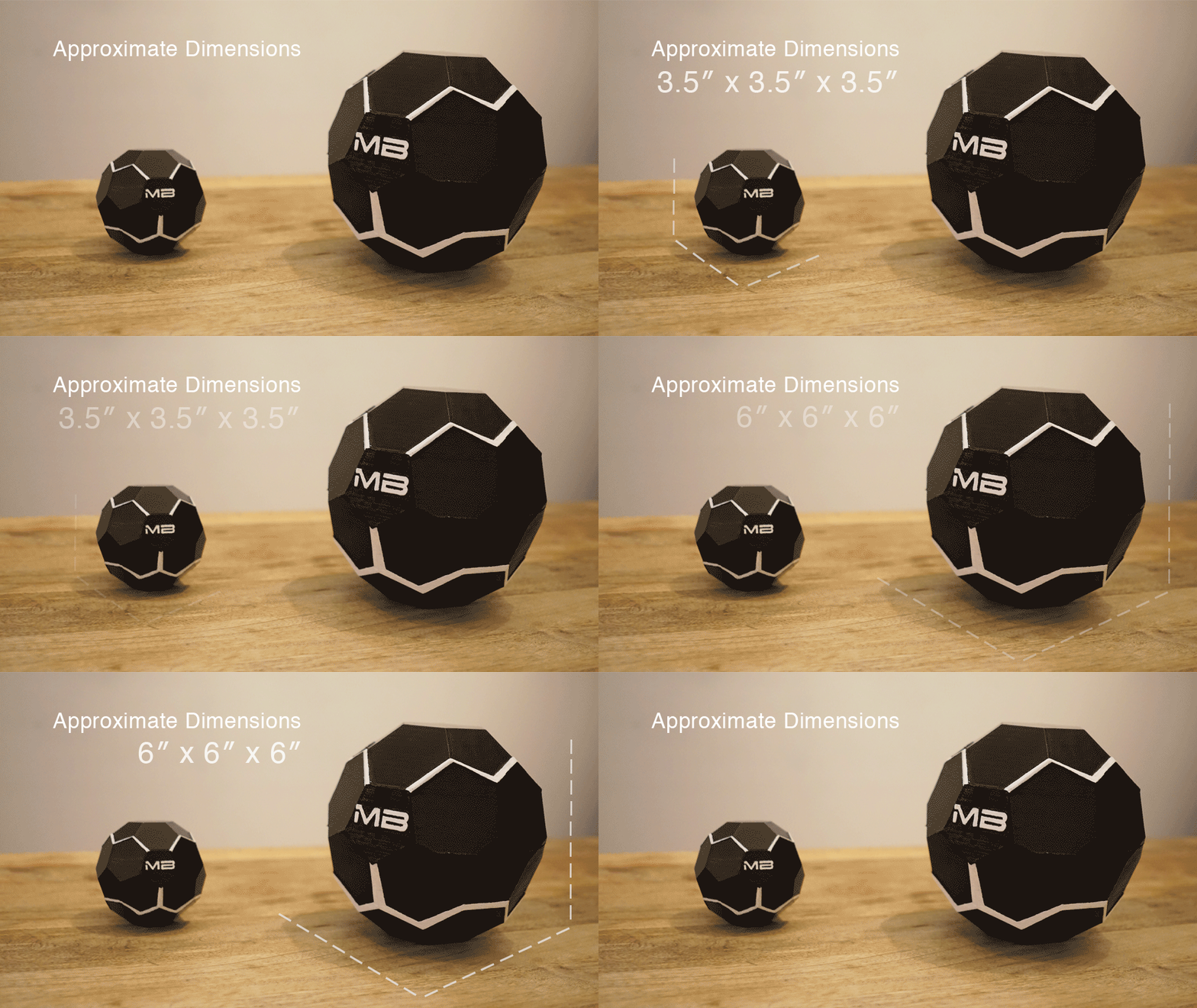 Technology is advancing day by day. There’s a new invention every now and then, and MotherBox is the perfect example of this. The device will help you stay powered at the places and moments you need your phone charged the most. Isn’t it amazing?
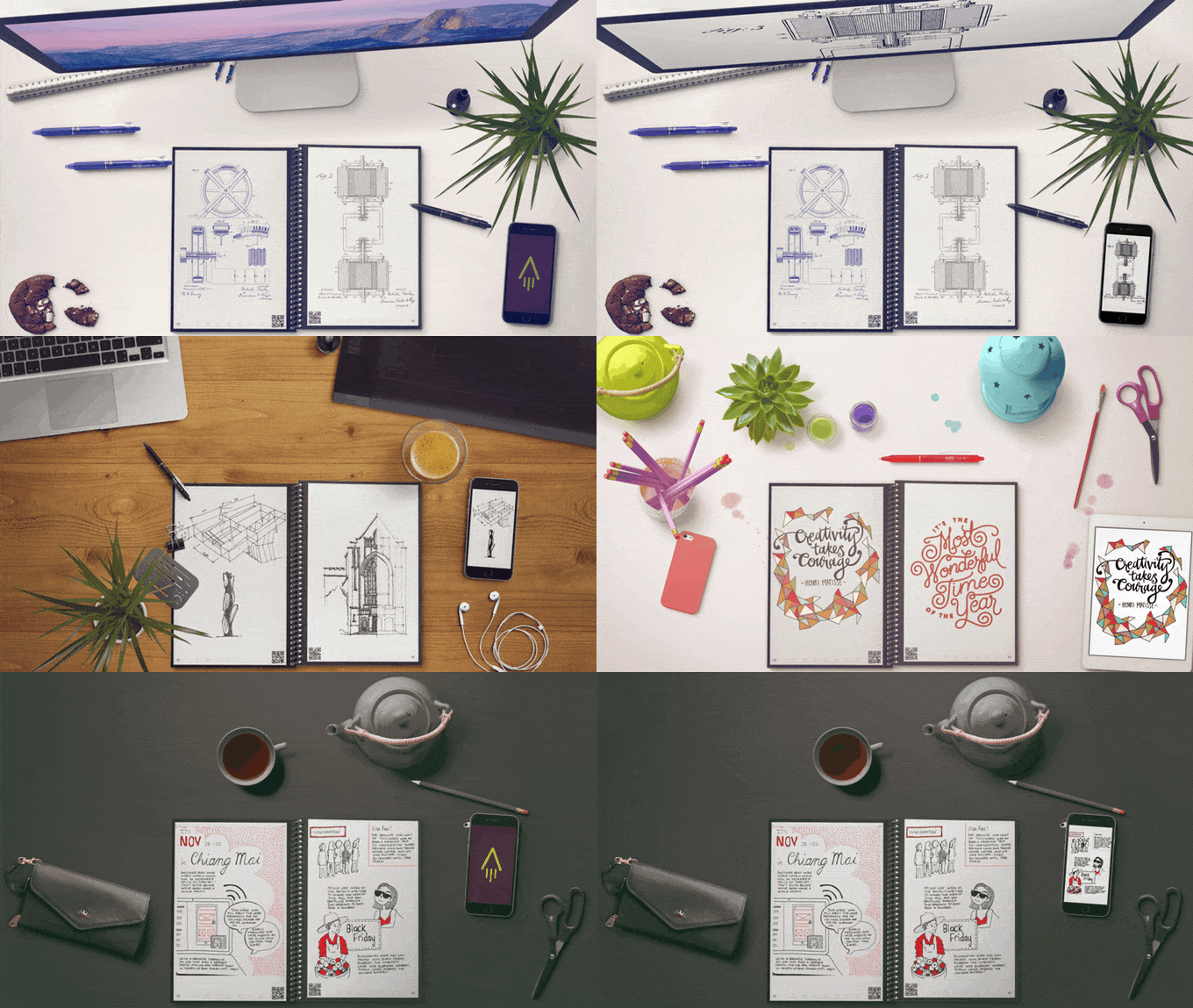 If you write down lots of notes and you’re always in constant need of paper & notebooks. Then you should definitely go for this product because Everlast Notebook is the notebook that still gives the users the same traditional feel and ease of paper and pen. It reduces the overall paperwork and a pile of notebooks sitting on your study table. It’s affordable and an environment-friendly, that means now people can save trees for being cut down for papers.


