WonderFox DVD Video Converter Review : This is all you need

For almost one century, movies have become an essential part in people’s life. Movies can take you to the places that you’ve dreamed about, and take you to experience the most adventurous life. But for movie enthusiasts, a huge collection of DVDs would take up much space, and it would also take a lot of time to find out one DVD in such a huge collection. The best solution for this problem is backing up DVDs to portable devices, and the best tool of that is WonderFox DVD Video Converter. Now, let’s get to know everything about this dedicated tool in this article.

Get Licence Free

By collaboration with Wonderfox team we are giving away some of the premium licence:

Download Free 

WonderFox DVD Video Converter – What Is It?

It’s basically a DVD converter designed to back up DVDs to digital formats. In addition, it can convert the video to any format and can download YouTube videos as well as edit video with some simple editing features. All the features make it become a powerful all-in-one program.

How Does It Work?

DVD Video Converter 2

The interface of DVD Video Converter is designed to be friendly with users. The tutorial on the interface shows you clearly how to convert video, download video, and back up DVDs. You can choose the output formats (such as AVI, HD MP4, HD MOV, FLV, HD WMV, AVI, MP4, VOB, MKV, TS/MTS/M2TS, WMV, MPEG, WEBM) manually. Besides, it also allows you to save your settings, so that you can apply your settings on the output formats directly next time. Free download here to have a try by yourself.

Download Free

Some of the main features for Wonderfox DVD Video Converter:

 Backup Your DVD Videos on Your PC Very Easily

DVD Video Converter 3

With advanced tech, it can help you solve any DVD ripping related issues, such as “can’t find the right main title”, “data can’t be read”, “ripping DVD to video is in low quality” and any more troublesome situations. All you need to do is clicking on the “Load DVD”, and then the DVD Video Converter would take rest of it for you! BTW, it even can rip and convert DVDs to MP4, MKV, AVI, WMV and More on Windows 10, so it was called the best DVD ripper windows 10.

Convert Video and Audio to Different Formats or Devices

DVD Video Converter provides a wide range of output formats, like AVI, MPG, MKV, MP4, WMV, MOV, TS, VOB, WebM, and Html5 video, MP3, AC3, AAC, FLAC and many more. Moreover, even if you are a beginner, it supports you to choose a profile with optimized parameters. So you really don’t need to know so much about complicated video and audio settings, such as bitrates, resolution, and sample rate.

 Download Video from Websites

DVD Video Converter can download any hot video from websites such as Facebook, Twitter and Vimeo. This operation is easy to use-you just need copy the video link and paste it to the download interface, it can be finished automatically.

 The DIY Editor

DVD Video Converter4

You are the editor of your video if you are not satisfied with the video image. It can remove unwanted areas and unnecessary information and cut a particular portion from a video or a movie. It can add subtitle (*.SRT/*.ASS) to MP4, MKV, AVI, MOV, HTML5 video and can merge the multiple video into one video if necessary. Also you can change the settings (such as bite rate, resolution) of the output formats manually.

The Conclusion

The DVD Video Converter is the all-in-one software. People who have troubles in backing up DVDs, converting video, downloading YouTube video would definitely regard this software as the best solution to their problems. DVD Video Converter would never disappoint you. Try this software, and let us know your ideas about it.

Change your Way to Read & Write with reMarkable Paper Tablet

Do you still like reading and writing on paper despite the innovation of those advanced gadgets like tablets and e-readers? We have found a device that can change your ancient habit of writing. The reMarkable tablet gives you a paper-like feel for reading, writing and sketching with digital powers. If you are still not able to replace your love for writing on paper with a pen, which can result in storing lots of heavy paper. God! That is very frustrating. Then you need a reMarkable tablet. This cool gadget is the perfect replacement for paper.

What is reMarkable?

https://youtu.be/34I27KPZM6g

reMarkable is basically a 10.3-inch tablet with an E-Ink display and a pressure sensitive pen, capable of detecting 2048 levels of pressure sensitivity just like real paper. This device is a hybrid of an e-reader and a tablet, which is specially designed for taking notes, drawing sketches or reading documents and other lots of things. So, say bye-bye to the heavy and non-durable paper notes and switch to reMarkable.

Features:

reMarkable is just the opposite of high-end tablets as this “paper gadget” has minimal functionalities. It lets users read, write and sketch on its digital paper display ‘with a paper like a feel’. The company’s highlight is the “Ultra-high friction” materials used on the display to allow it to feel like writing on actual paper.

reMarkable--Replacement-for-Paper-techniblogic

Key Specifications:

  • 10.3-inch e-ink display
  • 1,872×1,404-pixel resolution (226 DPI)
  • Weighs 355 gm
  • 55ms touchscreen response latency
  • 8GB internal storage (no expandable memory)
  • 512MB RAM
  • Wi-Fi
  • 3,000 mAh battery

It can display ebooks, PDFs, and documents, allowing you to work as a blank notebook for writing or sketching. It doesn’t have any app store or browser so no tweeting or checking Instagram, only reading, writing or sketching. But the experience will be great as it doesn’t affect your eyes and give you the paper feel while reading your favorite book or writing on it with a pen.

You can sync all of your notes and drawings (via WI-Fi) to reMarkable’s cloud service as well and get a quick access from your Mac, iOS, and Android devices. Thanks to no glass technology, this paper tablet is quite sturdy and isn’t prone to breaking.

Availability

I am impressed by this ‘paper tablet.’ It’s like a dream come true for every doodler. Although reMarkable is not the first attempt to replace paper but so far it is the best solution. Also at the pre-order price of $379 with a pen, case and free shipping, it is a lot cheaper than its rivals Apple Pencil and Apple iPod Pro. So why wait? Preorder now to get a discount.

Order Now

Thanks for hanging out with us guys. Please do drop your suggestion and ideas in the comment section below. If you want to keep tabs on a more innovative product like this, subscribe to our website and don’t forget to give your reaction down below.

Convert your Smartphone into 10.1″ Tablet using Superscreen

Just imagine you have a device that can change your mobile phone into a tablet? Yes, Superscreen is that device which is capable of transforming nearly any phone into a full form tablet. Surprising isn’t it.

How does it work?

Superscreen comes along with a matching android app. The app must be installed on your phone, then sync your phone to the device (this is a wireless process), after which you can use all the apps, games on the bigger screen just like you are working on a tablet. The device works with both android and IOS devices and uses the touch recognition technology to identify if it’s you or not.

Key Features:

  • It is a 1-inch screen that syncs to your smartphone.
  • It comes with the resolution 2560×1600 pixels, sharper than a lot of smartphones currently available.
  • As well as using multi-touch it supports stylus inputs, so you can do scribbling and doodling also.
  • Talking about weight, this device is comparatively lighter than standalone tablets.
  • Supports speakers.
  • Though it is synced with your mobile phone every time, it still uses 70% less battery compares to the equal amount of smartphone use.

What is the need of Superscreen?

Convert your Smartphone into 10.1 Tablet using Superscreen

 Superscreen is a device connected with your phone that means while having this device your phone will be still beneficial to you and your urge of big screen will be also fulfilled. Now, just consider you have a tablet and all of your work is done on that and now your mobile phone is no use to you. So the extensive money that you invested on your phone honestly, It’ll be a total waste.

Having a separate tablet and a mobile phone will definitely cost you much. But having a Superscreen that is functionally equivalent to a tablet can cost you less.

So, my suggestion. If you want the tablet experience at low cost, carry a lightweight device and you also do not want to make your phone feel unwanted. Then go for this device.

Availability:

Start-ups like this are mostly not available in public stores. but still, you can buy the device, which is available worldwide with a shipping charge from Kickstart.com. The retail price of the device is 299$, but you can buy in less since they are offering a discount.

Order Now

Thanks for hanging out with us guys. Please do drop your suggestion and ideas in the comment section below. If you want to keep tabs on a more innovative product like this, subscribe to our website and don’t forget to give your reaction down below.

Ulefone Gemini Review : Cheapest phone with Dual Camera !

We have seen so many dual camera phones, reviewed them but today we are having the cheapest dual cameras phone named as Ulefone Gemini.  It comes with 2 Rear Cameras which will cost you about $129 (8,299 INR).

Buy Here                                               More Offers

Box Content

Ulefone-Gemini-box

  1. Ulefone Gemini
  2. Manual
  3. Curved Tempered
  4. TPU Case
  5. Phone stand / Phone Back Ring
  6. USB Cable
  7. Charging Brick (1.5amp)

Rest what all you can expect with this price phone.

Design & Built

Ulefone-Gemini-front-camera-techniblogic

Ulefone Gemini is available in three colors Grey, Black and Gold and I personally like the black one. Starting with the front part here we get a 5 megapixel shooter beside it an earpiece, LED Notification and different sensors.

Ulefone-Gemini-software-techniblogic

Coming below we get 5.5” FHD Display, which is covered with 2.5D curved glass as well as a gorilla glass 3 is also added and take my words screen looks quite good when we compare other phones with same pricing.

Ulefone-Gemini-fingerprint-button

Sliding little bit down here we get Back Navigation keys which are customizable and below that house a Home Button, which also act as a fingerprint sensor as well as the button can also be pressed not like we get on Moto and Oppo Devices.

Ulefone-Gemini-charging-port

Coming to the bottom portion of the phone here we get a Normal Micro USB port, beside it a speaker and a primary MIC.

Ulefone-Gemini-headphone-jack-techniblogic

Turning to the top we get a 3.5mm audio jack and nothing much which need to be mentioned over here.

Ulefone-Gemini-sim-tray

Moving further to the right side of the phone there we get a Hybrid Sim tray slot, and you can expand it to up to 256GB. Below that we get a Dedicated Camera shutter button which is made up of metal and has some kind of patterned feel on it. Previously I thought that it is a power lock key, but it was not.

Ulefone-Gemini-volume-buttons

Turning to another side we get Volume rockers, and power lock keys which are also made up of metal and buttons feels quite good while you press them on regular basis on complains.  Overall built of the phone is great we get proper chaptered edges on the phone all its corners, and black color really suits a lot.

Ulefone-Gemini-review-techniblogic

Finally coming to the back panel of the phone which is the primary highlight over here, we get metallic body but the upper and lower parts are made up of plastic, still they have added some unique design to their plastic part, not like another device which we get in the market with plain finish, below that we get chrome finish antenna line and below that houses Dual Camera setup which is a 13MP+5MP shooter with Dual LED flash over there. Below that we get Ulefone branding and nothing much we need to explain.

Buy Here- https://goo.gl/tS4h5t
More Offers: https://goo.gl/Sk7JlM

Display

ulefone-gemini-front

Here we get a 5.5” FHD display with gorilla glass 3 protection on top of it. Here we also get a added 2.5D curved Display which makes the device look way better.  We get the resolution of 1920 x 1080. The colors are vibrant and dark. They are more towards artificial tone and sometime at high brightness you may don’t feel good with your eyes it may strain. Still if you set the brightness at auto, it will make it look good and playing games and watching movies looks quite good. We can watch movies in odd angle too.

Sunlight legibility is also quite good at auto brightness. I have no complaints regarding the display, but still it can be improved with that high pinch with high brightness. Rest we cannot expect much with that price device.

Performance

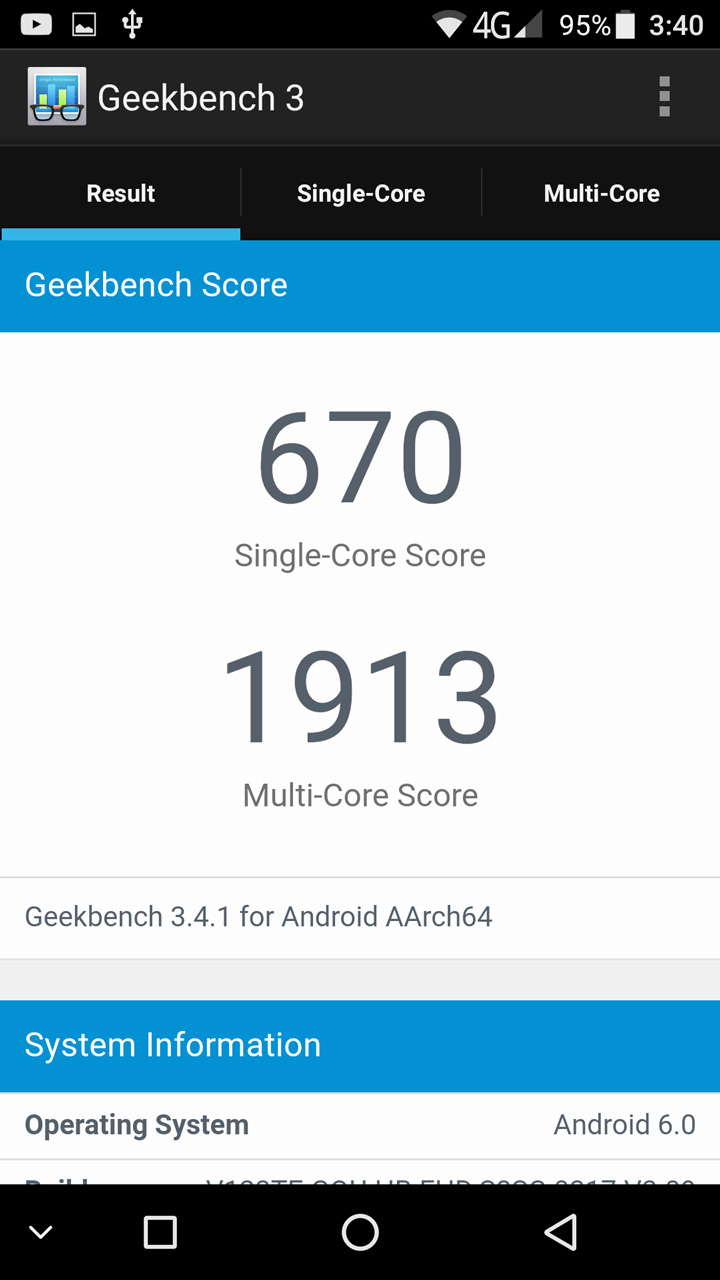
The Ulefone Gemini comes with MediaTek MTK6737T processor which is paired with Mali-T720 and 3GB RAM. There we get 64GB of internal storage which can be expanded by up to 256GB using a microSD card slot.

Even the device has low end processor in it, it can some how to handle all graphic intensive games quite easily. I tried playing different games such as GTA San Andreas, Bully, Batman, Nova 3 and GTA, Bully, were working well with no lag but playing Nova 3 and batman give me frame drops, The device is for normal gaming and won’t suggest for gamers. Rest you can see our gaming review.

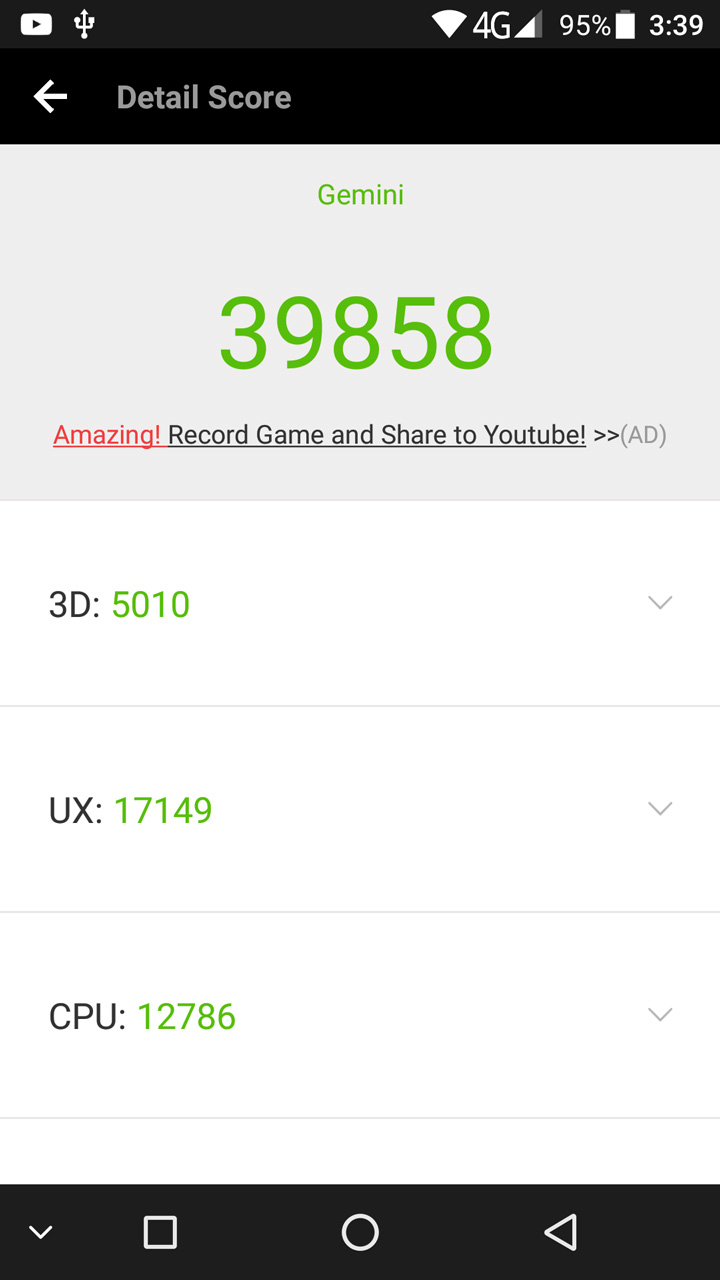
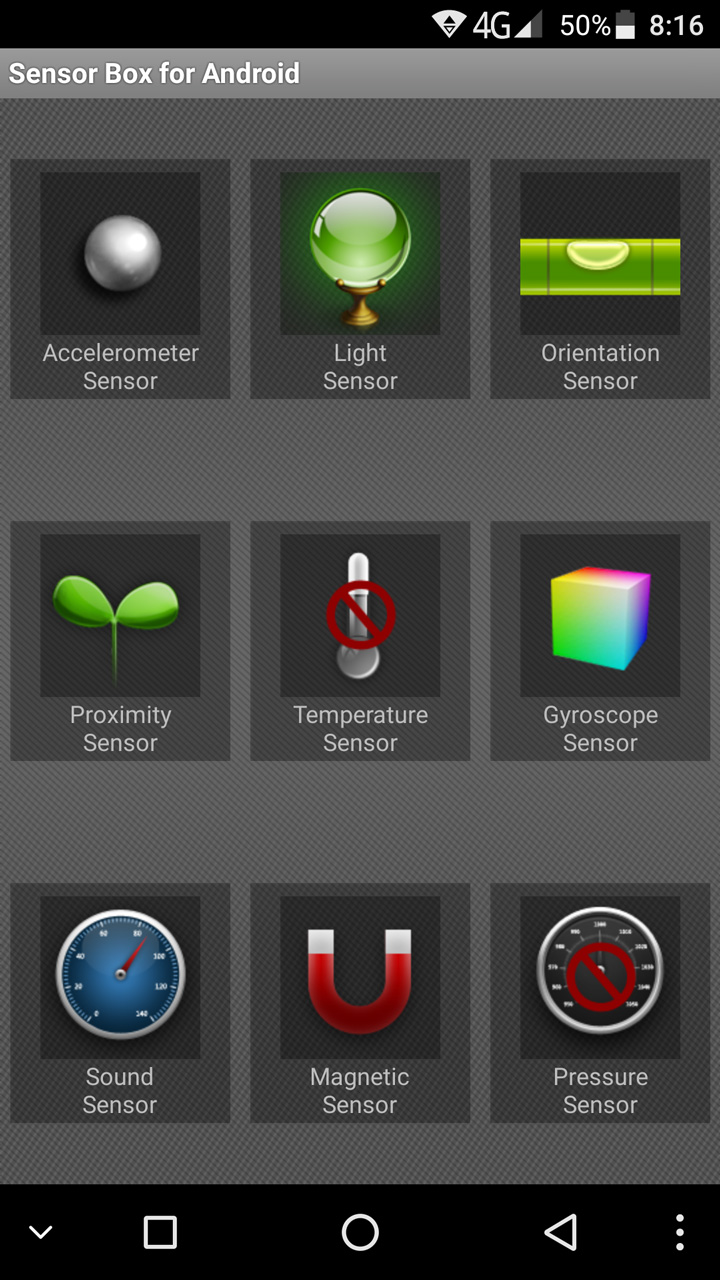
Rest, Antutu Score is decent. In Ulefone gemini we get all the sensors which is required and yes Gyroscope is there and you can use it with VR too.

One issue which i faced in the UI is the camera app sometime gets laggy while you are recording on FHD, but if you use a third party app to record videos, it works perfectly fine. Even recording videos via third party app give you better clarity with no flickering (Strange but true.)

Camera

ulefone-gemini-camera-UI

Starting with the most highlighted feature of Ulefone Gemini, which is the cheapest dual camera phone available globally, comes with 13+ 5-megapixel back camera with Dual LED flash which allows you to take brighter and better photos even in low-light. Here we get different normal effect nothing much which we can explain. Still, i am not satisfied with the back camera of the phone because we need a stable tripod to get good images, taking images directly by hand will give shaky images most of time. 10 out of 6 images will be shaky on an average. Where as when we use tripod images came out really very good and even SLR mode work quite well with tripod or any other stabilizer.

Now coming to the front camera, here we get a 5-megapixel sensor. To add more effect the camera app comes with a ‘face beauty’ mode, which allows you to smoother your skin tone, removing wrinkles, slimming down your face and much more. The camera UI is very simple and easy to use, but sometime get laggy may be due to UI which I have already explained earlier in the article.

As per my views, rear camera of Ulefone Gemini is average and need some stabilization to get better image quality. If you are a youtuber and want to make videos with this device, you need a tripod with a third party app and take my words till will make your work done very well. If they add any software stabilization, it might have done a great job for that dual camera setup.

Software

Ulefone-Gemini-software-techniblogic

The Ulefone Gemini comes with Android 6.0 Marshmallow out-of-the-box with their custom skin which is not mentioned anywhere in the device. Only launcher is customized rest the whole UI seems to be like a stock UI. I would say even with that processor the UI is buttery smooth even after filling the whole internal storage, with games, movies, and songs. It can be handled easily.

Overall, the UI is quite good, and the person who love stock then this device is for you. There are some minor bugs, but we can expect those bugs to be fixed by gionee in next coming OTA updates.

We also get different option and screenshots for that is being attached over here.

Battery

Coming to the battery part of the phone here we are getting 3250 mAh battery. On moderate usage, the smartphone will easily last you a full day on a single charge. The battery works quite well for this device. You can watch normal runtime 3 to 4 movies continuously on the phone.  Rest no complains with the battery. There we also get some energy saving modes which will further optimize your battery life.

We do not get any kind of fast charging support and took approx 2 hour to charge from 0% to 100% using a stock charger which we get inside the box.

Verdict

According to me, if you want a budget oriented decent normal use device with dual camera setup at the back to flaunt within your friends then this device is for you. Lets see some pros and cons of the phone.

Pros

  • Great built
  • Nice UI (User Interface)
  • Nice video Recording (Using Third party application)
  • Decent battery
  • Dedicated Camera shutter button
  • Fast Fingerprint

Cons

  • No Fast Charging
  • Camera app is not up to the mark
  • High end games make it heat a bit but not a lot

Buy Here                                               More Offers

Xiaomi New Smartwatch is Here : Looks Alike Apple Watch

From past few weeks Xiaomi is already teasing about their new upcoming smartwatch and now finally it is out with the name of “Hey S3” or in other words we can say Xiaomi S3. The smartwatch comes with a 1.28-inch display with added GPS-Glonass. The thing is that Xiaomi S3 only weighs 38 grams.

Xiaomi New Smartwatch is Here : Looks Alike Apple Watch 1

The main thing which we noticed in the watch is that it looks be to inspired from apple watch 2 and many others are referring it to be as “fully functional Apple Watch clone.” In Xiaomi S3 we also going to get a fitness tracker blended into a smartwatch. This is not going to be enough for them, Hey S3 is going to give you the heart rate sensor in it which will going to monitor your heart rate. That Smartwatch will also work as a fitness tracker.

Buy Here

Now the most important part for these kind of smartwatches are their battery life. Here Xiaomi is giving something insane to us. As we all know in Xiaomi MI Band 2 and other MI Bands we are getting 30 days of battery and so as this time we are getting 30-days of battery life that too with that screen and standalone GPS (This is going to be insane). We can charge the watch by using the magnetic charging dock which is going to be bundled along within the box.

Xiaomi New Smartwatch is Here : Looks Alike Apple Watch 2

Finally coming to the pricing part, Xiaomi Hey S3 is priced at 539 Yuan (Rs 4923), and as of now they have not announced any kind of international availability still we can import it once it goes on sale.

We get different functions within the watch like notification, call control, control music, read messages and even the watch is waterproof up to 50 metres (really insane).

Best Budget Laptops Available in 2017

0

Just because you do not have much to spend doesn’t mean you have to throw quality out the window. In fact, you can find a number of great budget laptops and notebooks today. These are just a few you can consider, if you do not have much to spend, but do not want to compromise on the quality of the machine you are going to buy for personal, school, or other uses you have in mind.

Asus X555 LA

Best Budget Laptops Available in 2017 3

At under £350, this is a great budget laptop. Slim, a 5th generation Intel chip for fast processing speeds, reasonable screen size, and nice graphics for the price range. Full touch screen capabilities, and adaptability for work or play, makes this a great entry level option for those who do not have much to spend, but do want quick processing speeds.

Buy Here

Chuwi LapBook

Best Budget Laptops Available in 2017 4

With a 14” display, the laptop is easy to carry, light to transport, yet large enough for work, or watching films and browsing the web. Coming in at under £225 the price is right for any budget shopper. It is not the fastest laptop in terms of processing speed, but gets the job done. Whether you need it for browsing the web, writing a term paper, or completing daily tasks such as calendaring or creating presentations for work, it will get the job done easily. And, at a lower price than most Windows 10 PCs out there, along with a full HD screen and keyboard, you aren’t going to find many devices out there for such a low-price point.This notebook laptop is a very Good Deal to Buy in India.

Buy Here

Asus Vivo Book 

Best Budget Laptops Available in 2017 5

If you want a solid, cheap computer, look no further. At about £300, the price is right for an Intel i3 core processor on the market today. A large hard disk, fake brushed metal finish, excellent speaker quality, quick processing and browsing speeds, are just a few of the perks this little device has to offer its users. The screen is truly dazzling, especially for the price point. Plenty of storage, built in and additional storage options, and ease of adaptability, are a few of the benefits users will appreciate with this little device, from a trusted manufacturer on the market today.

Buy Here

Even if you do not have much to spend, you do have options. Consider some of these when time comes to invest in a new laptop, if you don’t want, or don’t have much money when you are ready to buy. If you are interested in getting a new lap top but don’t have the spare money at the moment then you’re in luck. More and more retailers have notice that these are expensive items and have started to offer different payment plans, from buy now pay later to pay monthly. If you would like to compare some of these sites then catalogues247 is a great place to compare retailers which offer laptops on finance.

Vivo V5s : Another Selfie Expert Launched

VIVO technology has launched yet another device today. The device is a part of the Selfie series, which is today’s haute couture. Vivo V5 S is a 20-megapixel front camera phone. The Vivo V5 S is priced at 18,990 INR. It will be available in two different colors matte Black and Gold. The device is a VoLTE enabled smartphone, which will give a quality video/audio calling on LTE network.

Vivo V5s : Another Selfie Expert Launched 6

The Vivo V5 S has a 5.5-inch HD display with the resolution of 1280 x 720 display, the device is also featuring a 2.5D curved glass. Vivo V5s is powered by a MediaTek MT6750 Octa-core 1.5 GHz processor, with 4GB of RAM and a 64 GB internal memory, which is expandable up to 256GB.

Vivo V5s : Another Selfie Expert Launched 7

The Vivo V5 S is packed with a 13MP rear camera and a 20-megapixel front camera. The device is also inbuilt with Sony IMX376 Exmor RS, CMOS Sensor with f/2.0 aperture. The device also has features such as Moonlight Glow, which allows users to click perfect selfies in low lighting condition. The device also has a custom built AK4376 Hi-fi audio chip, that gives an exemplarily sound.

Vivo V5s : Another Selfie Expert Launched 8

The device runs on Android 6.0 Marshmallow with a Funtouch OS 3.0 over it. It is backed by a 3,000mAh battery. V5 S also supports an ‘Eye Protection Mode’ feature that filters out blue light to protect vision and prevents eye strain. The device also features a fingerprint sensor, which can unlock the device in just 0.2 seconds. Overall the device gives a very good performance.

That’s all for this guys, stay tuned for more update and please subscribe to our website and YouTube channel.

3 Tips to finding the best antivirus software for your PC in 2017

0

Anyone who owns a computer is vulnerable to a variety of security risks. There are malwares, spam emails, viruses, and trojans everywhere. If you’re unlucky, a hit from any one of those threats can easily put your work and life at a compromise. Looking for the best antivirus 2017 may seem hard, but it shouldn’t be if you’re properly guided. To help you find the best antivirus software for your PC, here are a couple of tips that you should bear in mind.

Choose an antivirus that fits your lifestyle

First, you have to identify what type of user you are. There are different types of users, each performing different sets of activities. Answer the following questions:

  • Do you own a PC or a Mac?
  • What operating system do you use?
  • Are you a business user or a home user?
  • How is your internet connection?
  • How is your web browsing habits?
  • What programs/software do you regularly use?

Your answers will greatly help in determining the product that’s right for you. Some home users who don’t have internet tend to opt out of installing an antivirus. That’s until an infected USB gets in contact with their port, and voila, you don’t want to know what happens next.

Determining the type of user you are, and your activities are two great considerations on what antivirus to install.

Get a product that offers real-time protection from the most common threats

You want an antivirus that actively works to protect your activities in real time. Anyone who accesses the internet can get infected within minutes. This is when your antivirus should jump in and tell you that you’re about to get in danger. A good antivirus is equipped with at least the following features:

  • Anti-everything – protection from malwares, viruses, trojans, worms, rootkits, spywares, malicious scripts, email attacks, phishing attacks, network attacks, and browser exploits, to name a few.
  • Automatic updates – to ensure that you’re getting the latest protection updates from your software provider.
  • Malware removal – it’s one thing to detect and block, and another to remove. Some customers think that blocking and putting the malicious item under quarantine is enough. But in the cyber security world, removing a malware is an entirely different process.

Most antivirus offer basic protection from all those and more. It’s up to you to pay a premium if you want access to the more sophisticated and thorough protection features. There are, however, already a ton of free antiviruses out there that offer complete package so you might want to try them out first before deciding to pay.

Get an antivirus that has reputable performance and usability scores

With the many processes an antivirus is running simultaneous with your daily activities, you want to ensure that it’s not hogging your PC resources to the point that your productivity gets compromised. You want an antivirus that effectively manages its performance efforts without slacking down on being on-guard.

Antiviruses are big on background processes that may amp up your memory usage. A good product doesn’t interfere with your work and sits quietly until it encounters a threat.

There are several antivirus tests online that can help you decide which product to install on your machine. These tests analyze the latest malware and thoroughly test them against multiple products, then rate them according to a set criteria. Reports generated by these expert reviewers are of big help when deciding.

These are just a couple of tips in finding the best antivirus for your PC. Whatever you choose, the most important thing is to always be protected.

Best Camera Smartphones in India 2017

In the last couple of years, camera on smartphones has evolved a lot. Now, smartphone cameras are the most widely used tool for capturing the special moments. They can click awesome pictures and can give competition to digital cameras. A smartphone camera now even comes with dual lenses so that the consumers can click portrait images with shallow depth of field. Today, we will list the best camera smartphones in India. These are mostly flagship smartphones with great cameras suited for mobile photography. The list also comprises some budget smartphones, but if your budget is on the lower side and you cannot afford to purchase the best flagship phones, we would advise you to check out these best smartphones within 15000. They also offer an excellent camera experience.

[toc]

So let’s get started now with our segment of the best camera smartphones available in India currently that your money can buy. Do note that the list is in no specific order as these smartphones are the best in their own rights.

Best Camera Smartphones in India 2017

1. Samsung Galaxy S8+

Samsung-Galaxy-S8-front-panel-techniblogic

The Samsung Galaxy S8+ is not famous for its cameras since they are mostly the same in comparison to the Galaxy S7 Edge and Samsung has decided to not jump on the dual camera bandwagon yet. However, this remains in our best camera smartphones list because it offers an incredible 12-megapixel primary camera, which is one of the best in the mobile world and the selfie cameras has become better with a bump to 8-megapixel sensor. We are recommending it over the S7 edge because of its Infinity Display, stellar design, and better performance.

Also Read: Top Best Mobile Phones under 15,000 INR

Do check out the other specifications of the Samsung Galaxy S8+ below.

Key Specifications:

  • 2-inch Quad HD+ display
  • Exynos 8895 octa-core processor
  • 4GB RAM
  • 64GB storage, expandable – 256GB
  • TouchWiz UI (Android 7.1 Nougat)
  • 12MP rear camera with LED flash
  • 8MP selfie camera
  • Fingerprint sensor (back)
  • Iris scanner
  • Heart Rate sensor
  • IP68 certified
  • 4G VoLTE
  • 3500mAh battery (non-removable)
  • Fast charging (both wired and wireless)

2. Apple iPhone 7 Plus

Apple iPhone 7, iPhone 7 Plus

The iPhone 7 Plus from the house of Apple may not be the first smartphone in the world with dual rear cameras but it is the first iPhone to sport the dual lens system, and according to us, it’s the best mobile in the world to have implemented the feature successfully. The iPhone 7 Plus sports two 12 megapixel rear cameras and the second lens is being used for clicking portrait images with shallow depth of field (bokeh) effect. It performs on par with the best DSLR cameras in this department if the pictures are clicked in natural lighting. The 7-megapixel selfie camera is great as well.

Find out more about the Apple iPhone 7 Plus below.

Key Specifications:

  • 5-inch Full HD Retina display
  • 3GHz A10 quad-core processor
  • 3GB RAM
  • 128GB storage, non-expandable
  • iOS 10
  • Dual 12MP rear cameras with Quad-LED True Tone flash
  • 7MP selfie camera with Retina flash
  • Fingerprint Sensor (front)
  • IP67 certified
  • 4G VoLTE
  • 2900mAh battery (non-removable)

3. OnePlus 5

Oneplus 5 unboxing
Oneplus 5 Box

OnePlus 5 features a beautiful Optic AMOLED display with a 5.5-inch FHD (1920 x 1080 pixels) screen. The device is also protected via a Corning Gorilla glass 5 and 2.5D curved glass. Armed with a metal Uni-body design, the OnePlus 5 looks and feels awesome.

The device is packing a Qualcomm MSM8998 Snapdragon 835 Octa-core processor, which has four cores clocked at 2.45 GHz and other four core clocked at 1.9 GHz. The processor is backed by 710MHz Adreno 540 GPU for startling graphics and gaming. The device is available in two RAM option 6 GB and 8 GB and features two storage option 64 GB and 128 GB.

ALSO READ: Best Dual SIM phones with dedicated MicroSD card slot In India

As far as the dual camera is concerned, the OnePlus 5 is now armed with a 16-megapixel front camera, with and f/2.0 aperture, the front camera itself can record 1080p @30fps video. The rear camera is sensation these days, featuring a dual camera setup the device has left many smartphone cameras behind. It features a 16-megapixel lens with f/1.7 aperture, the other one is 20 MP telephoto lens with a f/2.6 aperture for the wide angle shot you take. The camera features a Sony IMX398 Exmor RS sensor with DIS, OIS an imaging sensor.

The device also features a 3,300 mAh battery, with the OnePlus dedicated dash charging technology to power up your smartphone in less than 30 minutes. The device is powered by Android 7.1.1 Nougat with the latest Oxygen OS on top of it. In the connectivity section, we have Bluetooth 5.0, aptX HD, NFC, CAT 12/3 CA and 2*2 MIMO WiFi. The device features the fastest fingerprint sensor in the market.

Pros:

  • Snapdragon 835
  • Dual Cameras
  • Corning Gorilla Glass 5
  • Camera have 2x optical Zoom for lossless closer
  • Fastest battery charging (Dash Charge)
  • Bluetooth 5.0

Cons:

  • No IP68 water resistant body
  • No SDcard Slot
  • No OIS
  • No IR blaster

Also Read: Best Site to Buy Refurbished Mobiles Phones in India

4. Google Pixel XL

Best Camera Smartphones in India 2017 9

The Pixel XL from the house of Google is also regarded as one of the best camera smartphones in the world. It does not feature a dual lens system, but its single 12.3-megapixel primary camera does a great job. Since Google is pioneer in the field of software, thus the Pixel XL takes some awesome pictures because of its software. There is an auto HDR+ mode which makes the images look stunning. The 8-megapixel front-facing camera also does a great job.

Do check out the other features of the Google Pixel XL below.

Key Specifications:

  • 5-inch Quad HD display
  • 15GHz Snapdragon 821 quad-core processor
  • 4GB RAM
  • 128GB storage, non-expandable
  • Android 7.1 Nougat OS
  • 3MP rear camera with dual-tone LED flash
  • 8MP selfie camera
  • Fingerprint sensor (back)
  • 4G VoLTE
  • 3450mAh battery (non-removable)
  • Fast charging

5. LG G6

Lg g6 smartphones best camera

The LG G6 sports a dual lens system at the back. It comes with two 13 megapixel sensors that can also shoot 4K videos. The secondary lens is a wide-angle lens which can take pictures with super zoom and also click portrait images. The 5 megapixel selfie camera might seem poor on paper due to its low megapixel count but it performs well too.

Find out more about the LG G6 below.

Key Specifications:

  • 7-inch Quad+ HD display
  • 35GHz Snapdragon 821 octa-core processor
  • 4GB RAM
  • 32GB storage, expandable – 2TB
  • LG UX 6.0 (Android 7.0 Nougat)
  • Dual 13MP rear cameras with dual-tone LED flash
  • 5MP selfie camera
  • Fingerprint sensor (back)
  • Dolby Vision and HDR 10
  • IP68
  • 4G VoLTE
  • 3300mAh battery (non-removable)
  • Quick Charge 3.0

6. Xiaomi Mi 6

xiaomi Mi 6 smartphone

The Xiaomi Mi 6 is the first smartphone from the company to have ditched the 3.5mm jack, but we are not concerned about that here. We are more than happy that Xiaomi has added a dual lens system at the back, and thus we get two 12 megapixel primary cameras that can click some stunning pictures. The 8 megapixel selfie cameras also does a great job. Moreover, the Mi 6 doesn’t cost a lot like the flagship smartphones above, so if they do not fit your budget, then go for the Mi 6.

Check out the other specifications of the Xiaomi Mi 6 below.

Key Specifications:

  • 15-inch Full HD display
  • Snapdragon 835 octa-core processor
  • 6GB RAM
  • 64/128GB storage, nonexpandable
  • MIUI 8 (Android 7.1.1 Nougat)
  • Dual 12MP rear cameras with dual-tone LED flash
  • 8MP selfie camera
  • Fingerprint sensor (front)
  • USB Type-C audio, no 3.5mm jack
  • 4G VoLTE
  • 3350mAh battery (non-removable)
  • Quick Charge 3.0

7. Honor 6X

Honor-6x-Front-Techniblogic'

The Honor 6X from the house of Huawei also sports dual rear cameras but it is a budget smartphone, which is in reach for most consumers. If you’re a mobile photographer but cannot afford to purchase the flagship smartphones, then do not worry and get the Honor 6X that comes with a 12-megapixel primary rear camera along with a 2-megapixel secondary rear camera. It can shoot great portrait images with background blur. The 8-megapixel selfie camera is not bad either.

Do find out more about the Honor 6X below.

Key Specifications:

  • 5-inch Full HD display
  • 1GHz Kirin 655 octa-core processor
  • 3GB RAM
  • 32GB storage, expandable – 128GB
  • EMUI 4.1 (Android 6.0 Marshmallow)
  • 12MP + 2MP rear cameras with LED flash
  • 8MP selfie camera
  • Fingerprint sensor (back)
  • 4G VoLTE
  • 3340mAh battery (non-removable)
  • Fast charging

The best camera smartphones in India listing ends here. Do share your honest opinions with us in the comments section below. We hope you have liked our content and it has been useful for you to make a decision in purchasing your next smartphone which comes with a superb camera. This article will get updated periodically so that the best camera phones launched in India gets added here. Until next time, keep clicking and frame your memories.

iVoomi Launches Me 1 & Me1+ 4G Phones with 3000mAh Battery Starting at Rs. 3,999

iVoomi is a Chinese smartphone manufacturer that has launched two budget section smartphones in India. The devices are Me 1 and Me 1+. These affordable smartphones are exclusively available on Shopclues.com at the cost of 3,999 & 4,999 INR. Yes, you heard it these are super cheap devices, that are possibly going to dominate the cheap smartphone market, which has been previously occupied by manufacturers like Micromax, Lava and Intex.

iVoomi Me 1

As far as we know, the iVoomi Me 1 features a 5-inch HD display, with a pixel resolution of 1280×720 and a 2.5D curved glass design. The device is powered by a 1.2GHz Quad-core processor and it is backed by 1 GB of RAM and 8 GB of internal storage, which is expandable up to 123GB via microSD card.

The device features a 5MP rear camera with LED flash and a 5 MP front camera, for the selfies you take. The smartphone is action packed with a 3,000 mAh battery and supports fast charging. So far, it runs on Android 6.0 Marshmallow with the iVoomi official UI on top of it.

Pros:

  • Good battery.
  • Value for money.
  • Good display.

Cons:

  • Performance may lack, but in this price bracket, this is what you get.
  • Rear and front camera performance are average.

iVoomi Me 1+

ivoomi-me1+-Back-Techniblogic

As far as we know, the iVoomi Me 1+ features a 5-inch HD display, with a pixel resolution of 1280×720 and a 2.5D curved glass design. The device is powered by a 1.2GHz Quad-core processor and it is backed by 2 GB of RAM and 16 GB of internal storage, which is expandable up to 123GB via microSD card.

The device features an 8MP rear camera with LED flash and a 5 MP front camera, for the selfies you take. The smartphone is action packed with a 3,000 mAh battery and supports fast charging. So far, it runs on Android 6.0 Marshmallow with the iVoomi official UI on top of it.

Pros:

  • Good battery.
  • Good RAM performance.
  • Good display.

Cons:

  • Front camera performance is average.

That’s all for this guys, stay tuned for more update and don’t forget to subscribe to our website and YouTube channel.

TRAVIS- Best language translator, speaks 80 languages in just 2 seconds

Technology has helped mankind in several ways. We can say that it is a boon of technology that a device named Travis: the translator has been launched in China. With this device, you can speak 80 languages in just 2 seconds.

How does Travis, that speaks 80 languages in just 2 seconds work?

  • It works on artificial intelligence, i.e., this device learns as you speak. So the more you speak, the better it gets.
  • They use Google translation for some languages and translate other languages using apps from Microsoft, Systran, and IBM.

Travis the translator will be very much useful for the travelers, who wish to travel the entire world but fail to communicate with different regional people because of the diverse language barriers. This device can also be useful for business merchandise so that the goods and products can be sold through entire world as the sellers can now communicate with people in their language. Most importantly the device is easy to use, just one touch and you are done.

This device beats the Google translation app when it comes to battery backup. The battery of Travis lasts for 12 hours, so keep talking and keep communicating.

Speak 80 languages in just 2 seconds using Travis.

Features:

  • High performance with quad core processor.
  • Crystal clear audio quality with patent-pending voice DSP dynamically boosted microphone and speakers.
  • Works both online (4G & WiFi) and offline.
  • Cooperates with your privacy concerns as it works with earphones for private talks.

Availability:

Start-ups like this are mostly not available in public stores. but still, you can buy the device, which is available worldwide with a shipping charge from Kickstart.com. The retail price of the device is 199$, but you can buy it for less since they are offering a discount. Buy this device and enjoy translating 80 languages in just 2 seconds.

Order Now

Please do drop your suggestion and ideas in the comment section below. If you want to keep tabs on a more innovative product like this, subscribe to our website and don’t forget to give your reaction down below.

What is Travis the translator?

Travis® Touch Go is the ultimate pocket translator. Easy to use, Travis® can translate up to 80 languages in just 2 seconds.

What is full translation?

In full translation, the entire text is submitted to the translation process, that is, every part of the source language text is replaced by the target language text material. 

Where can I get Travis, the translator, that can speak 80 languages in just 2 seconds.

Travis is available on the Amazon shopping website.

CLOUDACAR : A New Social Commute Platform

CLOUDACAR is a start-up, which was launched in January 2016. The startup is mainly focused on offering rideshare solution for large corporates houses. CloudaCar is the first app of its kind to integrate Uber to its clients so they could enjoy a safe ride from their home to their respected offices.

What is the Secure riding solution?

CLOUDACAR : A New Social Commute Platform

Pay Technologies India Pvt. Ltd. owned CloudaCar is promoting smart pooling solutions for co-workers, which means if you carpool from this app. Your office colleagues will be joining you for the ride rather than some anonymous persona.

It’s basically an organization dependent cab service, which is integrated with an app and because you have an app for Office cab service, you can actually choose who you want to ride with. It is an intelligent joint traveling solution to improve mobility among co-workers. The app is also integrated with Uber and Paytm wallet so that you can experience the finest service.

“All this is available along with a lot more features at a simple but comprehensive dashboard.”

CloudaCar is a unique and creative application, which is very relevant and useful to present situation. The Startup was selected as one of the final 32 Start-Ups to win the coveted award of SuperStartUp.

About the company: In 2016 by Prajwal Zende, Rishabh Sawansukha, Ashutosh Sathe and Mandar Landhe, Cloudacar is a Pune based social commute platform for ride sharing. While in the west, carpooling is a way of life, it is yet to gain traction in India. Once a user registers and verifies himself, he can create his home to office trip in the application and find fellow carpoolers or build his own community using cloudacar. Every user can see their nearby users and invite friends to form a community of trusted people.

Google launches Indian Language support in Google Translate, Gboard app and Other Products as well

Google India has launched Indian language support across all its products to break the language barriers among its diverse customers. The company has announced two different set of products and features for Indian users, to help them establish better communication with technology.

How will it work?

The Neural translation will be very helpful in translating a sentence at a time. Compare to the old Phrase-based system, which was designed to translate pieces of the sentence at a time. The new technology is very fast.

Google Translate:

From now on, the Google translator will Google’s new Neural Machine translation technology, which is surely going to help a lot to Google’s local customers. The new NMT will establish a better transmission between English and nine widely used Indian languages such as- Hindi, Bengali, Tamil, Telugu, Punjabi, Malayalam, Gujarati, Marathi, and Kannada.

Google Chrome:

The NMT will also be integrated with the Chrome browser’s built-in Auto-translate functionality for the web content. This will surely quicken the translation of an entire web, with more accurate results.

Google Search:

The Google search and Maps will also feature this update, which will surely make searches and discovery of new places very swift. This feature will work both on mobile and desktop, making it more feasible to its consumers.

G board:

Google launched the G board app a while ago in December 2016. The app features some similar functionality as Google Indic Keyboard, but it offers more accurate results with its NMT technology. The app has a better auto correction in regional language. The app also features two layouts design for native and Qwerty layouts. Which lets users spell words English alphabets and get text output in their native language.

Google Dictionary:

Now, Google searches will also offer Hindi dictionary results. Means, you can type the Hindi word on the search bar, it will show you the meaning and also the English translation of the word.

 The most important aspect of making the web more useful and meaningful for all of India is to make India’s Internet more representative of the India we live in. India today has 234 million Indian Language users who’re online, compared to 175 Million English web users, we expect another 300 million Indian language users to come online in the next four years. With today’s launches, we’re taking a huge step forward to bring down the barriers that stop Indian language users from getting more out of the Internet and also helping the Industry to solve for the needs of billion Indians.” Said, Rajan Anandan, VP, India & southeast Asia, Google.

https://www.facebook.com/techniblogic/posts/1400178446709871

We will update you for more about the Google related News, So stay tuned and be Subscribed… 🙂

Lost your data? No more worries about it

EaseUS Data Recovery Wizard is a free data recovery software that allows you to recover your data if you have lost it by mistake or deleted it intentionally, thinking that it will not be useful in the future. It is a free software which is easy to use and recover your data from your memory card, hard drive, or any other device attached to your computer. If you have erased, formatted or lost data from your computer, laptop or any removable device, you don’t need to get worried about it because you can recover your data within few minutes or hours.

It can recover data from different environments and offers the fast recovery of deleted photos, ideos, emails, music, and many more software files.

This software has three easy steps in which you can recover your data within less time. These are:

  • Launch
  • Scan
  • Recover

EaseUS Data Recovery Tutorial 1

Launch:

In the launch process, you install the application.  You can select customized settings which ask you to add a shortcut to your desktop and other self explanatory questions. After the installation EaseUS Data Recovery Wizard gets open automatically.

EaseUS Data Recovery Wizard has a menu bar on the top which allows you to select various options like giving feedback, import scan status, menu, minimize, maximize, close. It is easy to use because it doesn’t have deep settings which bother new users.


Scan:

In the next step, you scan your computer for lost data. You need to add a location from where you want to scan your lost data to recover it. You can choose any destination from your computer or attached devices to scan.

EaseUS Data Recovery Wizard offers you two types of scans i.e. Quick scan and deep scan. Quick scan is instant and scans the files within few minutes whereas deep scan searches for over 100 more files than quick search but it takes long time to complete.

EaseUS Data Recovery Tutorial 2

Recover:

In recovering process, you choose a destination where you want to restore your data for future use. After selecting the destination, you may select the files that you want to restore to that location. You may select some of them or you may select all of them from the list.

Some features of EaseUS Data Recovery Wizard are:

  1. In deep scan mode, it can recover the files instantly and precisely.
  2. Quick scan allows to look into your lost data thoroughly within less time than deep search.
  3. It can be applied to all data file types which are lost by mistake or intentionally
  4. By EaseUS Data Recovery Wizard you can restore all file types such as images, documents, audio, videos, emails, compressed files etc.
  5. It can restore data from your PC, laptops, memory cards, hard drives, storage devices etc.
  6. It also helps disk images to help in the file recovery.
  7. You can see-through your files rapidly by entering their name, date, type, or size to find them quickly rather than finding them in a mass
  8. EaseUS Data Recovery Wizard offers you a lifetime free upgrade and technical support.
  9. EaseUS Data Recovery is a free data recovery software that helps you recover your data in no money.

itel Mobile Wish A21 launched at Rs. 5,390 with 4G Volte

So, itel Mobile is here with their other series in the market named as ‘Wish’ series and with device named Wish A21. The main USP and highlight of this smartphone is its 4G VoLTE and ViLTE support that too out-of-the-box. The Wish A21 is available with the pricing of Rs. 5,390 and will be available in three different colours which includes Grey, Champagne, and Coffee. The device is very closely priced with their competitors Xiaomi Redmi 4A.

As of now the company is offering two other 4G VoLTE enabled smartphones within Selfie Pro series(it1518) and (it1520) along with the Wish A41 in ‘Wish’ series.

The smartphone is going to runs on Android 6.0 Marshmallow out-of-the-box. It is packed with 1GB of RAM, 8GB of internal storage space which is also expandable that to up to 32GB. The device is powered by a quad-core chipset.

The smartphone features 4.5″ FWVGA display and  is backed up by a 2,000mAh battery. we get 5MP autofocus camera on the back and a 2MP sensor at the front for selfies.

Sudhir Kumar, CEO, itel Mobile India at the launch event said, “At itel, our long-term vision is to make high-speed digital connectivity a tangible reality for all Indians. Our recent successful foray into the 4G smartphone category in Wish series with Wish A41 highlights our commitment to provide the best-in-class products with unmatched specifications to our discerning customers. Wish A21 is yet another technological marvel that has the perfect confluence of design, style, and performance which gives it a considerable edge over other product offerings.”

“Wish A21 offers specifications and capabilities superior to basic entry-level 4G smartphones within similar price points. This enticing value-plus proposition will appeal to Indian consumers looking to upgrade from keypad phones to smartphones. We are certain that Wish A21 will redefine established standards set by its predecessors in the ‘Wish’ series,” he added.

How to Remap Bixby Button on your Galaxy S8 & S8 Plus (Easy Trick)

Couple day ago the Galaxy S8 and S8 + were launched in India. The smartphone has not even hit the market yet, and there are problems with it. Like, the replica of google assistant ‘Bixby’ and the dedicated button to launch it.

Samsung-Galaxy-S8-Plus-Bixby-Demo-techniblogicWell, weeks ago developers tried to remap the Bixby button and they were successful with it, but then Samsung came out with a software update and now, you can no longer remap the Bixby button. Yeah! It’s terrible.

Remap Bixby Button : New Solution!

A popular Youtuber and developer ‘Dave Benett’ came up with an app, which he developed himself. The app lets you remap the Bixby button but it still on developing phase, so it’s not going to work as you’re imagining right now.

See the working app here:

The App is configured to open Google now, whenever you press the Bixby button but it will also open Bixby in the background. So, that means Bixby will open first and then in a second the Google now screen will pop up. It’s cool for us because honestly speaking, it’s the only solution available right now.

Download the Android App here

The Youtuber has mentioned specifically that, the app is in the development phase. So, he will work on it and try to make it better and implement new features as soon as possible, features like opening different app, double clicks and triple clicks. WOW!

Thanks for hanging out with us guys, stay tuned for more update like this and don’t forget to give your reaction down below. It’s fun; I promise.

HTC Vive Enters India Starting Rs. 92990

HTC a few months back launched their Virtual reality headset named as HTC Vive globally and now finally they are launching the same in India with a price of Rs. 92990. HTC Vive is the only headset which remains one of the most appreciated products from HTC globally because of its features and innovation. We have experienced the same way back on HTC product launch. HTC vive is going to be on sale starting from 25th April at Amazon.in. There will be two packages for HTC Vive which includes following in the purchase:

The Everest VR:  It allows the wearer or the user to experience, what it actually feels. Example; Climbing Mountain or we can say Everest through a sequence of immersive first person locations. It looks like we have reached top of the world.

Richie’s Plank Experience: It seems to be like taking an elevator to a plank that sits 80 stories high above the ground. There you have to dare to walk to the end!

The HTC Vive was announced way back in 2015 and from 2016 developers get something out of it. Now finally it has made available for the consumers. This high resolution VFX effects and real time area mapping allows the HTC Vive to create a virtual experience right in your workspace or living room without going anywhere out to experience it. This is not enough because the Vive headset has some serious system requirements that require high end GPUs on your PC to work in that intense real time environment.

5 Awesome Benefits of Adapting Social Media Marketing For Yours Business

2

Social media marketing is a very powerful marketing tool for any entrepreneur who wants to be in the spotlight. Social media is something that has been really developed on internet. Well established businesses have a huge customer base on almost all social media networks.

Social media has become a well reputed and profitable source of marketing for all type of business websites. A website linked with social media has a huge potential to increase profits and sales, but it needs good understanding about how on achieve these targets.

Following are the most exciting reasons behind the benefits of using social media marketing service for your business:

  1. Increase Brand’s Reputation

Social media networks offer new opportunities to increase brand’s visibility every day. With the help of a huge customer base that resides on social media, you can make the audience aware of your brand. Moreover, customers are easily accessible on every social media. You can also easily judge what the new customers are and what the existing ones are.

Some social media comes with feature where their users can see your company’s name on news feed for first time.  Your brand’s reputation will automatically increase when customers will see your company on every social media network.

  1. Loyal Customers

Social media are the best way to engage your brand to the most loyal customers. It is the best way through which companies can connect to their audience every day. A well planned social media optimization services can positively influence their customer base into loyal customers. And loyal customers mean great profit.

  1. More Conversions

Every story you post on social media gives a better opportunity for your brand to get maximum conversions. Every customer that connects to your ideas and innovative posts will definitely convert. Through blogs you can share interesting image, videos and help you to see your customer’s reaction and their feedback about your company. Every feedback can result into conversions and then every conversion can results into leads.

  1. Mobile Device oriented leads

A large number of world’s population is using social media on their mobile devices and almost every social media activity is happening through these devices. It is very important for you to make your social media strategies accordingly. Most of the information is being shared through social media networks and most probably via mobile devices. So, social media marketing targets the mobile device oriented conversions.

  1. Inbound Activity

Without social networking, your inbound activity is restricted to individuals officially acquainted with your brand’s image and people looking for keywords you as of now rank for. Each social networking profile you include is another way driving back to your webpage, and each bit of blog or post you syndicate on those profiles is another open door for new customer. More inbound activities of traffic can be converted into leads by using great quality content.

Conclusion:

Do not wait to use this powerful tool to succeed in the market. Get most effective services from good resources. For example, social media marketing companies in Chandigarh serving good options in the market. You can get maximum benefits by rightly done social media marketing. You can get maximum traffic, huge profits and great benefits only by using right strategies of social media marketing.

Things you never knew about GPS

0

GPS nowadays is playing a vital role in many of our technologies. For an instance, it allows us to navigate through different directions when we are driving, tracks how far we are running during workouts, helps to respond in emergencies and much more.

In Spite of GPS being pervasive and essential in our daily basis,  we realize that we don’t know much about GPS and taking it for granted. As far as i know what I knew about GPS is that satellites transmit their location and with its use you can solve your own location in 3d space.

But I came to know that there is much more than that. Let’s have a look.

1. GPS is not Unique

GPS in one from different space-based radio navigation systems. Europe has its own Galileo system, Russia has its own GLONASS system and China has its own BeiDou system.

However the GLONASS is the only system in Russia offering the global coverage, less accurate than GPS. And Galileo is expected to reach the global operational capacity by 2019 and BeiDou by 2020.

These space-based radio navigation is important for many military applications, so that one country may not need to rely on other in case of hostilities. The Indian military learned this well at the time of Kargil war in 1999, when they were selectively denied access.

2. US Government has its own GPS

Alike all advanced technologies, GPS took a birth out of the military during the Cold War. Nuclear deterrence meant the capacity to launch nuclear weapons at the enemy’s homeland.

To fire ballistic missiles from the nuclear submarines basically needed the location of the enemy’s submarine. And thus GPS was meant to be best navigation system for submarine-launched ballistic missiles.

Though the cold war was ended 4 years before the Soviet Union was collapsed, GPS become operational in 1995. Before highest quality of signal was reserved for the use of military but in 2000, GPS was  freely available to the public as a national resource.

3. 32 GPS Satellites are currently present in the orbit

For achieving global coverage for GPS, 24 satellites are needed. The first from 24th was launched in 1989 and the 24th in 1994. GPS satellites last only about 10 years and they need servicing often during their lifetime and that is the reason why there are 32 GPS satellites present in the orbit. The extra ones fill the gap when the core satellites are services, so that the coverage is maintained.

But the question arises why 24 satellites are needed in the first place.

4. Minimum 4 GPS Satellites are needed in Line-of-Sight

Constellation using 24 GPS satellites make sure that minimum 4 satellites are within line-of-sight of any location on Earth  every time. The number is 4 since GPS calculates your exact position. Each satellite sending signals include the exact time that the signal is sent and the position of the satellite  relative to the center of the Earth.

We know well that the speed of light is constant, so it takes time for the signal from GPS satellite to reach you, multiplied by the speed of light, is the distance between you and the satellite. Moreover, we also know the positions of each satellites, so calculating by geometry, we can make use of satellite locations and the known distance to figure out our own location.

You must be wondering “ I hardly use three equations for three unknowns, but what about the fourth one? Well, there is a fourth unknown. We don’t actually know the exact time it took the signal to travel from the satellites to you.

5. Accounts General Relativity

According to Albert Einstein, “Time moves faster for objects that are further from sources of gravity”. Since, satellites are far away from the earth, their clock run 38 microseconds faster per day than clocks on Earth’s surface. This depicts that GPS locations would be off as much as 6 miles per day.

And thus, the fourth unknown variable is the time derivation from the atomic clocks on GPS satellites. And these four satellites are used for the determination of precise location. And however, the advantage of this system is that….

6. GPS not only determines Location

The accuracy for the GPS time signals is within 10 billionths of a second, that is only second to atomic clocks themselves. And thus GPS determines exact time that is actually vital for the time-related applications.

In our daily lives, cellular networks, banking systems, financial markets and power grids are all dependent on GPS for  precise time synchronization. Even in the communication sector GPS timing allows synchronized call handoffs. Moreover, in financial sector as well, GPS timing allows financial transactions to be accurately timestamped.

GPS and IoT

The precise location and the timing ability of GPS is vital in many IOT Applications. From agriculture to connected vehicle platforms, fleet tracking, smart museum and many more.

So hopefully this helps you to get aware about GPS technology that has quickly become necessary and important component of our everyday lives.

4 Misconception About GPS Tracking System

0

Most of us know the importance of GPS in our lives, the GPS tracking system are widely used for navigation and to track vehicles and containers. Though there are many advantages of GPS, some people still have misconceptions about this technology.

Some of the common misconceptions are as follows:

All drivers will quit if we put GPS trackers on vehicles.

Contrary to this myth, many drivers believe that GPS device is actually very helpful in their work, they get the routing information, roadside assistance, and much more from it. So without worry, you can install a GPS device in your vehicle.

GPS tracking device is a complex device to install and use.

GPS devices are very easy to install and use, you don’t need to be a tech expert to use this system, these devices are not bulky and you don’t have to make any major changes in your vehicle.

We trust our employee, we don’t need the GPS device.

The main purpose of this device is to monitor your vehicles, not your employees. A vehicle should serve its purpose of supplying and delivering in an efficient way, but the driver will be accountable for everything related to the vehicle.

GPS tracking system in not necessary for my vehicle. 

Some people believe that they can track their vehicles on a cell phone, but it’s not just about tracking the vehicle. They cannot get updates like engine status, history of stops and other valuable metrics. There are much more which you can get only from a GPS tracking system.

Before installing a GPS tracking system, make sure you clear all your doubts regarding this technology, you can consult an expert in this technology or can ask the experts of the company from which you are taking this service.

PS4 vs Xbox One : Which one to go ?

If you enjoy gaming, you are probably familiar with the best consoles. But, is the PS4 or Xbox One the right fit for you? These days there are dozens of online stores from which you can buy the latest consoles. Many of them even allow you to spread the cost using pay weekly and pay monthly deals. Consider some of these factors when deciding which console to buy, and which will give you the most gaming enjoyment.

Hardware –

PS4 is the smaller of the two, but the Xbox one has easier to access rear panels. The PS4 has a more distinct angular shape, and hidden ports make it a sleeker, slimmer looking machine. Xbox One does feature the ability to upgrade, and features more ports for connection options. Sony features more external storage options, while the Xbox One has limited options on this end.

Specs –

Xbox has a more powerful CPU, while the PS4 has a more powerful GPU. So the question is, do you prefer more graphics (PS4) or greater speeds and clock rates (Xbox)? Depending on the gaming, your answer may differ. For fast paced, shooter style games, Xbox might be the best option. For RPG, games with depth, character development, and unique level play, PS4 may be the route to go. The Xbox has a custom chip built in, meaning an increasing in processing speed and capabilities.

RAM –

Both systems have built in 8 GB of RAM, but allocation of memory differs. PS4 went with the faster bandwidth, meaning less freezing or lag time in play. So, this is a great benefit for fast paced, shooter style gaming. The AMD architecture is fairly similar in both systems, and allocated memory for game developers is limited (at best) with both gaming systems.

Gaming –

Ultimately it is going to come down to the type of gaming you prefer doing when deciding which of the two systems is right for you. If you are a dedicated shooter, RPG gamer, you are likely going to find that PS4 has more options, and more selection. However, the Xbox system does offer its fair share of games. Graphics with the Xbox are a bit better, meaning colour contrast and resolution are a bit clearer; further, there are more gaming options (online and off) with the system.

It typically comes down to name preference. Do you prefer Sony or Microsoft? In most cases this will dictate the purchase. But, for those who want to consider a little more, in addition to brand loyalty, these are a few additional factors to keep in mind when deciding which system, and which games you are most going to enjoy playing on either system.