Home Blog Page 230

Reliance Jio ‘Double Dhamaka’ offer to give users 1.5GB extra data per day

Reliance Jio, on Tuesday, announced a gratuity for its users under which people will get an additional amount of data than usual, thereby leaving its users to enjoy the fullest. In order to overtake its only competitor that is Airtel, Jio is nurturing its customers with as many benefits as possible. Reliance Jio ‘Double Dhamaka’ offer will really a boom in the market.

Also See: Top 15 Best Antivirus For Android Phone

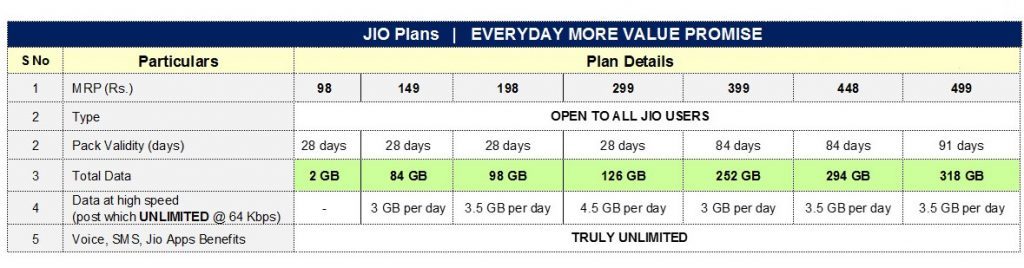
Under the new Reliance Jio Double Dhamaka offer, Jio prepaid customers will now get 3GB per day data instead of 1.5GB per day that includes 1.5GB of initial data and 1.5GB additional data. This benefit will be available on recharges of Rs. 149, Rs. 349, Rs. 399, and Rs. 449.

Reliance Jio ‘Double Dhamaka’ offer

The Jio Double Dhamaka offer has been implemented as the company’s answer to the recent plans introduced by Airtel which offered 1GB per day data at Rs. 149 and Rs. 399. However, the new Airtel packs were targeted to limited Airtel subscribers. The offer will be valid till 30th of June,2018. For those unaware of this amazing offer, these packs come with freebies like free voice calls, SMS and access to Jio suite of apps.

Also See: Top 7 Best iPhone Security Apps

Till now, on the recharges of Rs.198, Rs.398, Rs.448 and Rs.498 customers used to get 2GB data per day but after this scheme, instead, they will be getting 3.5GB per day. On the prepaid plans of Rs.299, 3GB data per day pack, users will get 4.5GB data per day. Similarly, the Rs. 509 pack will offer 5.5GB per day instead of 4GB per day data, which was earlier being offered. Finally, the 5GB data day pack user will get 6.5GB daily data, this applies to the Rs 799 prepaid plans. On calculating, it’s found that Airtel offers Rs 2.26 per GB whereas Jio provides per GB of data at Rs 1.18.

Reliance Jio ‘Double Dhamaka’ offer to give users

Coupling with this offer, Jio will also give a discount of Rs.100 on all the prepaid plans that cost a minimum of Rs. 300. On the recharges of below Rs.300, users will get discount of 20% on the respected amount. This offer will only be available if the payment has been done using the MyJio app and paying using PhonePe wallet.

Oppo Find X Release Date Finally Out! Here are the Specification & Expected Price

The Chinese smartphone maker, Oppo is set to mark its return with the old Find series. Oppo Find X Release Date Finally Out! Oppo recently confirmed the return and launched a website dedicated to the Find series. The company will launch the new Find X at The Louvre Museum in Paris at an event on June 19 next week. Teasers for the device have been continuously pouring in and there is only a little left that’s not known.

Also See: 10 Best Offline Dictionary Apps For Android

The Oppo Find X will feature dual-edged curved displays like the Samsung Edge displays according to the recent posters. It is expected to be a 6.3-inch Full HD+ AMOLED 2.5D curved glass display with a screen resolution of 1080 x 2340 pixels and a 19.5:9 aspect ratio. The device will be powered by the Qualcomm Snapdragon 845 octa-core SoC clocked at 2.8GHz and paired with Adreno 630 GPU. The smartphone will also have 8 GB of RAM and 256 GB of internal storage with no option for memory expansion.

Oppo Find X Teased to Sport Dual Edge Display, VOOC Fast Charge

One of the many distinguishing features of the device will be Oppo’s 5x Dual Camera Zoom system, which is a periscope-style module that might remove the frustrating camera bumps. Vertical Dual rear camera setup will consist of 16MP and 2MP sensors and the front-facing camera will be a 25MP sensor.  The device will only measure 5.7mm in thickness. The Find X will run on Android 8.0 Oreo with Oppo’s own Color OS. The device will pack a 3645mAh battery with the support of VOOc Flash Charge technology which is supposed to fully charge a 2500mAh battery within 15 minutes.

Also See: This Smart Bluetooth Keyboard is as Intelligent as it Looks!

The Oppo Find X comes with all basic connectivity options that include Dual 4G VoLTE, Bluetooth 5LE, GPS and WiFi 802.11ac. The device will approximately weigh around 186 grams and will probably feature a fingerprint sensor on the rear of the device. Oppo Find X is reportedly expected to be launched in two color variants, that is, Black and White.

You May Also Like to Watch:

Spend Less Hack More

2

Costs for everything from food to entertainment keep going up and people are looking for ways to save money. That’s why money-saving hacks are so popular, they are shortcuts or ways that are different from traditional methods and accomplish things better and faster. It takes a little outside the box thinking but is so worth it if you can spend less money.

One of the places people first look to save money is entertainment. Cutting the cord, i.e. canceling cable and satellite TV service, has become extremely popular in the last few years. But people still want to be able to watch their favorite movies and TV programs. There are streaming services such as Hulu, Netflix, and Amazon Prime which take the place of a paid cable service.  People are also downloading their programming and music so they can get rid of the pile of CD’s and DVD’s collecting dust on their shelves. Or maybe they prefer to purchase individual tunes instead of an entire CD of music which they may not all enjoy. Add gaming which can also be streamed and there is a lot of entertainment which can be accessed digitally.

As we’ve just covered there are an enormous number of entertainment options and choices and it can be hard to keep track of every service you’re subscribed to and every game, song, movie, or television show you’ve downloaded. That’s why digital media fanatics love Kodi. It’s a free, open source media player which serves as an entertainment hub. This is your “command center” where you can store your downloaded or uploaded media, as well as access your subscription services, and even your photos. It’s versatile because it can be installed on Linux, OSX, Windows, iOS and Android. That’s why Kodi is consistently voted one of the top media player apps.

One of the easiest ways to access Kodi, is to use an Amazon Fire TV, it’s cheap, easy to use and it is connected to your HDTV. It also provides a remote control to make it even simpler to make selections. There are easy to follow instructions to install Kodi on your Amazon Fire TV, one Troypoint guide will take you through the steps to ensure you set it up right.

Combining Kodi with an Amazon Fire TV will provide you with unparalleled streaming options so that you can make the most of every dollar you spend on your digital entertainment.

Do I Need To Use A VPN?

A VPN (virtual private network) allows users to send and receive data as if they were connected to a private network. In practical terms, it means that the benefits of a private network are applied to users on public networks. There are a few reasons why you may want to use a VPN for your digital streaming:

  1. Online Surveillance. With increased government surveillance in certain areas, some people feel more comfortable using a VPN to keep their activity private.
  2. Geo-restriction. An Amazon Fire TV with Kodi gives you access to streaming services but these are often geo-restricted, meaning they are only available in certain parts of the world. This also applies to Kodi add-ons. Using a VPN allows you to access these services regardless of your geographic location.
  3. ISP Throttling. When your internet service provider becomes aware that you are streaming content, it will often throttle your bandwidth and slow your speed. This will seriously affect your streaming experience causing buffering and slow-downs.

Conclusion

There’s no reason that your entertainment budget should break the bank. There are ways to spend less money by taking control of your digital media consumption. All it takes is a little bit of research to learn which device best serves your needs. Whether it’s gaming, movies, TV, sports, or music, there are many ways for you and your family to enjoy a variety of programming by taking advantage of these options.

Fujifilm announces global partnership agreement with Taylor Swift for its ‘Instax’ series

Fujifilm Corporation has announced a global partnership and a global tour sponsorship with Taylor Swift for its Instax series of instant cameras. Taylor is a ten-time GRAMMY winner, a singer, songwriter, musician and producer. Beginning this summer, a sweeping promotional campaign for Instax will be rolled out worldwide with Taylor’s participation.

Also See: 10 Best Offline Dictionary Apps For Android

Smartphones are the main tool for taking photos nowadays, but Fujifilm’s Instax series of instant cameras let users shoot pictures and make beautiful colour prints on the spot. These cameras have been a worldwide global hit in more than 100 countries and regions, with over 30 million units shipped since the product first went on sale in November 1998. This year, as Instax celebrates its 20th anniversary, Fujifilm aims to gain popularity through a huge promotional campaign in collaboration with Taylor Swift, who has approximately 300 million global social media followers and unparalleled influence among young people. This will surely do the work for Fujifilm.

Fujifilm’s motto is to deliver: truly one-of-a-kind photos. The unique feel of a physical print together with Taylor, who is herself a longtime Instax user, is sure to attract masses. Taylor will be appearing in television commercials and an online campaign.

Also See: Mobiistar CQ Review: Xiaomi Redmi 5A Killer!

Fujifilm is also holding a sponsorship of ‘Taylor Swift’s reputation STADIUM TOUR’ which begins on May 8, 2018, in Glendale, Arizona. Reputation, one of the Taylor Swift’s critically-adored new albums, was the biggest selling album of 2017 and #1 in over 111 countries on iTunes’ sales charts upon release. As a global sponsor of the tour, Fujifilm Corporation will be conveying the appeal of its Instax cameras to audiences around the world through Instax experience booths and digital promotion activities at concert venues. They will also be presenting sponsor of the tour’s recently confirmed Japan leg, set to take place in Tokyo on November 20 and 21 officially titled TAYLOR SWIFT reputation STADIUM TOUR in Japan presented by Fujifilm Instax, with special guest Charli XCX.

Learn easy hacks to identify what font is this

Ever saw a font and thought what font is this? Identifying a font just by looking at them is a tough job since there are a large variety of fonts present. What if there was an application to detect and identify What Font Is This Image, exact name of the font so that you can use it in the future. Wouldn’t that be great?

Also See: 10 Best Offline Dictionary Apps For Android

We are talking about the WhatTheFont Mobile app which does the task of identifying fonts for you. You may be familiar with the desktop version of this amazing application. Well, its mobile version has a completely new redesigned and streamlined way to identify fonts.

Learn to know what font is this using this

What Font Is This Image From WhatTheFont Mobile App

This application is actually powered by deep learning branch of artificial intelligence which makes it more fast and accurate. Deep learning gives it an advantage over the desktop version, you cannot identify connected scripts or multiple fonts in the same image. But the mobile application helps you to overcome the limitations of the desktop version. With deep learning, the system is able to learn more and more in the process of identifying new fonts.

Walkthrough:

WhatTheFont Mobile App

Now that was all the conceptual knowledge. Now we’ll discuss step by step about how to use this application.

Click here to download

Step 1. First of all capture the font you want to identify. Make sure the picture taken is clear enough.

Find What Font Is This Image

Step 2. Now the application will detect all the fonts available in your picture by highlighting them in a dotted box.

Step 3. Now you can choose the font about which you wish to inquire.

What Font Is This techniblogic

Step 4. The application will give all the best possible results which match your font type. You can check them out individually if you wish.

Step 5. You can also try your own text in the font style that you just encountered.

Our Opinion:

Since this application is powered by AI, it completes the whole identification process in an instant. So there is no excess time consumption and the results produced are accurate as well. One advantage of this application is that you can identify multiple fonts present in a single picture as well as identify connected scripts easily.

Also See: Top 15 Best Antivirus For Android Phone

If you’re a sort of person who loves typography, or you’re a designer, crafter or anyone who loves creativity, you should certainly try this amazing application. Get ideas and inspiration from anywhere anytime. The good thing is you can also learn some cool font names too. You can download and run this application both on iOS as well as Android.

How do you understand which font it this?

Once you have a digital image, you can upload the image to a website like WhatTheFont. WhatTheFont ‘reads’ the font in your image and compares it to thousands it holds in its database.

Is there an app for identifying fonts?

Identify fonts in a snap! Take a photo of a design you love – WhatTheFont recognizes the fonts and shows font matches

How do I identify what font is this in a PDF?

Using Adobe Acrobat Reader, open the PDF file and select Properties by pressing Ctrl+D or clicking on File. 

Vivo creates global World Cup Dance movement Name as #PassTheSwag

World cup boosts the youth as nothing else does, now is the time for FIFA world cup and it has to be great. Turning this as an opportunity, the global smartphone brand VIVO has launched an event termed as #PassTheSwag destined to connect two of the most popular fields of the world that are music and sports. It will unite football fans with the music fans throughout the world. This is going to be an iconic dance movement for 2018 FIFA world cup.

Also See: This Smart Bluetooth Keyboard is as Intelligent as it Looks!

Vivo aims to provide a platform to its fans for capturing unforgettable memories and express themselves through Vivo #PassTheSwag during the World Cup which will encourage them to share videos and pictures on social media, lining up with its product focus on creating smartphones with quality sound, ultimate photographic experience and cutting-edge technology that a smartphone user aspires for. This follows shortly after it launched its global brand campaign “My Time, My FIFA World Cup”, in collaboration with BBDO South China.

The initiative will bring people together through a common dance language and to the tunes of the Official Song for the 2018 FIFA World Cup Russia, ‘Live it Up’, by Nicky Jam, Will Smith, and Era Istrefi. Vivo will also organize Super DJ Show during all 64 matches resulting in doubling the fun. Together with the Vivo Super Fan photographer programme, which provides fans anomalous pitch-side, stadium and warm up session thereby opening a way to access to capture and share the extraordinary moments, Vivo Super Time is part of the brand’s global World Cup campaign, ‘My Time, My FIFA World Cup’.

Also See: Convert Any Transcribe Audio to Text Automatically for Free

The brand director, Michael Chang, quoted- “Globally, we’ve seen how, when tied together, music and performance goes hand-in-hand with sports to create truly extraordinary moments. #PassTheSwag brings to life our campaign theme ‘My Time, My FIFA World Cup‘, in getting everyone excited and by allowing fans to be part of the World Cup through a fun and catchy dance.”

You May Also Like to Watch:

This Smart Bluetooth Keyboard is as Intelligent as it Looks!

A portable keyboard is one that is designed to be used with wireless devices, such as tablets and smartphones. The usability of keyboard for mobile has received a great deal of attention. But carrying a bulky keyboard would defeat the purpose of handheld devices. Therefore, presenting you with Rollable Bluetooth Keyboard with an Intelligent Magnetic Switch for Smartphone and Tablet, which has all the additional features making them easier to carry around.

Buy Now

Coming to its specification, Rollable Bluetooth Wireless Bluetooth Keyboard has dimensions of 252×46.8×28.8 mm and weighs 196gm which make it compact and lightweight. This device has 64 keys with wireless solution Broadcom V3.0. Its operating range is about 10m and frequency range is 2402-2480 MHz. It has a Human Interface Device (HID) Bluetooth profile and is made of plastic. Its working time is up to 288 hours.

Watch Full Video Unboxing

What’s Magnetic Switch?

Rollable BT Wireless Keyboard with an Intelligent Magnetic Switch for Smartphone and Tablet

This device comes with an intelligent magnetic switch which can automatically On/Off the device while rolling or unrolling the keyboard. It is a multi-device keyboard which can pair up to 3 devices and you have to just turn a single dial to switch between typing on three wireless Bluetooth devices. All the 64 keys of the keyboard are compatible with iOS, Android and Windows system.

Rollable BT Wireless Keyboard with an Intelligent Magnetic Switch for Smartphone and Tablet

Also See: 10 Best Offline Dictionary Apps For Android

For support, it has a built-in cradle which holds your device at the ideal angle of typing. One feature you’ll surely like about this device is that the keyboard will automatically switch on after opening and will turn to sleep mode when closing.

Verdict:

Rollable BT Wireless Keyboard with an Intelligent Magnetic Switch for Smartphone and TabletThe overall size of the keyboard is kept small but it has maintained the traditional QWERTY layout. This device can also be rolled up to fit in a pocket and one can use this keyboard while travelling. Thus this device is good to buy as it has all the necessary features. You can buy it at Rs. 2401.07 on www.banggood.com. It is available in black colour.

Buy Now

Hope you like this awesome gadget, make sure to Subscribe for More New Gadgets and Technology.

You Can also Watch Unboxing Video in हिन्दी

OnePlus One to OnePlus 6: The journey of the flagship killer

OnePlus, the technology startup which is best known for its ‘flagship killer’ phones in India. OnePlus’ first flagship, the OnePlus One, made its India debut in 2014. With a highly competitive price tag of Rs 21,999, OnePlus One was among the first to offer features that were fixed to premium smartphones with a price-tag of around Rs 50,000. OnePlus continues to disrupt the smartphone market by their devices.

One_Plus_Journey-01

Via:  Adeendren Hometop

How To Keep Your Data Secure while Travelling

In today’s world, securing your data is of prime concern, especially with the growing threat of cybercrime. In the course of travel, you become even more vulnerable to the danger of theft, hackers, identity thieves or random prying eyes.

Clearly, protecting your data while travelling is very important. Lucky for you, there has never been a more convenient time to do so as there are tons of apps and tips available to help you secure your most important information. If you are interested in these tips for keeping your personal and private data safe while on a journey in a limo from Limo Find, read on.

  • PROTECT YOUR PHONE AND APPS WITH PASSWORDS

If you misplace your phone or another electronic device while on a trip, you will have to ensure that whoever picks it up cannot gain access to the device, and one way to do so is with the use of passwords. Even if you don’t lose your phone, you may have a reason to step away from it, leaving it vulnerable to persons who might want to snoop; with a password, you are protected from this.

You can also set a passcode or turn on the fingerprint or Touch ID settings on your device to protect it from second party use. Whichever means you choose to go about this, the most important thing is that you set up some form of “native” protection for your devices.

  • AVOID TRAVELING WITH SENSITIVE DATA

If there’s a chance to go on a trip without taking your sensitive information along, you should do so. This can be as simple as leaving storage devices back at home if they won’t be of use, disabling sync on your cloud accounts or deleting files stored in your devices before heading out. You can still gain access to cloud copies of whatever files you didn’t sync or removed from your device while on your trip, but not having them saved on your device makes them less vulnerable to theft and hackers.

  • AVOID PUBLIC COMPUTERS

If you happen to have left your devices at home, you may be tempted to access your emails, social media accounts or cloud files using public computers. This is a risky thing to do as it leaves you vulnerable to cyber-attack since you don’t know whether any malware or viruses are installed on the computer you are working with.

You can perform less risky activities over public computers, like using them to search for places to eat or for local attractions. However, you should not log into your email, bank, social media, or other sensitive accounts from public computers as you never know what dangers you expose yourself to while using them.

  • BE CAREFUL WHEN USING PUBLIC WI-FI

Just like public computers, public Wi-Fi connections pose a huge risk to travelers, especially since most people use free networks to either check messages or update their social media statuses. Public Wi-Fi hotspots pose a huge risk because they are often unencrypted, which means even an amateur hacker could hack your device through the network.

However, if you absolutely must use a public hotspot, avoid sending sensitive data such as passwords or private emails, and never access your financial details while on a public Wi-Fi network.

  • USE A TRUSTED VPN

If you must use a public Wi-Fi, then you must be careful as there’s no way to know who else is connected to these Wi-Fi networks. You can protect your data from hackers by using a trusted third-party VPN. A VPN provides an extra layer of security to your device when browsing so that even when hackers launch cyber-attacks over public Wi-Fi, they can’t infiltrate your device.

  • MONITOR YOUR SENSITIVE ACCOUNTS

Traveling puts your data at risk; therefore, it is wise to monitor relevant accounts for fraudulent activities so you can resolve it once you notice it. This means you should keep an eye on your credit card accounts and other sensitive financial information.

When monitoring these accounts, avoid doing so over public networks; you should be fine doing so over a cellular network. Also, you can speak with your personal banker or financial institution before traveling to let them know how long you will be away and possibly get them to set up fraud alerts. You can also entrust this responsibility to a friend or family member (obviously, you have to trust the person), so they keep an eye on these accounts from the safety of your home’s network.

  • CHANGE RELEVANT PASSWORDS

As a form of extra protection, you should change any sensitive passwords as soon as you return from your journey. This way, anyone who might have had grabbed your passwords while on your trip would no longer have access to your accounts. If you happen to be on the road for long, you should perhaps consider changing your passwords several times while away.

Traveling should always be an experience to be enjoyed, and one way to do this is by protecting yourself and your data. The above tips can help you stay safe.

Xiaomi Redmi 6 Launching Today : How to Watch Mi Live Stream Event 2018

Xiaomi, the Chinese smartphone maker will unveil their new Redmi 6 in an event on 12th June in China. This is supposed to be another budget-friendly device offered by the company. Xiaomi’s President  Lin Bin has already revealed the front panel of the device in a poster on Weibo which is a Chinese micro-blogging site. Xiaomi might also launch Redmi 6A and the Redmi 6 Pro/Plus with Redmi 6 launching in the event.

Redmi 6 Launch Event: Watch Live Stream

https://youtu.be/uwZhkcddXhs

The Xiaomi launch event for the Redmi 6 has been scheduled to take place at 2 PM in China. This translates to 11:30 AM in India. We are going to provide the Redmi 6 live launch with English subtitles which will help you to understand the launch in a simpler way.

Redmi 6: Expected Specifications

The Redmi 6 is expected to come in three storage variants – 2GB RAM/ 16GB internal storage, 3GB RAM/ 32GB internal storage and the 4GB RAM with 64GB internal storage. The device will run on Android 8.1 Oreo out of the box. If rumors are to be believed, the Redmi 6 will be powered by MediaTek’s Helio P22 processor with eight Cortex A53 cores clocked at a frequency of 2GHz.

Also See: 10 Best Offline Dictionary Apps For Android

The poster shows that the device will retain thick bezels. Earlier last week, the TENNA listing showed that the device will feature a 5.45 inch HD+ display with a resolution of 1440 x 720 pixels. The Redmi 6 poster shows the device with no notch display. A single camera setup is provided with an LED flash for well-lit selfies that houses above the tall display with an 18:9 aspect ratio. The Redmi 6 will be packed with features like its predecessors. No capacitive physical buttons can be seen which hints at the presence of on-screen navigation keys. The device is expected to be powered by a 3000mAh battery.

The power button and the volume rocker can be seen on the right. According to rumors, the Redmi 6 will also feature the Face Unlock technology using the front facing camera. There is no fingerprint scanner on the front and should be placed on the rear panel just like the older generations of the smartphone. Xiaomi intends to rule over the market again with the Redmi 6 that checks all the requirements of a basic smartphone at affordable pricing. There has been no official news regarding the phone’s availability in India.

Redmi 6: Expected Price in India

Xiaomi is just to aggressive in Indian market too due to which we can expect the phone to get launch in India by next month. As per the specification the pricing to be expected as Rs. 8,999 for the base storage model, whereas for other two higher storage variants the price is expected to be around Rs.9,999 and Rs.11,999 respectively.

Best Tool to Convert Any Transcribe Audio to Text Automatically for Free

If you’re a blogger/writer or love writing reports about anything, one thing you need is to do is keep researching the source again and again just to get enough details for your article. For example, transcribing a TV interview into a textual form or writing from any sort of video is a hectic task and it’ll take few hours. But don’t worry, because we might have something to help you out with that, which is nothing but a little Chrome Web app named Transcribe (Transcribe Audio to Text Automatically) . It’s an easy to use Chrome extension that you’ll surely love.

Also See: Best Offline Dictionary Apps For Android and iOS

So, let me first clarify one thing that many of the users get confused with. Transcribe is not some automatic video to text converter. It is an audio player that is tightly integrated with a text editor, which eases the process of manual audio transcription efficiently.

Tell me how it works?

Convert Transcribe Audio to Text AutomaticallySince it offers an audio player integrated with a text editor on the same screen, you do not need to switch back and forth to listen and write. Type, while you listen, is the basic motto here. With a large variety of shortcut keys, you can easily slow, pause and rewind audio anytime using single-keypress on the keyboard.

Give me a Walkthrough!

Convert Transcribe Audio to Text Automatically for FreeSuppose you want to insert a timestamp in the audio. This too can be done using Transcribe.  The shortcut keys provided in Transcribe are; Esc, F1, F2, F3, F4, F6 where each one of them has their own functionality.

Also See: How to Restore Google Chrome Tabs After Crash

  • Esc is used for playing or pausing the audio
  • F1 is used for slowing up the audio
  • F2 is used to speed up the audio
  • F3 and F4 are used to rewind and forward the audio 2 seconds

One more thing in this application is that you’ll surely love is its online dictation engine. Suppose you hear any audio, all you’ve to do is speak whatever you heard. Transcribe’s online dictation tool will convert your speech into the text as you speak. Now, this method of transcribing is quite faster than your usual typing and the plus point is you don’t have to type anymore. Although Transcribe is an offline application but to use this dictation tool, you’ll need to connect to the internet. Its online engine supports all major European and Asian languages.

Verdict:

Note that it’s a paid app with a 7-day free trial. Just tap on the Transcribe icon on the Google Chrome New Tab page and you can access Transcribe anywhere anytime without needing any sort of internet. All your transcribed data is purely secure and nobody can steal it. It’s good to go transcribing application which makes your time consumption much less as compared to the manual process of transcribing audios. So, try it out and let us know how you feel about it. You can Try it your Self by Downloading from HERE.

If you like this Article make sure to Subscribe to our Website for More interesting Articles every day.

10 Best Offline Dictionary Apps For Android and iOS [Free Download]

0

You know what they say about dictionaries? Well, use them. Dictionary applications are quite possibly the most worthy apps that you could ever come across and that is valid for many reasons and Offline Dictionary Apps are adding some extra value to life as it make it more flexible and fast to use. Be it finding your way in a new country, language or ways – or even going through new words that didn’t strike sense in you among friends, family or colleagues – the dictionary was, is and always will be your best bud.

Also See: Top 15 Best Antivirus For Android Phone

Wherever you go, it is more than a good idea to carry your dictionary with you. That is why they came up with pocket dictionaries in the first place, that now, of course have taken the form of apps and we are not complaining.

Apps are great but it is not like we all have internet on us all the time and at times like such, it is only sensible to have a few offline dictionary apps as backup. Like everything else, you can find many dictionary app options on the Play Store in English as well other languages and to make the choices easier, we bring you a list of the top ten offline dictionary applications.

Best Offline Dictionary Apps For Android and iOS are:

1. Merriam-Webster

[appbox googleplay com.merriamwebster screenshots]

This is a clear favorite and attracts the best reviews. It is available on Play from Google and is one of the smartest apps that are there. The app lets you apply voice search which means you can look up a word simply based on pronunciation without having to worry about spelling it correctly. Merriam-Webster also brings you synonyms, antonyms, sample sentences and word of the day. The app is pretty large – almost 100MB for the Android version, since it is designed to automatically save data files for offline access. Now you will not get the audio help offline but the other features are still available for offline access as long as you download and install the files on your phone.

2. Dictionary.com

[appbox googleplay com.dictionary screenshots]

The Dictionary.com app is another free smart app that automatically suggests files to download for offline access once installed. The archive allows you to access words that have been looked up in the past and gives you definitions in both English and Spanish.
The app suits most devices active on the operating system, such as Blackberry, Samsung and other phones and tablets. You would still need internet access at the beginning to set straight the files and once that is covered, you are all set to use the app freely offline. Although, pronunciations and synonyms still remain for online access.

3. Wordnet

[appbox googleplay org.freedictionary.offline.wordnet.data screenshots]

The Wordnet dictionary application is yet another sublime dictionary app available on Google Play that does well for offline use. Wrapped with a massive lexical database that is prepared to be downloaded as soon as the app is installed, the app is well suited for offline use. Wordnet has a wide base with everything covered from synonyms to synsets to example phrases.

Also See: How to Make your Android look like iOS

Any device active on the same operating system, in this case Android – be it a tablet or phone is well equipped to run the application. All that needs to be done from your end is download and install the 11MB app and be prepared to make most use of this app offline.

4. English Dictionary Offline

[appbox googleplay livio.pack.lang.en_US screenshots]

This is a free app available on the common platform that suggests meanings based on English Wiktionary. It has a huge word base covering over 167000 words and 113000 inflected forms that runs fast and net free with only the exception of words that cannot be found offline.

Also See: Top 5 Amazing Launchers You MUST TRY !

The app has a user-friendly interface and you can easily swipe through words with the touch of a finger and look up everything that needs to be found. The English Dictionary Offline 2.3 is suited for use on most phones and tablets and all you need to do is download the app here and wait till the installation process is completed.

5. Arcus Dictionary

[appbox googleplay livio.pack.lang.en_US screenshots]

The Arcus Dictionary app is well suited for all Android devices and is available for free install on the Play Store. You can use the app from any given location as a result of its broad database for offline use. Definitions, synonyms, words – everything comes offline and free.
The app will consume internet at the start but once the 6.2 MB app is set on your device, you should be good to go. With the app, you also get access to favorite features, definitions, sharing, hyperlinking and customization options.

6. QuickDic Offline Dictionary

[appbox googleplay edu.ouzyapps.offline.dictionary screenshots]

QuickDic is yet another free offline dictionary that does the job and does it well. It is available on the common ground i.e Google Play and is suited to run on Android 2.3.3 and newer versions of the same operating system. The app takes a tad bit time longer to download since it is pretty large stuffed with multi-lingual and mono-lingual dictionaries in German, English and Italian.

Also See: 10 Best To-Do List Apps for Android

You can use the app wherever and whenever due to its offline feature with the obvious exception of data used during download and install. The app is both free and ad-free.
It includes Arabic-French, English-Croatian, French-Dutch, Italian-Japanese, Spanish-French, German-Esperanto and many other multi-lingual options.

7. Offline English Hindi Dictionary

[appbox googleplay com.movinapp.dict.enhi.free screenshots]

The app is free and functions with the limitless number of StarDict dictionaries online. Unlike its earlier units, the app can be well used offline due to its huge database and collection of words and definitions. The app has the potential to translate words instantly and runs smoothly on any Android 2.2 or newer versions. The app is also extensively light and only takes up about 390 KB worth storage space.
Just use WiFi to download and install the app on your tablet or mobile and you are all set to look up words offline.

8. English Offline Dictionary

[appbox googleplay com.rb.englishdictionary screenshots]

Much like the others, this free app too can be found on Google Play with smooth running on any Android 2.3 or higher device performing on the same operating system. The app is 28 MB in load and comes bearing 15 recognized languages – Chinese, Italian, French, Spanish, German, Portuguese, Polish, Czech, Greek, Japanese, Russian, Romanian, Turkish, Korean and Arabic.

Also See: Eufy Genie review: Replacing Amazon Echo!

The app innovates in terms of its support extended for competitive exams aspirants as it offers them favorite options for TOEFL, GRE and CAT. This feature is included in the paid version and allows students to practice while listening to music on their mobiles.
Use WiFi to download the app and never worry about using internet on the app again when you need some word help.

9. Dictionnaire Francais

[appbox googleplay livio.pack.lang.fr_FR screenshots]

The offline dictionary option is not just valid for English but very much so for the other languages too. If you are preparing for a French paper or maybe you are looking to brush up your French skills, this app could be all the answer you need. And it’s free!
Easily located on Google Play, the app has a wide range with over 110000 words and 355000 inflected forms that can all be touched upon offline. The app is designed to work fine on any Android 2.2 or higher device and needs the Moon+ Reader and FBReader for use and optimization.

10. Offline Hindi Dictionary

[appbox googleplay HinKhoj.Dictionary screenshots]

This is yet another valuable addition to the load of free offline dictionary apps that are available on Google Play. The app runs fine on any Android 1.6 or higher device functioning on the same operating system. It is endowed with a huge collection of Hindi words, making it a pretty massive app itself – 10 MB.

Also See: Top 28 Best Android Hacking Apps and Tools

The app is well suited for new users as well as individuals speaking English who are hoping to hone their Hindi skills. The Offline Hindi Dictionary gives you a strong hand at practice and is one user-friendly application. For offline usage, not much needs to be done differently from any of the apps mentioned above, which is to say, all you need to do is get the app installed through WiFi and then use it to its potential, all free and offline.

That was the list folks, hope you have found your pick!