Looking for Best Mystery Movies On Netflix India? Mystery Movies are very entertaining as well as just the right ones to keep you engaged all the time. It is not only the detectives or police conducting the investigation, but also the viewers who play an equally important role in figuring out the real criminal or the actual truth behind a particular incident. Netflix has a vast collection of Mystery movies. However, not all of them are mysterious enough.
In this article, we have come up with the Best Mystery Movies on Netflix India that will surely keep you hooked the entire time. You will surely enjoy watching these, and they have great potential to keep you engaged all the time.
Best Mystery Movies On Netflix India
[toc]
1. Shutter Island (2010)
A U.S. marshal’s troubling visions compromise his investigation into the disappearance of a patient from a hospital for the criminally insane. (Netflix)
Shutter Island is an enthralling movie to watch. There are a lot of questions that you are forced to ask as a viewer, it is hence a thought-provoking movie, but the ending isn’t one of those that satisfy you, the uncertainty in the film may make it seem unconvincing. However, that is what makes this movie a great watch, it still seems like everything fits smoothly and is in the right place. Shutter Island is a gritty drama which you should definitely watch.
His marriage crumbling, Nick comes home one day to find his wife has vanished. And as the police turn up the heat, shocking truths come to light. (Netflix)
Gone Girl is a fantastic movie with Gothic elements as well as modern gender politics. It’s thrilling and full of suspense. The film makes us question the stereotypical notions about femininity and masculinity. The movie has some funny as well as dark elements, which is what makes it even more brilliant. The film can turn out to be disturbing as it has strong language and violent scenes, so be prepared for that if you plan to watch this movie.
When a man who’s seemingly lost everything is grabbed by police for questioning, it starts a twisted cat-and-mouse game between him and a detective. (Netflix)
The Interview is a gem in this genre, it keeps its viewers hooked throughout the film. Though underrated, this film is a must-watch if you are looking for a fantastically shot film with a great script.
The movie has some exciting twists and turns in the plot, and you are likely to get amazed. As a viewer, you keep wondering whether the protagonist is innocent or guilty, there is a lot of confusion and guessing-game going on in the viewer’s mind as well. The movie is thought-provoking and a great watch.
When a woman is accused of killing her lover, a renowned lawyer is hired — but the more they try to untangle the truth, the more convoluted it becomes. (Netflix)
Everybody has something or the other to hide, everybody is in disguise and hiding the truth while revealing some of it. Badla is an entertaining yet thought-provoking movie. It keeps you hooked throughout as there are so many twists and turns in the story that you don’t know whom to trust and whom to not. Shocking revelations throughout the film are what add up to the beauty of this film.
A homemaker and a writer are prime suspects – and the only witnesses – in a double murder, it’s up to one detective to uncover the elusive truth. (Netflix)
There are two completely different angles to the same incident by the two main suspects in the movie. What is going to keep you glued the entire film is that both the versions of the suspects are equally convincing yet utterly opposite to each other. Both are equally capable of committing the crime, but then who is guilty and who is innocent? Ittefaq is a great movie to watch if you are looking for a film filled with suspense and plot twists.
It is not easy to choose one good movie out of the ones mentioned in this list. However, I would still suggest all the readers to not miss out on The Interview (1998). It is indeed a masterpiece and one of its kind, so do make sure you watch it.
If you have any app suggestions that you think we should add to our list of Best Mystery Movies on Netflix India, please feel free to drop a comment, we are always open to new ideas and suggestions. If you like our content, please do bookmark our website and stay tuned.
Video editing is a time taking process. First, you take a clip and start building a story around it, adding transitions, secondary clips, captions, music, images, voiceover and animation. Every step you take, you get a more precise idea of what you want and implement those changes. But to be honest, no matter what you think, it takes time to perfect a video. However, in this age of AI and Machine learning, it has become a piece of cake. As a result, cloud video editing software is taking over the world by storm.
One such application is FlexClip. It is a premium video editing platform that offers various video templates, stock footage, and content creation tool that can help you create a compelling video in a jiffy. Developed by PearlMountain Limited, FlexClip offers a one-stop solution to all your video editing problems. The platforms have more than 1,000,000 million stock video footages, music and photos for your video editing requirement. Here is the FlexClip Review that will help you make intro videos in few clicks.
Amazing FlexClip Features:
Royalty-free videos: FlexClip has millions of stock videos that anyone can use for video editing. It reduces the hassle to find the footage and makes it easy for a video editor to perform their task.
Royalty-free music: For any video to look good, you need great audio. FlexClip has an extensive collection of royalty-free music that you can add to your video files. It also supports multiple audio formats such as AAC, FLAC, M4A, MP3, OGG, and WAV format.
Comprehensive Video Editing Feature: Any video editing requires various skills and tools to hone those skills. FlexClip eases the burden to edit videos by providing multiple features such as video trimming, effects, voiceover, watermark and logs. It also supports various video formats, including MOV, WEBM, M4V, and MP4.
Animated elements: No matter what you believe but animations are sweet. They engage the audience and help give a premium touch to a video project. FlexClip has many animation elements to explore, such as dynamic text, overlays, widgets, logo etc.
Screen Recorder: FlexClip also provides an in-built screen recorder that allows users to capture the screen. It helps them identify and make a product how-to video quickly.
How to use FlexClip?
Like any Cloud Video Editor, FlexClip can be easily accessible from your laptop or computer. You don’t need to meet the specific hardware required to create a video project. Just log in to your account and start working on your project. Below is a small guide that may assist you in creating a small video.
Step 1: Select a template that you want to work on.
Step 2: Once the FlexClip video editor opens, go to the Media section and go to the Stock media section to select the stock media you wish to add to the video project.
Step 3: Choose your desired transition, change the text, and build a narrative around your story. You can also pick up background music to complement the video footage and your product.
Step 4: Once you’re entirely done, click on the Preview button on the top-right corner to see the preview of the footage. Here, you can click on Export Video button to export the video project.
Step 5: Once clicked, you can also choose the video quality of the footage, i.e. 480p, 720p and 1080p. Choose the correct resolution and click on next to export the file.
Step 6: Now, enter the video name and creator name in the textbox. You can also add a custom introductory video of your brand or create a new one and add it in your video project. Once done click on the Export Video button to proceed ahead and export your video project.
FlexClip Review: Our Opinion
In the age of the rapidly increasing workforce and demand for video content, FlexClip might turn out to be a perfect solution for a video creator. It has all those standard features that a cloud video editor should possess, royalty-free footages, royalty-free music, royalty-free photos and an integrated catalogue of templets. All these combined features make it a video editor of tomorrow. The premium version of FlexClip starts from $4.99 to $19.99 per month.
However, you can always try the free version to get your hands around it. What looks like a Cloud Video editing platform may change the entire video game and help people create quick premium videos.
Profile Creation Sites are really very useful for improving your site traffic and ranking. Profile Linking sites have increased the rate of Engagement of users providing a better diversity and allowing the visitor to communicate with the site in a smoother way. It has provided web designers with a new approach and far bigger potential to show their creativity and enhanced the communication level of its audiences. It varies an easy job to create a profile backlink. You have to use different techniques for different sites. But your target is specific.
What are Profile Creation Sites?
Profile creation sites are websites where you can create a profile and add information about yourself or your business. These profiles often include details such as your name, contact information, interests, and a brief bio. Profile creation sites are used for various purposes, such as social networking, job search, and online marketing.
In the context of SEO (Search Engine Optimization), profile creation sites are used to create backlinks to your website or blog. By creating profiles on high-authority websites, you can increase your website’s visibility and traffic. These backlinks can also help to improve your website’s search engine ranking, which can lead to higher visibility and more potential customers.
Examples of popular profile creation sites include LinkedIn, Twitter, Facebook, Instagram, Pinterest, and many others.
Want to buy an Apple AirPods Pro? But is it expensive? Here are the Best Knock Off Airpods on Amazon 2026 List that you can buy and show off with your friends. All Knock Off Airpods are Good Airpod Replicas.
Amazon offers a wide range of products and is a trusted e-commerce site. When it comes to AirPods, we all know how costly the real ones are! However, there is always an alternative, and for original AirPods, we have the Kock-off Airpods. The Knock-off AirPods are replicas of the original Apple Airpods.
Most of the Knock-off Airpods that you will find on Amazon will be from brands that you have never heard of. But these knock-off AirPods offer comfort and auto-pairing, and are affordable as compared to the original Airpods. Most of them come with a charging case to add extra battery life so that you can enjoy the uninterrupted benefit of the ear pods. It will be useful to purchase these earphones from Amazon, as it delivers products of high quality.
What are Knock Off Airpods?
The Best Knock Off Airpods Buy online
Yes! That’s right. As the word describes itself Knock-offs are a copycat version of the classic Apple’s Airpod. They are not identical to Airpods since manufactures of Knock-offs tend to alter certain design elements, so they would not get a copyright claim. But Knock-offs AirPods do look exactly like Apple’s AirPods or we can say they are the perfect AirPod Replicas you can get online.
Here is the list of the Best Knock Off Airpods on Amazon:
Best Knock Off Airpods on Amazon
Best Knock Off Airpods Amazon that you can buy (Image Credit: apple.com)
This earphone is equipped with the latest Bluetooth 5.0 and 3D stereo sound. It comes with CVC8.0 noise cancellation technology that can block surrounding noise and avoid wind noise while you are running, driving, cycling, or jogging. It features pop-up auto-pairing. As soon as you take out the headphones, the iPhone interface will pop up a window automatically, and the Android users can open the Bluetooth interface, and find & choose A2mini to finish the pairing.
It comes with a long battery life, and the 50mAh charging case can quickly charge the earbud. With the help of smart touch control, you can touch control functions such as playing/pausing music, answering/hanging up a call, the next/previous song, activating Siri, and so on. The earbuds are waterproof and come with IPX5 waterproof Grade.
It comes with a semi-in-ear design and one-step pairing. The left and right earbuds will connect with each other automatically, and then you have to connect these earbuds to your smartphone, and within seconds you can enjoy music. With Bluetooth version 5.0, you can get two times faster transmission speed + more stable connectivity with no signal loss or music dropouts. The earbuds feature dual music that offers breathtaking music quality and stereo calling. These earbuds provide comfort and are sweatproof. They come with a smart touch control system. You can skip/play/pause tracks, and answer or reject a phone call by sensitive touch control.
3. Anker Soundcore Life P2 Wireless Bluetooth Earbuds
These earbuds come with the latest intelligent noise reduction, ergonomic design, fast charging, pop-up auto-pairing, and built-in mic for iPhone, and Android. The earbuds come with IPX5 waterproof technology and are resistant to sweat, water, and rain. With Bluetooth 5.0, the earbuds provide a stable and seamless connection. With the dual HD mic and CVC 8.0 noise reduction technology, the earbuds offer True-Stereo calls. In just a single charge, the earbuds provide 4-6 hours of playtime.
Moreover, the 18 extra hours in the compact charging case and the 6 hours of non-stop music are extended to 24 hours with the charging case. The earbuds support auto power on and auto-pairing. The touch control function supports a lot of features, such as pausing music, answering a call, activating Siri, and so on.
These earbuds feature dynamic speakers that deliver jaw-dropping clarity and high-resolution sound quality. They feature dual HD microphones that are built for the best calling performance. It is compatible with a mini-charging case that will provide a full-day charge for around 15 hours to the earbuds. These earbuds can function properly for over 5 hours of music playtime on a single charge.
The touch control function can be used to control essential functions like playing/pausing music, answering/hanging up a call, the next/previous song, activating Siri, and so on. It comes with IPX5- waterproof technology that allows sports activities like basketball, tennis, football, etc., also rain-proof.
It is the world’s most crowd-funded air pod accessory that conforms and expands to your inner ear and alleviates any pain from silicone ear tips. The superior mesh wax protection helps in keeping wax away from entering AirPods Pro. It is available on Amazon for $29.99
These earbuds adopt the most advanced Bluetooth 5.0 version with TWS technology that offers a more stable connection, faster pairing, and universal compatibility. These earbuds also support multi-matching with two devices at the same time. They offer 30 hours of playtime and are super lightweight in design and offer a comfortable fit for any ear. These are sweat and water-resistant.
It comes with Bluetooth 5.0 version with TWS technology that offers a more stable connection, faster pairing, and universal compatibility. It supports multi-point pairing of the two devices at the same time. It comes with 35 hours of extended battery life and a portable charging case. As soon as you remove the headset from the box, the power will automatically turn on and enable auto-pairing. It comes with IPX5- waterproof technology.
These Bluetooth earphones are enabled with Bluetooth version 5.0 and can work seamlessly with all Bluetooth-enabled devices. They come with a long battery life, and it hardly takes 1.5 hours for the earphones to fully charge the battery. The portable charging case comes with the 500mAh rechargeable lithium that is capable of charging the earbuds entirely for up to 4-5 times. They are sweat-resistant, and the built-in mic comes with noise reduction technology that reduces ambient noise and provides Hi-Fi stereo sound.
These earphones require easy to switch between Single Ear Mode and Binaural Mode and are enabled by Bluetooth 5.0 version that offers stable transmission these earbuds also support HSP, HFP, A2DP, and AVRCP. They come with a mini portable charging case that can recharge 5 additional times, hence, offering playtime for up to 30 hours. Moreover, they come with a 13mm vibrating diaphragm and HD rendering technology that produces incredible sound quality with crisp crystal treble.
These are wireless Bluetooth Headphones that come with a portable wireless charging case. They come with stable, fast, and easy pairing. These earphones can easily be paired with any of the Bluetooth devices in seconds. These are lightweight, secure, and comfortable earbuds that are guarded via sweatproof technology. It is backed up by a Built-in 3.7V/ 80 mAh lithium battery, allowing you to enjoy your music for a long time up to 3-4 hours, up to 4 hours of talking time, and 50 hours of standby time with a quick charge of only 30 minutes.
Knock Off Airpods Amazon List 2024
[affegg id=56 template=egg_list_tbl]
Conclusion: The Best Knock Off Airpods on Amazon
This sums up the Best Knock Off Airpods on Amazon. All of them are comfortable to wear and come with exciting features and functions. In my opinion, Bluetooth Earbuds, Bluetooth 5.0 Headphones Wireless Earbuds, are the best as they offer 35 hours of battery life have a portable charging case, offer Bluetooth connectivity, and come with a 4.4-star rating. These earphones are in the best-selling category on Amazon, and they replace slippery painful silicone ear tips with comfortable memory foam ear tips on the AirPods Pro. Do let us know which of your favorite knock off Airpods in the comment section!
If you have any suggestions for the Best Knock Off Airpods that we should add to this Knock Off Airpods Amazon List, feel free to contact us at [email protected]. We always welcome new ideas. Thank you, and stay subscribed to Techniblogic for more content.
What replaced AirPods?
Express Replacement Service is a benefit of AppleCare+ for AirPods.
Why do people buy fake AirPods?
People buy fake AirPods only for one reason: that the original Airpods are too expensive
Can fake AirPods have malware?
Unlikely, but if the fake AirPods were specifically designed to be malicious, anything could be done.
Are fake AirPods illegal?
Counterfeit products infringe on the intellectual property rights of the original brand, which is illegal.
Regular clients are everything to a small business. In the absence of repeat patrons, many small businesses would have considerable trouble staying afloat. That being the case, every small business should strive to go above and beyond with regard to meeting client expectations. While it’s true that some clients are liable to have much loftier expectations than others, keeping customers happy isn’t nearly as daunting a task as you may think. Small business owners who value their regular patrons and want to keep them coming back for the foreseeable future will be well-served by the following pointers.
Fully Understand Client Expectations
Before diving into a new project, it is imperative that you and your team fully understand what your client expects. If even a single member of your team is unclear on any given point, this can pave the way for large errors down the line. With this in mind, make sure that everyone involved in completing a project is well-versed in the specifics of this project in advance of starting work. If your team knows exactly what a client expects, they’ll be well-equipped to meet – and possibly even surpass – their expectations.
Understanding client expectations from the get-go can also prevent you from committing to projects your business isn’t equipped to complete. While the temptation to promise prospective clients the moon can often prove overwhelming, agreeing to a project for which you lack the manpower, knowledge or resources is practically guaranteed to backfire on you. Not only will this ultimately draw the ire of clients whose expectations have been dashed, but it’s also liable to result in negative word of mouth, which can prove disastrous for your enterprise in the long run.
Avoid Overpromising
As previously stated, it can be tempting for fledgeling enterprises to promise more than what they’re able to deliver. This is particularly true in the case of businesses that sorely need new clients. While there’s nothing wrong with being confident in your team’s abilities, overpromising is likely to frustrate both clients and employees. Committing to a project your workforce is unqualified to tackle will stress out your team members and anger clients whose expectations fail to be met.
Agreeing to unrealistic deadlines can produce similar results. Even if your team is perfectly qualified to complete a project, saddling them with an unrealistic time frame in which to do so is likely to result in overworked, thoroughly stressed employees and work that clients find unsatisfactory. Again, overpromising can be very tempting, especially when you’re hurting for new business. However, promising more than you can deliver won’t work out well for anyone involved. This may prompt some clients to take a chance on your enterprise, but upon seeing the results of overpromising, most of them are unlikely to give you a second chance.
Clearly Communicate Questions and Concerns
Some small businesses go out of their way to never bother clients. While this may sound like a good policy in theory, it also stands to result in improperly completed work. Whenever your team encounters a point on which they’re unclear, it is strongly recommended that you reach out to the client for clarification. If you and the client aren’t on the same page throughout every phase of a project, you both may be in for an unpleasant surprise when you present them with the results of your team’s labour. So, in the interest of cultivating lasting client relationships, always keep the lines of communication wide open.
Utilize Smart Shipping Practices
If shipping products to clients is a large part of your business, you’d do well to utilize smart shipping practices. This means working with dependable shipping partners, not committing to unrealistic delivery deadlines and taking measures to keep products safe throughout every leg of their journey. When it comes to the third point, cutting-edge RFID tracking tools can prove particularly helpful.
In the world of small business, client trust is everything. If you consistently meet – or surpass – your clients’ expectations, there’s a good chance you receive a lot of repeat business. On the flip side, however, if you regularly have trouble remaining on the same page as your clients, many of them are unlikely to place their trust in you for a second time. Although it can’t be denied that some patrons are harder to please than others, exceeding customer expectations doesn’t have to entail running your team ragged. So, if dashed expectations are a common problem for your small business, but the measures discussed above to good use.
Photo Sharing Sites are still very powerful than textbase websites, as they are more attractive and can help you to drive a massive amount of traffic towards your site or content. You may already know some of the favorite photo sharing sites like Facebook, Instagram, etc. but there are many more websites that will help you to gain quality traffic as well as promote your brand to the end-users. Image sharing sites are a very clever way to promote your content or product as people are moving towards the graphical interface from the text-based interface. As per the research, an image or thumbnail of a content increase your chances of interaction and remember the rate of the brand.
There are many websites which are giving you the 100+ or even 1000+ list of photo sharing sites, but again if you check it, there are many websites that are repeated again or many websites don’t work anymore. Here are some filtered sites that will save you and effort. You just have to click on the links rather can link in text form which makes a headache to copy each site and paste it in the browser. So let’s begin the list of top free image/ photo sharing sites list:-
I hope you like the above list. If I missed any photo-sharing sites don’t hesitate to mention them in the comment section, and I will surely add them to my image-sharing sites list. Thanks for your support and make sure to Subscribe for the latest updates. Click here to read more.
What is the most popular photo-sharing site?
Flickr is the best photo storage and sharing site.
Is 500 px free?
500px is a free community of over 8 million photographers. You can sign up and start uploading your photos
What is the safest photo-sharing app?
Google Photos provides a safe and convenient platform for storing and sharing images.
What is the first photo-sharing app?
In 1995, Webshots was one of the first online photo-sharing platforms. Webshots offered an easy-to-use interface and basic photo editing tools.
An article submitting is definitely an essential assistance for almost any enterprise needing to draw visitors to the web page. Corporations have to enhance the visitors (referral) to go to their Website sites. Here is the small list of free instant approval article submission sites which can help you to grow your business.
Cloud computing allows users to concentrate on their projects and consumers without thinking about technology issues. It saves time, money, and effort. It also helps customers focus on engaging business aspects.
Amazon Web Services (AWS) is a leading pioneer in Infrastructure-as-a-Service (IaaS), promoting everything from the Internet of Things and artificial intelligence to virtual reality and analytics. AWS provides every advantage you could expect from the cloud. It is far superior to other cloud service providers on the market regarding data availability and high transfer stability.
This AWS guide is for all professionals who want to know about cloud computing. It will help you with various career paths such as Cloud Architect, AWS Solution Architect, DevOps Engineer, and AWS Engineer. In this article, let first try to understand cloud computing, AWS, and then we shall move ahead to know different career paths in Chennai at the end.
What is Cloud Computing?
Remote servers are used on the internet to store, handle, and process data instead of on the local server/pc.
In cloud computing, there are essentially three categories:
Software as a Service (SaaS): It helps businesses use software without purchasing it, which significantly decreases their expense. It has already been deployed on the cloud server and can be accessed quickly and saves time.
Platform as a Service (PaaS): It enables developers to create apps, work on projects without buying or maintaining infrastructure.
Infrastructure as a Service (IaaS): It allows businesses to rent servers, storage space from a cloud provider.
What is AWS?
AWS refers to Amazon Web Services. AWS platform is the largest and most commonly used cloud platform in the world.
As of 2020, AWS includes more than 175 products and services for the Internet of Things tools, computing, analytics, storage, networking, database, software, production, administration, mobile, and developer tools. It leads the market share of the cloud platform market and is the world’s leading cloud platform.
AWS certification and training
Are you searching for AWS training in Chennai? In today’s IT nation, AWS certifications are highly sought after certifications. It is suggested that you were prepared to obtain certification and pick various appropriate certificates from Amazon and several other training providers. Which certification to choose depends on your profession, your role, and your experience.
According to your experience, if you choose the AWS certification, it will strengthen your knowledge, and more and more opportunities will boost your career. The Associate Solution Architect is the most demanded certification. The AWS certification is accredited in compliance with the needs of the industry. It allows you to deploy safe and robust AWS applications effectively. It also helps to find a suitable AWS service based on data, computation, or security needs.
AWS certification benefits
You need to know the value of AWS certification if you wonder why you should adopt Amazon’s AWS certification. It’s very beneficial to pursue AWS certifications. Here are the advantages of having an AWS certification that shows you how useful an AWS certification exam can be.
Examines the AWS knowledge and skills
Adds options to raise your salary
Helps you desirable in the job market
Manifest professional contribution
Increases prospects to get hired
Opens the door to new jobs
Makes you flirtable
Career paths for AWS in Chennai
Certifications from Amazon Web Services (AWS) will open the door to multiple highly paid jobs. It will help you conquer the uncertainty of potential careers. There are a variety of positions open to you if you are AWS certified. Look at the top AWS positions that can be gained with an AWS certification.
Solution Architect: As an AWS Solutions Architect (SA), you can use your experience and build advanced cloud-based applications and move current workloads to the cloud. The AWS Accredited Solution Architect is the qualified specialist who analyzes the company’s specifications or the businesses and makes architectural decisions for the design and adoption of the application on AWS.
DevOps professionals: The AWS DevOps Engineer’s task is to design and improve automation to facilitate continuous delivery and integration processes. They must collaborate with senior leaders to carry out complex, business-wide strategies that are part of its overall strategic direction.
Cloud practitioners: AWS Certified Cloud Practitioner provides a high-level introduction to AWS. It does not deal deeply with any individual service. It focuses instead on the general framework of AWS and some working knowledge of what essential services do.
Cloud developers: Cloud developers are responsible for developing enterprise applications and solutions. You can apply to various AWS positions through extensive experience in software development and knowledge of AWS platforms. AWS certification can also help you advance your career one level up as a cloud developer. The average salary for a cloud developer or solution engineer in India is Rs. 7,25,00/- per annum.
SysOps Administrator: AWS SysOps Administrator is responsible for the implementation, maintenance, and management of AWS systems. If you have experience managing and deploying the development operations on the AWS cloud, confirm your expertise with AWS SysOps Administrator certification. It increases the selection capabilities for AWS jobs. The AWS certification adds a credential to your resume, thereby helping to increase your earnings. AWS Machine Learning certification is one of the best AWS certifications for advanced machine learning experts.
AWS Cloud Architect: AWS Cloud Architect is the job role directly related to engineers and clients, offering a stakeholder platform and strategic leadership. The cloud architect offers leading implementation and technological architectures to ensure that modern technology is interspersed. You can become an AWS Cloud architect if you have cloud computing experience and are an AWS Certified Solutions Architect expert.
Final words
In the cloud computing industry, AWS has played an increasingly important role and is a significant revenue source for Amazon. It is undoubtedly the best time to engage yourself and launch your career in AWS. Select job positions and relevant certifications and verify your experience in the cloud to excel in your professional career. Build your cloud competencies to the next level to support your career and pass the certification exams with the best AWS training course in Chennai.
In the age of information warfare, data has turned out to be the currency of the 21st century. We all are creating and consuming more and more data every day. A report published by Ericsson Mobility states that an average Indian uses around 12 GB of data per month; this figure is rapidly increasing. Another report says that by 2025 Indian will be adding close to 400 million more active internet users, which will boost up data usage to a new summit.
Most people don’t realise this, but intensive data consumption doesn’t always turn out to be beneficial; the more data we generate, the more we are at constant risk of data theft, fraud and intellectual property theft. Using connectivity options like public WiFi, browsing the web without erasing cache files or handing over your laptop to a person, decades ago, this might sound like a very generous act, but today it can turn out to be a case of identity theft; if not cautious.
There is a solution to this problem: Use a robust antivirus protection system. However, you can take up to the notch by using a data cleaning solution. These top in the line software are specially designed to cater for your data protection needs. Data cleaning solutions help erase all kinds of files from your internal or external hard drive without leaving any traces. A once such software is BitRaser File Eraser from Stellar data recovery solutions, a well-known brand for its robust data recovery software.
[toc]
What is BitRaser File Eraser?
It is a data cleaning solution aiming to provide complete data wiping solutions to all kinds of internal and external storage devices. E.g. hard drive, USB drive, SD card, SSD, Mini SD, Flash storage and Server files etc. The software can erase all kinds of files, including photos, videos, documents, clear browsing history from different browsers, online financial details, passwords, emails, remove app traces and cookies. All these features make it the Best File Eraser Software in the market.
Features that we like
Although the software has many features, some make it stand out from the conventional file erasing software.
Wipe all internet activity traces:
BitRaser File Eraser doesn’t just clean your browser history; it is fully capable of cleaning sensitive traces of internet activity, which includes cookies, temp files and passwords. The software supports multiple browsers like Chrome, Mozilla, Safari, Edge, IE, Opera and SeaMonkey.
Remove Application Traces
Every other application in your laptop or computer records a form of activity log apart from stored data. Apps like News, Zoom, Skype, email, photos, music, peer to peer apps, messengers etc., have sensitive information of users. BitRaser’s intricate file erasing system removes those app traces in a jiffy.
Erase deleted data
Even if you delete a particular file from your system, some traces of the file are left on the hard drive. These traces are further traced back and used to recover the file; BitRrase promises to delete even those traces so that your file is permanently deleted from your computer. The fact that BitRaser capable of destroying even permanently deleted files makes it out of the line Filer Erasing Solution.
Schedule Erasure Tasks
You can schedule file erasing task from time to time; the system will automatically run the software at the provided time and make sure your sensitive information is wiped out of the system. You can track the scheduled task and see Status, State, Algorithm, frequency, mode etc. The software also has functionality that allows users to add files to an ‘Ignore list’, which will be left untouched during any file cleaning activity.
Wipe Assurance
The software is also packed with industry-leading data wiping technology and uses erasure standards defined by the US Department of Defense. This makes the software capable of wiping out data that cannot be recovered using any software tool.
How to install and use the software?
Installing BitRaser File Eraser is an easy task; just download the software from the Stellar website, you’ll initially get 30 days of the free trial period. However, you can always upgrade and use the premium version for better security.
Step 1:Click here to open the website and download the software to your computer. Do the registration process and complete the installation.
Step 2: Once installed, click on Erase Files & Folder to select the folder you want to wipe out. You can drag and drop the folder directly here.
Step 3: Now, click on the Erase Now button to begin the process.
Step 4: You’ll get a BitRaser File Eraser pop up box to approve the request to wipe out data. Click on the Proceed button.
Step 5: The moment you’ll click Proceed, the cleaning process will begin in a jiffy. Once completed, you’ll get an Erasure Complete screen, where you’ll be able to see the details of the file removed. Click on Ok to proceed ahead.
Erasing browsing history and cookies:
Most of the time, people’s data are compromised because of their browsing history and cookies left in the system. You can always avoid that problem by permanently deleting the data from your computer. Follow these simple steps to clean your browsing history.
Step 1: Open the BitRaser File Eraser app and click on the Erase Traces tab. Here, you need to click on the Scan button to scan temporary file traces on your computer.
Step 2: Once the scan is completed, you’ll be able to see a Scan Complete pop-up box. Here, click on the OK button to continue.
Step 3: In the next screen, you’ll be able to see different browsers listed down; click on the one whose data you want to clean and then click on Erase Now button.
Step 4: Once completed, you’ll get an Erasure Complete screen. Here you would be able to see the file details, path, size and status.
Step 5: Once you click on the Ok button. You’ll get an Automate this task pop up box to schedule the cleanup task. Click on the Schedule Now button to proceed ahead or the Close button to complete the cleaning task.
Final Thoughts:
Though it may sound like another File Erasing tool, Stellar’s BitRaser File Eraser may turn some head and convince people to use it for better data protection. It is with no doubt a feature-packed software with a very user-friendly design. Some of their top-line features, such as Schedule Erasure and parament deletion, is worth noting down. In this world of information, data is the new currency, software like this that promises to entirely wipe out the data and its traces is vital for optimum protection. What looks like an erasing tool may come out to be an essential tool for data protection.
Love LAN Gaming? Here are the Best Hamachi Alternative discussed here are good in their own ways. Hamachi is a virtual private network (VPN) application that is nothing but a group of computers connected to each other via a LAN cable.
Many of us use a LAN connection to play multiplayer games. There is another concept of multiplayer gaming which is quite similar to LAN – VLAN Gaming.
VLAN stands for a virtual local area network. VLAN basically allows multiple servers or network devices to appear on the same LAN even if the devices are not physically connected to each other or are located someplace else. Now we shall introduce you to Hamachi and how does it work.
Coming to the topic, Hamachi is a VPN software that uses VLAN to connect devices over the internet in such a way that it seems like devices are connected over LAN. It is a free VPN which makes connecting computers over the internet quite easily. Like Hamachi, there are some other alternative to hamachi too that serve the same purpose. So, let us know more about them.
[toc]
Top 6 Best Hamachi Alternatives 2026
1. Evolve
Evolve uses the motto of Gaming. Better. Together. which itself is sufficient enough to describe it. It is one of the Best Hamachi Alternative for gaming. Evolve makes sure that all you’ve to do is to play and the rest of the things are managed by it. All you’ve to do is to launch your game and access the overlay using a hotkey. Using evolve you can also chat with friends, surf the web, take screenshots, record video, and broadcast with Twitch. Thus, with Evolve, you’ll get various features that you’ll surely love about. Click here to download.
2. Garena
Garena is somewhat similar to Tunggle. Here also users can create an account and use the Garena software to connect to the virtual network. Game rooms are available that need to be joined to play with other people over the LAN. Garena has got some pretty amazing features like avatars, message logs, tournaments, blocking users, friends, replays, ladders and much more. One thing which you should keep in mind is that Garena is only available for Microsoft Windows. Click here to download.
3. GameRanger
GameRanger is the longest running multiplayer online gaming service on any platform. It is a free download for both Mac and PC which let’s you play over 700 games online. GameRanger also offers some pretty cool features like profiles, friend’s lists, instant messaging, in-game voice communication, and competitive ladders/rankings/ratings. The level of security and stability provided by GameRanger is uncomparable as unlike other Virtual LAN gaming clients, GameRanger does not utilize various drivers to emulate LAN gaming but achieves the same internally via its client. Click here to download.
4. Wippien
Wippien is a free, open source VPN solution which is easy to use and at just 2 MB this software is one of the lightest VPN creators out there. One of the constraints is that you can only use a Gmail/Jabber account to run this. This is safer then Hamachi, and most importantly, is so much faster and doesn’t drop out on you. Undoubtedly, it is one of the best alternatives to Hamachi. Click here to download.
5. NetOverNet
With NetOverNet, you can connect multiple devices and plus point that you’ll find here is that each of the devices has its individual login/passwords. Users can log in using their credentials privately. NetOverNet allows direct connection from any computer running Windows or Mac OS, mobile devices based on Android and iOS, and even hardware routers. It is better than hamachi as it is simple and adds extra security to users. Click here to download.
6. FreeLan
When you take a look at the name, you’d get the entire idea of FreeLAN. It is one of the most extensive yet simple to use VPN creator. Freelan is a generic VPN software, not a Web proxy service. It is completely open-source and can be customized to create a network following topologies like client-server, peer-to-peer, or hybrid.
In order to run the application, you need to manually configure the FreeLAN config file as the software offers no GUI. With FreeLan, you can enjoy a smooth gaming experience without any lag. There are no sudden ping spikes. Overall it will definitely work as an alternative to Hamachi. Click here to download.
Verdict: Best Hamachi Alternative
All the Hamachi Alternatives discussed here are good in their own ways. However, Evolve and GameRanger is used by quite a number of users. Garena, Tunggle and FreeLan are similar are quite simple to use. If you want a lightweight VPN, you should go for Wippien. In case you want a more secure one, go for NetOverNet.
All of these can be downloaded and installed directly on your systems without any hassle. Keep playing and let us know which one of the above you found more appropriate.
TORRENTS – We know that you have heard this term a lot. It automatically gives you a glimpse of pirated movies, music, and games. But is it really true? Is Torrenting only means movies and music or there are some hidden grand-mom’s cookies in it? What is Torrent? Well, don’t worry because we are here to help you out with Torrenting in an impeccable way. In this article, we will learn about What is Torrent and How it Really Works? So Let’s get started…
What is Torrent?
what is torrent
BitTorrent or Torrent is a technology, that enables the user to share files without any second medium. The concept is known as P2P (Peer to peer), which means from one person to another. Initially, BitTorrent was created by Bram Cohen, when he was a student at the University at Buffalo. Now, there are various factors in BitTorrent, let’s break them one by one.
How does it work?
The working of torrent can be defined by its term “P2P”. P2P is a file-sharing protocol, that enables the user to share a file in a chunk of data. It is very different from conventional data sharing, where you download a file from one particular server. A single server will give you a fixed downloading speed, which relies on the server’s capability. Whereas, in a torrent, a file is shared via multiple sources making it a vast network of servers; aftermath, a superior downloading speed.
Torrent client: In order to download a file via torrent, you need to have a torrent client, which is nothing but software that enables the user to download and upload the file to other users. Without the client, you can’t download a torrent file because torrent files are in chunks of data, which is known as pieces. Some of the popular torrent clients are BitTorrent, uTorrent, Vuze, Tixati etc.
Pieces: When you download a torrent file, it is downloaded via multiple sources or users. For example, if your file size is 100 MB and you’re downloading it from 20 different seeders, the file will break down into 10 different pieces and the torrent will download those pieces from the seeders. Once the pieces are download the Torrent Client will add those pieces together and voila your file is downloaded.
Seeders: Basically, a seeder is a user that has downloaded the file completely and is uploading the file to other users. The more the seeders are the healthier the torrent is, which means you get more speed while downloading the file. Users can also set the upload speed limit and priorities for the particular file as well.
Peers/Leechers: A peer is a user who is downloading the file. Once you become a peer, you also start uploading the file but that doesn’t make you a seeder. You can set the limit on upload speed and peer connection as well.
Trackers: A Tracker is a server that keeps track of which seeds and peers are on board. To establish a connection effectively you need a middle man, for the torrent, the Tracker is that middle man, which keeps a record of the torrent file that you’re downloading. A Tracker is nothing but a URL of the server. It has metadata about the torrent file, for example, seeders, peers, number of downloads, date, size etc.
.torrent file: A .torrent file is an extension of a file that is being shared via torrent. This file contains metadata of the file, for example, size, number of the file, tracker information. A .torrent file requires a Tracker in order to download a torrent. Mostly, .torrent files are in KB.
Magnet links: What happens if you remove the Tracker; Magnet links. A magnet link is nothing but a hyperlink that contains the hash code of the torrent file, which your torrent client can immediately use to start downloading the file. In one word you can say that they are the upgraded version of the .torrent file. Magnet links don’t require a tracker, nor does it requires you to download a separate file for adding torrent. Just one click and you’re good to go.
Is it Legal or Illegal?
Just because some people are using this amazing technology as a bad verse doesn’t make it transgressional. Using torrent is not illegal at all, however downloading a pirated or copyright materials like movies and music is illegal. The problem here is that a lot of torrent data is nothing but movies and music and copyright materials. And that’s the preliminary reason why torrent websites are banned in some countries. Some nations have not barred torrent websites rather they have imposed a fine if you download copyright material.
So, it’s not illegal to download a torrent or open a torrent website. As long as you’re not downloading any copyrighted material.
That’s all for this guys, feel free to drop your suggestion and ideas in the comment section below. If you have any questions regarding torrent drop them below, I’ll be delighted to answer them. For more such articles, follow Techniblogic.
What is Torrent?
Torrents are a type of P2P file sharing that is used to share large files, such as movies or TV shows.
What is torrent and is it safe?
Torrenting has many legitimate uses as well, such as lessening the load on centralized servers by distributing the hosting burden among users.
What is torrent and how does it work?
A torrent file acts like a table of contents (index) that allows computers to find information through the use of a BitTorrent client
Every new website got problem to boost their indexing speed and get traffic from the search engines.Google is one the top search engines which can drive traffic to a website ,but it is very difficult for everyone to get on the first page .Therefore I will recommend to submit your website to all top search engines to get higher traffic.Here you can find best free Search Engine Submission Sites ,you should submit your website.
Why Should I Submit My Site to Search Engines ?
Getting listed in Google or in other popular search engines is one of the most effective ways of directing free (or more accurately unpaid), targeted traffic to your web site.Higher your Search engine ranking you get , higher you can get traffic.Therefore,Listed in top search engine to increase your business.About once a month follow the links below and submit the URLs for your Websites
Page rank – is an algorithm used by Google to rank websites in their search engine results. Therefore, High PR Directory Submission Sites are given here to increase your PageRank. Page rank indicates the importance of site pages and google trust. Or in other words, PageRank is a link analysis algorithm used by Google to help determine the relative importance of a website. Every website is given a Google PageRank score between 0 and 10 on an exponential scale.
The low page rank low Alexa rank directory sites are not good for your site its never pass good backlink in google eye and traffic. so you must use only high pr directory submission sites.PageRank is also sometimes referred to by the slang term “Google juice.”
In a world run by technology, it is easy to feel lonely, sitting in your room day and night, streaming one season after another, hardly changing out of your clothes, or doing something productive. Binge-watching is a serious addiction with crippling side effects. It makes you lazy, prone to emotional outbursts, and worst of all, it disconnects you from your household. Don’t worry, though. It is possible to turn this around. You just need to have the will to do it.
How? Take the first step out of your den, talk to your family members, order an exciting movie on-demand from your cable provider, and schedule a time to watch it together on your HDTV. Cox cable packages will help you a lot in this regard, by delivering high-quality entertainment to your living room around the clock. Watching TV as a family has numerous benefits, the best of which are covered in this post. Take a look.
Benefits of Watching TV with Your Family
Builds a Sense of Connectedness
Watching TV with your family creates a sense of belongingness, which most of us are seeking nowadays. Human beings are social animals, in essence. Starting from the first cave dwellers, who hunted together, rested together, and shared a bond with each other, and down to the technologically-equipped generation of today, no one likes to be left on their own. The best chances of survival are in a pack. Your family is the first community you come into touch with the moment you are born into this world, and they stay with you forevermore. So, in order to feel like a part of a dynamic group, you need to spend quality time with your folks and sibs. Watching TV is a great source of family quality time.
But, there is a problem. Everyone has a unique taste for entertainment. Your father likes action, while your mother is into cheesy rom-com. Your sister likes mysteries, while your brother would do anything to catch the latest game. You, yourself, are a fan of good old fantasy. How can you bring everyone around? By finding the best movies and TV shows to watch with your family. There are hundreds of series and blockbuster films out there, which combine various genres. Take the Harry Potter series, for instance. It has action, comedy, romance, mystery, and even sports. The whole story is constructed around fantasy. Therefore, it will be the perfect movie marathon to appease your entire family in a go.
What do we learn from this? That though you, your siblings, or even your parents may have different interests, when you come together to enjoy a show or a movie that entertains thoroughly, you will get a sense of connectedness that you may not find elsewhere. Whether you watch an episode of Parks and Recreation on TV or go for a suspense thriller, you will enjoy laughing at jokes together, tearing up over losses, and collectively musing about plot twists that struck a chord in your heart. Your family bond will be the strongest ever and you’ll hardly feel alone after that. All thanks to your TV.
Educates while it Entertains
Depending on the kind of cable provider you have, you may get your hands on a ton of TV channels, known for broadcasting shows and movies that have the purest moral lessons at their core, subtly woven into the plot. You may also subscribe to premium networks, which educate as well as entertain. The thing is that a family that learns together, stays together. If you are a parent and have kids in the household, you can tune to PBS or other channels with instructive programming, and watch science-centred shows like Nova, nature series like National Geographic Specials, historical dramas like American Experience, or animated shows like Hero Elementary and Arthur, etc.
Such a genre of TV entertainment will help you grasp the level of understanding your kids have at present, let you ask them questions about the important aspects of life, and allow your kids to learn something new every day. Not only that, if you or your spouse catch up with the latest documentaries on television, depicting the world in a new light, you can exchange ideas or spur conversations to grow even closer to each other. Watching home improvement shows together with your family might also inspire you to initiate renovation projects around the house that double up the fun and turn your personal space into the cosiest place ever.
Creates an Air of Collective Catharsis
What is catharsis? It is the relief of pent-up emotions. In the times of Greeks, the playwrights staged dramas in the amphitheatre, which people came from miles away to watch in real-time. Comedies brought on collective laughter, which rang through the air, whereas, tragedies moved the hearts of the audience, which cried together at the deaths of their favourite characters. Cut to modern times, the same effect is possible in today’s setting. When you schedule a Disney classic like Bambi to watch with your family, you will all go through the deer’s pain at the loss of its mother and rejoice at the end. In other words, you will experience a catharsis together, which will ward off the stress or frustration of the day, and help you all start anew.
Wrapping Up
Watching TV with your family has several benefits. It strengths your sense of connectedness, allows you to learn something while being amused, and lets you go through the ride of catharsis together, as explained in this post. So, put everything aside, and have a movie marathon with your loved ones to convert this COVID-imposed lockdown into some memorable quality time.
When running an online shipping business, there is a lot of profit to be made when doing everything correctly. Nonetheless, there are a whole host of mistakes that businesses can make when trying to shift stock online. This guide has five key mistakes that businesses should try and avoid if they want to be a success. Read on now to learn all about it.
Relying Too Much on AVS Mismatches
An AVS mismatch can occur when somebody goes to purchase something but the billing address does not match that on the account. This can happen rather often for completely legitimate reasons, especially when people put in their current address which can be different to that of their actual bank. While this is a common method used in order to verify purchases, it can mean killing an otherwise perfectly good sale. A better scheme is relying on 3D secure verification, which better allows people to verify their transactions with far less opportunity for the purchase to fail.
When operating an online shipping business, it makes sense to operate on a just-in-time principle. This means being able to have just enough in stock in order to meet deliveries. If you have too much in stock and it turns out that nobody actually wants to buy the objects you have in storage, this can take up valuable space and end up costing you money.
Not Offering Express Delivery
In today’s modern world, especially with Amazon offering a lightning-quick Prime service, people want to order something and have it arrive on their doorstep the next day. By not offering a next-day delivery service, at least within the country that you ship from, you could lose customers who urgently need that which you offer. While it might cost you more logistical costs, it will make you far more money in the long run and prevent people from using your competitors.
Not Making Full Use of Automation Software
Automation software can help to streamline so many processes in the online delivery business that you are simply losing out by not making full use of what it has to offer. Whether it is customizing invoices, retyping addresses or creating automatic packaging slips, automation can save you so much time, allowing you to ship more quickly and saving you a whole heap of money in the long run.
Not Being Transparent About Costs
When people make a purchase online, it is really important for you to be transparent as to how much money they will be spending on a particular product. This also includes aspects such as credit card or debit fees, currency conversion rates and shipping fees. By being upfront about those costs when people move to make a purchase, you are more like to retain customers as they know exactly how much they will be spending when they make a purchase with you. If you do not do this, it is likely to lose your customers and you can easily earn a bad reputation as a company that is not honest about how much they charge.
Many businesses throughout Singapore have been devastated and forced to shut down due to the COVID-19 pandemic. These days, we’re seeing these mandatory restrictions and shutdowns starting to ease, and more businesses are allowed to reopen. This gradual shift came with new rules and new standards for how businesses operate in the new normal. If you are also looking forward to reopen your business, you should start preparing to get back on your feet fast, but with the right mindset.
Explore strategic moves for your business
Things will be different after the mandatory shutdowns and restrictions. Crowd limits and social distancing practices will continue. It’s time to consider how you might need to update your business or shift focus to address the changes that may occur. Consider other products or services you can offer that would be more sensible considering the crisis. Are there alternative ways to offer your services or offer your products to consumers, such as online options?
Some businesses came up with ways continue operation despite COVID-19 business shutdowns. For instance, restaurants remained open with food pickup and delivery services, gyms and yoga studios kept their client base by offering online sessions. At the same time, counselors, healthcare providers, and other consultants continued offering their services via Zoom and other video conferencing platforms. If you can shift and remain in operation, think about whether you can and should continue offering your services on an alternative basis. Through this, you can even branch out your business.
Allow flexibility and remote working
If you can successfully shift employees to remote working, consider whether it’s possible to continue offering this option. For many workers, the importance of flexibility with working from home will continue, even after business shutdowns are lifted.
For your business, it will be even more beneficial to have employees that you know and trust. Additional stress and uncertainties will remain after the pandemic. Needing to train and get new employees up to speed can be detrimental to your processes. The flexible your business is, the more you can maintain your current employee base. Moreover, allowing remote working also helps with social distancing.
Enhance workspace operations and hygiene
Rules on social distancing after businesses reopen will likely remain like restrictions on the number of people permitted to gather in one space or proximity of people to each. Consider your business’s workspace and necessary changes to accommodate these different space needs.
You’ll also need to add added cleanliness and precautions in your business, particularly the community spaces, including shared kitchens, cafeterias, or conference rooms. Consider taking additional measures for a cleaner workplace like adding hand sanitiser dispensers at trafficked places like doorways and elevators or near shared equipment like printers.
End Note
To help you run your SG business with ease right after reopening, you can opt to take out a business loan from your top local lender. Thankfully, you can easily apply online and know if you’ll get approved within a day. If you’re still considering reopening or planning to start a business for the first time, you can also check out SG business articles on a lender’s site. Best of luck!
Are you having problems with booting your system? The bootrec fixboot access denied is a problem regarding the BCD or Boot Configuration Data. Without solving the problem you won’t be able to do any operation in the BCD.
Here you will get an idea of how to solve the bot rec issue if it happens on your computer or laptop. The steps provided here are simple and we hope that you will be able to solve the issue all by yourself.
What is the bootrec fixboot access issue all about?
So what happens during booting your Windows 10 system is that you put the Windows 10 bootable DVD in the system.
You choose the option ‘repair your computer’ then choose ‘troubleshoot’ and at last you choose the ‘command prompt line’.
On the command prompt, you enter ‘Bootrec/ FixMbr’ and press on Enter button. For exiting you type ‘exit’ and then press enter.
See, when your facing issues with your hard drive such as a hard drive crash this is when the bootrec fixboot access denied issue crops up. This is because the MBR or the Master Boot Record Files are often within the hard drive itself. When the system cannot access these files this is when you get text such as ‘fixboot access denied’ or ‘windows 10 fixboot access denied’.
How to solve the issue?
So far we have been discussing when you could face the bootrec fixbboot access denied issue. Now here we will inform you in a stepwise manner on how to fix the issue all by yourself.
Remember that there are 15 steps in the entire process.
Let’s get started-
The first step is to shut down your computer and then turn it on again.
When you see the Windows logo appear you got to press the power button and hold it for some time. This causes the machine to start over again.
You got to repeat the process a couple of times maybe three or four times so don’t be anxious and keep doing it until you see the ‘Automatic Repair’ screen pop up. Here you will see the ‘advanced options’ so click on them.
A screen can be seen that is the ‘choose an option’ screen. Within this one, you have to choose the ‘troubleshoot’ option.
In the ‘troubleshoot’ window you got to choose the ‘advanced options’.
Within the ‘advanced options’ window, you got to choose the ‘command prompt’ option.
The command prompt window opens up where you got to type the commands as given here-
First type-‘diskpart’
Then type ‘listdisk’
Press enter and allow the system to execute the commands.
Now within the command prompt window, you will be entering the commands as given above but this time the commands will have something more to them.
the generic command will be something like this-
<select disk disk no>
<list vol>
For the disk no you need to type the harddrive number which will be given just above on the screen. For example, if the hard drive no is 5 then enter ‘select disk 5’.
In the next step, you got to write the commands ‘diskpart’ and ‘listdisk’. Execute them by pressing the enter button and then choose the ‘system reserved’ volume.
Now is the time for you to make a partition in the drive and assign a letter name to it. Again enter the ‘diskpart’ and ‘listdisk’ and then type <Assign letter=V>.
Then press enter. You will see a message prompt up like this which shows ‘diskpart successfully assigned the drive letter’. With the completion of this step, most of the bootrec fixboot access denied issue is mostly over.
For exiting the diskpart enter ‘disk part’ and then type ‘exit’ followed by enter button.
Type the command ‘V:’
The last part of the action in the command prompt window is to run the command ‘<bcdboot C:\windows /s V: /f UEFI>’ now close the command prompt window.
Go back to the troubleshoot window and click on the ‘continue’ option. If you have done the above steps sequentially and correctly then the bootrec fixboot access denied issue is all resolved and your PC or laptop should start smoothly.
Some final points to remember
It can be said that the bootrec fixboot access denied issue is a problem with the internal booting process.
If your system crops up this problem during the booting process you got to follow the steps given above and this should solve the problem.
Today’s corporate world has advanced in so many ways; this is due to the rise of technological advances in the market trends. Businesses that involve the service through contracts have also benefited from modern technology. Contracts, in general, used to be very tiring due to the lengthy processes before a contract is completed. A manual contract that is handwritten on paper could take a lot of time and resources from the company before approval. The long, tedious process slows down a company’s operations that rely on contractual jobs. It has now become a thing of the past from the advancement ofcontract management software that enabled companies to handle their entire contract job. The contract management software links all the interested parties to form an agreeable contract that benefits them. There are various examples of arrangements that happen within interested parties; some of the contracts are;
Service agreement contract
Sale contract
The contract between an employer and the employees
License contracts
Users of the contract management software
Contract management software is mainly used in businesses that involve services or operate through contracts; it is software that enables personnel in a company to conduct their work without hustles and speeds up contract management operations. This management software handles the entire process of contract issuance. Contract management software is used by different personnel in a company, mostly by the organization’s human resource managers whose role in an organization is to deal with the company’s daily activities, including the people at large. They are liable to bring on broad suppliers critical in every business. The procurement department also uses the contract management system to deal with all the company’s external dealing that benefits the company’s growth. The contract manager’s role is to administer agreements looking for the best offers from the qualified supplier who provide the needed products or services.
Contract management software features
Contract management software comes with different market features, and different programming companies have different features that represent their brands. Every company that develops this software wants to be the best in the market, so there are regular upgrades of different versions. Before purchasing this software and installing it in your systems, it is wise first to identify the features that suit your operations. There is software programmed to handle all companies’ levels, from small to large companies. Once the company has decided to purchase a contract management software, here are the key features to look out for;
The software must have unlimited archive space to store all the data
The software must have a specification for an unlimited number of users to enable it to handle as many suppliers as possible.
Speedy search automation ability
The software should have an allowance for bulk messaging and emailing.
The software uses simple, clear language that all parties can understand with ease
The software should be simple to navigate through to allow entry to all users/
They should have a security feature allowing for passwords before navigating through.
After the company has identified the type of contract management software they deserve, getting suppliers can now begin. The contract has to pass through various stages before it is fully approved. The multiple stages have processes in each phase, and they are agreed upon for qualifications accepted in the contract by the involved parties.
Phases of contract management software
There are main stages that a contract must go through with the introduction of the contract management software. Most of the stages have been made easy and fast compared to the manual contract management services, where contract phases used to take so long, leaving the suppliers with no other option but to wait for the long periods. The contract management has to go through the following phases before it is issued to the supplier;
Planning phase: The planning stage brings together the management and the company’s critical stakeholders to decide on what will be terms of the contract that will both suit the supplier and the company.
The implementation phase: once the management and the stakeholders have come up with a desirable plan
The details are then fed to the contract management software, which saves the details in templates such that when a need arises, the management does not have to meet again to discuss; rather, they will generate it from the system. The implementation stage is fast due to the contract’s software management program’s involvement. In the implementation stage, the supplier’s terms are also heard, and negotiations are welcomed between the parties to reach a better deal that both parties will celebrate. Through its advancement, the contract management software offers possible predictions of how the negotiations will turn out to be, giving the company a negotiating stand.
Contract delivery stage: once the terms have been agreed on, the company proceeds to issue the contract to the suitable supplier chosen by the contract management software. Approvals are done on the software system, and the contract is ready to be signed. Contract management software allows for e-signing; the supplier does not have to present themselves to the organization physically; they can sign through the system and upload the final document, which is fully signed.
Contract renewal stage: the contract management software takes through the contract services from the inception to the completion of the entire process. The software does not stop at that; it keeps records and data of all the suppliers, ensuring it alerts all the departments involved with set reminders on the contracts that need renewal and the ones that need to be done away with. This element gives the supplier a sense of confidence with the company they are with, encouraging compliance on both ends.
In conclusion, contract management software greatly benefits all the parties involved. Some of these benefits experienced are;
High standards of compliance.
There are reduced contract disputes between parties.
Less approval duration for the contracts
Up to date alerts on renewal and expiry of contracts
Maximization of financial benefits.
The scalability and functionality of the contract are optimal.
In various situations, we need to disable anchor tags on a webpage to prevent visitors from clicking the anchor tag and going to that link. There are several ways to block or disable the anchor tag. In this article, I will show you 3 Simple Methods of ‘How to Disable Anchor Tag‘ as well as compare the three methods- by using Simple HTML, CSS, and Javascript
1. How to disable anchor tag using HTML
In this method, we used a simple HTML attribute in an anchor tag to disable the click, ie. disabled=’disabled’
This adds an instruction to the anchor tag to prevent clicking on the link
e.g.
<html>
<head>
<title>Disable Anchor Tag by Simple HTML</title>
</head>
<body>
<a href='http://techniblogic.com' disabled='disabled'>Click Here</a>
</body>
</html>
It not supported by all browsers but only by old browsers (eg Internet Explorer )
2. How to Disable Anchor Tag Using CSS
In this method, we used a simple CSS style; ‘pointer-events‘ is given none. The anchor link isn’t clickable, but the mobile cursor will change as soon as there is a link. To prevent this, we have to set ‘cursor: default’.
It is widely used to disable an anchor tag in a small and simple line of code, but as shown in the above figure, it’s not supported by ancient browsers Apart from that, this is a very widely usable method.
In this method, we use a JavaScript event on the anchor tag, i.e., ‘onClick’. We add this event to the anchor tag, which we want to disable And add the ‘the return false’ value to the onClick event in an anchor tag
e.g.
<html>
<head>
<title>Disable Anchor Tag using JavaScript</title>
</head>
<body>
<a onclick="return false" href="http://techniblogic.com/" />Techniblogic</a>
</body>
</html>
You may prefer one you are comfortable using.
Thank you for visiting. If you like this article, leave a comment with your opinion. Read more such articles on Techniblogic.
Buyed New iPhone 12? Looking for the Best iPhone 12 Pro Case? The iPhone 12 and 12 Pro case makers are designing and creating amazing, beautiful, and getting compatible cases out early. If you are planning to get an iPhone 12 or iPhone 12 Pro, then you might need one protective case to wrap around your new phone the day you get it.
As costly as the iPhone may seem what is more surprising is that a little damage on the device can cost you a solid chunk of cash. And, you do not want to take that risk. So, it is advised to use the iPhone while it is on its cover. In this article, we have listed a few of the Best iPhone 12 Pro Case that is tested to confirm proper fit and functionality.
[toc]
Best iPhone 12 Pro Case to Buy Online
1. iPhone 12 | 12 Pro Silicone Case with MagSafe
Price: $49.07
This iPhone cover is compatible with iPhone 12 and iPhone 12Pro. It is available in various colour options like Plum, kumquat, deep navy,
Cyprus green, pink citrus, white, black and red. The mega safe offers a new ecosystem of accessories, and iPhone cases are one of them. These cases are easy to attach and faster wireless charging. Using this case, you can protect your iPhone from external damage. Moreover, the cases come with a soft-touch finish of the silicone exterior that feels great while in hand. The case offers magical attach and detach experience, every time and the flawlessly aligned magnets make wireless charging quickly and easier than ever before. And when it’s time to charge, just leave the case on your iPhone and snap on your MagSafe charger, or set it on your Qi-certified charger.
2. Magsafe Compatible iPhone 12 Cases
Price: $ 49.95
These iPhone cases are slim in design; they are just a perfect fit on your iPhone. The cases even offer slim form slides in and out of pockets easily. Moreover, the edges of the case add a splash of colour and give you a confident hold. You get direct access to your touchscreen, and the raised screen bumpers help you to keep your screen and camera safe. These cases not only adds protection, but they even add beauty to your devices.
This iPhone 12 case is engineered using advanced shock-absorbing polymers. Hence, this case offers military-grade impact protection without sacrificing the aesthetics of the iPhone. The case provides a revolutionary grip that allows you to hold the smartphone firmly. The case comes with a Crescent Arc™ design that lowers the raised edges to allow for unparalleled accessibility, all while exceeding military-grade standards for face-down impact protection.
Evo check cases for iPhone 12 and iPhone 12 Pro allows you to protect your iPhone external damage. The case is built using microbe-reducing materials. Hence, your iPhone will be hygienically clean, with this case. Moreover, this case has a stylish pattern and colourful, interchangeable buttons so you can mix up the colours. The case even comes with increased camera protection, interchangeable buttons and is Magsafe compatible. Oh, and I forget to mention it in the beginning that this case offers impact protection from drops of up to 12ft. The case is available in many colours like smokey black, classic blue, midnight green, mystical fuchsia, luminous yellow, and luminous pink.
5. Razer Arctech Pro for iPhone 12 and iPhone 12 Pro – Black
Price: US$44.99
This iPhone protective case is compatible with the iPhone 12 and iPhone 12 Pro. It comes with Thermaphene™ Cooling Technology that offers optimal phone performance, and it also provides heavy-duty protection. The anti-bacterial coating on the case offers prevention and protection against the growth of bacteria. This case is Drop-Certified which means that it is tough enough to save your phone against any nasty dings or drops. The reinforced side panels make the case easier and more comfortable to hold, hence, offering an easier grip.
This iPhone 12 case comes with blending seamless design properties and technical innovation. The back shell of the case is an electroplated finish that is designed to protect the edges of your phone from knocks, drops and bumps. The magnetic snap-back feature makes this case car mount-ready. The case even features a commuter-friendly interior pocket that can be used for payment and travel cards. This iPhone case has received many positive feedbacks, and one of the most loved qualities of this case is that it is built using the finest quality materials.
You can purchase this case from Amazon, and it is compatible with the latest model of iPhone that is iPhone 12 and iPhone 12 Pro. It is currently available in 19 colours. This iPhone protecting case is created with technology that was once reserved for first responders and extreme-enthusiasts around the world. The rigid, impact-resistant outer shell of the case is combined with a shock-absorbing rubber lining. Hence, the case offers military-spec protection. The Pelican Protector case is designed to keep your iPhone safe while stylishly preserving your phone’s functionality. Moreover, the Micropel Protection keeps your case looking like a new one always.
You can purchase this case from Amazon, and it is compatible with the latest model of iPhone that is iPhone 12 and iPhone 12 Pro. This protective case comes with precise cuts that allow you to have full access to the ports, speakers, and other features. These are durable hybrid cover that is made of clear hard plastic. The back of the cover is made of black rubber, providing full protection from dust, dirt, scratches, drops or bumps. Moreover, the raised bezels around the camera and front display screen lips lift the phone off the ground surface. Hence, adding extra protection!
You can purchase this case from Amazon, and it is compatible with the latest model of iPhone that is iPhone 12 and iPhone 12 Pro. The case is available in 7 colours. The cover is built using the combination of a hard polycarbonate and anodized aluminium metal to form the best protective iPhone case. The use of machined metal provides military-grade drop protection to survive drops over 10 feet. The inside of the case offers soft rubber wraps around your iPhone Hence, absorbing and deflecting any shock your device experiences on impact. The case even features built-in antimicrobial protection that prevents your case and phone against germs.
This sums up the list of the protective covers for iPhone 12/iPhone 12Pro. While most of them are costly, but they are worth the price. Go for the covers that do offer maximum protection to your iPhone. In case there are any other protective covers in your knowledge, do let us know via comments or feedback.
Please do drop your suggestion and ideas in the comment section below. If you want to keep tabs on a more innovative product like this, subscribe to our website.
What are Knock Off Airpods? Where can I buy a cheap yet good quality Best Knock Off Airpods Online? Are they worth buying? Don’t Worry! We have all the answers to this. Here are all the Best Knock off Airpods that you can buy and save a lot of money.
Earphones are our go-to companion, they are the soul of our smartphone these days. Without earpods or earphones, it is like how we can manage to take our whole day thankfully, we have a variety of options from which you can choose. From wired to true wireless, from in-ear to over-ear, and from extra bass to noise-canceling, there are hundreds of them out there.
But the most popular everyday earphones are the Airpods. They are the trendsetter and the earphones that everybody wants but to be honest not everyone can afford a $159 – $199 earphones. So, for those folks, we have something – Knock-offs.
What are Knock Off Airpods?
The Best Knock Off Airpods Buy online
Yes! That’s right. As the word describes itself Knock-offs are a copycat version of the classic Apple’s Airpod. They are not identical to Airpods since manufacturers of Knock-offs tend to alter certain design elements, so they would not get a copyright claim. But Knock-offs AirPods do look exactly like Apple’s AirPods or we can say they are the perfect AirPod Replicas you can get online.
Why are these best fake airpods better to buy?
So, if you wanna go wireless but can’t afford Apple’s Airpods? Do not worry! In this article, we will talk about some Best Knock off AirPods and their features. These are the 10 best Knock-off Airpods that are difficult to track since they are sold by third-party retailers with no link to Apple. These affordable AirPods are equipped with excellent features while keeping your style in check.
Best Knock Off Airpods 2024
1. Lasuney Waterproof Bluetooth 5.0 True Wireless Earbuds
This earphone is one of the Best Knock off Airpods that comes with Bluetooth 5.0 and offers a stable signal and strong transmission. It is equipped with a smart chip and inbuilt tuning technology. The technology enhances low-frequency sound performance and delivers high-quality sound.
Moreover, noise cancellation technology allows you to hear clear voice messages despite noisy environments. The earphone comes with an ergonomic design that makes it comfortable to wear. Speaking of the compatibility factor, the i80 TWS is compatible with 98% of branded smartphones, tablets, and PSP game consoles.
The earphone is equipped with a charging bin that compromises high-sensitivity magnetic contact charging and it supports Bluetooth 5.0 version that offers stable and strong transmission. The earphone is backed up by a long-lasting, high quality, high capacity, and durable battery life. It comes with a 400mAh battery and 3 hours of playtime with 100 hours of standby duration.
This smart earphone features an audio processing duplicate noise reduction technology that improves the sound quality of the headset and in doing so it improves the overall voice quality on voice calls as well. The earpods are small, portable, and compatible with most of the devices with iOS. Indeed one of the best Knock off Airpods.
The earphone comes with Bluetooth 5.0 pairing that provides a stable connection, less power consumption, and zero latency. It offers a smooth and clear hands-free call and music play. The earphones take 1.5 hours to charge completely and once fully charged, they can deliver 4-5 hours of playtime along with that a fully charged (2 hours) charging case can recharge the earbuds 5 times. The earbuds are automatically powered on, once the user opens the charging case. The ergonomic design makes it comfortable to wear.
4. TOZO NC2 Hybrid Active Noise Cancelling Wireless Earbuds
These are smart earphones that support awakening the voice assistant to play music, tell stories, or search routes. The earphones also support local voice commands to play music with free switching. The earphones feature dual-microphone, and with the support of Environment Noise Reduction Technology, it effectively reduces the environmental noise during the call, hence, ensuring High-Definition voice recognition and call quality even in noisy environments.
The earphones adopt LHDC Bluetooth HD decoding technology that offers lossless sound. The earphones offer simple touch operations that make it a more user-friendly device. Users can watch the earphone battery status on the display and after the first connection, the earphone will automatically pair with the Bluetooth Device.
It comes with loaded features such as a Built-in infrared optical sensor, real-time detection of the wearing state of the earphones, instant sensing in the ear, and automatic pause with the removal of the earphones. It supports fast charging and comes with long-lasting battery life. When it comes to design, the earphones feature a semi-in-ear design, hence, they can fit better into the ear canal.
5. Skullcandy Indy Evo True Wireless In-Ear Earbud
The earphones come equipped with a charging box. These earphones are comfortable to wear and support an upgraded Bluetooth 5.0 chip. The earphones feature touch control and are portable and lightweight. The earphones come with a long-lasting battery with a charging base of 300mAh and headphones – 33mAh. It takes a maximum of 60 minutes to charge and the charging base is capable of charging the headset at least 3-4 times. The earphones are sweatproof, offer HD call, and come with a stereo sound bass. Indeed one of the best Knock off Airpods.
These earphones support a variety of wireless charging and come with a name change along with GPS positioning. The earphones offer single-ear use. You can use the left and right earbuds separately and also all together. The earphones feature clear sound, noise reduction, and Hi-Fi sound. These earphones support pop-up windows (iOS) and they are perfectly compatible with iOS/Android devices.
These earphones come with a stereo wireless microphone. The earphones offer 2 modes of design- the TWS Mode and the Single Earphone Mode. The earphones support 3D stereo music and feature outstanding voice quality. The charging case delivers the power to the earphones so that you can enjoy, uninterrupted music for 24 hours. The power case comes with a backup of 400mAh and the earphone battery capacity is 40mAh. These are lightweight and portable and the multi-functional key makes it easy to operate.
i12 TWS Wireless Bluetooth headset is small and convenient and features magnetic contact charging. It comes with Bluetooth V5.0 which supports stable transmission within 10m of range. It helps to optimize compatibility, supports CVC echo noise reduction, and helps in low-power transmission. It offers clearly superior sound.
The earbuds provide rich and high-quality AAC audio. Users can press and hold the power button for 3 seconds during the play model. It comes with IPx5 waterproof and dust-proof technology. It comes with a binaural separation design and a magnetic attraction design which makes it easy to cover, and feel comfortable, magnetic induction on the bottom, and makes the storage simple. There’s more that makes it one of the best Knock off Airpods.
i12 is built using human ear engineering data and that is why it offers comfort, perfect fit, and is more stable. These earbuds are widely compatible with various Bluetooth devices on the market. These earbuds are priced for $15.99
9. TaoTronics SoundLiberty 92 Bluetooth 5.0 Earbuds
The earphones support renaming and GPS. They come with a noise reduction interface that helps in clear sound quality without any external disturbance. They support wireless charging moreover, they support play and pause feature
The earphones come with a built-in microphone and are optimized with the combination of two nearly designed loudspeakers, and high-quality units of moving coil that together carry a smooth circuit with a high-quality medium or full and wide sound scale and a more balanced and powerful medium and high frequency. The earphones offer Hi-Fi sound quality which is clear and durable. The earpods are compatible with most of the devices such as iOS and Android devices. The earphones come with a charging box for long-lasting battery life.
Airpods 3Pro comes with noise reduction technology, and these AirPods can be used to listen to songs or make calls. Once charged the AirPods work for almost 2.5-3 hours. The single earphone features a battery capacity of 35mAh. Whereas, the charging case comes with a battery capacity of 250mAh. Moreover, it takes only 1-1.5 hours for the air pods to completely charge. You will never face any compatibility challenges as these AirPods are compatible with mobile phones that operate on Android, iOS, or Microsoft.
You will have to pair your headset with your smartphone using Bluetooth. It is a one-time process. Once the pairing is done, the Bluetooth headset will automatically reconnect to the phone when it is turned on, which is conveniently faster. The AirPods feature an in-ear smart sensor, support wireless charging, binaural calls, and many more exciting features.
These earbuds are from the brand Pleson, and they feature the newest Bluetooth 5.0 technology that provides in-call stereo sound and fast, stable transmission. It is easy to pair these earbuds, and as soon as you open the charging case, the earbuds are turned on and automatically get paired with the compatible device. The earbuds are built using a high-quality mic that makes calls 3 times clearer than other true wireless earbuds. There’s more that makes it one of the best knock off Airpods.
The 45-degree design style ensures that the earbuds fit in your ear you will have total comfort while using them. Moreover, the earbuds even feature an excellent battery backup that ensures 5 hrs of continuous playtime, and a fully charged case is capable of charging the earbuds up to 6 times providing 30 hrs of extra playtime. Considering all the features, this TWS headphone can be considered as a good option.
These Bluetooth Wireless Earbuds by GPED Store come with an innovative ergonomic design that allows you to wear these earphones for a long duration of time without suffering from any sort of pain. One key, multiple functions! With just one click you can either answer a call, or you can pause music. With a double click, you can reject a call, and with 3 clicks you can activate Siri.
If you press the left earbud for 2 seconds, then it will play the previous song. If you press the right earbud for 2 seconds, later it will play the next song. Moreover, the advanced Bluetooth 5.0 technology and the latest Bluetooth chip ensure stable connectivity. With a battery life of up to 30 hours, the GPED earbuds challenge the other mentioned earpods in the list.
These wireless Bluetooth earbuds are from the brand ASO, and they feature Bluetooth 5.0 which ensures fast and stable transmission. The earbuds offer powerful and balanced sound with dynamic range and noise isolation for a premium listening experience. The earbuds support the iOS pop-up pairing feature. As you open the charging box, the automatic pairing starts. There’s more that makes this one of the Best Knock off Airpods. These earbuds are IPX6 certified which makes them waterproof and sweatproof. So, you can use these earbuds even while working out and your listening experience won’t be affected. The earbuds feature single and binaural separation modes. You can either use the single earbud, or you can use both of them.
You won’t experience any change. The earbuds support fast charging. Even if you charge these earphones for 15 minutes, you can use them for 2 hours. The earpads come with a quality battery life of 24 hours. The charging case has 4 charging contacts for safer charging, and the earplugs can be used for 5–6 hours in just 1 hour of charging time. The earpads are designed by considering the wearer’s comfort zone. These are lightweight and comfy earpads.
Here is the Best Knock Off Airpods List
[affegg id=48 template=egg_list_tbl]
The Best Knock Off Airpods 2024
All the above-mentioned Knock-off AirPods are the most trending AirPods in the market. So, if you’re thinking of going wireless, try them out. These budget true-wireless earphones can surely satisfy your music needs. They may not be exactly like an Apple AirPod, but their sound may surprise you. If you’ll like me, I’ll go with Skullcandy Indy Evo True Wireless In-Ear Earbuds; they are built premium and deliver great sound quality, and they offer a whole new experience of quality music and voice clarity, that will astonish you.
If you have any suggestions related to this Best Knock Off Airpods List, feel free to contact us, we always welcome new ideas. Thank you, and stay subscribed to Techniblogic for more content.
What replaced AirPods?
Express Replacement Service is a benefit of AppleCare+ for AirPods.
Are fake AirPods illegal?
Counterfeit products infringe on the intellectual property rights of the original brand, which is illegal.
Why do people buy fake AirPods?
People buy fake AirPods only for one reason: that the original Airpods are too expensive.
Can fake AirPods have malware?
Unlikely, but if the fake AirPods were specifically designed to be malicious, anything could be done.





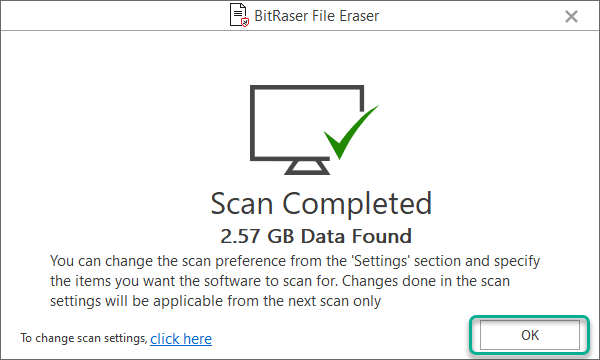


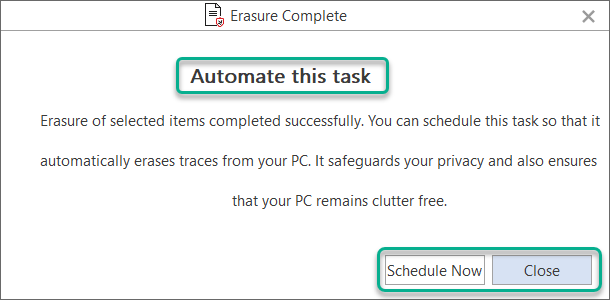
![[Open Source] Best Hamachi Alternatives 2021 – Best For Virtual LAN Gaming!](https://techniblogic.com/wp-content/webp-express/webp-images/uploads/2018/07/Evolve-768x427.jpg.webp "[Open Source] Best Hamachi Alternatives 2021 – Best For Virtual LAN Gaming!")


