![SEMrush Review 2024: 10x Your Traffic [Step-By-Step Guide]](https://techniblogic.com/wp-content/webp-express/webp-images/uploads/2020/05/semrush-review-nimish-gupta-techniblogic-768x432.png.webp "SEMrush Review 2024: 10x Your Traffic [Step-By-Step Guide]")
Looking to buy Semrush? Is it Really Worth? This is a Complete “Semrush Review” in which I will be covering all the Semrush features and a step-by-step guide that will help you increase your website organic traffic.
[toc heading_levels=”1,2,3″ label=”Semrush Review : A Complete Step-By-Step Guide”]
Everyone wants more and more visitors to their site! but the main question is, HOW?
If you are reading this you may have already heard about the Semrush tool by many people who use Semrush to 10x their website traffic. But the question is the same, HOW?
The first step to conquer the Google ranking space is “Keyword Research”, but the question is still the same, HOW?
You want to Spy on your competitors, But HOW?
You want to find High-Quality backlinks, But HOW?
The solution? SEMrush, But Again HOW?
There are so many HOWs to grasp and make your article BEST from others.
Don’t worry! You are on the right spot to discover all these “HOWs” and Level-Up Your Digital Marketing Skills to boost your traffic.

You must be thinking of “Why the Hell a Tech blog is posting an article about a Digitial marketing tool?“
Well, it is a part of digital technology.
With that said, I am using this Semrush Tool for the past 3 months and it really blows my mind. There are a lot of Semrush Reviews out there but this is the one that will change your life. Other than just explaining the Semrush features, I have tried to cover the necessary steps to boost your website traffic as well. You will learn how to use it properly to Boost your Website Traffic in lesser time.
Also Read: Grammarly Review – Is Grammarly Premium Worth to Buy?
This is my experience of using Semrush for a Tech and Digital Marketing Niche. So, if you are still interested in increasing your website organic traffic and know how you can optimally utilize Semrush, this Semrush review article is for you.
Before diving into how to achieve your 10x Traffic using the Semrush tool, Let’s first know about SEMrush itself.
What is SEMrush?
Semrush is All-in-one SEO Suite that bundles all the necessary SEO tools in one dashboard. I can get everything done in one place. I will show you what I mean in a moment. It is a Software as a Service (SAAS) company based in Boston, that aims to make digital marketers life easier.
Semrush was founded by Oleg Shchegolev and Dmitry Melnikov to provide intelligence data about your website traffic, keywords, AdWords spend and much more. SEMrush started out in 2008, and since then they have evolved a lot. I didn’t know about Semrush before, and I guess, things would have been different if I would have gotten my hands on it earlier, but nevermind. In short, SEMrush software is designed for people who need assistance with digital marketing.

If you want to know more about Semrush company you can check out their official website or Wikipedia. I don’t want to bore with history.
So let’s start with what is the real thing about Semrush that we need to know before using it.
Here is the Overview of the SEMrush Statistics that you must know!
| SEMrush Stats (Source) | |
| Particulars | Semrush Data |
| Users | 5 million |
| Keywords | 18.8 billion |
| Geo databases | 142 |
| Domains | 717 million |
The Semrush Data seems to be enormous, now the question arises “Where does SEMRush get its keyword data from?“. If you have the same question in your mind then go and search on “Google” and if you find the answer, let me know in the comment section. But if you are lazy enough to search on Google, it’s Okay! I will tell you what I found on Google, and the answer is “GOOGLE”.
Yes, you read it right! *There is no typing error or anything.*
So, as per my understanding. Semrush scrapes data from Google or maybe even buy Google AdWords keyword planner data, you pick your choice. Because Google is the only one who can tell your best searching keywords on google. The other possibility is that Semrush may collect the data from more than one different source and combine them together to provide accurate stats to their users.
So, now you have an understanding of
- What is Semrush?
- How big is Semrush Database?
- And even How Semrush collects its data?
Let move forward to our main topic: How to use Semrush? Why we Need SEMrush?
Don’t be in a hurry! Before going into Semrush Tutorial, you should know if you really need Semrush tool?
Why you Need SEMrush?
Semrush only shows you the data, and from the right data, you can achieve any goal you ever want if you have the knowledge. It’s like you want to be a digital marketer but you don’t have any skills of SEO or you want to make a website but you don’t know how to create one. You always need some data in one way or another, and the right knowledge to implement that data in the real scenario.
Semrush tool provides you data about Keywords, Competitors, Backlinks and anything that you will ever need to rank your website and increase traffic. So, if you are really serious about going into the field of Digital marketer or want to be a Blogger in any niche.
You can go for it. At the start, I will always recommend using Semrush Free Trial to get a better experience on your own. I will talk in detail about “How to Get Semrush Free Account?” later in this article.
Semrush Tutorial: How to use SEMrush?
Semrush Dashboard is divided into several sections to reducing the complexing of its software. To be honest, when I opened Semrush it seemed simple, but as I started exploring all the tabs in the menu, it puzzled my brain. So to make it simple, I will be focusing on the features that will help you to increase your website reach.
Also Read: Only Way to Get Grammarly Premium Free Trial
If I separate the sections as per their use cases, Semrush has 2 major sections:-
- Semrush Toolkits
- Management Section
Semrush Toolkits further are divided into 5 toolkit categories:-
- SEO Toolkit
- Advertising Toolkit
- Social Media Toolkit
- Content Marketing Toolkit
- Competitive Research Toolkit
And these 5 Semrush Toolkits have more subsections in it as well.
And Semrush Management Section has many other tools that will ease your work,
- My Reports
- Projects
- Lead Generation Tool
- Oppty
- Marketing Calendar
- Notes
So, I will be explaining each and every Semrush Feature?
Yes, I will.
This Semrush Review will be more focused on how you can increase your website organic traffic. There are many Semrush Features that will also help to build a brand on the internet, and I will be explaining all the important features of Semrush as well. But will be focusing our SEMrush Tutorial On FREE Traffic.
Also See: 12+ Popular Google Doodle Games 2026 (3rd Game is Best)
To reduce the complexity of the Semrush Tutorial, I will be dividing all the important features into sections. That you can read, and focus on what you want from this Semrush Tool. For example, if you want to find organic keywords you must check out SEO Toolkit Review, or if you want to focus on Advertising Campaigns then you must check Advertising Toolkit Review for spying Competitor Ads details.
So, Let’s get started now!
Keep Calm and Try Semrush
So first let’s start with “Creating a New Project on Semrush“.
Create a New Project

The first step after creating an account on Semrush, you must add your website into semrush for better tracking and fuller utilization of the semrush tool.
Here are the 4 steps to Create a New Semrush Project:-
- Click on the “Add new product” button at the top right corner.
- Add the Project domain name in the text field that you want to add.
- Add Project Name.
- And at last click on ‘Create Project’ button and submit.
Now you can use Semrush’s other features like Site Audit and many other features as you can see in the screenshot given below.

So, it’s just the start of Semrush Tutorial. Hope you are liking it.
Now check your site with “Semrush Site Audit“. Which will help you to understand your website issues and problems that cause low traffic?
Semrush Site Audit

As you can see, after working hard on our website for years, I still have new issues to fix. This is the best Semrush feature that I liked. It shows an overview of your website and the thing that must be rectified.
In techniblogic case, there are 18 errors and 200 Warnings. Other than these issues, it also compares the progress with the previews site audit.

To solve these issues you can check on the “Issues” tab and there will be a well-organised list of errors that needs to be fixed. You can also check your website broken links as well.

If we come to the Statistics section, you will get an overview of all the data crawled pages in a structured format. Where you can see the Pages Markup percentage used in your website pages, and other metrics as well.
In my case, apart from many issues on the Site Audit Dashboard, there are 2 issues that I think Semrush is NOT giving it right. As I am using Accelerated Mobile Pages (AMP) and Auto-optimise for better load speed. It gives errors on the temporary files created by that plugin.
Also Read: Best Grammarly Alternative [Free & Cheaper]
So, if you do a Semrush Site audit again after some days, it will automatically fix that issue and raises new issues regarding the new temporary files. Well, that is one thing I think Semrush can fix in the near future.
Other than this, it will give a good report of your website and help you in avoiding the silly mistakes that you may miss by a manual site checkup.
Position Tracking
If you want to keep track of your targeted keyword position on Google or Baidu? The Semrush Position tracking tool is what you need to use.

You can set up your Semrush Position Tracking in 2 minutes!
- First, click on the Position Tracking option on the left side of the menu.
- Enter the location of the target visitors. For example, if you want to check your post is ranked in Google US or in different countries.
- Click on ‘Keywords’, and add the keywords which you want to track.
There are many custom options as well while in the set up like changing search engine to Baidu. If you want to track the keyword position in Baidu search engine then you can change it. You can also change the device type, which means checking desktop search results, mobile or tablet results.

So after you set up the search engine settings, you have to add the keywords that you want to track.
- Add one keyword per line, and if you want to add tags you can add it by using comma operator as shown in the above screenshot.
- Click ‘Add to Project’ button after adding all your keywords and tags with it in the text area.
- You can edit the tags anytime, the tags option is used to categories your keyword and can be used to add an extra filter option afterwords.
- Here I have added keywords manually, but you can import from a .csv file, Semrush Keyword Database or directly from your google analytics.
- I am using Semrush Guru Plan, which enables me to add a total of 1500 Keywords in all projects. I will compare all the plans later in this Semrush Review article.
- You can also get weekly updates on your email.

After completing all the steps you will get a separate dashboard with all the Position tracking features like Ranking Distrition, Pages, Competitors Discovery, Devices and Locations.
The most used section will be “Overview“, where you can check all the keywords ranking in one place.

Hope this Position Tracking will help you to track your targeted keywords, and keep your eyes on their position in Search Engines.
On-Page SEO Checker
This Semrush On-Page SEO Checker offers a complete and structured list of things you can do to improve the search engine optimization for selected pages of your website. It helps to improve your google ranking.
So How to Setup Semrush On-page SEO Checker?

There are only 3 easy steps:-
- Select the Google Search Engine Location, which you want to target.
- Add your website links and their respective target keywords. You can do it manually or use Semrush Auto Import Feature, Import from a .csv file, import directly from google search console.
- You can select the user agent to crawl your site. Here, I have used Semrush bot user agent while testing it.
After all the crawling, it will show you data as well as gives you suggestions to improve your on-page SEO and compare it with other websites’ ranking. Our precise optimization ideas are based on the top 10 real-time competitors for each of the target keywords.

As you can see in the above screenshot, you will get so many data and ideas of the process. My favourite one is the Search Engine Result Pages (SERP) Analysis of the target Keywords.
So, what’s special in it?

Well, it will compare your keyword and article with other top 10 articles which are ranking on Google Search and give you some insights, which you may be missing. There are main 7 factors that it calculates, and they are:-
- Content-Length: You may have heard that “Content is King“. Yes, that’s true! While writing an article you must check if you are giving some value to your reader’s life. And another thing to keep in mind is Content-Length. How long should you write an article? So this tool will analyze the top 10 articles and show you average article length.
- Referring Domains: Different domains that are pointing to your web page.
- Video Usage: Using any type of video embed on your web page
- Keyword Usage: It will check if the target keyword has been used in web page “title | h1 | body“.
- Ordered List: If a web page has an ordered list.
- Markups: If any page is using any type of markups (like a store, SoftwareApplication etc.)
- Readability: It will compare the readability score of the content.
For better understanding, you can use Semrush Free Trial and get these data ideas for free of cost.
Brand Monitoring
The Brand Monitoring tool allows you to easily track all your mentions as well as your competitors’ brand, product or service on the web and social media.

Semrush Brand Monitoring Tool is very simple to use, just add your brand name, select the Country and Start Tracking. Though there is not much detail about this tool after you have submitted it, it will take some time to search and report it if you have any mentions.

But when I tested this tool for techniblogic, I couldn’t find anything. 😞
So, I don’t know if this feature is not working properly or my website actually has no mentions. What do you think? Let me know in the comments…
Backlink Audit
This Semrush Feature will allow you to secure your SEO efforts in link building. Comprehensive algorithms help discover toxic backlinks, which can lead to penalties by search engines.

In general, the Backlink Audit tool helps you protect your site from Google penalties. After I checked my website, it shows 3 toxic websites. When I checked those sites manually, all those sites were close to shutting down.
That’s how it helps me investigate my backlinks. So, if you are buying Semrush then you must check your website here.
Link Building
Increase your rankings by acquiring high-quality backlinks from the most authoritative domains in your niche. Communicate with site owners and track your progress. You can check the Prospects tab to discover hundreds of backlink opportunities.

There are simple steps to start with Semrush Link Building Settings:
- Select the target country and add your keywords.
- Add competitors URLs and click on ‘Start Link Building’.

After Semrush finishes its analysis, it will give you huge numbers of domain prospects from which you can start with. So, it will be very helpful for your off-page SEO strategy.
Other Semrush Project Tools
Social Media Tracker
Semrush Social Media Tracker will let you track social audience, activity and engagement of you and your competitors on Facebook, Twitter, Instagram and YouTube. It is very helpful if you are taking your website to build an online brand.
Social Media Poster
It will publish and schedule posts across major social networks, save time on social managing, analyze your content performance and more. You can try it yourself.
PPC Keyword Tool
Pay Per Click (PPC) keywords are for advertisers. You can search, create and manage your keywords with the SEMrush PPC Keyword tool. Create different campaigns and ad groups with just one click.
Ad Builder
Ad Builder helps you create compelling ad texts. Analyze your competitors’ ads, preview your ads and assign the newly created ads to your existing keyword groups.
Organic Traffic Insights
You have to connect your Google Analytics (GA) and Google Search Console (GSC) accounts to unlock ‘not-provided’ keywords and see the actual organic traffic driven by them.
Content Analyzer
Audit your domain content and track your guest posts to pinpoint high-exposure content.
SEO Toolkit – Semrush Review
From research to reporting, SEO Toolkit will let you improve your search engine rankings by testing, analyzing and monitoring, not just your website, but also your competitors. Without any further ado, let’s dive right in.
You can also Try Semrush SEO Toolkit yourself for Free and understand it better.
Your entire SEMrush SEO experience starts with our SEO Dashboard. You can customise it as per your needs and requirements. You will get all the necessary information on one single page.
To create an SEO Dashboard you have to add your website to Semrush Project as I explained at the starting of this Semrush Review. You can also easily connect your Google Analytics and Search Console to keep track of the key metrics in one place.
Once you’ve taken a close look at your own metrics it’s time to move on to Semrush competitive research section.
Competitive Research
The biggest benefit SEMrush provides is its Traffic Analytics tool for competitors. The Semrush competitive report includes all the key SEO metrics for a competitor’s site with monthly data, along with information on locations and devices from which the users visit their site. Other than this, the tool provides data on where the traffic comes from, which helps you reverse-engineer competitors’ marketing strategies. And replicate that success to your website.
Also Read: Best Website Screenshot Generator Tools & Chrome Plugins
So to start Competitive Research on any website, you have to add your competitor website URL in the search box and select the country which you want to target.
That’s all! Semrush will do rest.
Domain Overview

As you can see in the screenshot below, all the ndtv.com stats are shown in just one click. You can check its backlinks, organic search traffic, organic keywords, Traffic Trends and much more.

You got the data, but how to use it to get more traffic to your website? Don’t worry!
I will give you a strategy that you can use for getting Free organic traffic from this Competitive domain data.
- You can use Organic Research to analyse your competitors and find the keywords they rank for.
- You can even analyse their site on different levels – look at the entire domain, subdomain, or a separate URL.
- All the keywords that your competitors rank for can be found in this easy-to-navigate table with a list of keywords.
These three steps are the most important of Competitive Research.
Traffic Analytics
You can also compare the Traffic of multiple websites with your website to know more insights.

To do that you just have to go and click on the Traffic Analytics tab and follow the instructions:-
- Select the option which you want to perform.
- Enter the domain name.
- Click on “Search”.

It will give you a lot more detailed information about your competitor’s traffic. So what are you waiting for? find your competitor organic traffic.
Organic Research
This is one of my favourite Semrush tool section, it is most useful to spy on other websites and steal their keywords. It is also divided into 6 sections:-
- Overview: Where you can see all the data at one place, it just gives the top 5 or minimum amount of data in the form of blocks.
- Positions: This will give you detailed information about the top keywords ranking on google. You can also sort the table in terms of keywords searches volume, CPC, Keyword difficulty level etc or you can use Advance Filters. I will show you how to smartly add the filter and find low competitive keywords. So, stay with me!
- Position Changes: In this, you can check how a domain’s rankings are changing. You’ll get information on position gained, lost, improved, and declined with rankings and explore your opportunities within it.
- Competitors: If you can not find enough keywords from your current competitor, don’t worry! Semrush will give you more competitors list in seconds.
- Pages: This page will give you top ranking pages of your competitors, so you can check and analyse those pages and get some ideas out of it.
- Subdomains: This section may or may not be useful to you, as it will shows all the domains used by your competitor website. In my test on amazon.com, it has almost 137 subdomains. Yes! I am also shocked after seeing this.

As you can see in this example, it will show you all the necessary details of the keywords such as its Volume, Keyword difficulty, Competitor ranked URL link, Search Engine Result Page (SERP) data, CPC and many more things.

For filtering the keywords, I mostly used 2 filters:-
- Keyword difficulty must be less than 60
- Traffic must be greater than 500
This is the only filter that I will recommend for beginners and for new bloggers or digital marketers. You’ll maybe find some untapped opportunities with those keywords.
Keyword Gap
This is another great tool for full analysis of your keyword with the keywords of your competitors. The main feature is that you can also check a Paid Keyword Gap as well.

You can take five competing domains and use the chart view for a better understanding. The charts will include both mutual and unique keywords for the domains you compare, so make sure to pay attention to the unique keywords section and to discover keyword opportunities you never thought of for your own website.
The Keyword Gap tool is widely successful and used, so Semrush also introduced a similar tool for backlinks.
Backlink Gap
SEMrush’s Backlink Gap tool has similar functionality to Keyword Gap. You can enter your competitors’ website and check out where they are getting their backlinks, and compare it will your website for better understanding and discover some missing opportunities.

While comparing Amazon, Walmart and eBay you can see the common backlinks that they are having and where are the backlinks.
If you think we’re done with keywords, well, that’s not exactly right. There are more Semrush tools that will be discussed later in this “Semrush Review“.
Keyword Research
After understanding the way to explore competitor keywords, you must do Keyword Research on those keywords before you implement an efficient keyword strategy for your own domain.
Keyword Overview

This Keyword Research tool is also very simple to use, you can just search your target keyword in the search bar on the top and click on search and BOOM! you will get all the data about this keyword on the internet.
In simple terms, it’s the data in the perspective of the keyword, not a domain.
You can add filters to get more focused data about your keyword. Such as:-
- Database County: You filter your keyword with respect to your target country.
- Device: It just an extra sauce to your keyword analysis, as it allows you to filter data in terms of mobile device or desktop device. As Google is separating the search results of these 2 devices, it may help you to target the right audience.
- Date: If you want to check the historical data of that keyword then this filter is for you.
You can also search for Bulk Keywords if you want, by going to the Bulk Analysis tab. Just paste your keywords in the text area (One keyword per line) and it will give you an overview of all the keywords with respect to their Search volume, Keyword difficulty, CPC, total results and more. You can check on the keywords for a detailed report of that keyword.
Keyword Magic Tool

Keyword Magic Tool has everything you need for keyword research. You can enter your seed keyword and look at keywords semantic group, and you can find more content ideas in the “questions section” that also help you to optimize your pages for voice search. Apart from that, you can use the Advanced Filter option here as well. It works the same as I explained earlier in the competitive research section.
If you like the keyword you can directly select it and add to your keyword manager or export the file as per your Semrush Plan, directly to an excel file. Isn’t it Great!
Keyword Manager
In this section, you can collect your favourite keywords from SEMrush. Save your findings, get fresh metrics, and export your findings into an XLSX or CSV file or other SEMrush tools. It is like a personal directory.

You can create multiple lists for your projects or category. It makes very simple to manage all the keywords that you want to target.
Keyword Difficulty Tool
Keyword Difficulty tool will estimate how hard it would be to use SEO on a new webpage to rank on google. It will give you a rough idea about an expected keyword that can rank, and will notify you to not go after that keyword that is too difficult. In a way, it minimises the use of unworthy keywords and saves your time and resources.
Organic Traffic Insights
Organic Traffic Insights will combine your Google Analytics, Google Search Console, and SEMrush data all into a single dashboard. And show you all the necessary data about your keywords that are ranking or getting traffic at one single dashboard.
Also See: Top 21 Best Upcoming PC Games 2026
Link Building
The tool allows you to look at backlink profiles from any website. But, why should you change any websites backlinks?
According to SEO experts, backlinks are still a top factor in Google’s organic ranking algorithm. So, learning about your and competitors’ backlink profile is only half the battle. Link-Building is your best tool choice for acquiring high-quality backlinks.
Backlink Analytics

It analyses your potential best backlink sources and prioritizes them by the value they bring to the website. You will also get the option to filter the data like you can filter the type of links (Follow links, Nofollow links, Sponsored links) and if you want to check only new backlinks then you can check the New checkbox.
If you are testing your website and it is showing a toxic backlink, you can directly add it to Disavow list and help you to improve your website authority.
Backlink Analytics is divided into 7 sections:-
- Overview: It is a simple dashboard where you can view almost everything about backlinks at some level. It has been designed by a block, which gives a cleaner look.
- Backlinks: It is one of the important section where you can check out all the backlinks of your competitors with various filter options.
- Anchors: It will show you all the anchor text on which backlinks are created by your competitor.
- Referencing Domains: It gives you an idea about the backlinks referencing to your competitor’s website such as a number of different top-level domain referencing and list all the unique domain out of all backlinks.
- Referencing IPs: It is same as Referencing Domains, just that you will get a unique IP address pointing towards a website.
- Indexed Pages: It gives you detailed information about each web page like backlinks, external links, internal links etc..
- Domain Competitors: It gives you a list of website Competitors which you can check for more information.
Backlink Audit Tool
Backlink Audit looks at your domain’s backlink profile in order to help you avoid Google penalties related to toxic backlinks. I have already explained this tool, you can check out the Backlink Audit section.
Link Building Tool
Using the Semrush Link building Tool you can check the Prospects tab to discover hundreds of backlink opportunities. I have already explained this tool, you can check out the Link Building section.
Bulk Backlink Analysis

If you have a lot of backlinks, you can check their backlinks together with Semrush Bulk Backlink Analysis. Just paste your websites in the text area, line by line and click compare. That’s all!
Semrush will show you an overview of all the domain in a tabular format. You can see AS, Backlinks, Monthly Visits, Follow/Nofollow links etc.
AS refers to Authority Score, it is a Semrush proprietary metric which used to measure the overall quality of target and influence on SEO. This score is based on the number of backlinks, referring domains, organic search traffic, and other data.
Now you have every knowledge to get Free Organic traffic but if you have an eCommerce website and want to promote fast with paid advertisement. Then don’t worry, Semrush has your back!
Advertising Toolkit – Semrush Review
In this section, I’ll be walking you through the Semrush Advertising Toolkit. The variety of features offered in this toolkit can really boost your business ads and have a better understanding of your target audience, and you can also know about your competitor’s advertisements.
Yes, you heard it right! You can spy on your competitor’s ads in semrush. This makes Semrush an all-rounder.
You can run a competitive analysis of your competitor’s online advertising strategies and tactics. In short, The SEMrush Advertising Toolkit is your one-stop-shop for planning a Google Ads campaign.
Advertising Research
Advertising Research can help you capture competitors’ advertising information. It will analyze your competitors’ advertising strategies on various levels – domain, subdomain, or URL.
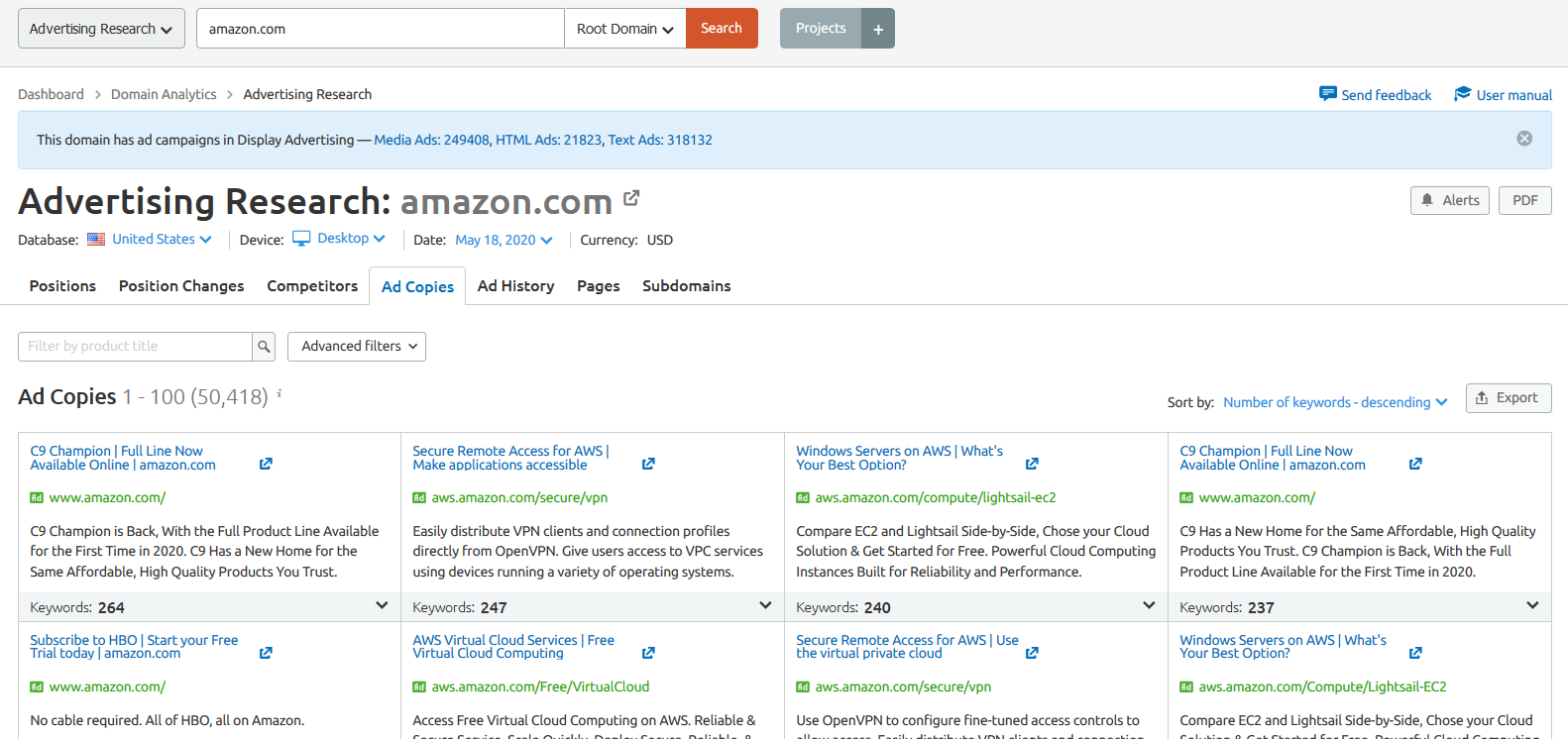
And if you want to understand how your competitors appeal to their audience, you can also explore the actual ad copies, available in the Ad Copies report. As you can see in the screenshot, this report contains headlines and Call-to-Actions your rivals have used in their ads, along with the keywords they target, and the landing pages they direct paid traffic to. You can repeat their strategy on your own website and get better conversion.
With Ad History report, you can access competitors’ overall advertising strategy for the last 12 months.
Overall this tool helps you to answer all the questions such as how and when they run their ads, which keywords they use and how much traffic it brings to them. So if you can spot the trends and use these insights for your own advertising strategy. The next go-to tool is Keyword Gap which I already explained in SEO Toolkit.
Display Advertising
SEMrush also provides you with a unique set of tools for display ads and Shopping ads analysis like Display ads. Display Advertising reports help you to know about your competitor’s use of online display ads that is banners, sidebars, and text ads placed through Google Ads or published on the Google Display Network.

Display Advertising tool gives you an idea of a competitor’s recent activity and their target audience. One way to approach website analysis is to find out its advertising strategy, and what type of ads it hosts as a publisher. You can segment the ads by location and by device type.
The Ads tab dissects each ad individually and convenes your competitors’ display ads data by sorting them based on their type – media, HTML or text. You can check when and where the ad campaign was aired and what creative copies they used. Isn’t it Great!
While testing it, I have check Grammarly Display Advertising and it works pretty well. This information is useful if you are planning to run your own ads on a similar topic. In my case, I used it for finding the keywords. Yes, you read it right!
I checked Grammarly.com in this Semrush Display Advertising tool to find out new keywords that the company wants to target. This is a cool trick to increase your organic traffic with fewer competition keywords.
Let’s take another example, If your competitor is in eCommerce, you’d want to discover which of their product listing ads or shopping ads showed up for different keywords along with their recent position changes. You can start targeting the best selling products with the best possible keyword that was researched by the eCommerce itself. So, now you can understand the importance of the Semrush Tool. But this is not finished yet!
PLA Research
SEMrush PLA (Product Listing Ads) research allows you to analyze the performance of an advertiser’s Google Shopping ad campaigns. It is a good feature if you want to deep drive in Paid Traffic or you are more focused on getting traffic from ads. Using PLA Research you can discover product listing ads that showed up for every keyword.

This is the list of PLA Keywords that amazon.com is running. Isn’t that Great!
You can uncover what your competitors’ PLAs look like and analyze their components. You can discover the titles and prices of promoted products and if you filter the list of copies by the number of keywords, you can deduce what products they’re placing their biggest bets on.

In the PLA Copies section, you show your competitors’ best-performing ads as well as the keywords that triggered them to show up in search results.
So by combining the Semrush Display Advertising and PLA Research, you will be getting a huge piece of Competitor advertising data and if you use this data to reverse-engineer your own campaigns to appear in Google’s Shopping ads section, you will see the results on your own.
CPC Map
Currently, this tool is in Beta but it works great. It shows general data of CPC as per the last 30 days. You can check the CPC data with respect to the location and regions. This information is useful if you are finding any higher CPC niches.

The CPC map tool has an interactive map with the regions of your selected country colour-coded by the average CPC of advertising. To the left side, you will see the regions with the lowest and highest average CPC in a selected country.

Apart from the CPC map, you will get detailed information about the different industry’s CPC with respect to your selected country. And not only this but you can also get the most expensive keywords and most popular keywords in a particular niche. So, overall the new SEMrush CPC Map tool is a perfect place to evaluate the potential of a particular state or region in terms of cost per click and your niche.
Apart from all these Market Analysis Tools, Semrush also has Ad builder. Ad Builder automatically syncs with the PPC Keyword tool and mirror your keyword list in its entirety. It allows you to write ad copy and headlines for your PPC campaigns. You can check out your competitors’ ads and use them as templates to create your own ads.
So before making this more complex let’s end it and move towards another Semrush Toolkit that will help you to grow your audience.
Social Media Toolkit – Semrush Review
You’ve already learned a lot about Semrush Tool but you are still in the middle of exploring Semrush. So Let’s learn about the Semrush Social Tool that will save you a lot of time.
SEMrush’s Social Media Toolkit is not just another tool for social media analysis. It combines the functionality of various tools that respond to your Social Media management needs and helps analyze your competitors’ Social Media strategy and performance across several social media channels – like Facebook, Twitter, YouTube, and even LinkedIn.
Social Media Poster

As you can see Semrush have so many options to start with. I personally liked Facebook and Twitter to start with. You can add all these social media and post everywhere at a single click. Isn’t it Great!
Apart from post scheduling, you will get many advance options like your business page Analytics, rescheduling content in a loop. You can even create ads and boost your social media reach. All in one place.
So, for demo let’s connect our twitter page @techniblogic.

It is quite easy, you just have to follow the steps. First Click on “Connect Twitter Button” and “Allow Application in your Twitter Account“, Now Add your profile and you will find 4 options in your panel. i.e.
- Schedule Post: Here you can schedule your posts, you can add anything a photo, link, video etc. and schedule it any time you want or choose the perfect time suggested by Semrush itself. I will be explaining it in detail, so don’t worry.
- Go to Calendar: Here you can view all your posts overtime at one place in a calendar UI, which makes it simpler to understand.
- Open Ad Manager: Here you can manage your Ads on your Twitter account, so many of you will not open your twitter account after using all these semrush social tools.
- Set Competitors: It is the place that makes this tool more useful as you can add your competitors, twitter account and it will track their posts and engagement on their post. You can get proper data of what is trending on your competitor’s social media page and try it on your own pages to increase your reach and engagement.
You can connect your Facebook or other social media platforms as well. The order of steps will be the same.
So now you have connected your social media, let’s try to schedule a post on our social media.

So when you click on schedule post. It will redirect you to the page as shown in the above screenshot. For easy understanding lets me explain you step-by-step:-
- At the first section, you will get all the social media accounts that you have connected with semrush. You can select or reject if you want to post the same content on your handles. In my case, I just want to share a wallpaper on my Facebook page. So I unticked my twitter account.
- In the second section, you can add text or paste your link as per your requirement. If you have selected both twitter and Facebook page then you will get more tabs, in case, you need different text on different social media. You also have the option to tag someone using @.
- You can add smilies in your text or you can add a GIF image in your post directly from the tool. If you are sharing a link you can use, try UTM settings to track your Campaign.
- Apart from the text and links, you can schedule multiple photos as well as videos from here. You’ll also have an option to select and unselect images that you want to share on different platforms. As twitter supports 4 images only.
- After your post is ready, you have many options to schedule or post it to your social media. You can also directly “Add to queue” which means it will be added in the posting queue table, schedule directly with a specific time and date, “Publish regularly” after some specific time interval (it can be days, weeks or months), Post Now or Save as Draft if your post is not ready yet.
- If you select a Schedule option, then you can just add time and date when you want to make it live on your social media pages.
- If you don’t have any idea about “When to Post?“, then you can check out Semrush suggestion which will tell you about when your fans are online. I will recommend you to post when your maximum fans are online. It will increase your chances of getting your post more engagement.
- It also has a preview option, where you can check out how your post will look like before actually posting it. You can change the views as well, like How your post will look like on a computer or on a mobile device. You can check the calendar view to get an overview of the post that you have scheduled.
- If you think its’ all you get in Semrush Social Media Poster, you’ll find one more thing that’ll simplify these tools for you. Yes, to boost the speed of sharing you can use “SEMrush Social Media Poster Chrome Plugin“, where you can share any content on social media with just one click while you browse the web. I will not explain this more to reduce the complexity, you can download and try it yourself.
Social Media Tracker
In this, you can check the top posts of your competitors, sort their posts by engagement and check what messaging is the most engaging. You can actually compare your competitors’ audience growth with their overall activity and engagement numbers to better understand what steps you need to take to achieve the desired outcome.
Timing is another important aspect of productive interaction with your users. You can even analyze the publishing strategy of your competitor to determine what schedule to follow.

To start with it, just add your competitor’s social media account in Semrush. And it will find their social handles, in this testing I will be adding my own page, as I can’t find my right competitor…😝
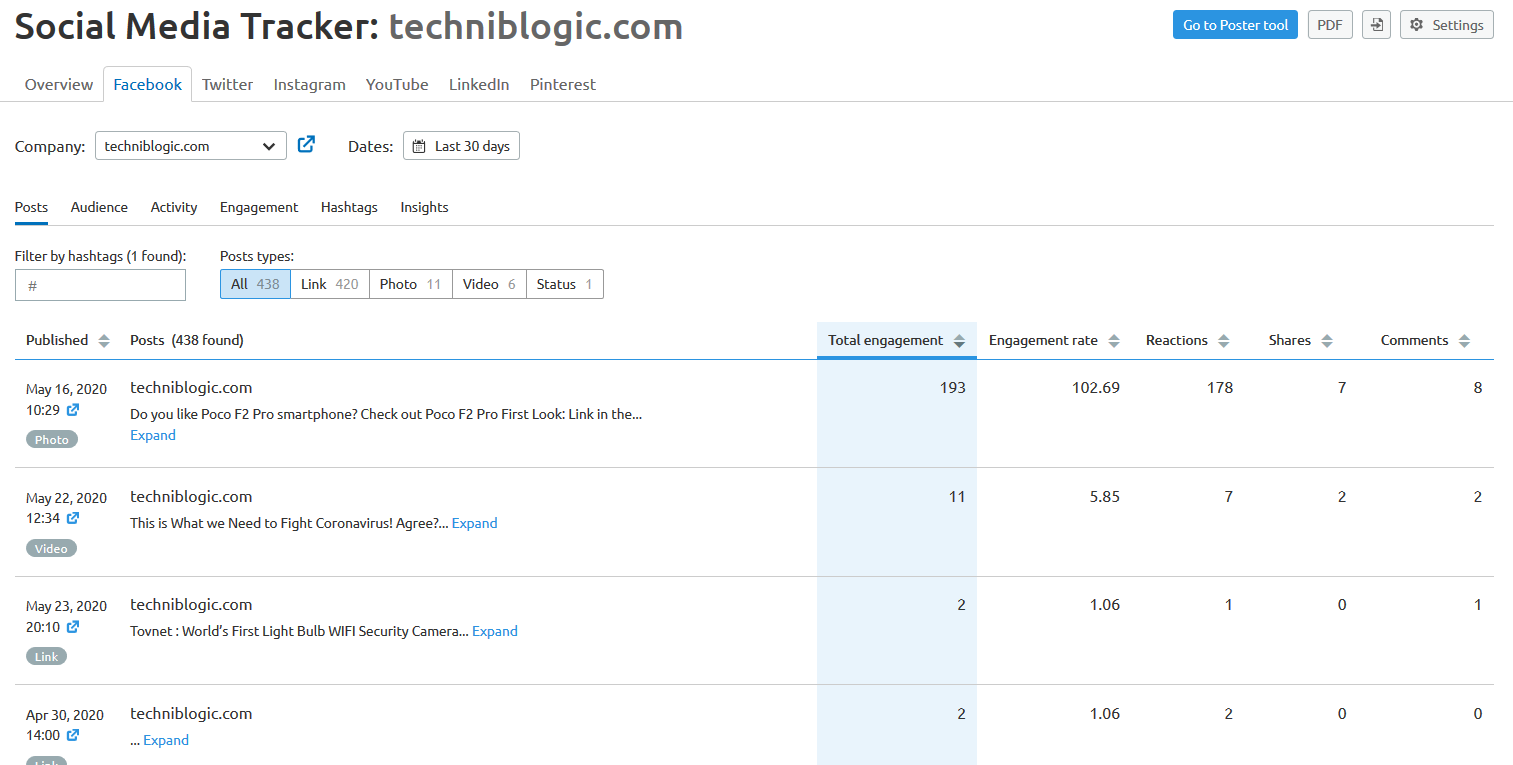
So here are my top posts which can be filtered by Link, Photo, videos or even status. You can also sort it by the Highest engagement post with its shares and number of comments. Isn’t it Great!
I will show you more Semrush features that’ll benefit your website but you must try Semrush yourself to learn it better.
Content Marketing Toolkit – Semrush Review
Apart from SEO related tools, Semrush also has a Content marketing tool that helps with all of the areas of content marketing, from creating good content to optimizing it for your website. It will assist you in drafting an efficient content distribution plan by gathering metrics to evaluate the performance of your external content. So without wasting much time, let’s get started.
Topic Research
Every content marketing strategy starts with analyzing your existing content and how well it performed. So, Semrush Topic Research helps you find the right topic and give you ideas to write winning content. This is the first step you need to take to narrow down a list of ideas for interesting material.
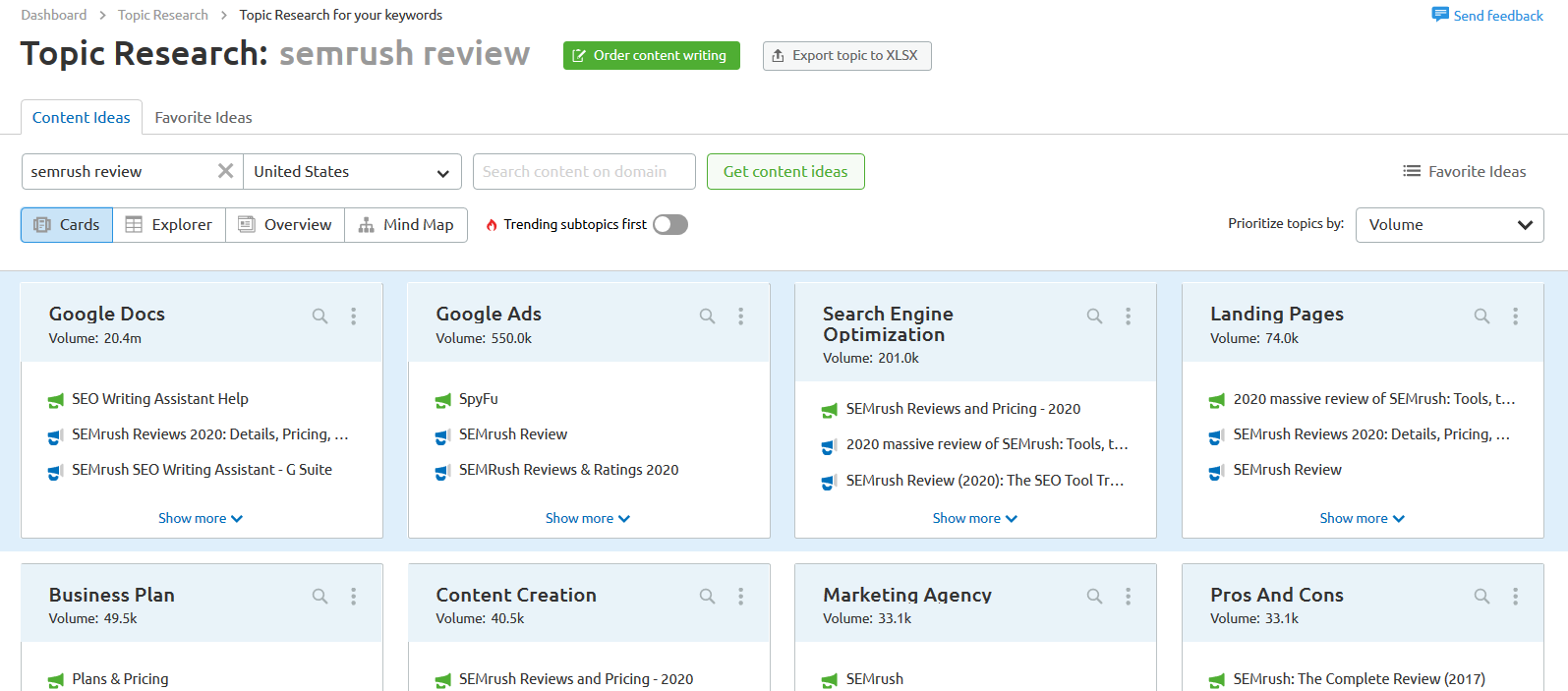
SEMrush counts popularity based on the number of search queries for your topic, with a breakdown of its most searched subtopics and each subtopic, includes a number of most popular headlines that are sorted by the number of backlinks they attracted.
You must also check out for related questions especially if you are optimizing for mobile or voice search and want to earn a sweet spot on google search results. You can also brainstorm how to improve your competitors’ best performing content on the topic – just enter their domain into the Topic Research tool.
So, once you are done researching ideas, save your topics for later to Favorites ideas. This is where you can export your ideas or start implementing them right away.

You must see this kind of Keyword Mind map around the internet, Yes! almost all are created by semrush. It is just a graphical representation of top keywords related to your topic.
SEO Content Template
SEO Content Template is a tool that provides you with recommendations to ensure that your content is indeed SEO friendly, from readability and text length to semantically related words and many other factors.
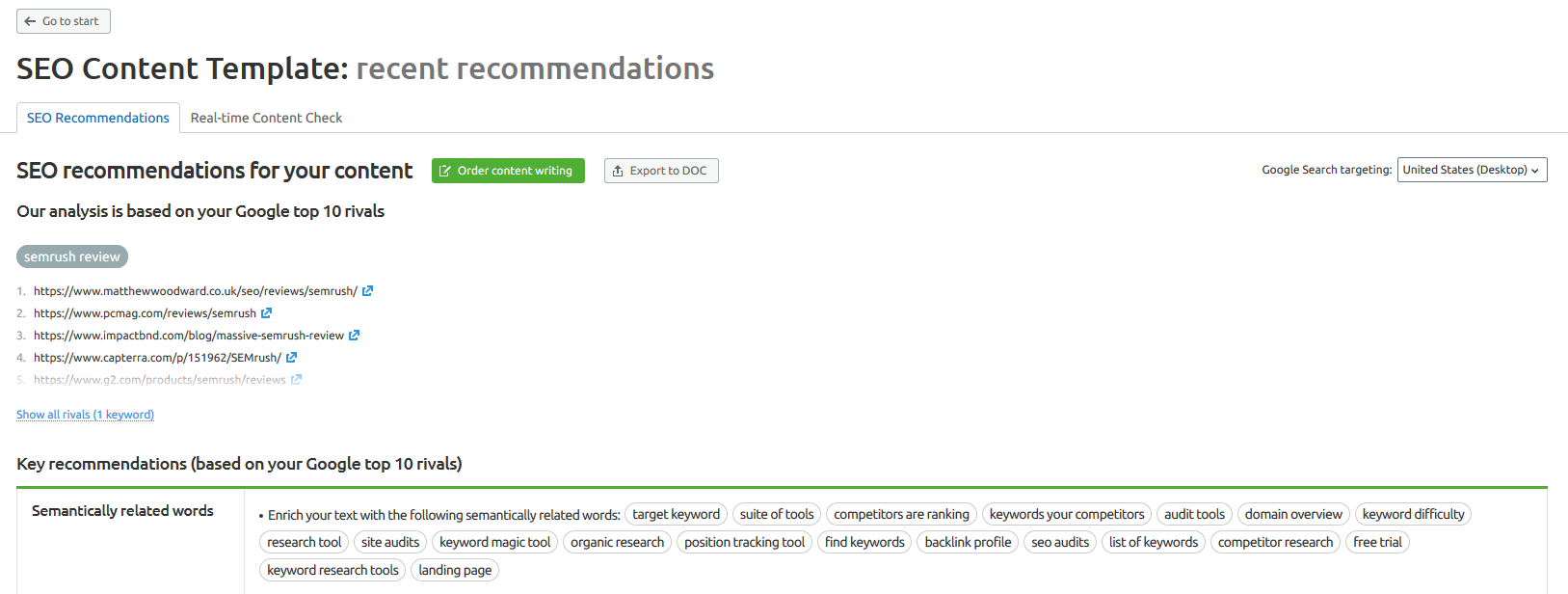
This tool will give you practical suggestions based on the TOP 10 Google ranking for these keywords. Simply export the recommendations you received, and get in the writing mood.
You will get Semantically related words that you must include in your content to rank. I will suggest not to stuff words in your articles but add keywords that are relevant to your content. Google keeps changing its algorithm, so we should take care of keyword stuffing.
SEO Writing Assistant
This writing assistant tool will keep track of your SEO optimization goals. As you go on writing your content, the plugin checks it for SEO friendliness and gives real-time recommendations.

As in the above screenshot, I have pasted this whole “Semrush Review” article in it. And it rates 8.1 out of 10, which means I need to optimise this Semrush review draft more as per the SEO Writing Assistant suggestions.
This is a fantastic Semrush feature that you can use to pre-check your article before publishing it. Now, you can just focus on writing and Semrush will take care of SEO-friendly articles. Super cool, I know!
Post Tracking
By adding competitors’ posts to Post Tracking, you can check if your competitors are seeing any results with their guest posts, and benchmark their numbers against yours. If you connect your Google Analytics and Search Console, you’ll be able to see how your content marketing efforts are affecting your site’s overall performance.
Content Audit
The Content Audit is a tool that will actually help you in evaluating your content based on the most important metrics. In other words, these content marketing tools take care of the research and technical part of your online content creation and optimization.
Competitive Research Toolkit – Semrush Review
In this Semrush Review, I have explained various parts of Semrush’s powerful suite that is SEO, Content Marketing, Advertising and Social Media. And now it’s time to introduce you to Semrush Competitive Research which helps you find solutions to be a step ahead of your competitor or make tactical suggestions to improve your website performance. In other words, the Competitive toolkit allows you to fully scope out your competitors’ marketing strategies and tactics.
The prominent question when you do competitor research is how big is their audience? or where does their web traffic come from? With Traffic Analytics, you already have a general understanding of your competitors’ website performance as I mentioned earlier.
Market Explorer
This tool helps you to identify metrics for an industry of a domain website. You can see the market traffic size, industry leaders by acquisition channels, traffic trends, the share of visits, audience gender, age and interests.

Now you can look at the overall online presence of your closest competitors as I have shown in the above screenshot where I have search amazon.com in it.
In this Competitive Research Toolkit, all the other sections are common with other Semrush Toolkits that I have already explained in my Semrush review article. So if you missed out on anything please do check out. I hope you will get a better understanding after reading this article.
OH! Finally! All the Semrush Toolkits are covered!
What’s now? That’s all?
No No No!
Apart from a huge website, Semrush also has a Mobile app as well to track your keywords position.
Semrush App Review: Position Tracking Mobile App

Position Tracking Mobile App helps you to keep an eye on your website keyword positions anywhere on your smartphone. This Semrush app is available on Android as well as on Apple Store. As per my experience, Semrush App seems very basic and simple with very limited features.
You can only check your keywords position on the google search engine, which you have added in your project. You can not even add any new keyword from the app.
I Hope Semrush will add more features in its mobile app in the near future. Because so now you may not need this app unless you are obsessed to check your search ranking again and again.
Also See: Grammarly Review 2026 – Is Grammarly Premium Worth to Buy?
It has been fun testing all these awesome features of Semrush. I may have missed some semrush features in this Semrush Review, as Semrush is evolving day by day and new features are adding very rapidly. But I have tried to give every useful information about Semrush tools that help you to learn and use Semrush easily.
Semrush Tutorial: How to Get Free Traffic using Semrush.com?
So, now you are familiar with almost all the features of semrush that you need to get Free organic traffic.
You have the Power of this Tool but How to use SEMRUSH for SEO?
I have divided the Semrush Tutorial into 8 Simple Steps:-
- Utilize Semrush Site Audit to Examine your Website
- List your Competitors and Evaluate their Site
- Find out your Competitors’ Best Performing Keyword
- Find Profitable Keywords using Keywords Magic Tool
- Research the Keyword outside the Semrush
- Create Unique Content
- Target your Competitors Backlink Sources
- Track your Keyword in Google Using SEMrush
- Update your Content regularly
Let’s drive into it.
1. Utilize “Semrush Site Audit” to Examine your Website
As I already explained you about Semrush Site Audit tool, which helps you to check your website built and structure as well as tell you how easy it is for search engines to crawl and index your content as well warn you if you have some technical SEO issues that you might even make your website invisible to the search engines.
So the first step of “Semrush Tutorial” is to find these issues and fix them. You can check the Full Semrush Site Audit Tutorial, analyze your website and fix technical on-page issues to boost your website’s health and ranking.
You can also check this Semrush Academy Tutorial Video as well and learn more about this Semrush feature. When you completed your Site audit and you have fixed all your website issues. Let’s move towards the second step.
2. List your Competitors and Evaluate their Site
Now, your website health has been fixed. So its time to go for hunting new keywords and content that you will feed to your website visitors. It is like a deep forest where you have no idea what you will find. So, always be anxious while doing research! It’s key to your success.
I will recommend you to make a list of your competitors or websites that post similar content like you. This will help you to get only quality keywords that are relevant to you.
If you want to find more competitors’ websites then semrush can give you hundreds of thousands of website list similar to your website in a few clicks. Yes, you read it Right!

Here are some easy steps to find out your organic competitors:
- Go to Organic Research section, by clicking on the left side menu. You will find it in SEO toolkit and in All Tools section.
- Now, Search your domain or any other domain which is from targeted niche category.
- Then you can see its Organic Research data that you entered. There is a tab called “Competitors“, go and click on it and BAZINGA!!!
- You now have thousands of competitor websites in your list in a second.
- You can analyze these site individually by clicking on the domain name.
- Now repeat from step 3 and you have lakhs of websites in your hand.
Think about it, if you can find and rank to at least 10 low competitive keywords with a minimum 1000 traffic from even 100 websites. Then you will have a minimum of 10x1000x100=1,000,000 monthly visitors. That is amazing right!
But again think if you repeat that for 1,000 websites? 10,000 websites? or Find 30 low competitive keywords?
The output scope is very vast if you use Semrush data in the right way.
3. Find out your Competitors’ Best Performing Keyword
So, when you finalised your Competitors and Evaluate their Site as per your target niche and audience, then you are ready to go. When you do Organic Research of your Competitors then you can see how many keywords rank in a particular country.

As you can see in the screenshot, you will get a lot of details about your competitor’s website and its ranking. You can find Top Organic Keywords, Top Position Changes Keywords and many many more.
So we will be focusing on Organic Keywords for now. You will get the Top 7 Organic Keywords of the website but honestly, for maximum time they are highly competitive so don’t go after them. Click on the blue button which shows “View all Organic Keywords“.
As you can see in this example, it will show you all the necessary details of the keywords such as its Volume, Keyword difficulty, Competitor ranked URL link, SERP data, CPC and many more things.
When you click on view all, you can see all the keywords, which that website is ranking of, but wait, don’t go for higher search volume because higher the traffic volume higher it becomes to rank. And for a new website, I don’t recommend that. Playing with some filters is the best, I generally use 2 kinds of filters that are,
For filtering the keywords, I mostly used 2 filters:-
- Keyword difficulty must be less than 60
- and Traffic must be greater than 500
The first filter controls the keyword difficulty level and the second will remove all the low traffic keywords from your list. It may or may not work for every site because sometimes your competitor is ranked on a higher keyword difficulty level keyword and that keyword is driving whole traffic funnel to its website.
So, if you don’t find any good keywords by applying this filter, I suggest you increase the Keyword difficulty level up to a maximum of 75 KD. That’s my mark. If you can work more on a single post you can target 80+ KD keywords as well.
So, when you finalised your keyword, you can add it to your favourite and export it any time or you can note it on your computer/laptop.
4. Find Profitable Keywords using Keywords Magic Tool
After you shortlist your keyword, now its time to know more about your keyword. Analyze it and find related tail keywords around it. So, How to do that? Don’t worry!
Semrush has a solution for you, you can use Semrush Keyword Magic Tool that has everything you need for keyword research. You can enter your seed keyword and look at keywords semantic group, and you can find more content ideas in the “questions section” that also help you to optimize your pages for voice search. Apart from that, you can use the Advanced Filter option here as well and use that 2 filters in this as well.
If you like the keyword you can directly select it and add it to your keyword manager or export the file as per your Semrush Plan, directly to an excel file.
5. Research the Keyword outside the Semrush
After all the Keyword research phrases you pass you are one step close to finalising your target keyword. Make sure to do manual keyword research, check outside the semrush.com as well. You must check the keyword yourself before you start writing it.
So how to do that? Let me ask you if you have any query where do you go to find your solution? on GOOGLE? Right?
So simply search your keyword on Google, at last, it is the place where you want to rank and always use a “Private Window” or “Incognito Mode” to search or Google will cache your search results and show you different results as compared to other people.

As you can see there are 3 things that you must see in google search results:-
- Always try to use top 10 search suggestions by google in your article content(do not stuff irrelevant keywords).
- Check the “People also Ask” sections for sub-headings or for content ideas.
- Search your keyword in google result page and check how many top websites is using that same keyword in their title. If you find that all the results having that keyword then move to the long tail keyword. In my case “Digital marketing” is very difficult to rank for a new website.
You can also use Semrush Content Marketing Toolkit for more suggestions that I have already explained here.
Another way to find whether your keyword is trending among people at that time is by using “Google Trends“.

Google Trends is a free tool that uses graphs to compare the search volume of different queries over time. It does not give you accurate numbers but you will get an idea if your topic has any popularity or not. You can also add extra filters like Country-specific search, want to know just last 90 days’ data.
Now, when you decide the topic or keyword, you must analyze all links on the first page manually and make rough notes on how much content your competitors have written, and what is the article structure. I know semrush can help you do that, but I like to do it manually for better understanding.
For checking the article length I used “Article Word Counter Plugin” for my Firefox browser but you can also download it for Chrome browser. So what does it plugin do?

This browser plugin solves the problem of coping all the articles in MS Word just to check its total word count again and again for every website. As many of the websites follow the google standard structure of article posting on their website. This plugin fetches that structure automatically and shows the approx word count of the article.
If some of the websites do not use that structure, you can just select the word and this addon will show your number of characters in realtime. So this will work either way. So give it a try, it saves me a lot of time.
Another website you must check is quora.com, it is one of the most popular websites now a day. It is the place where questions are asked and answered by anyone with that knowledge. So before start writing on your topic, you also check quora for a better understanding of your audience.

You can simply go to quora.com and search your keyword, then at the left side of the menu, you will find a “Questions” option, click on it. And here we have a lot of popular questions that people are asking frequently. You must check out these questions for a better understanding of your visitor’s needs. Apart from the questions, you can also see how many people are following the question which means that the topic is in demand.
So, now you are ready to start writing your article!
6. Create Unique Content

Don’t Worry! Writing is not very hard if you know about your topic. The first step of writing is to make a format and divide the heading and subheading of your topic. List all the subtopics and questions you want to answer in the article.
Always write as you are doing a conversation with your friends. Because if the reader connects with you then he/she can more efficiently understand what you are talking about. It’s not that difficult. You can use Grammarly for extra writing help or use Semrush Writing Assistant for better SEO friendly articles.
I have already explained about Semrush Writing Assistant in this Semrush Review article. So if you missed it you can scroll up and check that.
7. Target your Competitors Backlink Sources
There are two ways for finding the right backlink sources from Semrush.
- By using Semrush Backlink Gap where you can enter your competitors’ website and check out where they get their backlinks from and compare it will your website for better understanding and find discover some missing opportunities.
- And by Semrush Backlink Analytics which analyses your potential best backlink sources and prioritizes them by the value, they bring to the website.
So you may be thinking what is the best way to Target your Competitor’s Backlink Sources more effectively.
Well, there is a strategy which you can follow to get only targeted competitor backlinks. So, what you have to do is first search your target keyword on google and copy the first article URL which is ranking on your keyword.
Now open Semrush Backlink Analytics tool, and search that exact article URL in that.

When searched the exact article URL in the Backlink Analytics tool, go to the “Backlinks” Section. And BOOM!!!
You will get the list of backlinks that your competitor’s web page is having. You can export an excel file or do some extra filter to your list directly on Semrush. I prefer using FOLLOW filter which helps you just see the backlinks that give follow links only.
I suggest you start making backlinks after 1 month of publishing that content as it does not look like spam in the eyes of google. And don’t make a lot of backlinks in one day. Make a backlink strategy to create per day.
So, we are almost end of this Semrush Tutorial. Hope you get any value out of this. So, let’s move to our next step.
8. Track your Keyword in Google Using SEMrush
Now, when you have done publishing your content and making some backlinks. The last thing you can do is keep track on your target keywords. Semrush Position Tracking tool helps you in that. I already explained in detail about Semrush keyword tracking in this review, so scroll up and read it.
You can also install Semrush App on your mobile phone that helps you to keep an eye on your website keyword positions anywhere on your smartphone.
So, why we need to do this? Why you should always track your keyword positions in Google?
It is a very important part because when you publish an article putting all your all efforts, you want it to rank it and people can see it. So, if it doesn’t happen after 3 months then you need to analyze your content or your off-page SEO strategy again. You should find the problem because if you find the problem you can fix it, so it doesn’t happen again in your future articles.
9. Update your Content regularly
This is the extra layer of strategy which help you to get your content ranked for a longer time. Because everything is changing rapidly and your visitor doesn’t want to read obsolete content. So more the people hit the back button more lower-ranking you will get.
So make sure to update your content regularly as per the trend changes. But make sure you don’t change the URL permalink as if you changed that you will lose all the ranking in google and backlinks as well.
That’s all for this Semrush Tutorial, hope you get the answer to “How to Get Free Traffic using Semrush.com?“. So what are you waiting for?
Signup on Semrush Free Trial and Test it yourself!
SEMrush Pricing Plans
You must be thinking that every feature of semrush is good but “How much does SEMrush cost?“. So without wasting much time lets sum up the Semrush pricing plans. SEMrush is not a cheap tool its pricing starts from $99.95/month. Yes! it is what it is…
No, don’t be sad!
I will show you How to Get Semrush Free Account in this article. So wait for it!
So first understand Semrush Pricing Plans,

As you can see Semrush.com has 3 major plans:-
- Semrush Pro Plan
- Semrush Guru Plan
- Semrush Business Plan
And the fourth will be Enterprise plan but it is not defined as it will be customised as per the company needs and requirements. If you are a company you can directly contact them for better deals and Semrush Offers.
Without creating more confusion here is a quick comparison table that helps you understand the difference among all the Semrush pricing plans.
| Semrush Features/Plans | Pro | Guru | Business |
| Results per report | 10000 | 20000 | 50000 |
| Reports per day | 3000 | 5000 | 10000 |
| Keyword metrics updates per month | 250 | 1000 | 5000 |
| Historical data | No | Yes | Yes |
| Number of Projects | 3 | 15 | 25 |
| Keywords to track (with daily updates) | 500 | 1500 | 5000 |
| Social profiles for monitoring | 50 | 100 | 300 |
| Social profiles for posting | 10 | 30 | 50 |
| Scheduled PDF reports | 5 | 20 | 50 |
| Users | 1 | 1 | 1 |
| Topics to research | limited | unlimited | unlimited |
| Semrush Pricing | $99.95/month | $199.95/month | $399.95/month |
| FREE TRIAL | FREE TRIAL | KNOW MORE |
These are the important Semrush features that I think is you must to know. There are a lot more features in these different plans you can check out the Semrush pricing comparison table for more details.
If you are a blogger or freelancer digital marketer then Semrush Pro plan may be enough for you as a start. But if you are running a big eCommerce, then you must check its Guru or Business Plan.
Semrush *SECRET*: How to Get Semrush Free Account?
Yes, it’s time to get your hands on Semrush yourself. But you must be thinking, you do have not much budget to get a Semrush premium plan. What to do? Don’t worry! There is always a Way.
The solution is: Use Semrush Free Trial for the most effective way!
So here is a secret sauce, go for a free semrush Trial and register.

Now, follow some easy steps to register on semrush.com.
Click on the “Get a Free 7-day trial” button and Create your account, make sure you create a new account for getting a Semrush free trial. Enter your Email and password and Submit them.

Now you will get an option to select your Semrush plan, Pro or Guru. You can select as per your budget, you can anytime upgrade or downgrade your plan or even cancel your subscription at any moment. If you want to just try it first, go for the Semrush Guru plan. It has everything you ever need.
So, after selecting a subscription plan, click on the “Get free trial” Button (Please don’t click on skip trial as it voids the free 7 days). Now, Enter your Card details. Yes, it will be needing your card details but it will not charge you anything, not even a single penny. It just filters the fake accounts registrations on their website and only the serious people will join them.
As you can see in the above screenshot, it will charge me after 7 days are completed, till that time you are free to use any Semrush Guru feature as a normal account. And if you don’t like it you always have the option to cancel it anytime.
So, What is the catch? What is the Semrush SECRET? that I have mentioned in my sub-heading!
Ok, so here is the Semrush secret that you can use and 10x Your Traffic it is the tricks that I explained in this Semrush review. After registering for Free semrush you have 7 days to juice out all the information you need to target your audience.
In the 7 days, you can make a relevant competitors’ website list and that list can be used to fetch 100’s of low competition keywords. I have already explained all these trick in Semrush Tutorial Section. You must check out that first.
The only difference will be that Now you will make an offline excel file for storing all your keywords and competitors’ data as much you can fetch out. And before you have completed 7 days, you can cancel your plan and BOOM! Now you have all the information of keywords as well as insights of your competitors, use it smartly and I can tell you, after some time when you see results on your own. Then you will come back and buy the Semrush subscription plan.
My motive here is, even if you buy or don’t buy, you at least give it a try. And implement it on your websites. Without actually testing no software is worth it. So, to see the results you have to step forward and do it.
I will try to arrange a Free Semrush Trial for more than 7 days for you, Let’s see can I do that or not. I will update it here, so make sure to stay tuned and subscribe to our website or follow us on Facebook.
Semrush Alternatives: Which is Best?
Now you have all the information about Semrush and its features and its pricing as well. But is Semrush worth it? Is Semrush is the best marketing tool to go with? What is the best Semrush Alternative?
To answer your query let’s compare 2 other big Semrush competitors which are Ahrefs and SimilarWeb.
- Ahrefs: It is similar to Semrush where you have tools for link building, keyword research, competitor analysis, rank tracking and site audits.
- SimilarWeb: It is quite different but has some common features with Semrush like Keyword Analysis, Web Traffic Data, Global and Country Level Data. SimilarWeb provides web analytics services for businesses and has some unique features such as Mobile App Data, Mobile App Engagement Data which makes it very useful for Mobile App store marketing.
So now you have a general idea about these Semrush alternatives, Let’s drive in to check if Semrush is Better or not.
SEMrush vs Ahrefs: Quick Comparison
Semrush and Ahrefs approximately having the same features. The main difference is its Database. And that one thing can change everything. Because in this type of service, Data is oil!
If we look to their popularity around the worldwide as per Google Trends,

You can see SEMrush is a clear winner here, people are searching Semrush more than Ahrefs. This data is from Google itself of part 5 years. This graph speaks more about the Comparison between these two Marketing Tool giants.
So I have created a small SEMrush vs Ahrefs Comparison table that I think you must know. I have focused on their minimum plans only.
| SEMrush vs Ahrefs Features | SEMrush | Ahrefs |
| Pricing | $99.95/mo | $99/mo |
| Users | 1 | 1 |
| Number of Projects | 5 | 5 |
| Keywords to track | 500 | 500 |
| Keyword Tracking Update frequency | With Daily Updates | Every 7 days |
| Domains Database | 731 million | 170 million |
| Keywords Database | 18.8 billion | 10.3 billion |
| FREE TRIAL | TRIAL for $7 |
But Ahrefs is also a very good Semrush Alternative as you will currently get better Link building opportunities in Ahrefs. You can try Ahrefs own your own for $7 for 7 days, so what’s stopping you?
If I sum up all, Semrush for everything related to digital marketing and Ahrefs for links. It depends on your needs. It’s just my view.
SEMrush vs SimilarWeb: Quick Comparison
Semrush and SimilarWeb are not exactly the same but they share some common space that makes SimilarWeb an alternative to Semrush.
If we look at their popularity worldwide as per Google Trends,

You can see SEMrush is a clear winner here as well, people are searching Semrush more than SimilarWeb. This data is from Google itself of part 5 years. This graph speaks more about the Comparison between these two Marketing Tool giants.
The best part of SimilarWeb is that you can get an insight view into any website’s statistics with the click of a button using a SimilarWeb browser add-on. And you also check Mobile app store data that is missing in Semrush and other marketing tools.

I cannot check SimilarWeb pricing on their website as you have to contact them personally. I cannot understand that but they also have a free plan where you can have 5 Results Per Metric, 1 Month of Mobile App Data and 3 Months of Web Traffic Data. So it totally runs on a different modal as compared to Semrush.
As Semrush is more focused on giving the people what they want at a particular price, but on the other hand, SimilarWeb wants to give the same data to different people at an unspecified price.
Well, I suggest you can go for Free SimilarWeb to get basic information quickly. And for many sites I checked, it shows N/A traffic and there is an option to connect with your Google Analytics and I think then It will show your real traffic to people.
The only thing Semrush is behind SimilarWeb is App Analysis and SimilarWeb browser add-on, if you are not an App developer then you may not need SimilarWeb Pro plan, Free plan is enough for now.
Hope this SEMrush Review article give you all points related to Semrush that help you to take discussion whether to buy Semrush or not.
SEMrush FAQ
Where does SEMRush get its keyword data from?
So as per my understanding, Semrush scrapes data from Google or maybe even buy Google AdWords keyword planner data directly. Because Google is the only one who can tell you your best searching keywords. Semrush may collect the data from more than one different sources and combine them together to provide accurate stats to their users.
Is semrush legit?
Yes, Semrush is 100% Legit marketing software.
How much does SEMrush cost?
Semrush pricing plans are divided into 3 main plans that are SEMrush Pro ($99.95/month), SEMrush Guru ($199.95/month) & SEMrush Business ($399.95/month).
Is there any semrush lifetime deal?
No, currently there is no lifetime deal on Semrush.com
What are some of the SEMrush alternatives?
There are some alternatives that are in the market like MOZ, AHREFS and Similar Web.
Is SEMRush a good SEO tool for beginners?
Yes, Semrush is a good SEO tool for beginners as well as for professionals.
What is the best tool for an in-depth on-page SEO audit?
You can try the Semrush Site Audit tool which is a perfect On-page SEO audit tool in the market right now.
What is the premium version of SEMrush?
All premium plans of Semrush is good enough to give you insight information and assists you to achieve your goals.
SEMrush Review : Verdict
SEMrush is all about giving you data-driven insights on different aspects of digital marketing. Or we can say Semrush is a suite that helps your digital marketing. With its huge amount of database, it becomes more valuable from other competitors in the market as compared to Ahrefs and SimilarWeb.
If I Conclude my whole SEMrush Review, I personally liked Semrush tools like Competitive organic research, Organic keyword research, Link analysis, Site Audit, PPC spying tools and many more.
But nothing is perfect!
There is something that I don’t like very much about it, first is the Complex UI. This is one of the most researched Review articles on my website. It takes a lot of time just to get an overview of the main features of Semrush.
Semrush is trying to give all the tools in one roof, that’s a good thing but it also comes with a cost. And the price you pay is- complex. There are some options that navigate too deep, and many Semrush tools are repeated in various Toolkits, that create confusion. But, I guess you have to look at the other side as well, the brand is trying to make sure you get all your SEO tools at Semrush, I mean that’s a lot of tools.
The only things I can say is, once you understand all the functions and get familiar with the Semrush interface then it becomes easy, but still, if it is possible to simplify the UI it would be great. There is also a solution for this, but that’s just a theory, Semrush may consider to launch a SEMrush Lite UI with fewer features like Keyword Research & Competitor Research. That will be really awesome!
Second, It is not a cheap tool. It would be nice if there were a lower pricing tier for light users. As the Marketing industry is growing, newbies are stepping in this industry. I think if there is a lower pricing tier then SEMrush can cover both budget and professional digital marketers.
SEMRush traffic predictions of the website may not be so accurate, as per my understanding it calculates the traffic by checking its top ranking keywords and that keywords search volume. My experience says it’s not very accurate, but you will get a basic idea of website traffic and its top ranking keywords that are accurate and helpful.
Overall, it is an excellent marketing tool that you must use if you want to increase your website traffic or if you are looking for paid advertising, then this tool is for you.
They also launched “Semrush Academy” where you can Learn Digital Marketing and Semrush Tools for Free. You can also Enrich Your CV and LinkedIn Profile as they provide a Certificate as well.
So hope you liked this “Semrush Review“.
[joomdev-wpc-pros-cons disable_title=”no” wpc_style=”wppc-view1″ title_tag=”H3″ title=”SEMrush Pros & Cons” pros_title=”Pros” cons_title=”Cons” button_text=”Explore SEMrush for FREE” disable_button=”no” button_link=”https://techniblogic.com/recommends/semrush/” button_link_target=”_BLANK” button_rel_attr=”nofollow” verdict_text=””][joomdev-wpc-pros]
- Allows Keyword Monitoring
- Competitive organic research.
- Analyzes the SEO you Website
- Do Content Audit
- Get PLA Keywords
[/joomdev-wpc-pros][joomdev-wpc-cons]
- Expensive Subscription plan
- Additional cost for extra users
[/joomdev-wpc-cons][/joomdev-wpc-pros-cons]
In short, Semrush is a complete package that comes with tools that will spy on your competitor’s work and help you climb your ladder of success if used effectively!!!
Did you find this SEMrush review helpful? Did I miss any Semrush Feature in this article?
If you have any questions or suggestions? Please let me know in the comments below.